





系列文章目录
本系列文章记录在Linux操作系统下,如何在不依赖QT、GTK等开源GUI库的情况下,基于x11窗口系统(xlib)图形界面应用程序开发。之所以使用x11进行窗口开发,是在开发一个基于duilib跨平台的界面库项目,使用gtk时,发现基于gtk的开发,依赖的动态库太多,发布时太麻烦,gtk不支持静态库编译发布。所以我们决定使用更底层的xlib接口。在此记录下linux系统下基于xlib接口的界面开发
一、xlib创建窗口
二、xlib事件
三、xlib窗口图元
四、xlib区域
五、xlib绘制按钮控件
六、绘制图片
七、xlib窗口渲染
八、实现编辑框控件
九、异形窗口
十、基于xlib实现定时器
十一、xlib绘制编辑框-续
十二、Linux实现截屏小工具
在这篇文章中我们将记录如何在Linux操作系统下基xlib接口实现一个截屏工具。以下实验代码在ubuntu20.04下测试运行。理论上以下代码可以不经过修改或少量修改后编译运行在各种国产化操作系统 之上。
1.实现第一个截屏程序
想要在Linux下实现截屏我们首先要做的就是获取关于桌面这个窗口的句柄,然后从桌面这个窗口中获取屏幕每个像素的rgb值 ,最后存储到磁盘文件。xlib为我们提供了获取桌面窗口的方式即RootWindow,xlib提供的XGetImage和XGetPixel可以从Window或是Pixmap类型的对象中获取到图像相应像素的rgb颜色值。第一个小程序,我们截取整个屏幕,保存为bmp图片。实现代码如下
#include <X11/Xlib.h>
#include <X11/Xutil.h>
#include <stdio.h>
#include <stdlib.h>

#pragma pack(push, 1)
typedef struct {
    unsigned short bfType;          // 文件类型,必须是0x4D42 ('BM')
    unsigned int bfSize;            // 文件大小
    unsigned short bfReserved1;     // 保留,必须为0
    unsigned short bfReserved2;     // 保留,必须为0
    unsigned int bfOffBits;         // 从文件头到实际位图数据之间的字节偏移量
} BITMAPFILEHEADER;

typedef struct {
    unsigned int biSize;            // 本结构所占字节数
    signed int biWidth;             // 图像宽度
    signed int biHeight;            // 图像高度
    unsigned short biPlanes;        // 目标设备的平面数,总设置为1
    unsigned short biBitCount;      // 每个像素的位数(1/4/8/24/32)
    unsigned int biCompression;     // 压缩类型
    unsigned int biSizeImage;       // 图像数据大小
    signed int biXPelsPerMeter;     // 水平分辨率
    signed int biYPelsPerMeter;     // 垂直分辨率
    unsigned int biClrUsed;         // 使用的颜色数
    unsigned int biClrImportant;    // 重要颜色数
} BITMAPINFOHEADER;
#pragma pack(pop)

void WriteBmp(const char* filename, int width, int height, unsigned char* data) {
    FILE *fp = fopen(filename, "wb");
    if (!fp) return;

    // 计算行填充至4字节边界所需的额外字节
    int padding = (4 - (width * 3) % 4) % 4;
    unsigned  int filesize = 54 + (3 * width + padding) * height;

    BITMAPFILEHEADER fileHeader = {0x4D42, filesize, 0, 0, 54};
    BITMAPINFOHEADER fileInfo = {40, width, height, 1, 24, 0, 0, 0, 0, 0, 0};

    fwrite(&fileHeader, sizeof(BITMAPFILEHEADER), 1, fp);
    fwrite(&fileInfo, sizeof(BITMAPINFOHEADER), 1, fp);

    for(int i = 0; i < height; ++i) {
        fwrite(data + (height - 1 - i) * width * 3, 3, width, fp); // BMP存储时按行倒序存储
        fseek(fp, padding, SEEK_CUR); // 跳过padding字节
    }

    fclose(fp);
}

unsigned char *GetRootWindowPixels(Display *display,int x,int y,int width,int height) {
    int screen = DefaultScreen(display);
    Window rootWindow = RootWindow(display,screen);
    XImage *image = XGetImage(display,rootWindow,x,y,width,height,AllPlanes,ZPixmap);
    unsigned char *buffer = new unsigned char[width*height*3];
    for(int y=0;y<height;y++){
        unsigned char *rowData = buffer + y * width*3;
        for(int x=0;x<width;x++){
            //获取每个像素的rgb值
            unsigned long pixel = XGetPixel(image,x,y);
            rowData[3*x+2] = (pixel>>16)&0xFF;
            rowData[3*x+1] = (pixel>>8)&0xFF;
            rowData[3*x+0] = (pixel>>0)&0xFF;
        }
    }
    XDestroyImage(image);
    return buffer;
}

int main() {
    Display *display;
    int screen;

    /* 打开与X服务器的连接 */
    display = XOpenDisplay(NULL);
    if (display == NULL) {
        fprintf(stderr, "无法打开X显示器\n");
        exit(1);
    }
    screen = DefaultScreen(display);
    int width = DisplayWidth(display,screen);
    int height = DisplayHeight(display,screen);

    unsigned char *buffer = GetRootWindowPixels(display,0,0,width,height);

    WriteBmp("screen.bmp",width,height,buffer);
    delete []buffer;

    XCloseDisplay(display);

    return 0;
}
以上示例程序中,我们把屏幕的截图保存到bmp图片。这里保存为bmp是因为该图片格式相对简单,根据已有的rgb颜色值写生成图片文件时,不需要太多额外的代码或是第三方库的参与即可生成图片文件。以上WriteBmp函数代码由通义大语言模型生成;接下来示例程序,我们不再给出WriteBmp的实现,后续保存图片默认都是使用该函数将结果生成bmp图片文件。编译以上程序运行后即可在可执行文件同目录下看到一个名为screen.bmp的文件。保存的是我们运行程序时的屏幕上的像素。
2.实现鼠标选择区域
前一个示例中我们直接把整个屏幕的数据全部都存储下来,放到了bmp图片中,作为屏幕截图工具,我们有时并不需要整个屏幕,可能只需要其中的一部分区域。这时我们可以发挥界面应用程序的优势,鼠标、键盘的交互。我们创建一个全屏的窗口,把桌面图像和一个半透明的黑色进行混合,绘制到我们创建的全屏窗口上,这样便于用户区别当前是对桌面进行操作还是在做截屏操作;此外我们还需要一个Pixmap来保存截图工具开始时屏幕的状态,一是因为随着用户操作的进行,桌面上的像素可能发生变化,二是当我们对全屏窗口区域进行选择时,我们可以使用这个保存的窗口像素来填充选中的区域,使得选中区域高亮显示。
暂存桌面像素
将桌面图片暂存到内存的实现如下
void CreateRootPixmap(Display *display,Window window,int width, int height) {
    int screen = DefaultScreen(display);
    glbRootPixmap = XCreatePixmap(display, window, width, height, DefaultDepth(display,screen));
    XImage *rootImage = XGetImage(display, RootWindow(display,screen),0,0,width,height,AllPlanes,ZPixmap);
    GC gc = XCreateGC(display,window,0,nullptr);
    XPutImage(display, glbRootPixmap, gc, rootImage, 0, 0, 0, 0, width, height);
    XFreeGC(display,gc);
    XDestroyImage(rootImage);
}
创建黑色半透明桌面图片
创建一个黑色半透明混合桌面图片的pixmap实现如下
void CreateDarkPixmap(Display *display,Window window, int width, int height) {
    int screen = DefaultScreen(display);
    glbDarkPixmap = XCreatePixmap(display,window, width,height, DefaultDepth(display,screen));

    //
    Pixmap blackBackground = XCreatePixmap(display, window,width,height, 32);
    XRenderPictFormat *format  = XRenderFindVisualFormat(display,DefaultVisual(display,screen));

    XRenderColor color = {0x0,0x0,0x0,0x8000};
    Picture blackBackgroundPicture = XRenderCreatePicture(display,blackBackground,
                                                          XRenderFindStandardFormat(display, PictStandardARGB32),0,nullptr);
    XRenderFillRectangle(display,PictOpSrc,blackBackgroundPicture,&color,0,0,width,height);

    Picture picture = XRenderCreatePicture(display,glbRootPixmap, format,0, nullptr);
    Picture window_picture = XRenderCreatePicture(display,glbDarkPixmap,format,0,nullptr);

    XRenderComposite(display,PictOpOver,picture, None,window_picture,0,0,0,0,0,0,width,height);
    XRenderComposite(display,PictOpOver,blackBackgroundPicture, None,window_picture,0,0,0,0,0,0,width,height);

    XRenderFreePicture(display,blackBackgroundPicture);
    XRenderFreePicture(display,window_picture);
    XRenderFreePicture(display, picture);
    //XFreeGC(m_x11Window->display,gc);
    XFreePixmap(display,blackBackground);
}
改变窗口样式
此外我们创建的窗口,还需要去掉窗口管理器给窗口默认的标题栏、边框信息、在截图时不希望切换窗口。此外还需要将窗口的CWOverrideRedirect属性设置为True,否则像ubuntu系统下通知栏不会被覆盖。实现以上功能的代码如下
void ChangeWindowStyle(Display *display, Window window) {
    Atom wm_type = XInternAtom(display, "_NET_WM_WINDOW_TYPE", False);
    Atom wm_type_dock = XInternAtom(display, "_NET_WM_WINDOW_TYPE_DOCK", False);
    XChangeProperty(display, window, wm_type, XA_ATOM, 32, PropModeReplace,
                    (unsigned char *)&wm_type_dock, 1);

    // Disable window decorate,we will create a window without title bar and border
    Atom wm_state = XInternAtom(display, "_NET_WM_STATE", False);
    Atom wm_state_skip_taskbar = XInternAtom(display, "_NET_WM_STATE_SKIP_TASKBAR", False);
    Atom wm_state_skip_pager = XInternAtom(display, "_NET_WM_STATE_SKIP_PAGER", False);
    XChangeProperty(display, window, wm_state, XA_ATOM, 32, PropModeReplace,
                    (unsigned char *)&wm_state_skip_taskbar, 1);
    XChangeProperty(display, window, wm_state, XA_ATOM, 32, PropModeAppend,
                    (unsigned char *)&wm_state_skip_pager, 1);

    // setting the window to top level
    Atom wm_state_above = XInternAtom(display, "_NET_WM_STATE_ABOVE", False);
    XChangeProperty(display, window, wm_state, XA_ATOM, 32, PropModeAppend,
                    (unsigned char *)&wm_state_above, 1);

    XSetWindowAttributes attrs;
    attrs.override_redirect = True;
    XChangeWindowAttributes(display, window, CWOverrideRedirect, &attrs);
}
绘制
在窗口的Expose事件中,即绘制事件中。我们把创建黑色透明Pixmap数据拷贝到窗口显示;同时让当前窗口执接收键盘输入。设置override_redirect后,如果没有调XSetInputFocus,当前全屏窗口不会响应键盘输入。实现逻辑如下
if (event.type == Expose && event.xexpose.count == 0) {
            //当前全屏窗口接收键盘输入
            XSetInputFocus(display, window,RevertToParent, CurrentTime);
            XCopyArea(display,glbDarkPixmap,window,gc,0,0,width,height,0,0);
        }
鼠标事件
要实现通过鼠标选择截图区域,在鼠标按下时记录鼠标位置,鼠标松开后,再次记下当前鼠标位置。两个点形成的矩形区域就是截图区域。
实现如下
if (event.type == ButtonPress) {
            if (event.xbutton.button == Button1) {
                mousePressed = true;
                mousePressedPoint.x = event.xbutton.x;
                mousePressedPoint.y = event.xbutton.y;
            }
        }
        if (event.type == ButtonRelease) {
            if (event.xbutton.button == Button1 && mousePressed) {
                XPoint mouseReleasePoint;
                mouseReleasePoint.x = event.xbutton.x;
                mouseReleasePoint.y = event.xbutton.y;
                mousePressed = false;
                //此时鼠标选中区域为(x1,y1,x2,y2)
                //此时我们可以从glbRootPixmap的(x1,y1)偏移处,获取x2-x1宽度,y2-y1高度的像素数据,调用WriteBmp写入文件。
                //省略XGetImage,WriteBmp代码
                //完成后退出截图程序
                break;
            }
        }
此外当鼠标左键按下,并移动鼠标到鼠标松开的过程,我们希望鼠标选中的区域能够使用桌面的像素进行高亮显示。实现如下
if (event.type == MotionNotify && mousePressed) {
            //鼠标按下时的坐标点不一定是左上角的坐标。找到选中区域左上角坐标。
            int x1 = mousePressedPoint.x < event.xmotion.x?mousePressedPoint.x:event.xmotion.x;
            int y1 = mousePressedPoint.y < event.xmotion.y?mousePressedPoint.y:event.xmotion.y;
            int selectionWidth = abs(mousePressedPoint.x - event.xmotion.x);
            int selectionHeight = abs(mousePressedPoint.y - event.xmotion.y);
            //先用黑色透明混合图片覆盖整个屏幕
            XCopyArea(display,glbDarkPixmap,window,gc,0,0,width,height,0,0);
            //再用桌面真实数据高亮选中区域
            XCopyArea(display,glbRootPixmap,window,gc,x1,y1,selectionWidth,selectionHeight,x1,y1);
        }
接下来给出一个完整的,可以编译运行的代码
#include <dirent.h>
#include <X11/Xlib.h>
#include <X11/Xutil.h>
#include <stdio.h>
#include <stdlib.h>
#include <X11/extensions/Xrender.h>
#include <X11/Xatom.h>

Pixmap  glbDarkPixmap;//存储50%透明黑色与桌面混合后的像素
Pixmap  glbRootPixmap;//存储截图工具运行时,桌面的像素值

void CreateRootPixmap(Display *display,Window window,int width, int height) {
    int screen = DefaultScreen(display);
    glbRootPixmap = XCreatePixmap(display, window, width, height, DefaultDepth(display,screen));
    XImage *rootImage = XGetImage(display, RootWindow(display,screen),0,0,width,height,AllPlanes,ZPixmap);
    GC gc = XCreateGC(display,window,0,nullptr);
    XPutImage(display, glbRootPixmap, gc, rootImage, 0, 0, 0, 0, width, height);
    XFreeGC(display,gc);
    XDestroyImage(rootImage);
}

void CreateDarkPixmap(Display *display,Window window, int width, int height) {
    int screen = DefaultScreen(display);
    glbDarkPixmap = XCreatePixmap(display,window, width,height, DefaultDepth(display,screen));

    //
    Pixmap blackBackground = XCreatePixmap(display, window,width,height, 32);
    XRenderPictFormat *format  = XRenderFindVisualFormat(display,DefaultVisual(display,screen));

    XRenderColor color = {0x0,0x0,0x0,0x8000};
    Picture blackBackgroundPicture = XRenderCreatePicture(display,blackBackground,
                                                          XRenderFindStandardFormat(display, PictStandardARGB32),0,nullptr);
    XRenderFillRectangle(display,PictOpSrc,blackBackgroundPicture,&color,0,0,width,height);

    Picture picture = XRenderCreatePicture(display,glbRootPixmap, format,0, nullptr);
    Picture window_picture = XRenderCreatePicture(display,glbDarkPixmap,format,0,nullptr);

    XRenderComposite(display,PictOpOver,picture, None,window_picture,0,0,0,0,0,0,width,height);
    XRenderComposite(display,PictOpOver,blackBackgroundPicture, None,window_picture,0,0,0,0,0,0,width,height);

    XRenderFreePicture(display,blackBackgroundPicture);
    XRenderFreePicture(display,window_picture);
    XRenderFreePicture(display, picture);
    //XFreeGC(m_x11Window->display,gc);
    XFreePixmap(display,blackBackground);
}

void ChangeWindowStyle(Display *display, Window window) {
    Atom wm_type = XInternAtom(display, "_NET_WM_WINDOW_TYPE", False);
    Atom wm_type_dock = XInternAtom(display, "_NET_WM_WINDOW_TYPE_DOCK", False);
    XChangeProperty(display, window, wm_type, XA_ATOM, 32, PropModeReplace,
                    (unsigned char *)&wm_type_dock, 1);

    // Disable window decorate,we will create a window without title bar and border
    Atom wm_state = XInternAtom(display, "_NET_WM_STATE", False);
    Atom wm_state_skip_taskbar = XInternAtom(display, "_NET_WM_STATE_SKIP_TASKBAR", False);
    Atom wm_state_skip_pager = XInternAtom(display, "_NET_WM_STATE_SKIP_PAGER", False);
    XChangeProperty(display, window, wm_state, XA_ATOM, 32, PropModeReplace,
                    (unsigned char *)&wm_state_skip_taskbar, 1);
    XChangeProperty(display, window, wm_state, XA_ATOM, 32, PropModeAppend,
                    (unsigned char *)&wm_state_skip_pager, 1);

    // setting the window to top level
    Atom wm_state_above = XInternAtom(display, "_NET_WM_STATE_ABOVE", False);
    XChangeProperty(display, window, wm_state, XA_ATOM, 32, PropModeAppend,
                    (unsigned char *)&wm_state_above, 1);

    XSetWindowAttributes attrs;
    attrs.override_redirect = True;
    XChangeWindowAttributes(display, window, CWOverrideRedirect, &attrs);
}

XPoint mousePressedPoint;
bool   mousePressed = false;

int main() {
    Display *display;
    int screen;

    /* 打开与X服务器的连接 */
    display = XOpenDisplay(NULL);
    if (display == NULL) {
        fprintf(stderr, "无法打开X显示器\n");
        exit(1);
    }
    screen = DefaultScreen(display);
    int width = DisplayWidth(display,screen);
    int height = DisplayHeight(display,screen);
    Window window = XCreateSimpleWindow(display, RootWindow(display,screen),
                                              0,0,width,height,0,BlackPixel(display, screen),
                                              WhitePixel(display, screen));
    //改变窗口样式,使其能够全屏显示。
    ChangeWindowStyle(display,window);
    //将桌面像素保存到rootPixmap
    CreateRootPixmap(display,window,width,height);
    //将桌面与黑色半透明混合存储到glbDarkPixmap
    CreateDarkPixmap(display,window,width,height);
    XSelectInput(display,window,ExposureMask|KeyPressMask|ButtonPressMask | ButtonReleaseMask | PointerMotionMask);


    GC gc = XCreateGC(display,window,0,nullptr);
    XMapWindow(display,window);
    XEvent  event;
    while (1) {
        XNextEvent(display,&event);
        if (event.type == Expose && event.xexpose.count == 0) {
            //当前全屏窗口接收键盘输入
            XSetInputFocus(display, window,RevertToParent, CurrentTime);
            XCopyArea(display,glbDarkPixmap,window,gc,0,0,width,height,0,0);
        }
        if (event.type == KeyPress) {
            KeySym keysym = XLookupKeysym(&event.xkey,0);
            if (keysym == XK_Escape) {
                break;
            }
        }
        if (event.type == ButtonPress) {
            if (event.xbutton.button == Button1) {
                mousePressed = true;
                mousePressedPoint.x = event.xbutton.x;
                mousePressedPoint.y = event.xbutton.y;
            }
        }
        if (event.type == ButtonRelease) {
            if (event.xbutton.button == Button1 && mousePressed) {
                XPoint mouseReleasePoint;
                mouseReleasePoint.x = event.xbutton.x;
                mouseReleasePoint.y = event.xbutton.y;
                mousePressed = false;
                //此时鼠标选中区域为(x1,y1,x2,y2)
                //此时我们可以从glbRootPixmap的(x1,y1)偏移处,获取x2-x1宽度,y2-y1高度的像素数据,调用WriteBmp写入文件。
                //省略XGetImage,WriteBmp代码
                //完成后退出截图程序
                break;
            }
        }
        if (event.type == MotionNotify && mousePressed) {
            //鼠标按下时的坐标点不一定是左上角的坐标。找到选中区域左上角坐标。
            int x1 = mousePressedPoint.x < event.xmotion.x?mousePressedPoint.x:event.xmotion.x;
            int y1 = mousePressedPoint.y < event.xmotion.y?mousePressedPoint.y:event.xmotion.y;
            int selectionWidth = abs(mousePressedPoint.x - event.xmotion.x);
            int selectionHeight = abs(mousePressedPoint.y - event.xmotion.y);
            //先用黑色透明混合图片覆盖整个屏幕
            XCopyArea(display,glbDarkPixmap,window,gc,0,0,width,height,0,0);
            //再用桌面真实数据高亮选中区域
            XCopyArea(display,glbRootPixmap,window,gc,x1,y1,selectionWidth,selectionHeight,x1,y1);
        }
    }

    XFreeGC(display,gc);
    XDestroyWindow(display,window);
    XCloseDisplay(display);

    return 0;
}
编译运行以上程序。一个效果如下
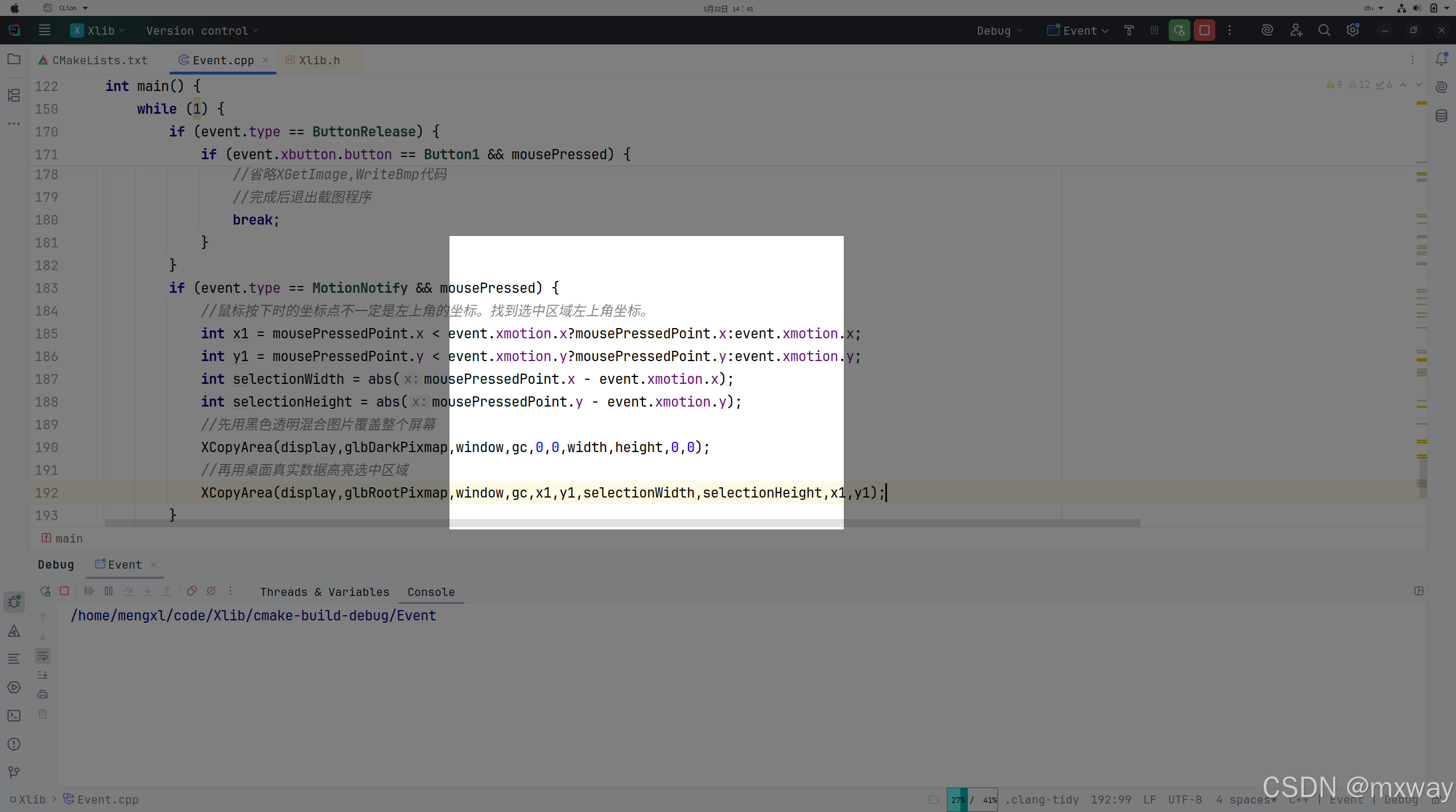
如果尝试编译运行以上代码,当我们使用鼠标拖动选择截图区域时,出现了很严重的“闪烁”现象。在我们开发第一个版本的截屏程序时,确实出现了很严重的闪烁问题,问了通义大语言模型,给出的解决方案就是使用高级的Qt或是gtk、cairo图形库。但是前面已经做了那么的事,不能就这样放弃了。
3.解决鼠标拖动闪烁问题
以上拖动鼠标时出现闪烁现象是因为当鼠标按下后,拖动鼠标的过程中,我们先用黑色混合图片重新覆盖整个窗口,再用原有桌面图片覆盖选中区域。仔细分析可以发现每次鼠标拖动过程其变化的区域都是一小部分,但我们需要把整个屏幕区域全部都重绘,还要再绘制选中区域,闪烁现象主要是我们做了大量不必要的重绘工作。如果我们能计算出鼠标拖动变化前后,哪些区域发生了改变,针对这些变化的区域绘制黑色混合图片或是桌面原有图片,这样我们绘制的就是极小一部分区域。问了一些大语言模型,也没有给出特别好建议,当时脑子闪现是否可以利用集合差集运算来解决这个问题。集合的差集表述为
A − B = { x ∣ x ∈ A a n d x ∉ B } A-B = \{{x|x\in \ A \ and\ x \notin \ B}\} A−B={x∣x∈ A and x∈/ B}
首先我们先看几个鼠标变动的示意图,再进行分析
情形1
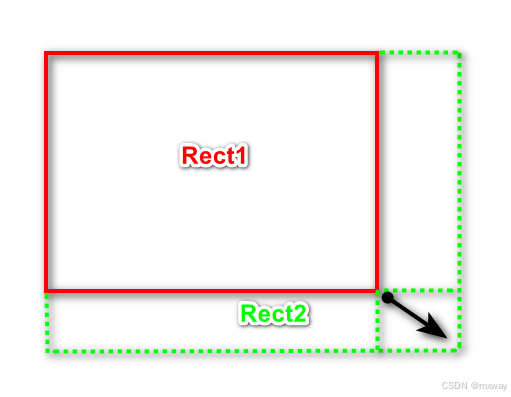
上图中鼠标原本选中的区域是Rect1,鼠标向下角拖动,形成的矩形区域是Rect2,从上面可以知道选中的区域在向下和向右都扩大了,这时我们应该使用截图程序运行时桌面真实像素数据填充这两块区域。对于上述两个区形Rect1-Rect2为空集,Rect2-Rect1为下边和右边两个区域的并集。
情形2
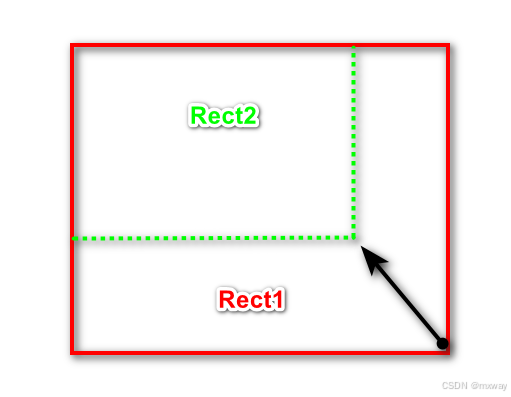
以上操作鼠标通过移动缩小了选中区域。此时Rect1-Rect2为下侧绿色虚线与下侧红色实线形成的矩形区域以及右侧绿色虚线与右侧红色实线形成矩形,两个矩形的并集,对于这个结果我们需要使用黑色混合图片进行重新覆盖。而Rect2-Rect为空集
情形3
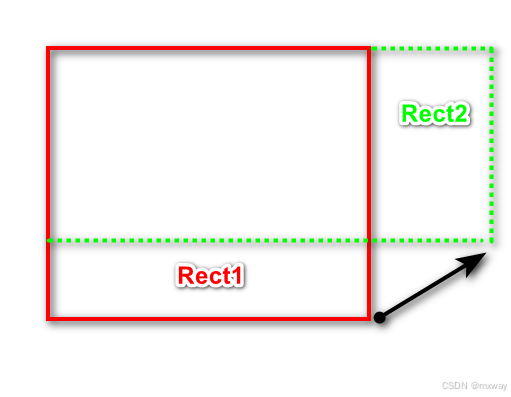
此情形下选中区域在高度上缩小了,在宽度上扩大了。根据集合差集定义Rect1-Rect2就是下侧绿色线与下侧红色线形成的区域,这是我们缩小高度的区域,应该使用黑色混合图片覆盖。Rect2-Rect1为右侧绿色Rect2的小块,这是选中区域宽度扩大区域,应该使用桌面真实像素覆盖。
情形4
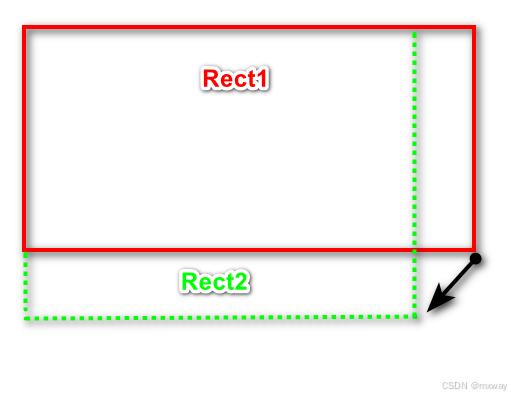
在此情形下Rect1-Rect2为右侧红线和右侧绿色形成的矩形区域,需要使用黑色混合图片覆盖。Rect2-Rect1为下侧红色线与下侧绿色之间的矩形区域,应该使用桌面真实像素覆盖。
有了以上几种情形的分析我们可以得到,在进行截图时如果原有选中的区域为Rect1,鼠标拖动后的区域为Rect2。那么使用Rect1-Rect2得到的矩形区域就是我们需要使用黑色混合图片覆盖的区域,而Rect2-Rect1就是我们需要使用桌面真实像素覆盖的区域。以上只是对鼠标在选中区域右下角方向操作的分析。在其它几个方向上的操作完全可以利用集合差操作实现。这里就不再分析。
以下是我们借助通义千问生成的矩形的并、交、差运算。实现如下
typedef struct _UIRect{
    int x;
    int y;
    int width;
    int height;
} UIRect;

/**
 * The following code is generated by Tongyi Qianwen Larger Language Model
 */

int get_right(const UIRect *rect) {
    return rect->x + rect->width;
}

int get_bottom(const UIRect *rect) {
    return rect->y + rect->height;
}

UIRect rect_union(const UIRect *rect1, const UIRect *rect2) {
    UIRect result;

    // calculate the TopLeft of Union Rectangle
    result.x = (rect1->x < rect2->x) ? rect1->x : rect2->x;
    result.y = (rect1->y < rect2->y) ? rect1->y : rect2->y;

    // calculate the BottomRight of Union Rectangle
    int right = (get_right(rect1) > get_right(rect2)) ? get_right(rect1) : get_right(rect2);
    int bottom = (get_bottom(rect1) > get_bottom(rect2)) ? get_bottom(rect1) : get_bottom(rect2);

    result.width = right - result.x;
    result.height = bottom - result.y;

    return result;
}

UIRect rect_intersection(const UIRect *rect1, const UIRect *rect2) {
    UIRect result;

    // calculate the TopLeft of Intersection Rectangle
    result.x = (rect1->x > rect2->x) ? rect1->x : rect2->x;
    result.y = (rect1->y > rect2->y) ? rect1->y : rect2->y;

    //calculate BottomRight of Intersection Rectangle
    int right = (get_right(rect1) < get_right(rect2)) ? get_right(rect1) : get_right(rect2);
    int bottom = (get_bottom(rect1) < get_bottom(rect2)) ? get_bottom(rect1) : get_bottom(rect2);

    // if the Intersection is Empty,return empty Rectangle.
    if (result.x >= right || result.y >= bottom) {
        result.x = result.y = result.width = result.height = 0;
        return result;
    }

    result.width = right - result.x;
    result.height = bottom - result.y;

    return result;
}

void rect_difference(const UIRect *rect1, const UIRect *rect2, UIRect *result, int *count) {
    *count = 0;

    //check if the intersection of two rectangles is empty,if the intersection is empty,return rect1.
    UIRect intersection = rect_intersection(rect1, rect2);
    if (intersection.width == 0 || intersection.height == 0) {
        result[*count] = *rect1;
        (*count)++;
        return;
    }

    //if rect1 is a subset of rect2,the difference set should be empty.
    if (intersection.x <= rect1->x &&
        intersection.y <= rect1->y &&
        get_right(&intersection) >= get_right(rect1) &&
        get_bottom(&intersection) >= get_bottom(rect1)) {
        return;
    }

    // The difference set may generate up to four rectangles

    // Top
    if (rect1->y < intersection.y) {
        result[*count].x = rect1->x;
        result[*count].y = rect1->y;
        result[*count].width = rect1->width;
        result[*count].height = intersection.y - rect1->y;
        (*count)++;
    }

    // Bottom
    if (get_bottom(rect1) > get_bottom(&intersection)) {
        result[*count].x = rect1->x;
        result[*count].y = get_bottom(&intersection);
        result[*count].width = rect1->width;
        result[*count].height = get_bottom(rect1) - get_bottom(&intersection);
        (*count)++;
    }

    // Left
    if (rect1->x < intersection.x) {
        result[*count].x = rect1->x;
        result[*count].y = intersection.y;
        result[*count].width = intersection.x - rect1->x;
        result[*count].height = intersection.height;
        (*count)++;
    }

    // Right
    if (get_right(rect1) > get_right(&intersection)) {
        result[*count].x = get_right(&intersection);
        result[*count].y = intersection.y;
        result[*count].width = get_right(rect1) - get_right(&intersection);
        result[*count].height = intersection.height;
        (*count)++;
    }
}
有了以上对于矩形的交并差运算。接下来就是处理当鼠标移动时,我们通过新老两个矩形区域的差集来确实哪些区域应该填充桌面真实图片,哪些区域应该填充黑色混合图片。鼠标移动修改后代码如下
if (event.type == MotionNotify && mousePressed) {
            //鼠标按下时的坐标点不一定是左上角的坐标。找到选中区域左上角坐标。
            int x1 = mousePressedPoint.x < event.xmotion.x?mousePressedPoint.x:event.xmotion.x;
            int y1 = mousePressedPoint.y < event.xmotion.y?mousePressedPoint.y:event.xmotion.y;
            int selectionWidth = abs(mousePressedPoint.x - event.xmotion.x);
            int selectionHeight = abs(mousePressedPoint.y - event.xmotion.y);

            UIRect newRect = {x1,y1,selectionWidth,selectionHeight};
            if (lastSelectionRect.x == -1) {
                lastSelectionRect = newRect;
                XCopyArea(display,glbRootPixmap,window,gc,x1,y1,selectionWidth,selectionHeight,x1,y1);
                continue;
            }

            UIRect  diffRectArray[4] = {0};
            int count = 0;
            rect_difference(&newRect,&lastSelectionRect,diffRectArray,&count);
            //Rect2 - Rect1结果矩形使用桌面图像覆盖
            for (auto &diffRect : diffRectArray) {
                if (diffRect.width<=0||diffRect.height<=0) {
                    continue;
                }
                XCopyArea(display,glbRootPixmap,window,gc,diffRect.x,
                    diffRect.y,diffRect.width,diffRect.height,diffRect.x,diffRect.y);
            }
            memset(diffRectArray,0,sizeof(diffRectArray));
            rect_difference(&lastSelectionRect,&newRect,diffRectArray,&count);
            for(auto & diffRect : diffRectArray){
                //Rect1 - Rect2 使用黑色混合图片覆盖
                if(diffRect.width <= 0 || diffRect.height <= 0){
                    continue;
                }
                XCopyArea(display, glbDarkPixmap, window,gc, diffRect.x, diffRect.y,
                          diffRect.width, diffRect.height, diffRect.x, diffRect.y);
            }
            lastSelectionRect = newRect;
        }
以上程序完整代码如下:
#include <cstring>
#include <dirent.h>
#include <X11/Xlib.h>
#include <X11/Xutil.h>
#include <stdio.h>
#include <stdlib.h>
#include <X11/extensions/Xrender.h>
#include <X11/Xatom.h>

Pixmap  glbDarkPixmap;//存储50%透明黑色与桌面混合后的像素
Pixmap  glbRootPixmap;//存储截图工具运行时,桌面的像素值

void CreateRootPixmap(Display *display,Window window,int width, int height) {
    int screen = DefaultScreen(display);
    glbRootPixmap = XCreatePixmap(display, window, width, height, DefaultDepth(display,screen));
    XImage *rootImage = XGetImage(display, RootWindow(display,screen),0,0,width,height,AllPlanes,ZPixmap);
    GC gc = XCreateGC(display,window,0,nullptr);
    XPutImage(display, glbRootPixmap, gc, rootImage, 0, 0, 0, 0, width, height);
    XFreeGC(display,gc);
    XDestroyImage(rootImage);
}

void CreateDarkPixmap(Display *display,Window window, int width, int height) {
    int screen = DefaultScreen(display);
    glbDarkPixmap = XCreatePixmap(display,window, width,height, DefaultDepth(display,screen));

    //
    Pixmap blackBackground = XCreatePixmap(display, window,width,height, 32);
    XRenderPictFormat *format  = XRenderFindVisualFormat(display,DefaultVisual(display,screen));

    XRenderColor color = {0x0,0x0,0x0,0x8000};
    Picture blackBackgroundPicture = XRenderCreatePicture(display,blackBackground,
                                                          XRenderFindStandardFormat(display, PictStandardARGB32),0,nullptr);
    XRenderFillRectangle(display,PictOpSrc,blackBackgroundPicture,&color,0,0,width,height);

    Picture picture = XRenderCreatePicture(display,glbRootPixmap, format,0, nullptr);
    Picture window_picture = XRenderCreatePicture(display,glbDarkPixmap,format,0,nullptr);

    XRenderComposite(display,PictOpOver,picture, None,window_picture,0,0,0,0,0,0,width,height);
    XRenderComposite(display,PictOpOver,blackBackgroundPicture, None,window_picture,0,0,0,0,0,0,width,height);

    XRenderFreePicture(display,blackBackgroundPicture);
    XRenderFreePicture(display,window_picture);
    XRenderFreePicture(display, picture);
    //XFreeGC(m_x11Window->display,gc);
    XFreePixmap(display,blackBackground);
}

void ChangeWindowStyle(Display *display, Window window) {
    Atom wm_type = XInternAtom(display, "_NET_WM_WINDOW_TYPE", False);
    Atom wm_type_dock = XInternAtom(display, "_NET_WM_WINDOW_TYPE_DOCK", False);
    XChangeProperty(display, window, wm_type, XA_ATOM, 32, PropModeReplace,
                    (unsigned char *)&wm_type_dock, 1);

    // Disable window decorate,we will create a window without title bar and border
    Atom wm_state = XInternAtom(display, "_NET_WM_STATE", False);
    Atom wm_state_skip_taskbar = XInternAtom(display, "_NET_WM_STATE_SKIP_TASKBAR", False);
    Atom wm_state_skip_pager = XInternAtom(display, "_NET_WM_STATE_SKIP_PAGER", False);
    XChangeProperty(display, window, wm_state, XA_ATOM, 32, PropModeReplace,
                    (unsigned char *)&wm_state_skip_taskbar, 1);
    XChangeProperty(display, window, wm_state, XA_ATOM, 32, PropModeAppend,
                    (unsigned char *)&wm_state_skip_pager, 1);

    // setting the window to top level
    Atom wm_state_above = XInternAtom(display, "_NET_WM_STATE_ABOVE", False);
    XChangeProperty(display, window, wm_state, XA_ATOM, 32, PropModeAppend,
                    (unsigned char *)&wm_state_above, 1);

    XSetWindowAttributes attrs;
    attrs.override_redirect = True;
    XChangeWindowAttributes(display, window, CWOverrideRedirect, &attrs);
}

typedef struct _UIRect{
    int x;
    int y;
    int width;
    int height;
} UIRect;

/**
 * The following code is generated by Tongyi Qianwen Larger Language Model
 */

int get_right(const UIRect *rect) {
    return rect->x + rect->width;
}

int get_bottom(const UIRect *rect) {
    return rect->y + rect->height;
}

UIRect rect_union(const UIRect *rect1, const UIRect *rect2) {
    UIRect result;

    // calculate the TopLeft of Union Rectangle
    result.x = (rect1->x < rect2->x) ? rect1->x : rect2->x;
    result.y = (rect1->y < rect2->y) ? rect1->y : rect2->y;

    // calculate the BottomRight of Union Rectangle
    int right = (get_right(rect1) > get_right(rect2)) ? get_right(rect1) : get_right(rect2);
    int bottom = (get_bottom(rect1) > get_bottom(rect2)) ? get_bottom(rect1) : get_bottom(rect2);

    result.width = right - result.x;
    result.height = bottom - result.y;

    return result;
}

UIRect rect_intersection(const UIRect *rect1, const UIRect *rect2) {
    UIRect result;

    // calculate the TopLeft of Intersection Rectangle
    result.x = (rect1->x > rect2->x) ? rect1->x : rect2->x;
    result.y = (rect1->y > rect2->y) ? rect1->y : rect2->y;

    //calculate BottomRight of Intersection Rectangle
    int right = (get_right(rect1) < get_right(rect2)) ? get_right(rect1) : get_right(rect2);
    int bottom = (get_bottom(rect1) < get_bottom(rect2)) ? get_bottom(rect1) : get_bottom(rect2);

    // if the Intersection is Empty,return empty Rectangle.
    if (result.x >= right || result.y >= bottom) {
        result.x = result.y = result.width = result.height = 0;
        return result;
    }

    result.width = right - result.x;
    result.height = bottom - result.y;

    return result;
}

void rect_difference(const UIRect *rect1, const UIRect *rect2, UIRect *result, int *count) {
    *count = 0;

    //check if the intersection of two rectangles is empty,if the intersection is empty,return rect1.
    UIRect intersection = rect_intersection(rect1, rect2);
    if (intersection.width == 0 || intersection.height == 0) {
        result[*count] = *rect1;
        (*count)++;
        return;
    }

    //if rect1 is a subset of rect2,the difference set should be empty.
    if (intersection.x <= rect1->x &&
        intersection.y <= rect1->y &&
        get_right(&intersection) >= get_right(rect1) &&
        get_bottom(&intersection) >= get_bottom(rect1)) {
        return;
    }

    // The difference set may generate up to four rectangles

    // Top
    if (rect1->y < intersection.y) {
        result[*count].x = rect1->x;
        result[*count].y = rect1->y;
        result[*count].width = rect1->width;
        result[*count].height = intersection.y - rect1->y;
        (*count)++;
    }

    // Bottom
    if (get_bottom(rect1) > get_bottom(&intersection)) {
        result[*count].x = rect1->x;
        result[*count].y = get_bottom(&intersection);
        result[*count].width = rect1->width;
        result[*count].height = get_bottom(rect1) - get_bottom(&intersection);
        (*count)++;
    }

    // Left
    if (rect1->x < intersection.x) {
        result[*count].x = rect1->x;
        result[*count].y = intersection.y;
        result[*count].width = intersection.x - rect1->x;
        result[*count].height = intersection.height;
        (*count)++;
    }

    // Right
    if (get_right(rect1) > get_right(&intersection)) {
        result[*count].x = get_right(&intersection);
        result[*count].y = intersection.y;
        result[*count].width = get_right(rect1) - get_right(&intersection);
        result[*count].height = intersection.height;
        (*count)++;
    }
}

XPoint mousePressedPoint;
bool   mousePressed = false;
UIRect  lastSelectionRect = {-1,-1,0,0};

int main() {
    Display *display;
    int screen;

    /* 打开与X服务器的连接 */
    display = XOpenDisplay(NULL);
    if (display == NULL) {
        fprintf(stderr, "无法打开X显示器\n");
        exit(1);
    }
    screen = DefaultScreen(display);
    int width = DisplayWidth(display,screen);
    int height = DisplayHeight(display,screen);
    Window window = XCreateSimpleWindow(display, RootWindow(display,screen),
                                              0,0,width,height,0,BlackPixel(display, screen),
                                              WhitePixel(display, screen));
    //改变窗口样式,使其能够全屏显示。
    ChangeWindowStyle(display,window);
    //将桌面像素保存到rootPixmap
    CreateRootPixmap(display,window,width,height);
    //将桌面与黑色半透明混合存储到glbDarkPixmap
    CreateDarkPixmap(display,window,width,height);
    XSelectInput(display,window,ExposureMask|KeyPressMask|ButtonPressMask | ButtonReleaseMask | PointerMotionMask);


    GC gc = XCreateGC(display,window,0,nullptr);
    XMapWindow(display,window);
    XEvent  event;
    while (1) {
        XNextEvent(display,&event);
        if (event.type == Expose && event.xexpose.count == 0) {
            //当前全屏窗口接收键盘输入
            XSetInputFocus(display, window,RevertToParent, CurrentTime);
            XCopyArea(display,glbDarkPixmap,window,gc,0,0,width,height,0,0);
        }
        if (event.type == KeyPress) {
            KeySym keysym = XLookupKeysym(&event.xkey,0);
            if (keysym == XK_Escape) {
                break;
            }
        }
        if (event.type == ButtonPress) {
            if (event.xbutton.button == Button1) {
                mousePressed = true;
                mousePressedPoint.x = event.xbutton.x;
                mousePressedPoint.y = event.xbutton.y;
            }
        }
        if (event.type == ButtonRelease) {
            if (event.xbutton.button == Button1 && mousePressed) {
                XPoint mouseReleasePoint;
                mouseReleasePoint.x = event.xbutton.x;
                mouseReleasePoint.y = event.xbutton.y;
                mousePressed = false;
                //此时鼠标选中区域为(x1,y1,x2,y2)
                //此时我们可以从glbRootPixmap的(x1,y1)偏移处,获取x2-x1宽度,y2-y1高度的像素数据,调用WriteBmp写入文件。
                //省略XGetImage,WriteBmp代码
                //完成后退出截图程序
                break;
            }
        }
        if (event.type == MotionNotify && mousePressed) {
            //鼠标按下时的坐标点不一定是左上角的坐标。找到选中区域左上角坐标。
            int x1 = mousePressedPoint.x < event.xmotion.x?mousePressedPoint.x:event.xmotion.x;
            int y1 = mousePressedPoint.y < event.xmotion.y?mousePressedPoint.y:event.xmotion.y;
            int selectionWidth = abs(mousePressedPoint.x - event.xmotion.x);
            int selectionHeight = abs(mousePressedPoint.y - event.xmotion.y);

            UIRect newRect = {x1,y1,selectionWidth,selectionHeight};
            if (lastSelectionRect.x == -1) {
                lastSelectionRect = newRect;
                XCopyArea(display,glbRootPixmap,window,gc,x1,y1,selectionWidth,selectionHeight,x1,y1);
                continue;
            }

            UIRect  diffRectArray[4] = {0};
            int count = 0;
            rect_difference(&newRect,&lastSelectionRect,diffRectArray,&count);
            //Rect2 - Rect1结果矩形使用桌面图像覆盖
            for (auto &diffRect : diffRectArray) {
                if (diffRect.width<=0||diffRect.height<=0) {
                    continue;
                }
                XCopyArea(display,glbRootPixmap,window,gc,diffRect.x,
                    diffRect.y,diffRect.width,diffRect.height,diffRect.x,diffRect.y);
            }
            memset(diffRectArray,0,sizeof(diffRectArray));
            rect_difference(&lastSelectionRect,&newRect,diffRectArray,&count);
            for(auto & diffRect : diffRectArray){
                if(diffRect.width <= 0 || diffRect.height <= 0){
                    continue;
                }
                XCopyArea(display, glbDarkPixmap, window,gc, diffRect.x, diffRect.y,
                          diffRect.width, diffRect.height, diffRect.x, diffRect.y);
            }
            lastSelectionRect = newRect;
        }
    }

    XFreeGC(display,gc);
    XDestroyWindow(display,window);
    XCloseDisplay(display);

    return 0;
}
编译以上程序,运行后。当我们再次使用鼠标拖动选中截图区域时,不会再有闪烁现象了。拖动操作非常丝滑。
4.总结
以上我们基于xlib实现了linux操作系统下一个小小的屏幕截图工具。以上代码可以在国产操作系统上编译运行,前提是国产操作系统的GUI采用X11窗口系统,如果窗口系统使用的wayland,以上截图功能无法使用。此外我们可以stb_image、libpng、libjpeg等开源库将以上截图结果保存为bmp、jpg、png等图片格式。此外我们为程序添加选择图片保存名称和路径的功能。我在github开源了一个跨平台的屏幕截图工具,该工具可运行在windows、linux以及各国产化操作系统下。





 扫一扫
扫一扫


 1388
1388

 被折叠的 条评论
为什么被折叠?
被折叠的 条评论
为什么被折叠?
 到【灌水乐园】发言





