





系列文章目录
本系列文章记录在Linux操作系统下,如何在不依赖QT、GTK等开源GUI库的情况下,基于x11窗口系统(xlib)图形界面应用程序开发。之所以使用x11进行窗口开发,是在开发一个基于duilib跨平台的界面库项目,使用gtk时,发现基于gtk的开发,依赖的动态库太多,发布时太麻烦,gtk不支持静态库编译发布。所以我们决定使用更底层的xlib接口。在此记录下linux系统下基于xlib接口的界面开发
一、xlib创建窗口
二、xlib事件
三、xlib窗口图元
四、xlib区域
五、xlib绘制按钮控件
六、绘制图片
七、xlib窗口渲染
八、实现编辑框控件
九、异形窗口
十、基于xlib实现定时器
十一、xlib绘制编辑框-续
十二、Linux实现截屏小工具
在前一篇文章中,我们描述了如何利用xlib提供的接口以及Xft库进行文字渲染,图形基本元素(点,线,矩形,弧形)的绘制。但是我们并没有限制文本绘制的范围。在前面的例子中如果我们给了一个非常长的字符串,则字符串会一直显示,直到填满整个窗口的宽度。在实际开发中比如我们所使用的Labe控件,后面一般都会跟着一个编辑框控件,这样如果不对Label控件可绘制文本的范围进行限制,文本多时就会覆盖到后面编辑框控件中的内容。当然在xlib窗口系统中除了窗口和提供的绘制图形基本元素之外,xlib窗口系统没有Label、编辑框、按钮这些控件的概念,在xlib窗口系统中如果我们需要这些“控件”都需要我们自己编码实现,也许这就是为什么我每次让通义千问大模型给我使用xlib实现一些简单控件时,它总是让我使用gtk或是Qt这样高级库来实现。后面也会记录一些使用xlib实现button,编辑框这样的"控件"。
先来看一个简单的示例程序
#include <clocale>
#include <cstring>
#include <X11/Xlib.h>
#include <stdio.h>
#include <stdlib.h>
#include <X11/Xft/Xft.h>

void DoPaint(Display *display, Window window) {
    char drawText[] = "Draw Text...";
    char utf8String[] = "这是一个示例,我们将使用xlib和Xft库来实现文本的渲染。";
    int screen = DefaultScreen(display);
    XftColor    xftColor;
    xftColor.color.alpha=0xffff;
    xftColor.color.red = 0xffff;
    xftColor.color.green = 0;
    xftColor.color.blue = 0;
    XftFont *font = XftFontOpenName(display, screen, "文泉驿微米黑-20");
    XftDraw *xftDraw = XftDrawCreate(display,window,DefaultVisual(display,screen),DefaultColormap(display,screen));
    XftDrawStringUtf8(xftDraw,&xftColor,font,30,50,reinterpret_cast<const FcChar8*>(drawText),strlen(drawText));
    XftDrawStringUtf8(xftDraw,&xftColor,font,30,120,reinterpret_cast<const FcChar8*>(utf8String),strlen(utf8String));
    XftFontClose(display,font);
    XftDrawDestroy(xftDraw);
}


int main() {
    Display *display;
    Window window;
    int screen;
    XEvent event;

    display = XOpenDisplay(NULL);
    if (display == NULL) {
        fprintf(stderr, "无法打开X显示器\n");
        exit(1);
    }

    screen = DefaultScreen(display);
    window = XCreateSimpleWindow(display, RootWindow(display, screen), 10, 10, 400, 300, 1,
                                 BlackPixel(display, screen), WhitePixel(display, screen));

    /* 选择要接收的事件类型 */
    XSelectInput(display, window, ExposureMask);
    XMapWindow(display, window);

    while (1) {
        XNextEvent(display, &event);
        if (event.type == Expose) {
            DoPaint(display,window);
        }
    }

    XDestroyWindow(display, window);
    XCloseDisplay(display);

    return 0;
}
编译运行以上程序,我们需要安装X11和Xft的开发库,并且在编译时链接X11和Xft库。运行结果如下:
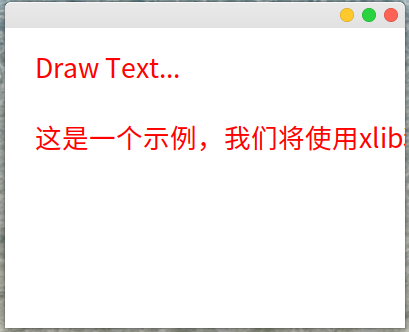
以上程序会一直向窗口中输出文本,直到整个文本占满整个窗口的宽度。如果上下两行都是Label我们下面显示的文字宽度与上面的Draw Text…对齐。对于多于的文本暂时并不想显示。我们可以设置绘制图形的有效区域来实现该功能。
1.矩形区域
在xlib窗口系统中可以通过XCreateRegion,以及XUnionRectWithRegion创建一个区域。区域创建后,我们还需要将其应用到某绘图上下文下才能实现我们想要的效果,如我们使用XftDraw系统绘制文本功能,则需要调用XftDrawSetClip来设置有效的绘制区域。当我们调用XDrawString、XDrawLine、XDrawRectangle、XDrawArc、XFill系列函数进行绘图时,需要调用XSetRegion函数来设置这些函数有效工作区域。以下是对上面的程序进行修改,设置有效绘制区域的代码
void DoPaint(Display *display, Window window) {
    char drawText[] = "Draw Text...";
    char utf8String[] = "这是一个示例,我们将使用xlib和Xft库来实现文本的渲染。";
    int screen = DefaultScreen(display);
    XftColor    xftColor;
    xftColor.color.alpha=0xffff;
    xftColor.color.red = 0xffff;
    xftColor.color.green = 0;
    xftColor.color.blue = 0;
    XftFont *font = XftFontOpenName(display, screen, "文泉驿微米黑-20");

    XftDraw *xftDraw = XftDrawCreate(display,window,DefaultVisual(display,screen),DefaultColormap(display,screen));
    XRectangle rectangle{30,20,150,120};
    Region region = XCreateRegion();
    XUnionRectWithRegion(&rectangle,region,region);
    XftDrawSetClip(xftDraw,region);
    XftDrawStringUtf8(xftDraw,&xftColor,font,30,50,reinterpret_cast<const FcChar8*>(drawText),strlen(drawText));
    XftDrawStringUtf8(xftDraw,&xftColor,font,30,120,reinterpret_cast<const FcChar8*>(utf8String),strlen(utf8String));
    XftFontClose(display,font);
    XDestroyRegion(region);
    XftDrawDestroy(xftDraw);
}
这里我们不再给出所有的代码,只给出绘制函数的代码。编译以上程序,运行效果如下:
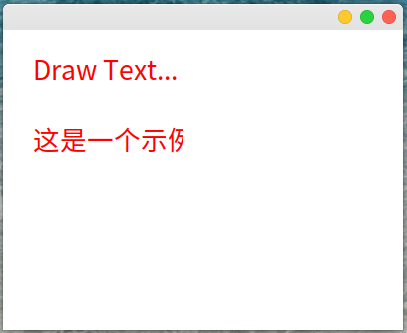
这里通过设置有效工作区域,进行文本绘制时,在有效区域外的文本没有被显示到窗口中。
在xlib窗口系统中,和区域有关的函数有以下几个XCreateRegion、XPolygonRegion、XUnionRectWithRegion、XIntersectRegion、XSubtractRegion、XDestroyRegion.其中XCreateRegion用于创建一个区域,初始创建的区域没有有效区域的概念,所以我们创建一个区域后一般使用XUnionRectWithRegion来设置一个区域的左上角坐标和大小。XPolygonRegion给出多个顶点创建一个多边形的区域。XIntersectRegion用于计算两个区域交集区域,XSubtractRegion用于从一个有效区域中减少另一个有效区域。XDestroyRegion销毁区域。利用区域我们不仅可以设置绘制文本,图形元素的有效区域,还可以利用区域和xlib的Shape扩展结合实现一些异形窗口的绘制,后续我们将会展示如何利用区域实现圆角矩形窗口、圆形渐变窗口以及五角形窗口。
2.多边形区域
在xlib接口函数有绘制弧形、矩形的接口,但是如果我想创建一个弧形的区域。xlib就没有相关的接口函数了,如我想创建一个圆形的区域。我们就需要使用XPolygonRegion来近似一个圆形区域。这里我们实现过程使用通义千问大模型帮我们实现了个模拟圆形反锯齿功能,我们对大模型给出的代码进行了整理,并根据需要实现一个创建圆形区域的功能,下面给出实现代码,以下实现在测试的过程中发现给出的圆形仍然存在一定的锯齿情况。
#include <vector>
#include <algorithm>
#include <cmath>

using namespace std;

enum CircleCorner{
    TopLeft,
    TopRight,
    BottomRight,
    BottomLeft
};

static bool IsPointExistsInVector(vector<XPoint> &points, XPoint point){
    return std::find_if(points.begin(),points.end(),[&](const XPoint &iter){
        return iter.x == point.x && iter.y == point.y;
    }) != points.end();
}

#define DISTANCE() \
        sqrt(((px)-(cx))*((px)-(cx)) + ((py)-(cy))*((py)-(cy)))


#define TopLeft1()                         \
        do{                                             \
             px =    (cx) - (x) + (i);                        \
             py =    (cy) - (y) + (j);                        \
             point.x = px;                              \
             point.y = py;                              \
             double dist = DISTANCE(); \
             coverage = fmax(0, fmin(1, 0.5 - fabs(dist - r)));\
        }while(0);


#define TopLeft2()                         \
        do{                                             \
              px =       (cx) - (y) + (i);                    \
              py =       (cy) - (x) + (j);                    \
              point.x  = px;                            \
              point.y =  py;                            \
              double dist = DISTANCE();      \
              coverage = fmax(0, fmin(1, 0.5 - fabs(dist - r))); \
        }while(0);


//{cx + x + i, cy - y + j}, // 右-上-下
//                        {cx + y + i, cy - x + j}, // 右-上-上

#define TopRight1()                    \
        do{                                         \
              px = (cx) + (x) + (i);                \
              py = (cy) - (y) + (j);                \
              point.x = px;                         \
              point.y = py;                         \
              double dist = DISTANCE();  \
              coverage = fmax(0, fmin(1, 0.5 - fabs(dist - r)));\
        }while(0)


#define TopRight2()                            \
        do{                                                 \
             px = cx+y+i;                                   \
             py = cy-x+j;                                   \
             point.x = px;                                  \
             point.y = py;                                      \
             double dist = DISTANCE();               \
             coverage = fmax(0, fmin(1, 0.5 - fabs(dist - r))); \
        }while(0)


//{cx + x + i, cy + y + j}, // 右-下-下
//                        {cx + y + i, cy + x + j}, // 右-下-上

#define BottomRight1()              \
        do{                         \
            px = cx+x+i;            \
            py = cy+y+j;            \
            point.x = px;              \
            point.y = py;              \
            double dist = DISTANCE(); \
            coverage = fmax(0, fmin(1, 0.5 - fabs(dist - r)));\
        }while(0)


#define BottomRight2()              \
        do{                         \
            px = cx + y + i;         \
            py = cy + x + j;         \
            point.x = px;              \
            point.y = py;              \
            double dist = DISTANCE(); \
            coverage = fmax(0, fmin(1, 0.5 - fabs(dist - r)));\
        }while(0)


//{cx - x + i, cy + y + j}, // 左-下-下
//                        {cx - y + i, cy + x + j} // 左-下-上

#define BottomLeft1() \
        do{                         \
            px = cx -x + i;         \
            py = cy + y +j;         \
            point.x = px;              \
            point.y = py;              \
            double dist = DISTANCE(); \
            coverage = fmax(0, fmin(1, 0.5 - fabs(dist - r)));\
        }while(0)

#define BottomLeft2()           \
        do{                         \
            px = cx -y +i;         \
            py = cy + x +j;         \
            point.x = px;              \
            point.y = py;              \
            double dist = DISTANCE(); \
            coverage = fmax(0, fmin(1, 0.5 - fabs(dist - r)));\
        }while(0)   \


#define CONCAT(x,y) x ## y

#define CreateCorner(CornerType) \
        CONCAT(CornerType,1)();    \
        if(coverage>=0.30 && (!IsPointExistsInVector(circlePoints,point))){ \
            circlePoints.push_back(point);                    \
        }                                                                      \
        CONCAT(CornerType,2)();                                               \
        if(coverage>=0.30 && (!IsPointExistsInVector(circlePoints,point))){   \
            circlePoints.push_back(point);                                    \
        }


void GetRoundCornerPoints(int cx, int cy, int r, CircleCorner cornerType, vector<XPoint> &circlePoints){
    int x = 0, y = r;
    int d = 1 - r;
    int deltaE = 3, deltaSE = -2 * r + 5;

    while (x <= y) {
        // 处理当前点及其对称点
        for (int i = -1; i <= 1; i++) {
            for (int j = -1; j <= 1; j++) {

                int px,py;
                XPoint point;
                double coverage = 0.0;
                if(cornerType == TopLeft){
                    CreateCorner(TopLeft);
                }else if(cornerType == TopRight){
                    CreateCorner(TopRight);
                }else if(cornerType == BottomRight){
                    CreateCorner(BottomRight);
                }else if(cornerType == BottomLeft){
                    CreateCorner(BottomLeft);
                }
            }
        }

        // 更新决策变量
        if (d < 0) {
            d += deltaE;
            deltaE += 2;
            deltaSE += 2;
        } else {
            d += deltaSE;
            deltaE += 2;
            deltaSE += 4;
            y--;
        }
        x++;
    }
}

static Region CreateCircleRegion(int cx, int cy, int r) {
    vector<XPoint>   topLeftPoints;
    vector<XPoint>   topRightPoints;
    vector<XPoint>   bottomRightPoints;
    vector<XPoint>   bottomLeftPoints;

    GetRoundCornerPoints(cx,cy, r, TopLeft, topLeftPoints);
    GetRoundCornerPoints(cx,cy, r, TopRight, topRightPoints);
    GetRoundCornerPoints(cx,cy, r, BottomRight,  bottomRightPoints);
    GetRoundCornerPoints(cx,cy, r, BottomLeft, bottomLeftPoints);

    //左上角的四分之一圆,点按照x轴增大,y轴增大的方式排序
    std::sort(topLeftPoints.begin(),topLeftPoints.end(),[&](const XPoint &a,const XPoint &b){
        if(a.x == b.x){
            return a.y < b.y;
        }
        return a.x < b.x;
    });

    //右上角四分之一圆点,按照x轴增大,y轴减少的方式排序。
    std::sort(topRightPoints.begin(),topRightPoints.end(),[&](const XPoint &a, const XPoint &b){
        if(a.x == b.x){
            return a.y > b.y;
        }
        return a.x < b.x;
    });

    //右下角四分之上圆点,按照x轴减小,y轴增大方式排序
    std::sort(bottomRightPoints.begin(),bottomRightPoints.end(),[&](const XPoint &a, const XPoint &b){
        if(a.x == b.x){
            return a.y < b.y;
        }
        return a.x > b.x;
    });

    //左下角四分之一圆点,按照x轴减少,y轴减少排序
    std::sort(bottomLeftPoints.begin(), bottomLeftPoints.end(), [&](const XPoint &a, const XPoint &b){
        if(a.x == b.x){
            return a.y > b.y;
        }
        return a.x > b.x;
    });

    vector<XPoint> circlePoints;
    circlePoints.reserve(topLeftPoints.size() + topRightPoints.size() + bottomRightPoints.size() + bottomLeftPoints.size());
    std::copy(topLeftPoints.begin(),topLeftPoints.end(),std::back_inserter(circlePoints));
    std::copy(topRightPoints.begin(),topRightPoints.end(),std::back_inserter(circlePoints));
    std::copy(bottomRightPoints.begin(), bottomRightPoints.end(), std::back_inserter(circlePoints));
    std::copy(bottomLeftPoints.begin(), bottomLeftPoints.end(), std::back_inserter(circlePoints));

    return XPolygonRegion(circlePoints.data(), circlePoints.size(), EvenOddRule);
}
以上程序代码中的CreateCircleRegion就是创建一个圆形的区域。
结合DoPaint代码我们可以设置一个圆形区域,让文字只在这个圆形区域中显示,代码如下
void DoPaint(Display *display, Window window) {
    char line1[] = "line1 text in circle region";
    char line2[] = "Draw Text...";
    char line3[] = "这是一个示例,我们将使用xlib和Xft库来实现文本的渲染。";
    char line4[] = "line4 show the text,may be can't be seen";
    int screen = DefaultScreen(display);
    XftColor    xftColor;
    xftColor.color.alpha=0xffff;
    xftColor.color.red = 0xffff;
    xftColor.color.green = 0;
    xftColor.color.blue = 0;
    XftFont *font = XftFontOpenName(display, screen, "文泉驿微米黑-20");

    XftDraw *xftDraw = XftDrawCreate(display,window,DefaultVisual(display,screen),DefaultColormap(display,screen));
    Region region = CreateCircleRegion(100,100,80);

    XftDrawSetClip(xftDraw,region);

    XftDrawStringUtf8(xftDraw,&xftColor,font,30,50,reinterpret_cast<const FcChar8*>(line1),strlen(line1));
    XftDrawStringUtf8(xftDraw,&xftColor,font,30,80,reinterpret_cast<const FcChar8*>(line2),strlen(line2));
    XftDrawStringUtf8(xftDraw,&xftColor,font,30,120,reinterpret_cast<const FcChar8*>(line3),strlen(line3));
    XftDrawString8(xftDraw,&xftColor,font,30,150,reinterpret_cast<const FcChar8*>(line4),strlen(line4));
    XftFontClose(display,font);
    XDestroyRegion(region);
    XftDrawDestroy(xftDraw);
}
编译以上程序,这里我们用到了stl库,所以使用g++编译。运行结果示例如下:
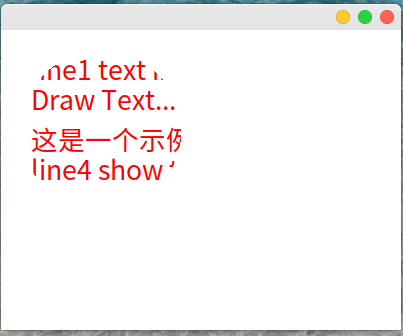
通过结果我们可以看到只有在圆形区域的文字才被显示了出来。





 扫一扫
扫一扫


 679
679

 被折叠的 条评论
为什么被折叠?
被折叠的 条评论
为什么被折叠?
 到【灌水乐园】发言





