





系列文章目录
本系列文章记录在Linux操作系统下,如何在不依赖QT、GTK等开源GUI库的情况下,基于x11窗口系统(xlib)图形界面应用程序开发。之所以使用x11进行窗口开发,是在开发一个基于duilib跨平台的界面库项目,使用gtk时,发现基于gtk的开发,依赖的动态库太多,发布时太麻烦,gtk不支持静态库编译发布。所以我们决定使用更底层的xlib接口。在此记录下linux系统下基于xlib接口的界面开发
一、xlib创建窗口
二、xlib事件
三、xlib窗口图元
四、xlib区域
五、xlib绘制按钮控件
六、绘制图片
七、xlib窗口渲染
八、实现编辑框控件
九、异形窗口
十、基于xlib实现定时器
十一、xlib绘制编辑框-续
十二、Linux实现截屏小工具
到目前为止,我们创建的所有窗口都是长方形的窗口。在实际开发中,有时我们可能需要创建非矩形窗口,圆角矩形窗口,圆形、椭圆形或其它类型的窗口。在xlib所提供的方法中,没有创建圆角矩形或是异形窗口的接口。此时我们需要使用region结合XShapeCombineRegion函数实现异形窗口的绘制。
1.创建没有标题栏的窗口
在之前所有的示例中,调用XCreateWindow或是XCreateSimpleWindow,创建出来的窗口都会默认带有标题栏、边框等信息;这些“额外”的信息是由操作系统的窗口管理器实现的。在某些需求下,我们不需要操作系统自带的标题栏。在窗口创建完成后,我们可以使用XChangeProperty来改变窗口样式。一个简单不带有标题栏的窗口如下:
#include <X11/Xlib.h>
#include <stdio.h>
#include <stdlib.h>

int main() {
    Display *display;
    Window window;
    int screen;

    /* 打开与X服务器的连接 */
    display = XOpenDisplay(NULL);
    if (display == NULL) {
        fprintf(stderr, "无法打开X显示器\n");
        exit(1);
    }

    screen = DefaultScreen(display);

    /* 创建窗口 */
    window = XCreateSimpleWindow(display, RootWindow(display, screen), 10, 10, 400, 300, 1,
                                 BlackPixel(display, screen), WhitePixel(display, screen));
    // 移除窗口装饰
    Atom hints = XInternAtom(display, "_MOTIF_WM_HINTS", False);
    struct {
        unsigned long flags;
        unsigned long functions;
        unsigned long decorations;
        long input_mode;
        unsigned long status;
    } motif_hints = {2, 0, 0, 0, 0}; // decorations = 0 表示无装饰

    XChangeProperty(
            display, window,
            hints, hints, 32, PropModeReplace,
            (unsigned char *)&motif_hints, sizeof(motif_hints) / sizeof(long)
    );

    /* 显示(映射)窗口 */
    XMapWindow(display, window);

    XEvent  event;
    while (1) {
        XNextEvent(display,&event);
    }

    XDestroyWindow(display, window);
    XCloseDisplay(display);

    return 0;
}
编译以上程序,运行结果如下,显示了一个不带有标题栏的窗口。
我们创建了一个不带标题栏的窗口,但是该窗口显示后不能移动也不能通过交互方式(鼠标和按钮)退出。我们让该窗口处理键盘按钮事件,当按下Esc键时,退出程序。实现代码如下
#include <X11/Xlib.h>
#include <stdio.h>
#include <stdlib.h>
#include <X11/keysymdef.h>
#include <X11/keysym.h>

int main() {
    Display *display;
    Window window;
    int screen;

    /* 打开与X服务器的连接 */
    display = XOpenDisplay(NULL);
    if (display == NULL) {
        fprintf(stderr, "无法打开X显示器\n");
        exit(1);
    }

    screen = DefaultScreen(display);

    /* 创建窗口 */
    window = XCreateSimpleWindow(display, RootWindow(display, screen), 10, 10, 400, 300, 1,
                                 BlackPixel(display, screen), WhitePixel(display, screen));
    // 移除窗口装饰
    Atom hints = XInternAtom(display, "_MOTIF_WM_HINTS", False);
    struct {
        unsigned long flags;
        unsigned long functions;
        unsigned long decorations;
        long input_mode;
        unsigned long status;
    } motif_hints = {2, 0, 0, 0, 0}; // decorations = 0 表示无装饰

    XChangeProperty(
            display, window,
            hints, hints, 32, PropModeReplace,
            (unsigned char *)&motif_hints, sizeof(motif_hints) / sizeof(long)
    );

    XSelectInput(display,window,KeyPressMask|ButtonPressMask);
    /* 显示(映射)窗口 */
    XMapWindow(display, window);

    XEvent  event;
    while (1) {
        XNextEvent(display,&event);
        if (event.type == KeyPress) {
            KeySym keysym = XLookupKeysym(&event.xkey,0);
            if (keysym == XK_Escape) {
                break;
            }
        }
    }

    XDestroyWindow(display, window);
    XCloseDisplay(display);

    return 0;
}
编译以上程序,按下Esc键退出程序。下面我们再为窗口添加鼠标按下时,移动窗口功能。可以使用XSendEvent向窗口发送ClientMessage,以便把窗口交窗口管理器管理实现拖动窗口操作。使用XSendEvent发送ClientMessage的实现代码如下
void StartWindowMoveResize(Display *display, Window window, int x_root, int y_root, int operateCode) {
    XEvent event;
    memset(&event, 0, sizeof(event));

    XUngrabPointer(display,CurrentTime);

    event.xclient.type = ClientMessage;
    event.xclient.window = window;
    event.xclient.message_type = XInternAtom(display, "_NET_WM_MOVERESIZE", False);
    event.xclient.format = 32;
    event.xclient.data.l[0] = x_root; // 鼠标指针的根窗口 X 坐标
    event.xclient.data.l[1] = y_root; // 鼠标指针的根窗口 Y 坐标
    event.xclient.data.l[2] = operateCode;      // 动作:8 表示移动窗口
    event.xclient.data.l[3] = Button1; // 使用鼠标左键
    event.xclient.data.l[4] = 0;      // 保留字段

    // 发送事件到根窗口
    XSendEvent(display, DefaultRootWindow(display), False,
               SubstructureRedirectMask | SubstructureNotifyMask, &event);
    XFlush(display); // 刷新事件队列
}
在StartWindowMoveResize函数中,需要了解下operateCode,这是一个int值,取值范围为[0,8]。各取值范围及含义如下
| OperateCode | 含义 |
|---|---|
| 0 | 左上角方向改变窗口大小 |
| 1 | 向上方向改变窗口大小 |
| 2 | 右上角方向改变窗口大小 |
| 3 | 向右改变窗口大小 |
| 4 | 右下角方向改变窗口大小 |
| 5 | 向下改变窗口大小 |
| 6 | 左下角方向改变窗口大小 |
| 7 | 向左改变窗口大小 |
| 8 | 用于移动窗口位置 |
不使用系统自带标题栏,实现窗口的移动完整代码如下
#include <X11/Xlib.h>
#include <stdio.h>
#include <stdlib.h>
#include <X11/keysymdef.h>
#include <X11/keysym.h>
#include <cstring>

void StartWindowMoveResize(Display *display, Window window, int x_root, int y_root, int operateCode) {
    XEvent event;
    memset(&event, 0, sizeof(event));

    XUngrabPointer(display,CurrentTime);

    event.xclient.type = ClientMessage;
    event.xclient.window = window;
    event.xclient.message_type = XInternAtom(display, "_NET_WM_MOVERESIZE", False);
    event.xclient.format = 32;
    event.xclient.data.l[0] = x_root; // 鼠标指针的根窗口 X 坐标
    event.xclient.data.l[1] = y_root; // 鼠标指针的根窗口 Y 坐标
    event.xclient.data.l[2] = operateCode;      // 动作:8 表示移动窗口
    event.xclient.data.l[3] = Button1; // 使用鼠标左键
    event.xclient.data.l[4] = 0;      // 保留字段

    // 发送事件到根窗口
    XSendEvent(display, DefaultRootWindow(display), False,
               SubstructureRedirectMask | SubstructureNotifyMask, &event);
    XFlush(display); // 刷新事件队列
}

int main() {
    Display *display;
    Window window;
    int screen;

    /* 打开与X服务器的连接 */
    display = XOpenDisplay(NULL);
    if (display == NULL) {
        fprintf(stderr, "无法打开X显示器\n");
        exit(1);
    }

    screen = DefaultScreen(display);

    /* 创建窗口 */
    window = XCreateSimpleWindow(display, RootWindow(display, screen), 10, 10, 400, 300, 1,
                                 BlackPixel(display, screen), WhitePixel(display, screen));
    // 移除窗口装饰
    Atom hints = XInternAtom(display, "_MOTIF_WM_HINTS", False);
    struct {
        unsigned long flags;
        unsigned long functions;
        unsigned long decorations;
        long input_mode;
        unsigned long status;
    } motif_hints = {2, 0, 0, 0, 0}; // decorations = 0 表示无装饰

    XChangeProperty(
            display, window,
            hints, hints, 32, PropModeReplace,
            (unsigned char *)&motif_hints, sizeof(motif_hints) / sizeof(long)
    );

    XSelectInput(display,window,KeyPressMask|ButtonPressMask|PointerMotionMask);
    /* 显示(映射)窗口 */
    XMapWindow(display, window);

    XEvent  event;
    while (1) {
        XNextEvent(display,&event);
        if (event.type == KeyPress) {
            KeySym keysym = XLookupKeysym(&event.xkey,0);
            if (keysym == XK_Escape) {
                break;
            }
        }
        if (event.type == MotionNotify) {
            printf("Motion State = %d\n",event.xmotion.state);
            if (event.xmotion.state & Button1Mask) {
                //鼠标移动并且按下左键,并且按下左键的位置在标题栏处,当然这里的标题栏的高度、宽度都是可以自定义的
                if (event.xmotion.y <= 50) {
                    StartWindowMoveResize(display,window,event.xmotion.x_root,event.xmotion.y_root,8);
                }
            }
        }
    }

    XDestroyWindow(display, window);
    XCloseDisplay(display);

    return 0;
}
运行以上程序,在窗口上方50像素内按下鼠标并移动可以实现窗口移动。当然这里我们可以修改代码判断鼠标是否在改变窗口大小的区域内,以实现改变窗口大小功能,这里不再给出实现代码。
之所以在创建异形窗口这里给出代码实现窗口移动,退出功能是因为当我们创建异形时,正常情况下都会创建没有标题栏的窗口(不让窗口管理器对我们创建的窗口进行装饰如标题栏、边框等);否则我们的异形窗口带有标题栏。而这时我们就需要处理窗口退出、移动、改变大小事件。
2.实现一个五角星窗口
我们想要实现一个五角星的窗口,可以使用多边形来实现,示例如下图所示
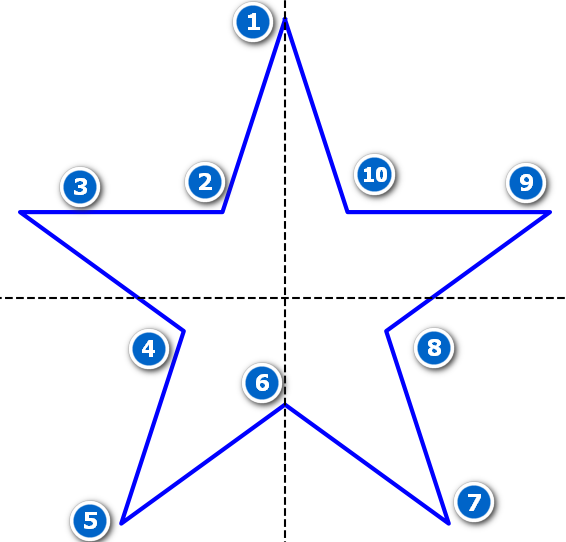
在上面所示的五角星示例中,使用笛卡尔坐标系来描述五角星,两线虚线相交处为坐标原点水平方向从左向右为x轴,垂直方向从下向上为y轴。总共需要10个顶点来绘制五角星,第一个顶点需要落在y轴正坐标上,从标点1、3、5、7、9五个点平分整个圆。任意两个点之间的角度为360/5=72度。由于点1需要在y轴上,点1的x坐标为0,y坐标为radius * sin(90.0)。假设Radius为五角星所在圆的半径。点3的x坐标为radius * cos(162.0);所在y轴的坐标为radius*sin(162)。这里的162=90+72。点5,点7,点9的坐标以此类推。对于2,4,6,8,10这5个点的坐标,我们来看点2,这个点是由点1和点5组成的直线与点3与点9组成的直线,两条直线的交点形成,我们只需要解两条直线的交点,即可算出点2的坐标。其它4个点以此类推。
坐标映射
在上面的示例中,我们所有的点都是在笛卡尔坐标系下计算完成的。需要把这些点映射到屏幕中窗口中。
笛卡尔坐标系示意图如下:

屏幕坐标系示意图如下
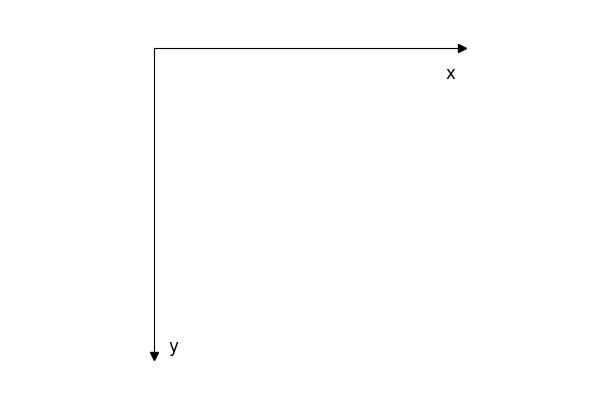
从上面两个图中我们可以知道在窗口界面中坐标x方向从0开始向右增,y方向从0开始向下增长。而在笛卡尔坐标系中,x从左向右增长,并且可能存在负数值;y轴方向从下向上增长。所以当我们把笛卡尔坐标系下原点(0,0)映射到屏幕坐标系的( x,y)时。 x轴方向所有的点加上x即可将笛卡尔坐标系坐标映射到屏幕坐标。而对于y轴方向,在笛卡尔坐标系下y由下向上增长,在屏幕坐标系下,y轴坐标值由上向下增长,这时我们需要把在笛卡尔坐标系下得到y轴坐标值乘以(-1);负数是改变方向,再把乘以-1的结果加y。根据以上规则对于笛卡尔坐标系下的坐标(x1,y1),假设屏幕坐标中心点为(x,y)映射到屏幕坐标系下的坐标(x2,y2)存在以下关系
x 2 = x + x 1 y 2 = y + y 1 ∗ ( − 1 ) x2 = x + x1 \\ y2 = y + y1*(-1) x2=x+x1y2=y+y1∗(−1)
以上映射关系使用矩阵可表示为
( x 2 y 2 1 ) = ( 1 0 x 0 − 1 y 0 0 1 ) ( x 1 y 1 1 ) \begin{pmatrix} x2 \\ y2 \\ 1 \end{pmatrix} = \begin{pmatrix} 1 & 0 & x \\ 0 & -1 & y \\ 0 & 0 & 1 \end{pmatrix} \begin{pmatrix} x1 \\ y1 \\ 1 \end{pmatrix} x2y21 = 1000−10xy1 x1y11
有了以上数学基础,我们可以编码实现10个点坐标计算。实现代码如下
inline int CalculateIntersectX(XPoint point1,XPoint point2, XPoint point3,XPoint point4) {
    double k1 = (point2.y-point1.y)*1.0/(point2.x-point1.x);
    double k2 = (point4.y-point3.y)*1.0/(point4.x-point3.x);
    return (point3.y-k2*point3.x + k1*point1.x -point1.y)/(k1-k2);
}

inline int CalculateIntersectY(XPoint point1,XPoint point2,int x) {
    double k = (point2.y-point1.y)*1.0/(point2.x-point1.x);
    return k*x + point1.y -k*point1.x;
}

Region CreateFiveStarRegion(int x,int y,int radius) {
    XPoint  points[10] = {0};
    points[0].x = x + radius * cos(90.0*(M_PI/180.0));
    points[0].y = y - radius * sin(90.0*(M_PI/180.0));
    points[2].x = x + radius * cos(162.0*(M_PI/180.0));
    points[2].y = y - radius * sin(162.0*(M_PI/180.0));
    points[4].x = x + radius * cos(234.0*(M_PI/180.0));
    points[4].y = y - radius * sin(234.0*(M_PI/180.0));
    points[6].x = x + radius * cos(306.0*(M_PI/180.0));
    points[6].y = y - radius * sin(306.0*(M_PI/180.0));
    points[8].x = x + radius * cos(18.0*(M_PI/180.0));
    points[8].y = y - radius * sin(18.0*(M_PI/180.0));
    points[1].x = CalculateIntersectX(points[0],points[4],points[2],points[8]);
    points[1].y = CalculateIntersectY(points[0],points[4],points[1].x);
    points[3].x = CalculateIntersectX(points[0],points[4],points[2],points[6]);
    points[3].y = CalculateIntersectY(points[0],points[4],points[3].x);
    points[5].x = CalculateIntersectX(points[2],points[6],points[4],points[8]);
    points[5].y = CalculateIntersectY(points[2],points[6],points[5].x);
    points[7].x = CalculateIntersectX(points[4],points[8],points[0],points[6]);
    points[7].y = CalculateIntersectY(points[4],points[8],points[7].x);
    points[9].x = CalculateIntersectX(points[0],points[6],points[2],points[8]);
    points[9].y = CalculateIntersectY(points[0],points[6],points[9].x);
}
利用这些点我们可以创建一个多边形区域,并实现一个五角星异形窗口。完整代码如下
#include <X11/Xlib.h>
#include <X11/extensions/shape.h>
#include <X11/extensions/Xrender.h>
#include <stdio.h>
#include <string.h>
#include <chrono>
#include <iostream>
#include <cmath>

using namespace std;

inline int CalculateIntersectX(XPoint point1,XPoint point2, XPoint point3,XPoint point4) {
    double k1 = (point2.y-point1.y)*1.0/(point2.x-point1.x);
    double k2 = (point4.y-point3.y)*1.0/(point4.x-point3.x);
    return (point3.y-k2*point3.x + k1*point1.x -point1.y)/(k1-k2);
}

inline int CalculateIntersectY(XPoint point1,XPoint point2,int x) {
    double k = (point2.y-point1.y)*1.0/(point2.x-point1.x);
    return k*x + point1.y -k*point1.x;
}

Region CreateFiveStarRegion(int x,int y,int radius) {
    XPoint  points[10] = {0};
    points[0].x = x + radius * cos(90.0*(M_PI/180.0));
    points[0].y = y - radius * sin(90.0*(M_PI/180.0));
    points[2].x = x + radius * cos(162.0*(M_PI/180.0));
    points[2].y = y - radius * sin(162.0*(M_PI/180.0));
    points[4].x = x + radius * cos(234.0*(M_PI/180.0));
    points[4].y = y - radius * sin(234.0*(M_PI/180.0));
    points[6].x = x + radius * cos(306.0*(M_PI/180.0));
    points[6].y = y - radius * sin(306.0*(M_PI/180.0));
    points[8].x = x + radius * cos(18.0*(M_PI/180.0));
    points[8].y = y - radius * sin(18.0*(M_PI/180.0));
    points[1].x = CalculateIntersectX(points[0],points[4],points[2],points[8]);
    points[1].y = CalculateIntersectY(points[0],points[4],points[1].x);
    points[3].x = CalculateIntersectX(points[0],points[4],points[2],points[6]);
    points[3].y = CalculateIntersectY(points[0],points[4],points[3].x);
    points[5].x = CalculateIntersectX(points[2],points[6],points[4],points[8]);
    points[5].y = CalculateIntersectY(points[2],points[6],points[5].x);
    points[7].x = CalculateIntersectX(points[4],points[8],points[0],points[6]);
    points[7].y = CalculateIntersectY(points[4],points[8],points[7].x);
    points[9].x = CalculateIntersectX(points[0],points[6],points[2],points[8]);
    points[9].y = CalculateIntersectY(points[0],points[6],points[9].x);
    Region region = XPolygonRegion(points,10,EvenOddRule);
    return region;
}

// 发送 _NET_WM_MOVERESIZE 消息以启动窗口移动
void start_window_move_resize(Display *display, Window window, int x_root, int y_root, int operateCode) {
    XEvent event;
    memset(&event, 0, sizeof(event));

    XUngrabPointer(display,CurrentTime);

    event.xclient.type = ClientMessage;
    event.xclient.window = window;
    event.xclient.message_type = XInternAtom(display, "_NET_WM_MOVERESIZE", False);
    event.xclient.format = 32;
    event.xclient.data.l[0] = x_root; // 鼠标指针的根窗口 X 坐标
    event.xclient.data.l[1] = y_root; // 鼠标指针的根窗口 Y 坐标
    event.xclient.data.l[2] = operateCode;      // 动作:8 表示移动窗口
    event.xclient.data.l[3] = Button1; // 使用鼠标左键
    event.xclient.data.l[4] = 0;      // 保留字段

    // 发送事件到根窗口
    XSendEvent(display, DefaultRootWindow(display), False,
               SubstructureRedirectMask | SubstructureNotifyMask, &event);
    XFlush(display); // 刷新事件队列
}

int main() {
    // 打开与 X 服务器的连接
    Display *display = XOpenDisplay(NULL);
    if (display == NULL) {
        fprintf(stderr, "无法连接到 X 服务器\n");
        return 1;
    }

    int screen = DefaultScreen(display);

    int width = 200;
    int height = 200;

    // 创建无装饰窗口
    Window window = XCreateSimpleWindow(
            display, RootWindow(display, screen),
            100, 100, width, height, 1,
            BlackPixel(display, screen),
            WhitePixel(display, screen)
    );

    // 移除窗口装饰
    Atom hints = XInternAtom(display, "_MOTIF_WM_HINTS", False);
    struct {
        unsigned long flags;
        unsigned long functions;
        unsigned long decorations;
        long input_mode;
        unsigned long status;
    } motif_hints = {2, 0, 0, 0, 0}; // decorations = 0 表示无装饰

    XChangeProperty(
            display, window,
            hints, hints, 32, PropModeReplace,
            (unsigned char *)&motif_hints, sizeof(motif_hints) / sizeof(long)
    );

    // 注册事件
    XSelectInput(display, window, ExposureMask | KeyPressMask | ButtonPressMask | ButtonReleaseMask | PointerMotionMask | StructureNotifyMask);

    // 显示窗口
    XMapWindow(display, window);

    // 主事件循环
    XEvent event;
    bool continueRunning = true;
    while (continueRunning) {
        XNextEvent(display, &event);

        if(event.type == Expose){
            if(event.xexpose.count == 0){
                printf("窗口被重绘\n");
            }
            int edge = width<height?width:height;
            Region region = CreateFiveStarRegion(edge/2,edge/2,edge/2);

            // 先测试剪切4个角,看效果
            XShapeCombineRegion(display, window, ShapeBounding, 0, 0, region, ShapeSet);
            XDestroyRegion(region);

        }else if(event.type == MotionNotify) {
            if (event.xmotion.state & Button1Mask) { // 鼠标左键按下
                start_window_move_resize(display,window,event.xmotion.x_root,event.xmotion.y_root,8);
            }
        }else if(event.type == KeyPress) {
            KeySym key = XLookupKeysym(&event.xkey,0);
            if(key == XK_Escape){
                continueRunning = false;
            }
        }
    }
    // 清理资源
    XDestroyWindow(display, window);
    XCloseDisplay(display);
    return 0;
}
编译以上代码,运行结果如下:

以上我们创建了一个五角星的窗口。并且可以使用鼠标拖动、移动该窗口。按Esc键退出程序
3.实现一个圆形窗口
我们可以利用前面通义大模型生成的抗锯齿代码来生成一个圆形区域,结合XShapeCombineRegion实现一个圆形窗口。实现代码如下
#include <X11/Xlib.h>
#include <X11/extensions/shape.h>
#include <stdio.h>
#include <stdlib.h>
#include <math.h>
#include <unistd.h>
#include <vector>
#include <algorithm>
#include <iostream>

using namespace std;


enum CircleCorner{
    TopLeft,
    TopRight,
    BottomRight,
    BottomLeft
};

static bool IsPointExistsInVector(vector<XPoint> &points, XPoint point){
    return std::find_if(points.begin(),points.end(),[&](const XPoint &iter){
        return iter.x == point.x && iter.y == point.y;
    }) != points.end();
}

#define DISTANCE() \
        sqrt(((px)-(cx))*((px)-(cx)) + ((py)-(cy))*((py)-(cy)))


#define TopLeft1()                         \
        do{                                             \
             px =    (cx) - (x) + (i);                        \
             py =    (cy) - (y) + (j);                        \
             point.x = px;                              \
             point.y = py;                              \
             double dist = DISTANCE(); \
             coverage = fmax(0, fmin(1, 0.5 - fabs(dist - r)));\
        }while(0);


#define TopLeft2()                         \
        do{                                             \
              px =       (cx) - (y) + (i);                    \
              py =       (cy) - (x) + (j);                    \
              point.x  = px;                            \
              point.y =  py;                            \
              double dist = DISTANCE();      \
              coverage = fmax(0, fmin(1, 0.5 - fabs(dist - r))); \
        }while(0);


//{cx + x + i, cy - y + j}, // 右-上-下
//                        {cx + y + i, cy - x + j}, // 右-上-上

#define TopRight1()                    \
        do{                                         \
              px = (cx) + (x) + (i);                \
              py = (cy) - (y) + (j);                \
              point.x = px;                         \
              point.y = py;                         \
              double dist = DISTANCE();  \
              coverage = fmax(0, fmin(1, 0.5 - fabs(dist - r)));\
        }while(0)


#define TopRight2()                            \
        do{                                                 \
             px = cx+y+i;                                   \
             py = cy-x+j;                                   \
             point.x = px;                                  \
             point.y = py;                                      \
             double dist = DISTANCE();               \
             coverage = fmax(0, fmin(1, 0.5 - fabs(dist - r))); \
        }while(0)


//{cx + x + i, cy + y + j}, // 右-下-下
//                        {cx + y + i, cy + x + j}, // 右-下-上

#define BottomRight1()              \
        do{                         \
            px = cx+x+i;            \
            py = cy+y+j;            \
            point.x = px;              \
            point.y = py;              \
            double dist = DISTANCE(); \
            coverage = fmax(0, fmin(1, 0.5 - fabs(dist - r)));\
        }while(0)


#define BottomRight2()              \
        do{                         \
            px = cx + y + i;         \
            py = cy + x + j;         \
            point.x = px;              \
            point.y = py;              \
            double dist = DISTANCE(); \
            coverage = fmax(0, fmin(1, 0.5 - fabs(dist - r)));\
        }while(0)


//{cx - x + i, cy + y + j}, // 左-下-下
//                        {cx - y + i, cy + x + j} // 左-下-上

#define BottomLeft1() \
        do{                         \
            px = cx -x + i;         \
            py = cy + y +j;         \
            point.x = px;              \
            point.y = py;              \
            double dist = DISTANCE(); \
            coverage = fmax(0, fmin(1, 0.5 - fabs(dist - r)));\
        }while(0)

#define BottomLeft2()           \
        do{                         \
            px = cx -y +i;         \
            py = cy + x +j;         \
            point.x = px;              \
            point.y = py;              \
            double dist = DISTANCE(); \
            coverage = fmax(0, fmin(1, 0.5 - fabs(dist - r)));\
        }while(0)   \


#define CONCAT(x,y) x ## y

#define CreateCorner(CornerType) \
        CONCAT(CornerType,1)();    \
        if(coverage>=0.30 && (!IsPointExistsInVector(circlePoints,point))){ \
            circlePoints.push_back(point);                    \
        }                                                                      \
        CONCAT(CornerType,2)();                                               \
        if(coverage>=0.30 && (!IsPointExistsInVector(circlePoints,point))){   \
            circlePoints.push_back(point);                                    \
        }


void GetRoundCornerPoints(int cx, int cy, int r, CircleCorner cornerType, vector<XPoint> &circlePoints){
    int x = 0, y = r;
    int d = 1 - r;
    int deltaE = 3, deltaSE = -2 * r + 5;

    while (x <= y) {
        // 处理当前点及其对称点
        for (int i = -1; i <= 1; i++) {
            for (int j = -1; j <= 1; j++) {

                int px,py;
                XPoint point;
                double coverage = 0.0;
                if(cornerType == TopLeft){
                    CreateCorner(TopLeft);
                }else if(cornerType == TopRight){
                    CreateCorner(TopRight);
                }else if(cornerType == BottomRight){
                    CreateCorner(BottomRight);
                }else if(cornerType == BottomLeft){
                    CreateCorner(BottomLeft);
                }
            }
        }

        // 更新决策变量
        if (d < 0) {
            d += deltaE;
            deltaE += 2;
            deltaSE += 2;
        } else {
            d += deltaSE;
            deltaE += 2;
            deltaSE += 4;
            y--;
        }
        x++;
    }
}

static Region CreateCircleRegion(int cx, int cy, int r) {
    vector<XPoint>   topLeftPoints;
    vector<XPoint>   topRightPoints;
    vector<XPoint>   bottomRightPoints;
    vector<XPoint>   bottomLeftPoints;

    GetRoundCornerPoints(cx,cy, r, TopLeft, topLeftPoints);
    GetRoundCornerPoints(cx,cy, r, TopRight, topRightPoints);
    GetRoundCornerPoints(cx,cy, r, BottomRight,  bottomRightPoints);
    GetRoundCornerPoints(cx,cy, r, BottomLeft, bottomLeftPoints);

    //左上角的四分之一圆,点按照x轴增大,y轴增大的方式排序
    std::sort(topLeftPoints.begin(),topLeftPoints.end(),[&](const XPoint &a,const XPoint &b){
        if(a.x == b.x){
            return a.y < b.y;
        }
        return a.x < b.x;
    });

    //右上角四分之一圆点,按照x轴增大,y轴减少的方式排序。
    std::sort(topRightPoints.begin(),topRightPoints.end(),[&](const XPoint &a, const XPoint &b){
        if(a.x == b.x){
            return a.y > b.y;
        }
        return a.x < b.x;
    });

    //右下角四分之上圆点,按照x轴减小,y轴增大方式排序
    std::sort(bottomRightPoints.begin(),bottomRightPoints.end(),[&](const XPoint &a, const XPoint &b){
        if(a.x == b.x){
            return a.y < b.y;
        }
        return a.x > b.x;
    });

    //左下角四分之一圆点,按照x轴减少,y轴减少排序
    std::sort(bottomLeftPoints.begin(), bottomLeftPoints.end(), [&](const XPoint &a, const XPoint &b){
        if(a.x == b.x){
            return a.y > b.y;
        }
        return a.x > b.x;
    });

    vector<XPoint> circlePoints;
    circlePoints.reserve(topLeftPoints.size() + topRightPoints.size() + bottomRightPoints.size() + bottomLeftPoints.size());
    std::copy(topLeftPoints.begin(),topLeftPoints.end(),std::back_inserter(circlePoints));
    std::copy(topRightPoints.begin(),topRightPoints.end(),std::back_inserter(circlePoints));
    std::copy(bottomRightPoints.begin(), bottomRightPoints.end(), std::back_inserter(circlePoints));
    std::copy(bottomLeftPoints.begin(), bottomLeftPoints.end(), std::back_inserter(circlePoints));
    return XPolygonRegion(circlePoints.data(), circlePoints.size(), EvenOddRule);
}

int main() {
    Display *display;
    Window window;
    int screen;

    display = XOpenDisplay(NULL);
    if (display == NULL) {
        fprintf(stderr, "无法打开X显示\n");
        exit(1);
    }

    screen = DefaultScreen(display);
    window = XCreateSimpleWindow(display, RootWindow(display, screen), 100, 100, 400, 400, 1,
                                 BlackPixel(display, screen), WhitePixel(display, screen));
    XSelectInput(display,window,KeyPressMask|PointerMotionMask|ButtonPressMask);

    // 显示窗口
    XMapWindow(display, window);

    // 移除窗口装饰
    Atom hints = XInternAtom(display, "_MOTIF_WM_HINTS", False);
    struct {
        unsigned long flags;
        unsigned long functions;
        unsigned long decorations;
        long input_mode;
        unsigned long status;
    } motif_hints = {2, 0, 0, 0, 0}; // decorations = 0 表示无装饰

    XChangeProperty(
            display, window,
            hints, hints, 32, PropModeReplace,
            (unsigned char *)&motif_hints, sizeof(motif_hints) / sizeof(long)
    );

    // 创建并应用圆形区域
    Region circleRegion = CreateCircleRegion(200,200,150);
    XRectangle rect = {0,0,400,400};
    Region region = XCreateRegion();
    XUnionRectWithRegion(&rect, region, region);
    XIntersectRegion(region, circleRegion, region);
    XDestroyRegion(circleRegion);
    // 将圆形区域应用为窗口形状
    XShapeCombineRegion(display, window, ShapeBounding, 0, 0, region, ShapeSet);
    XDestroyRegion(region);
    XMoveWindow(display,window,300,500);

    while (1) {
        XEvent event;
        XNextEvent(display,&event);
        if (event.type == KeyPress) {
            KeySym keysym = XLookupKeysym(&event.xkey,0);
            if (keysym == XK_Escape) {
                break;
            }
        }
    }

    XDestroyWindow(display,window);
    // 清理资源
    XCloseDisplay(display);

    return 0;
}
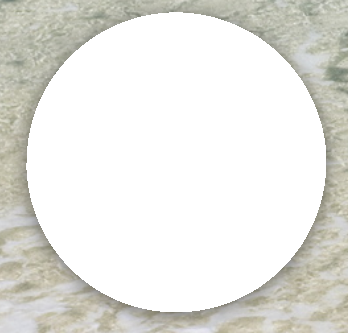
编译以上代码,运行结果如下
4.圆形渐变窗口
在上面我们实现了一个圆形窗口,可以使用XRender扩展实现一个圆形的渐变窗口。关于xlib实现渐变可以查看之前的实现代码。
实现代码如下
#include <X11/Xlib.h>
#include <X11/extensions/shape.h>
#include <stdio.h>
#include <stdlib.h>
#include <math.h>
#include <unistd.h>
#include <vector>
#include <algorithm>
#include <iostream>
#include <X11/extensions/render.h>
#include <X11/extensions/Xrender.h>

using namespace std;


enum CircleCorner{
    TopLeft,
    TopRight,
    BottomRight,
    BottomLeft
};

static bool IsPointExistsInVector(vector<XPoint> &points, XPoint point){
    return std::find_if(points.begin(),points.end(),[&](const XPoint &iter){
        return iter.x == point.x && iter.y == point.y;
    }) != points.end();
}

#define DISTANCE() \
        sqrt(((px)-(cx))*((px)-(cx)) + ((py)-(cy))*((py)-(cy)))


#define TopLeft1()                         \
        do{                                             \
             px =    (cx) - (x) + (i);                        \
             py =    (cy) - (y) + (j);                        \
             point.x = px;                              \
             point.y = py;                              \
             double dist = DISTANCE(); \
             coverage = fmax(0, fmin(1, 0.5 - fabs(dist - r)));\
        }while(0);


#define TopLeft2()                         \
        do{                                             \
              px =       (cx) - (y) + (i);                    \
              py =       (cy) - (x) + (j);                    \
              point.x  = px;                            \
              point.y =  py;                            \
              double dist = DISTANCE();      \
              coverage = fmax(0, fmin(1, 0.5 - fabs(dist - r))); \
        }while(0);


//{cx + x + i, cy - y + j}, // 右-上-下
//                        {cx + y + i, cy - x + j}, // 右-上-上

#define TopRight1()                    \
        do{                                         \
              px = (cx) + (x) + (i);                \
              py = (cy) - (y) + (j);                \
              point.x = px;                         \
              point.y = py;                         \
              double dist = DISTANCE();  \
              coverage = fmax(0, fmin(1, 0.5 - fabs(dist - r)));\
        }while(0)


#define TopRight2()                            \
        do{                                                 \
             px = cx+y+i;                                   \
             py = cy-x+j;                                   \
             point.x = px;                                  \
             point.y = py;                                      \
             double dist = DISTANCE();               \
             coverage = fmax(0, fmin(1, 0.5 - fabs(dist - r))); \
        }while(0)


//{cx + x + i, cy + y + j}, // 右-下-下
//                        {cx + y + i, cy + x + j}, // 右-下-上

#define BottomRight1()              \
        do{                         \
            px = cx+x+i;            \
            py = cy+y+j;            \
            point.x = px;              \
            point.y = py;              \
            double dist = DISTANCE(); \
            coverage = fmax(0, fmin(1, 0.5 - fabs(dist - r)));\
        }while(0)


#define BottomRight2()              \
        do{                         \
            px = cx + y + i;         \
            py = cy + x + j;         \
            point.x = px;              \
            point.y = py;              \
            double dist = DISTANCE(); \
            coverage = fmax(0, fmin(1, 0.5 - fabs(dist - r)));\
        }while(0)


//{cx - x + i, cy + y + j}, // 左-下-下
//                        {cx - y + i, cy + x + j} // 左-下-上

#define BottomLeft1() \
        do{                         \
            px = cx -x + i;         \
            py = cy + y +j;         \
            point.x = px;              \
            point.y = py;              \
            double dist = DISTANCE(); \
            coverage = fmax(0, fmin(1, 0.5 - fabs(dist - r)));\
        }while(0)

#define BottomLeft2()           \
        do{                         \
            px = cx -y +i;         \
            py = cy + x +j;         \
            point.x = px;              \
            point.y = py;              \
            double dist = DISTANCE(); \
            coverage = fmax(0, fmin(1, 0.5 - fabs(dist - r)));\
        }while(0)   \


#define CONCAT(x,y) x ## y

#define CreateCorner(CornerType) \
        CONCAT(CornerType,1)();    \
        if(coverage>=0.30 && (!IsPointExistsInVector(circlePoints,point))){ \
            circlePoints.push_back(point);                    \
        }                                                                      \
        CONCAT(CornerType,2)();                                               \
        if(coverage>=0.30 && (!IsPointExistsInVector(circlePoints,point))){   \
            circlePoints.push_back(point);                                    \
        }


void GetRoundCornerPoints(int cx, int cy, int r, CircleCorner cornerType, vector<XPoint> &circlePoints){
    int x = 0, y = r;
    int d = 1 - r;
    int deltaE = 3, deltaSE = -2 * r + 5;

    while (x <= y) {
        // 处理当前点及其对称点
        for (int i = -1; i <= 1; i++) {
            for (int j = -1; j <= 1; j++) {

                int px,py;
                XPoint point;
                double coverage = 0.0;
                if(cornerType == TopLeft){
                    CreateCorner(TopLeft);
                }else if(cornerType == TopRight){
                    CreateCorner(TopRight);
                }else if(cornerType == BottomRight){
                    CreateCorner(BottomRight);
                }else if(cornerType == BottomLeft){
                    CreateCorner(BottomLeft);
                }
            }
        }

        // 更新决策变量
        if (d < 0) {
            d += deltaE;
            deltaE += 2;
            deltaSE += 2;
        } else {
            d += deltaSE;
            deltaE += 2;
            deltaSE += 4;
            y--;
        }
        x++;
    }
}

static Region CreateCircleRegion(int cx, int cy, int r) {
    vector<XPoint>   topLeftPoints;
    vector<XPoint>   topRightPoints;
    vector<XPoint>   bottomRightPoints;
    vector<XPoint>   bottomLeftPoints;

    GetRoundCornerPoints(cx,cy, r, TopLeft, topLeftPoints);
    GetRoundCornerPoints(cx,cy, r, TopRight, topRightPoints);
    GetRoundCornerPoints(cx,cy, r, BottomRight,  bottomRightPoints);
    GetRoundCornerPoints(cx,cy, r, BottomLeft, bottomLeftPoints);

    //左上角的四分之一圆,点按照x轴增大,y轴增大的方式排序
    std::sort(topLeftPoints.begin(),topLeftPoints.end(),[&](const XPoint &a,const XPoint &b){
        if(a.x == b.x){
            return a.y < b.y;
        }
        return a.x < b.x;
    });

    //右上角四分之一圆点,按照x轴增大,y轴减少的方式排序。
    std::sort(topRightPoints.begin(),topRightPoints.end(),[&](const XPoint &a, const XPoint &b){
        if(a.x == b.x){
            return a.y > b.y;
        }
        return a.x < b.x;
    });

    //右下角四分之上圆点,按照x轴减小,y轴增大方式排序
    std::sort(bottomRightPoints.begin(),bottomRightPoints.end(),[&](const XPoint &a, const XPoint &b){
        if(a.x == b.x){
            return a.y < b.y;
        }
        return a.x > b.x;
    });

    //左下角四分之一圆点,按照x轴减少,y轴减少排序
    std::sort(bottomLeftPoints.begin(), bottomLeftPoints.end(), [&](const XPoint &a, const XPoint &b){
        if(a.x == b.x){
            return a.y > b.y;
        }
        return a.x > b.x;
    });

    vector<XPoint> circlePoints;
    circlePoints.reserve(topLeftPoints.size() + topRightPoints.size() + bottomRightPoints.size() + bottomLeftPoints.size());
    std::copy(topLeftPoints.begin(),topLeftPoints.end(),std::back_inserter(circlePoints));
    std::copy(topRightPoints.begin(),topRightPoints.end(),std::back_inserter(circlePoints));
    std::copy(bottomRightPoints.begin(), bottomRightPoints.end(), std::back_inserter(circlePoints));
    std::copy(bottomLeftPoints.begin(), bottomLeftPoints.end(), std::back_inserter(circlePoints));
    return XPolygonRegion(circlePoints.data(), circlePoints.size(), EvenOddRule);
}

int main() {
    Display *display;
    Window window;
    int screen;

    display = XOpenDisplay(NULL);
    if (display == NULL) {
        fprintf(stderr, "无法打开X显示\n");
        exit(1);
    }

    screen = DefaultScreen(display);
    window = XCreateSimpleWindow(display, RootWindow(display, screen), 100, 100, 400, 400, 1,
                                 BlackPixel(display, screen), WhitePixel(display, screen));
    XSelectInput(display,window,ExposureMask | KeyPressMask|PointerMotionMask|ButtonPressMask);

    // 显示窗口
    XMapWindow(display, window);

    // 移除窗口装饰
    Atom hints = XInternAtom(display, "_MOTIF_WM_HINTS", False);
    struct {
        unsigned long flags;
        unsigned long functions;
        unsigned long decorations;
        long input_mode;
        unsigned long status;
    } motif_hints = {2, 0, 0, 0, 0}; // decorations = 0 表示无装饰

    XChangeProperty(
            display, window,
            hints, hints, 32, PropModeReplace,
            (unsigned char *)&motif_hints, sizeof(motif_hints) / sizeof(long)
    );

    XMoveWindow(display,window,300,500);

    while (1) {
        XEvent event;
        XNextEvent(display,&event);
        if (event.type == Expose) {
            // 创建并应用圆形区域
            Region circleRegion = CreateCircleRegion(200,200,150);
            XRectangle rect = {0,0,400,400};
            Region region = XCreateRegion();
            XUnionRectWithRegion(&rect, region, region);
            XIntersectRegion(region, circleRegion, region);
            XDestroyRegion(circleRegion);
            // 将圆形区域应用为窗口形状
            XShapeCombineRegion(display, window, ShapeBounding, 0, 0, region, ShapeSet);
            XDestroyRegion(region);

            // 创建窗口的图片(Picture)
            Picture window_picture = XRenderCreatePicture(display, window,
                                                          XRenderFindVisualFormat(display, DefaultVisual(display, screen)), 0,
                                                          NULL);

            // 定义线性渐变的起点和终点
            XLinearGradient gradient;
            gradient.p1.x = XDoubleToFixed(0); // 起点 x 坐标
            gradient.p1.y = XDoubleToFixed(0); // 起点 y 坐标
            gradient.p2.x = XDoubleToFixed(0); // 终点 x 坐标
            gradient.p2.y = XDoubleToFixed(400); // 终点 y 坐标

            // 定义渐变的颜色停止点
            XFixed stops[3];
            XRenderColor colors[3];

            // 第一个颜色:红
            stops[0] = XDoubleToFixed(0.0);
            colors[0].red = 65535;
            colors[0].green = 0;
            colors[0].blue = 0;
            colors[0].alpha = 65535; // 不透明


            stops[1] = XDoubleToFixed(0.5);
            colors[1].red = 0;
            colors[1].green = 0;
            colors[1].blue = 65535;
            colors[1].alpha = 65535;

            // 第三个颜色:绿
            stops[2] = XDoubleToFixed(1.0);
            colors[2].red = 0; // 红色 (范围 0-65535)
            colors[2].green = 65535;
            colors[2].blue = 0;
            colors[2].alpha = 65535; // 不透明

            // 创建线性渐变图案
            Picture gradient_picture = XRenderCreateLinearGradient(display, &gradient, stops, colors, 3);
            XRenderComposite(display, PictOpSrc, gradient_picture, None, window_picture,
                             0, 0, 0, 0, 0, 0, 400, 400);
            XRenderFreePicture(display, gradient_picture);
            XRenderFreePicture(display, window_picture);

        }
        if (event.type == KeyPress) {
            KeySym keysym = XLookupKeysym(&event.xkey,0);
            if (keysym == XK_Escape) {
                break;
            }
        }
    }

    XDestroyWindow(display,window);
    // 清理资源
    XCloseDisplay(display);

    return 0;
}
编译以上程序运行结果如下
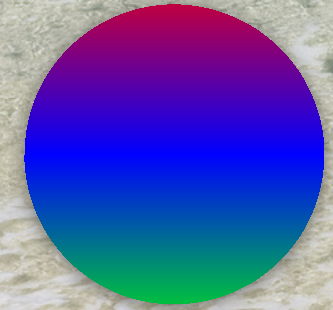
利用xlib提供的创建多边形区域,我们可以复杂高级的界面开状,同时结合XRender扩展,我们可以高级炫丽的界面效果。满足不同项目对于对界面渲染的需求。






 扫一扫
扫一扫


 1万+
1万+

 被折叠的 条评论
为什么被折叠?
被折叠的 条评论
为什么被折叠?
 到【灌水乐园】发言





