



 本文介绍了一个简单的C++程序示例,该程序利用gflags库来定义和解析命令行参数,包括输入文件路径、布尔标志和整数类型计数器。通过此示例,读者可以了解到如何在C++项目中引入gflags库并使用它来处理命令行参数。
#include <string>
#include <iostream>
#include <gflags/gflags.h>

using namespace std;

DEFINE_string(input_path, "empty" , "input file path");
DEFINE_bool(show_flag, false, "show flag");
DEFINE_int32(count, -1, "int type count ");

int main(int argc, char** argv) {
  gflags::ParseCommandLineFlags(&argc, &argv, true);

  cout << "input_path = " << FLAGS_input_path << endl;
  cout << "show_flag = " << FLAGS_show_flag << endl;
  cout << "count = " << FLAGS_count << endl;

  gflags::ShutDownCommandLineFlags();
  return 0;
}
cmake_minimum_required(VERSION 2.8)
project(untitled)
set(CMAKE_CXX_STANDARD 11)

add_executable(untitled main.cpp)
target_link_libraries(untitled
        gflags
        )
运行:
./untitled
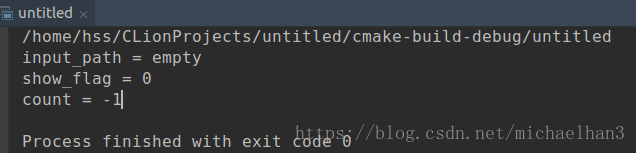
./untitled --input_path="/home/Desktop" --show_flag=true --count=999






 扫一扫
扫一扫


 2142
2142

 被折叠的 条评论
为什么被折叠?
被折叠的 条评论
为什么被折叠?
 到【灌水乐园】发言





