
当OpenHarmony遇上OpenEuler

openEuler编译OpenHarmony

1、 安装openEuler

虚拟机、物理机器当然都可以安装。虚拟机又可以使用WSL、或者VMWare、VirtualBox虚拟机软件,如果需要安装最新版本,建议使用后者。当前WSL只支持OpenEuler 20.03。

1.1 WSL openEuler

WSL的安装都是程序员的必备技能了,不展开如何开启WSL了。打开Windows Store搜索openEuler,如下图所示,进行安装即可。
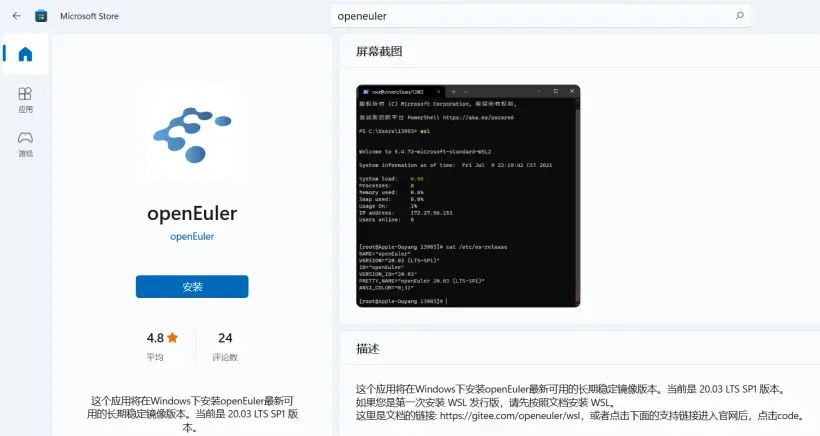
安装后,可以查看版本信息:

[ken@kenneth ~]$ cat /etc/os-release
NAME="openEuler"
VERSION="20.03 (LTS-SP1)"
ID="openEuler"
VERSION_ID="20.03"
PRETTY_NAME="openEuler 20.03 (LTS-SP1)"
ANSI_COLOR="0;31"

1.2 虚拟机安装

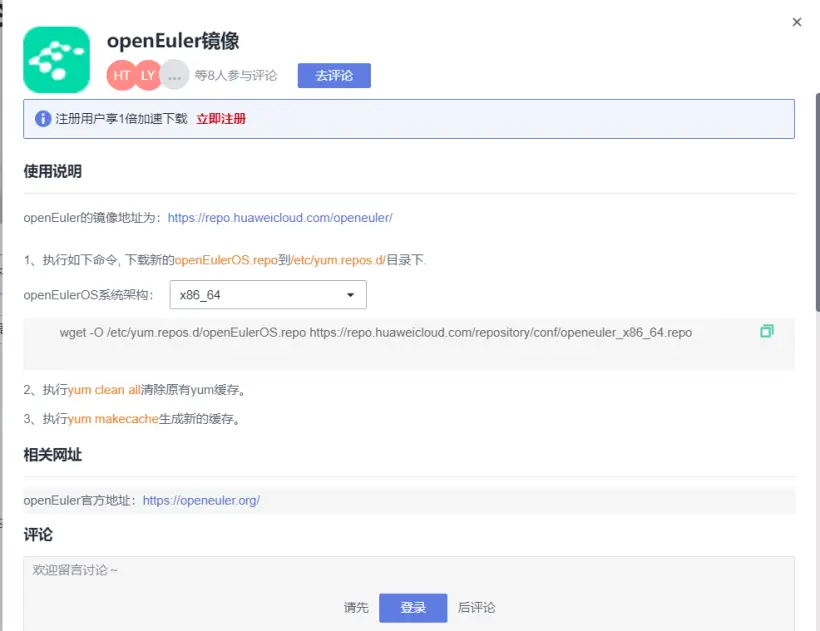
可以访问openEuler镜像服务器https://repo.huaweicloud.com/openeuler/,下载ISO文件,如https://repo.huaweicloud.com/openeuler/openEuler-21.09/ISO/x86_64/openEuler-21.09-everything-x86_64-dvd.iso。然后使用VMWare或者VirtualBox安装。本文以WSL openEuler为例,虚拟机安装也比较简单,不再展开。

安装服务器后,执行uname -a查看系统架构,根据架构下载不同的openEulerOS.repo到/etc/yum.repos.d/目录下,执行下述命令设置软件包镜像。

wget -O /etc/yum.repos.d/openEulerOS.repo https://repo.huaweicloud.com/repository/conf/openeuler_x86_64.repo
yum clean all   # 清除原有yum缓存。
yum makecache   #生成新的缓存。

这里就想放张图,比较喜欢华为云镜像服务器https://mirrors.huaweicloud.com,大家也可以访问试试。
2、准备编译OpenHarmony的软件环境

参考在Ubuntu编译服务器上编译OpenHarmony的软件环境,准备openEuler上的环境。主要参考文件为: https://gitee.com/openharmony/docs/blob/master/docker/Dockerfile,还有获取源代码文档页面。使用的openEuler版本就是WSL openEuler 20.03。

2.1 安装软件包

下面这些软件包对有些开发板的编译可能是不全的,需要另行安装些其他软件。⑴处命令会安装gcc、c++等开发相关的软件包。对于openEuler 20.03,安装的gcc版本为V7.3.0,版本有些低。如果有需要高版本gcc比如 gcc 9.3.0版本,建议使用更高版本的openEuler。

    sudo yum install curl wget -y
	sudo yum install vim -y
	sudo yum install openssh -y
	sudo yum install git -y
	sudo yum install dosfstools -y
	sudo yum install mtools -y
	sudo yum install scons -y
	sudo yum install make -y
	sudo yum install libffi-devel -y
	sudo yum install zip -y
	sudo yum install binutils -y
	sudo yum install bison -y
	sudo yum install flex -y
	sudo yum install bc -y
	sud
明白了!你的意思是: ✅ **保留使用 `huaweicloud` SDK**(华为云 OBS SDK) ❌ **但不使用 `flask_caching` 模块** --- 我们将使用 `huaweicloud` SDK 访问 OBS,但 **不使用 Flask-Caching 缓存**,而是使用一个简单的内存字典来缓存 JSONL 数据和图片数据。 --- ## ✅ 一、安装依赖 ```bash pip install flask huaweicloud pillow ``` --- ## ✅ 二、后端代码(使用 huaweicloud SDK,不使用 flask_caching) ```python # app.py from flask import Flask, request, jsonify, send_file from io import BytesIO from PIL import Image, ImageDraw, ImageFont import json import base64 from huaweicloud.sdk.core.auth.credentials import BasicCredentials from huaweicloud.sdk.obs.v1.obs_client import ObsClient app = Flask(__name__) # 使用内存字典模拟缓存 file_cache = {} image_cache = {} # 初始化华为云 OBS 客户端 credentials = BasicCredentials( ak="YOUR_AK", sk="YOUR_SK", project_id="YOUR_PROJECT_ID" ) client = ObsClient( access_key_id="YOUR_AK", secret_access_key="YOUR_SK", server="https://obs.cn-north-4.myhuaweicloud.com" ) BUCKET_NAME = "your-bucket-name" # 替换为你的桶名 @app.route("/buckets", methods=["GET"]) def list_buckets(): resp = client.list_buckets() buckets = [b.name for b in resp.body.buckets] return jsonify(buckets) @app.route("/files", methods=["GET"]) def list_files(): prefix = request.args.get("prefix", "") resp = client.list_objects(BUCKET_NAME, prefix=prefix) files = [content.key for content in resp.body.contents] return jsonify(files) @app.route("/jsonl", methods=["GET"]) def get_jsonl_data(): file_path = request.args.get("file") if file_path in file_cache: return jsonify(file_cache[file_path]) resp = client.get_object(BUCKET_NAME, file_path) lines = resp.body.read().decode("utf-8").splitlines() data = [json.loads(line) for line in lines] file_cache[file_path] = data # 缓存数据 return jsonify(data) @app.route("/image", methods=["GET"]) def get_image(): image_path = request.args.get("path") if image_path in image_cache: return send_file(BytesIO(base64.b64decode(image_cache[image_path])), mimetype="image/png") resp = client.get_object(BUCKET_NAME, image_path) img_data = resp.body.read() img = Image.open(BytesIO(img_data)) draw = ImageDraw.Draw(img) font = ImageFont.load_default() # 如果有 box 信息,绘制框框 if "box" in request.args: box = json.loads(request.args.get("box")) label = request.args.get("label") draw.rectangle(box, outline="red", width=2) draw.text((box[0], box[1]), label, fill="red", font=font) img_io = BytesIO() img.save(img_io, "PNG") encoded = base64.b64encode(img_io.getvalue()).decode("utf-8") image_cache[image_path] = encoded return send_file(BytesIO(base64.b64decode(encoded)), mimetype="image/png") if __name__ == "__main__": app.run(host="0.0.0.0", port=5000) ``` --- ## ✅ 三、前端代码(HTML + JS) 这部分与之前保持一致,不再赘述。你可以参考前面的 `index.html` 示例代码。 --- ## ✅ 四、说明 | 模块 | 说明 | |------|------| | `huaweicloud` SDK | 用于访问 OBS,列出文件、读取文件 | | `file_cache` 字典 | 替代 `flask_caching`,缓存 JSONL 数据 | | `image_cache` 字典 | 缓存图片的 base64 数据,加快加载速度 | | `ImageDraw` | 用于在图片上绘制框框和文字 | --- ## ✅ 五、部署建议 ### 1. 启动服务 ```bash python app.py ``` ### 2. 使用 Gunicorn 部署(生产环境) ```bash pip install gunicorn gunicorn -w 4 -b 0.0.0.0:5000 app:app ``` ### 3. Nginx 反向代理配置(可选) ```nginx server { listen 80; server_name your-domain.com; location / { proxy_pass http://127.0.0.1:5000; proxy_set_header Host $host; } } ``` --- ## ✅ 六、优点与限制 | 优点 | 限制 | |------|------| | 使用官方 SDK,稳定性强 | 需要安装 `huaweicloud` 包 | | 使用内存缓存,响应更快 | 不适合大规模数据缓存 | | 代码结构清晰 | 依赖华为云 AK/SK | --- ##
评论
成就一亿技术人!
拼手气红包6.0元
还能输入1000个字符
 
红包 添加红包
表情包 插入表情
 条评论被折叠 查看
添加红包

请填写红包祝福语或标题

红包个数最小为10个

红包金额最低5元

当前余额3.43前往充值 >
需支付:10.00
成就一亿技术人!
领取后你会自动成为博主和红包主的粉丝 规则
hope_wisdom
发出的红包
实付
使用余额支付
点击重新获取
扫码支付
钱包余额 0

抵扣说明:

1.余额是钱包充值的虚拟货币,按照1:1的比例进行支付金额的抵扣。
2.余额无法直接购买下载,可以购买VIP、付费专栏及课程。

余额充值



