






配套管理
配套管理提供三个接口:
- 按类型查询配套列表
- 保存/更新配套信息
- 根据ID删除配套
具体实现位于FacilityController中,新增内容如下:
@Tag(name = "配套管理")
@RestController
@RequestMapping("/admin/facility")
public class FacilityController {
    @Autowired
    private FacilityInfoService service;
    @Operation(summary = "[根据类型]查询配套信息列表")
    @GetMapping("list")
    public Result<List<FacilityInfo>> listFacility(@RequestParam(required = false) ItemType type) {
        LambdaQueryWrapper<FacilityInfo> queryWrapper = new LambdaQueryWrapper<>();
        queryWrapper.eq(type!=null,FacilityInfo::getType,type);
        List<FacilityInfo> list = service.list(queryWrapper);
        return Result.ok(list);
    }

    @Operation(summary = "新增或修改配套信息")
    @PostMapping("saveOrUpdate")
    public Result saveOrUpdate(@RequestBody FacilityInfo facilityInfo) {
        service.saveOrUpdate(facilityInfo);
        return Result.ok();
    }

    @Operation(summary = "根据id删除配套信息")
    @DeleteMapping("deleteById")
    public Result removeFacilityById(@RequestParam Long id) {
        service.removeById(id);
        return Result.ok();
    }

}
基本属性管理
房间基础属性管理包含五个功能接口:
- 新增/更新属性名称
- 新增/更新属性值
- 查询全部属性名称及对应值列表
- 根据ID删除属性名称
- 根据ID删除属性值
实现步骤如下:
首先在AttrController中注入服务:
@Tag(name = "房间属性管理")
@RestController
@RequestMapping("/admin/attr")
public class AttrController {

    @Autowired
    private AttrKeyService attrKeyService;

    @Autowired
    private AttrValueService attrValueService;
}
新增更新属性名称、新增/更新属性值、根据ID删除属性值
这三个还是很简单的
    @Operation(summary = "新增或更新属性名称")
    @PostMapping("key/saveOrUpdate")
    public Result saveOrUpdateAttrKey(@RequestBody AttrKey attrKey) {
        attrKeyService.saveOrUpdate(attrKey);
        return Result.ok();
    }

    @Operation(summary = "新增或更新属性值")
    @PostMapping("value/saveOrUpdate")
    public Result saveOrUpdateAttrValue(@RequestBody AttrValue attrValue) {
        attrValueService.saveOrUpdate(attrValue);
        return Result.ok();
    }

    @Operation(summary = "根据id删除属性值")
    @DeleteMapping("value/deleteById")
    public Result removeAttrValueById(@RequestParam Long id) {
        attrValueService.removeById(id);
        return Result.ok();
    }
根据ID删除属性名称
    @Operation(summary = "根据id删除属性名称")
    @DeleteMapping("key/deleteById")
    public Result removeAttrKeyById(@RequestParam Long attrKeyId) {
        //注意删除属性名称时,会一并删除其下的所有属性值
        //删除attrKey
        attrKeyService.removeById(attrKeyId);
        //查询器查出对应attValue
        LambdaQueryWrapper<AttrValue> attrValueLambdaQueryWrapper = new LambdaQueryWrapper<>();
        attrValueLambdaQueryWrapper.eq(AttrValue::getAttrKeyId,attrKeyId);
        //查询到的attValue,然后删除
        attrValueService.remove(attrValueLambdaQueryWrapper);
        return Result.ok();
    }
查询全部属性名称及对应值列表
这个地方不单单是查询出一个list就行了,还要关联对应属性值列表,mybatisplus单表查询不能显示,要一对多查询,需要手写sql语句查询,
1. 接口层(Controller):接收请求 + 返回结果
@Operation(summary = "查询全部属性名称和属性值列表") // knife4j 接口描述
@GetMapping("list") // 接口路径:GET /list
public Result<List<AttrKeyVo>> listAttrInfo() {
    // 调用 Service 层方法获取数据
    List<AttrKeyVo> list = attrKeyService.listAttrInfo();
    return Result.ok(list); // 统一返回成功结果(Result 为自定义响应封装类)
}- 核心职责:暴露接口、参数校验(此处无参数)、调用 Service、统一响应格式。
- 关键:返回类型是
Result<List<AttrKeyVo>>,而非直接返回List,便于前端统一处理状态码、消息和数据。
2. 业务层(Service):定义业务方法 + 委托查询
// Service 接口:定义查询契约
public interface AttrKeyService extends IService {
    List<AttrKeyVo> listAttrInfo();
}

// Service 实现类:委托 Mapper 执行查询
@Service
public class AttrKeyServiceImpl extends ServiceImpl<AttrKeyMapper, AttrKey> implements AttrKeyService {
    @Autowired
    private AttrKeyMapper attrKeyMapper;

    @Override
    public List<AttrKeyVo> listAttrInfo() {
        return attrKeyMapper.listAttrInfo(); // 直接调用 Mapper 方法,无业务逻辑
    }
}- 核心职责:定义业务逻辑入口(此处逻辑简单,仅透传 Mapper 结果)。
- 关键:继承
ServiceImpl可能是为了复用 MyBatis-Plus 的基础 CRUD 方法,此处自定义方法专注于关联查询。
3. 数据访问层(Mapper + XML):执行数据库关联查询
(1)Mapper 接口(无额外代码,依赖 XML 实现)
// 假设 AttrKeyMapper 继承 BaseMapper,此处仅定义接口方法(XML 中实现)
public interface AttrKeyMapper extends BaseMapper<AttrKey> {
    List<AttrKeyVo> listAttrInfo(); // 对应 XML 中的查询方法
}
(2)MyBatisPlus XML:编写 SQL + 结果映射
<!-- 结果映射:将数据库查询字段映射到 AttrKeyVo -->
<resultMap id="c" type="com.yuhuan.lease.web.admin.vo.attr.AttrKeyVo">
    <id property="id" column="id" /> <!-- 属性键ID -->
    <result property="name" column="key_name" /> <!-- 属性键名称(对应 k.name) -->
    <!-- 关联属性值列表:一对多映射 -->
    <collection property="attrValueList" ofType="com.yuhuan.lease.model.entity.AttrValue">
        <id column="value_id" property="id"/> <!-- 属性值ID -->
        <result column="key_id" property="attrKeyId" /> <!-- 属性值关联的属性键ID -->
        <result column="value_name" property="name" /> <!-- 属性值名称(对应 v.name) -->
    </collection>
</resultMap>

<!-- 关联查询 SQL:左关联属性键和属性值表 -->
<select id="listAttrInfo" resultMap="c">
    select
        k.id,
        k.name key_name, -- 属性键名称别名(避免与属性值名称冲突)
        v.id value_id, -- 属性值ID别名
        v.name value_name, -- 属性值名称别名
        v.attr_key_id key_id -- 属性值关联的属性键ID别名
    from lease.attr_key as k
    left join lease.attr_value v
        on k.id = v.attr_key_id -- 关联条件:属性键ID = 属性值的attr_key_id
        and v.is_deleted=0 -- 过滤未被逻辑删除的属性值
    where k.is_deleted = 0 -- 过滤未被逻辑删除的属性键
</select>- 核心职责:执行 “一对多” 关联查询,通过
resultMap解决 “属性键字段与属性值字段冲突”(如两者都有name字段,通过别名区分),并将查询结果映射到AttrKeyVo的attrValueList中。 - 关键:使用
left join确保 “即使属性键没有对应的属性值,也会被查询出来”(attrValueList为空列表,而非不返回该属性键)。
4. 数据模型(Entity + Vo):封装数据结构
(1)实体类(Entity):对应数据库表
// 属性值实体:对应 lease.attr_value 表
@Schema(description = "房间基本属性值表")
@TableName(value = "attr_value")
@Data
public class AttrValue extends BaseEntity {
    private static final long serialVersionUID = 1L;

    @Schema(description = "属性value")
    @TableField(value = "name")
    private String name; // 属性值名称

    @Schema(description = "对应的属性key_id")
    @TableField(value = "attr_key_id")
    private Long attrKeyId; // 关联的属性键ID
}


@Schema(description = "房间基本属性值表")
@TableName(value = "attr_value")
@Data
public class AttrValue extends BaseEntity {

    private static final long serialVersionUID = 1L;

    @Schema(description = "属性value")
    @TableField(value = "name")
    private String name;

    @Schema(description = "对应的属性key_id")
    @TableField(value = "attr_key_id")
    private Long attrKeyId;
}
(2)视图对象(Vo):封装查询结果
@Data
public class AttrKeyVo extends AttrKey { // 继承属性键实体,复用基本字段
    @Schema(description = "属性value列表")
    private List<AttrValue> attrValueList; // 关联的属性值列表
}- 核心职责:
AttrKeyVo是 “查询结果专用封装类”,通过继承AttrKey复用属性键的基本字段(如id、name),再新增attrValueList字段存储关联的属性值列表,避免在 Entity 中冗余关联字段。
核心亮点与注意点
亮点:
- 分层清晰:Controller → Service → Mapper → 数据库,符合 MVC 设计模式,代码可读性强。
- 关联查询优化:通过 MyBatisPlus
resultMap+collection实现 “一对多” 映射,避免手动循环查询(N+1 问题),性能更优。 - 逻辑删除处理:SQL 中通过
is_deleted=0过滤已删除数据,符合业务系统的 “软删除” 需求。 - 响应统一:使用
Result封装返回结果,便于前端统一处理状态(成功 / 失败)和数据。
注意点:
- Service 层冗余:当前 Service 实现类仅调用 Mapper 方法,无实际业务逻辑,可考虑直接让 Controller 调用 Mapper(但不符合分层原则,建议保留 Service 层,便于后续扩展业务逻辑)。
- ResultMap 别名依赖:SQL 中字段别名(如
key_name、value_id)必须与resultMap中的column一致,否则映射失败,需注意维护一致性。 - 左关联的意义:若业务需求 “只查询有属性值的属性键”,可将
left join改为inner join,否则会返回无属性值的属性键(attrValueList为空)。
总结
这段代码完整实现了 “查询所有属性键及其对应属性值列表” 的功能,从接口定义、业务委托、数据库查询到结果封装,流程闭环且规范,适合作为 “一对多” 关联查询的经典示例,核心依赖 MyBatisPlus 的 resultMap 解决字段冲突和关联映射问题,整体设计简洁高效。
公寓杂费管理
房间基本属性管理模块包含五个核心接口功能:
- 杂费名称的保存与更新
- 杂费值的保存与更新
- 查询所有杂费名称及对应值的列表
- 按ID删除杂费名称
- 按ID删除杂费值
实现步骤如下: 在FeeController中需注入两个服务类:
- FeeKeyService(杂费名称服务)
- FeeValueService(杂费值服务)
@Tag(name = "房间杂费管理")
@RestController
@RequestMapping("/admin/fee")
public class FeeController {

    @Autowired
    private FeeKeyService feeKeyService;

    @Autowired
    private FeeValueService feeValueService;
}
杂费值的保存与更新、按ID删除杂费名称、按ID删除杂费值
    @Operation(summary = "保存或更新杂费值")
    @PostMapping("value/saveOrUpdate")
    public Result saveOrUpdateFeeValue(@RequestBody FeeValue feeValue) {
        feeValueService.saveOrUpdate(feeValue);
        return Result.ok();
    }

    @Operation(summary = "根据id删除杂费值")
    @DeleteMapping("value/deleteById")
    public Result deleteFeeValueById(@RequestParam Long id) {
        feeValueService.removeById(id);
        return Result.ok();
    }

    @Operation(summary = "查询全部杂费名称和杂费值列表")
    @GetMapping("list")
    public Result<List<FeeKeyVo>> feeInfoList() {
        List<FeeKeyVo> feeKeyVos = feeKeyService.allFeeList();
        return Result.ok(feeKeyVos);
    }
根据id删除杂费名称
    @Operation(summary = "根据id删除杂费名称")
    @DeleteMapping("key/deleteById")
    public Result deleteFeeKeyById(@RequestParam Long feeKeyId) {
        //先删除杂费名称信息
        feeKeyService.removeById(feeKeyId);
        //在删除对应的杂费值信息
        LambdaQueryWrapper<FeeValue> feeValueLambdaQueryWrapper = new LambdaQueryWrapper<>();
        feeValueLambdaQueryWrapper.eq(FeeValue::getFeeKeyId, feeKeyId);
        feeValueService.remove(feeValueLambdaQueryWrapper);
        return Result.ok();
    }
查询全部杂费名称和杂费值列表
这里的查询是一对多,应该数据结构如下:
{
	"code": 200,
	"message": "成功",
	"data": [{
			"id": 1,
			"name": "停车费",
			"feeValueList": [{
					"id": 3,
					"name": "400",
					"unit": "元/月",
					"feeKeyId": 1
				},
				{
					"id": 2,
					"name": "300",
					"unit": "元/月",
					"feeKeyId": 1
				},
				{
					"id": 1,
					"name": "200",
					"unit": "元/月",
					"feeKeyId": 1
				}
			]
		},
		{
			"id": 2,
			"name": "网费",
			"feeValueList": [{
					"id": 7,
					"name": "500",
					"unit": "元/年",
					"feeKeyId": 2
				},
				{
					"id": 6,
					"name": "1000",
					"unit": "元/年",
					"feeKeyId": 2
				},
				{
					"id": 5,
					"name": "60",
					"unit": "元/月",
					"feeKeyId": 2
				},
				{
					"id": 4,
					"name": "50",
					"unit": "元/月",
					"feeKeyId": 2
				}
			]
		}
	]
}
这种一对多的情况,mybatisplus自带的方法处理不了,我们自己要手写sql的形式来完成
1. 数据库交互层(Mapper 层)
FeeKeyMapper.xml
<mapper namespace="com.yuhuan.lease.web.admin.mapper.FeeKeyMapper">

<resultMap id="c" type="com.yuhuan.lease.web.admin.vo.fee.FeeKeyVo">
    <id column="id" property="id" />
    <result property="name" column="name" />
    <collection property="feeValueList" ofType="com.yuhuan.lease.model.entity.FeeValue">
        <id column="value_id" property="id" />
        <result property="name" column="value_name" />
        <result property="unit" column="unit" />
        <result property="feeKeyId" column="fee_key_id" />
    </collection>

</resultMap>
    <select id="allFeeList" resultMap="c">
        select
            k.id, k.name,
            v.id value_id,
            v.name value_name,
            v.unit,
            v.fee_key_id
        from lease.fee_key k left join lease.fee_value v on k.id = v.fee_key_id and v.is_deleted = 0
        where k.is_deleted=0
    </select>
</mapper>- 定义
<resultMap id="c">:映射FeeKeyVo与数据库查询结果,通过<collection>标签处理 一对多关系(一个FeeKey对应多个FeeValue)。id/result:映射FeeKeyVo自身字段(id、name)。<collection property="feeValueList">:映射关联的FeeValue列表,通过别名(value_id、value_name)避免字段冲突。
- 定义
<select id="allFeeList">:- 使用
LEFT JOIN关联fee_key和fee_value表,条件为k.id = v.fee_key_id(外键关联)。 - 过滤条件:
k.is_deleted=0(杂费名称未删除)、v.is_deleted=0(杂费值未删除)。
- 使用
FeeKeyMapper.java
public interface FeeKeyMapper extends BaseMapper<FeeKey> {

    List<FeeKeyVo> allFeeList();
}- 继承 MyBatis-Plus 的
BaseMapper<FeeKey>,拥有基础 CRUD 能力。 - 自定义方法
allFeeList(),对应 XML 中的查询语句,返回List<FeeKeyVo>。
2. 业务逻辑层(Service 层)
FeeKeyService.java
public interface FeeKeyService extends IService<FeeKey> {

    List<FeeKeyVo> allFeeList();
}- 继承 MyBatis-Plus 的
IService<FeeKey>,定义业务接口allFeeList()。
FeeKeyServiceImpl.java
@Service
public class FeeKeyServiceImpl extends ServiceImpl<FeeKeyMapper, FeeKey>
    implements FeeKeyService{
    @Autowired
    private FeeKeyMapper feeKeyMapper;
    @Override
    public List<FeeKeyVo> allFeeList() {
         return feeKeyMapper.allFeeList();
    }
}- 继承
ServiceImpl<FeeKeyMapper, FeeKey>,实现FeeKeyService接口。 - 通过
@Autowired注入FeeKeyMapper,直接调用allFeeList()方法,无额外业务逻辑(纯数据查询)。
3. 接口层(Controller 层)
    @Operation(summary = "查询全部杂费名称和杂费值列表")
    @GetMapping("list")
    public Result<List<FeeKeyVo>> feeInfoList() {
        List<FeeKeyVo> feeKeyVos = feeKeyService.allFeeList();
        return Result.ok(feeKeyVos);
}- 提供 RESTful API:
GET /list。 - 通过
@Operation(summary="")添加 knife4j文档注释(说明接口功能)。 - 调用
FeeKeyService.allFeeList()获取数据,封装为统一返回格式Result.ok(feeKeyVos),返回给前端。
地区信息管理
地区信息管理提供以下三个接口:
- 查询省份信息列表
- 根据省份ID查询城市信息列表
- 根据城市ID查询区县信息列表
具体实现如下:
在RegionInfoController中添加以下代码:
@Tag(name = "地区信息管理")
@RestController
@RequestMapping("/admin/region")
public class RegionInfoController {
    @Autowired
    private ProvinceInfoService provinceInfoService;
    @Autowired
    private CityInfoService cityInfoService;
    @Autowired
    private DistrictInfoService districtInfoService;
    @Operation(summary = "查询省份信息列表")
    @GetMapping("province/list")
    public Result<List<ProvinceInfo>> listProvince() {
        List<ProvinceInfo> list = provinceInfoService.list();
        return Result.ok(list);
    }

    @Operation(summary = "根据省份id查询城市信息列表")
    @GetMapping("city/listByProvinceId")
    public Result<List<CityInfo>> listCityInfoByProvinceId(@RequestParam Long id) {
        LambdaQueryWrapper<CityInfo> cityInfoLambdaQueryWrapper = new LambdaQueryWrapper<>();
        cityInfoLambdaQueryWrapper.eq(CityInfo::getProvinceId,id);
        List<CityInfo> list = cityInfoService.list(cityInfoLambdaQueryWrapper);
        return Result.ok(list);
    }

    @GetMapping("district/listByCityId")
    @Operation(summary = "根据城市id查询区县信息")
    public Result<List<DistrictInfo>> listDistrictInfoByCityId(@RequestParam Long id) {
        LambdaQueryWrapper<DistrictInfo> districtInfoLambdaQueryWrapper = new LambdaQueryWrapper<>();
        districtInfoLambdaQueryWrapper.eq(DistrictInfo::getCityId,id);
        List<DistrictInfo> list = districtInfoService.list(districtInfoLambdaQueryWrapper);
        return Result.ok(list);
    }

}
图片上传管理
在新增或修改公寓、房间信息时,由于这些实体都包含图片信息,因此需要实现一个图片上传接口。
-
图片上传流程
下图展示了在新增房间或公寓时,图片上传的具体流程。
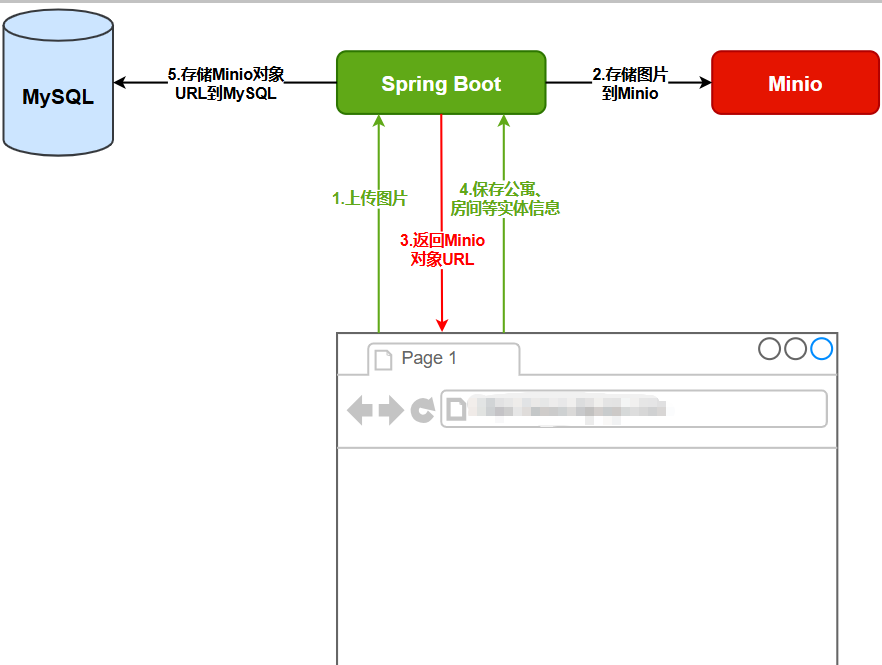
可以看出图片上传接口接收的是图片文件,返回的Minio对象的URL。
-
图片上传接口开发
在common模块的pom.xml文件中添加以下Minio依赖配置:
<dependency>
    <groupId>io.minio</groupId>
    <artifactId>minio</artifactId>
</dependency>
Minio配置参数
在application.yml文件中设置以下Minio连接参数:
- 服务端点(endpoint)
- 访问密钥(accessKey)
- 安全密钥(secretKey)
目录
1. 接口层(Controller):接收请求 + 返回结果
3. 数据访问层(Mapper + XML):执行数据库关联查询
(2)MyBatisPlus XML:编写 SQL + 结果映射
- 存储桶名称(bucketName)
minio:
  endpoint: 192.168.200.128:9000
  access-key: minioadmin
  secret-key: minioadmin
bucket-name: lease在common模块中创建com.yuhuan.lease.common.minio.MinioProperties类,内容如下:
@ConfigurationProperties(prefix = "minio")
@Data
public class MinioProperties {

    private String endpoint;

    private String accessKey;

    private String secretKey;

    private String bucketName;
}
这个类的作用是 “读取并封装” application.yml (或 .properties) 文件中的 MinIO 配置信息。
-
@ConfigurationProperties(prefix = "minio")- 这是 Spring Boot 的一个核心注解,用于将外部配置文件(如
application.yml)中的属性绑定到这个类的字段上。 prefix = "minio"表示它会读取配置文件中所有以minio.开头的属性。- Spring Boot 会自动将
minio.endpoint的值注入到MinioProperties类的endpoint字段,以此类推。
- 这是 Spring Boot 的一个核心注解,用于将外部配置文件(如
小结:MinioProperties 就像一个配置的 “容器”,它将分散在配置文件中的 MinIO 连接信息集中管理起来,方便后续代码使用。
在common模块中创建com.atguigu.lease.common.minio.MinioConfiguration,内容如下
@Configuration
@EnableConfigurationProperties(MinioProperties.class)
public class MinioConfiguration {

    @Autowired
    private MinioProperties properties;

    @Bean
    public MinioClient minioClient() {
        return MinioClient.builder().endpoint(properties.getEndpoint()).credentials(properties.getAccessKey(), properties.getSecretKey()).build();
    }
}
这个类是 “配置的核心”,它的作用是根据 MinioProperties 提供的信息,创建一个可以被全项目注入和使用的 MinioClient 实例。
-
@Configuration- 这个注解标记当前类是一个 Spring 的配置类。
- Spring Boot 启动时,会扫描带有此注解的类,并执行其中的代码来构建 Bean 定义。
-
@EnableConfigurationProperties(MinioProperties.class)- 这个注解的作用是 启用 对
MinioProperties类的支持。 - 它告诉 Spring:“请去寻找
MinioProperties这个类,并将其作为一个 Bean 注入到容器中”。这样,我们才能在下面的代码中通过@Autowired注入它。 - 注意:在较新版本的 Spring Boot (2.2+) 中,如果
MinioProperties类本身在 Spring 的扫描路径下,并且有@ConfigurationProperties注解,那么@EnableConfigurationProperties注解有时可以省略。但显式地写上它是一个好习惯,能让配置意图更加明确。
- 这个注解的作用是 启用 对
-
@Autowired private MinioProperties properties;- 这是 Spring 的依赖注入。
- Spring 容器会自动查找
MinioProperties类型的 Bean(这个 Bean 是由@EnableConfigurationProperties创建的),并将其实例赋值给properties变量。 - 现在,我们就可以通过
properties.getXXX()来获取配置文件中的值了。
-
@Bean public MinioClient minioClient()- 这是整个配置的最终目的。
@Bean注解告诉 Spring:“请执行这个方法,并将其返回的对象(MinioClient实例)注册为 Spring 容器中的一个 Bean”。- 方法内部,我们使用 MinIO Java SDK 提供的
MinioClient.builder()构建器模式,结合从properties中获取的endpoint、accessKey和secretKey来创建并配置一个MinioClient对象。 - 这个 Bean 的默认名称就是方法名
minioClient。
小结:MinioConfiguration 类负责 “生产” 一个配置好的 MinioClient 对象,并把它交给 Spring 容器保管。
开发图片上传接口
在FileUploadController中添加以下代码
1. 接口层(Controller 层)
@Tag(name = "文件管理")
@RequestMapping("/admin/file")
@RestController
public class FileUploadController {
    @Autowired
    private FileService service;
    @Operation(summary = "上传文件")
    @PostMapping("upload")
    public Result<String> upload(@RequestParam MultipartFile file) {
        String url =  service.upload(file);
        return Result.ok(url);
    }

}
2. 业务逻辑层(Service 层)
public interface FileService {
    String upload(MultipartFile file);
}

@Service
public class FileServiceImpl implements FileService {
    @Autowired
    private MinioClient client; // 注入 MinIO 客户端
    @Autowired
    private MinioProperties properties; // 注入 MinIO 配置属性

    @Override
    public String upload(MultipartFile file) {
        try {
            // 1. 检查存储桶是否存在,不存在则创建
            boolean b = client.bucketExists(BucketExistsArgs.builder().bucket(properties.getBucketName()).build());
            if (!b) {
                client.makeBucket(MakeBucketArgs.builder().bucket(properties.getBucketName()).build());
                // 2. 设置存储桶的访问权限(公开读)
                client.setBucketPolicy(SetBucketPolicyArgs.builder()
                        .bucket(properties.getBucketName())
                        .config(createBucketPolicyConfig(properties.getBucketName()))
                        .build());
            }

            // 3. 生成唯一的文件名(避免重复)
            String fileName = new SimpleDateFormat("yyyyMMdd").format(new Date())
                            + UUID.randomUUID()
                            + "-" + file.getOriginalFilename();

            // 4. 上传文件到 MinIO
            client.putObject(PutObjectArgs.builder()
                    .bucket(properties.getBucketName()) // 存储桶名称
                    .object(fileName) // 文件名称
                    .stream(file.getInputStream(), file.getSize(), -1) // 文件流和大小
                    .contentType(file.getContentType()) // 文件 MIME 类型
                    .build());

            // 5. 构建并返回文件访问 URL
            return String.join("/", properties.getEndpoint(), properties.getBucketName(), fileName);

        } catch (Exception e) {
            e.printStackTrace(); // 异常处理(实际项目中应记录日志)
        }
        return null; // 上传失败返回 null
    }

    // 生成存储桶的访问策略(公开读)
    private String createBucketPolicyConfig(String bucketName) {
        return """
            {
              "Statement" : [ {
                "Action" : "s3:GetObject",
                "Effect" : "Allow",
                "Principal" : "*",
                "Resource" : "arn:aws:s3:::%s/*"
              } ],
              "Version" : "2012-10-17"
            }
            """.formatted(bucketName);
    }
}@Service:标记该类为 Spring 管理的业务逻辑组件。@Autowired MinioClient client:注入 MinIO 客户端实例(由MinioConfiguration配置类创建)。@Autowired MinioProperties properties:注入 MinIO 配置属性(包含endpoint、bucketName等)。upload(MultipartFile file)方法:- 检查并创建存储桶:使用
bucketExists检查存储桶是否存在,不存在则通过makeBucket创建。 - 设置存储桶权限:通过
setBucketPolicy设置存储桶的访问策略为 “公开读”,允许任何人通过 URL 访问文件。 - 生成唯一文件名:结合日期、UUID 和原始文件名,确保文件名唯一,避免覆盖。
- 上传文件:使用
putObject方法将文件流上传到 MinIO,指定存储桶、文件名、文件流、大小和 MIME 类型。 - 返回访问 URL:拼接 MinIO 服务地址、存储桶名称和文件名,生成文件的公开访问 URL。
- 检查并创建存储桶:使用
异常处理
上传图片时若MinIO服务器出现故障,将导致上传失败,但当前系统尚未对此情况进行妥善处理。
我们先关闭minio服务
systemctl stop minio再次上传发现,前端没有提示任何错误
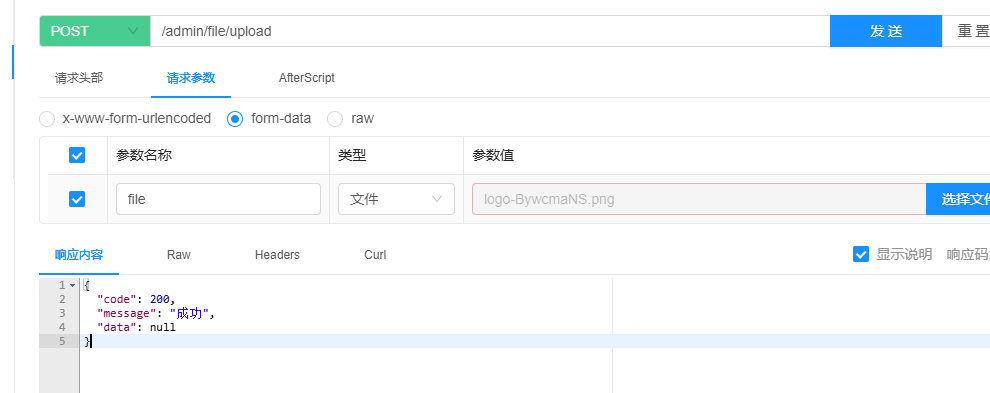
显然这种方案是不行的
方式一(在Server层和controller层做处理):
    public String upload(MultipartFile file) {
        try {
            boolean b = client.bucketExists(BucketExistsArgs.builder().bucket(properties.getBucketName()).build());
            if(!b){
                //如果不存在就创建桶
                client.makeBucket(MakeBucketArgs.builder().bucket(properties.getBucketName()).build());
                //设置桶的访问权限
                client.setBucketPolicy(SetBucketPolicyArgs.builder().bucket(properties.getBucketName()).config(createBucketPolicyConfig(properties.getBucketName())).build());
            }
            //重新组装上传的文件名称
            String fileName = new SimpleDateFormat("yyyyMMdd").format(new Date())+ UUID.randomUUID()+"-"+file.getOriginalFilename();
            System.out.println(fileName);
            client.putObject(PutObjectArgs.builder()
                    .bucket(properties.getBucketName())
                    .object(fileName)
                    .stream(file.getInputStream(), file.getSize(), -1) // 核心修复:添加文件流和大小
                    .contentType(file.getContentType()) // 推荐:设置正确的 MIME 类型
                    .build());
            return String.join("/", properties.getEndpoint(), properties.getBucketName(), fileName);
        } catch (MinioException e) {
            // 5. 捕获 MinIO 客户端特定异常
            log.error("MinIO 服务异常: 状态码={}, 错误信息={}", e.getMessage(), e.getMessage(), e);
            throw new RuntimeException("文件上传失败,请检查 MinIO 服务是否正常");
        } catch (IOException e) {
            // 6. 捕获文件流相关异常
            log.error("读取上传文件失败: {}", e.getMessage(), e);
            throw new RuntimeException("文件上传失败,请检查文件是否可读");
        } catch (InvalidKeyException | NoSuchAlgorithmException e) {
            // 7. 捕获认证和加密相关异常
            log.error("MinIO 认证或加密算法异常: {}", e.getMessage(), e);
            throw new RuntimeException("文件上传失败,配置信息可能有误");
        } catch (Exception e) {
            // 8. 捕获其他所有未预料的异常(兜底)
            log.error("文件上传时发生未知错误: {}", e.getMessage(), e);
            throw new RuntimeException("文件上传失败,请稍后重试");
        }
    }

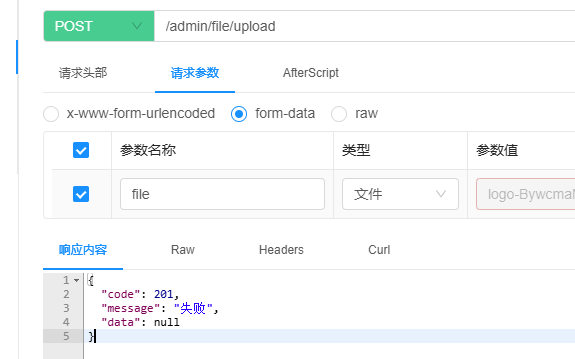
    public Result<String> upload(@RequestParam MultipartFile file) {
        try {
            String url = service.upload(file);
            return Result.ok(url);
        } catch (Exception e) {
            e.printStackTrace();
            return Result.fail();
        }
    }
方式二(全局异常处理)
采用Spring MVC的全局异常处理机制,可以集中管理所有Controller层方法的异常处理逻辑。这种方式避免了在每个方法中重复编写try-catch块,不仅简化了代码结构,还显著提升了系统的可维护性。
SpringMVC 提供了全局异常处理功能,需要在 common 模块的 pom.xml 文件中添加以下依赖:
<!--spring-web-->
<dependency>
    <groupId>org.springframework.boot</groupId>
    <artifactId>spring-boot-starter-web</artifactId>
</dependency>在common模块中创建com.yuhuan.lease.common.exception.GlobalExceptionHandler类,内容如下:
@Slf4j
@RestControllerAdvice
public class GlobalExceptionHandler {

    @ExceptionHandler(RuntimeException.class)
    public ResponseEntity<Result<?>> handleRuntimeException(RuntimeException e) {
        log.error("业务异常: {}", e.getMessage());
        return new ResponseEntity<>(Result.fail(), HttpStatus.INTERNAL_SERVER_ERROR);
    }

    @ExceptionHandler(IllegalArgumentException.class)
    public ResponseEntity<Result<?>> handleIllegalArgumentException(IllegalArgumentException e) {
        log.warn("参数非法: {}", e.getMessage());
        return new ResponseEntity<>(Result.fail(), HttpStatus.BAD_REQUEST);
    }

    // 你可以为不同的异常类型添加更多的 @ExceptionHandler

    @ExceptionHandler(Exception.class)
    public ResponseEntity<Result<?>> handleException(Exception e) {
        log.error("未知异常: ", e);
        return new ResponseEntity<>(Result.fail(), HttpStatus.INTERNAL_SERVER_ERROR);
    }
}
@Operation(summary = "上传文件")
@PostMapping("upload")
public Result<String> upload(@RequestParam MultipartFile file) {
String url = service.upload(file);
return Result.ok(url);
}公寓管理
公寓管理包含六个接口,下面将依次实现。
首先,在ApartmentController中注入ApartmentInfoService,具体代码如下:
@Tag(name = "公寓信息管理")
@RestController
@RequestMapping("/admin/apartment")
public class ApartmentController {

    @Autowired
    private ApartmentInfoService service;
}
1. 保存或更新公寓信息
查看返回数据的结构
查看 web-admin 模块中的 com.yuhuan.lease.web.admin.vo.apartment.ApartmentSubmitVo 类,其内容如下:
@Schema(description = "公寓信息")
@Data
public class ApartmentSubmitVo extends ApartmentInfo {

    @Schema(description="公寓配套id")
    private List<Long> facilityInfoIds;

    @Schema(description="公寓标签id")
    private List<Long> labelIds;

    @Schema(description="公寓杂费值id")
    private List<Long> feeValueIds;

    @Schema(description="公寓图片id")
    private List<GraphVo> graphVoList;

}- 编写Controller层逻辑
在 ApartmentController 中补充以下内容:
@Operation(summary = "保存或更新公寓信息")
@PostMapping("saveOrUpdate")
public Result saveOrUpdate(@RequestBody ApartmentSubmitVo apartmentSubmitVo) {
    service.saveOrUpdateApartment(apartmentSubmitVo);
    return Result.ok();
}- 编写Service层逻辑
public interface ApartmentInfoService extends IService<ApartmentInfo> {

    void saveOrUpdateApartment(ApartmentSubmitVo apartmentSubmitVo);
}
在ApartmentInfoServiceImpl类中添加以下内容
@Service
/**
 * 公寓信息服务实现类
 * 继承自 MyBatis-Plus 的 ServiceImpl,提供对 ApartmentInfo 表的基本增删改查操作
 * 实现了自定义业务接口 ApartmentInfoService
 */
public class ApartmentInfoServiceImpl
        extends ServiceImpl<ApartmentInfoMapper, ApartmentInfo>
        implements ApartmentInfoService {

    // 注入图片信息(如公寓相册)的服务类
    @Autowired
    private GraphInfoService graphInfoService;

    // 注入公寓配套设施关联表的服务类
    @Autowired
    private ApartmentFacilityService apartmentFacilityService;

    // 注入公寓标签关联表的服务类
    @Autowired
    private ApartmentLabelService apartmentLabelService;

    // 注入公寓杂费项关联表的服务类
    @Autowired
    private ApartmentFeeValueService apartmentFeeValueService;

    /**
     * 保存或更新公寓完整信息(包括主信息 + 图片 + 配套 + 标签 + 杂费)
     * 使用策略:有 ID 则为修改,先删除旧的关联数据;无 ID 则为新增
     *
     * @param apartmentSubmitVo 前端提交的完整公寓信息封装对象
     */
    @Override
    public void saveOrUpdateApartment(ApartmentSubmitVo apartmentSubmitVo) {
        // 判断是否为修改操作:如果前端传来了 id,则认为是修改
        boolean isUpdate = apartmentSubmitVo.getId() != null;

        // 使用父类 ServiceImpl 提供的方法保存或更新主表(apartment_info)
        // 注意:ApartmentSubmitVo 应该继承自 ApartmentInfo 或字段兼容,否则可能映射失败
        super.saveOrUpdate(apartmentSubmitVo);

        // 如果是修改操作,需要先清理原有的关联数据(避免重复或残留)
        if (isUpdate) {
            // ========== 删除原有图片列表 ==========
            LambdaQueryWrapper<GraphInfo> graphInfoLambdaQueryWrapper = new LambdaQueryWrapper<>();
            // 筛选类型为“公寓”的图片记录
            graphInfoLambdaQueryWrapper.eq(GraphInfo::getItemType, ItemType.APARTMENT);
            // ❌ BUG: 这里应该是 .eq(GraphInfo::getItemId, ...) 而不是 getId!
            // 因为 GraphInfo 中有一个字段 itemId 表示所属公寓ID,而 getId() 是 GraphInfo 自身的主键
            // 正确写法如下:
            graphInfoLambdaQueryWrapper.eq(GraphInfo::getItemId, apartmentSubmitVo.getId());
            graphInfoService.remove(graphInfoLambdaQueryWrapper);

            // ========== 删除原有配套设施列表 ==========
            LambdaQueryWrapper<ApartmentFacility> apartmentFacilityLambdaQueryWrapper = new LambdaQueryWrapper<>();
            // 查找与当前公寓ID关联的所有设施记录
            apartmentFacilityLambdaQueryWrapper.eq(ApartmentFacility::getApartmentId, apartmentSubmitVo.getId());
            apartmentFacilityService.remove(apartmentFacilityLambdaQueryWrapper);

            // ========== 删除原有标签列表 ==========
            LambdaQueryWrapper<ApartmentLabel> apartmentLabelLambdaQueryWrapper = new LambdaQueryWrapper<>();
            // 查找与当前公寓ID绑定的所有标签记录
            apartmentLabelLambdaQueryWrapper.eq(ApartmentLabel::getApartmentId, apartmentSubmitVo.getId());
            apartmentLabelService.remove(apartmentLabelLambdaQueryWrapper);

            // ========== 删除原有杂费项列表 ==========
            LambdaQueryWrapper<ApartmentFeeValue> apartmentFeeValueLambdaQueryWrapper = new LambdaQueryWrapper<>();
            // 查找与当前公寓ID相关的所有费用配置
            apartmentFeeValueLambdaQueryWrapper.eq(ApartmentFeeValue::getApartmentId, apartmentSubmitVo.getId());
            apartmentFeeValueService.remove(apartmentFeeValueLambdaQueryWrapper);
        }

        // ======== 无论新增还是修改,接下来都重新插入最新的关联数据 ========

        // ========== 插入新的图片列表 ==========
        List<GraphVo> graphVoList = apartmentSubmitVo.getGraphVoList();
        if (!CollectionUtils.isEmpty(graphVoList)) {
            ArrayList<GraphInfo> graphInfos = new ArrayList<>();
            for (GraphVo graphVo : graphVoList) {
                GraphInfo graphInfo = new GraphInfo();
                graphInfo.setItemType(ItemType.APARTMENT);           // 设置项目类型为“公寓”
                graphInfo.setItemId(apartmentSubmitVo.getId());     // 关联到当前公寓ID(注意:此时ID已由MyBatis Plus生成或已有)
                graphInfo.setName(graphVo.getName());               // 图片名称(可选)
                graphInfo.setUrl(graphVo.getUrl());                 // 图片URL地址
                graphInfos.add(graphInfo);
            }
            // 批量保存所有图片记录
            graphInfoService.saveBatch(graphInfos);
        }

        // ========== 插入新的配套设施列表 ==========
        List<Long> facilityInfoIdList = apartmentSubmitVo.getFacilityInfoIds();
        if (!CollectionUtils.isEmpty(facilityInfoIdList)) {
            ArrayList<ApartmentFacility> facilityList = new ArrayList<>();
            for (Long facilityId : facilityInfoIdList) {
                ApartmentFacility apartmentFacility = new ApartmentFacility();
                apartmentFacility.setApartmentId(apartmentSubmitVo.getId()); // 当前公寓ID
                apartmentFacility.setFacilityId(facilityId);                 // 设施ID
                facilityList.add(apartmentFacility);
            }
            // 批量保存配套设施关联记录
            apartmentFacilityService.saveBatch(facilityList);
        }

        // ========== 插入新的标签列表 ==========
        List<Long> labelIds = apartmentSubmitVo.getLabelIds();
        if (!CollectionUtils.isEmpty(labelIds)) {
            List<ApartmentLabel> apartmentLabelList = new ArrayList<>();
            for (Long labelId : labelIds) {
                ApartmentLabel apartmentLabel = new ApartmentLabel();
                apartmentLabel.setApartmentId(apartmentSubmitVo.getId()); // 关联公寓
                apartmentLabel.setLabelId(labelId);                       // 标签ID
                apartmentLabelList.add(apartmentLabel);
            }
            // 批量保存标签关联记录
            apartmentLabelService.saveBatch(apartmentLabelList);
        }

        // ========== 插入新的杂费项列表 ==========
        List<Long> feeValueIds = apartmentSubmitVo.getFeeValueIds();
        if (!CollectionUtils.isEmpty(feeValueIds)) {
            ArrayList<ApartmentFeeValue> apartmentFeeValueList = new ArrayList<>();
            for (Long feeValueId : feeValueIds) {
                ApartmentFeeValue apartmentFeeValue = new ApartmentFeeValue();
                apartmentFeeValue.setApartmentId(apartmentSubmitVo.getId()); // 公寓ID
                apartmentFeeValue.setFeeValueId(feeValueId);                 // 杂费值ID
                apartmentFeeValueList.add(apartmentFeeValue);
            }
            // 批量保存杂费关联记录
            apartmentFeeValueService.saveBatch(apartmentFeeValueList);
        }
    }
}
2. 根据条件分页查询公寓列表
请求数据结构
current 和 size 是分页参数,分别表示当前页码和每页记录数。
ApartmentQueryVo 是公寓查询条件对象,具体结构如下:
@Data
@Schema(description = "公寓查询实体")
public class ApartmentQueryVo {

    @Schema(description = "省份id")
    private Long provinceId;

    @Schema(description = "城市id")
    private Long cityId;

    @Schema(description = "区域id")
    private Long districtId;
}
响应数据结构
公寓信息记录可参考 com.yuhuan.lease.web.admin.vo.apartment.ApartmentItemVo,具体字段说明如下:
@Data
@Schema(description = "后台管理系统公寓列表实体")
public class ApartmentItemVo extends ApartmentInfo {

    @Schema(description = "房间总数")
    private Long totalRoomCount;

    @Schema(description = "空闲房间数")
    private Long freeRoomCount;

}
配置Mybatis-Plus分页插件
在common模块的com.yuhuan.lease.common.mybatisplus.MybatisPlusConfiguration类中添加以下配置:
@Bean
public MybatisPlusInterceptor mybatisPlusInterceptor() {
    MybatisPlusInterceptor interceptor = new MybatisPlusInterceptor();
    interceptor.addInnerInterceptor(new PaginationInnerInterceptor(DbType.MYSQL));
    return interceptor;
}
接口实现
编写Controller层逻辑
在ApartmentController中新增以下Controller层逻辑:
    @Operation(summary = "根据条件分页查询公寓列表")
    @GetMapping("pageItem")
    public Result<IPage<ApartmentItemVo>> pageItem(@RequestParam long current, @RequestParam long size, ApartmentQueryVo queryVo) {
        IPage<ApartmentItemVo> page = new Page<>(current, size);
        IPage<ApartmentItemVo> list = service.pageApartmentItemByQuery(page, queryVo);
        return Result.ok(list);
    }
编写Service层逻辑
在 ApartmentInfoService 中新增以下内容
public interface ApartmentInfoService extends IService<ApartmentInfo> {

    void saveOrUpdateApartment(ApartmentSubmitVo apartmentSubmitVo);

    IPage<ApartmentItemVo> pageApartmentItemByQuery(IPage<ApartmentItemVo> page, ApartmentQueryVo queryVo);
}
在ApartmentInfoServiceImpl中新增以下内容
    public IPage<ApartmentItemVo> pageApartmentItemByQuery(IPage<ApartmentItemVo> page, ApartmentQueryVo queryVo) {
        return apartmentInfoMapper.pageApartmentItemByQuery(page, queryVo);
    }
编写Mapper层逻辑
在ApartmentInfoMapper中添加以下内容:
public interface ApartmentInfoMapper extends BaseMapper<ApartmentInfo> {

    IPage<ApartmentItemVo> pageApartmentItemByQuery(IPage<ApartmentItemVo> page, ApartmentQueryVo queryVo);
}在ApartmentInfoMapper.xml中增加如下内容
<?xml version="1.0" encoding="UTF-8"?>
<!DOCTYPE mapper PUBLIC "-//mybatis.org//DTD Mapper 3.0//EN" "http://mybatis.org/dtd/mybatis-3-mapper.dtd">

<!--
  Mapper接口的全路径名,用于MyBatis关联接口与XML文件
  接口:com.yuhuan.lease.web.admin.mapper.ApartmentInfoMapper
-->
<mapper namespace="com.yuhuan.lease.web.admin.mapper.ApartmentInfoMapper">

    <!--
      定义一个查询语句
      - id: 方法名称,必须与接口中的方法名一致 (pageApartmentItemByQuery)
      - resultType: 查询结果将自动映射到该指定的Java对象
                   (com.yuhuan.lease.web.admin.vo.apartment.ApartmentItemVo)
    -->
    <select id="pageApartmentItemByQuery" resultType="com.yuhuan.lease.web.admin.vo.apartment.ApartmentItemVo">
        <!--
          最终查询的列,来自于后面的表连接 (ai, tc, cc)
          - ai: 公寓基本信息表的别名
          - tc: 总房间数统计子查询的别名
          - cc: 已租房间数统计子查询的别名
          - ifnull(tc.cnt, 0): 如果tc.cnt为NULL(即该公寓下没有符合条件的房间),则返回0
          - free_room_count: 计算可用房间数 = 总房间数 - 已租房间数
        -->
        select
            ai.id,
            ai.name,
            ai.introduction,
            ai.district_id,
            ai.district_name,
            ai.city_id,
            ai.city_name,
            ai.province_id,
            ai.province_name,
            ai.address_detail,
            ai.latitude,
            ai.longitude,
            ai.phone,
            ai.is_release,
            ifnull(tc.cnt, 0) as total_room_count,
            ifnull(tc.cnt, 0) - ifnull(cc.cnt, 0) as free_room_count

        <!--
          主查询的FROM子句,使用了一个派生表(Derived Table)
          这个派生表负责筛选出符合条件的公寓基本信息
        -->
        from (
            <!--
              子查询:筛选公寓基本信息
              从apartment_info表中查询,并用<where>标签构建动态条件
            -->
            select
                id,
                name,
                introduction,
                district_id,
                district_name,
                city_id,
                city_name,
                province_id,
                province_name,
                address_detail,
                latitude,
                longitude,
                phone,
                is_release
            from apartment_info

            <!--
              MyBatis动态SQL标签:<where>
              - 自动处理AND/OR逻辑,只有当内部有条件成立时才会生成WHERE关键字
              - 自动去除条件前面多余的AND或OR
            -->
            <where>
                <!-- 基础条件:逻辑删除标记,确保只查询未被删除的数据 -->
                is_deleted = 0

                <!--
                  动态条件:根据传入的queryVo对象中的provinceId进行筛选
                  - test: 判断条件,当queryVo.provinceId不为null时,该条件才会生效
                  - #{queryVo.provinceId}: 参数占位符,防止SQL注入
                -->
                <if test="queryVo.provinceId != null">
                    and province_id = #{queryVo.provinceId}
                </if>

                <!-- 动态条件:根据城市ID筛选 -->
                <if test="queryVo.cityId != null">
                    and city_id = #{queryVo.cityId}
                </if>

                <!-- 动态条件:根据区域ID筛选 -->
                <if test="queryVo.districtId != null">
                    and district_id = #{queryVo.districtId}
                </if>
            </where>

        <!-- 为这个派生表设置别名ai (apartment info) -->
        ) as ai

        <!--
          LEFT JOIN: 左连接,即使右边的表中没有匹配的数据,左边表的数据也会显示
          这里连接一个子查询,用于计算每个公寓的总房间数
        -->
        left join (
            <!--
              子查询tc (total count): 统计每个公寓的总房间数
              - 从room_info表查询
              - 条件:房间未被删除(is_deleted=0)且已发布(is_release=1)
              - group by apartment_id: 按公寓ID分组,计算每个公寓的房间数
            -->
            select
                apartment_id,
                count(*) as cnt
            from room_info
            where
                is_deleted = 0
                and is_release = 1
            group by apartment_id

        <!-- 为这个派生表设置别名tc,并通过apartment_id与ai表连接 -->
        ) as tc on ai.id = tc.apartment_id

        <!--
          LEFT JOIN: 再次左连接,用于计算每个公寓的已租房间数
        -->
        left join (
            <!--
              子查询cc (leased count): 统计每个公寓的已租房间数
              - 从lease_agreement表查询(租赁合同表)
              - 条件:合同未被删除(is_deleted=0)
              - status in (2, 5): 假设状态2代表"已入住",状态5代表"已续租"等已占用状态
              - group by apartment_id: 按公寓ID分组
            -->
            select
                apartment_id,
                count(*) as cnt
            from lease_agreement
            where
                is_deleted = 0
                and status in (2, 5)
            group by apartment_id

        <!-- 为这个派生表设置别名cc,并通过apartment_id与ai表连接 -->
        ) as cc on ai.id = cc.apartment_id

    </select>

</mapper>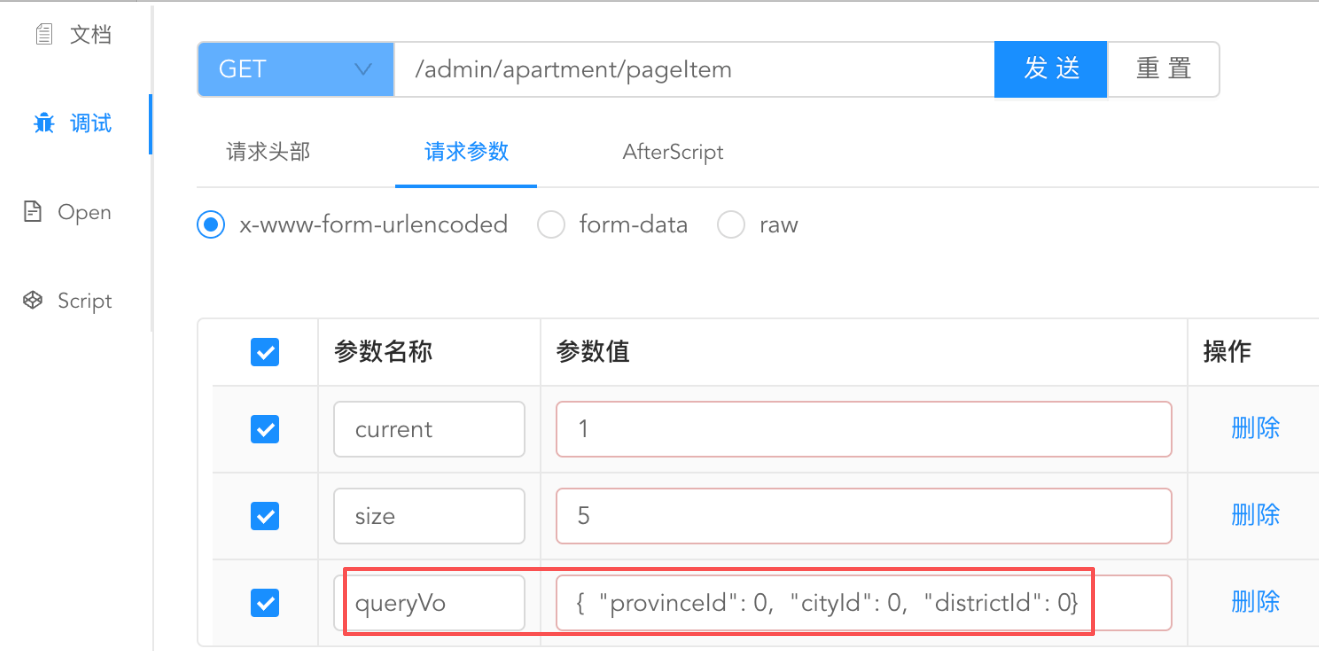
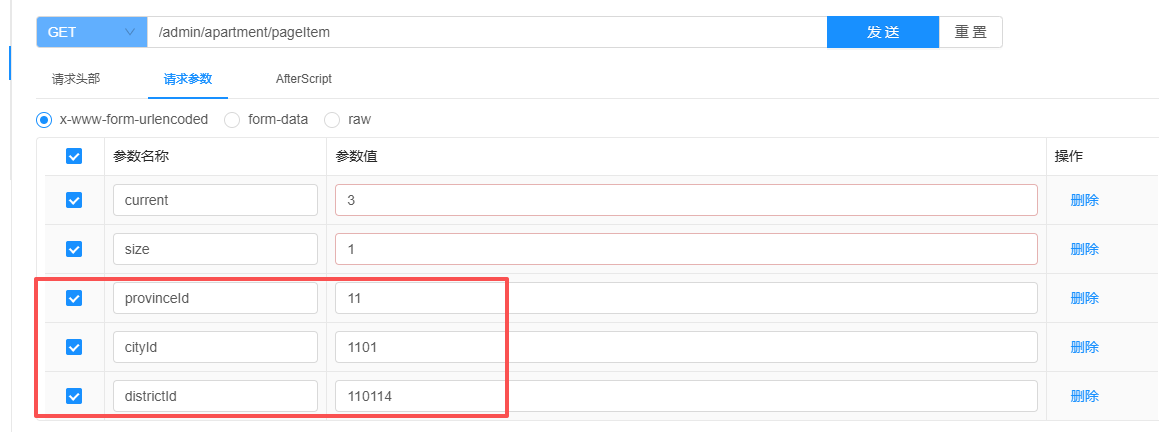
上面queryVo这个参数比较复杂,如果只想传递 provinceId 这个参数,确实需要移除另外两个字段。这样处理确实不太方便。
参数扁平化设置
springdoc:
  default-flat-param-object: true
启用spring.default-flat-param-object参数(设为true)后,效果如下:
3. 根据ID获取公寓详细信息
查看返回数据的结构:
@Schema(description = "公寓信息")
@Data
public class ApartmentDetailVo extends ApartmentInfo {

    @Schema(description = "图片列表")
    private List<GraphVo> graphVoList;

    @Schema(description = "标签列表")
    private List<LabelInfo> labelInfoList;

    @Schema(description = "配套列表")
    private List<FacilityInfo> facilityInfoList;

    @Schema(description = "杂费列表")
    private List<FeeValueVo> feeValueVoList;

}-
controller层的代码
    @Operation(summary = "根据ID获取公寓详细信息")
    @GetMapping("getDetailById")
    public Result<ApartmentDetailVo> getDetailById(@RequestParam Long id) {
        ApartmentDetailVo apartmentDetailVo = service.getApartmentDetailById(id);
        return Result.ok();
}-
service层的代码
在ApartmentInfoService中增加如下内容
public interface ApartmentInfoService extends IService<ApartmentInfo> {

    void saveOrUpdateApartment(ApartmentSubmitVo apartmentSubmitVo);

    IPage<ApartmentItemVo> pageApartmentItemByQuery(IPage<ApartmentItemVo> page, ApartmentQueryVo queryVo);

    ApartmentDetailVo getApartmentDetailById(Long id);
}在ApartmentInfoServiceImpl中增加如下内容
/**
 * 根据公寓ID获取公寓的详细信息。
 * 该方法会查询公寓的基本信息,并关联查询其对应的图片、标签、配套设施和费用信息,
 * 最终封装成一个 ApartmentDetailVo 对象返回。
 *
 * @param id 公寓的唯一标识符 (ID)
 * @return 包含公寓所有详细信息的 ApartmentDetailVo 对象,如果未找到则返回 null
 */
public ApartmentDetailVo getApartmentDetailById(Long id) {
    // 1. 根据ID查询公寓的基本信息
    // this.getById(id) 通常是 MyBatis-Plus 提供的方法,用于从数据库中查询单条记录
    ApartmentInfo apartmentInfo = this.getById(id);

    // 2. 健壮性判断:如果查询结果为空(即未找到对应ID的公寓),则直接返回null
    // 这可以有效避免后续代码因操作null对象而引发空指针异常 (NullPointerException)
    if (apartmentInfo == null) {
        return null;
    }

    // 3. 关联查询:根据公寓ID查询相关的图片信息列表
    // graphInfoMapper 是用于操作图片信息的Mapper接口
    // selectListByItemTypeAndId 是一个自定义的查询方法,根据项目类型(ItemType.APARTMENT)和项目ID(公寓ID)来筛选图片
    List<GraphVo> graphVoList = graphInfoMapper.selectListByItemTypeAndId(ItemType.APARTMENT, id);

    // 4. 关联查询:根据公寓ID查询相关的标签信息列表
    // labelInfoMapper 是用于操作标签信息的Mapper接口
    List<LabelInfo> labelInfoList = labelInfoMapper.selectListByApartmentId(id);

    // 5. 关联查询:根据公寓ID查询相关的配套设施信息列表
    // facilityInfoMapper 是用于操作配套设施信息的Mapper接口
    List<FacilityInfo> facilityInfoList = facilityInfoMapper.selectListByApartmentId(id);

    // 6. 关联查询:根据公寓ID查询相关的费用信息列表,并封装成 FeeValueVo
    // feeValueMapper 是用于操作费用信息的Mapper接口
    List<FeeValueVo> feeValueVoList = feeValueMapper.selectListByApartmentId(id);

    // 7. 创建最终的返回对象 ApartmentDetailVo
    // 这个对象是一个视图对象 (View Object),用于封装需要返回给前端的所有数据
    ApartmentDetailVo adminApartmentDetailVo = new ApartmentDetailVo();

    // 8. 属性拷贝:将查询到的公寓基本信息 (apartmentInfo) 的属性值快速复制到 adminApartmentDetailVo 中
    // BeanUtils.copyProperties 是 Spring 提供的一个工具方法,它会遍历源对象的所有属性,
    // 并将其值赋给目标对象中名称相同的属性。这避免了手动编写大量的 setXXX 代码。
    BeanUtils.copyProperties(apartmentInfo, adminApartmentDetailVo);

    // 9. 设置关联属性:将前面查询到的各个列表数据设置到 adminApartmentDetailVo 对象中
    adminApartmentDetailVo.setGraphVoList(graphVoList);
    adminApartmentDetailVo.setLabelInfoList(labelInfoList);
    adminApartmentDetailVo.setFacilityInfoList(facilityInfoList);
    adminApartmentDetailVo.setFeeValueVoList(feeValueVoList);

    // 10. 返回封装好所有详细信息的 ApartmentDetailVo 对象
    return adminApartmentDetailVo;
}
selectListByItemTypeAndId
//GraphInfoMapper.java
public interface GraphInfoMapper extends BaseMapper<GraphInfo> {

    List<GraphVo> selectListByItemTypeAndId(ItemType itemType, Long id);
}


//GraphInfoMapper.xml
<mapper namespace="com.yuhuan.lease.web.admin.mapper.GraphInfoMapper">

    <select id="selectListByItemTypeAndId" resultType="com.yuhuan.lease.web.admin.vo.graph.GraphVo">
        select
            name,
            url
        from graph_info
        where is_deleted=0
          and item_type=#{itemType}
          and item_id=#{id}
    </select>
</mapper>
selectListByApartmentId
//LabelInfoMapper.java
public interface LabelInfoMapper extends BaseMapper<LabelInfo> {

    List<LabelInfo> selectListByApartmentId(Long id);
}

//LabelInfoMapper.xml
<mapper namespace="com.yuhuan.lease.web.admin.mapper.LabelInfoMapper">

    <select id="selectListByApartmentId" resultType="com.yuhuan.lease.model.entity.LabelInfo">
        select id,
               type,
               name
        from label_info
        where is_deleted = 0
          and id in
              (select label_id
               from apartment_label
               where is_deleted = 0
                 and apartment_id = #{id})
    </select>
</mapper>
selectListByApartmentId
//FacilityInfoMapper.java
public interface FacilityInfoMapper extends BaseMapper<FacilityInfo> {

    List<FacilityInfo> selectListByApartmentId(Long id);
}

//FacilityInfoMapper.xml

<mapper namespace="com.yuhuan.lease.web.admin.mapper.FacilityInfoMapper">

    <select id="selectListByApartmentId" resultType="com.yuhuan.lease.model.entity.FacilityInfo">
        select id,
               type,
               name,
               icon
        from facility_info
        where is_deleted = 0
          and id in
              (select facility_id
               from apartment_facility
               where is_deleted = 0
                 and apartment_id = #{id})
    </select>
</mapper>
selectListByApartmentId
//FeeValueMapper.java
public interface FeeValueMapper extends BaseMapper<FeeValue> {

    List<FeeValueVo> selectListByApartmentId(Long id);
}

//FeeValueMapper.java
<mapper namespace="com.yuhuan.lease.web.admin.mapper.FeeValueMapper">
    <select id="selectListByApartmentId" resultType="com.yuhuan.lease.web.admin.vo.fee.FeeValueVo">
        select fv.id,
               fv.name,
               fv.unit,
               fv.fee_key_id,
               fk.name AS fee_key_name
        from fee_value fv
                 join fee_key fk on fv.fee_key_id = fk.id
        where fv.is_deleted = 0
          and fk.is_deleted = 0
          and fv.id in (select fee_value_id
                        from apartment_fee_value
                        where is_deleted = 0
                          and apartment_id = #{id})
    </select>
</mapper>
4. 根据ID删除公寓信息
Controller层
    @Operation(summary = "根据id删除公寓信息")
    @DeleteMapping("removeById")
    public Result removeById(@RequestParam Long id) {
        service.removeApartmentById(id);
        return Result.ok();
    }
Service层
//ApartmentInfoService.java增加代码
public interface ApartmentInfoService extends IService<ApartmentInfo> {

    void saveOrUpdateApartment(ApartmentSubmitVo apartmentSubmitVo);

    IPage<ApartmentItemVo> pageApartmentItemByQuery(IPage<ApartmentItemVo> page, ApartmentQueryVo queryVo);

    ApartmentDetailVo getApartmentDetailById(Long id);

    void removeApartmentById(Long id);
}
//ApartmentInfoServiceImpl.java增加代码
    @Override
    public void removeApartmentById(Long id) {
        LambdaQueryWrapper<RoomInfo> roomQueryWrapper = new LambdaQueryWrapper<>();
        roomQueryWrapper.eq(RoomInfo::getApartmentId, id);
        Long count = roomInfoMapper.selectCount(roomQueryWrapper);
        if (count > 0) {
            throw new LeaseException(ResultCodeEnum.ADMIN_APARTMENT_DELETE_ERROR);
        }

        //1.删除GraphInfo
        LambdaQueryWrapper<GraphInfo> graphQueryWrapper = new LambdaQueryWrapper<>();
        graphQueryWrapper.eq(GraphInfo::getItemType, ItemType.APARTMENT);
        graphQueryWrapper.eq(GraphInfo::getItemId, id);
        graphInfoService.remove(graphQueryWrapper);

        //2.删除ApartmentLabel
        LambdaQueryWrapper<ApartmentLabel> labelQueryWrapper = new LambdaQueryWrapper<>();
        labelQueryWrapper.eq(ApartmentLabel::getApartmentId, id);
        apartmentLabelService.remove(labelQueryWrapper);

        //3.删除ApartmentFacility
        LambdaQueryWrapper<ApartmentFacility> facilityQueryWrapper = new LambdaQueryWrapper<>();
        facilityQueryWrapper.eq(ApartmentFacility::getApartmentId, id);
        apartmentFacilityService.remove(facilityQueryWrapper);

        //4.删除ApartmentFeeValue
        LambdaQueryWrapper<ApartmentFeeValue> feeQueryWrapper = new LambdaQueryWrapper<>();
        feeQueryWrapper.eq(ApartmentFeeValue::getApartmentId, id);
        apartmentFeeValueService.remove(feeQueryWrapper);

        //5.删除ApartmentInfo
        super.removeById(id);
    }
异常处理
在common模块中创建com.yuhuan.lease.common.exception.LeaseException类,具体代码如下:
@Data
public class LeaseException extends RuntimeException {

    //异常状态码
    private Integer code;
    /**
     * 通过状态码和错误消息创建异常对象
     * @param message
     * @param code
     */
    public LeaseException(String message, Integer code) {
        super(message);
        this.code = code;
    }

    /**
     * 根据响应结果枚举对象创建异常对象
     * @param resultCodeEnum
     */
    public LeaseException(ResultCodeEnum resultCodeEnum) {
        super(resultCodeEnum.getMessage());
        this.code = resultCodeEnum.getCode();
    }

    @Override
    public String toString() {
        return "LeaseException{" +
                "code=" + code +
                ", message=" + this.getMessage() +
                '}';
    }
}在common模块的com.yuhuan.lease.common.exception.GlobalExceptionHandler类中,新增针对自定义异常类的处理逻辑
    @ExceptionHandler(LeaseException.class)
    @ResponseBody
    public Result error(LeaseException e){
        e.printStackTrace();
        return Result.fail(e.getCode(), e.getMessage());
    }
为com.yuhuan.lease.common.result.Result新增一个构造方法,如下
    public static <T> Result<T> fail(Integer code, String message) {
        Result<T> result = build(null);
        result.setCode(code);
        result.setMessage(message);
        return result;
    }
5. 根据ID修改公寓发布状态
在ApartmentController中增加如下内容:
    @Operation(summary = "根据id修改公寓发布状态")
    @PostMapping("updateReleaseStatusById")
    public Result updateReleaseStatusById(@RequestParam Long id, @RequestParam ReleaseStatus status) {
        LambdaUpdateWrapper<ApartmentInfo> updateWrapper = new LambdaUpdateWrapper<>();
        updateWrapper.eq(ApartmentInfo::getId, id);
        updateWrapper.set(ApartmentInfo::getIsRelease, status);
        service.update(updateWrapper);
        return Result.ok();
    }
6. 根据区县ID查询公寓信息列表
在ApartmentController中增加如下内容:
    @Operation(summary = "根据区县id查询公寓信息列表")
    @GetMapping("listInfoByDistrictId")
    public Result<List<ApartmentInfo>> listInfoByDistrictId(@RequestParam Long id) {
        LambdaQueryWrapper<ApartmentInfo> queryWrapper = new LambdaQueryWrapper<>();
        queryWrapper.eq(ApartmentInfo::getDistrictId, id);
        List<ApartmentInfo> list = service.list(queryWrapper);
        return Result.ok(list);
    }





 扫一扫
扫一扫


 1474
1474

 被折叠的 条评论
为什么被折叠?
被折叠的 条评论
为什么被折叠?
 到【灌水乐园】发言





