



1.在pom.xml引入依赖
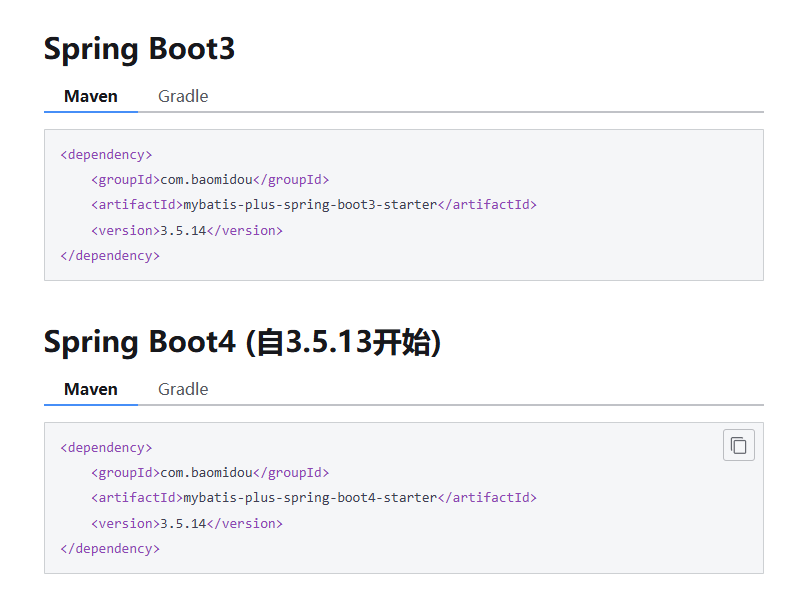
我的springboot版本是3.5.7,所以引入下面的不然报错(org.springframework.beans.factory.BeanDefinitionStoreException: Invalid bean definition with name 'userMapper' defined in file)
<dependency>
    <groupId>com.baomidou</groupId>
    <artifactId>mybatis-plus-spring-boot3-starter</artifactId>
    <version>3.5.14</version>
</dependency>
2.创建entity包,创建User.java
package com.yuhuan.hellomp.entity;

import com.baomidou.mybatisplus.annotation.IdType;
import com.baomidou.mybatisplus.annotation.TableField;
import com.baomidou.mybatisplus.annotation.TableId;
import com.baomidou.mybatisplus.annotation.TableName;
import lombok.Data;

@Data
@TableName("user")
public class User {

    @TableId(value = "id", type = IdType.AUTO)
    private Long id;

    @TableField("name")
    private String name;

    @TableField("age")
    private Integer age;

    @TableField("email")
    private String email;
}
实体类中的三个注解的含义如下(需要引入Lombok依赖)
@TableName:表名注解,用于标识实体类所对应的表
value:用于声明表名
@TableId:主键注解,用于标识主键字段
value:用于声明主键的字段名
type:用于声明主键的生成策略,常用的策略有`AUTO`、`ASSIGN_UUID`、`INPUT`等等
@TableField:普通字段注解,用于标识属性所对应的表字段
value:用于声明普通字段的字段名
3.创建mapper包,已经接口UserMapper.java
package com.yuhuan.hellomp.mapper;

import com.baomidou.mybatisplus.core.mapper.BaseMapper;
import com.yuhuan.hellomp.entity.User;
import org.apache.ibatis.annotations.Mapper;

@Mapper
public interface UserMapper extends BaseMapper<User> {

}
4.配置application.yml文件
spring:
datasource:
driver-class-name: com.mysql.cj.jdbc.Driver
username: root
password: Server@123
url: jdbc:mysql://192.168.200.128:3306/hello_mp?useUnicode=true&characterEncoding=utf-8&serverTimezone=GMT%2b8
mybatis-plus:
configuration:
log-impl: org.apache.ibatis.logging.stdout.StdOutImpl # 注意是 StdOutImpl(O 是字母)
#启动项目后,当代码执行数据库操作(查询、新增、修改、删除)时,控制台会输出类似这样的日志:
#==> Preparing: SELECT id, name, age FROM user WHERE id = ?
#==> Parameters: 1(Integer)
#<== Columns: id, name, age
#<== Row: 1, 张三, 25
#<== Total: 1
5.创建测试文件
右击UserMapper转到测试,完成测试类
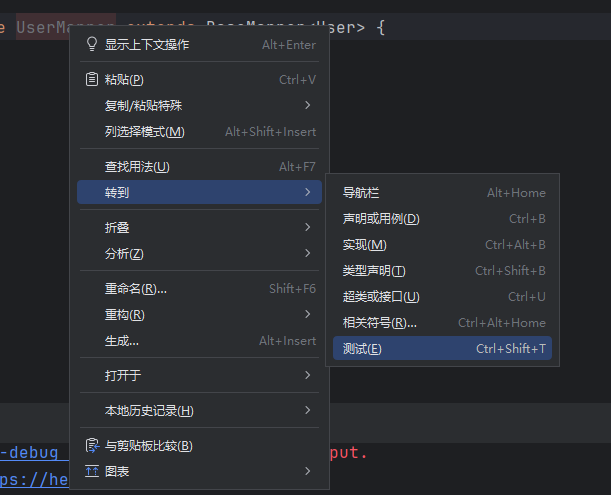
@SpringBootTest
class UserMapperTest {
    @Autowired
    private UserMapper userMapper;
    @Test
    public void testList(){
        List<User> users = userMapper.selectList(null);
        users.forEach(System.out::println);
    }

    @Test
    public void testSelectById(){
        User user = userMapper.selectById(1);
        System.out.println(user);
    }

    @Test
    public void testInsert(){
        User user = new User();
        user.setAge(10);
        user.setName("大水牛");
        user.setEmail("dashuiniu@123.com");
        userMapper.insert(user);
    }

    @Test
    public void testUpdateById(){
        User user = userMapper.selectById(1);
        user.setName("小明");
        userMapper.updateById(user);
    }

    @Test
    public void testDeleteById(){
        userMapper.deleteById(1);
    }
}
6.通用service
创建接口UserService.java
public interface UserService extends IService<User> {
}
在 MyBatis-Plus(MP)中,IService 是 MP 提供的一套通用 Service 层接口,封装了常见的 CRUD 业务逻辑(如新增、删除、修改、查询、分页等),目的是 简化 Service 层代码编写,避免重复开发基础业务逻辑,同时与 MP 的 BaseMapper(DAO 层通用接口)深度配合,形成「DAO+Service」完整的通用架构。
总结
IService 是 MP 对 Service 层的「通用封装」,核心价值是 减少重复代码、提高开发效率,尤其适合常规 CRUD 业务。使用时只需「接口继承 IService + 实现类继承 ServiceImpl」,就能快速获得完整的 CRUD + 批量 + 分页能力,同时支持自定义扩展,是 MP 中非常实用的核心组件。
创建类UserServiceImpl.java
@Service
public class UserServiceImpl extends ServiceImpl<UserMapper, User> implements UserService {
}
ServiceImpl 是 MyBatis-Plus(MP)中 IService 接口的通用实现类,是 IService 的「落地载体」—— 它已经帮我们实现了 IService 中所有通用 CRUD、批量操作、分页等方法,开发者的 Service 实现类只需继承 ServiceImpl<Mapper, Entity>,就能直接复用这些实现,无需自己编写重复的 Service 层逻辑。
ServiceImpl 核心价值总结
- 「少写代码」:无需手动实现 CRUD、批量、分页等基础逻辑,专注业务核心;
- 「降低风险」:统一的实现模板,减少手动编码出错(如批量操作的批次处理、条件构造的语法错误);
- 「无缝衔接」:与 MP 的
BaseMapper、QueryWrapper、分页插件等组件深度整合,形成完整生态; - 「灵活扩展」:支持自定义方法、覆盖父类方法,满足复杂业务场景。
简单说,ServiceImpl 是 MP 给 Service 层的「懒人工具」—— 能复用的都帮你写好了,你只需要关注业务逻辑,不用再做重复工作!
使用案例
@SpringBootTest
class UserServiceImplTest {
    @Autowired
    private UserService userService;
    @Autowired
    private UserMapper userMapper;

    @Test
    public void testList(){
        List<User> users  = userService.list();
        for (User user : users) {
            System.out.println("User: " + user);
        }
    }
    @Test
    public void testGetById(){
        User byId = userService.getById(2);
        System.out.println(byId);
    }

    @Test
    public void testSave(){
        User user = new User();
        user.setName("宋江");
        user.setAge(40);
        user.setEmail("songjiang@123.com");
        boolean save = userService.save(user);
        System.out.println(save);
    }

    @Test
    public void testUpdateById(){
        User user = userService.getById(3);
        user.setName("豹子头林冲");
        boolean b = userService.updateById(user);
    }

    @Test
    public void testRemoveById(){
        boolean b = userService.removeById(2);
    }

    @Test
    public void testSaveOrUpdate(){
        //没有id就新增
        User user1 = new User();
        user1.setName("鲁智深");
        user1.setEmail("luzhishen@123.com");
        user1.setAge(40);
        userService.saveOrUpdate(user1);
        //存在id就修改
        User user2 = userService.getById(4);
        user2.setName("武松");
        userService.saveOrUpdate(user2);
    }

    @Test
    public void testSaveBatch(){
        User user1 = new User();
        user1.setName("李逵");
        user1.setEmail("likui@123.com");
        user1.setAge(40);
        User user2 = new User();
        user2.setName("杨志");
        user2.setEmail("杨志@123.com");
        user2.setAge(40);
        List<User> user3 = List.of(user1, user2);
        userService.saveBatch(user3);
    }
}
7.条件构造器
MyBatis-Plus(MP)的 条件构造器 是一套用于「动态构建 SQL 条件」的工具,核心价值是 无需手动拼接 SQL 字符串,通过 Java 链式调用的方式构造查询 / 更新条件,避免 SQL 注入风险,同时简化代码。
MP 提供了两类核心条件构造器,适配不同场景:
QueryWrapper:用于 查询条件 构造(如WHERE name = ? AND age > ?);UpdateWrapper:用于 更新条件 构造(如SET name = ? WHERE id = ?);- 衍生的
LambdaQueryWrapper/LambdaUpdateWrapper:通过 Lambda 表达式引用实体类字段,避免硬编码字段名(推荐使用,减少字段名写错风险)。
创建WrapperTest.java文件
@SpringBootTest
public class WrapperTest {
    @Autowired
    private UserService userService;
    @Test
    public void testQueryWrapper(){
        //查询name=宋江的所有用户
        QueryWrapper<User> userQueryWrapper = new QueryWrapper<>();
        userQueryWrapper.eq("name","宋江");
        List<User> userList = userService.list(userQueryWrapper);
        userList.forEach(user -> System.out.println("用户名称:"+user.getName()+" "+"年龄:"+user.getAge()));
        System.out.println("=========================");
        //查询邮箱包含为baomidou.com的所有用户
        QueryWrapper<User> userQueryWrapper2 = new QueryWrapper<>();
        userQueryWrapper2.like("email","baomidou.com");
        List<User> userList2 = userService.list(userQueryWrapper2);
        userList2.forEach(System.out::println);
        System.out.println("=========================");
        //查询所有用户信息并按照age字段降序排序
        QueryWrapper<User> userQueryWrapper3 = new QueryWrapper<>();
        userQueryWrapper3.orderByDesc("age");
        List<User> userList3 = userService.list(userQueryWrapper3);
        userList3.forEach(System.out::println);
        System.out.println("=========================");
        //查询age介于[20,30]的所有用户
        QueryWrapper<User> userQueryWrapper4 = new QueryWrapper<>();
        userQueryWrapper4.between("age",20,30);
        List<User> userList4 = userService.list(userQueryWrapper4);
        userList4.forEach(System.out::println);
        System.out.println("=========================");
        //查询age小于20或大于30的用户
        QueryWrapper<User> userQueryWrapper5 = new QueryWrapper<>();
        userQueryWrapper5.lt("age", 20).or().gt("age", 30);
        List<User> userList5 = userService.list(userQueryWrapper5);
        userList5.forEach(System.out::println);
        System.out.println("=========================");
        //邮箱域名为baomidou.com且年龄小于30或大于40且的用户
        QueryWrapper<User> userQueryWrapper6= new QueryWrapper<>();
        userQueryWrapper6.like("email","baomidou.com").and(user->{
            user.lt("age",30).or().gt("age",40);
        });
        List<User> userList6 = userService.list(userQueryWrapper6);
        userList6.forEach(System.out::println);
    }

    @Test
    public void testUpdateWrapper(){
        UpdateWrapper<User> userUpdateWrapper = new UpdateWrapper<>();
        userUpdateWrapper.eq("name","鲁智深");
        userUpdateWrapper.set("email","lzs@234.com");
        userService.update(userUpdateWrapper);
    }
}
LambdaWrapperTest
上述的QueryWrapper和UpdateWrapper均有一个Lambda版本,也就是LambdaQueryWrapper和LambdaUpdateWrapper,Lambda版本的优势在于,可以省去字段名的硬编码,具体案例如下:
@SpringBootTest
public class LambdaWrapperTest {
    @Autowired
    private UserService userService;

    @Test
    public void testLambdaQueryWrapper(){
        //查询name=宋江的所有用户
        LambdaQueryWrapper<User> userLambdaQueryWrapper = new LambdaQueryWrapper<>();
        userLambdaQueryWrapper.eq(User::getName,"宋江");
        List<User> list = userService.list(userLambdaQueryWrapper);
        list.forEach(System.out::println);
    }

    @Test
    public void testLambdaUpdateWrapper(){
        //将name=豹子头林冲的用户的邮箱改为lc@123.com
        LambdaUpdateWrapper<User> userLambdaUpdateWrapper = new LambdaUpdateWrapper<>();
        userLambdaUpdateWrapper.eq(User::getName,"豹子头林冲").set(User::getEmail,"lc@123.com");
        userService.update(userLambdaUpdateWrapper);
    }
}
8.分页插件
MyBatis-Plus 的分页插件 PaginationInnerInterceptor 提供了强大的分页功能,支持多种数据库,使得分页查询变得简单高效。
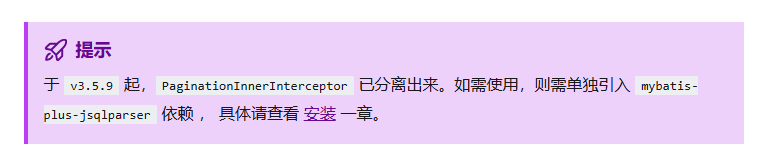
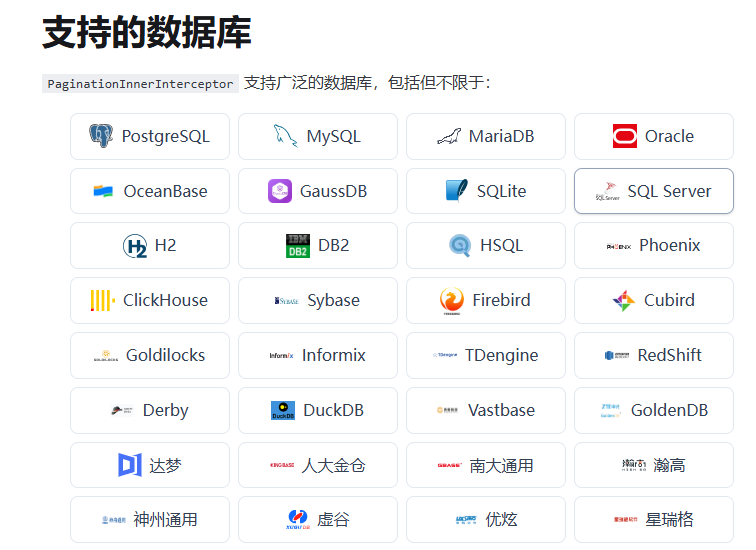
配置方法
在 Spring Boot 项目中,你可以通过 Java 配置来添加分页插件:
@Configuration
@MapperScan("scan.your.mapper.package")
public class MybatisPlusConfig {

    /**
     * 添加分页插件
     */
    @Bean
    public MybatisPlusInterceptor mybatisPlusInterceptor() {
        MybatisPlusInterceptor interceptor = new MybatisPlusInterceptor();
        interceptor.addInnerInterceptor(new PaginationInnerInterceptor(DbType.MYSQL)); // 如果配置多个插件, 切记分页最后添加
        // 如果有多数据源可以不配具体类型, 否则都建议配上具体的 DbType
        return interceptor;
    }
}
分页对象包含了分页的各项信息,其核心属性如下:
| 属性名 | 类型 | 默认值 | 描述 |
|---|---|---|---|
| records | List | emptyList | 查询数据列表 |
| total | Long | 0 | 查询列表总记录数 |
| size | Long | 10 | 每页显示条数,默认10 |
| current | Long | 1 | 当前页 |
分页对象既作为分页查询的参数,也作为分页查询的返回结果,当作为查询参数时,通常只需提供current和size属性,如下
IPage<T> page = new Page<>(current, size);注:IPage为分页接口,Page为IPage接口的一个实现类。
-
分页查询
Mybatis Plus的BaseMapper和ServiceImpl均提供了常用的分页查询的方法,例如:
-
BaseMapper的分页查询:
IPage<T> selectPage(IPage<T> page,Wrapper<T> queryWrapper); -
ServiceImpl的分页查询:
// 无条件分页查询 IPage<T> page(IPage<T> page); // 条件分页查询 IPage<T> page(IPage<T> page, Wrapper<T> queryWrapper); -
自定义Mapper
对于自定义SQL,也可以十分方便的完成分页查询,如下
Mapper接口:
//定义一个自定义查询分页的方法 IPage<User> selectUserPage(IPage<User> page);Mapper.xml:
<mapper namespace="com.yuhuan.book.mapper.UserMapper"> <select id="selectUserPage" resultType="com.yuhuan.book.entity.User"> select * from user </select> </mapper>注意:Mapper.xml中的SQL只需实现查询list的逻辑即可,无需关注分页的逻辑。
-
示例如下:
package com.yuhuan.book.page;

import com.baomidou.mybatisplus.core.conditions.query.QueryWrapper;
import com.baomidou.mybatisplus.core.metadata.IPage;
import com.baomidou.mybatisplus.extension.plugins.pagination.Page;
import com.yuhuan.book.entity.User;
import com.yuhuan.book.mapper.UserMapper;
import com.yuhuan.book.service.UserService;
import org.junit.jupiter.api.Test;
import org.springframework.beans.factory.annotation.Autowired;
import org.springframework.boot.test.context.SpringBootTest;

@SpringBootTest
public class PageTest {
    @Autowired
    private UserService userService;
    @Autowired
    private UserMapper userMapper;
    @Test
    public void testPageService(){
        Page<User> userPage = new Page<>(1,3);
        Page<User> result = userService.page(userPage);
        result.getRecords().forEach(System.out::println);

    }
    @Test
    public void testPageMapper(){
        Page<User> userPage = new Page<>(1,3);
        QueryWrapper<User> userQueryWrapper = new QueryWrapper<>();
        userQueryWrapper.lt("age",40);
        Page<User> userPage1 = userMapper.selectPage(userPage, userQueryWrapper);
        userPage1.getRecords().forEach(System.out::println);
    }
    @Test
    //自定义SQL分页查询
    public void testCustomMapper(){
        Page<User> userPage = new Page<>(1,3);
        IPage<User> userIPage = userMapper.selectUserPage(userPage);
        userIPage.getRecords().forEach(System.out::println);
    }
}
9.MyBatisX插件
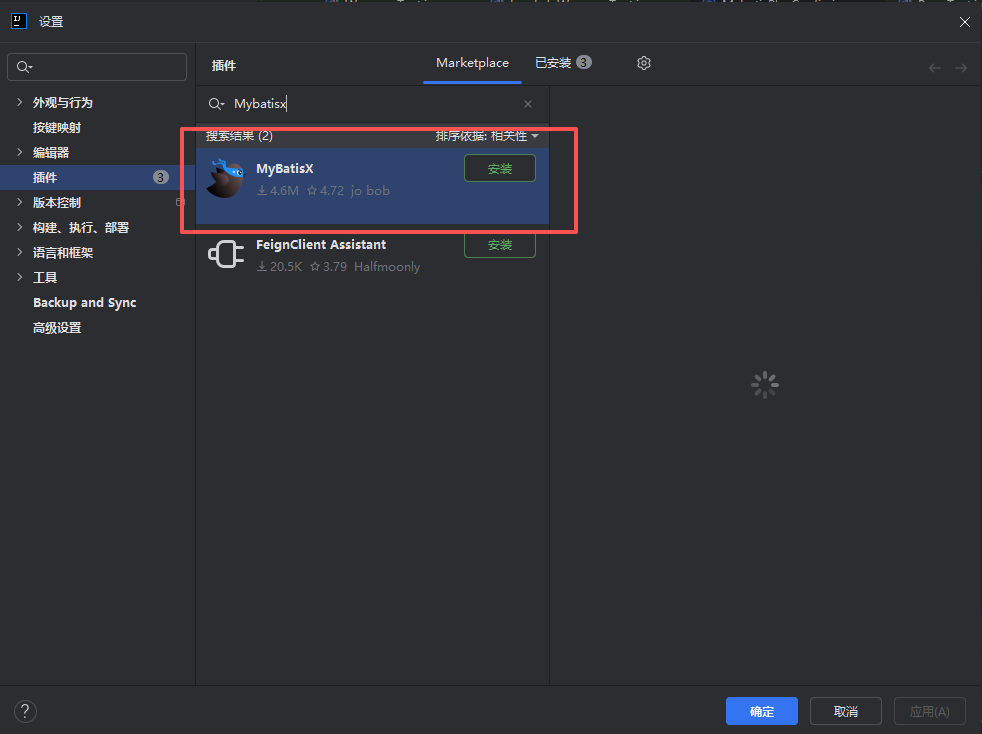
MyBatis Plus提供了一个IDEA插件——MybatisX,使用它可根据数据库快速生成Entity、Mapper、Mapper.xml、Service、ServiceImpl等代码,使用户更专注于业务。
1.安装插件
2. 配置数据库连接
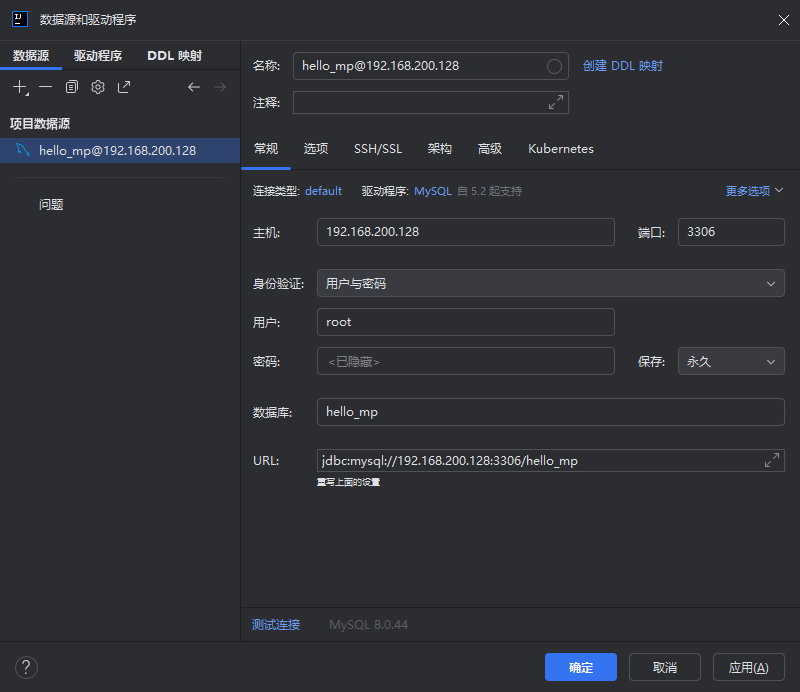
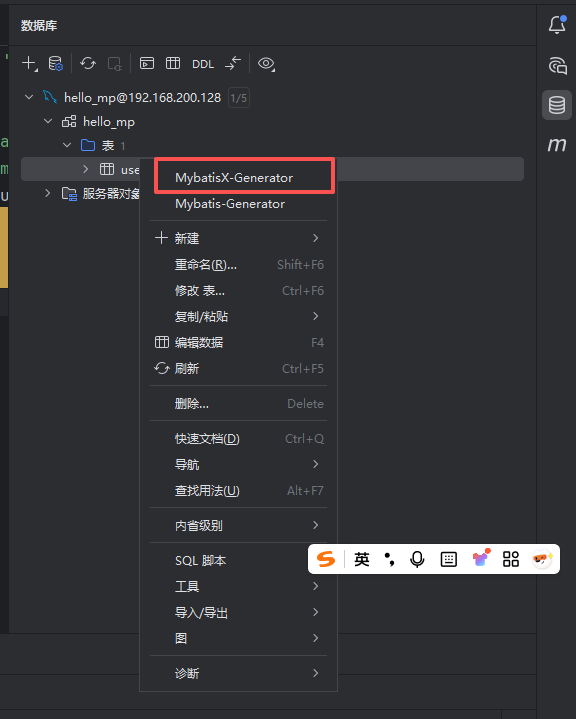
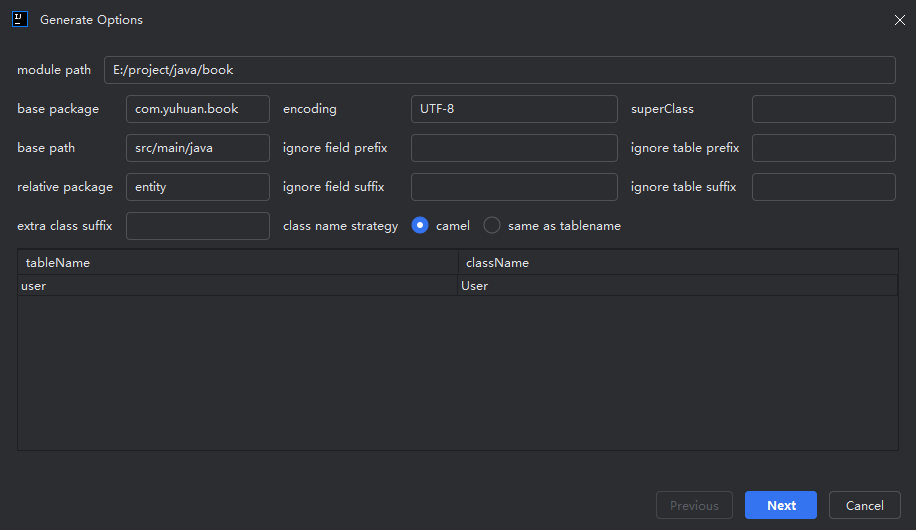
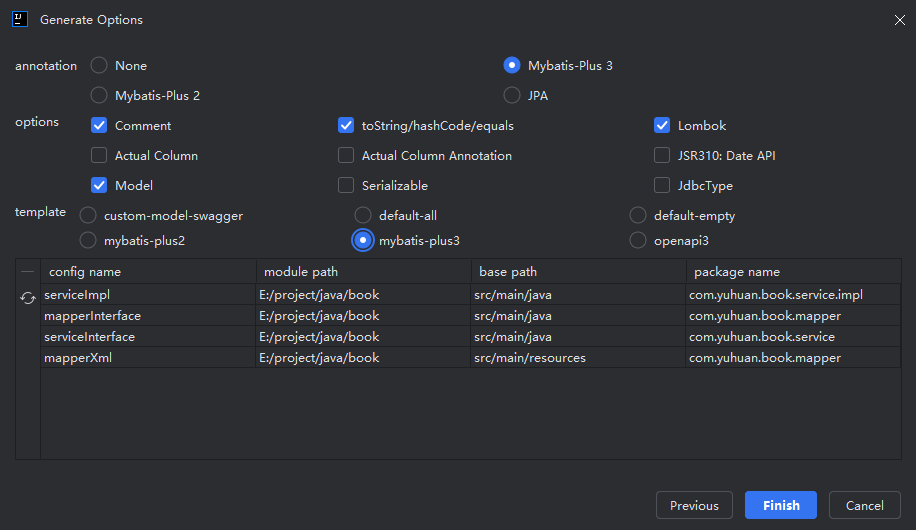
根据上面的操作完成后,就会自动生成 entity、service、mapper下面的文件还有 UserMapper.xml文件
注意事项:
通过mybatisX下面生成的Mapper文件下面文件,都要增加@Mapper注解,自定义的方法要alt+enter生成出来,xml里面的sql语句也要自己重新写一下





 扫一扫
扫一扫


 8695
8695

 被折叠的 条评论
为什么被折叠?
被折叠的 条评论
为什么被折叠?
 到【灌水乐园】发言





