








房间管理
房间管理共有六个接口,下面逐一实现
首先在RoomController中注入RoomInfoService,如下
@Tag(name = "房间信息管理")
@RestController
@RequestMapping("/admin/room")
public class RoomController {

    @Autowired
    private RoomInfoService service;
}
1. 保存或更新房间信息
-
查看数据返回结构
@Data
@Schema(description = "房间信息")
public class RoomSubmitVo extends RoomInfo {

    @Schema(description = "图片列表")
    private List<GraphVo> graphVoList;

    @Schema(description = "属性信息列表")
    private List<Long> attrValueIds;

    @Schema(description = "配套信息列表")
    private List<Long> facilityInfoIds;

    @Schema(description = "标签信息列表")
    private List<Long> labelInfoIds;

    @Schema(description = "支付方式列表")
    private List<Long> paymentTypeIds;

    @Schema(description = "可选租期列表")
    private List<Long> leaseTermIds;

}
-
编写Controller层
    @Operation(summary = "保存或更新房间信息")
    @PostMapping("saveOrUpdate")
    public Result saveOrUpdate(@RequestBody RoomSubmitVo roomSubmitVo) {
        service.saveOrUpdateRoom(roomSubmitVo);
        return Result.ok();
    }
-
编写Service层
//RoomInfoService.java
public interface RoomInfoService extends IService<RoomInfo> {

    void saveOrUpdateRoom(RoomSubmitVo roomSubmitVo);
}

//RoomInfoServiceImpl.java
import org.springframework.beans.factory.annotation.Autowired;
import org.springframework.stereotype.Service;
import com.baomidou.mybatisplus.core.conditions.query.LambdaQueryWrapper;
import com.baomidou.mybatisplus.extension.service.impl.ServiceImpl;
import java.util.ArrayList;
import java.util.List;
import org.springframework.util.CollectionUtils;

@Service
public class RoomInfoServiceImpl extends ServiceImpl<RoomInfoMapper, RoomInfo>
        implements RoomInfoService {

    // 注入与Room关联的其他服务
    @Autowired
    private GraphInfoService graphInfoService;
    @Autowired
    private RoomAttrValueService roomAttrValueService;
    @Autowired
    private RoomFacilityService roomFacilityService;
    @Autowired
    private RoomLabelService roomLabelService;
    @Autowired
    private RoomPaymentTypeService roomPaymentTypeService;
    @Autowired
    private RoomLeaseTermService roomLeaseTermService;

    /**
     * 保存或更新房间信息,并同步处理其关联数据。
     * <p>
     * 这是一个典型的“全量更新”或“UPSERT”(插入或更新)场景。
     * 为了保证数据一致性,采用了“先删除,后插入”的策略来处理关联表数据。
     *
     * @param roomSubmitVo 包含房间基本信息和所有关联数据的提交对象
     */
    @Override
    // 建议:在实际生产环境中,此方法应添加 @Transactional 注解,
    // 以确保房间主表和所有关联表的操作在同一个事务中完成,要么全部成功,要么全部失败。
    // @Transactional(rollbackFor = Exception.class)
    public void saveOrUpdateRoom(RoomSubmitVo roomSubmitVo) {
        // 1. 判断是更新操作还是新增操作
        // 如果传入的VO对象包含id,则视为更新;否则视为新增。
        boolean isUpdate = roomSubmitVo.getId() != null;

        // 2. 保存或更新房间主表信息
        // ServiceImpl 提供的 saveOrUpdate 方法会根据实体是否有id来自动选择执行INSERT或UPDATE。
        // 注意:这里假设 RoomSubmitVo 继承自或可以被MyBatis-Plus正确映射到 RoomInfo 实体。
        // 如果字段名不一致,可能需要手动转换或使用 MapStruct 等工具。
        super.saveOrUpdate(roomSubmitVo);

        // --- 核心逻辑:处理关联数据 ---
        // 对于更新操作,最稳妥的方式是先删除该房间之前所有的关联数据,
        // 然后再根据传入的新数据重新创建。
        // 这样可以避免处理“哪些数据被新增、哪些被删除、哪些被修改”的复杂逻辑。
        if (isUpdate) {
            // 确保在更新关联数据时,roomId已经存在(新增操作时ID是在save后才生成的)
            Long roomId = roomSubmitVo.getId();

            // 3. 批量删除旧的关联数据
            // 使用LambdaQueryWrapper可以获得类型安全,避免字符串硬编码字段名。

            // 3.1 删除与房间关联的图片信息
            LambdaQueryWrapper<GraphInfo> graphQueryWrapper = new LambdaQueryWrapper<>();
            graphQueryWrapper.eq(GraphInfo::getItemType, ItemType.ROOM); // 业务类型为房间
            graphQueryWrapper.eq(GraphInfo::getItemId, roomId);         // 关联的房间ID
            graphInfoService.remove(graphQueryWrapper);

            // 3.2 删除与房间关联的属性值
            LambdaQueryWrapper<RoomAttrValue> attrQueryMapper = new LambdaQueryWrapper<>();
            attrQueryMapper.eq(RoomAttrValue::getRoomId, roomId);
            roomAttrValueService.remove(attrQueryMapper);

            // 3.3 删除与房间关联的设施
            LambdaQueryWrapper<RoomFacility> facilityQueryWrapper = new LambdaQueryWrapper<>();
            facilityQueryWrapper.eq(RoomFacility::getRoomId, roomId);
            roomFacilityService.remove(facilityQueryWrapper);

            // 3.4 删除与房间关联的标签
            LambdaQueryWrapper<RoomLabel> labelQueryWrapper = new LambdaQueryWrapper<>();
            labelQueryWrapper.eq(RoomLabel::getRoomId, roomId);
            roomLabelService.remove(labelQueryWrapper);

            // 3.5 删除与房间关联的支付方式
            LambdaQueryWrapper<RoomPaymentType> paymentQueryWrapper = new LambdaQueryWrapper<>();
            paymentQueryWrapper.eq(RoomPaymentType::getRoomId, roomId);
            roomPaymentTypeService.remove(paymentQueryWrapper);

            // 3.6 删除与房间关联的租赁期限
            LambdaQueryWrapper<RoomLeaseTerm> termQueryWrapper = new LambdaQueryWrapper<>();
            termQueryWrapper.eq(RoomLeaseTerm::getRoomId, roomId);
            roomLeaseTermService.remove(termQueryWrapper);
        }

        // 4. 批量插入新的关联数据
        // 无论是新增还是更新操作,最后都需要将VO中的关联数据保存到数据库。
        // 在更新场景下,这是在删除旧数据之后执行的“重新创建”步骤。

        // 4.1 处理并保存图片信息列表
        List<GraphVo> graphVoList = roomSubmitVo.getGraphVoList();
        // 使用 CollectionUtils.isEmpty 进行空判断,是更安全和规范的写法
        if (!CollectionUtils.isEmpty(graphVoList)) {
            ArrayList<GraphInfo> graphInfoList = new ArrayList<>();
            // 将前端传来的 GraphVo 转换为数据库实体 GraphInfo
            for (GraphVo graphVo : graphVoList) {
                GraphInfo graphInfo = new GraphInfo();
                graphInfo.setItemType(ItemType.ROOM);
                // 关键:这里的 roomSubmitVo.getId() 在 saveOrUpdate 之后一定有值(新增时会被回填)
                graphInfo.setItemId(roomSubmitVo.getId());
                graphInfo.setName(graphVo.getName());
                graphInfo.setUrl(graphVo.getUrl());
                graphInfoList.add(graphInfo);
            }
            // 使用 saveBatch 进行批量保存,性能远高于循环单条插入
            graphInfoService.saveBatch(graphInfoList);
        }

        // 4.2 处理并保存属性值列表 (多对多关系)
        List<Long> attrValueIds = roomSubmitVo.getAttrValueIds();
        if (!CollectionUtils.isEmpty(attrValueIds)) {
            List<RoomAttrValue> roomAttrValueList = new ArrayList<>();
            // 为每个选中的属性值ID创建一个中间表记录
            for (Long attrValueId : attrValueIds) {
                // 使用建造者模式(Builder)创建对象,代码更简洁易读
                RoomAttrValue roomAttrValue = RoomAttrValue.builder()
                        .roomId(roomSubmitVo.getId())
                        .attrValueId(attrValueId)
                        .build();
                roomAttrValueList.add(roomAttrValue);
            }
            roomAttrValueService.saveBatch(roomAttrValueList);
        }

        // 4.3 处理并保存设施列表 (多对多关系)
        List<Long> facilityInfoIds = roomSubmitVo.getFacilityInfoIds();
        if (!CollectionUtils.isEmpty(facilityInfoIds)) {
            List<RoomFacility> roomFacilityList = new ArrayList<>();
            for (Long facilityInfoId : facilityInfoIds) {
                RoomFacility roomFacility = RoomFacility.builder()
                        .roomId(roomSubmitVo.getId())
                        .facilityId(facilityInfoId)
                        .build();
                roomFacilityList.add(roomFacility);
            }
            roomFacilityService.saveBatch(roomFacilityList);
        }

        // 4.4 处理并保存标签列表 (多对多关系)
        List<Long> labelInfoIds = roomSubmitVo.getLabelInfoIds();
        if (!CollectionUtils.isEmpty(labelInfoIds)) {
            ArrayList<RoomLabel> roomLabelList = new ArrayList<>();
            for (Long labelInfoId : labelInfoIds) {
                RoomLabel roomLabel = RoomLabel.builder()
                        .roomId(roomSubmitVo.getId())
                        .labelId(labelInfoId)
                        .build();
                roomLabelList.add(roomLabel);
            }
            roomLabelService.saveBatch(roomLabelList);
        }

        // 4.5 处理并保存支付方式列表 (多对多关系)
        List<Long> paymentTypeIds = roomSubmitVo.getPaymentTypeIds();
        if (!CollectionUtils.isEmpty(paymentTypeIds)) {
            ArrayList<RoomPaymentType> roomPaymentTypeList = new ArrayList<>();
            for (Long paymentTypeId : paymentTypeIds) {
                RoomPaymentType roomPaymentType = RoomPaymentType.builder()
                        .roomId(roomSubmitVo.getId())
                        .paymentTypeId(paymentTypeId)
                        .build();
                roomPaymentTypeList.add(roomPaymentType);
            }
            roomPaymentTypeService.saveBatch(roomPaymentTypeList);
        }

        // 4.6 处理并保存租赁期限列表 (多对多关系)
        List<Long> leaseTermIds = roomSubmitVo.getLeaseTermIds();
        if (!CollectionUtils.isEmpty(leaseTermIds)) {
            ArrayList<RoomLeaseTerm> roomLeaseTerms = new ArrayList<>();
            for (Long leaseTermId : leaseTermIds) {
                RoomLeaseTerm roomLeaseTerm = RoomLeaseTerm.builder()
                        .roomId(roomSubmitVo.getId())
                        .leaseTermId(leaseTermId)
                        .build();
                roomLeaseTerms.add(roomLeaseTerm);
            }
            roomLeaseTermService.saveBatch(roomLeaseTerms);
        }
    }
}
2. 根据条件分页查询房间列表
-
查看数据请求结构
@Schema(description = "房间查询实体")
@Data
public class RoomQueryVo {

    @Schema(description = "省份Id")
    private Long provinceId;

    @Schema(description = "城市Id")
    private Long cityId;

    @Schema(description = "区域Id")
    private Long districtId;

    @Schema(description = "公寓Id")
    private Long apartmentId;
}
-
查看数据返回结构
@Data
@Schema(description = "房间信息")
public class RoomItemVo extends RoomInfo {

    @Schema(description = "租约结束日期")
    private Date leaseEndDate;

    @Schema(description = "当前入住状态")
    private Boolean isCheckIn;

    @Schema(description = "所属公寓信息")
    private ApartmentInfo apartmentInfo;
}
-
Controller层
    @Operation(summary = "根据条件分页查询房间列表")
    @GetMapping("pageItem")
    public Result<IPage<RoomItemVo>> pageItem(@RequestParam long current, @RequestParam long size, RoomQueryVo queryVo) {
        IPage<RoomItemVo> page = new Page<>(current, size);
        IPage<RoomItemVo> result = service.pageRoomItemByQuery(page, queryVo);
        return Result.ok(result);
    }
-
Service层
//RoomInfoService.java
public interface RoomInfoService extends IService<RoomInfo> {

    void saveOrUpdateRoom(RoomSubmitVo roomSubmitVo);

    IPage<RoomItemVo> pageRoomItemByQuery(IPage<RoomItemVo> page, RoomQueryVo queryVo);
}

// RoomInfoServiceImpl.java
    @Override
    public IPage<RoomItemVo> pageRoomItemByQuery(IPage<RoomItemVo> page, RoomQueryVo queryVo) {
        return roomInfoMapper.pageRoomItemByQuery(page, queryVo);
    }
-
Mapper层
//RoomInfoMapper.java
public interface RoomInfoMapper extends BaseMapper<RoomInfo> {

    IPage<RoomItemVo> pageRoomItemByQuery(IPage<RoomItemVo> page, RoomQueryVo queryVo);
}
//RoomInfoMapper.xml
<mapper namespace="com.yuhuan.lease.web.admin.mapper.RoomInfoMapper">
        <!--
          1. 定义结果集映射 (ResultMap)
          - id: "RoomItemVoMap",这个 ResultMap 的唯一标识符,在 select 标签中通过 resultMap 属性引用。
          - type: 指定最终映射到的 Java 对象类型,这里是自定义的视图对象 RoomItemVo。
          - autoMapping: "true",开启自动映射。MyBatis 会自动将查询结果中列名与 RoomItemVo 的属性名(驼峰命名法与下划线命名法会自动转换)一致的字段进行映射。
                        例如:SQL 中的 room_number 会自动映射到 RoomItemVo 的 roomNumber 属性。
        -->
        <resultMap id="RoomItemVoMap" type="com.yuhuan.lease.web.admin.vo.room.RoomItemVo" autoMapping="true">
            <!--
              <id> 标签用于指定主键字段。
              - property: RoomItemVo 中的属性名 "id"。
              - column: SQL 查询结果中的列名 "id" (来自 room_info 表)。
              作用:MyBatis 使用主键来标识唯一对象,尤其在处理嵌套结果集(如 association)时,能更准确地组装对象,避免重复数据。
            -->
            <id property="id" column="id"/>

            <!--
              <association> 标签用于处理“一对一”或“多对一”的关联关系。
              这里表示一个 RoomItemVo 对象内部包含一个 ApartmentInfo 对象。
              - property: RoomItemVo 中用于存储关联对象的属性名 "apartmentInfo"。
              - javaType: 关联对象的全类名,即 ApartmentInfo。
              - autoMapping: "true",同样开启自动映射,将查询到的公寓信息字段自动填充到 ApartmentInfo 对象中。
            -->
            <association property="apartmentInfo" javaType="com.yuhuan.lease.model.entity.ApartmentInfo" autoMapping="true">
                <!--
                  同样,为关联对象 ApartmentInfo 指定其主键映射。
                  - property: ApartmentInfo 的主键属性 "id"。
                  - column: SQL 查询结果中对应的别名 "apart_id"。
                  注意:这里必须使用别名,因为主表 room_info 也有一个 id 字段,避免混淆。
                -->
                <id property="id" column="apart_id"/>

                <!--
                  <result> 标签用于手动指定一个字段的映射关系,当自动映射无法满足时使用。
                  这里将 SQL 结果集中的别名 "apart_is_release" 映射到 ApartmentInfo 对象的 "isRelease" 属性。
                  虽然开启了 autoMapping,但由于 SQL 列名(apart_is_release)和 Java 属性名(isRelease)
                  之间的转换(下划线 to 驼峰)可能不直接匹配(apartIsRelease -> isRelease),所以手动指定更保险。
                -->
                <result property="isRelease" column="apart_is_release"/>
            </association>
        </resultMap>

        <!--
          2. 定义查询语句 (Select)
          - id: "pageRoomItemByQuery",对应 Mapper 接口中的方法名。
          - resultMap: "RoomItemVoMap",指定使用上面定义的 ResultMap 来解析查询结果。
        -->
        <select id="pageRoomItemByQuery" resultMap="RoomItemVoMap">
            select
            ri.id,
            ri.room_number,
            ri.rent,
            ri.apartment_id,
            ri.is_release,
            <!--
              这是一个巧妙的用法,用于判断房间当前是否有有效的租赁。
              - la.room_id is not null: 如果左连接到 lease_agreement 表且能找到记录,说明存在租赁。
              - is_check_in: 这是一个别名,会被映射到 RoomItemVo 的 isCheckIn 属性(布尔类型)。
            -->
            la.room_id is not null is_check_in,
            la.lease_end_date,
            <!--
              为公寓表的字段设置别名,以避免与房间表的字段(特别是 id)冲突。
              所有公寓相关的字段都以 "apart_" 为前缀。
            -->
            ai.id                  apart_id,
            ai.name,
            ai.introduction,
            ai.district_id,
            ai.district_name,
            ai.city_id,
            ai.city_name,
            ai.province_id,
            ai.province_name,
            ai.address_detail,
            ai.latitude,
            ai.longitude,
            ai.phone,
            ai.is_release          apart_is_release
            from room_info ri
            <!--
              左连接 (LEFT JOIN) 租赁协议表。
              - 目的:查询每个房间是否存在有效的租赁协议。
              - on 条件:
                - ri.id = la.room_id: 房间ID关联。
                - la.is_deleted = 0: 只查询未被逻辑删除的租赁协议。
                - la.status in (2,5): 只查询状态为“已入住”或“已续约”等有效状态的协议。
              即使没有找到匹配的租赁协议,房间信息也依然会被查询出来,此时 la 的相关字段会为 null。
            -->
            left join lease_agreement la
            on ri.id = la.room_id
            and la.is_deleted = 0
            and la.status in (2,5)
            <!--
              左连接公寓信息表。
              - 目的:将房间所属的公寓信息一并查询出来。
              - on 条件:
                - ri.apartment_id = ai.id: 通过 apartment_id 关联。
                - ai.is_deleted = 0: 只查询未被逻辑删除的公寓。
            -->
            left join apartment_info ai
            on ri.apartment_id = ai.id
            and ai.is_deleted = 0
            <!--
              <where> 标签用于动态构建 WHERE 子句。
              - 它会自动处理 AND/OR 逻辑,并在至少有一个内部条件成立时才生成 WHERE 关键字。
            -->
            <where>
                <!-- 基础条件:只查询未被逻辑删除的房间 -->
                ri.is_deleted = 0

                <!--
                  动态条件:根据传入的 queryVo 对象中的属性是否为 null 来决定是否添加该查询条件。
                  - test="queryVo.provinceId != null": OGNL 表达式,判断传入的查询参数对象中 provinceId 是否有值。
                  - 如果有值,则添加 "and ai.province_id = #{queryVo.provinceId}" 到 SQL 中。
                  - 注意:这里的条件是针对公寓表 (ai) 的,所以使用 ai.province_id。
                -->
                <if test="queryVo.provinceId != null">
                    and ai.province_id = #{queryVo.provinceId}
                </if>
                <if test="queryVo.cityId != null">
                    and ai.city_id = #{queryVo.cityId}
                </if>
                <if test="queryVo.districtId != null">
                    and ai.district_id = #{queryVo.districtId}
                </if>
                <if test="queryVo.apartmentId != null">
                    and ri.apartment_id = #{queryVo.apartmentId}
                </if>
            </where>
            <!--
              注意:一个完整的分页查询通常还需要 order by 和 limit 子句。
              例如:
              order by ${sortColumn} ${sortDirection}
              limit #{pageSize} offset #{offset}
              这些可以根据你的具体分页逻辑添加。
            -->
        </select>
</mapper>
3. 根据ID获取房间详细信息
-
查看响应数据结构
@Schema(description = "房间信息")
@Data
public class RoomDetailVo extends RoomInfo {

    @Schema(description = "所属公寓信息")
    private ApartmentInfo apartmentInfo;

    @Schema(description = "图片列表")
    private List<GraphVo> graphVoList;

    @Schema(description = "属性信息列表")
    private List<AttrValueVo> attrValueVoList;

    @Schema(description = "配套信息列表")
    private List<FacilityInfo> facilityInfoList;

    @Schema(description = "标签信息列表")
    private List<LabelInfo> labelInfoList;

    @Schema(description = "支付方式列表")
    private List<PaymentType> paymentTypeList;

    @Schema(description = "可选租期列表")
    private List<LeaseTerm> leaseTermList;
}
-
Controller层
    @Operation(summary = "根据id获取房间详细信息")
    @GetMapping("getDetailById")
    public Result<RoomDetailVo> getDetailById(@RequestParam Long id) {
        RoomDetailVo roomInfo = service.getRoomDetailById(id);
        return Result.ok(roomInfo);
    }
-
Service层
public interface RoomInfoService extends IService<RoomInfo> {

    void saveOrUpdateRoom(RoomSubmitVo roomSubmitVo);

    IPage<RoomItemVo> pageRoomItemByQuery(IPage<RoomItemVo> page, RoomQueryVo queryVo);

    RoomDetailVo getRoomDetailById(Long id);
}
    @Override
    public RoomDetailVo getRoomDetailById(Long id) {
        //1.查询RoomInfo
        RoomInfo roomInfo = roomInfoMapper.selectById(id);

        //2.查询所属公寓信息
        ApartmentInfo apartmentInfo = apartmentInfoMapper.selectById(roomInfo.getApartmentId());

        //3.查询graphInfoList
        List<GraphVo> graphVoList = graphInfoMapper.selectListByItemTypeAndId(ItemType.ROOM, id);

        //4.查询attrValueList
        List<AttrValueVo> attrvalueVoList = attrValueMapper.selectListByRoomId(id);

        //5.查询facilityInfoList
        List<FacilityInfo> facilityInfoList = facilityInfoMapper.selectListByRoomId(id);

        //6.查询labelInfoList
        List<LabelInfo> labelInfoList = labelInfoMapper.selectListByRoomId(id);

        //7.查询paymentTypeList
        List<PaymentType> paymentTypeList = paymentTypeMapper.selectListByRoomId(id);

        //8.查询leaseTermList
        List<LeaseTerm> leaseTermList = leaseTermMapper.selectListByRoomId(id);


        RoomDetailVo adminRoomDetailVo = new RoomDetailVo();
        BeanUtils.copyProperties(roomInfo, adminRoomDetailVo);

        adminRoomDetailVo.setApartmentInfo(apartmentInfo);
        adminRoomDetailVo.setGraphVoList(graphVoList);
        adminRoomDetailVo.setAttrValueVoList(attrvalueVoList);
        adminRoomDetailVo.setFacilityInfoList(facilityInfoList);
        adminRoomDetailVo.setLabelInfoList(labelInfoList);
        adminRoomDetailVo.setPaymentTypeList(paymentTypeList);
        adminRoomDetailVo.setLeaseTermList(leaseTermList);

        return adminRoomDetailVo;
    }
-
Mapper层
图片列表下的selectListByItemTypeAndId
public interface GraphInfoMapper extends BaseMapper<GraphInfo> {

    List<GraphVo> selectListByItemTypeAndId(ItemType itemType, Long id);
}
<mapper namespace="com.yuhuan.lease.web.admin.mapper.GraphInfoMapper">

    <select id="selectListByItemTypeAndId" resultType="com.yuhuan.lease.web.admin.vo.graph.GraphVo">
        select
            name,
            url
        from graph_info
        where is_deleted=0
          and item_type=#{itemType}
          and item_id=#{id}
    </select>
</mapper>
属性信息列表下的:selectListByRoomId
public interface AttrValueMapper extends BaseMapper<AttrValue> {

    List<AttrValueVo> selectListByRoomId(Long id);
}

<mapper namespace="com.yuhuan.lease.web.admin.mapper.AttrValueMapper">

    <select id="selectListByRoomId" resultType="com.yuhuan.lease.web.admin.vo.attr.AttrValueVo">
        select v.id,
               v.name,
               v.attr_key_id,
               k.name attr_key_name
        from attr_value v
                 join attr_key k on v.attr_key_id = k.id
        where v.is_deleted = 0
          and k.is_deleted = 0
          and v.id in (select attr_value_id
                       from room_attr_value
                       where is_deleted = 0
                         and room_id = #{id})
    </select>
</mapper>
配套信息列表下的:selectListByRoomId
public interface FacilityInfoMapper extends BaseMapper<FacilityInfo> {

    List<FacilityInfo> selectListByApartmentId(Long id);

    List<FacilityInfo> selectListByRoomId(Long id);
}
    <select id="selectListByRoomId" resultType="com.yuhuan.lease.model.entity.FacilityInfo">
        select id,
               type,
               name,
               icon
        from facility_info
        where is_deleted = 0
          and id in
              (select facility_id
               from room_facility
               where is_deleted = 0
                 and room_id = #{id})
    </select>
标签信息列表下的:selectListByRoomId
public interface LabelInfoMapper extends BaseMapper<LabelInfo> {

    List<LabelInfo> selectListByApartmentId(Long id);

    List<LabelInfo> selectListByRoomId(Long id);
}
    <select id="selectListByRoomId" resultType="com.yuhuan.lease.model.entity.LabelInfo">
        select id,
               type,
               name
        from label_info
        where is_deleted = 0
          and id in
              (select label_id
               from room_label
               where is_deleted = 0
                 and room_id = #{id})
    </select>
支付方式列表下的:selectListByRoomId
public interface PaymentTypeMapper extends BaseMapper<PaymentType> {

    List<PaymentType> selectListByRoomId(Long id);
}
    <select id="selectListByRoomId" resultType="com.yuhuan.lease.model.entity.PaymentType">
        select id,
               name,
               pay_month_count,
               additional_info
        from payment_type
        where is_deleted = 0
          and id in
              (select payment_type_id
               from room_payment_type
               where is_deleted = 0
                 and room_id = #{id})
    </select>
可选租期列表下的:selectListByRoomId
public interface LeaseTermMapper extends BaseMapper<LeaseTerm> {

    List<LeaseTerm> selectListByRoomId(Long id);
}
    <select id="selectListByRoomId" resultType="com.yuhuan.lease.model.entity.LeaseTerm">
        select id,
               month_count,
               unit
        from lease_term
        where is_deleted = 0
          and id in (select lease_term_id
                     from room_lease_term
                     where is_deleted = 0
                       and room_id = #{id})
    </select>
4. 根据ID删除房间信息
-
Controller层
    @Operation(summary = "根据id删除房间信息")
    @DeleteMapping("removeById")
    public Result removeById(@RequestParam Long id) {
        service.removeRoomById(id);
        return Result.ok();
    }
-
service层
public interface RoomInfoService extends IService<RoomInfo> {

    void saveOrUpdateRoom(RoomSubmitVo roomSubmitVo);

    IPage<RoomItemVo> pageRoomItemByQuery(IPage<RoomItemVo> page, RoomQueryVo queryVo);

    RoomDetailVo getRoomDetailById(Long id);

    void removeRoomById(Long id);
}
RoomInfoServiceImpl下的代码
    @Override
    public void removeRoomById(Long id) {
        //1.删除RoomInfo
        super.removeById(id);

        //2.删除graphInfoList
        LambdaQueryWrapper<GraphInfo> graphQueryWrapper = new LambdaQueryWrapper<>();
        graphQueryWrapper.eq(GraphInfo::getItemType, ItemType.ROOM);
        graphQueryWrapper.eq(GraphInfo::getItemId, id);
        graphInfoService.remove(graphQueryWrapper);

        //3.删除attrValueList
        LambdaQueryWrapper<RoomAttrValue> attrQueryWrapper = new LambdaQueryWrapper<>();
        attrQueryWrapper.eq(RoomAttrValue::getRoomId, id);
        roomAttrValueService.remove(attrQueryWrapper);

        //4.删除facilityInfoList
        LambdaQueryWrapper<RoomFacility> facilityQueryWrapper = new LambdaQueryWrapper<>();
        facilityQueryWrapper.eq(RoomFacility::getRoomId, id);
        roomFacilityService.remove(facilityQueryWrapper);

        //5.删除labelInfoList
        LambdaQueryWrapper<RoomLabel> labelQueryWrapper = new LambdaQueryWrapper<>();
        labelQueryWrapper.eq(RoomLabel::getRoomId, id);
        roomLabelService.remove(labelQueryWrapper);

        //6.删除paymentTypeList
        LambdaQueryWrapper<RoomPaymentType> paymentQueryWrapper = new LambdaQueryWrapper<>();
        paymentQueryWrapper.eq(RoomPaymentType::getRoomId, id);
        roomPaymentTypeService.remove(paymentQueryWrapper);

        //7.删除leaseTermList
        LambdaQueryWrapper<RoomLeaseTerm> termQueryWrapper = new LambdaQueryWrapper<>();
        termQueryWrapper.eq(RoomLeaseTerm::getRoomId, id);
        roomLeaseTermService.remove(termQueryWrapper);
    }
5. 根据id修改房间发布状态
-
controller层
    @Operation(summary = "根据id修改房间发布状态")
    @PostMapping("updateReleaseStatusById")
    public Result updateReleaseStatusById(Long id, ReleaseStatus status) {
        LambdaUpdateWrapper<RoomInfo> updateWrapper = new LambdaUpdateWrapper<>();
        updateWrapper.eq(RoomInfo::getId, id);
        updateWrapper.set(RoomInfo::getIsRelease, status);
        service.update(updateWrapper);
        return Result.ok();
    }
6. 根据公寓ID查询房间列表
-
controller层
    @GetMapping("listBasicByApartmentId")
    @Operation(summary = "根据公寓id查询房间列表")
    public Result<List<RoomInfo>> listBasicByApartmentId(Long id) {
        LambdaQueryWrapper<RoomInfo> queryWrapper = new LambdaQueryWrapper<>();
        queryWrapper.eq(RoomInfo::getApartmentId, id);
        queryWrapper.eq(RoomInfo::getIsRelease, ReleaseStatus.RELEASED);
        List<RoomInfo> roomInfoList = service.list(queryWrapper);
        return Result.ok(roomInfoList);
    }
看房预约管理
预约管理模块包含两个核心接口:
- 分页查询预约信息(支持条件筛选)
- 根据ID更新预约状态
实现步骤如下:
首先在ViewAppointmentController中注入ViewAppointmentService服务,代码如下:
@Tag(name = "预约看房管理")
@RequestMapping("/admin/appointment")
@RestController
public class ViewAppointmentController {

    @Autowired
    private ViewAppointmentService service;
}
1.分页查询预约信息(支持条件筛选)
-
查看请求和响应的数据结构
@Data
@Schema(description = "预约看房查询实体")
public class AppointmentQueryVo {


    @Schema(description="预约公寓所在省份")
    private Long provinceId;

    @Schema(description="预约公寓所在城市")
    private Long cityId;

    @Schema(description="预约公寓所在区")
    private Long districtId;

    @Schema(description="预约公寓所在公寓")
    private Long apartmentId;

    @Schema(description="预约用户姓名")
    private String name;

    @Schema(description="预约用户手机号码")
    private String phone;

}
@Data
@Schema(description = "预约看房信息")
public class AppointmentVo extends ViewAppointment {

    @Schema(description = "预约公寓信息")
    private ApartmentInfo apartmentInfo;

}
-
controller层
    @Operation(summary = "分页查询预约信息")
    @GetMapping("page")
    public Result<IPage<AppointmentVo>> page(@RequestParam long current, @RequestParam long size, AppointmentQueryVo queryVo) {
        IPage<AppointmentVo> page = new Page<>(current, size);
        IPage<AppointmentVo> list = service.pageAppointmentByQuery(page, queryVo);
        return Result.ok(list);
    }
-
service层
ViewAppointmentService
public interface ViewAppointmentService extends IService<ViewAppointment> {

    IPage<AppointmentVo> pageAppointmentByQuery(IPage<AppointmentVo> page, AppointmentQueryVo queryVo);
}
ViewAppointmentServiceImpl
@Service
public class ViewAppointmentServiceImpl extends ServiceImpl<ViewAppointmentMapper, ViewAppointment>
        implements ViewAppointmentService {
    @Autowired
    private ViewAppointmentMapper viewAppointmentMapper;
    @Override
    public IPage<AppointmentVo> pageAppointmentByQuery(IPage<AppointmentVo> page, AppointmentQueryVo queryVo) {
        return viewAppointmentMapper.pageAppointmentByQuery(page, queryVo);
    }
}
-
Mapper层
public interface ViewAppointmentMapper extends BaseMapper<ViewAppointment> {

    IPage<AppointmentVo> pageAppointmentByQuery(IPage<AppointmentVo> page, AppointmentQueryVo queryVo);
}
    <!--
      1. 定义结果集映射 (ResultMap)
      - id: "AppointmentVoMap",此 ResultMap 的唯一标识符。
      - type: 指定查询结果最终要映射到的 Java 对象类型,即 AppointmentVo。
      - autoMapping: "true",开启自动映射。MyBatis 会自动将查询结果中列名
                     与 AppointmentVo 的属性名(遵循驼峰命名法与下划线命名法的转换规则)
                     一致的字段进行映射。例如,SQL 中的 user_id 会自动映射到 userId 属性。
    -->
    <resultMap id="AppointmentVoMap" type="com.yuhuan.lease.web.admin.vo.appointment.AppointmentVo" autoMapping="true">
        <!--
          <id> 标签用于指定主键字段。
          - property: AppointmentVo 中的主键属性名 "id"。
          - column: SQL 查询结果中对应的列名 "id"。
          作用:帮助 MyBatis 识别唯一的对象,尤其在处理嵌套结果时,可以避免重复数据,并能更高效地组装对象。
        -->
        <id property="id" column="id"/>

        <!--
          <association> 标签用于处理“一对一”或“多对一”的关联关系。
          这里表示每个 AppointmentVo 对象内部都包含一个 ApartmentInfo 对象。
          - property: AppointmentVo 中用于存储关联对象的属性名 "apartmentInfo"。
          - javaType: 关联对象的全类名,即 ApartmentInfo。
          - autoMapping: "true",对关联对象 ApartmentInfo 也开启自动映射。
        -->
        <association property="apartmentInfo" javaType="com.yuhuan.lease.model.entity.ApartmentInfo" autoMapping="true">
            <!--
              为关联对象 ApartmentInfo 指定其主键映射。
              - property: ApartmentInfo 的主键属性 "id"。
              - column: SQL 查询结果中对应的别名 "apartment_id"。
              使用别名是为了避免与主查询(view_appointment)中的其他字段(如 va.id)产生混淆。
            -->
            <id property="id" column="apartment_id"/>

            <!--
              <result> 标签用于手动指定一个字段的映射关系。
              这里将 SQL 结果集中的别名 "apartment_name" 映射到 ApartmentInfo 对象的 "name" 属性。
              虽然开启了 autoMapping,但由于查询的是视图 view_appointment,其列名可能直接就是 apartment_name,
              为了明确映射关系并增强代码可读性,这里手动指定。
            -->
            <result property="name" column="apartment_name"/>
        </association>
    </resultMap>

    <!--
      2. 定义查询语句 (Select)
      - id: "pageAppointmentByQuery",对应 Mapper 接口中的方法名。
      - resultMap: "AppointmentVoMap",指定使用上面定义好的 ResultMap 来解析查询结果。
    -->
    <select id="pageAppointmentByQuery" resultMap="AppointmentVoMap">
        select
            va.id,
            va.user_id,
            va.name,
            va.phone,
            va.appointment_time,
            va.additional_info,
            va.appointment_status,
            -- 为关联的公寓表字段设置别名,以避免字段名冲突,并与 ResultMap 中的配置对应
            ai.id   apartment_id,
            ai.name apartment_name,
            ai.district_id,
            ai.district_name,
            ai.city_id,
            ai.city_name,
            ai.province_id,
            ai.province_name
        -- 从预约视图 view_appointment 中查询,使用别名 va
        from view_appointment va
        --
        -- 左连接 (LEFT JOIN) 公寓信息表 apartment_info
        -- 目的:在查询预约信息的同时,一并获取该预约所关联的公寓详情。
        -- 即使某个预约没有关联到公寓(这种情况通常应避免),预约信息本身也依然会被查询出来。
        left join
            apartment_info ai
            -- 连接条件:预约记录中的 apartment_id 与公寓表的主键 id 相等。
            -- 并且只关联未被逻辑删除的公寓 (ai.is_deleted = 0)
            on va.apartment_id = ai.id and ai.is_deleted = 0
        <!--
          <where> 标签用于动态构建 WHERE 子句。
          - 它会自动处理 AND/OR 逻辑,并在至少有一个内部条件成立时才生成 WHERE 关键字。
          - 如果没有任何条件成立,则不会生成 WHERE 子句,避免了 SQL 语法错误。
        -->
        <where>
            -- 基础查询条件:只查询未被逻辑删除的预约记录
            va.is_deleted = 0

            <!--
              动态查询条件:根据传入的 queryVo 对象中的属性值来动态添加。
              - test: OGNL 表达式,判断 queryVo 中的 provinceId 是否不为 null。
              - 如果不为 null,则添加 "and ai.province_id = #{queryVo.provinceId}" 这个条件。
            -->
            <if test="queryVo.provinceId != null">
                and ai.province_id = #{queryVo.provinceId}
            </if>
            <if test="queryVo.cityId != null">
                and ai.city_id = #{queryVo.cityId}
            </if>
            <if test="queryVo.districtId != null">
                and ai.district_id = #{queryVo.districtId}
            </if>
            <if test="queryVo.apartmentId != null">
                and va.apartment_id = #{queryVo.apartmentId}
            </if>

            <!--
              模糊查询条件:判断 name 是否不为 null 且不为空字符串。
              - 使用 like 关键字和 concat 函数来拼接通配符 %,实现模糊搜索。
              - #{queryVo.name} 是参数占位符,MyBatis 会自动处理 SQL 注入问题。
            -->
            <if test="queryVo.name != null and queryVo.name != ''">
                and va.name like concat('%', #{queryVo.name}, '%')
            </if>
            <if test="queryVo.phone != null and queryVo.phone != ''">
                and va.phone like concat('%', #{queryVo.phone}, '%')
            </if>
        </where>
        <!--
          注意:一个完整的分页查询通常还需要添加排序和分页限制。
          例如:
          order by va.create_time desc
          limit #{pageSize} offset #{offset}
          这些可以根据你的具体业务逻辑添加到 SQL 语句的末尾。
        -->
    </select>

</mapper>
-
优化相关
-
时间格式化
在ViewAppointment实体类中,appointmentTime字段采用Date类型。使用Jackson框架进行JSON序列化时,需特别注意日期格式和时区处理。以下是具体配置方案:
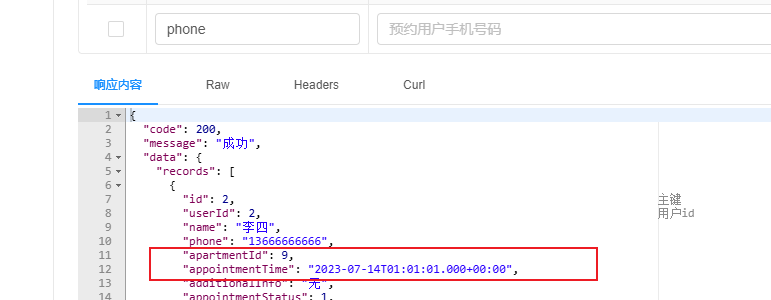
上面的列表里面预约时间 "appointmentTime": "2023-07-14T01:01:01.000+00:00", 不符合要求
单独配置
在指定字段增加@JsonFormat注解,如下
@JsonFormat(pattern = "yyyy-MM-dd HH:mm:ss",timezone = "GMT+8")
private Date appointmentTime;
全局配置
在application.yml中增加如下内容
spring:
  jackson:
    date-format: yyyy-MM-dd HH:mm:ss
    time-zone: GMT+8
2. 根据ID更新预约状态
在ViewAppointmentController中增加如下内容
    @Operation(summary = "根据id更新预约状态")
    @PostMapping("updateStatusById")
    public Result updateStatusById(@RequestParam Long id, @RequestParam AppointmentStatus status) {
        LambdaUpdateWrapper<ViewAppointment> updateWrapper = new LambdaUpdateWrapper<>();
        updateWrapper.eq(ViewAppointment::getId, id);
        updateWrapper.set(ViewAppointment::getAppointmentStatus, status);
        service.update(updateWrapper);
        return Result.ok();
    }
租约管理
租约管理需要实现五个核心接口,同时还需开发一个定时任务来检查租约到期状态并更新。具体实现步骤如下:首先在LeaseAgreementController中注入LeaseAgreementService,代码如下:
@Tag(name = "租约管理")
@RestController
@RequestMapping("/admin/agreement")
public class LeaseAgreementController {

    @Autowired
    private LeaseAgreementService service;
}
1. 保存获更新租约信息
在 LeaseAgreementController 中添加以下内容:
    @Operation(summary = "保存或修改租约信息")
    @PostMapping("saveOrUpdate")
    public Result saveOrUpdate(@RequestBody LeaseAgreement leaseAgreement) {
        service.saveOrUpdate(leaseAgreement);
        return Result.ok();
    }
2. 根据条件分页查询租约列表
-
查看请求和响应的数据结构
请求数据结构
@Data
@Schema(description = "租约查询实体")
public class AgreementQueryVo {

    @Schema(description = "公寓所处省份id")
    private Long provinceId;

    @Schema(description = "公寓所处城市id")
    private Long cityId;

    @Schema(description = "公寓所处区域id")
    private Long districtId;

    @Schema(description = "公寓id")
    private Long apartmentId;

    @Schema(description = "房间号")
    private String roomNumber;

    @Schema(description = "用户姓名")
    private String name;

    @Schema(description = "用户手机号码")
    private String phone;

}
返回的数据结构
@Data
@Schema(description = "租约信息")
public class AgreementVo extends LeaseAgreement {

    @Schema(description = "签约公寓信息")
    private ApartmentInfo apartmentInfo;

    @Schema(description = "签约房间信息")
    private RoomInfo roomInfo;

    @Schema(description = "支付方式")
    private PaymentType paymentType;

    @Schema(description = "租期")
    private LeaseTerm leaseTerm;
}
-
Controller层
    @Operation(summary = "根据条件分页查询租约列表")
    @GetMapping("page")
    public Result<IPage<AgreementVo>> page(@RequestParam long current, @RequestParam long size, AgreementQueryVo queryVo) {
        IPage<AgreementVo> page = new Page<>();
        IPage<AgreementVo> list = service.pageAgreementByQuery(page, queryVo);
        return Result.ok(list);
    }
-
Service层
public interface LeaseAgreementService extends IService<LeaseAgreement> {

    IPage<AgreementVo> pageAgreementByQuery(IPage<AgreementVo> page, AgreementQueryVo queryVo);
}
@Service
public class LeaseAgreementServiceImpl extends ServiceImpl<LeaseAgreementMapper, LeaseAgreement>
        implements LeaseAgreementService {
    @Autowired
    private LeaseAgreementMapper leaseAgreementMapper;
    @Override
    public IPage<AgreementVo> pageAgreementByQuery(IPage<AgreementVo> page, AgreementQueryVo queryVo) {
        return leaseAgreementMapper.pageAgreementByQuery(page,queryVo);
    }
}
-
Mapper层
public interface LeaseAgreementMapper extends BaseMapper<LeaseAgreement> {

    IPage<AgreementVo> pageAgreementByQuery(IPage<AgreementVo> page, AgreementQueryVo queryVo);
}
    <!--
       1. 定义结果集映射 (ResultMap)
       - id: "agreementVoMap",此 ResultMap 的唯一标识符。
       - type: 指定查询结果最终要映射到的 Java 对象类型,即 AgreementVo。
       - autoMapping: "true",开启自动映射。MyBatis 会自动将查询结果中列名
                      与 AgreementVo 的属性名(遵循驼峰命名法与下划线命名法的转换规则)
                      一致的字段进行映射。例如,SQL 中的 lease_start_date 会自动映射到 leaseStartDate 属性。
     -->
    <resultMap id="agreementVoMap" type="com.yuhuan.lease.web.admin.vo.agreement.AgreementVo" autoMapping="true">
        <!--
          <id> 标签用于指定主键字段。
          - property: AgreementVo 中的主键属性名 "id"。
          - column: SQL 查询结果中对应的列名 "id" (来自 lease_agreement 表)。
          作用:帮助 MyBatis 识别唯一的对象,尤其在处理多个关联时,可以避免重复数据,并能更高效地组装对象。
        -->
        <id property="id" column="id"/>

        <!--
          <association> 标签用于处理“一对一”或“多对一”的关联关系。
          这里表示一个 AgreementVo 对象内部包含一个 ApartmentInfo 对象。
          - property: AgreementVo 中用于存储关联对象的属性名 "apartmentInfo"。
          - javaType: 关联对象的全类名。
          - autoMapping: "true",对关联对象也开启自动映射。
        -->
        <association property="apartmentInfo" javaType="com.yuhuan.lease.model.entity.ApartmentInfo" autoMapping="true">
            <id property="id" column="apartment_id"/>
            <result property="name" column="apartment_name"/>
        </association>

        <!-- 关联房间信息 -->
        <association property="roomInfo" javaType="com.yuhuan.lease.model.entity.RoomInfo" autoMapping="true">
            <id property="id" column="room_id"/>
        </association>

        <!-- 关联支付方式信息 -->
        <association property="paymentType" javaType="com.yuhuan.lease.model.entity.PaymentType" autoMapping="true">
            <id property="id" column="payment_type_id"/>
            <result property="name" column="payment_type_name"/>
        </association>

        <!-- 关联租赁期限信息 -->
        <association property="leaseTerm" javaType="com.yuhuan.lease.model.entity.LeaseTerm" autoMapping="true">
            <id property="id" column="lease_term_id"/>
        </association>
    </resultMap>

    <!--
      2. 定义查询语句 (Select)
      - id: "pageAgreementByQuery",对应 Mapper 接口中的方法名。
      - resultMap: "agreementVoMap",指定使用上面定义好的 ResultMap 来解析查询结果。
    -->
    <select id="pageAgreementByQuery" resultMap="agreementVoMap">
        select
        la.id,
        la.phone,
        la.name,
        la.identification_number,
        la.lease_start_date,
        la.lease_end_date,
        la.rent,
        la.deposit,
        la.status,
        la.source_type,
        la.additional_info,
        -- 为关联表的字段设置别名,以避免字段名冲突,并与 ResultMap 中的配置对应
        ai.id   apartment_id,
        ai.name apartment_name,
        ai.district_id,
        ai.district_name,
        ai.city_id,
        ai.city_name,
        ai.province_id,
        ai.province_name,
        ri.id   room_id,
        ri.room_number,
        pt.id   payment_type_id,
        pt.name payment_type_name,
        pt.pay_month_count,
        lt.id   lease_term_id,
        lt.month_count,
        lt.unit
        -- 从主表 lease_agreement 开始查询,使用别名 la
        from lease_agreement la
        -- 左连接公寓信息表,获取协议关联的公寓详情
        left join apartment_info ai
        on la.apartment_id = ai.id and ai.is_deleted = 0
        -- 左连接房间信息表,获取协议关联的房间详情
        left join room_info ri
        on la.room_id = ri.id and ri.is_deleted = 0
        -- 左连接支付方式表,获取协议关联的支付方式详情
        left join payment_type pt
        on la.payment_type_id = pt.id and pt.is_deleted = 0
        -- 左连接租赁期限表,获取协议关联的租赁期限详情
        left join lease_term lt
        on la.lease_term_id = lt.id and lt.is_deleted = 0

        <!--
          <where> 标签用于动态构建 WHERE 子句。
          - 它会自动处理 AND/OR 逻辑,并在至少有一个内部条件成立时才生成 WHERE 关键字。
        -->
        <where>
            -- 基础查询条件:只查询未被逻辑删除的租赁协议
            la.is_deleted = 0

            <!-- 动态查询条件:根据传入的 queryVo 对象中的属性值来动态添加 -->
            <if test="queryVo.provinceId != null">
                and ai.province_id = #{queryVo.provinceId}
            </if>
            <if test="queryVo.cityId != null">
                and ai.city_id = #{queryVo.cityId}
            </if>
            <if test="queryVo.districtId != null">
                and ai.district_id = #{queryVo.districtId}
            </if>
            <if test="queryVo.apartmentId != null">
                and la.apartment_id = #{queryVo.apartmentId}
            </if>
            <if test="queryVo.roomNumber != null and queryVo.roomNumber != ''">
                and ri.room_number like concat('%', #{queryVo.roomNumber}, '%')
            </if>
            <if test="queryVo.name != null and queryVo.name != ''">
                and la.name like concat('%', #{queryVo.name}, '%')
            </if>
            <if test="queryVo.phone != null and queryVo.phone != ''">
                and la.phone like concat('%', #{queryVo.phone}, '%')
            </if>
        </where>
    </select>
3. 根据ID查询租约信息
-
controller层
    @Operation(summary = "根据id查询租约信息")
    @GetMapping(name = "getById")
    public Result<AgreementVo> getById(@RequestParam Long id) {
        AgreementVo apartment = service.getAgreementById(id);
        return Result.ok(apartment);
    }
-
service层
public interface LeaseAgreementService extends IService<LeaseAgreement> {

    IPage<AgreementVo> pageAgreementByQuery(IPage<AgreementVo> page, AgreementQueryVo queryVo);

    AgreementVo getAgreementById(Long id);
}
    @Override
    public AgreementVo getAgreementById(Long id) {
        //1.查询租约信息
        LeaseAgreement leaseAgreement = leaseAgreementMapper.selectById(id);

        //2.查询公寓信息
        ApartmentInfo apartmentInfo = apartmentInfoMapper.selectById(leaseAgreement.getApartmentId());

        //3.查询房间信息
        RoomInfo roomInfo = roomInfoMapper.selectById(leaseAgreement.getRoomId());

        //4.查询支付方式
        PaymentType paymentType = paymentTypeMapper.selectById(leaseAgreement.getPaymentTypeId());

        //5.查询租期
        LeaseTerm leaseTerm = leaseTermMapper.selectById(leaseAgreement.getLeaseTermId());

        AgreementVo adminAgreementVo = new AgreementVo();
        BeanUtils.copyProperties(leaseAgreement, adminAgreementVo);
        adminAgreementVo.setApartmentInfo(apartmentInfo);
        adminAgreementVo.setRoomInfo(roomInfo);
        adminAgreementVo.setPaymentType(paymentType);
        adminAgreementVo.setLeaseTerm(leaseTerm);
        return adminAgreementVo;
    }
4. 根据ID删除租约信息
在LeaseAgreementController中增加如下内容
    @Operation(summary = "根据id删除租约信息")
    @DeleteMapping("removeById")
    public Result removeById(@RequestParam Long id) {
        service.removeById(id);
        return Result.ok();
    }
5. 根据ID更新租约状态
后台管理系统需提供多个修改租约状态的接口,包括将租约状态改为已取消、已退租等。为避免代码重复,现将这些接口合并为一个。请注意:实际生产环境中应避免采用此写法。
在LeaseAgreementController中添加以下代码
    @Operation(summary = "根据id更新租约状态")
    @PostMapping("updateStatusById")
    public Result updateStatusById(@RequestParam Long id, @RequestParam LeaseStatus status) {
        LambdaUpdateWrapper<LeaseAgreement> updateWrapper = new LambdaUpdateWrapper<>();
        updateWrapper.eq(LeaseAgreement::getId, id);
        updateWrapper.set(LeaseAgreement::getStatus, status);
        service.update(updateWrapper);
        return Result.ok();
    }
6. 定时检查租约状态
本节内容是通过定时任务定时检查租约是否到期。SpringBoot内置了定时任务,具体实现如下。
启用Spring Boot定时任务
在Spring Boot启动类中添加@EnableScheduling注解,示例如下:
@SpringBootApplication
@EnableScheduling
public class AdminWebApplication {
    public static void main(String[] args) {
        SpringApplication.run(AdminWebApplication.class, args);
    }
}
在web-admin模块下创建com.yuhuan.lease.web.admin.schedule.ScheduledTasks类,具体内容如下:
@Component
public class ScheduledTasks {

    @Autowired
    private LeaseAgreementService leaseAgreementService;

    @Scheduled(cron = "0 0 0 * * *")
    public void checkLeaseStatus() {
        LambdaUpdateWrapper<LeaseAgreement> updateWrapper = new LambdaUpdateWrapper<>();
        Date now = new Date();

        // 优化2:清理冲突条件,只保留in条件(覆盖需要处理的两种状态)
        updateWrapper.le(LeaseAgreement::getLeaseEndDate, now) // 租赁结束日期 <= 当前时间(已到期)
                .in(LeaseAgreement::getStatus, LeaseStatus.SIGNED, LeaseStatus.WITHDRAWING); // 状态为已签署或退租中

        // 优化3:添加更新字段(将状态改为「已到期」,假设枚举值为 EXPIRED)
        updateWrapper.set(LeaseAgreement::getStatus, LeaseStatus.EXPIRED);

        // 执行更新(添加返回值判断,便于排查问题)
        boolean success = leaseAgreementService.update(updateWrapper);
        if (success) {
            // 可添加日志记录(如更新成功的协议数量、执行时间等)
            // log.info("定时更新到期租赁协议状态成功,执行时间:{}", new Date());
        } else {
            // log.error("定时更新到期租赁协议状态失败,执行时间:{}", new Date());
        }
    }
}


用户管理
用户管理功能包含两个接口:条件分页查询用户列表和根据ID更新用户状态。以下是具体实现步骤:首先,在UserInfoController中注入UserInfoService,代码如下:
    @Autowired
    private UserInfoService service;
1. 获取用户列表(支持条件筛选与分页)
-
查看请求的数据结构
current和size是分页参数,分别代表当前页码和每页显示的记录数。
UserInfoQueryVo封装了用户查询条件,其数据结构如下:
@Schema(description = "用户信息查询实体")
@Data
public class UserInfoQueryVo {

    @Schema(description = "用户手机号码")
    private String phone;

    @Schema(description = "用户账号状态")
    private BaseStatus status;
}
-
controller层
@Operation(summary = "分页查询用户信息")
@GetMapping("page")
public Result<IPage<UserInfo>> pageUserInfo(@RequestParam long current, @RequestParam long size, UserInfoQueryVo queryVo) {

    IPage<UserInfo> page = new Page<>(current, size);
    LambdaQueryWrapper<UserInfo> queryWrapper = new LambdaQueryWrapper<>();
    queryWrapper.like(queryVo.getPhone() != null, UserInfo::getPhone, queryVo.getPhone());
    queryWrapper.eq(queryVo.getStatus() != null, UserInfo::getStatus, queryVo.getStatus());
    IPage<UserInfo> list = service.page(page, queryWrapper);
    return Result.ok(list);
}
知识点:
password字段属于敏感信息,查询时需要过滤。可在UserInfo实体的password字段的@TableField注解中添加select=false参数实现此功能。
    @Schema(description = "密码")
    @TableField(value = "password",select = false)
    private String password;
2. 根据ID更新用户状态
在UserInfoController中增加如下内容
    @Operation(summary = "根据用户id更新账号状态")
    @PostMapping("updateStatusById")
    public Result updateStatusById(@RequestParam Long id, @RequestParam BaseStatus status) {
        LambdaUpdateWrapper<UserInfo> updateWrapper = new LambdaUpdateWrapper<>();
        updateWrapper.eq(UserInfo::getId, id);
        updateWrapper.set(UserInfo::getStatus, status);
        service.update(updateWrapper);
        return Result.ok();
    }
后台用户岗位管理
后台用户岗位管理功能包含六个接口,具体实现步骤如下:首先在SystemPostController中注入SystemPostService,代码如下:
@Autowired
private SystemPostService service;
1. 分页查询岗位信息
在SystemPostController中增加如下内容
    @Operation(summary = "分页获取岗位信息")
    @GetMapping("page")
    private Result<IPage<SystemPost>> page(@RequestParam long current, @RequestParam long size) {
        IPage<SystemPost> page = new Page<>(current, size);
        IPage<SystemPost> systemPostPage = service.page(page);
        return Result.ok(systemPostPage);
    }
2. 保存或更新岗位信息
    @Operation(summary = "保存或更新岗位信息")
    @PostMapping("saveOrUpdate")
    public Result saveOrUpdate(@RequestBody SystemPost systemPost) {
        service.saveOrUpdate(systemPost);
        return Result.ok();
    }
3. 根据ID删除岗位信息
    @DeleteMapping("deleteById")
    @Operation(summary = "根据id删除岗位")
    public Result removeById(@RequestParam Long id) {
        service.removeById(id);
        return Result.ok();
    }
4. 获取全部岗位列表
    @Operation(summary = "获取全部岗位列表")
    @GetMapping("list")
    public Result<List<SystemPost>> list() {
        List<SystemPost> list = service.list();
        return Result.ok(list);
    }
5. 根据ID获取岗位信息
    @GetMapping("getById")
    @Operation(summary = "根据id获取岗位信息")
    public Result<SystemPost> getById(@RequestParam Long id) {
        SystemPost systemPost = service.getById(id);
        return Result.ok(systemPost);
    }
6. 根据ID修改岗位状态
    @Operation(summary = "根据岗位id修改状态")
    @PostMapping("updateStatusByPostId")
    public Result updateStatusByPostId(@RequestParam Long id, @RequestParam BaseStatus status) {
        LambdaUpdateWrapper<SystemPost> updateWrapper = new LambdaUpdateWrapper<>();
        updateWrapper.eq(SystemPost::getId, id);
        updateWrapper.set(SystemPost::getStatus, status);
        service.update(updateWrapper);
        return Result.ok();
    }
后台用户信息管理
在SystemUserController中注入SystemUserService,示例如下:
    @Autowired
    SystemUserService service;
1. 根据条件分页查询后台用户列表
-
请求的数据结构
@Data
@Schema(description = "员工查询实体")
public class SystemUserQueryVo {

    @Schema(description= "员工姓名")
    private String name;

    @Schema(description= "手机号码")
    private String phone;
}
-
响应的数据结构
@Data
@Schema(description = "后台管理系统用户基本信息实体")
public class SystemUserItemVo extends SystemUser {

    @Schema(description = "岗位名称")
    @TableField(value = "post_name")
    private String postName;

}
-
controller层
    @Operation(summary = "根据条件分页查询后台用户列表")
    @GetMapping("page")
    public Result<IPage<SystemUserItemVo>> page(@RequestParam long current, @RequestParam long size, SystemUserQueryVo queryVo) {
        IPage<SystemUser> page = new Page<>(current, size);
        IPage<SystemUserItemVo> systemUserPage = service.pageSystemUserByQuery(page, queryVo);
        return Result.ok(systemUserPage);
    }
-
service层
public interface SystemUserService extends IService<SystemUser> {

    IPage<SystemUserItemVo> pageSystemUserByQuery(IPage<SystemUser> page, SystemUserQueryVo queryVo);
}
@Service
public class SystemUserServiceImpl extends ServiceImpl<SystemUserMapper, SystemUser>
        implements SystemUserService {
    @Autowired
    private SystemUserMapper systemUserMapper;
    @Override
    public IPage<SystemUserItemVo> pageSystemUserByQuery(IPage<SystemUser> page, SystemUserQueryVo queryVo) {
        return systemUserMapper.pageSystemUserByQuery(page,queryVo);
    }
}
-
Mapper层逻辑
public interface SystemUserMapper extends BaseMapper<SystemUser> {

    IPage<SystemUserItemVo> pageSystemUserByQuery(IPage<SystemUser> page, SystemUserQueryVo queryVo);
}
<mapper namespace="com.yuhuan.lease.web.admin.mapper.SystemUserMapper">

    <select id="pageSystemUserByQuery"
            resultType="com.yuhuan.lease.web.admin.vo.system.user.SystemUserItemVo">
        select su.id,
        username,
        su.name,
        type,
        phone,
        avatar_url,
        additional_info,
        post_id,
        su.status,
        sp.name post_name
        from system_user su
        left join system_post sp on su.post_id = sp.id and sp.is_deleted = 0
        <where>
            su.is_deleted = 0
            <if test="queryVo.name != null and queryVo.name != ''">
                and su.name like concat('%',#{queryVo.name},'%')
            </if>
            <if test="queryVo.phone !=null and queryVo.phone != ''">
                and su.phone like concat('%',#{queryVo.phone},'%')
            </if>
        </where>
    </select>
</mapper>
password字段不要查询
2. 根据ID查询后台用户信息
-
controller层
    @Operation(summary = "根据ID查询后台用户信息")
    @GetMapping("getById")
    public Result<SystemUserItemVo> getById(@RequestParam Long id) {
        SystemUserItemVo systemUser = service.getSystemUserById(id);
        return Result.ok(systemUser);
    }
-
service层
public interface SystemUserService extends IService<SystemUser> {

    IPage<SystemUserItemVo> pageSystemUserByQuery(IPage<SystemUser> page, SystemUserQueryVo queryVo);

    SystemUserItemVo getSystemUserById(Long id);
}
    @Override
    public SystemUserItemVo getSystemUserById(Long id) {
        SystemUser systemUser = systemUserMapper.selectById(id);

        SystemPost systemPost = systemPostMapper.selectById(systemUser.getPostId());

        SystemUserItemVo systemUserItemVo = new SystemUserItemVo();
        BeanUtils.copyProperties(systemPost, systemUserItemVo);
        systemUserItemVo.setPostName(systemUserItemVo.getPostName());

        return systemUserItemVo;
    }
知识点
system_user表中的password字段不应查询,需要在SystemUser的password字段的@TableField注解中增加select=false参数。
3. 保存或更新后台用户信息
这里涉及到存储用户密码我们 使用md5界面的方式
-
引入依赖
common下的pom.xml,引入依赖
<dependency>
    <groupId>commons-codec</groupId>
    <artifactId>commons-codec</artifactId>
</dependency>
这个依赖是 Apache Commons Codec 工具库,核心作用是为 Java 开发提供 通用的编码 / 解码工具类,简化日常开发中常见的 “数据格式转换” 需求(无需自己手写复杂的编码逻辑)。
简单说:它是 Java 生态中处理「编码解码」的 “瑞士军刀”,覆盖了大部分开发中常用的编码场景,避免重复造轮子。
-
不修改密码的情况
修改用户信息的时候,没有修改到密码,这个时候密码为null,如果这样保存到数据库的话,会把原有密码修改成null,处理方案使用mybatisPlus的配置来处理
-
全局配置
在application.yml中配置如下参数
mybatis-plus:
  global-config:
    db-config:
      update-strategy: <strategy>
注:上述<strategy>可选值有:ignore、not_null、not_empty、never,默认值为not_null
- ignore:忽略空值判断,不管字段是否为空,都会进行更新
- not_null:进行非空判断,字段非空才会进行判断
- not_empty:进行非空判断,并进行非空串("")判断,主要针对字符串类型
- never:从不进行更新,不管该字段为何值,都不更新
局部配置
在实体类中的具体字段通过@TableField注解进行配置,如下
@Schema(description = "密码")
@TableField(value = "password", updateStrategy = FieldStrategy.NOT_EMPTY)
private String password;
controller层的逻辑
    @Operation(summary = "保存或更新后台用户信息")
    @PostMapping("saveOrUpdate")
    public Result saveOrUpdate(@RequestBody SystemUser systemUser) {
        if(systemUser.getPassword() != null){
            systemUser.setPassword(DigestUtils.md5Hex(systemUser.getPassword()));
        }
        service.saveOrUpdate(systemUser);
        return Result.ok();
    }
密码处理
用户的密码通常不会直接以明文的形式保存到数据库中,而是会先经过处理,然后将处理之后得到的"密文"保存到数据库,这样能够降低数据库泄漏导致的用户账号安全问题。
密码通常会使用一些单向函数进行处理,如下图所示

所以我们使用md5的方式,md5Hex是对输入字符串进行 MD5 哈希计算,并返回一个 32 位的小写十六进制字符串
4. 判断后台用户名是否可用
    @Operation(summary = "判断后台用户名是否可用")
    @GetMapping("isUserNameAvailable")
    public Result<Boolean> isUsernameExists(@RequestParam String username) {
        LambdaQueryWrapper<SystemUser> queryWrapper = new LambdaQueryWrapper<>();
        queryWrapper.eq(SystemUser::getUsername, username);
        long count = service.count(queryWrapper);
        return Result.ok(count == 0);
    }
5. 根据ID删除后台用户信息
    @DeleteMapping("deleteById")
    @Operation(summary = "根据ID删除后台用户信息")
    public Result removeById(@RequestParam Long id) {
        service.removeById(id);
        return Result.ok();
    }
6. 根据ID修改后台用户状态
    @Operation(summary = "根据ID修改后台用户状态")
    @PostMapping("updateStatusByUserId")
    public Result updateStatusByUserId(@RequestParam Long id, @RequestParam BaseStatus status) {
        LambdaUpdateWrapper<SystemUser> updateWrapper = new LambdaUpdateWrapper<>();
        updateWrapper.eq(SystemUser::getId, id);
        updateWrapper.set(SystemUser::getStatus, status);
        service.update(updateWrapper);
        return Result.ok();
    }
登录管理
常见的认证方案主要有两种:Session认证和Token认证,下面将分别介绍这两种方式。
基于Session
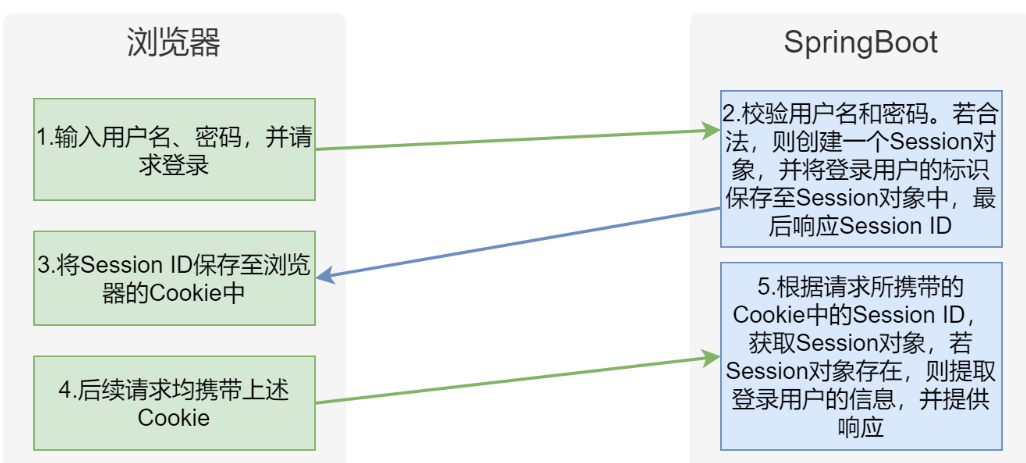
方案特性
-
服务器内存存储登录信息
单节点架构下,随着访问量上升会导致服务器负载压力显著增加 -
集群扩展需求
当用户规模扩大需要部署集群时,必须解决跨服务器登录状态同步问题
基于Token
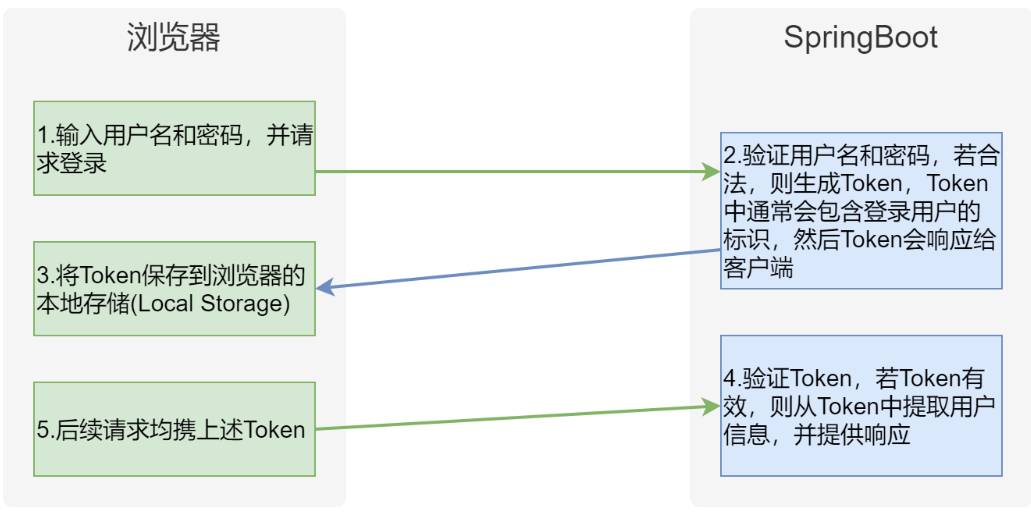
方案特点
- 采用客户端存储登录状态,大幅降低服务器存储压力
- 每个请求自动携带登录状态信息,天然支持集群部署
- 无需额外处理登录状态共享问题,系统架构更简洁
Token详解
我们所说的Token通常指JWT(JSON Web Token)。这是一种轻量级的安全信息传输方式,用于在双方之间传递认证数据,常见于身份验证和信息交换场景。
JWT(JSON Web Token)是一个由三部分组成的字符串,各部分之间通过点号(.)分隔。具体结构如下:
- Header(头部)
- Payload(负载)
- Signature(签名)
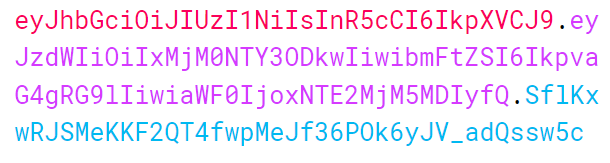
各组成部分功能说明:
Header(头部)
Header部分是通过对JSON对象进行base64url编码生成的。该JSON对象主要包含JWT的元数据信息,包括令牌类型(typ)和签名算法(alg)等。例如:
{
  "alg": "HS256",
  "typ": "JWT"
}
Payload(有效载荷)
又称Claims(声明),是通过base64url编码的JSON对象,用于存储具体的传输信息。JWT标准定义了7个官方字段:
- iss (issuer):签发者
- exp (expiration time):过期时间
- sub (subject):主题
- aud (audience):目标受众
- nbf (Not Before):生效时间
- iat (Issued At):签发时间
- jti (JWT ID):唯一标识符
除上述标准字段外,还支持自定义任意字段,例如
{
  "sub": "1234567890",
  "name": "John Doe",
  "iat": 1516239022
}
签名(Signature)
由消息头部、负载和密钥通过指定算法(在header中声明)计算生成的字符串,用于确保消息完整性,防止篡改。
登录流程
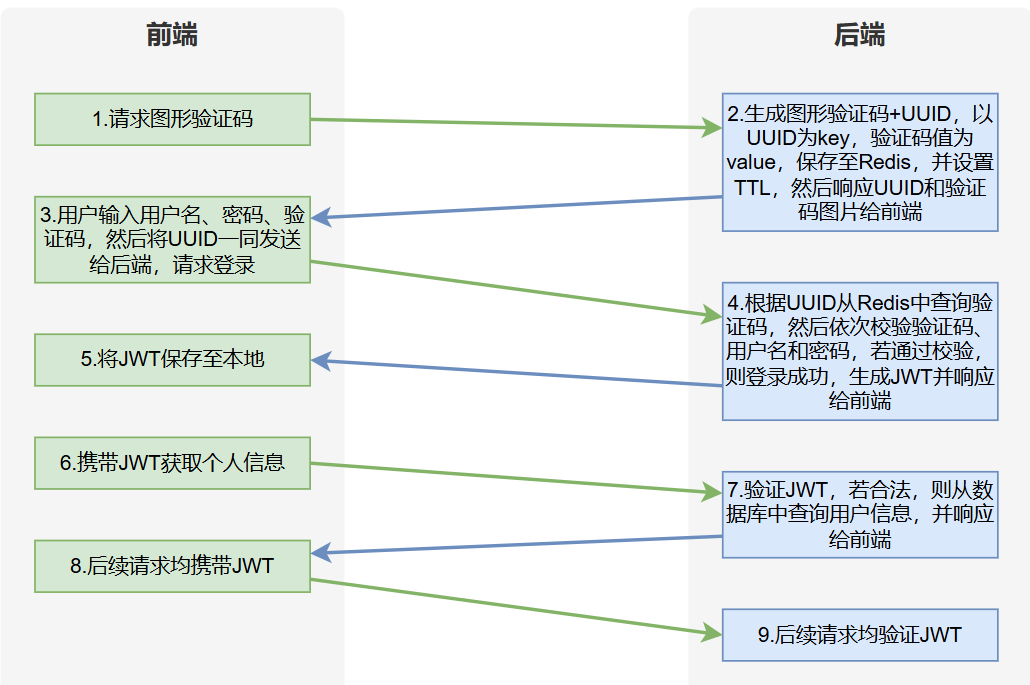
登录流程分析表明,管理系统需要三个核心接口:获取图形验证码、用户登录和获取个人信息。此外,所有受保护接口都需要通过HandlerInterceptor添加JWT验证功能来确保安全性。
接口开发
在LoginController中注入LoginService,具体实现如下
@Tag(name = "后台管理系统登录管理")
@RestController
@RequestMapping("/admin")
public class LoginController {

    @Autowired
    private LoginService service;
}
1. 获取图形验证码
-
查看响应的数据结构
@Data
@Schema(description = "图像验证码")
@AllArgsConstructor
public class CaptchaVo {

    @Schema(description="验证码图片信息")
    private String image;

    @Schema(description="验证码key")
    private String key;
}
-
配置所需依赖
验证码生成工具
本项目采用开源验证码生成工具EasyCaptcha,该工具具有以下特点:
- 支持多种验证码类型(包括GIF动画、中文、算术等)
- 简单易用
- 详细文档支持
具体实现时,需要在common模块的pom.xml文件中添加以下依赖配置:
<dependency>
    <groupId>com.github.whvcse</groupId>
    <artifactId>easy-captcha</artifactId>
</dependency>
Redis
在common模块的pom.xml文件中添加以下配置:
<dependency>
    <groupId>org.springframework.boot</groupId>
    <artifactId>spring-boot-starter-data-redis</artifactId>
</dependency>
在application.yml中增加如下配置
spring:
  data:
    redis:
      host: 192.168.200.128
      port: 6379
      database: 0
-
controller层
在LoginController中增加如下内容
    @Operation(summary = "获取图形验证码")
    @GetMapping("login/captcha")
    public Result<CaptchaVo> getCaptcha() {
        CaptchaVo captcha = service.getCaptcha();
        return Result.ok(captcha);
    }
-
service层
public interface LoginService {

    CaptchaVo getCaptcha();
}
为便于统一管理,建议将Redis相关的配置值定义为常量,包括Key前缀、过期时间等。这些常量应集中存放在common模块下的com.yuhuan.lease.common.constant.RedisConstant类中。
public class RedisConstant {
    public static final String ADMIN_LOGIN_PREFIX = "admin:login:";
    public static final Integer ADMIN_LOGIN_CAPTCHA_TTL_SEC = 60;
    public static final String APP_LOGIN_PREFIX = "app:login:";
    public static final Integer APP_LOGIN_CODE_RESEND_TIME_SEC = 60;
    public static final Integer APP_LOGIN_CODE_TTL_SEC = 60 * 10;
    public static final String APP_ROOM_PREFIX = "app:room:";
}
LoginServiceImpl中增加如下内容
@Service
public class LoginServiceImpl implements LoginService {
    @Autowired
    private StringRedisTemplate redisTemplate;
    @Override
    public CaptchaVo getCaptcha() {
        SpecCaptcha specCaptcha = new SpecCaptcha(130, 48, 4);
        specCaptcha.setCharType(Captcha.TYPE_DEFAULT);

        String code = specCaptcha.text().toLowerCase();
        String key = RedisConstant.ADMIN_LOGIN_PREFIX + UUID.randomUUID();
        String image = specCaptcha.toBase64();
        redisTemplate.opsForValue().set(key, code, RedisConstant.ADMIN_LOGIN_CAPTCHA_TTL_SEC, TimeUnit.SECONDS);

        return new CaptchaVo(image, key);
    }
}
Redis Key 命名规范:
- 采用三段式命名结构:
项目名:功能模块名:其他标识- 示例:
admin:login:123456项目集成说明: Spring Boot 已通过
spring-boot-starter-data-redis自动配置了StringRedisTemplate,开发者可直接注入使用。
2. 登录接口
用户登录验证流程
登录验证分为三个关键环节:验证码校验、用户状态检查和密码核对。具体步骤如下:
-
前端提交登录请求,包含以下字段:
- username(用户名)
- password(密码)
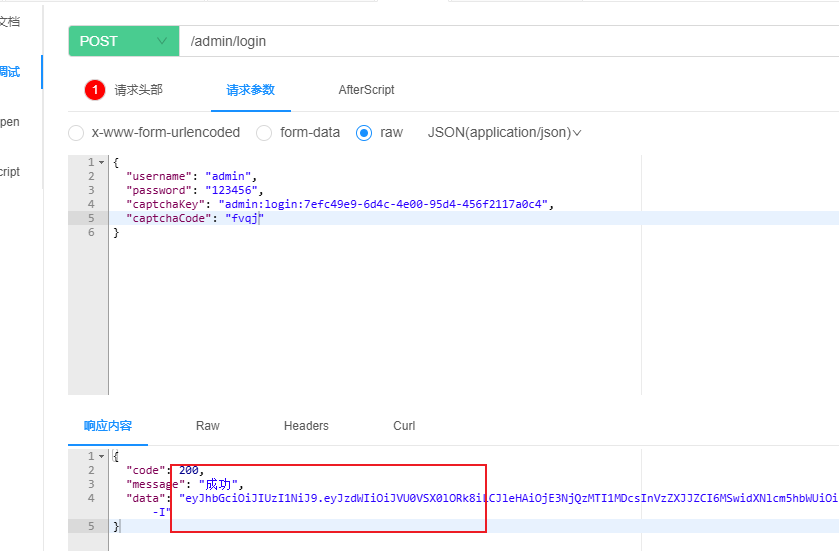
- captchaKey(验证码标识)
- captchaCode(验证码内容)
-
验证码校验流程:
- 检查验证码是否为空 → 为空则返回"验证码为空"
- 通过captchaKey查询Redis中存储的验证码 → 未查到则返回"验证码已过期"
- 比对提交的验证码与存储的验证码 → 不一致则返回"验证码不正确"
-
用户状态检查:
- 通过username查询用户记录 → 无结果则返回"账号不存在"
- 检查用户状态 → 已禁用则返回"账号被禁"
-
密码核对:
- 比对提交密码与数据库存储密码 → 不一致则返回"账号或密码错误"
-
验证通过后:
- 生成JWT令牌
- 返回令牌至客户端
-
查看请求数据结构
@Data
@Schema(description = "后台管理系统登录信息")
public class LoginVo {

    @Schema(description="用户名")
    private String username;

    @Schema(description="密码")
    private String password;

    @Schema(description="验证码key")
    private String captchaKey;

    @Schema(description="验证码code")
    private String captchaCode;
}
-
配置所需依赖
登录接口需为成功登录的用户生成并返回JWT令牌。本项目采用开源的Java-JWT工具实现,具体配置如下(详细内容可参阅官方文档):
在common模块的pom.xml文件中增加如下内容
<dependency>
    <groupId>io.jsonwebtoken</groupId>
    <artifactId>jjwt-api</artifactId>
</dependency>

<dependency>
    <groupId>io.jsonwebtoken</groupId>
    <artifactId>jjwt-impl</artifactId>
    <scope>runtime</scope>
</dependency>

<dependency>
    <groupId>io.jsonwebtoken</groupId>
    <artifactId>jjwt-jackson</artifactId>
    <scope>runtime</scope>
</dependency>
-
创建JWT工具类
在common模块中创建工具类:com.atguigu.lease.common.utils.JwtUtil,具体实现如下
public class JwtUtil {

    private static long tokenExpiration = 60 * 60 * 1000L;
    private static SecretKey tokenSignKey = Keys.hmacShaKeyFor("M0PKKI6pYGVWWfDZw90a0lTpGYX1d4AQ".getBytes());

    public static String createToken(Long userId, String username) {
        String token = Jwts.builder().
                setSubject("USER_INFO").
                setExpiration(new Date(System.currentTimeMillis() + tokenExpiration)).
                claim("userId", userId).
                claim("username", username).
                signWith(tokenSignKey).
                compact();
        return token;
    }
}
-
controller层
    @Operation(summary = "登录")
    @PostMapping("login")
    public Result<String> login(@RequestBody LoginVo loginVo) {
        String token = service.login(loginVo);
        return Result.ok(token);
    }
-
service层
public interface LoginService {

    CaptchaVo getCaptcha();

    String login(LoginVo loginVo);
}
    @Override
    public String login(LoginVo loginVo) {
        //1.判断是否输入了验证码
        if (!StringUtils.hasText(loginVo.getCaptchaCode())) {
            throw new LeaseException(ResultCodeEnum.ADMIN_CAPTCHA_CODE_NOT_FOUND);
        }

        //2.校验验证码
        String code = redisTemplate.opsForValue().get(loginVo.getCaptchaKey());
        if (code == null) {
            throw new LeaseException(ResultCodeEnum.ADMIN_CAPTCHA_CODE_EXPIRED);
        }

        if (!code.equals(loginVo.getCaptchaCode().toLowerCase())) {
            throw new LeaseException(ResultCodeEnum.ADMIN_CAPTCHA_CODE_ERROR);
        }

        //3.校验用户是否存在
        SystemUser systemUser = systemUserMapper.selectOneByUsername(loginVo.getUsername());

        if (systemUser == null) {
            throw new LeaseException(ResultCodeEnum.ADMIN_ACCOUNT_NOT_EXIST_ERROR);
        }

        //4.校验用户是否被禁
        if (systemUser.getStatus() == BaseStatus.DISABLE) {
            throw new LeaseException(ResultCodeEnum.ADMIN_ACCOUNT_DISABLED_ERROR);
        }

        //5.校验用户密码
        if (!systemUser.getPassword().equals(DigestUtils.md5Hex(loginVo.getPassword()))) {
            throw new LeaseException(ResultCodeEnum.ADMIN_ACCOUNT_ERROR);
        }

        //6.创建并返回TOKEN
        return JwtUtil.createToken(systemUser.getId(), systemUser.getUsername());
    }
-
编写Mapper层逻辑
public interface SystemUserMapper extends BaseMapper<SystemUser> {

    IPage<SystemUserItemVo> pageSystemUserByQuery(IPage<SystemUser> page, SystemUserQueryVo queryVo);

    SystemUser selectOneByUsername(String username);
}
    <select id="selectOneByUsername" resultType="com.yuhuan.lease.model.entity.SystemUser">
        select id,
               username,
               password,
               name,
               type,
               phone,
               avatar_url,
               additional_info,
               post_id,
               status
        from system_user
        where is_deleted = 0
          and username = #{username}
    </select>
-
编写HandlerInterceptor拦截器
需要为所有受保护的接口添加JWT合法性校验逻辑。具体实现方案如下:
在JwtUtil类中新增parseToken方法,实现代码如下:
    /**
     * 解析 JWT Token,获取其中的 Claims(负载信息)
     * 包含 Token 合法性校验、过期校验,校验失败会抛出对应业务异常
     *
     * @param token 待解析的 JWT Token 字符串
     * @return Claims:JWT 负载中的键值对数据(如用户ID、角色、过期时间等)
     * @throws LeaseException 自定义业务异常,包含 Token 为空、过期、无效等错误状态
     */
    public static Claims parseToken(String token) {
        // 1. 校验 Token 是否为空
        if (token == null) {
            // 抛出「管理员登录认证失败」异常(Token 为空意味着未登录)
            throw new LeaseException(ResultCodeEnum.ADMIN_LOGIN_AUTH);
        }

        try {
            // 2. 构建 JWT 解析器,设置签名密钥(核心:确保 Token 未被篡改)
            JwtParser jwtParser = Jwts.parserBuilder()
                    .setSigningKey(tokenSignKey) // 传入与生成 Token 相同的签名密钥
                    .build();

            // 3. 解析 Token:
            // - 验证签名完整性(防止 Token 被篡改)
            // - 验证 Token 格式合法性
            // parseClaimsJws() 返回包含 Header、Payload、Signature 的 Jws 对象
            // getBody() 获取负载中的 Claims 数据(即业务自定义的键值对)
            return jwtParser.parseClaimsJws(token).getBody();

        } catch (ExpiredJwtException e) {
            // 4. 捕获 Token 过期异常(JWT 内置的过期校验)
            throw new LeaseException(ResultCodeEnum.TOKEN_EXPIRED); // 抛出「Token 已过期」业务异常

        } catch (JwtException e) {
            // 5. 捕获其他 JWT 相关异常(如签名不匹配、Token 格式错误、篡改等)
            throw new LeaseException(ResultCodeEnum.TOKEN_INVALID); // 抛出「Token 无效」业务异常
        }
    }
在web-admin模块中创建com.yuhuan.lease.web.admin.custom.interceptor.AuthenticationInterceptor类,具体实现可参考以下代码。如需了解HandlerInterceptor的详细用法,请查阅官方文档。
@Component
public class AuthenticationInterceptor implements HandlerInterceptor {

    @Override
    public boolean preHandle(HttpServletRequest request, HttpServletResponse response, Object handler) throws Exception {
        String token = request.getHeader("access-token");
        JwtUtil.parseToken(token);
        return true;
    }
}
双方约定,用户完成前端登录后,后续所有请求都需在HTTP请求头中附带JWT令牌,该令牌对应的请求头字段为"access-token"。
-
注册HandlerInterceptor拦截器
在web-admin模块的
com.atguigu.lease.web.admin.custom.config.WebMvcConfiguration类中添加以下配置
    @Override
    public void addInterceptors(InterceptorRegistry registry) {
        // 1. 注册身份认证拦截器
        // 2. addPathPatterns:指定需要拦截的请求路径规则
        //    "/admin/**" 表示拦截所有以 /admin/ 开头的请求(包括子路径,如 /admin/user/list、/admin/role/add 等)
        // 3. excludePathPatterns:指定需要排除(不拦截)的请求路径规则
        //    "/admin/login/**" 表示放行所有以 /admin/login/ 开头的请求(如登录接口 /admin/login、登录验证 /admin/login/check 等)
        //    目的:登录相关接口不需要身份校验,否则会导致死循环(未登录 -> 拦截 -> 跳登录 -> 又拦截)
        registry.addInterceptor(this.authenticationInterceptor)
                .addPathPatterns("/admin/**") // 拦截所有管理员相关接口
                .excludePathPatterns("/admin/login/**"); // 放行登录相关接口,允许匿名访问
    }
-
Knife4j配置
先获取验证码
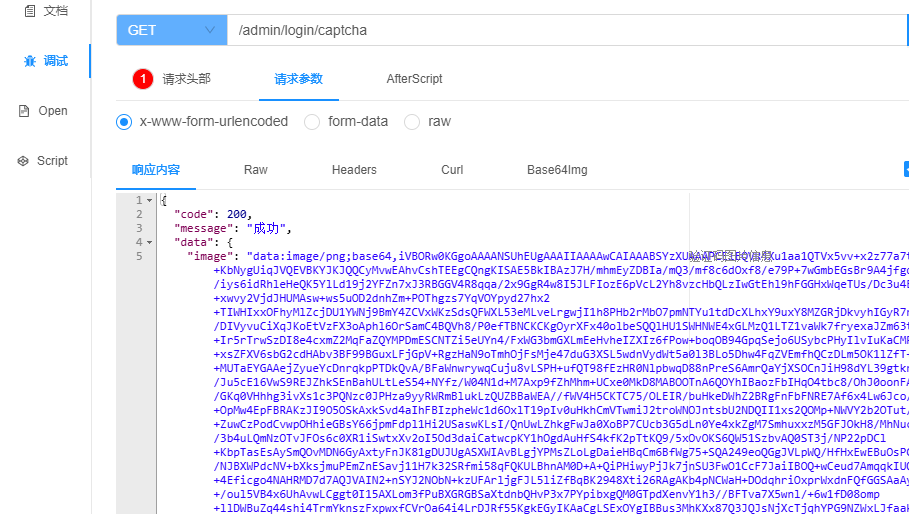
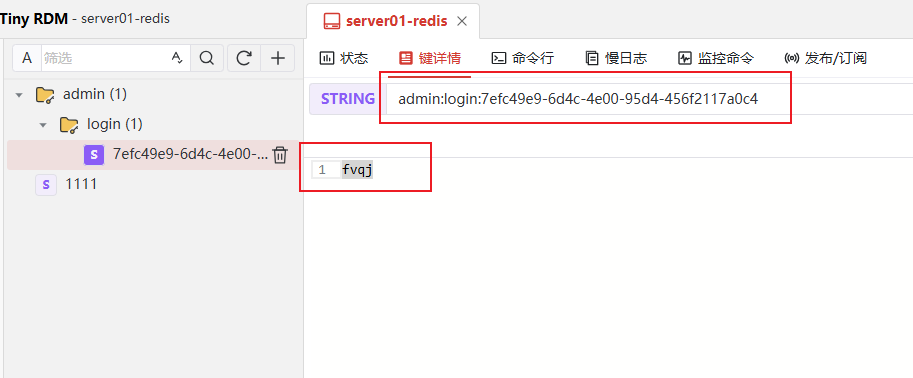
通过验证码登录,拿到token
添加上述拦截器后,若需继续调试其他接口,可获取长期有效的Token并配置到Knife4j全局参数中,操作示意如下: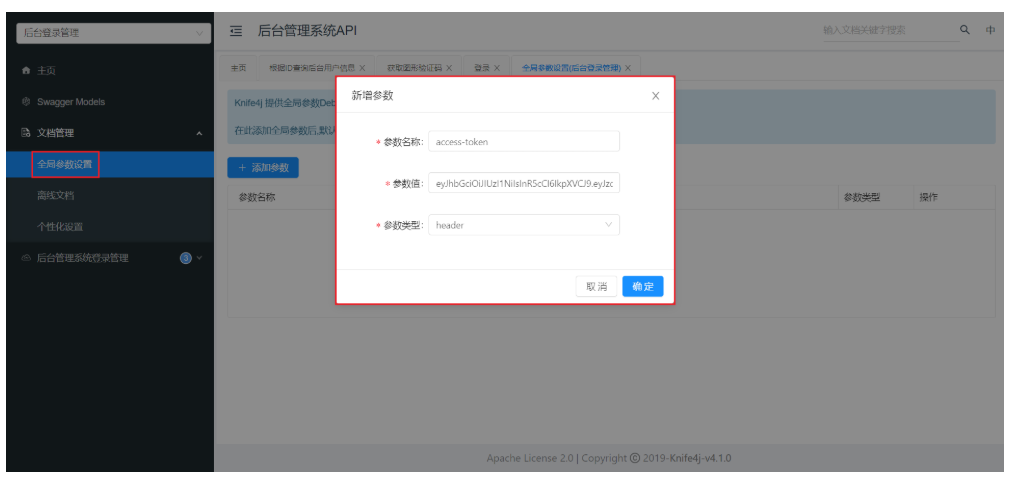
注意:每个接口分组需单独配置。
刷新页面后,任意选择一个接口进行调试,系统将自动在请求中添加该header,效果如下图所示:
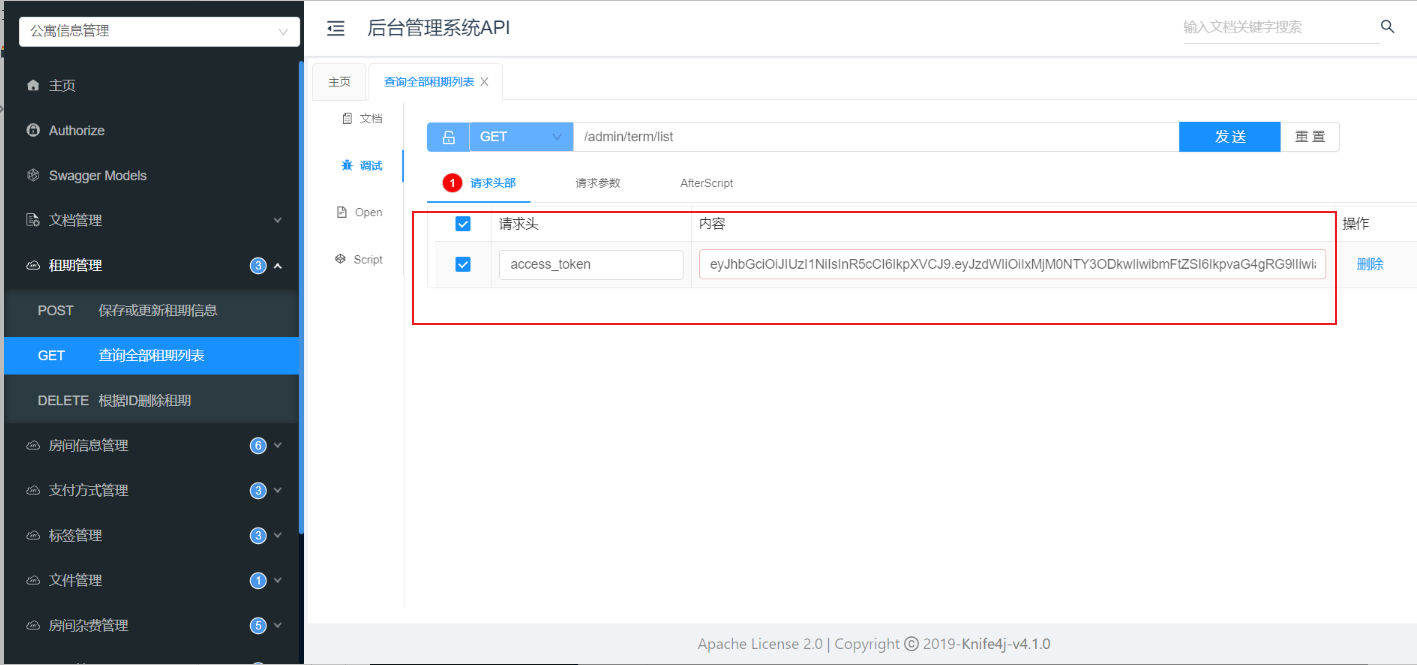
然后要刷新界面,否则不生效
3. 获取登录用户个人信息
-
查看请求和响应的数据结构
@Schema(description = "员工基本信息")
@Data
public class SystemUserInfoVo {

    @Schema(description = "用户姓名")
    private String name;

    @Schema(description = "用户头像")
    private String avatarUrl;
}
-
编写ThreadLocal工具类
理论上我们可以在Controller方法中,使用@RequestHeader获取JWT,然后在进行解析,如下
    @Operation(summary = "获取登陆用户个人信息")
    @GetMapping("info")
    public Result<SystemUserInfoVo> info(@RequestHeader("access-token") String token) {
        Claims claims = JwtUtil.parseToken(token);
        Long userId = claims.get("userId", Long.class);
        SystemUserInfoVo userInfo = service.getLoginUserInfo(userId);
        return Result.ok(userInfo);
    }
这段代码逻辑本身没有问题,但存在JWT重复解析的问题(拦截器和方法内各解析一次)。通常的优化做法是在拦截器解析Token后,将结果存入ThreadLocal,这样就能在整个请求处理流程中共享使用。
-
ThreadLocal
ThreadLocal 是 Java 中的一个线程本地存储工具类,核心作用是:为每个线程单独维护一份独立的变量副本,线程之间的变量互不干扰,实现线程级别的数据隔离。
简单说:ThreadLocal 让变量 “线程私有”,就像每个线程有自己的 “专属容器”,只存自己的变量,不会和其他线程混用。
在common模块中创建com.yuhuan.lease.common.login.LoginUser类
@Data
@AllArgsConstructor
public class LoginUser {

    private Long userId;
    private String username;
}
在common模块中创建com.yuhuan.lease.common.login.LoginUserHolder工具类
public class LoginUserHolder {
    public static ThreadLocal<LoginUser> threadLocal = new ThreadLocal<>();

    public static void setLoginUser(LoginUser loginUser) {
        threadLocal.set(loginUser);
    }

    public static LoginUser getLoginUser() {
        return threadLocal.get();
    }

    public static void clear() {
        threadLocal.remove();
    }
}
-
修改AuthenticationInterceptor拦截器
@Component
/**
 * 管理员身份认证拦截器
 * 作用:在请求进入控制器(Controller)前校验 JWT Token 有效性,
 * 并将当前登录用户信息存入 ThreadLocal(线程上下文),供后续链路复用;
 * 请求完成后清除 ThreadLocal 数据,避免内存泄漏
 */
public class AuthenticationInterceptor implements HandlerInterceptor {

    @Override
    public boolean preHandle(HttpServletRequest request, HttpServletResponse response, Object handler) throws Exception {
        // 1. 从请求头中获取 JWT Token(前端需将登录成功后的 Token 放入 access-token 头)
        String token = request.getHeader("access-token");

        // 2. 调用 JWT 工具类解析 Token:
        // - Token 为空、过期、签名错误等情况会直接抛出对应业务异常(无需手动捕获,由全局异常处理器处理)
        // - 解析成功返回 Token 中携带的 Claims(负载信息,包含 userId、username 等)
        Claims claims = JwtUtil.parseToken(token);

        // 3. 从 Claims 中提取用户核心信息(与 Token 生成时存入的字段对应)
        Long userId = claims.get("userId", Long.class); // 用户ID(Long类型)
        String username = claims.get("username", String.class); // 用户名(String类型)

        // 4. 将用户信息封装为 LoginUser 对象,存入 ThreadLocal 上下文(LoginUserHolder 是 ThreadLocal 工具类)
        // 后续 Controller/Service/Dao 可通过 LoginUserHolder 获取当前用户信息,无需层层传参
        LoginUserHolder.setLoginUser(new LoginUser(userId, username));

        // 5. Token 校验通过,放行请求,进入后续 Controller 处理
        return true;
    }

    /**
     * 拦截器后置完成处理(请求完全结束后执行,包括视图渲染完成)
     * 核心职责:清除 ThreadLocal 中的用户信息,避免内存泄漏
     *
     * @param request  Http请求对象
     * @param response Http响应对象
     * @param handler  目标处理器(Controller 方法)
     * @param ex       请求处理过程中抛出的异常(若有)
     * @throws Exception 清理过程中可能出现的异常
     */
    @Override
    public void afterCompletion(HttpServletRequest request, HttpServletResponse response, Object handler, Exception ex) throws Exception {
        // 关键操作:清除当前线程的 ThreadLocal 数据
        // 原因:Web 容器(如 Tomcat)使用线程池复用线程,若不清除,线程复用时会残留上一次请求的用户信息,导致数据泄露
        LoginUserHolder.clear();
    }
}
-
controller层
    @Operation(summary = "获取登陆用户个人信息")
    @GetMapping("info")
    public Result<SystemUserInfoVo> info(@RequestHeader("access-token") String token) {
        Claims claims = JwtUtil.parseToken(token);
        Long userId = claims.get("userId", Long.class);
        SystemUserInfoVo userInfo = service.getLoginUserInfo(userId);
        return Result.ok(userInfo);
    }
-
service层
public interface LoginService {

    CaptchaVo getCaptcha();

    String login(LoginVo loginVo);

    SystemUserInfoVo getLoginUserInfo(Long userId);
}
    @Override
    public SystemUserInfoVo getLoginUserInfo(Long userId) {
        SystemUser systemUser = systemUserMapper.selectById(userId);
        SystemUserInfoVo systemUserInfoVo = new SystemUserInfoVo();
        systemUserInfoVo.setName(systemUser.getName());
        systemUserInfoVo.setAvatarUrl(systemUser.getAvatarUrl());
        return systemUserInfoVo;
    }





 扫一扫
扫一扫


 1474
1474

 被折叠的 条评论
为什么被折叠?
被折叠的 条评论
为什么被折叠?
 到【灌水乐园】发言





