


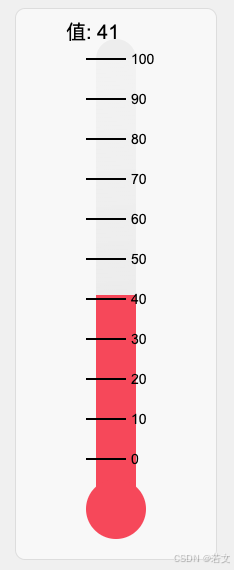
附上源码
<!DOCTYPE html>
<html lang="zh">
<head>
    <meta charset="UTF-8">
    <meta name="viewport" content="width=device-width, initial-scale=1.0">
    <title>滑动到 0 刻度的温度计</title>
    <style>
        body {
            display: flex;
            justify-content: center;
            align-items: center;
            height: 100vh;
            margin: 0;
            background-color: #f0f0f0;
        }
        canvas {
            background: #f8f8f8;
            border: 1px solid #ddd;
            border-radius: 10px;
        }
    </style>
</head>
<body>
<canvas id="thermometer" width="200" height="550"></canvas>

<script>
    const canvas = document.getElementById('thermometer');
    const ctx = canvas.getContext('2d');
    let value = 50; // 初始值,范围为 0-100

    // 绘制温度计
    function drawThermometer() {
        ctx.clearRect(0, 0, canvas.width, canvas.height);

        // 背景主体
        ctx.fillStyle = '#e0e0e0';
        ctx.fillRect(80, 50, 40, 400); // 主温度计背景部分

        // 顶部圆弧
        ctx.beginPath();
        ctx.arc(100, 50, 20, Math.PI, 0, false);
        ctx.fillStyle = '#ededed';
        ctx.fill();
        ctx.closePath();

        // 玻璃效果
        const glassGradient = ctx.createLinearGradient(80, 50, 120, 500);
        glassGradient.addColorStop(0, 'rgba(255, 255, 255, 0.6)');
        glassGradient.addColorStop(1, 'rgba(255, 255, 255, 0.2)');
        ctx.fillStyle = glassGradient;
        ctx.fillRect(80, 50, 40, 400);

        // 动态温度指示
        const currentY = 450 - (value * 4); // 转换值到 Y 轴位置
        const liquidBottomY = 430; // 红色液体的最底部

        ctx.fillStyle = '#ff5555';
        ctx.fillRect(80, currentY, 40, 450 - currentY);

        // 圆球到 0 刻度之间的固定红色液体
        ctx.fillStyle = '#ff5555';
        ctx.fillRect(80, 450, 40, 40); // 固定的红色部分

        // 底部圆球
        ctx.beginPath();
        ctx.arc(100, 500, 30, 0, 2 * Math.PI);
        ctx.fillStyle = '#ff5555';
        ctx.fill();
        ctx.closePath();

        // 刻度和文字
        ctx.fillStyle = '#000';
        for (let i = 0; i <= 10; i++) {
            const y = 450 - (i * 40);
            ctx.strokeStyle = '#000';
            ctx.lineWidth = 2;
            ctx.beginPath();
            ctx.moveTo(70, y);
            ctx.lineTo(110, y);
            ctx.stroke();

            // 标记文字始终在最上层
            ctx.font = '14px Arial';
            ctx.fillText(`${i * 10}`, 115, y + 5);
        }

        // 显示当前值
        ctx.fillStyle = '#000';
        ctx.font = '20px Arial';
        ctx.fillText(`值: ${value}`, 50, 30);
    }

    // 添加鼠标和触摸事件
    let isDragging = false;

    canvas.addEventListener('mousedown', (e) => {
        isDragging = true;
        updateValue(e.clientY);
    });

    canvas.addEventListener('mousemove', (e) => {
        if (isDragging) {
            updateValue(e.clientY);
        }
    });

    canvas.addEventListener('mouseup', () => {
        isDragging = false;
    });

    canvas.addEventListener('mouseleave', () => {
        isDragging = false;
    });

    canvas.addEventListener('touchstart', (e) => {
        isDragging = true;
        updateValue(e.touches[0].clientY);
    });

    canvas.addEventListener('touchmove', (e) => {
        if (isDragging) {
            updateValue(e.touches[0].clientY);
        }
    });

    canvas.addEventListener('touchend', () => {
        isDragging = false;
    });

    function updateValue(clientY) {
        const rect = canvas.getBoundingClientRect();
        const y = clientY - rect.top;
        const newValue = Math.round((450 - y) / 4);
        value = Math.max(0, Math.min(100, newValue)); // 限制值范围
        drawThermometer();
    }

    drawThermometer();
</script>
</body>
</html>





 扫一扫
扫一扫


 8348
8348

 被折叠的 条评论
为什么被折叠?
被折叠的 条评论
为什么被折叠?
 到【灌水乐园】发言





