


市面上桌面工具,要不就收费,要不就广告多。可以选择自己编写一个window的桌面小工具。时钟可以自定义表盘,大小,指针。有源码,可以自己修复问题。做美化。
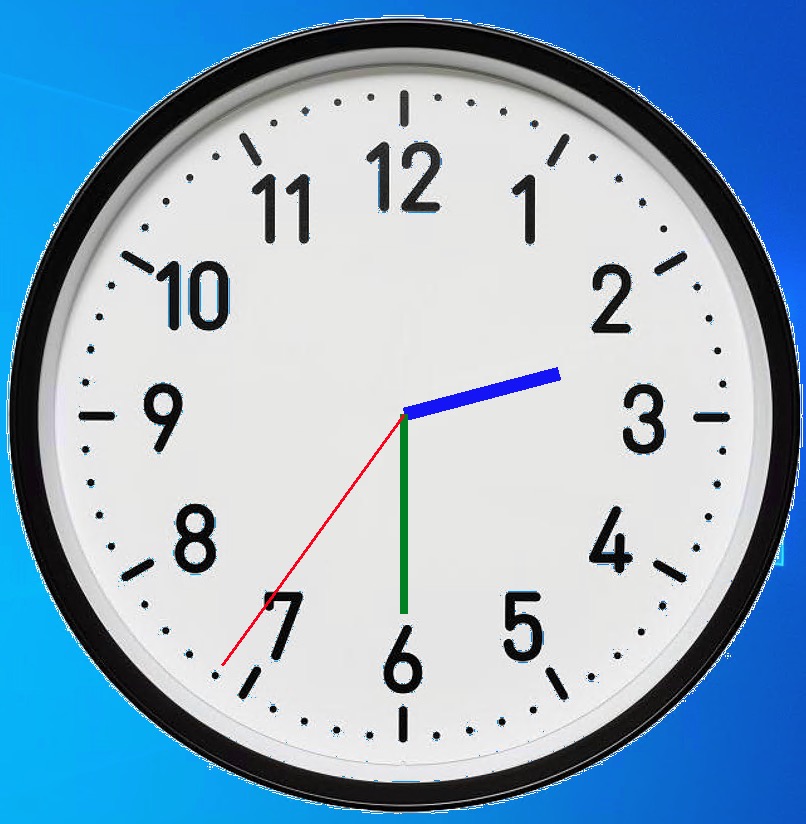
配置问价如下:
[Clock]
size = 800
background_image = clock_bg.png
hour_hand_color = blue
minute_hand_color = green
second_hand_color = red
hour_hand_length = 160
minute_hand_length = 200
second_hand_length = 310
hour_hand_width = 14
minute_hand_width = 8
second_hand_width = 3
主代码如下:
import tkinter as tk
from tkinter import PhotoImage, Menu
import time
import math
import os
import configparser
import pystray
from PIL import Image, ImageTk

class ImageClock:
    def __init__(self, root, config_path="config.ini"):
        self.root = root
        self.config = configparser.ConfigParser()
        self.config.read(config_path)

        # 从配置读取参数
        self.size = int(self.config.get('Clock', 'size', fallback=300))
        self.bg_image_path = self.config.get('Clock', 'background_image', fallback='clock_bg.png')
        self.hand_colors = {
            'hour': self.config.get('Clock', 'hour_hand_color', fallback='black'),
            'minute': self.config.get('Clock', 'minute_hand_color', fallback='black'),
            'second': self.config.get('Clock', 'second_hand_color', fallback='red')
        }
        self.hand_lengths = {
            'hour': int(self.config.get('Clock', 'hour_hand_length', fallback=50)),
            'minute': int(self.config.get('Clock', 'minute_hand_length', fallback=70)),
            'second': int(self.config.get('Clock', 'second_hand_length', fallback=90))
        }

        self.setup_ui()
        self.setup_tray_icon()

    def setup_ui(self):
        self.root.title("图片时钟")
        self.root.geometry(f"{self.size}x{self.size}")
        self.root.resizable(False, False)
        self.root.attributes('-transparentcolor', 'white')
        self.root.overrideredirect(True)

        self.canvas = tk.Canvas(self.root, width=self.size, height=self.size,
                               bg='white', highlightthickness=0)
        self.canvas.pack()

        # 右键菜单
        self.menu = Menu(self.root, tearoff=0)
        self.menu.add_command(label="退出", command=self.quit_app)
        self.canvas.bind("<Button-3>", self.show_menu)

        self.load_image_background()
        self.update_clock()

        # 窗口拖动
        self.canvas.bind("<ButtonPress-1>", self.start_move)
        self.canvas.bind("<ButtonRelease-1>", self.stop_move)
        self.canvas.bind("<B1-Motion>", self.on_move)

    def setup_tray_icon(self):
        # 创建系统托盘图标
        image = Image.new('RGB', (64, 64), 'white')
        self.tray_icon = pystray.Icon(
            "image_clock",
            ImageTk.PhotoImage(image),
            "图片时钟",
            menu=pystray.Menu(
                pystray.MenuItem("显示", self.show_window),
                pystray.MenuItem("退出", self.quit_app)
            )
        )

        # 最小化到托盘
        self.root.protocol('WM_DELETE_WINDOW', self.hide_window)

        # 启动托盘图标线程
        import threading
        threading.Thread(target=self.tray_icon.run, daemon=True).start()

    def show_menu(self, event):
        try:
            self.menu.tk_popup(event.x_root, event.y_root)
        finally:
            self.menu.grab_release()

    def hide_window(self):
        self.root.withdraw()

    def show_window(self):
        self.root.deiconify()

    def quit_app(self):
        self.tray_icon.stop()
        self.root.destroy()

    def load_image_background(self):
        try:
            if os.path.exists(self.bg_image_path):
                # 使用Pillow打开图片并调整尺寸
                from PIL import Image, ImageTk
                img = Image.open(self.bg_image_path)
                img = img.resize((self.size, self.size), Image.LANCZOS)
                self.bg_image = ImageTk.PhotoImage(img)
                self.canvas.create_image(0, 0, image=self.bg_image, anchor='nw')
            else:
                self.create_default_face()
        except Exception as e:
            print(f"加载图片失败: {e}")
            self.create_default_face()

    def create_default_face(self):
        center = self.size // 2
        radius = center - 50
        self.canvas.create_oval(center-radius, center-radius,
                               center+radius, center+radius,
                               width=2, outline='black')

        for i in range(60):
            angle = math.pi/30 * i
            length = 95 if i % 5 else 90
            start_x = center + length * math.cos(angle)
            start_y = center + length * math.sin(angle)
            end_x = center + 100 * math.cos(angle)
            end_y = center + 100 * math.sin(angle)
            width = 2 if i % 5 == 0 else 1
            self.canvas.create_line(start_x, start_y, end_x, end_y,
                                  width=width, fill='black')

    def update_clock(self):
        current_time = time.localtime()
        hours = current_time.tm_hour % 12
        minutes = current_time.tm_min
        seconds = current_time.tm_sec

        if hasattr(self, 'hour_hand'): self.canvas.delete(self.hour_hand)
        if hasattr(self, 'minute_hand'): self.canvas.delete(self.minute_hand)
        if hasattr(self, 'second_hand'): self.canvas.delete(self.second_hand)

        center = self.size // 2
        hour_angle = math.pi/6 * (hours + minutes/60) - math.pi/2
        minute_angle = math.pi/30 * minutes - math.pi/2
        second_angle = math.pi/30 * seconds - math.pi/2

        # 读取指针宽度配置
        hour_width = int(self.config.get('Clock', 'hour_hand_width', fallback=4))
        minute_width = int(self.config.get('Clock', 'minute_hand_width', fallback=2))
        second_width = int(self.config.get('Clock', 'second_hand_width', fallback=1))


        hour_x = center + self.hand_lengths['hour'] * math.cos(hour_angle)
        hour_y = center + self.hand_lengths['hour'] * math.sin(hour_angle)
        self.hour_hand = self.canvas.create_line(center, center, hour_x, hour_y,
                                               width=hour_width, fill=self.hand_colors['hour'])

        minute_x = center + self.hand_lengths['minute'] * math.cos(minute_angle)
        minute_y = center + self.hand_lengths['minute'] * math.sin(minute_angle)
        self.minute_hand = self.canvas.create_line(center, center, minute_x, minute_y,
                                                 width=minute_width, fill=self.hand_colors['minute'])

        second_x = center + self.hand_lengths['second'] * math.cos(second_angle)
        second_y = center + self.hand_lengths['second'] * math.sin(second_angle)
        self.second_hand = self.canvas.create_line(center, center, second_x, second_y,
                                                 width=second_width, fill=self.hand_colors['second'])

        self.root.after(100, self.update_clock)

    def start_move(self, event):
        self.x = event.x
        self.y = event.y

    def stop_move(self, event):
        self.x = None
        self.y = None

    def on_move(self, event):
        deltax = event.x - self.x
        deltay = event.y - self.y
        x = self.root.winfo_x() + deltax
        y = self.root.winfo_y() + deltay
        self.root.geometry(f"+{x}+{y}")

if __name__ == "__main__":
    root = tk.Tk()
    clock = ImageClock(root)
    root.mainloop()





 扫一扫
扫一扫


 被折叠的 条评论
为什么被折叠?
被折叠的 条评论
为什么被折叠?
 到【灌水乐园】发言





