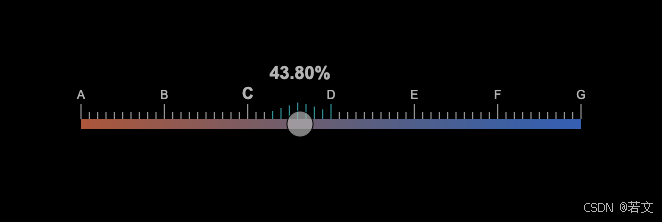
<!DOCTYPE html>
<html lang="zh">
<head>
    <meta charset="UTF-8">
    <title>炫酷滑块</title>
    <style>
        body {
            background-color: #000;
            display: flex;
            justify-content: center;
            align-items: center;
            height: 100vh;
            margin: 0;
        }
        canvas {
            background-color: transparent;
            opacity: 0.7; /* 设置透明度 */
        }
    </style>
</head>
<body>
<canvas id="sliderCanvas" width="600" height="150"></canvas>
<script>
    const canvas = document.getElementById('sliderCanvas');
    const ctx = canvas.getContext('2d');

    const sliderWidth = 500;
    const sliderHeight = 10;
    const sliderX = 50;
    const sliderY = 75;
    const knobRadius = 13; // 滑块半径
    let knobX = sliderX;
    let isDragging = false;
    let fadeTimeout;
    let showValue = false;
    let valueOpacity = 1; // 文字透明度

    const numMajorTicks = 7; // 大刻度数量
    const labels = ['A', 'B', 'C', 'D', 'E', 'F', 'G'].slice(0, numMajorTicks);

    function drawSlider() {
        // 清除画布
        ctx.clearRect(0, 0, canvas.width, canvas.height);

        // 绘制滑块背景
        const gradient = ctx.createLinearGradient(sliderX, sliderY, sliderX + sliderWidth, sliderY);
        gradient.addColorStop(0, '#ff7f50');
        gradient.addColorStop(1, '#1e90ff');
        ctx.fillStyle = gradient;
        ctx.fillRect(sliderX, sliderY, sliderWidth, sliderHeight);

        // 绘制刻度和标签
        ctx.strokeStyle = '#fff';
        ctx.fillStyle = '#fff';
        for (let i = 0; i < numMajorTicks; i++) {
            const x = sliderX + (i * (sliderWidth / (numMajorTicks - 1)));
            const isCurrentSection = knobX >= x && knobX < x + sliderWidth / (numMajorTicks - 1);

            // 放大当前区间的标签
            ctx.font = isCurrentSection ? 'bold 16px Arial' : '12px Arial';
            ctx.textAlign = 'center';
            ctx.fillText(labels[i], x, sliderY - 20);

            // 绘制大刻度
            ctx.beginPath();
            ctx.moveTo(x, sliderY - 15);
            ctx.lineTo(x, sliderY);
            ctx.stroke();

            // 绘制小刻度
            if (i < numMajorTicks - 1) {
                for (let j = 1; j < 10; j++) {
                    const smallX = x + j * (sliderWidth / (numMajorTicks - 1) / 10);
                    const distance = Math.abs(knobX - smallX);
                    const offsetY = distance < 30 ? 10 - distance / 3 : 0; // 限制波浪范围
                    const color = distance < 30 ? '#02F5FF' : '#fff'; // 波浪颜色

                    ctx.strokeStyle = color;
                    ctx.beginPath();
                    ctx.moveTo(smallX, sliderY - 7 - offsetY);
                    ctx.lineTo(smallX, sliderY);
                    ctx.stroke();
                }
            }
        }

        // 绘制滑块圆钮
        ctx.beginPath();
        ctx.arc(knobX, sliderY + sliderHeight / 2, knobRadius, 0, Math.PI * 2);
        ctx.fillStyle = 'rgba(255, 255, 255, 0.7)'; // 半透明白色
        ctx.fill();
        ctx.strokeStyle = '#000';
        ctx.stroke();

        // 绘制滑块上方的当前值
        if (showValue) {
            const value = ((knobX - sliderX) / sliderWidth) * 100;
            ctx.font = 'bold 18px Arial';
            ctx.fillStyle = `rgba(255, 255, 255, ${valueOpacity})`;
            ctx.fillText(`${value.toFixed(2)}%`, knobX, sliderY - 40);
        }
    }

    function onMouseDown(event) {
        const rect = canvas.getBoundingClientRect();
        const mouseX = event.clientX - rect.left;
        const mouseY = event.clientY - rect.top;

        if (Math.abs(mouseX - knobX) < knobRadius && Math.abs(mouseY - (sliderY + sliderHeight / 2)) < knobRadius) {
            isDragging = true;
            clearTimeout(fadeTimeout);
            showValue = true;
            valueOpacity = 1; // 重置透明度
        }
    }

    function onMouseMove(event) {
        if (isDragging) {
            const rect = canvas.getBoundingClientRect();
            const mouseX = event.clientX - rect.left;
            knobX = Math.max(sliderX, Math.min(mouseX, sliderX + sliderWidth));
            drawSlider();
            logCurrentValue();
        }
    }

    function onMouseUp() {
        isDragging = false;
        startFadeOut();
    }

    function onTouchStart(event) {
        const rect = canvas.getBoundingClientRect();
        const touchX = event.touches[0].clientX - rect.left;
        const touchY = event.touches[0].clientY - rect.top;

        if (Math.abs(touchX - knobX) < knobRadius && Math.abs(touchY - (sliderY + sliderHeight / 2)) < knobRadius) {
            isDragging = true;
            clearTimeout(fadeTimeout);
            showValue = true;
            valueOpacity = 1; // 重置透明度
        }
    }

    function onTouchMove(event) {
        if (isDragging) {
            const rect = canvas.getBoundingClientRect();
            const touchX = event.touches[0].clientX - rect.left;
            knobX = Math.max(sliderX, Math.min(touchX, sliderX + sliderWidth));
            drawSlider();
            logCurrentValue();
        }
    }

    function onTouchEnd() {
        isDragging = false;
        startFadeOut();
    }

    function logCurrentValue() {
        const value = ((knobX - sliderX) / sliderWidth) * 100;
        console.log(`当前值: ${value.toFixed(2)}%`);
    }

    function startFadeOut() {
        fadeTimeout = setTimeout(() => {
            fadeOut();
        }, 500);
    }

    function fadeOut() {
        if (valueOpacity > 0) {
            valueOpacity -= 0.02; // 每帧减少透明度
            drawSlider();
            requestAnimationFrame(fadeOut);
        } else {
            showValue = false; // 完全透明后隐藏文字
            drawSlider();
        }
    }

    canvas.addEventListener('mousedown', onMouseDown);
    canvas.addEventListener('mousemove', onMouseMove);
    canvas.addEventListener('mouseup', onMouseUp);
    canvas.addEventListener('mouseleave', onMouseUp);

    canvas.addEventListener('touchstart', onTouchStart);
    canvas.addEventListener('touchmove', onTouchMove);
    canvas.addEventListener('touchend', onTouchEnd);

    drawSlider();
</script>
</body>
</html>








 扫一扫
扫一扫


 823
823

 被折叠的 条评论
为什么被折叠?
被折叠的 条评论
为什么被折叠?
 到【灌水乐园】发言





