



本系列为笔者学习JavaWeb的课堂笔记,视频资源为B站黑马程序员出品的《黑马程序员JavaWeb开发教程,实现javaweb企业开发全流程(涵盖Spring+MyBatis+SpringMVC+SpringBoot等)》,章节分布参考视频教程,为同样学习JavaWeb系列课程的同学们提供参考。
01 XML 映射文件
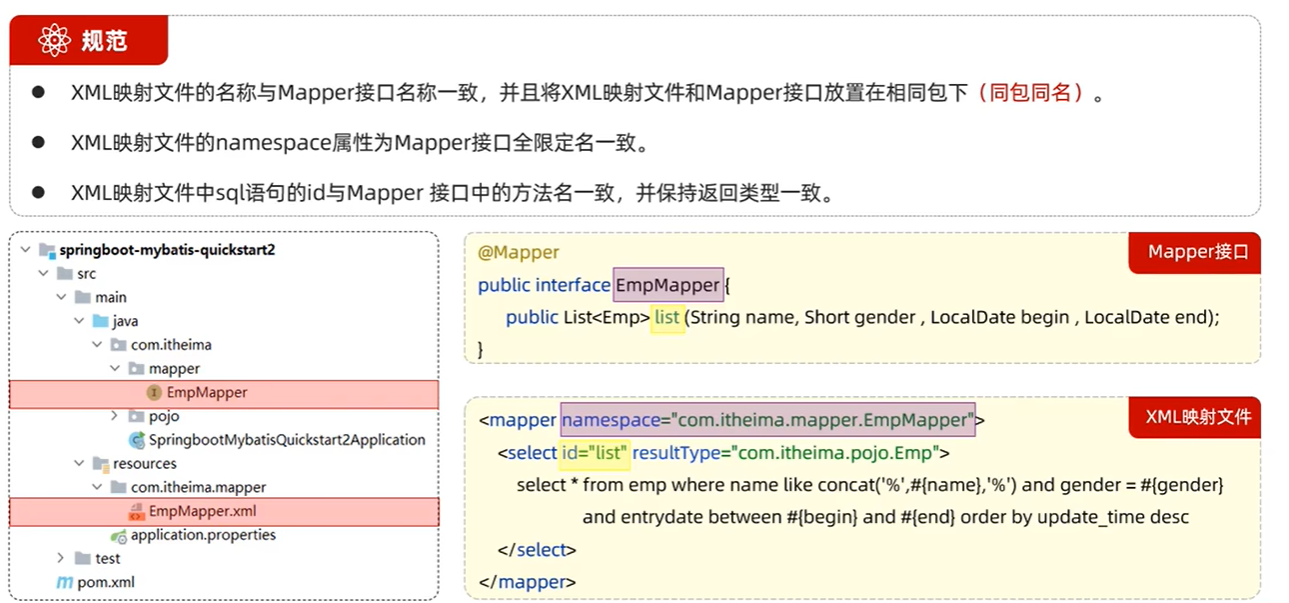
com/itheima/mapper
EmpMapper.xml
<?xml version="1.0" encoding="UTF-8" ?>
<!DOCTYPE mapper
  PUBLIC "-//mybatis.org//DTD Mapper 3.0//EN"
  "http://mybatis.org/dtd/mybatis-3-mapper.dtd">
<mapper namespace="com.itheima.mapper.EmpMapper"> ⭐
    <!--resultType:单条记录封装的类型-->
    <select id="list" resultType="com.itheima.pojo.Emp"> ⭐⭐
        select * from emp where name like concat('%', '张', '%') and gender = #{gender} and entryDate between #{begin} and #{end} order by update_time desc
    </select>
</mapper>
MybatisX是一款基于IDEA的快速开发MybatisX的插件,用于提高效率。
注:使用Mybatis的注解,主要是来完成一些简单的增删改查功能。如果需要实现复杂的SQL功能,建议使用XML来配置映射语句。
02 动态 SQL
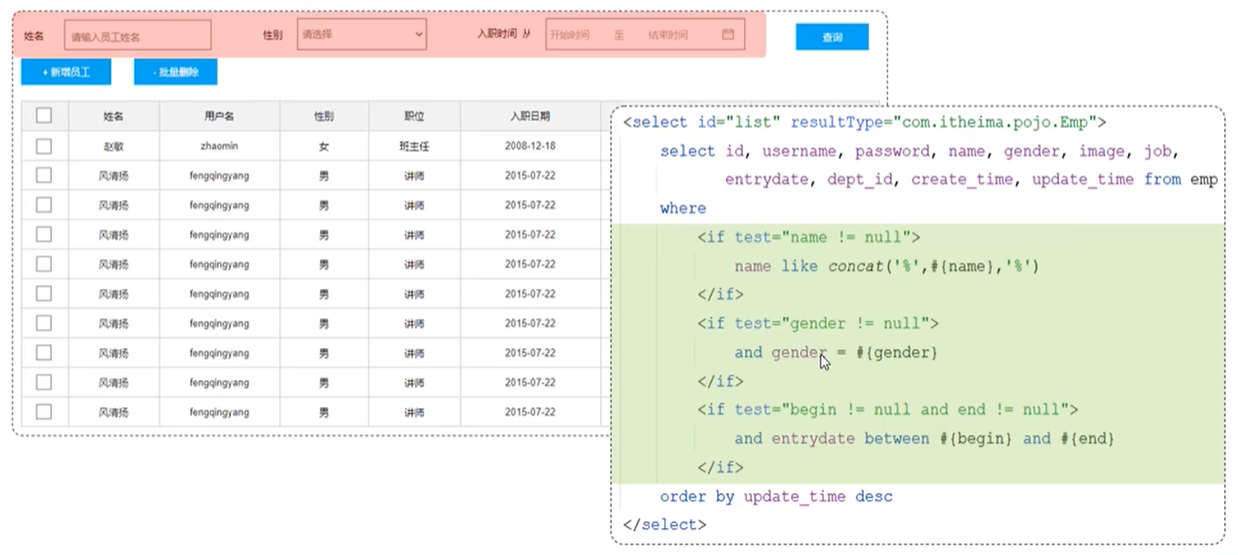
动态SQL为随着用户的输入或外部条件的变化而变化的SQL语句。
03 if 标签
<if>:通过test属性判断条件是否成立,成立为true,拼接SQL。
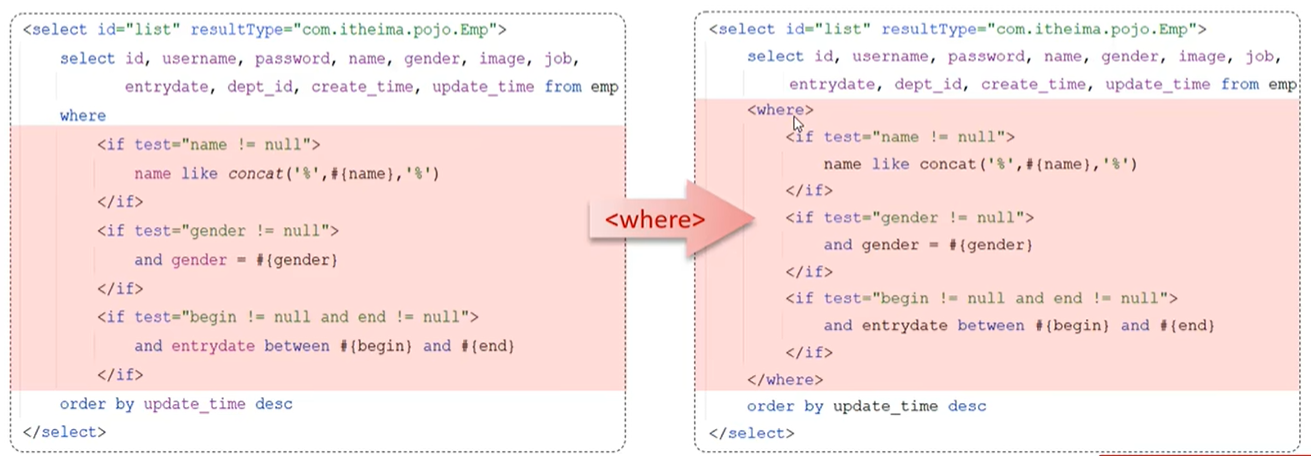
<where>:在子元素有内容的情况下插入where子句,自动去除子句当中的and或or。
EmpMapper.xml
<?xml version="1.0" encoding="UTF-8" ?>
<!DOCTYPE mapper
  PUBLIC "-//mybatis.org//DTD Mapper 3.0//EN"
  "http://mybatis.org/dtd/mybatis-3-mapper.dtd">
<mapper namespace="com.itheima.mapper.EmpMapper">
    <!--resultType:单条记录封装的类型-->
    <select id="list" resultType="com.itheima.pojo.Emp"> ⭐
        select *
        from emp
        <where>
            <if test="name != null">
                name like concat('%', '张', '%')
            </if>
            <if test="gender != null">
                and gender = #{gender}
            </if>
            <if test="begin != null and end != null">
                and entryDate between #{begin} and #{end}
            </if>
        </where>
        order by update_time desc
    </select>
</mapper>
注:and不能简单粗暴的删除,添加<where></where>标签对。
SpringbooyMybatisCrudApplicationTests.java
package com.itheima;

import com.itheima.mapper.EmpMapper;
import org.junit.jupiter.api.Test;
import org.springframework.beans.factory.annotation.Autowired;
import org.springframework.boot.test.context.SpringBootTest;

@SpringBootTest
class SpringbootMybatisCrudApplicationTests {

    @Autowired
    private EmpMapper empMapper;

    @Test
    public void testList(){
        List<Emp> empList = empMapper.list("张", (short)1, null, null); ⭐
        System.out.println(empList);
    }
}
04 案例:动态更新员工数据信息
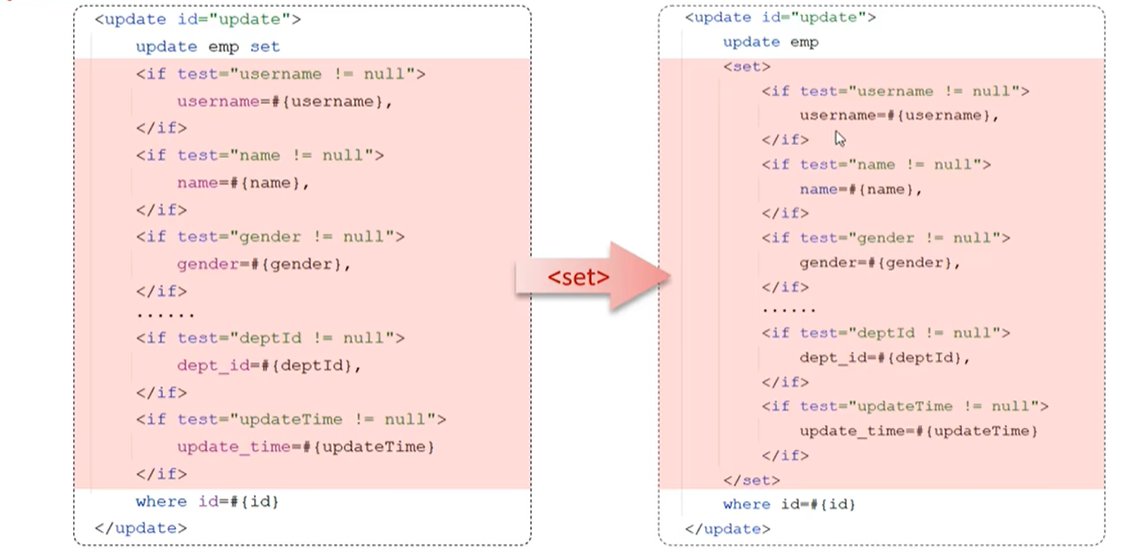
需求:动态更新员工信息,如果更新时传递有值,则更新,反之,则不更新。
解决方案:动态SQL
EmpMapper.xml
<?xml version="1.0" encoding="UTF-8" ?>
<!DOCTYPE mapper
  PUBLIC "-//mybatis.org//DTD Mapper 3.0//EN"
  "http://mybatis.org/dtd/mybatis-3-mapper.dtd">
<mapper namespace="com.itheima.mapper.EmpMapper">
    <update id="update2"> ⭐
    	update emp
        <set>
            <if test="username != null">username=#{username},</if>
            <if test="username != null">gender=#{gender},</if>
            <if test="username != null">image=#{image}, </if>
            <if test="username != null">job=#{job}, </if>
            <if test="username != null">entrydate=#{entrydate},</if>
            <if test="username != null">dept_id=#{deptId},</if>
            <if test="username != null">updateTime=#{updateTime}</if>
        </set>
        where id=#{id}
    </update>
</mapper>
注:,不能简单粗暴的删除,添加<set></set>标签对。
SpringbooyMybatisCrudApplicationTests.java
package com.itheima;

import com.itheima.mapper.EmpMapper;
import org.junit.jupiter.api.Test;
import org.springframework.beans.factory.annotation.Autowired;
import org.springframework.boot.test.context.SpringBootTest;

@SpringBootTest
class SpringbootMybatisCrudApplicationTests {

    @Autowired
    private EmpMapper empMapper;

    @Test
    public void testUpdate(){
        Emp emp = new Emp();
        emp.setId(19);
        emp.setUsername("Tom222");
        emp.setName("汤姆222");
        emp.setGender((short)1);
        emp.setUpdateTime(LocalDateTime.now());

        empMapper.update2(emp); ⭐
    }
}
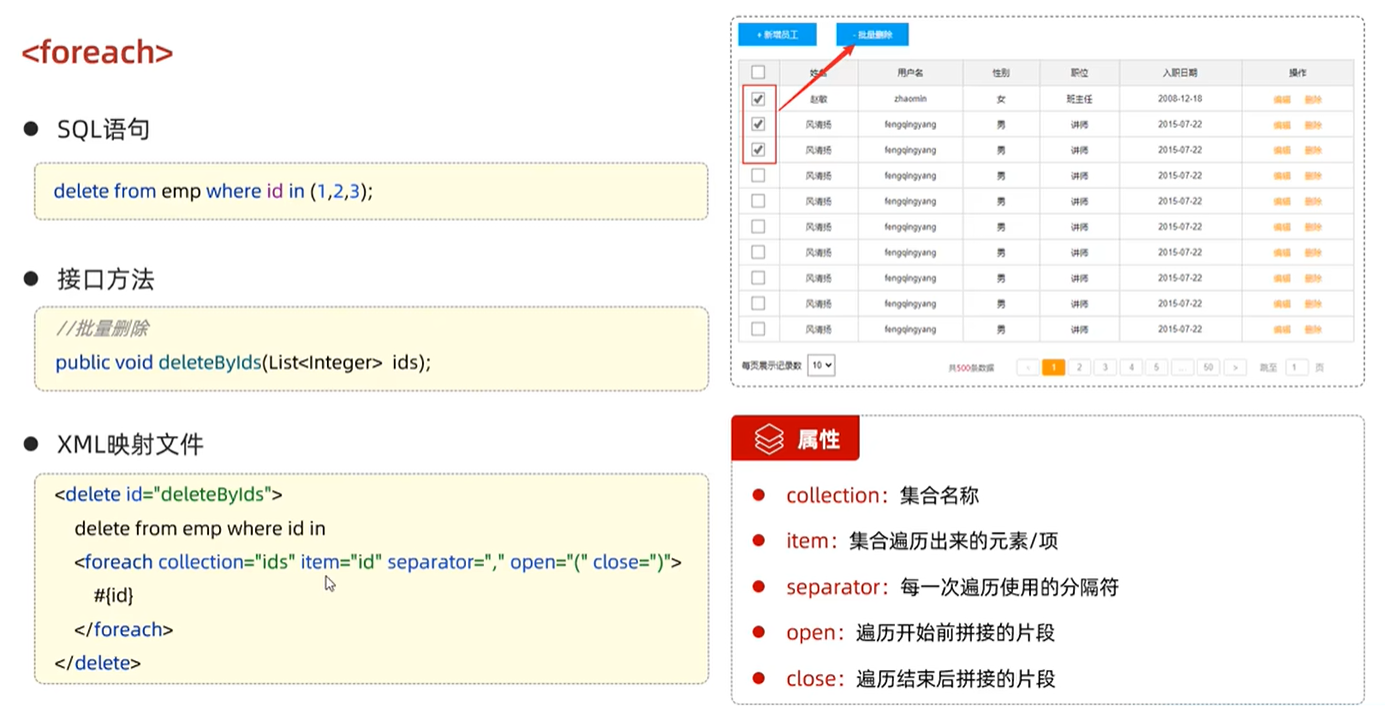
05 foreach 标签
delete from emp where id in(18, 19, 20);
EmpMapper.xml
<?xml version="1.0" encoding="UTF-8" ?>
<!DOCTYPE mapper
  PUBLIC "-//mybatis.org//DTD Mapper 3.0//EN"
  "http://mybatis.org/dtd/mybatis-3-mapper.dtd">
<mapper namespace="com.itheima.mapper.EmpMapper">

    <!--批量删除员工 (13, 14, 15)-->
    <delete id="deleteByIds"> ⭐
        delete from emp where id in
        <foreach collection="ids" item="id" separator="," open="(" close=")">
            #{id}
        </foreach>
    </delete>
</mapper>
connection:遍历的集合
item:遍历出来的元素
separation:分隔符
open:遍历开始前拼接的SQL片段
close:遍历开始后拼接的SQL片段
SpringbooyMybatisCrudApplicationTests.java
package com.itheima;

import com.itheima.mapper.EmpMapper;
import org.junit.jupiter.api.Test;
import org.springframework.beans.factory.annotation.Autowired;
import org.springframework.boot.test.context.SpringBootTest;

@SpringBootTest
class SpringbootMybatisCrudApplicationTests {

    @Autowired
    private EmpMapper empMapper;

    @Test
    public void testDeleteByIds(){
        List<Integer> ids = Arrays.asList(13, 14, 15); //构造List集合
        empMapper.deleteByIds(ids); ⭐
    }
}

注:不要忘了接口方法哦~
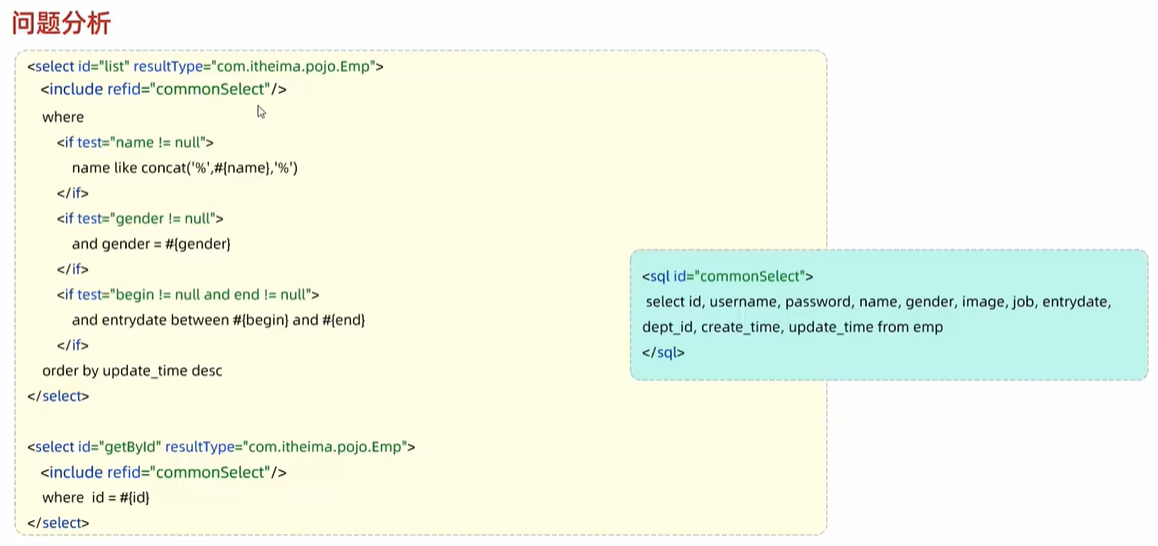
06 sql & include 标签
EmpMapper.xml
<?xml version="1.0" encoding="UTF-8" ?>
<!DOCTYPE mapper
  PUBLIC "-//mybatis.org//DTD Mapper 3.0//EN"
  "http://mybatis.org/dtd/mybatis-3-mapper.dtd">
<mapper namespace="com.itheima.mapper.EmpMapper">
    <sql id="commonSelect"> ⭐
    	select username, name, gender, image, job, entrydate, dept_id, create_time, update_time from emp
    </sql>

    <select id="list" resultType="com.itheima.pojo.Emp">
        <include refid="commonSelect"/> ⭐
        from emp
        <where>
            <if test="name != null">
                name like concat('%', '张', '%')
            </if>
            <if test="gender != null">
                and gender = #{gender}
            </if>
            <if test="begin != null and end != null">
                and entryDate between #{begin} and #{end}
            </if>
        </where>
        order by undate_time desc
    </select>
</mapper>
<sql>:定义可重用的SQL片段
<include>:通过属性refid,指定包含的SQL片段





 扫一扫
扫一扫


 745
745

 被折叠的 条评论
为什么被折叠?
被折叠的 条评论
为什么被折叠?
 到【灌水乐园】发言





