



本系列为笔者学习JavaWeb的课堂笔记,视频资源为B站黑马程序员出品的《黑马程序员JavaWeb开发教程,实现javaweb企业开发全流程(涵盖Spring+MyBatis+SpringMVC+SpringBoot等)》,章节分布参考视频教程,为同样学习JavaWeb系列课程的同学们提供参考。
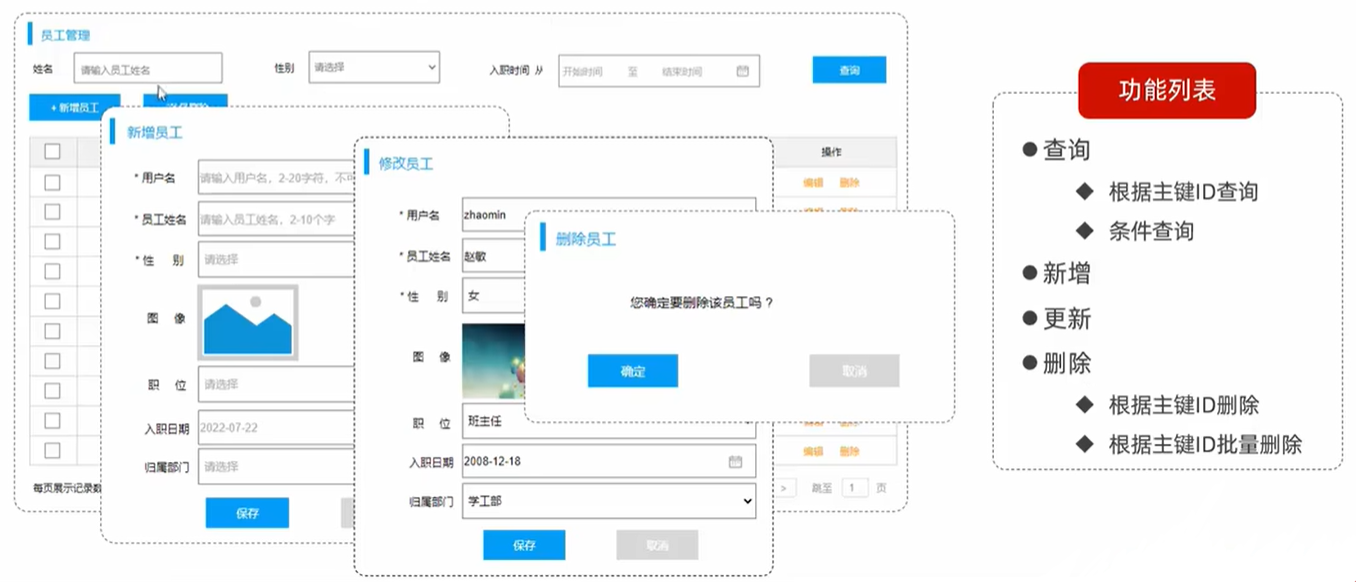
根据资料中提供的《tlias智能学习辅助系统》页面原型及需求,完成员工管理的需求开发。
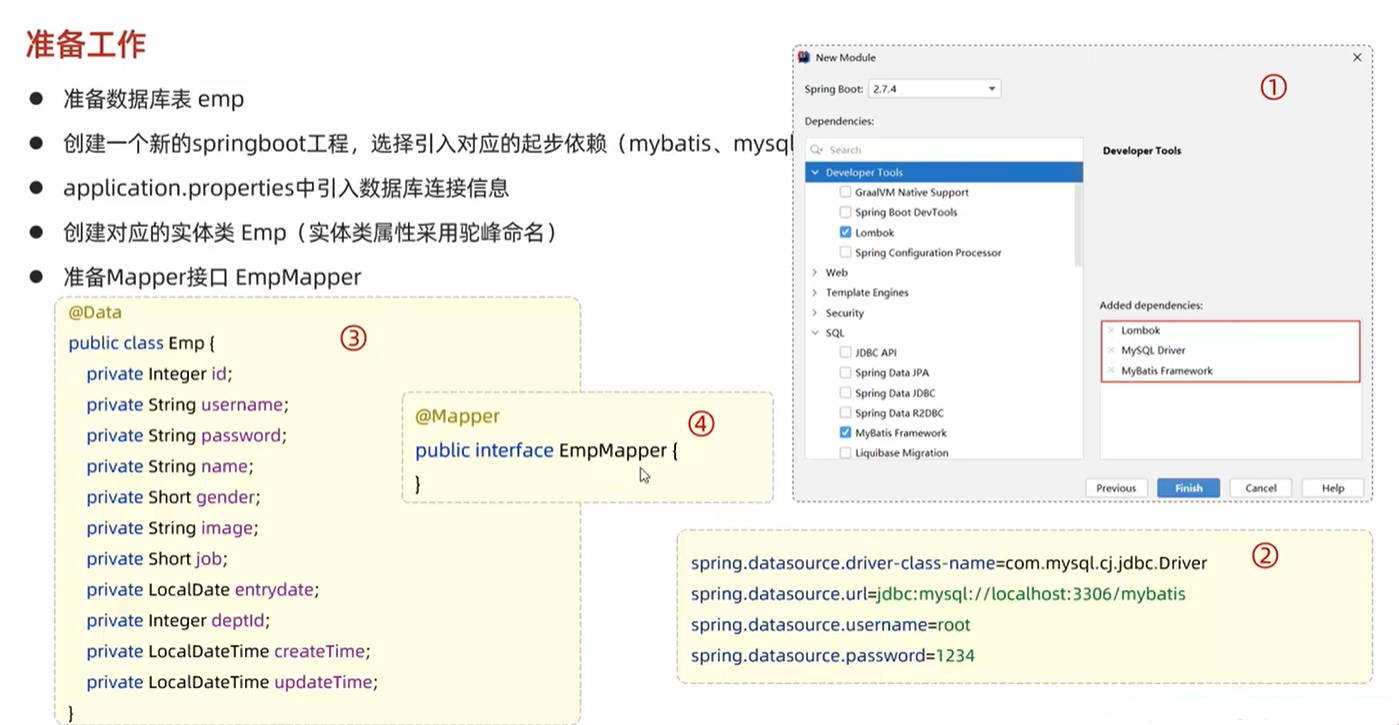
01 准备工作
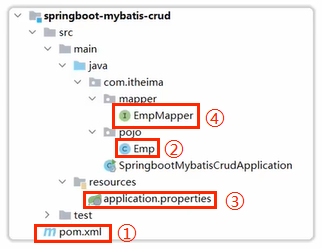
- 创建一个新的
springboot工程,选择引入对应的起步依赖(mybatis、mysql驱动、lombok) - 创建对应的实体类
Emp(实体类属性采用驼峰命名) application.properties中引入数据库连接信息- 准备
Mapper接口EmpMapper
Emp.java
package com.itheima.pojo;

import lombok.AllArgsConstructor;
import lombok.Data;
import lombok.NoArgsConstructor;
import java.time.LocalDate;
import java.time.LocalDateTime;

@Data
@NoArgsConstructor
@AllArgsConstructor
public class Emp {
    private Integer id;
    private String username;
    private String password;
    private String name;
    private Short gender;
    private String image;
    private Short job;
    private LocalDate entrydate;
    private Integer deptId;
    private LocalDateTime createTime;
    private LocalDateTime updateTime;
}
02 删除

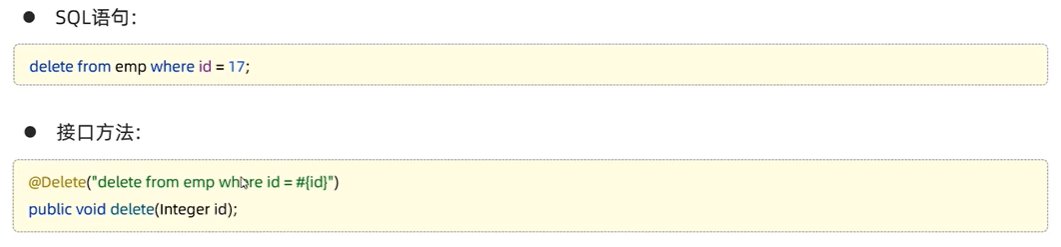
注:如果mapper接口方法形参只有一个普通类型的参数,#{...}里面的属性名可以随便写,比如#{id}、#{value}。
EmpMapper.java
package com.itheima.mapper;

import org.apache.ibatis.annotations.*;

@Mapper
public interface EmpMapper {
    @Delete("delete from emp where id = #{id}")
    public void delete(Integer id);
}
SpringbooyMybatisCrudApplicationTests.java
package com.itheima;

import com.itheima.mapper.EmpMapper;
import org.junit.jupiter.api.Test;
import org.springframework.beans.factory.annotation.Autowired;
import org.springframework.boot.test.context.SpringBootTest;

@SpringBootTest
class SpringbootMybatisCrudApplicationTests {

    @Autowired
    private EmpMapper empMapper;

    @Test
    public void testDelete(){
        empMapper.delete(17);
    }

}
03 日志输出
application.proporties
#指定mybatis输出日志的位置,输出控制台
mybatis.configuration.log-impl=org.apache.ibatis.logging.stdout.StdOutImpl

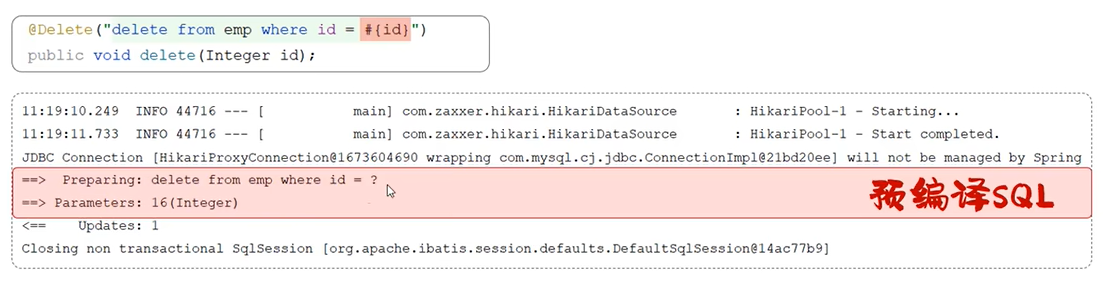
04 预编译SQL
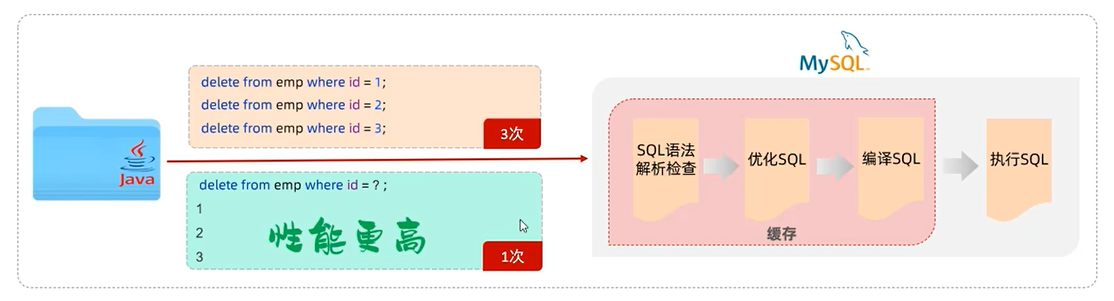
预编译SQL的性能更高,更安全。
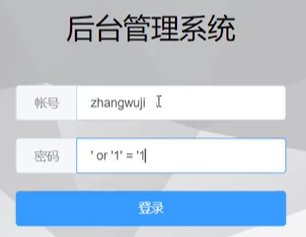
SQL注入是通过操作输入的数据来修改事先定义好的SQL语句,以达到执行代码对服务器进行攻击的方法。

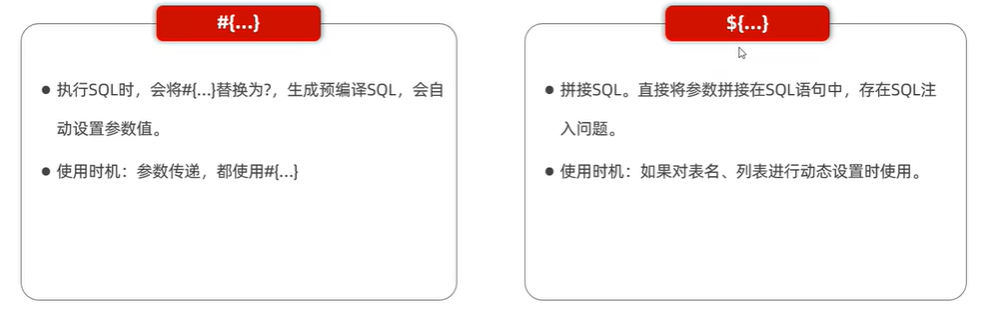
05 参数占位符
06 新增
EmpMapper.java
package com.itheima.mapper;

import org.apache.ibatis.annotations.*;

@Mapper
public interface EmpMapper {

    @Insert("insert into emp(username, name, gender, image, job, entrydate, dept_id, create_time, update_time) values(#{username}, #{name}, #{gender}, #{image}, #{job}, #{entrydate}, #{deptId}, #{createTime}, #{updateTime})")
    public void insert(Emp emp);
}
SpringbooyMybatisCrudApplicationTests.java
package com.itheima;

import com.itheima.mapper.EmpMapper;
import org.junit.jupiter.api.Test;
import org.springframework.beans.factory.annotation.Autowired;
import org.springframework.boot.test.context.SpringBootTest;

@SpringBootTest
class SpringbootMybatisCrudApplicationTests {

    @Autowired
    private EmpMapper empMapper;

    @Test
    public void testInsert(){
        Emp emp = new Emp();
        emp.setUsername("Tom");
        emp.setName("汤姆");
        emp.setImage("1.jpg");
        emp.setGender((short)1);
        emp.setJob((short)1);
        emp.setEntrydate(LocalDate.of(2000, 1, 1));
        emp.setDeptId(1);
        emp.setCreateTime(LocalDateTime.now());
        emp.setUpdateTime(LocalDateTime.now());

        empMapper.insert(emp);
    }
}
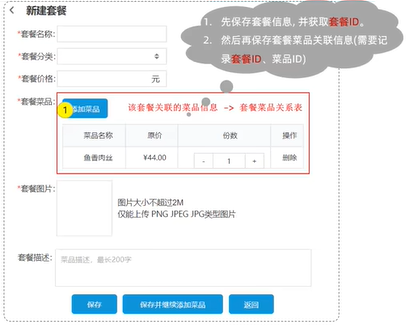
主键返回是指在数据添加成功后,需要获取插入数据库数据的主键。eg.添加套餐数据时,需要维护套餐菜品关系表数据。

07 更新
EmpMapper.java
package com.itheima.mapper;

import org.apache.ibatis.annotations.*;

@Mapper
public interface EmpMapper {

    @Update("update emp set username=#{username}, name=#{name}, gender=#{gender}, image=#{image}, job=#{job}, entrydate=#{entrydate}, dept_id=#{deptId}, create_time=#{createTime}, updateTime=#{updateTime} where id=#{id}")
    public void update(Emp emp);
}
SpringbooyMybatisCrudApplicationTests.java
package com.itheima;

import com.itheima.mapper.EmpMapper;
import org.junit.jupiter.api.Test;
import org.springframework.beans.factory.annotation.Autowired;
import org.springframework.boot.test.context.SpringBootTest;

@SpringBootTest
class SpringbootMybatisCrudApplicationTests {

    @Autowired
    private EmpMapper empMapper;

    @Test
    public void testUpdate(){
        Emp emp = new Emp();
        emp.setId(18); //1 ⭐
        emp.setUsername("Tom1"); //2
        emp.setName("汤姆1"); //3
        emp.setImage("1.jpg");
        emp.setGender((short)1);
        emp.setJob((short)1);
        emp.setEntrydate(LocalDate.of(2000, 1, 1));
        emp.setDeptId(1);
        emp.setCreateTime(LocalDateTime.now());
        emp.setUpdateTime(LocalDateTime.now());

        empMapper.update(emp); //执行更新员工操作
    }
}
08 查询
EmpMapper.java
package com.itheima.mapper;

import org.apache.ibatis.annotations.*;

@Mapper
public interface EmpMapper {

    @Select("select * from emp where id=#{id}")
    public Emp getById(Integer id);

    //数据封装
    //方案一:给数据起别名,让别名与实体类属性名一致
    @Select("select username, name, gender, image, job, entrydate, dept_id deptId, create_time createTime, update_time updateTime from emp where id=#{id}")
    public Emp getById(Integer id);

    //方案二:通过@results,@Result注解手动映射封装
    @Results({
        @Result(column = "dept_id", proporty = "deptId"),
        @Result(column = "create_time", proporty = "createTime"),
        @Result(column = "update_time", proporty = "updateTime")
    })
    @Select("select * from emp where id=#{id}")
    public Emp getById(Integer id);

    //方案三:proporties文件中开启mybatis的驼峰命名自动映射开关
}
#a_column ————> aColumn
mybatis.configuration.map-underscore-to-camel-case=true
SpringbooyMybatisCrudApplicationTests.java
package com.itheima;

import com.itheima.mapper.EmpMapper;
import org.junit.jupiter.api.Test;
import org.springframework.beans.factory.annotation.Autowired;
import org.springframework.boot.test.context.SpringBootTest;

@SpringBootTest
class SpringbootMybatisCrudApplicationTests {

    @Autowired
    private EmpMapper empMapper;

    @Test
    public void testSelect(){
        Emp emp = empMapper.getById(1);
        System.out.printLn(emp);
    }
}
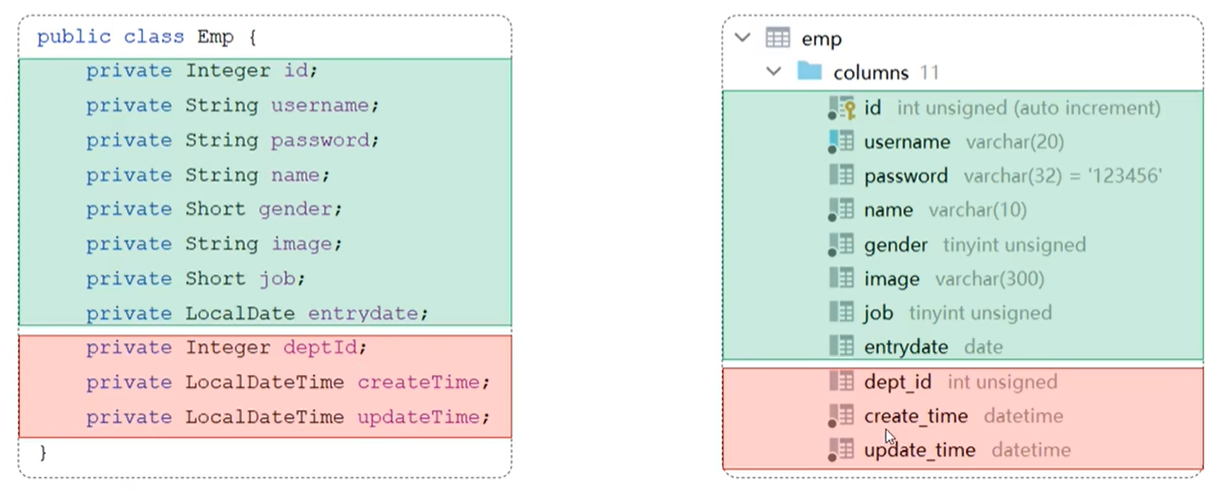
数据封装是指实体类属性名和数据库表查询返回的字段名已知,mybatis会自动封装,不一致,则不能自动封装。
09 条件查询

select * from emp where name like '%张%' and gender = 1 and entryDate between '2010-01-01' and '2020-01-01' order by undate_time desc;
concat('hello', 'MySQL');

select * from emp where name like concat('%', '张', '%') and gender = 1 and entryDate between '2010-01-01' and '2020-01-01' order by update_time desc;
EmpMapper.java
package com.itheima.mapper;

import org.apache.ibatis.annotations.*;

@Mapper
public interface EmpMapper {

    @Select("select * from emp where name like '%${name}%' and gender = #{gender} and entryDate between #{begin} and #{end} order by undate_time desc")
    public List<Emp> list(String name, Short gender, LocalDate begin, LocalDate end);
}
SpringbooyMybatisCrudApplicationTests.java
package com.itheima;

import com.itheima.mapper.EmpMapper;
import org.junit.jupiter.api.Test;
import org.springframework.beans.factory.annotation.Autowired;
import org.springframework.boot.test.context.SpringBootTest;

@SpringBootTest
class SpringbootMybatisCrudApplicationTests {

    @Autowired
    private EmpMapper empMapper;

    @Test
    public void testList(){
        List<Emp> empList = empMapper.list("张", (short)1, LocalDate.of(2010, 1, 1), LocalDate.of(2020, 1, 1));
        System.out.println(empList);
    }
}





 扫一扫
扫一扫


 864
864

 被折叠的 条评论
为什么被折叠?
被折叠的 条评论
为什么被折叠?
 到【灌水乐园】发言





