



前言
在Threejs中,创建一个基础的场景需要三个基础组成部分,分别是场景(scene)、相机(camera)和渲染器(renderer),scene和render不在此过多赘述,本文主要剖析camera。
在ThreeJS中camera负责将三维场景转化为一帧一帧的二维画面,并在requestAnimationFrame通过render对camera所获取的二维画面进行更新渲染。
const scene = new THREE.Scene();
const camera = new THREE.PerspectiveCamera( 75, window.innerWidth / window.innerHeight, 0.1, 1000 );
const renderer = new THREE.WebGLRenderer();
renderer.setSize( window.innerWidth, window.innerHeight );
document.body.appendChild( renderer.domElement );

function animate() {
    requestAnimationFrame( animate );
    renderer.render( scene, camera );
}
animate();
常见的相机种类
- 正交相机(OrthographicCamera)
- 特点:无论物体距离相机距离远或者近,在最终渲染的图片中物体的大小都保持不变
- 应用场景:渲染2D场景或者UI元素
- 透视相机(PerspectiveCamera)
- 特点:模拟人眼所看到的景象,它是3D场景的渲染中使用得最普遍的投影模式(近大远小)
- 应用场景:最常用的3d渲染相机,更符合人眼所看的景象
- 立方相机(CubeCamera)
- 特点:可以为场景中的所要渲染的物体创建快照
- 应用场景:创建反光效果,动态环境贴图,立方体全景贴图
- …
透视相机原理解析
1.PerspectiveCamera参数解析
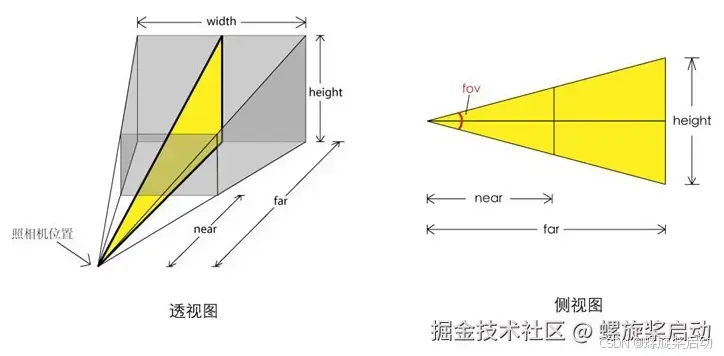
PerspectiveCamera( fov : Number, aspect : Number, near : Number, far : Number )
- fov: 视场即能够看到的角度范围,人的眼睛大约能够看到180度的视场,视角大小设置要根据具体应用,一般游戏会设置60~90度。 默认值45
- aspect:渲染窗口的长宽比,如果一个网页上只有一个全屏的canvas画布且画布上只有一个窗口,那么aspect的值就是网页窗口客户区的宽高比 window.innerWidth/window.innerHeight
- near(近裁切面):从距离相机多远的位置开始渲染,默认值0.1
- far(远裁切面):距离相机多远的位置截止渲染,如果设置的值偏小小,会有部分场景看不到。过大会影响渲染性能; 默认值1000
这些参数一起定义了摄像机的viewing frustum(视锥体)。
2.透视投影算法(Perspective Projection)
PerspectiveCamera在获取了上述参数后,会调用透视投影算法来实现试图的转换渲染逻辑
ps: 透视投影是一种常用的图形学技术,用于将三维空间中的物体投影到二维平面上,从而模拟人眼看到的视觉效果。这种投影方法可以创建出具有深度感的画面,使得远处的物体看起来比近处的小,符合现实世界的视觉规律。
源码地址:PerspectiveCamera.js
- 初始化PerspectiveCamera时调用updateProjectionMatrix方法,这个方法初始化投影矩阵projectionMatrix
class PerspectiveCamera extends Camera {
    constructor(fov = 50, aspect = 1, near = 0.1, far = 2000) {
        // ......
        this.updateProjectionMatrix();
    }
    // .......
    updateProjectionMatrix() {
      // ......
      // 透视投影算法(makePerspective)
	    this.projectionMatrix.makePerspective( left, left + width, top, top - height, near, this.far, this.coordinateSystem );
	    this.projectionMatrixInverse.copy( this.projectionMatrix ).invert();
	}
}
2.投影矩阵projectionMatrix的基类是Matrix4(4x4矩阵),该基类的makePerspective方法实现了透视投影算法
class Matrix4 {
    makePerspective(left, right, top, bottom, near, far, coordinateSystem = WebGLCoordinateSystem) {
        const te = this.elements;
        const x = 2 * near / ( right - left );
        const y = 2 * near / ( top - bottom );

        const a = ( right + left ) / ( right - left );
        const b = ( top + bottom ) / ( top - bottom );

        let c, d;

        if ( coordinateSystem === WebGLCoordinateSystem ) {
            c = - ( far + near ) / ( far - near );
            d = ( - 2 * far * near ) / ( far - near );
        } else if ( coordinateSystem === WebGPUCoordinateSystem ) {
            c = - far / ( far - near );
            d = ( - far * near ) / ( far - near );
        } else {
            throw new Error( 'THREE.Matrix4.makePerspective(): Invalid coordinate system: ' + coordinateSystem );
        }

        te[ 0 ] = x;	te[ 4 ] = 0;	te[ 8 ] = a; 	te[ 12 ] = 0;
        te[ 1 ] = 0;	te[ 5 ] = y;	te[ 9 ] = b; 	te[ 13 ] = 0;
        te[ 2 ] = 0;	te[ 6 ] = 0;	te[ 10 ] = c; 	te[ 14 ] = d;
        te[3] = 0; te[7] = 0; te[11] = - 1; te[15] = 0;
        return this;
    }
}
- makePerspective方法解析
这个方法乍一看很复杂,实则就是将投影算法的矩阵计算公式用js表示出来,对于应用层框架而言只是带入公式而已!
假设近裁剪面距离为 n,远裁剪面距离为 f,视景体的左右边界分别为 l 和 r,上下边界分别为 b 和 t,则透视投影矩阵 Mproj 可以表示为:
M p r o j = [ 2 n r − l 0 r + l r − l 0 0 2 n t − b t + b t − b 0 0 0 − f + n f − n − 2 f n f − n 0 0 − 1 0 ] M_{proj} = \begin{bmatrix} \frac{2n}{r-l} & 0 & \frac{r+l}{r-l} & 0 \\ 0 & \frac{2n}{t-b} & \frac{t+b}{t-b} & 0 \\ 0 & 0 & -\frac{f+n}{f-n} & -\frac{2fn}{f-n} \\ 0 & 0 & -1 & 0 \end{bmatrix} Mproj= r−l2n0000t−b2n00r−lr+lt−bt+b−f−nf+n−100−f−n2fn0
ps: 上述的te是一个4x4的变换矩阵,需要注意的点是在threejs矩阵的存储方式默认是列优先,而在我们大学线代中的矩阵是行优先。
源码地址:Matrix4
可以看出set方法传入是按照数组顺序,但是设置te矩阵是按照列的顺序进行set
class Matrix4 {
    constructor(n11, n12, n13, n14, n21, n22, n23, n24, n31, n32, n33, n34, n41, n42, n43, n44) {
        Matrix4.prototype.isMatrix4 = true;
        this.elements = [
            1, 0, 0, 0,
            0, 1, 0, 0,
            0, 0, 1, 0,
            0, 0, 0, 1
        ];
        if (n11 !== undefined) {
            this.set(n11, n12, n13, n14, n21, n22, n23, n24, n31, n32, n33, n34, n41, n42, n43, n44);
        }
    }

    set( n11, n12, n13, n14, n21, n22, n23, n24, n31, n32, n33, n34, n41, n42, n43, n44 ) {
		const te = this.elements;
		te[ 0 ] = n11; te[ 4 ] = n12; te[ 8 ] = n13; te[ 12 ] = n14;
		te[ 1 ] = n21; te[ 5 ] = n22; te[ 9 ] = n23; te[ 13 ] = n24;
		te[ 2 ] = n31; te[ 6 ] = n32; te[ 10 ] = n33; te[ 14 ] = n34;
		te[ 3 ] = n41; te[ 7 ] = n42; te[ 11 ] = n43; te[ 15 ] = n44;
		return this;

	}
}
透视矩阵推理过程本文不多赘述,粘一个链接:[图形学笔记]推导投影矩阵
进阶原理解析
上述对相机对象一些参数的设置本质上就是设置相机对象的视图矩阵modelViewMatrix和投影矩阵projectionMatrix属性
那么视图矩阵,投影矩阵是什么?他们之间有什么联系呢?
我们以threejs中一段基础的shader源码为例
源码地址:BasicShader.js
const BasicShader = {
	name: 'BasicShader',
	uniforms: {},
	vertexShader: /* glsl */`
		void main() {
			gl_Position = projectionMatrix * modelViewMatrix * vec4( position, 1.0 );
		}`,

	fragmentShader: /* glsl */`
		void main() {
			gl_FragColor = vec4( 1.0, 0.0, 0.0, 0.5 );
		}`
};

export { BasicShader };
在这段源码中我们可以看到vertexShader(顶点着色器)中的gl_Position(图像中每一个像素点的位置)是三个矩阵变换的最终结果;这三个矩阵分别是:
- projectionMatrix(投影矩阵)
- 上述过程中相机构造器的传参(fov,aspect,near,far)就是调整透视投影算法从而影响投影矩阵
- 在PerspectiveCamera中就是透视投影运算后的矩阵
- 在OrthographicCamera中就是正交投影运算后的矩阵
- modelViewMatrix(模型视图矩阵)
- 模型矩阵和视图矩阵的复合矩阵
- 模型矩阵:物体旋转,平移,缩放矩阵的复合矩阵
- 视图矩阵:设置相机对象的位置属性和lookAt方法本质就是改变自身的视图矩阵属性
- vec4( position, 1.0 )
- 初始坐标位置
ps: 改变相机的参数后,注意需要执行相机对象updateProjectionMatrix ()方法更新相机对象的投影矩阵,之所以需要手动更新,是因为Threejs为了提高渲染效率,Threejs系统每次执行渲染器WebGLRenderer渲染方法render()的时候不会读取相机相关的参数重新计算一次投影矩阵projectionMatrix,Threejs系统只会首次渲染的时候计算一次投影矩阵,所以当你改变影响相机投影矩阵的属性,自然需要调用updateProjectionMatrix ()更新相机对象的投影矩阵projectionMatrix。






 扫一扫
扫一扫


 6513
6513

 被折叠的 条评论
为什么被折叠?
被折叠的 条评论
为什么被折叠?
 到【灌水乐园】发言





