



 本文介绍生命游戏,它由英国数学家于1970年发明,基于元胞自动机理论。详细阐述了用C++实现生命游戏的过程,包括编写多个头文件和源文件,还可尝试不同初始布局,观察生命数量和分布的动态变化,感受简单规则产生的复杂行为。
目录
一、生命游戏概述
大家好!今天我将向大家介绍一款神奇的游戏——生命游戏(Game of Life)。这款游戏由英国数学家约翰·康威(John Horton Conway)于1970年发明,并在当时的计算机界引起了极大的关注。生命游戏是一款基于元胞自动机理论的模拟游戏,它的规则简单而富有哲理。
首先,让我们来了解一下生命游戏的基本概念和规则。在游戏中,我们有一个类似围棋棋盘的网格,每个格子可以是空的或包含一个“生命”单元。每个格子有8个相邻的格子:正上方、正下方、右侧、左侧、左上方、右上方、左下方以及右下方。相邻的格子中存活的生命数量被称为该格子的邻居数。
生命游戏的演化规则非常简洁:一个生命如果恰好有2个或3个邻居,它会存活到下一个世代;否则,会因为孤独或拥挤而死亡。一个空格,如果恰好有3个邻居,则诞生一个新生命。
总的来说,生命游戏是一款富有挑战性和趣味性的游戏,它可以激发我们对数学、计算机科学和生命哲学的兴趣。希望今天的分享能够让大家更好地理解和欣赏生命游戏的魅力。
二、C++生命游戏设计
本设计书旨在介绍如何使用C++编程语言实现生命游戏。生命游戏是由英国数学家约翰·康威在1970年发明的一款基于元胞自动机理论的模拟游戏,其规则简单而富有哲理。
首先,我们需要创建一个名为"TheGameOfLife"的项目,并编写头文件life.h和源文件life.cpp。其中,life.h定义了生命游戏类的基本结构,包括成员函数和私有变量;life.cpp实现了生命游戏类中的各个成员函数,如初始化游戏状态、打印当前状态以及更新游戏状态等。
此外,我们还需要编写两个辅助函数:instructions()用于打印使用生命游戏的说明信息;user_says_yes()用于获取用户的输入,并判断是否为肯定回答。这两个函数分别在utility.h中声明并在utility.cpp中实现。
最后,我们将编写主程序文件main.cpp,以运行我们的生命游戏并查看结果。在这个过程中,我们可以尝试不同的初始布局,观察它们如何按照生命游戏的规则演变。
通过这个C++实现的生命游戏,我们可以更好地理解和欣赏生命游戏的魅力,同时也能激发我们对数学、计算机科学和生命哲学的兴趣。
三、C++生命游戏实现
接下来,我将向大家展示如何使用C++编程语言实现生命游戏。在这个示例程序中,我们将创建一个名为"TheGameOfLife"的项目,并编写头文件life.h和源文件life.cpp。通过这些文件,我们可以定义游戏的基本结构、初始化游戏、打印当前状态以及更新游戏状态。
在Dev C++里创建项目TheGameOfLife
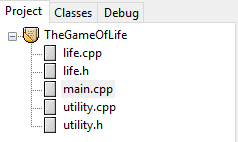
1、编写头文件life.h
这个头文件定义了生命游戏类(Life)的基本结构,包括成员函数和私有变量。其中的常量 maxrow 和 maxcol 分别表示网格的最大行数和最大列数。包含的成员函数有 initialize()、print() 和 update()。
const int maxrow = 20, maxcol = 60; // grid dimensions

class Life {
public:
	void initialize();
	void print();
	void update();
private:
	int grid[maxrow + 2][maxcol + 2]; // allows for two extra rows and columns
	int neighbor_count(int row, int col);
};

#define DONE
#include "life.cpp"
2、编写C++程序life.cpp
这个源文件实现了生命游戏类中的各个成员函数。initialize() 函数用于初始化游戏状态,用户可以指定活细胞的位置;print() 函数负责打印当前的游戏状态;update() 函数根据邻居计数规则更新游戏状态到下一代。
#ifdef DONE
void Life::initialize()
/*Pre: None
  Post: The Life object contains a configuration specified by the user.*/
{
	int row, col;
	for (row = 0; row <= maxrow + 1; row++)
		for (col = 0; col <= maxcol + 1; col++)
			grid[row][col] = 0;
	cout << "List the coordinates for living cells." << endl;
	cout << "Terminate the list with the special pair -1 -1" << endl;
	cin >> row >> col;
	while (row != -1 || col != -1) {
		if (row >=1 && row <= maxrow)
			if (col >=1 && col <= maxcol)
				grid[row][col] = 1;
		    else
		    	cout << "Column " << col << " is out of range." << endl;
		else
			cout << "Row " << row << " is out of range." << endl;
		cin >> row >> col;
	}
}

void Life::print()
/*Pre: The Life object contains a configuration.
  Post: The configuration is written for the user.*/
{
	int row, col;
	cout << "\nThe current Life configuration is:" << endl;
	for (row = 1; row <= maxrow; row++) {
		for (col = 1; col <= maxcol; col++)
			if (grid[row][col] == 1) cout << '*';
			else cout << ' ';
		cout << endl;
	}
	cout << endl;
}

void Life::update()
/*Pre: The Life object contains a configuration
  Post: The Life object contains the next generation of configuration.*/
{
	int row, col;
	int new_grid[maxrow + 2][maxcol + 2];

	for (row = 1; row <= maxrow; row++)
		for (col = 1; col <= maxcol; col++)
			switch(neighbor_count(row, col)) {
				case 2:
					new_grid[row][col] = grid[row][col]; // Status stays the same.
					break;
				case 3:
					new_grid[row][col] = 1; // Cell is alive.
					break;
				default:
					new_grid[row][col] = 0; // Cell is dead.
			}

	for (row = 1; row <= maxrow; row++)
		for (col = 1; col <= maxcol; col++)
			grid[row][col] = new_grid[row][col];
}

int Life::neighbor_count(int row, int col)
/*Pre: The Life object contains a configuration, and the coordinates row and col
       define a cell inside its hedge.
  Post: The number of living neighbors of the specified cell is returned.*/
{
	int i, j;
	int count = 0;

	for (i = row - 1; i <= row + 1; i++)
		for (j = col - 1; j <= col + 1; j++)
			count += grid[i][j]; // Increase the count if neighbor is alive.
	count -= grid[row][col]; // Reduce count, since cell is not its own neighbor.

	return count;
}
#endif
3、编写头文件utility.h
这个头文件包含了两个辅助函数声明:instructions() 用于打印使用生命游戏的说明信息;user_says_yes() 用于获取用户的输入,并判断是否为肯定回答。
#include <iostream>
#include <istream>
using namespace std;
#include "life.h"

void instructions();
bool user_says_yes();

#define DONE
#include "utility.cpp"
4、编写程序文件utility.cpp
这个源文件实现了 utility.h 中声明的两个辅助函数。instructions() 函数打印关于如何使用生命游戏的详细说明;user_says_yes() 函数接收用户输入并返回一个布尔值,表示用户是否给出了肯定回答。
#ifdef DONE
void instructions()
/*Pre: None.
  Post: Instructions for using the Life program have been printed.*/
{
	cout << "Welcome to Conway's game of Life." << endl;
	cout << "This game uses a grid of size " << maxrow << " by " << maxcol << " in which " << endl;
	cout << "each cell can either be occupied by an organism or not." << endl;
	cout << "The occupied cells change from generation to generation" << endl;
	cout << "according to the number of neighboring cells which are alive." << endl;
}

bool user_says_yes()
{
	int c;
	bool initial_response = true;

	do { // Loop until an appropriate input is received.
		if (initial_response)
			cout << " (y,n)? " << flush;
		else
			cout << "Respond with either y or n: " << flush;
		do { // Ignore white space.
			c = cin.get();
		} while (c == '\n' || c == ' ' || c == '\t');
		initial_response = false;
	} while (c != 'y' && c != 'Y' && c != 'n' && c != 'N');
	return(c == 'y' || c == 'Y');
}
#endif
5、编写主程序文件main.cpp
最后,我们将编写主程序文件main.cpp,以运行我们的生命游戏并查看结果。在这个过程中,我们可以尝试不同的初始布局,观察它们如何按照生命游戏的规则演变。
#include "utility.h"
int main() // Program to play Conway's game of Life
/*Pre: The user supplies an initial configuration of living cells.
  Post: The program prints a sequence of pictures showing the changes in the
        configuration of living cells according to the rules for the game of Life.
  Uses: The class Life and its methods initialize(), print(), and update().
        The functions instructions(); user_says_yes().*/
{
	Life configuration;
	instructions();
	configuration.initialize();
	cout << "count = " << configuration.neighbor_count(2, 3) << endl;
	configuration.print();
	cout << "Continue viewing new generations? " << endl;
	while (user_says_yes()) {
		configuration.update();
		configuration.print();
		cout << "Continue viewing new generations? " << endl;
	}

	return 0;
}
6、运行程序,查看结果
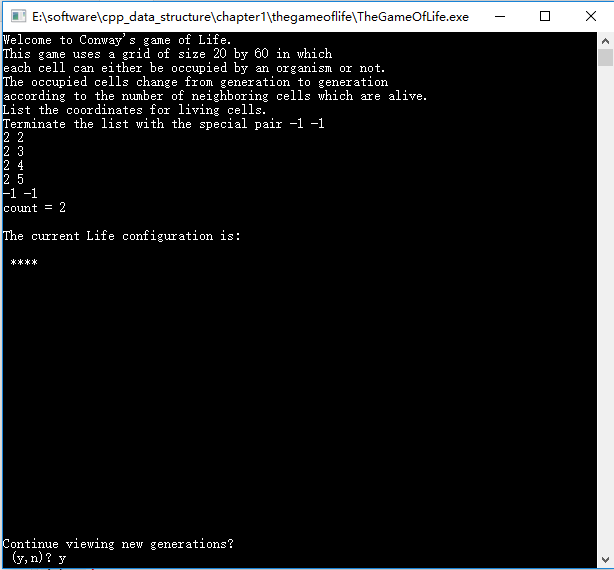
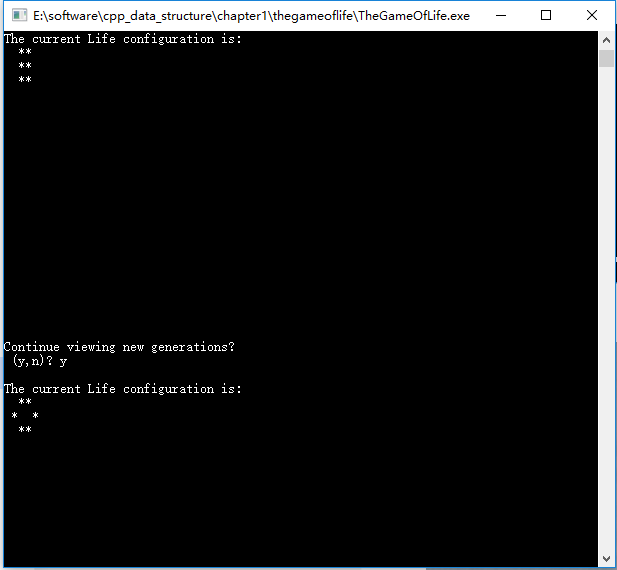
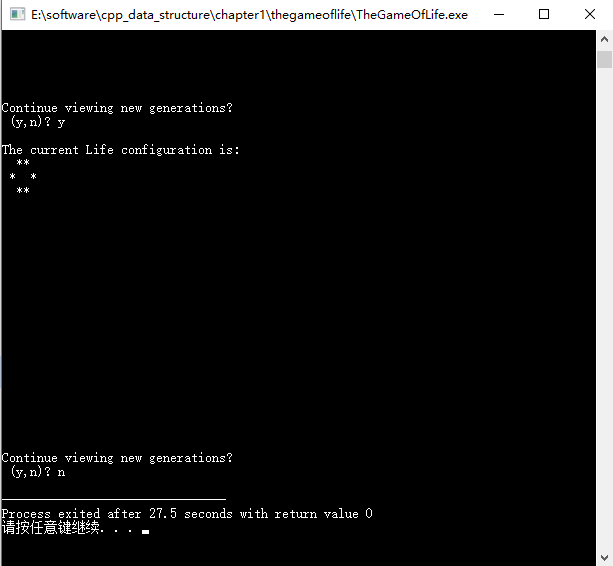
运行生命游戏程序后,我们可以看到一个由星号(*)表示的生命单元组成的初始布局。随着每个世代的更新,生命的数量和分布会发生变化,根据生命游戏的规则(B3/S23),只有在有2个或3个邻居时生命才能存活。通过观察这些动态变化,我们可以感受到生命游戏中的简单规则如何产生复杂且意想不到的行为模式。
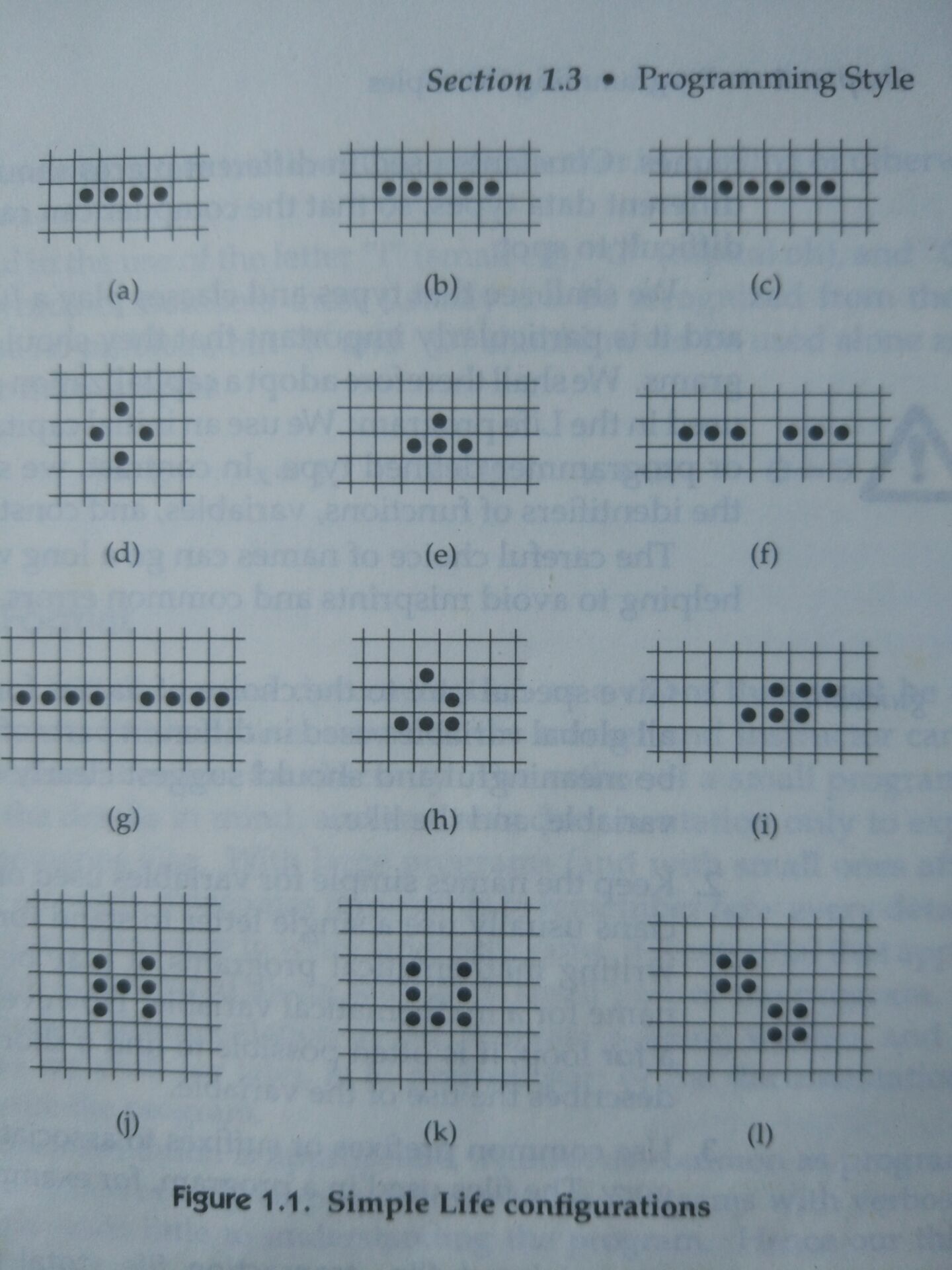
四、尝试生命游戏其它初始布局
在生命游戏中,尝试不同的初始布局可以产生千变万化的结果。例如,你可以从简单的点状布局开始,观察它们如何相互作用和演变;也可以设计复杂的图案,如滑翔机、飞船等,看它们如何在网格上移动和繁殖。通过探索各种初始布局,我们可以更深入地理解生命游戏的规则和复杂性。





 扫一扫
扫一扫


 756
756


 到【灌水乐园】发言



