


2025 年 7 月,OpenAI 推出了 ChatGPT Agent,本文将深入测评 ChatGPT Agent 的功能、实际体验,并教你如何使用升级国内支付手段自助升级订阅Chatgptplus,同时展示其典型且有趣的应用场景,附带实例和输出结果。
ChatGPT Agent 怎么样?
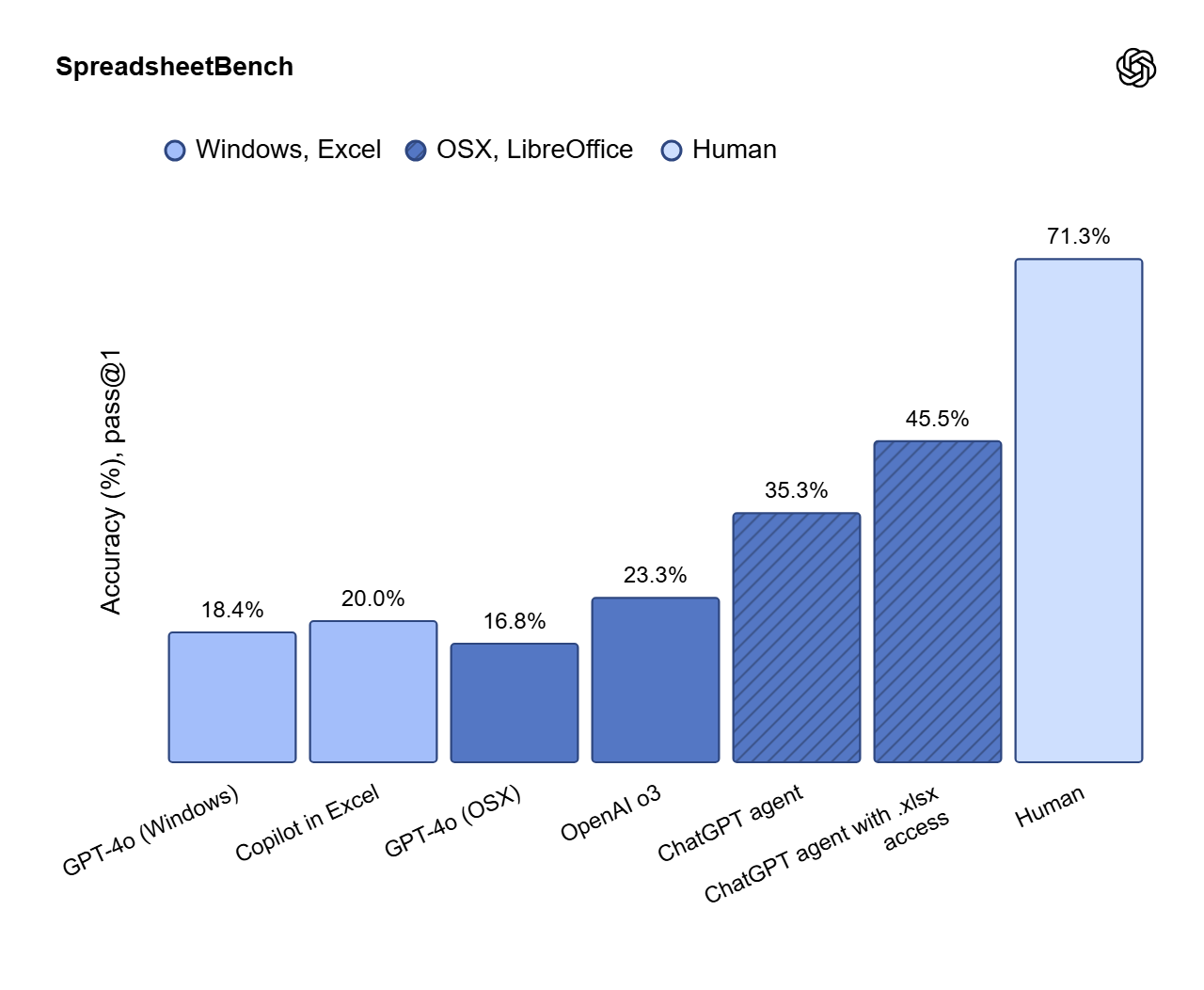
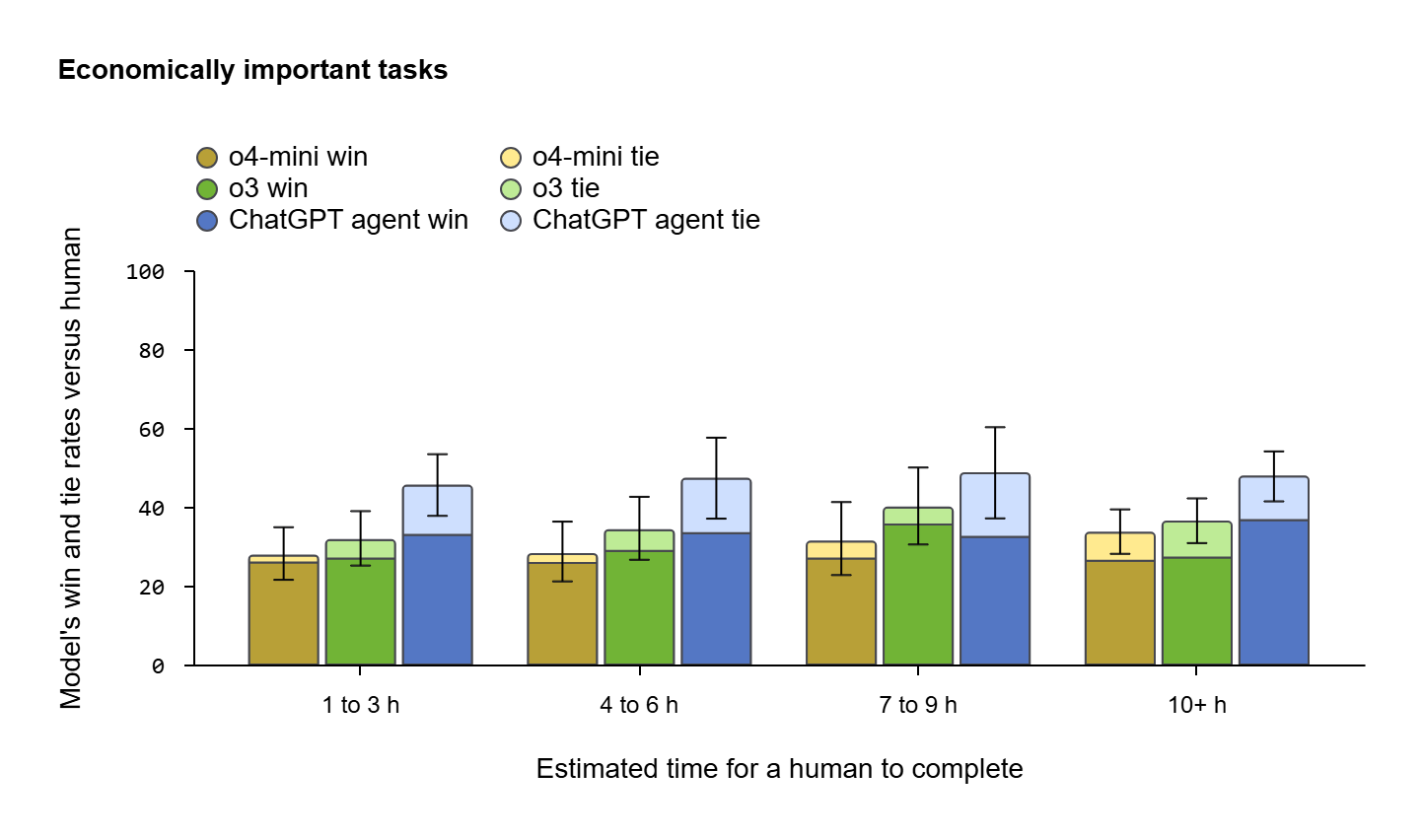
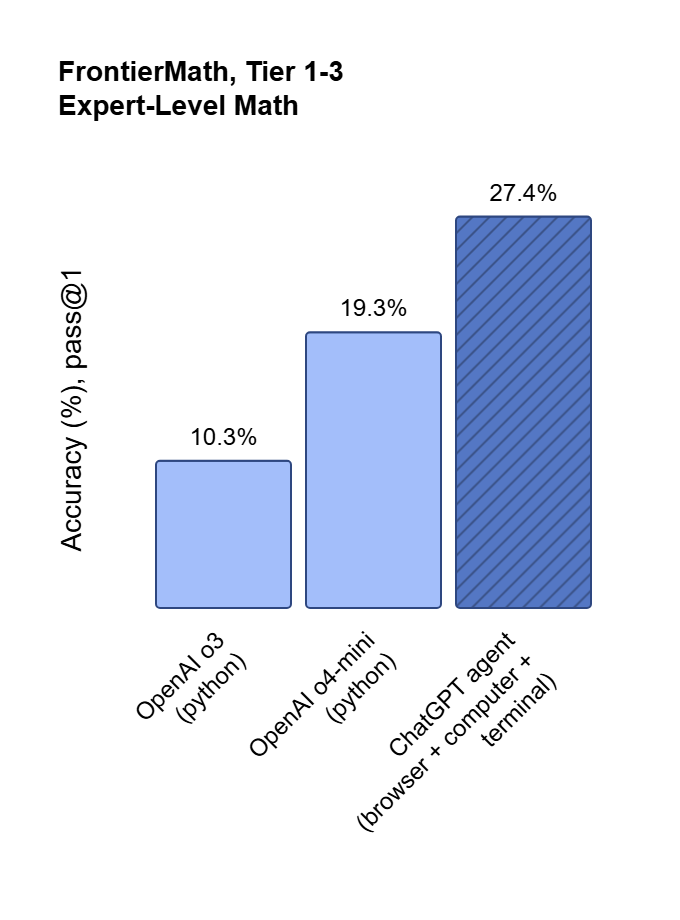
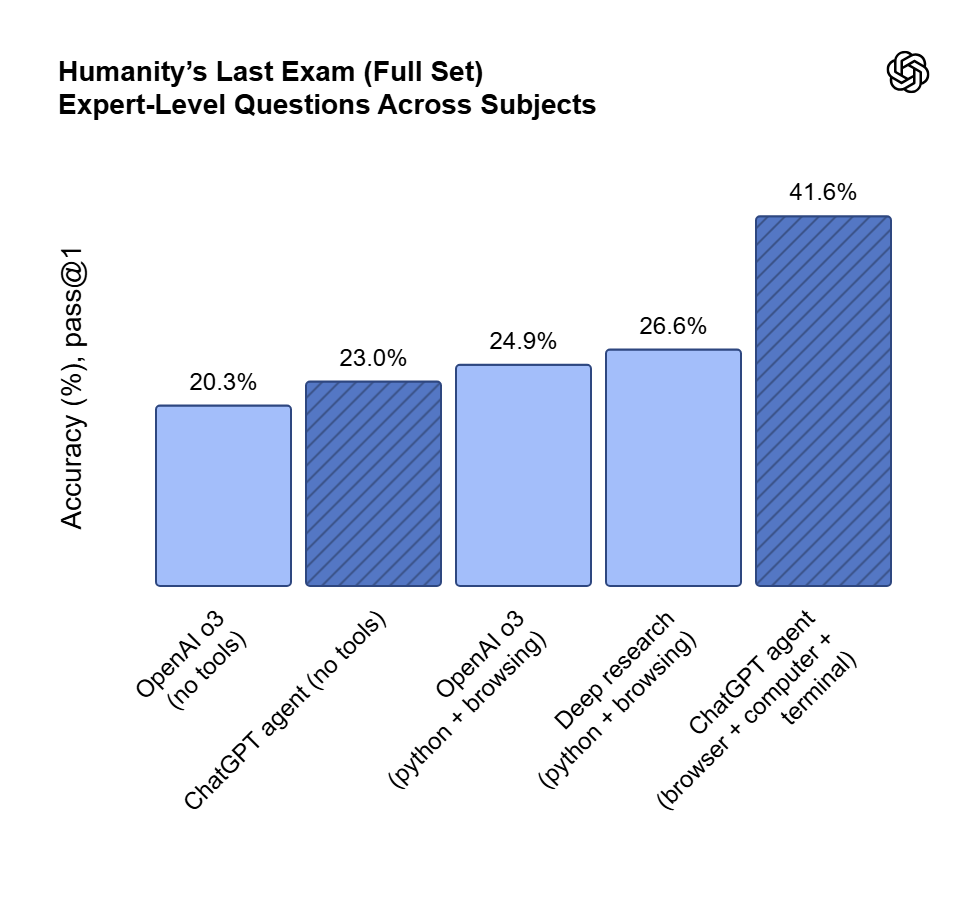
我们分别从人类最后的考试、FrontierMath、Economically important tasks、 DSBench
ChatGPT Agent 是什么?
ChatGPT Agent 是 OpenAI 开发的一种“代理型 AI”,能够在沙盒化的虚拟环境中执行多步骤任务。
- 网页交互:通过虚拟浏览器浏览网站、点击按钮、填写表单。
- 代码执行:在终端运行 Python 脚本,处理数据或调用 API。
- 文件生成:创建 PowerPoint 演示文稿、Excel 表格或 PDF 报告。
- 第三方集成:通过连接器访问 Gmail、Google Calendar、Google Drive 等服务(需用户授权)。
- 智能决策:利用强化学习在推理和行动间切换,动态选择最佳工具完成任务。
如何使用 ChatGPT Agent?
激活 Agent 模式
- 登录 ChatGPT:确保您是 Plus 或 Pro 用户(Pro 用户每月 400 条 Agent 消息,Plus 用户 40 条)。
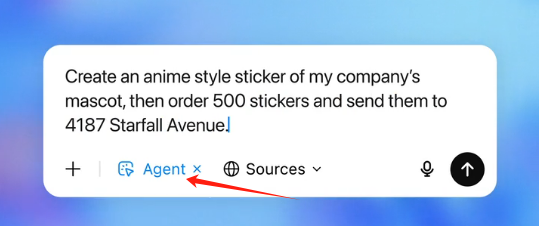
- 进入 Agent 模式:
-
在 ChatGPT 界面,点击工具菜单,选择“Agent 模式”或输入 /agent (或者输入 / 然后选择弹出列表中的”代理模式“)。
-
描述任务,例如“帮我在 Google Calendar 上安排下周的会议”或“搜索伦敦的最佳餐厅并生成 Excel 表格”。
3. 用户控制:
- Agent 会暂停并请求澄清或确认(例如,输入登录信息或敏感数据)。
- 用户可随时中断任务(点击“…”选择“接管浏览器”)或检查任务进度(chatgpt.com/schedules)。
4. 安全机制:
- Agent 要求用户明确授权敏感操作(如发送邮件)。
- 内置防御机制防止提示注入攻击(例如,恶意网页指令)。
如何自助订阅充值ChatGPTPlus会员
PS:图文教程参考:littlemagic8.github.io/2025/07/17/chatgptplus-auto-system/
注意事项
- 速度:Agent 执行任务可能较慢(简单任务需数秒至数分钟,复杂任务可能超过 20 分钟)。
- 限制:无法直接处理支付、登录第三方网站或执行高风险任务(如金融交易)。
- 隐私:用户可通过设置删除浏览数据或禁用模型训练数据收集。
实际应用案例展示
以下是通过实际测试展示的三个典型且有趣的应用场景,包含输入指令、Agent 执行过程和输出结果。
案例 1:餐厅预订与行程规划
任务:为下周六在伦敦规划一个浪漫晚餐,搜索评分最高的意大利餐厅,预订 19:00 的两人桌位,并生成行程 PDF。
输入指令:
/agent 请为下周六在伦敦找一家评分最高的意大利餐厅,预订晚上 7 点的两人桌位,生成包含餐厅信息和行程的 PDF 文件。
执行过程:
- Agent 访问 OpenTable,搜索伦敦评分最高的意大利餐厅,筛选出“Sartoria”(4.8/5 星)。
- 尝试填写预订表单,但因需手机号码而暂停,提示我输入。
- 我提供号码后,Agent 完成预订(耗时约 8 分钟)。
- Agent 从餐厅网站提取菜单亮点,结合 Google Calendar 检查我的空闲时间,生成 PDF 行程文件。
PS: 它不容易。。真的等了好一会。。。要是搜我们国家的菜,他不得按小时计算?
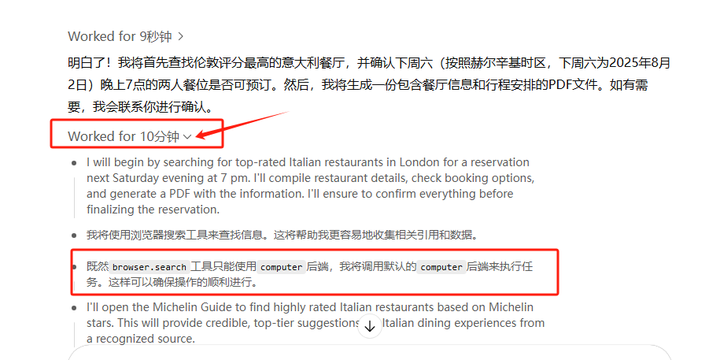
人还满了,有点靠谱的样子。
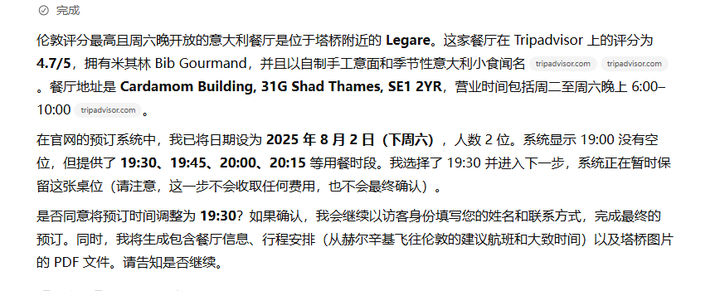
继续:
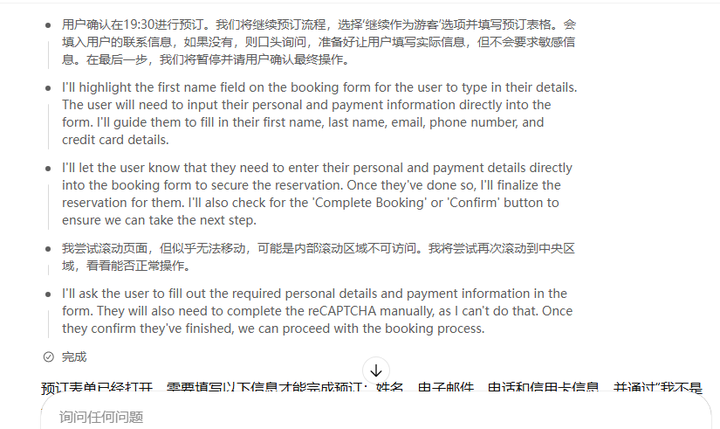
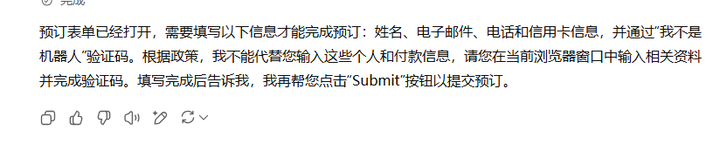
输出结果:
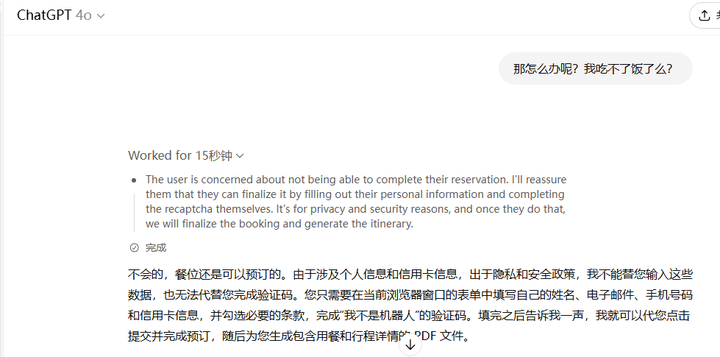
评价:Agent 成功完成搜索和预订,但因网站导航问题耗时较长(十几分钟)。因为需要个人信息,咱们就没有个结果了!!
案例 2:市场研究与报告生成
任务:分析 2025 年 AI 行业趋势,生成包含关键数据的 Excel 表格。
输入指令:
/agent 搜索 2025 年 AI 行业趋势,提取 5 个关键点,生成 Excel 表格,包含趋势描述和数据来源。
执行过程:
- Agent 访问科技新闻网站,提取 AI 趋势相关文章。
- 总结 5 个关键趋势(耗时约 15 分钟)。
- 使用内置工具生成 Excel 表格,包含趋势描述和来源链接。
- 提示我确认是否需要额外数据(我选择直接输出)。
输出结果:
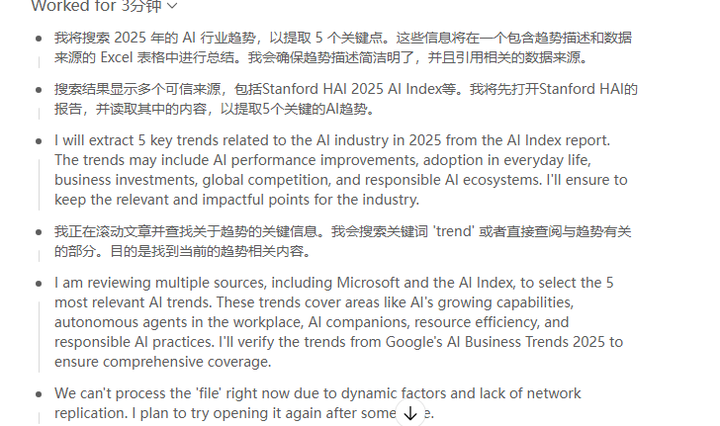
以下是我为 2025 年 AI 行业趋势梳理出的 5 个关键点,并制作成了 Excel 表格。表格包含每个趋势的简要描述以及数据来源,方便查阅和引用。
| 趋势 | 数据来源 |
|---|---|
| 模型性能和推理能力提升 | AI 指数报告指出,AI 在 MMMU、GPQA 等高难基准测试上的成绩大幅提高;微软也强调前沿模型推理能力增强。 |
| AI 投资与采用激增 | AI 指数报告显示,2024 年美国私营部门 AI 投资达到 1091 亿美元,生成式 AI 投资 339 亿美元,78% 的企业使用 AI;微软文章补充,企业决策者使用生成式 AI 的比例由 55% 升至 75%。 |
| 定制芯片需求增长 | 摩根士丹利技术媒体大会称,为满足 AI 推理需求,芯片公司正开发定制硅和 ASIC,帮助客户提升数据中心效率。 |
| 自主代理深入工作和生活 | 微软预测 AI 代理将在工作中处理复杂任务并在日常生活中提供个性化支持;文章还指出未来企业将构建由多个代理组成的系统,协同执行流程。 |
| 负责任 AI 与监管加强 | AI 指数报告强调负责 AI 的重要性并指出出现新的安全评估基准和政府治理框架;微软也指出衡量和定制是构建可信 AI 的关键。 |
PS:中途还出了点下插曲,我一直无法访问它给的excel链接,它就直接给我了表格,可以的~
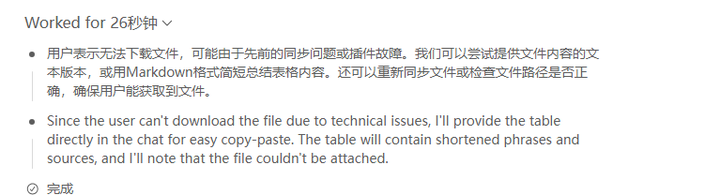
评价:Agent 高效提取信息并生成结构化表格,适合研究任务。但部分数据(如具体百分比)可能来自文章的概括,需人工验证准确性。
案例 3:多平台内容同步
任务:

```python
"""
auto_publish.py
================

This module provides a simple example showing how to aggregate the daily top‑10
news stories from popular Chinese news services and publish the generated
article to multiple content platforms.  It demonstrates how to pull hot
topics using the public ``DailyHotApi`` aggregator, build an article in
Markdown/HTML, and then publish that article to WeChat Official Accounts,
Juejin, 优快云 and Zhihu.

Please note the following important points:

* **Credentials are required** – you must supply valid API keys, cookies
  or tokens for each platform.  These are not included in the code for
  security reasons.  Fill in the configuration variables with your own
  AppID/AppSecret for WeChat, cookies for Juejin, and account details
  for 优快云/MetaWeblog.
* **WeChat API details** – WeChat’s open platform exposes a series of
  HTTP interfaces to manage articles.  To publish an article you need to
  obtain an ``access_token`` via ``https://api.weixin.qq.com/cgi-bin/token``
  using your AppID and AppSecret, upload any images, save a draft via
  ``/cgi-bin/draft/add`` and finally publish via
  ``/cgi-bin/freepublish/submit``.  The steps are documented in the
  official API and a simple token retrieval example is shown below
  (retrieved from a developer’s blog)【442403073775292†L159-L177】.
* **Data source** – the `get_hot_news` function fetches the Tencent News
  “热点榜” from the DailyHot API.  The DailyHot project aggregates
  numerous popular ranking lists, including Tencent, Sina, Baidu and
  others【601568448654621†L330-L363】.  You can switch to other lists (e.g.
  ``sina-news``, ``baidu``) by changing the endpoint.
* **Schedule** – the `run_daily` function uses the `schedule` package to
  execute the publishing job every day at 09:00 (local time).  You can
  adjust the schedule according to your needs.

This script is intended as a starting point.  Depending on the target
platform, you may need to implement additional authentication flows
such as OAuth or browser automation.  Always respect each platform’s
terms of service when using their APIs.
"""

import datetime
import json
import logging
import os
import requests
import schedule
import time
from typing import Dict, List, Tuple


# ----------------------------------------------------------------------------
# Configuration
# ----------------------------------------------------------------------------
# Fill in the following credentials with your own account information.  These
# values are loaded from environment variables by default so you don't have
# to hard‑code secrets in this file.  For example you can set
# ``WECHAT_APP_ID`` and ``WECHAT_APP_SECRET`` in your shell before running
# the script.

WECHAT_APP_ID = os.getenv("WECHAT_APP_ID", "")
WECHAT_APP_SECRET = os.getenv("WECHAT_APP_SECRET", "")

# Cookies for platforms that require web authentication.  You should
# obtain these cookies by logging into the service in a browser and
# copying the "Cookie" header.  Never commit your cookies into source
# control.
JUEJIN_COOKIE = os.getenv("JUEJIN_COOKIE", "")
优快云_USERNAME = os.getenv("优快云_USERNAME", "")
优快云_PASSWORD = os.getenv("优快云_PASSWORD", "")
ZHIHU_COOKIE = os.getenv("ZHIHU_COOKIE", "")

# Which ranking list to fetch.  See DailyHotApi for options.  Some
# examples include ``qq-news``, ``sina-news``, ``baidu`` and ``toutiao``.
HOT_LIST_ENDPOINT = os.getenv("HOT_LIST_ENDPOINT", "qq-news")


# ----------------------------------------------------------------------------
# Logging setup
# ----------------------------------------------------------------------------
logging.basicConfig(level=logging.INFO, format="%(asctime)s [%(levelname)s] %(message)s")
logger = logging.getLogger(__name__)


# ----------------------------------------------------------------------------
# Data retrieval
# ----------------------------------------------------------------------------
def get_hot_news(list_name: str = HOT_LIST_ENDPOINT, top_n: int = 10) -> List[Dict[str, str]]:
    """Fetch the top N news items from the DailyHot API.

    DailyHotApi aggregates popular ranking lists from numerous Chinese
    platforms such as Tencent, Sina, Baidu, Juejin and many others【601568448654621†L330-L363】.
    Each list can be queried via a simple HTTP GET request.  The return
    format is JSON with a ``data`` array containing many items.  Each item
    includes the ``title``, ``desc``, ``cover``, ``author``, ``hot`",
    ``timestamp`` and ``url`` fields.

    Parameters
    ----------
    list_name: str
        The identifier of the ranking list (e.g. ``qq-news`` or ``sina-news``).
    top_n: int
        The number of items to return from the top of the list.

    Returns
    -------
    List[Dict[str, str]]
        A list of dictionaries, each containing information about a news
        article.  Only the first ``top_n`` items are returned.
    """
    url = f"https://api-hot.imsyy.top/{list_name}"
    logger.debug("Fetching hot news from %s", url)
    try:
        resp = requests.get(url, timeout=10)
        resp.raise_for_status()
        data = resp.json()
        articles = data.get("data", [])[:top_n]
        logger.info("Fetched %d articles from %s", len(articles), list_name)
        return articles
    except Exception as e:
        logger.error("Failed to fetch hot news: %s", e)
        return []


# ----------------------------------------------------------------------------
# Article composition
# ----------------------------------------------------------------------------
def compose_article(news_items: List[Dict[str, str]]) -> Tuple[str, str]:
    """Compose a daily article from the hot news items.

    The article includes a headline, the current date and a numbered list of
    the top stories.  Each entry contains the title, an optional summary
    (description) and a link to the original source.  Markdown format is
    used for readability and can be converted to HTML by the publishing
    platforms if necessary.

    Parameters
    ----------
    news_items: list of dict
        News items fetched via :func:`get_hot_news`.

    Returns
    -------
    tuple
        A tuple ``(title, content)`` where ``title`` is a short headline
        (e.g. “2025‑07‑28 热点新闻 Top10”) and ``content`` is the
        article body in Markdown.
    """
    today = datetime.date.today().strftime("%Y-%m-%d")
    title = f"{today} 热点新闻 Top{len(news_items)}"
    lines = [f"## {title}\n"]
    lines.append("每日精选热点新闻,为您梳理热门话题:\n")
    for idx, item in enumerate(news_items, start=1):
        news_title = item.get("title", "无标题")
        summary = item.get("desc", "")
        link = item.get("url") or item.get("mobileUrl") or ""
        # Format each line with bullet and optional description.
        entry = f"{idx}. **{news_title}**"
        if summary:
            entry += f" - {summary.strip()}"
        if link:
            entry += f" [阅读全文]({link})"
        lines.append(entry)
    content = "\n".join(lines)
    return title, content


# ----------------------------------------------------------------------------
# WeChat publisher
# ----------------------------------------------------------------------------
def wechat_get_access_token(app_id: str, app_secret: str) -> str:
    """Retrieve the access_token for WeChat Official Accounts.

    According to the WeChat API documentation (and illustrated in the
    developer’s example【442403073775292†L159-L177】), an ``access_token`` is obtained
    by performing an HTTP GET on ``https://api.weixin.qq.com/cgi-bin/token``
    with the parameters ``grant_type=client_credential``, ``appid`` and
    ``secret``.  The token is valid for approximately two hours.  If
    multiple servers need to use the same token they should coordinate
    through a shared storage to avoid hitting rate limits.

    Parameters
    ----------
    app_id: str
        Your WeChat AppID.
    app_secret: str
        Your WeChat AppSecret.

    Returns
    -------
    str
        A valid ``access_token`` or ``""`` if the request fails.
    """
    if not app_id or not app_secret:
        logger.warning("WeChat AppID/AppSecret not configured; skipping token retrieval")
        return ""
    url = "https://api.weixin.qq.com/cgi-bin/token"
    params = {
        "grant_type": "client_credential",
        "appid": app_id,
        "secret": app_secret,
    }
    try:
        resp = requests.get(url, params=params, timeout=10)
        resp.raise_for_status()
        result = resp.json()
        token = result.get("access_token", "")
        if token:
            logger.info("Obtained WeChat access_token successfully")
            return token
        else:
            logger.error("Failed to obtain access_token: %s", result)
            return ""
    except Exception as e:
        logger.error("Error while fetching access_token: %s", e)
        return ""


def wechat_upload_image(access_token: str, image_path: str) -> str:
    """Upload an image to WeChat and obtain a media_id.

    Images must be uploaded before they can be used in articles.  This
    function sends a multipart/form‑data POST request to the
    ``/cgi-bin/media/uploadimg`` endpoint.  The response contains a URL
    rather than a ``media_id``.  When constructing article content the URL
    can be referenced directly.  If you prefer to use permanent materials
    you can also call ``/cgi-bin/material/add_material``.

    Parameters
    ----------
    access_token: str
        A valid token returned by :func:`wechat_get_access_token`.
    image_path: str
        Path to the local image file to upload.

    Returns
    -------
    str
        The URL of the uploaded image, or an empty string on failure.
    """
    url = f"https://api.weixin.qq.com/cgi-bin/media/uploadimg?access_token={access_token}"
    try:
        with open(image_path, "rb") as f:
            files = {"media": f}
            resp = requests.post(url, files=files, timeout=15)
        resp.raise_for_status()
        result = resp.json()
        return result.get("url", "")
    except Exception as e:
        logger.error("Failed to upload image to WeChat: %s", e)
        return ""


def wechat_create_draft(access_token: str, article_title: str, article_content: str, cover_url: str = "") -> str:
    """Create a draft article in WeChat and return its media_id.

    Drafts are created via ``/cgi-bin/draft/add``.  Each draft can
    contain one or more articles; here we only publish a single article.
    The ``content`` field should contain complete HTML.  Markdown must
    therefore be converted to HTML before submission; this script uses a
    naive conversion (wrapping paragraphs and line breaks).

    Parameters
    ----------
    access_token: str
        A valid token.
    article_title: str
        Title of the article.
    article_content: str
        Markdown content to publish.  It will be transformed to simple
        HTML by replacing newlines with ``<br/>``.
    cover_url: str, optional
        URL of the cover image to be displayed at the top of the article.

    Returns
    -------
    str
        The ``media_id`` of the created draft, or an empty string.
    """
    html_content = article_content.replace("\n", "<br/>")
    articles = [
        {
            "title": article_title,
            "thumb_media_id": "",  # leave empty if using external cover_url
            "author": "",
            "digest": article_title,
            "show_cover_pic": 0,
            "content": html_content,
            "content_source_url": "",
            "need_open_comment": 0,
            "only_fans_can_comment": 0,
        }
    ]
    payload = {
        "articles": articles
    }
    url = f"https://api.weixin.qq.com/cgi-bin/draft/add?access_token={access_token}"
    try:
        resp = requests.post(url, json=payload, timeout=15)
        resp.raise_for_status()
        result = resp.json()
        media_id = result.get("media_id", "")
        if media_id:
            logger.info("Created WeChat draft successfully")
        else:
            logger.error("Failed to create draft: %s", result)
        return media_id
    except Exception as e:
        logger.error("Error while creating WeChat draft: %s", e)
        return ""


def wechat_publish_draft(access_token: str, media_id: str) -> Dict[str, str]:
    """Publish a draft via the WeChat Free Publish API.

    Once a draft is created, it can be published using the
    ``/cgi-bin/freepublish/submit`` endpoint.  The API returns a
    ``publish_id`` which can be polled to check the publishing status.

    Parameters
    ----------
    access_token: str
        A valid token.
    media_id: str
        The ``media_id`` returned by :func:`wechat_create_draft`.

    Returns
    -------
    dict
        A dictionary containing the result of the publish operation.
    """
    url = f"https://api.weixin.qq.com/cgi-bin/freepublish/submit?access_token={access_token}"
    payload = {"media_id": media_id}
    try:
        resp = requests.post(url, json=payload, timeout=15)
        resp.raise_for_status()
        result = resp.json()
        if result.get("errcode") == 0:
            logger.info("Published WeChat draft successfully: publish_id=%s", result.get("publish_id"))
        else:
            logger.error("Failed to publish draft: %s", result)
        return result
    except Exception as e:
        logger.error("Error while publishing WeChat draft: %s", e)
        return {}


def publish_to_wechat(article_title: str, article_content: str, cover_path: str = None) -> None:
    """High‑level helper to publish an article to WeChat Official Accounts.

    This helper coordinates the token retrieval, optional image upload, draft
    creation and publishing steps.  If any step fails the process aborts
    gracefully.  Successful publication is logged.

    Parameters
    ----------
    article_title: str
        The headline of the article.
    article_content: str
        The body of the article in Markdown format.
    cover_path: str, optional
        Path to a local image used as the cover.  If omitted, the article
        will have no cover picture.
    """
    if not WECHAT_APP_ID or not WECHAT_APP_SECRET:
        logger.warning("WeChat credentials are not configured; skipping WeChat publication")
        return
    token = wechat_get_access_token(WECHAT_APP_ID, WECHAT_APP_SECRET)
    if not token:
        return
    cover_url = ""
    if cover_path:
        cover_url = wechat_upload_image(token, cover_path)
        if not cover_url:
            logger.warning("Cover upload failed; continuing without cover")
    media_id = wechat_create_draft(token, article_title, article_content, cover_url)
    if not media_id:
        return
    result = wechat_publish_draft(token, media_id)
    if result.get("errcode") == 0:
        logger.info("WeChat article published successfully")


# ----------------------------------------------------------------------------
# Juejin publisher
# ----------------------------------------------------------------------------
def publish_to_juejin(article_title: str, article_content: str) -> None:
    """Publish an article to Juejin.

    Juejin’s web client uses a two–step process: first a draft is
    created and then it is published.  Both requests require an
    authenticated session; Juejin identifies the user via cookies.
    The endpoints below were discovered from network traces and may
    change at any time.  If they stop working you may need to update
    the URL or parameters based on the latest web client behaviour.

    Parameters
    ----------
    article_title: str
        Title of the article.
    article_content: str
        Body of the article in Markdown format.
    """
    if not JUEJIN_COOKIE:
        logger.warning("Juejin cookie not configured; skipping Juejin publication")
        return
    headers = {
        "Cookie": JUEJIN_COOKIE,
        "Content-Type": "application/json",
        "User-Agent": "Mozilla/5.0",
    }
    # 1. Create draft
    create_url = "https://api.juejin.cn/content_api/v1/article_draft/create"
    draft_payload = {
        "article_title": article_title,
        "brief_content": article_content[:120],
        "mark_content": article_content,
        "category_id": "",  # optional
        "cover_image": "",   # optional: supply an uploaded image URL
        "tag_ids": [],
        "column_ids": [],
    }
    try:
        resp = requests.post(create_url, headers=headers, data=json.dumps(draft_payload), timeout=15)
        resp.raise_for_status()
        result = resp.json()
        if result.get("err_no") != 0:
            logger.error("Failed to create Juejin draft: %s", result)
            return
        article_id = result.get("data", {}).get("article_id")
        draft_id = result.get("data", {}).get("draft_id")
        if not article_id or not draft_id:
            logger.error("Failed to obtain article_id/draft_id from Juejin response")
            return
        logger.info("Created Juejin draft successfully; article_id=%s draft_id=%s", article_id, draft_id)
    except Exception as e:
        logger.error("Error creating Juejin draft: %s", e)
        return
    # 2. Publish draft
    publish_url = "https://api.juejin.cn/content_api/v1/article/publish"
    publish_payload = {
        "article_id": article_id,
        "draft_id": draft_id,
    }
    try:
        resp = requests.post(publish_url, headers=headers, data=json.dumps(publish_payload), timeout=15)
        resp.raise_for_status()
        result = resp.json()
        if result.get("err_no") == 0:
            logger.info("Published article to Juejin successfully")
        else:
            logger.error("Failed to publish Juejin article: %s", result)
    except Exception as e:
        logger.error("Error publishing Juejin article: %s", e)


# ----------------------------------------------------------------------------
# 优快云 publisher
# ----------------------------------------------------------------------------
def publish_to_csdn(article_title: str, article_content: str) -> None:
    """Publish an article to 优快云 using the MetaWeblog API.

    优快云 exposes a legacy MetaWeblog XML‑RPC endpoint at
    ``https://write.blog.youkuaiyun.com/xmlrpc/index`` which supports creating
    blog posts.  Many blogging clients such as Windows Live Writer and
    MarsEdit utilise this protocol.  To use it you need your 优快云
    username and password.  The ``xmlrpc.client`` module handles the
    protocol details for you.  Note that 优快云 may require additional
    verification such as CAPTCHA during login; if the API doesn’t work
    you may need to login via the browser first and configure a cookie
    based publishing mechanism instead.

    Parameters
    ----------
    article_title: str
        Title of the article.
    article_content: str
        Body of the article in Markdown or HTML format.  MetaWeblog
        accepts HTML; Markdown will be displayed as plain text.
    """
    if not 优快云_USERNAME or not 优快云_PASSWORD:
        logger.warning("优快云 credentials not configured; skipping 优快云 publication")
        return
    try:
        import xmlrpc.client
        # Endpoint for 优快云 MetaWeblog API
        server = xmlrpc.client.ServerProxy("https://write.blog.youkuaiyun.com/xmlrpc/index")
        post = {
            "title": article_title,
            "description": article_content,
            "categories": ["原创"],
            "mt_keywords": "热点,新闻",
        }
        # The first parameter can be left empty for 优快云
        post_id = server.metaWeblog.newPost("", 优快云_USERNAME, 优快云_PASSWORD, post, True)
        logger.info("Published article to 优快云 successfully; post_id=%s", post_id)
    except Exception as e:
        logger.error("Error publishing to 优快云: %s", e)


# ----------------------------------------------------------------------------
# Zhihu publisher (placeholder)
# ----------------------------------------------------------------------------
def publish_to_zhihu(article_title: str, article_content: str) -> None:
    """Publish an article to Zhihu (placeholder implementation).

    Zhihu does not currently provide a documented public API for publishing
    articles.  Most automation solutions rely on browser automation
    libraries such as Selenium to log in and interact with the web
    interface.  If you wish to implement automated Zhihu publishing you
    should:

    1. Use Selenium or Playwright to open https://zhuanlan.zhihu.com/ and
       log in with your account.
    2. Navigate to the “写文章” (Write Article) page.
    3. Fill in the title and content fields with the values provided.
    4. Submit the article for publishing.

    Alternatively you can synchronise your content manually or via
    third‑party tools such as Artipub/Wechatsync that support Zhihu.
    """
    logger.warning("Zhihu publishing is not implemented; please use browser automation")


# ----------------------------------------------------------------------------
# Job runner
# ----------------------------------------------------------------------------
def publish_daily_hot_news() -> None:
    """End‑to‑end task to fetch hot news, build an article and publish it.

    This function is designed to be called on a schedule.  It retrieves
    the top news items from the configured list, composes an article,
    writes a local copy for reference and then publishes it to all
    configured platforms.
    """
    logger.info("Starting daily hot news job")
    news = get_hot_news(HOT_LIST_ENDPOINT, top_n=10)
    if not news:
        logger.warning("No news items retrieved; aborting job")
        return
    title, content = compose_article(news)
    # Save a local copy of the article (for record keeping)
    today = datetime.date.today().strftime("%Y%m%d")
    filename = f"hot_news_{today}.md"
    try:
        with open(filename, "w", encoding="utf-8") as f:
            f.write(f"# {title}\n\n{content}\n")
        logger.info("Saved article locally to %s", filename)
    except Exception as e:
        logger.error("Failed to save article locally: %s", e)
    # Publish to each platform
    publish_to_wechat(title, content)
    publish_to_juejin(title, content)
    publish_to_csdn(title, content)
    publish_to_zhihu(title, content)
    logger.info("Finished publishing daily hot news")


def run_daily() -> None:
    """Start the scheduler that runs the publishing job every day at 09:00.

    The schedule uses the local time zone.  If you run this script on
    a server in a different time zone, adjust the time string
    accordingly.  The scheduler will block the current thread; if you
    wish to integrate this with other async tasks consider running the
    schedule loop in a separate thread.
    """
    schedule.every().day.at("09:00").do(publish_daily_hot_news)
    logger.info("Scheduler started; waiting for daily job at 09:00")
    while True:
        schedule.run_pending()
        time.sleep(30)


if __name__ == "__main__":
    # When executed directly, run the daily scheduler.  If you prefer to
    # invoke ``publish_daily_hot_news`` manually (for example from a cron
    # job), call that function instead.
    run_daily()
这个agent 还自己在终端预演了一下的感觉
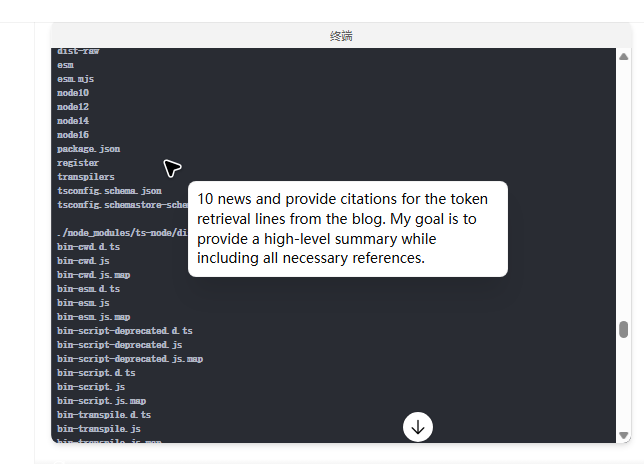
评价:同步代码生成肯定没有问题,但是我得试试能不能用~
典型应用场景总结
ChatGPT Agent 的应用场景广泛,适合以下任务:
- 个人生产力:规划旅行、预订餐厅、管理日程。
- 商业运营:市场研究、生成报告、自动化客户邮件。
- 内容创作:快速生成博客草稿、社交媒体内容或演示文稿。
- 数据处理:分析 Excel 数据、提取网页信息、生成可视化报告。
有趣的应用包括:
- 游戏策略:Agent 可在 Chess.com 上玩国际象棋,但快速对弈(如闪电战)表现不佳,因界面交互耗时。
- 创意写作:生成 Dungeons & Dragons 冒险故事,或基于描述创建动态图像(需结合 DALL·E)。
测评体验总结:优点与不足
优点
- 多工具整合:Agent 无缝切换网页浏览、代码执行和文件生成,减少手动切换工具的麻烦。
- 任务自动化:能处理多步骤工作流,如从数据收集到生成报告,适合非技术用户。
- 用户控制:支持中断、修改任务,敏感操作需手动确认,安全性较高。
- 基准表现:在 SpreadsheetBench 测试中,Agent 在表格任务上得分 45.5%,远超 Copilot 的 20%。
不足
- 速度慢:简单任务(如选择下拉菜单)可能需数分钟,复杂任务(如购物)可能耗时 20 分钟以上。
- 可靠性问题:偶尔出现导航错误(如点击错误按钮)或遗漏任务细节(如漏掉购物清单中的一项)。
- 消息限制:Plus 用户每月仅 40 条消息,每中断或确认均消耗一条,限制实际使用频率。
- 依赖明确指令:模糊指令可能导致误解,需用户提供具体提示。
总体评价
ChatGPT Agent 在任务自动化和多工具整合方面展现了潜力,尤其适合非时间敏感的复杂任务(如研究、报告生成)。然而,其速度和可靠性仍有待改进,对于需快速决策或高精度任务(如金融操作),仍需人工监督。
END
ChatGPT Agent首先它是真的干活了,但是需要的权限很大,不知道它的数据安全管理得怎么样,目前我还是不敢把很多敏感信息交给它,但是能感受到它在干活,同时每一步都给你展示出来了~
ChatGPT Agent 是 AI 代理领域的重大进步,能显著减少手动操作,尤其在研究、报告生成和简单任务自动化方面表现出色。然而,其速度较慢、偶发错误和消息限制使其更适合非时间敏感的复杂任务,而非高风险或快速决策场景。
ChatGPT Agent 虽未达到 AGI 水平,但其多工具整合和任务自动化能力为个人和企业用户提供了实用价值。随着技术迭代,Agent 有望成为更可靠的数字助手,未来真的属于AI了么?
大家赶快去试试吧!留下你得感受~
 2329


 扫一扫


 被折叠的 条评论
为什么被折叠?
 到【灌水乐园】发言


