


效果
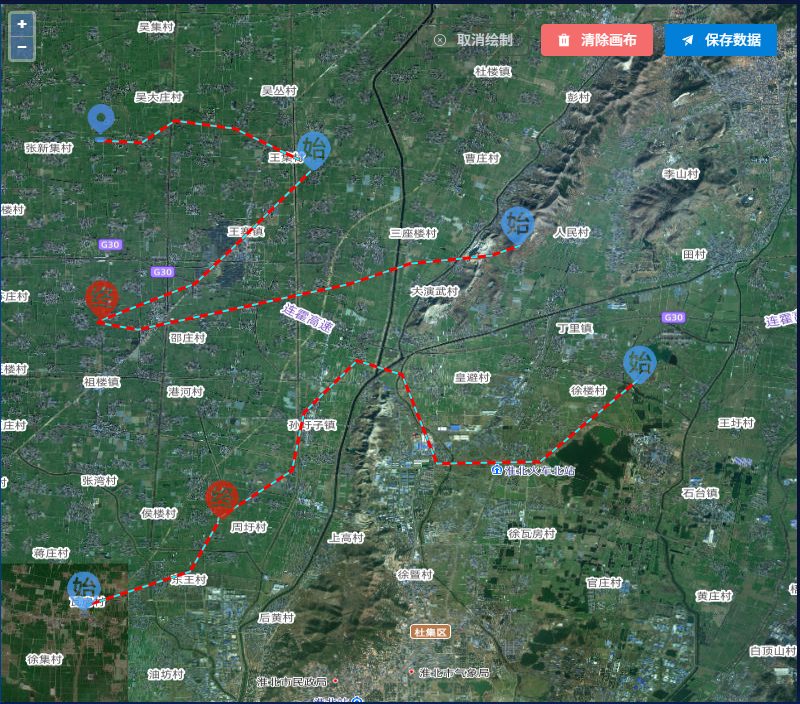
代码分享
<script lang="ts" setup>
import { defineComponent, onBeforeUnmount, onMounted, ref } from 'vue';


import localtion from '@/assets/map/localtion.png';
import luxian from '@/assets/map/luxian.png';
import start from '@/assets/map/start.png';
import end from '@/assets/map/end.png';
import 'ol/ol.css';
import { transform } from 'ol/proj'
import Map from 'ol/Map';
import TileLayer from 'ol/layer/Tile';
import View from 'ol/View';
import { Overlay, Feature } from 'ol';
import Point from 'ol/geom/Point';
import { getVectorContext } from 'ol/render';
import { defaults as defaultControls, MousePosition } from 'ol/control';
import { Cluster, Vector, XYZ } from 'ol/source';
import Draw, { createBox, createRegularPolygon } from 'ol/interaction/Draw';
import GeoJSON from 'ol/format/GeoJSON';
import VectorSource from 'ol/source/Vector';
import { Vector as VectorLayer, Tile } from 'ol/layer';
import { Fill, Stroke, Style, Icon, Circle, Text } from 'ol/style';
import { TileWMS, Vector as SourceVector } from 'ol/source';
import { Vector as LayerVector } from 'ol/layer';
import { createStringXY } from 'ol/coordinate';
import { ElMessage, ElMessageBox } from 'element-plus';
// 引入Lodash库
import _ from 'lodash';
import moment from 'moment';
import { feature } from '@turf/turf';
import { fromLonLat, get as getProjection } from 'ol/proj';
const types: any = {
  localtion: localtion,
  luxian: luxian,
  start: start,
  end: end,
}
import geojsonzy from './geojsonzy.json';
const pointImgs: any[] = [
  { id: 16, icon: "localtion", name: '建筑物', type: 'Point' },
  { id: 15, icon: "start", name: '起点', type: 'Point' },
  { id: 14, icon: "end", name: '终点', type: 'Point' },
  { id: 17, icon: "luxian", name: '路线', type: 'LineString' },
];
const props = defineProps({
  //拓扑图是否可编辑
  editAble: {
    type: Boolean,
    default: true,
  },
  data: {
    type: Object,
    default: () => { }
  }
});
watch(() => props.data, (val: any) => {
  getJSON();
})
const emit = defineEmits(["update:data"])
const editAble = ref<boolean>(props.editAble)
//pannel 选中
const active = ref<number>(0);
//画的标记
const tagActive = ref<string>('')
//画的动作
let draw = ref<any>(null);
const attrsTemp = ref<any[]>([
  { key: 'key', value: 'value', display: true }
]);
const attrs = ref<any[]>([
  { key: '', value: '', display: true }
]);
const mapInteractionSource = new SourceVector({ wrapX: false });
const map: any = ref(null);
//选中的图层
const selectedFeature = ref<any>();
//选中feature的id
const featureId = ref<any>();
//是否编辑图层属性
const editAttr = ref<boolean>(false)
// 创建GeoJSON格式化器
const geojsonFormat = new GeoJSON();
const currentZoom = ref<any>(12)
const lng = ref<any>();
const lat = ref<any>();
const metaDada = ref<any[]>([
  { metaKey: 'name', label: '名称' },
]);
onMounted(() => {
  // getJSON();
})

const legengClick = async (item: any) => {
  active.value = item.id;
  handleDraw(item);
}
//线路渲染的内外宽度
const linesStyle = {
  in: {
    width: 2,
    color: '#00FCFF',
  },
  out: {
    width: 3,
    color: 'red',
  },
};

//绘画的通用样式====虚线
const drawStyle = (item: any, status: string) => {
  const states = ["draw", "drawend"];
  let type, src, name;
  if (states.includes(status)) {
    type = item.type;
    src = types[item.icon];
    name = item.name;
  } else if (item instanceof Feature) {
    type = item.get("cfg").type
    src = item.get("cfg").icon ? types[item.get("cfg").icon] : item.get("cfg").src
    name = item.get("cfg").name;
  }
  switch (type) {
    case "Point":
      return new Style({
        image: new Icon({
          opacity: 0.75,
          src: src,
          scale: 0.2
        })
      })
      break;
    case 'LineString':
      return [new Style({
        stroke: new Stroke({
          color: linesStyle.out.color,
          width: linesStyle.out.width,
        })
      }), new Style({
        stroke: new Stroke({
          color: linesStyle.in.color,
          width: linesStyle.in.width,
          lineDash: [5, 10],
          lineDashOffset: 0,
        })
      })]
    default:
      break;
  }

};
const mapRef = ref(null);
const mouseControl = new MousePosition({
  coordinateFormat: createStringXY(4),
  projection: 'EPSG:4326',
  className: "custom-mouse-position",
  // @ts-ignore
  target: document.getElementById('mouse-position'),
});
// 获取JSON数据
const getJSON = async () => {
  // let geojsonString: any = JSON.stringify(geojsonzy) || localStorage.getItem('geojsonString');
  let geojsonString = props.data?.data;
  if (geojsonString != null && geojsonString != '' && geojsonString) {
    try {
      var features = geojsonFormat.readFeatures(geojsonString);
      mapInteractionSource.addFeatures(features);
    } catch (error) {
      console.log(error)
    }
  } else {
    clearAll();
  }

  setTimeout(() => {
    initMap();
  }, 1000)
}
const initMap = () => {
  if (map.value) {
    map.value.dispose();
    map.value = null;
  }
  map.value = new Map({
    layers: [
      new TileLayer({
        source: new XYZ({
          url: "http://t0.tianditu.gov.cn/img_w/wmts?SERVICE=WMTS&REQUEST=GetTile&VERSION=1.0.0&LAYER=img&STYLE=default&TILEMATRIXSET=w&FORMAT=tiles&TILEMATRIX={z}&TILEROW={y}&TILECOL={x}&tk=492e5a3eb5b46adcd475689a803843f2",
        }),
        visible: true,
        maxZoom: 16,
      }),
      new TileLayer({
        source: new XYZ({
          // wrapX: true,
          url: "http://t0.tianditu.gov.cn/cva_w/wmts?SERVICE=WMTS&REQUEST=GetTile&VERSION=1.0.0&LAYER=cva&STYLE=default&TILEMATRIXSET=w&FORMAT=tiles&TILEMATRIX={z}&TILEROW={y}&TILECOL={x}&tk=492e5a3eb5b46adcd475689a803843f2",
        }),
        visible: true,
        maxZoom: 16,
      }),
      new LayerVector({
        source: mapInteractionSource,
        style: drawStyle
      }),
    ],
    keyboardEventTarget: document,
    target: 'flowMap', // 对应页面里 id 为 map 的元素
    view: new View({
      projection: 'EPSG:4326',
      center: props.data.lgtd ? [props.data.lgtd, props.data.lttd] : [116.78479, 34.22131],
      zoom: currentZoom.value
    }),
    //控件初始默认不显示
    // controls: defaultControls({ zoom: false }).extend([mouseControl]),
  });
  // 监听键盘事件
  window.addEventListener('keydown', onKeyDown);
  const features = mapInteractionSource.getFeatures();
  features.forEach((feature: any) => {
    addOVerlay(feature);
  });
  map.value.on('singleclick', function (event: any) {
    event.preventDefault();

  });
  map.value.on('dblclick', function (event: any) {
    var pixel = event.pixel;
    var features = map.value.getFeaturesAtPixel(pixel);
  });
  map.value.on('moveend', function (event: any) {
    currentZoom.value = map.value.getView().getZoom().toFixed(2)
  });
  //鼠标悬浮显示
  map.value.on('pointermove', function (evt: any) {
    if (!editAble.value) {
      var pixel = map?.value?.getEventPixel(evt.originalEvent);
      var hit = map?.value?.hasFeatureAtPixel(pixel);
      if (!hit) {
        map.value?.getOverlays().clear();
      }
      var features = map.value.getFeaturesAtPixel(pixel);
      var popupElement: any = document.getElementById('popup');
      if (features && features.length == 1) {
        const feature = features[0];
        attrs.value = feature.get("infos") || [];
        if (!attrs.value?.length) return;
        popupElement.style.left = pixel[0] + 'px';
        popupElement.style.top = pixel[1] + 'px';
        popupElement.style.display = 'block';
      } else {
        attrCancel();
      }
    }
  });
  map.value.on('contextmenu', function (event: any) {
    if (!editAble.value) {
      return false;
    }
    if (draw.value) {
      event.stopPropagation();
      event.preventDefault();
      return false;
    }
    event.preventDefault();
    var pixel = event.pixel;
    var popupElement: any = document.getElementById('popup');
    var features = map.value.getFeaturesAtPixel(pixel);
    if (features && features.length == 1) {
      event.stopPropagation();
      popupElement.style.left = pixel[0] + 'px';
      popupElement.style.top = pixel[1] + 'px';
      popupElement.style.display = 'block';
      selectedFeature.value = features[0];
      featureId.value = features[0].getId();
    } else if (features && features.length > 1) {
      ElMessageBox.confirm('当前点击了多个图层,确认操作第一个图层吗?', '多个图层覆盖操作', {
        confirmButtonText: '确定',
        cancelButtonText: '取消',
        type: 'warning'
      }).then(() => {
        event.stopPropagation();
        popupElement.style.left = pixel[0] + 'px';
        popupElement.style.top = pixel[1] + 'px';
        popupElement.style.display = 'block';
        selectedFeature.value = features[0];
        featureId.value = features[0].getId();
      }).catch(() => {
        console.log('用户点击了取消操作');
      });
    }
    else {
      popupElement.style.display = 'none';
      editAttr.value = false;
    }
  });
}
// 监听键盘事件
const onKeyDown = (event: any) => {
  // 判断是否按下 ESC 键,键码 27 代表 ESC
  if (event.keyCode === 27 && draw.value) {
    // 停止绘制功能
    cancelDraw();
  }
  if (event.keyCode == 27) {
    attrCancel();
  }
};
const cancelDraw = () => {
  tagActive.value = "";
  if (draw.value) {
    map.value.removeInteraction(draw.value);
  }
  active.value = 0;
  draw.value = null;
}
// 清除画布
const clearAll = async () => {
  await mapInteractionSource.getFeatures().forEach((feature: any) => {
    delFeatureOverlay(feature)
  })
  mapInteractionSource.clear();
  cancelDraw();

}
const delFeatureOverlay = (feature: any) => {
  const overlayToRemove = feature.get("overlay");
  if (overlayToRemove) {
    overlayToRemove.setMap(null);
  }
}
/**
 * @desc 保存云端 调用后台服务接口;暂时存在本地
 * @params  geojsonString 存入后台的json数据
 */
const saveFeature = async () => {
  var allFeatures = mapInteractionSource.getFeatures();
  //解决序列化问题
  allFeatures.forEach((feature: any) => {
    feature.unset("overlay");
  });
  const geojsonString = geojsonFormat.writeFeatures(allFeatures);
  emit("update:data", geojsonString);
  return geojsonString;
}
const getFeatureData = async () => {
  var allFeatures = mapInteractionSource.getFeatures();
  //解决序列化问题
  allFeatures.forEach((feature: any) => {
    feature.unset("overlay");
  });
  const geojsonString = geojsonFormat.writeFeatures(allFeatures);
  return geojsonString;
}
const handleDraw = (item: any) => {
  const { type } = item;
  tagActive.value = type;
  if (draw.value) {
    map.value?.removeInteraction(draw.value);
  }
  draw.value = new Draw({
    type: type,
    style: drawStyle(item, "draw"),
  });
  map.value?.addInteraction(draw.value);
  draw.value.on('drawstart', (evt: any) => {
    // 获取绘制的特征
    let feature = evt.feature;
    //设置样式
    feature.setStyle(drawStyle({
      ...item,
      type: 'Point',
      icon: types.start
    }, 'drawstart'))
    // 在绘制结束事件中,设置特征的属性值
    const customPoint = new Feature({
      geometry: new Point(evt.feature.getGeometry().getCoordinates()),
      name: 'Custom Point'
    });

    // 设置自定义图标样式
    customPoint.setStyle(new Style({
      image: new Icon({
        src: types[item.icon], // 使用当前选中的图标
        scale: 0.8,
        opacity: 0.75
      })
    }));


  });
  draw.value.on('drawend', (evt: any) => {
    // 获取绘制的特征
    let feature = evt.feature;
    //设置样式
    feature.setStyle(drawStyle(item, 'drawend'))
    // 在绘制结束事件中,设置特征的属性值
    feature.setProperties({
      cfg: item,
    });
    feature.setId(moment().valueOf().toString());
    mapInteractionSource.addFeature(feature)
  });
};
//编辑图层属性
const editAttr_click = () => {
  editAttr.value = true;
  attrs.value = selectedFeature.value?.getProperties()?.infos || _.cloneDeep(attrsTemp.value);;
}
const addAttr = () => {
  attrs.value.push(
    { key: '', value: '', display: true }
  )
}
const attrCancel = () => {
  editAttr.value = false;
  var popupElement: any = document.getElementById('popup');
  popupElement.style.display = 'none';
}
const attrSave = () => {
  if (!featureId.value) {
    return;
  }
  let feature = mapInteractionSource.getFeatureById(featureId.value);
  feature.setProperties({
    infos: attrs.value
  })
  attrCancel();
  addOVerlay(feature);
}
const addOVerlay = (feature: any) => {
  const ele = document.createElement('div');
  ele.setAttribute('class', 'overlay-div');
  const title = document.createElement('div');
  title.setAttribute('class', 'overlay-title');
  const name = feature.get("infos")?.filter((item: any) => item.key == 'proName')[0]?.value || null
  if (!name) {
    feature.get("overlay")?.setMap(null);
    return false;
  }
  feature.get("overlay")?.setMap(null);
  title.setAttribute('title', name);
  title.innerText = name;
  ele.appendChild(title);
  const geometry = feature.getGeometry();
  let coordinate: any = null;
  if (geometry.getType() === 'Point') {
    coordinate = geometry.getCoordinates();
  } else if (geometry.getType() === 'LineString') {
    var lineCoordinates = geometry.getCoordinates();
    var lineLength = lineCoordinates.length;
    if (lineLength >= 2) {
      var middleIndex = Math.floor(lineLength / 2); // 取中间点索引,向下取整
      coordinate = lineCoordinates[middleIndex];
    }
  }
  const overlay = new Overlay({
    position: coordinate,
    offset: [-(name.length * 7), -52],
    element: ele,
    stopEvent: true,
    zIndex: 100
  })

  feature.set('overlay', overlay);
  feature.get("overlay").setMap(map.value);
}
const del_feature = () => {
  var popupElement: any = document.getElementById('popup');
  popupElement.style.display = 'none';
  delFeatureOverlay(selectedFeature.value);
  mapInteractionSource.removeFeature(selectedFeature.value);
}
const queryLocation = () => {
  if (lng.value && lat.value) {
    map.value.getView().setCenter([lng.value, lat.value])
  }
}

onBeforeUnmount(() => {
  // 组件销毁时移除键盘事件监听
  window.removeEventListener('keydown', onKeyDown);
});
defineExpose({
  getFeatureData
})
</script>
1、标记路线
2、标记点
3、根据需求扩展图标
4、存储一致






 扫一扫
扫一扫


 2693
2693

 被折叠的 条评论
为什么被折叠?
被折叠的 条评论
为什么被折叠?
 到【灌水乐园】发言





