


OpenAI Apps SDK 教程(附pizza点单案例)
Apps SDK 是 OpenAI 于 2025 年 10 月 10 日 在 DevDay 开发者大会 上正式发布的一套全新开发框架。
它为开发者提供了在 ChatGPT 平台内构建与运行 Apps 的标准化途径,使得第三方应用可以嵌入 ChatGPT 的对话界面,拥有独立的前端交互体验与可视化组件。
这或许意味着 ChatGPT 内 应用生态商业化 的开端,用户不仅能在对话中使用第三方 App,还能直接通过这些 App 完成消费与支付,实现资金与流量的闭环。
一、亮点: Apps inside ChatGPT
第三方应用可直接集成到ChatGPT对话界面中
用户可在ChatGPT内直接与应用可视化交互,无需跳转
提供基于MCP标准构建的Apps SDK供开发者使用
Apps SDK 简介
Apps SDK 基于 MCP 标准,扩展了 MCP 以使开发者能够设计应用逻辑和界面。APP 存在于 ChatGPT 内部,用于扩展用户的功能,同时又不会打断对话流程,并通过轻量级卡片、轮播、全屏视图和其他显示模式无缝集成到 ChatGPT 界面,同时保持其清晰度、可信度和语音功能。
APP 作为 MCP 扩展节点,每个第三方 App 的后端可以看作是一个 MCP 服务器,负责对外暴露能力。前端 UI 嵌入 ChatGPT 对话内, 并可以与 MCP 服务器双向通信。
想第一时间掌握 OpenAI Apps SDK 的实战用法,以及更多 MCP、Agent、RAG、多模态 应用落地案例
来 赋范大模型技术社区,这里不仅有 Apps SDK 全流程实操拆解,还有持续更新的 Agent / RAG / 多模态 应用落地实战案例,带你深入学习。
二、Apps SDK 教程
可使用node.js或python作为后端
下面将通过两部分来演示Apps SDK的使用:
- 官方示例项目(python)
- 自建两个简单的示例工具
官方示例项目演示
这里使用官方提供的示例项目 openai-apps-sdk-examples 中的
pizzaz_server_python项目来演示。
克隆项目到本地,然后安装依赖并本地运行前端项目。
若没有安装pnpm,先安装pnpm
npm install -g pnpm@latest-10
# 克隆项目到本地
git clone https://github.com/openai/openai-apps-sdk-examples.git

# 安装依赖并本地运行前端项目
pnpm install

pnpm run build

pnpm run dev
创建并激活 Python 虚拟环境,安装pizzaz_server的依赖并启动服务器。
# 创建虚拟环境
python -m venv .venv
# 激活虚拟环境
.venv\Scripts\Activate
# 安装pizzaz_server的依赖
pip install -r pizzaz_server_python/requirements.txt
# 启动服务器 这里的8000端口作为后面ngrok暴露的端口
uvicorn pizzaz_server_python.main:app --port 8000
安装ngrok(若有ngrok,跳到下一步)
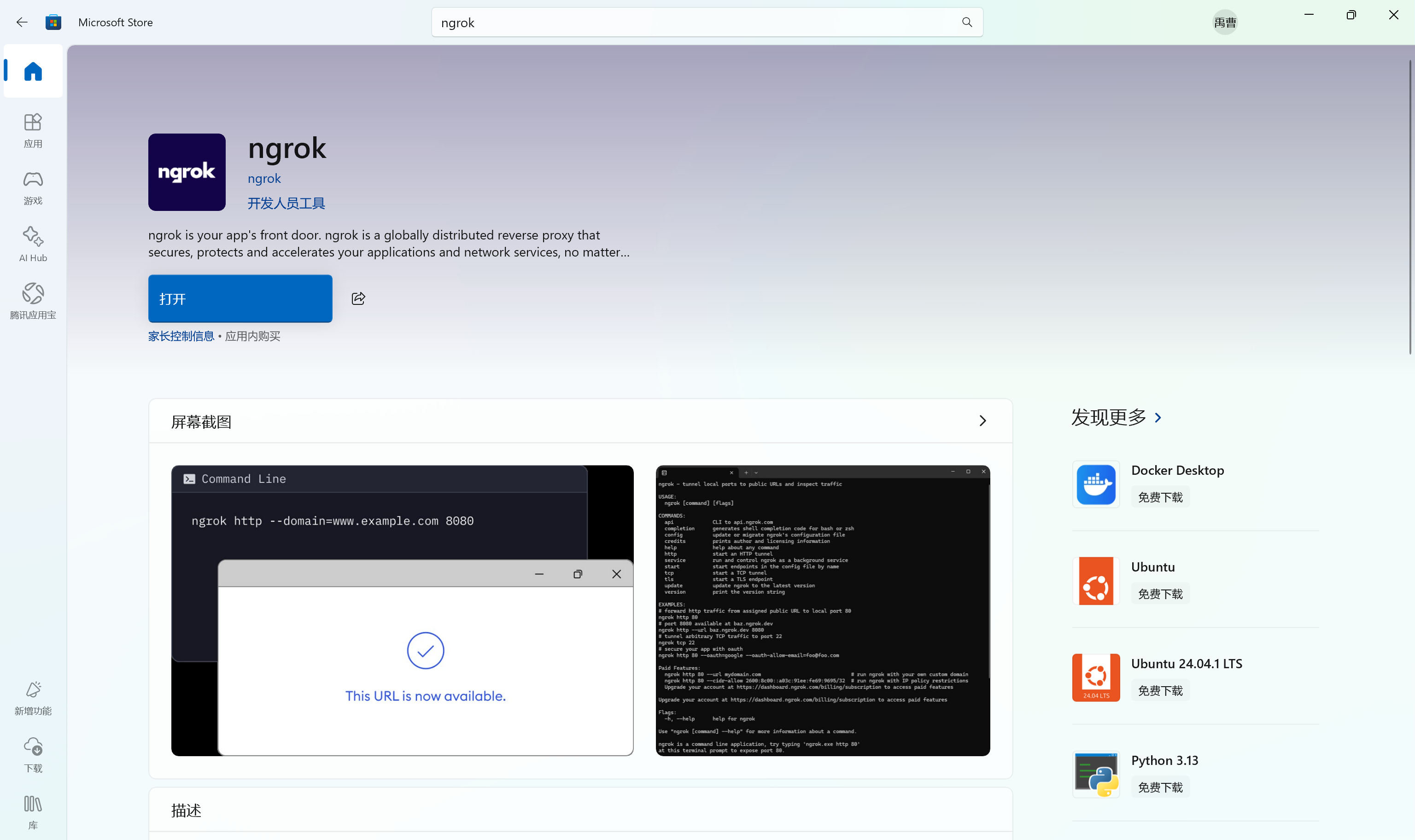
在Microsoft Store中下载ngrok
到 官网 注册ngrok账号,获取token,运行官网的配置token命令
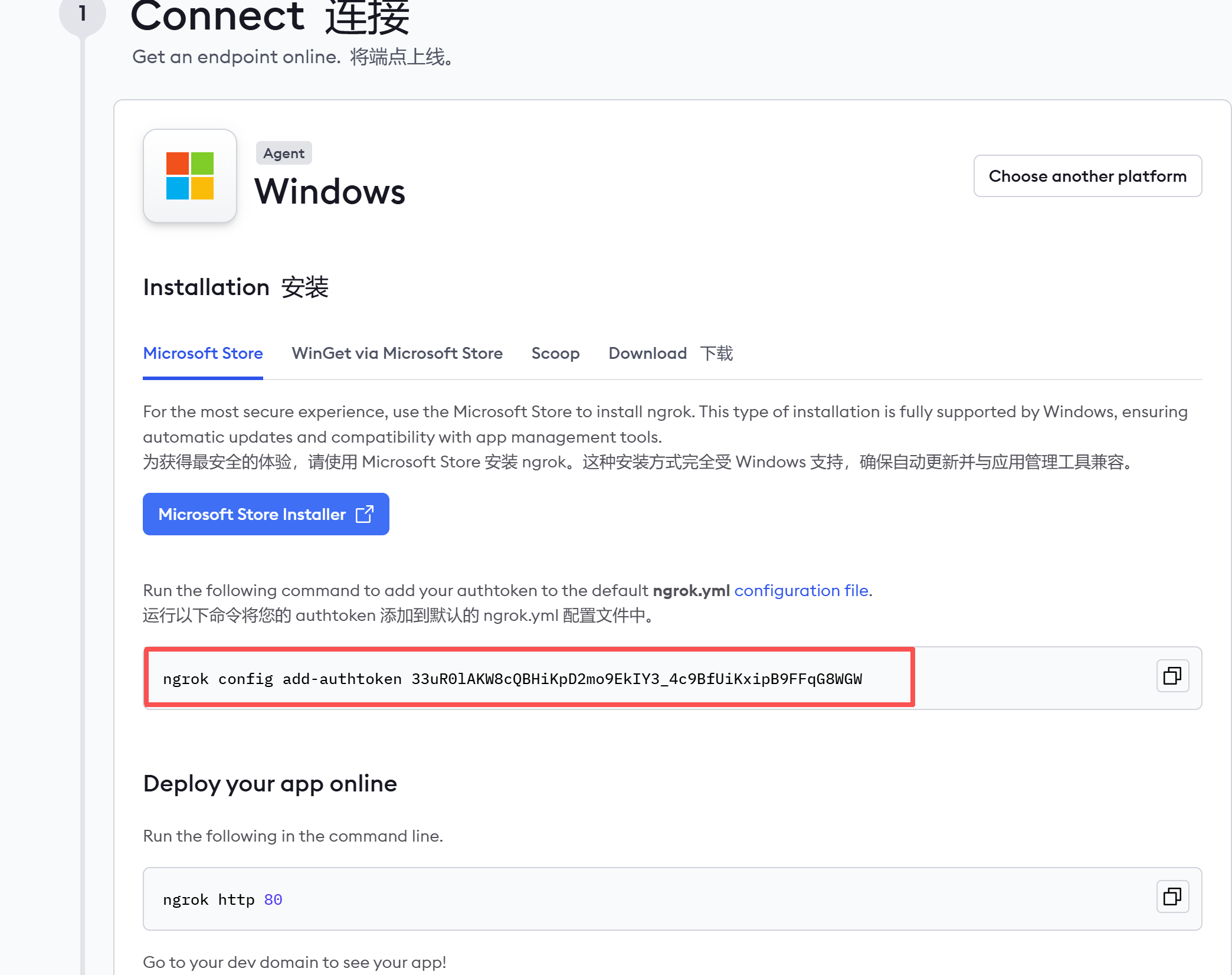
ngrok config add-authtoken <token>
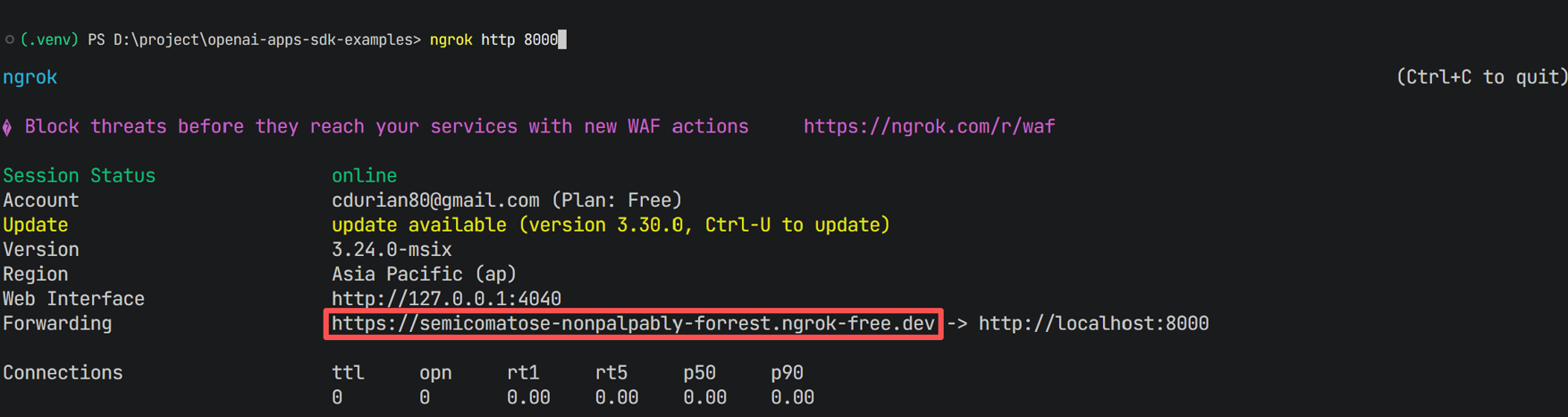
通过ngrok将本地服务器暴露到公网,获取临时URL
ngrok http 8000
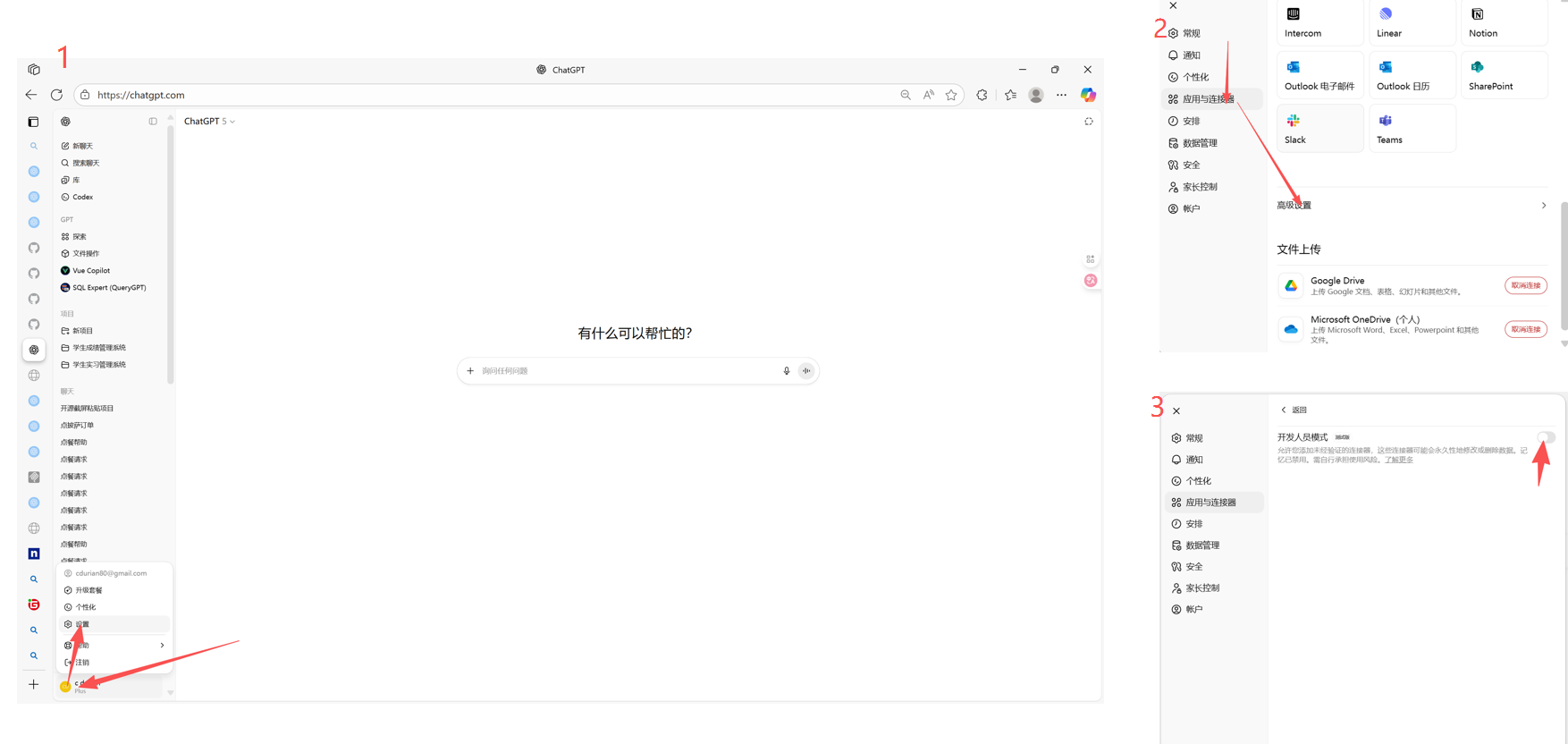
启用开发者模式
在ChatGPT中 设置->应用与连接器->高级设置->启用开发者模式
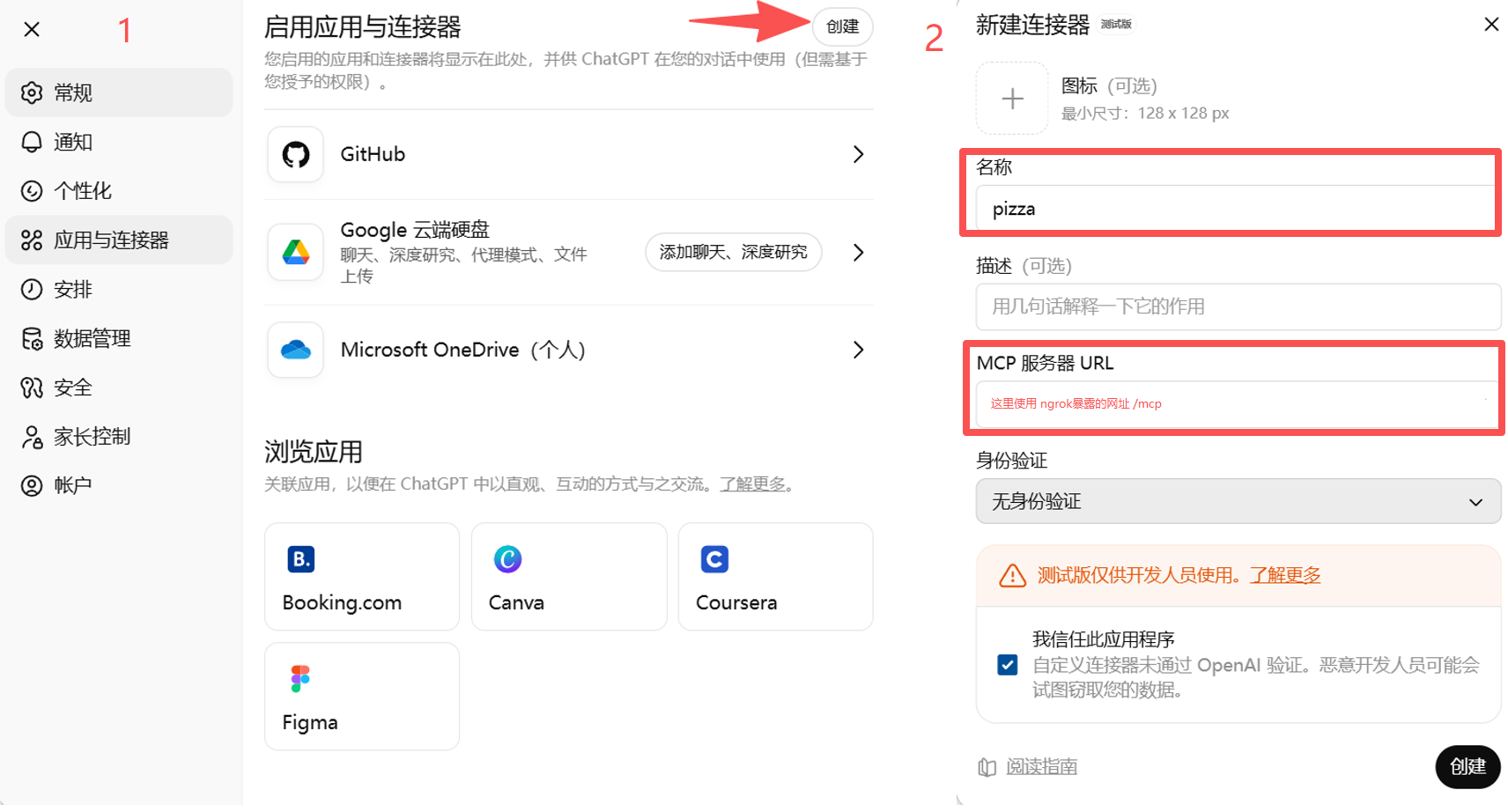
创建连接器
将ngrok提供的临时URL拼接上/mcp,在ChatGPT应用与连接器中创建一个新的连接器,名称填写pizza,MCP 服务器 URL填写拼接后的URL。
测试连接器
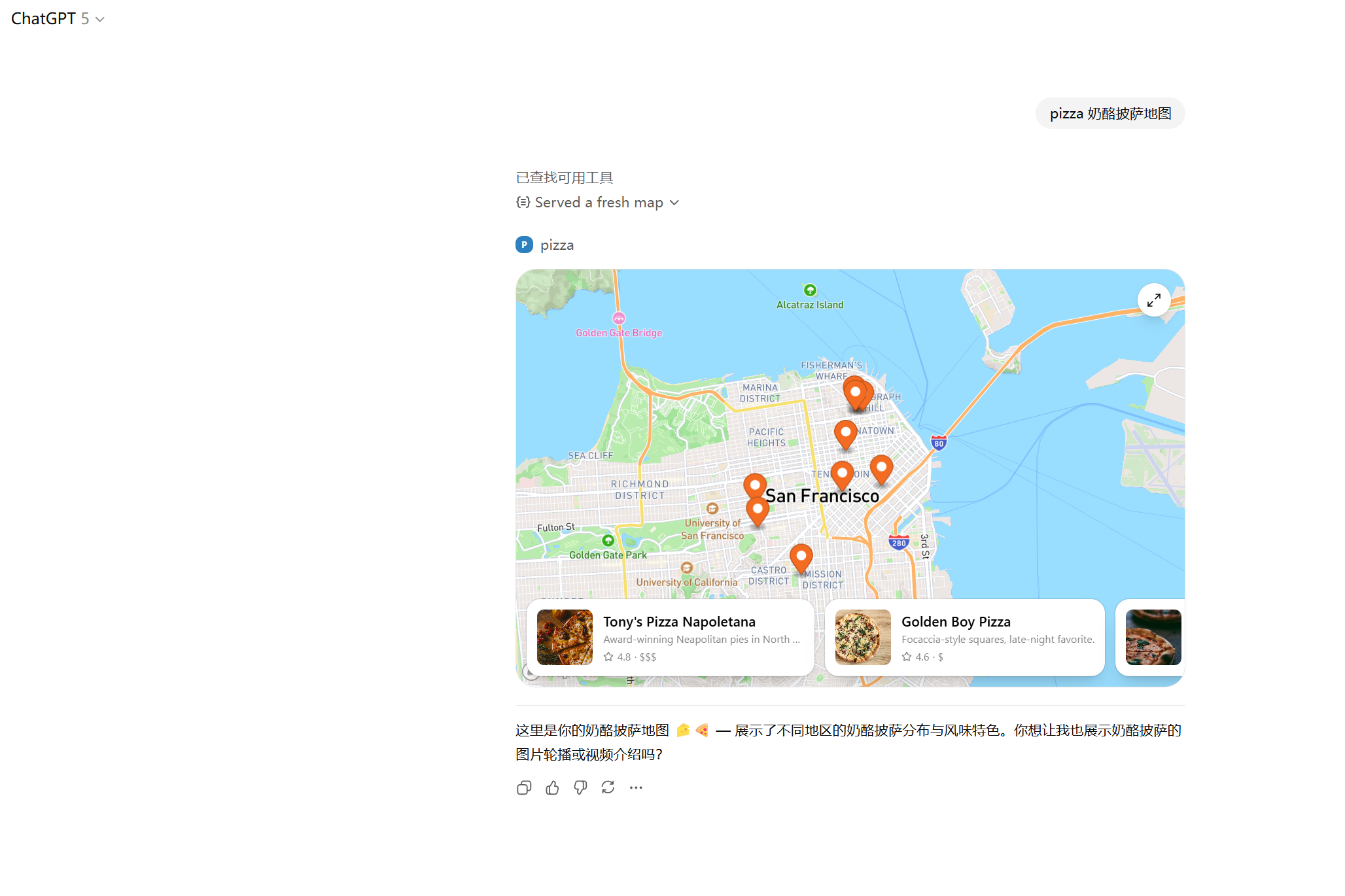
现在,我们可以在ChatGPT中提问,例如:pizza 奶酪披萨地图。
模型会返回可视化pizza地图,用户可以直接在ChatGPT中查看。
想第一时间掌握 OpenAI Apps SDK 的实战用法,以及更多 MCP、Agent、RAG、多模态 应用落地案例
来 赋范大模型技术社区,这里不仅有 Apps SDK 全流程实操拆解,还有持续更新的 Agent / RAG / 多模态 应用落地实战案例,带你深入学习。
新建自定义示例
接下来我们新建两个简单的示例来演示Apps SDK的使用。
新建 whoami 工具
在/src下新建文件夹whoami,并新建文件index.jsx。
// 示例:whoami 工具 最基础的工具示例
import React, { useState } from "react";
import { createRoot } from "react-dom/client";
//这里的App组件将作为chatgpt内的whoami工具的前端界面
function App() {
  const [surprise, setSurprise] = useState(false);
  return (
    <div className="w-full h-full flex items-center justify-center p-6">
      <div className="rounded-2xl border border-black/10 dark:border-white/10 p-8 shadow bg-white text-black text-center">
        <h1 className="text-2xl font-semibold">我是 pizza 助手</h1>
        <p className="mt-2 text-sm text-black/70">在这里为你提供披萨相关帮助 🍕</p>
        <button
          className="mt-4 inline-flex items-center gap-2 px-4 py-2 rounded-lg bg-black text-white hover:bg-black/80 active:scale-[0.99] transition"
          onClick={() => setSurprise(true)}
        >
          点击我有惊喜
        </button>
        {surprise && (
          <div className="mt-4 text-5xl select-none" aria-label="烟花">
            <span className="inline-block animate-bounce">🎆</span>
          </div>
        )}
      </div>
    </div>
  );
}
// 将组件绑定到 pizzaz-whoami-root 节点
createRoot(document.getElementById("pizzaz-whoami-root")).render(<App />);
新建 order 工具
在/src下新建文件夹pizzaz-order,并新建文件index.jsx。
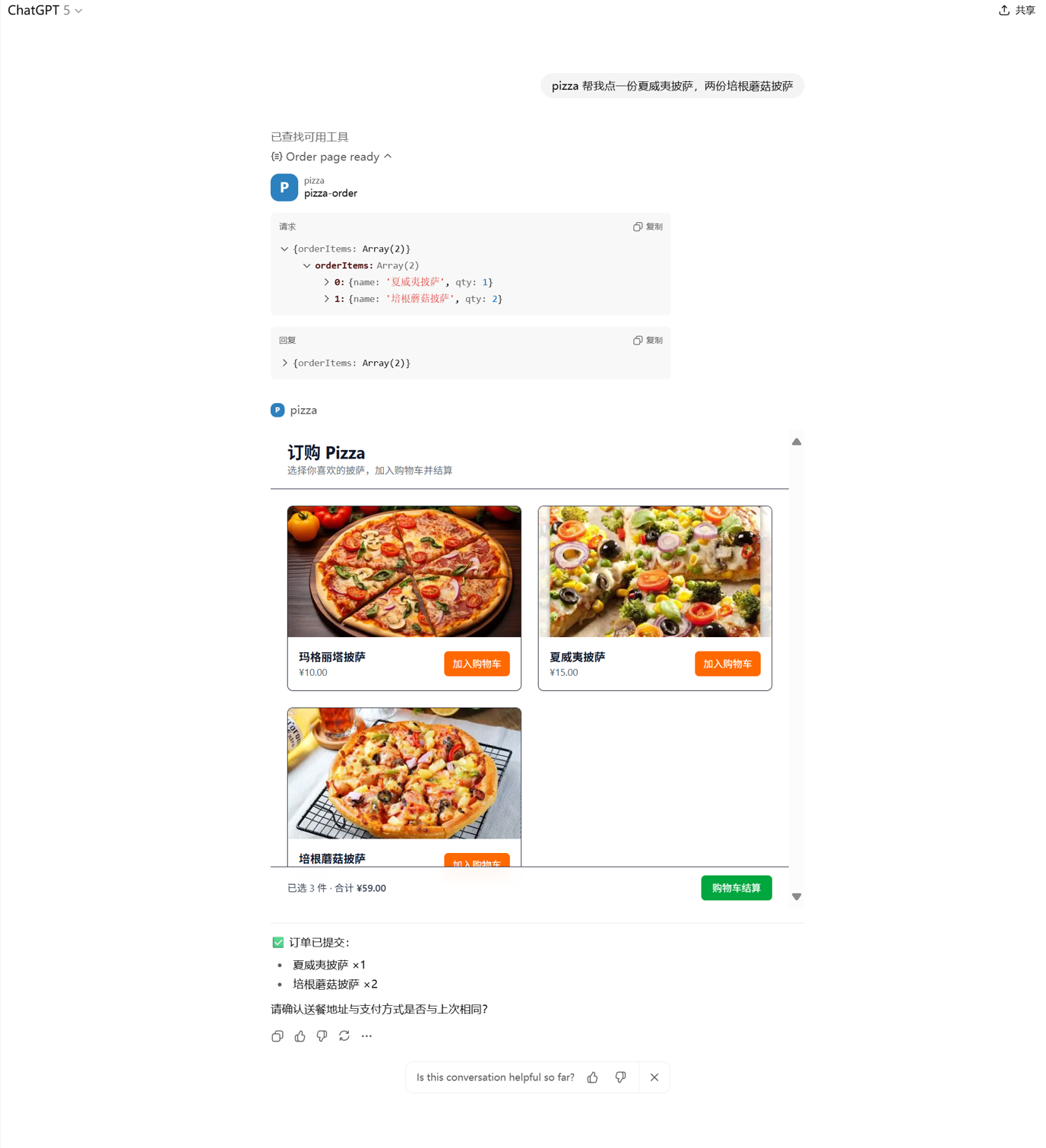
包含点单页面和模拟付款页面。通过监听 toolOutput 与 toolInput 获取 ChatGPT 给的点单信息并反映到购物车。
// 示例:order 工具 含MCP交互的工具示例
import { useMemo, useState, useEffect, useRef } from "react";
import { createRoot } from "react-dom/client";
import { HashRouter, Routes, Route, useNavigate, useLocation } from "react-router-dom";
import "../index.css";
import { useOpenAiGlobal } from "../use-openai-global";

// 示例披萨数据(包含id、名称、图片、价格)
const PIZZAS = [
  {
    id: 1,
    name: "玛格丽塔披萨",
    price: 10,
    image:
      "https://tse1.mm.bing.net/th/id/OIP.g4QYOOmFvL-Kxpk4AuI3-gHaE7?cb=12&rs=1&pid=ImgDetMain&o=7&rm=3",
  },
  {
    id: 2,
    name: "夏威夷披萨",
    price: 15,
    image:
      "https://tse4.mm.bing.net/th/id/OIP.veSCe42vltnOTEhL8sPAsQHaLP?cb=12&rs=1&pid=ImgDetMain&o=7&rm=3",
  },
  {
    id: 3,
    name: "培根蘑菇披萨",
    price: 22,
    image:
      "https://tse3.mm.bing.net/th/id/OIP.8nCs6Gpm5ckETI-aRrePIwHaE8?cb=12&rs=1&pid=ImgDetMain&o=7&rm=3",
  },
];

function formatCurrency(n) {
  return new Intl.NumberFormat("zh-CN", { style: "currency", currency: "CNY" }).format(n);
}

function OrderPage() {
  const navigate = useNavigate();
  const [cart, setCart] = useState({});
  const seededRef = useRef(false);
  // 监听 toolOutput 与 toolInput
  const toolOutput = useOpenAiGlobal("toolOutput");
  const toolInput = useOpenAiGlobal("toolInput");
  const mergedProps = useMemo(() => ({ ...(toolInput ?? {}), ...(toolOutput ?? {}) }), [toolInput, toolOutput]);
  const { orderItems = [] } = mergedProps;
  // 查找披萨
  const findPizzaByInput = (item) => {
    const name = item?.name;
    if (!name) return null;
    return PIZZAS.find((p) => p.name === name);
  };

  // 将初始条目注入购物车(chatgpt给的点单信息)
  useEffect(() => {
    if (seededRef.current) return;
    if (!Array.isArray(orderItems) || orderItems.length === 0) return;
    const next = {};
    for (const it of orderItems) {
      const pizza = findPizzaByInput(it);
      const qty = Number(it?.qty ?? it?.quantity ?? 0) || 0;
      if (pizza && qty > 0) {
        next[pizza.id] = (next[pizza.id] || 0) + qty;
      }
    }
    if (Object.keys(next).length > 0) {
      setCart((prev) => {
        const merged = { ...prev };
        for (const [id, q] of Object.entries(next)) {
          merged[id] = (merged[id] || 0) + q;
        }
        return merged;
      });
      seededRef.current = true;
    }
  }, [orderItems]);

  const items = useMemo(() => {
    return PIZZAS.filter((p) => cart[p.id]).map((p) => ({
      ...p,
      qty: cart[p.id],
      lineTotal: p.price * cart[p.id],
    }));
  }, [cart]);

  const total = useMemo(() => items.reduce((sum, it) => sum + it.lineTotal, 0), [items]);
  const count = useMemo(() => items.reduce((sum, it) => sum + it.qty, 0), [items]);

  function addToCart(id) {
    setCart((prev) => ({ ...prev, [id]: (prev[id] || 0) + 1 }));
  }

  function goCheckout() {
    navigate("/checkout", { state: { items, total } });
  }

  return (
    <div className="min-h-screen bg-white text-gray-900">
      <header className="px-6 py-4 border-b">
        <h1 className="text-2xl font-bold">订购 Pizza</h1>
        <p className="text-sm text-gray-500">选择你喜欢的披萨,加入购物车并结算</p>
      </header>

      <main className="px-6 py-6">
        <div className="grid grid-cols-1 sm:grid-cols-2 lg:grid-cols-3 gap-6">
          {PIZZAS.map((p) => (
            <div key={p.id} className="rounded-lg border shadow-sm overflow-hidden">
              <div className="aspect-video bg-gray-100">
                <img
                  src={p.image}
                  alt={p.name}
                  className="w-full h-full object-cover"
                  loading="lazy"
                />
              </div>
              <div className="p-4 flex items-center justify-between">
                <div>
                  <div className="font-semibold">{p.name}</div>
                  <div className="text-sm text-gray-600">{formatCurrency(p.price)}</div>
                </div>
                <button
                  className="inline-flex items-center rounded-md bg-orange-500 hover:bg-orange-600 text-white text-sm px-3 py-2"
                  onClick={() => addToCart(p.id)}
                >
                  加入购物车
                </button>
              </div>
            </div>
          ))}
        </div>
      </main>

      {/* 购物车汇总条 */}
      <div className="fixed left-0 right-0 bottom-0 border-t bg-white/95 backdrop-blur">
        <div className="mx-auto max-w-6xl px-6 py-3 flex items-center justify-between">
          <div className="text-sm text-gray-700">
            已选 {count} 件 · 合计 <span className="font-semibold">{formatCurrency(total)}</span>
          </div>
          <button
            className="inline-flex items-center rounded-md bg-green-600 hover:bg-green-700 text-white text-sm px-4 py-2 disabled:opacity-50"
            onClick={goCheckout}
            disabled={count === 0}
          >
            购物车结算
          </button>
        </div>
      </div>
    </div>
  );
}

function CheckoutPage() {
  const navigate = useNavigate();
  const location = useLocation();
  const items = location.state?.items || [];
  const total = location.state?.total || 0;

  function backToOrder() {
    navigate("/");
  }
  function payNow() {
    alert("已模拟付款,感谢你的订购!");
  }

  return (
    <div className="min-h-screen bg-white text-gray-900">
      <header className="px-6 py-4 border-b">
        <h1 className="text-2xl font-bold">付款页面</h1>
        <p className="text-sm text-gray-500">确认订单并完成付款</p>
      </header>

      <main className="px-6 py-6 mx-auto max-w-3xl">
        {items.length === 0 ? (
          <div className="text-center text-gray-600">
            购物车为空
            <div className="mt-4">
              <button
                className="rounded-md bg-gray-800 hover:bg-gray-900 text-white px-4 py-2"
                onClick={backToOrder}
              >
                返回订购
              </button>
            </div>
          </div>
        ) : (
          <div className="space-y-6">
            <div className="rounded-lg border overflow-hidden">
              <table className="w-full text-sm">
                <thead className="bg-gray-50">
                  <tr>
                    <th className="py-2 px-3 text-left">商品</th>
                    <th className="py-2 px-3 text-right">数量</th>
                    <th className="py-2 px-3 text-right">小计</th>
                  </tr>
                </thead>
                <tbody>
                  {items.map((it) => (
                    <tr key={it.id} className="border-t">
                      <td className="py-2 px-3">{it.name}</td>
                      <td className="py-2 px-3 text-right">{it.qty}</td>
                      <td className="py-2 px-3 text-right">{formatCurrency(it.lineTotal)}</td>
                    </tr>
                  ))}
                </tbody>
              </table>
            </div>
            <div className="flex items-center justify-between">
              <div className="text-gray-700">总计:</div>
              <div className="text-lg font-semibold">{formatCurrency(total)}</div>
            </div>
            <div className="flex items-center gap-3">
              <button
                className="rounded-md bg-gray-200 hover:bg-gray-300 text-gray-800 px-4 py-2"
                onClick={backToOrder}
              >
                返回订购
              </button>
              <button
                className="rounded-md bg-green-600 hover:bg-green-700 text-white px-4 py-2"
                onClick={payNow}
              >
                前往付款
              </button>
            </div>
          </div>
        )}
      </main>
    </div>
  );
}

function RouterRoot() {
  return (
    <Routes>
      <Route path="/" element={<OrderPage />} />
      <Route path="/checkout" element={<CheckoutPage />} />
    </Routes>
  );
}

createRoot(document.getElementById("pizzaz-order-root")).render(
  <HashRouter>
    <RouterRoot />
  </HashRouter>
);
新建 MCP服务端
新建openai-apps-sdk-examples\test_pizzaz_server\文件夹
添加 whoami和 order 工具,绑定 pizzaz-whoami-root 和 pizzaz-order-root 节点
定义 order 工具的输入参数 schema
# 概览:
# 该文件实现了一个基于 FastMCP 的 MCP 服务器,通过 HTTP+SSE 暴露 “带 UI 的工具”。
# ChatGPT Apps SDK 会根据返回的 _meta 信息加载对应的前端组件。
# 主要模块:
# 1) 定义 PizzazWidget 元信息(模板 URI、HTML、标题等)
# 2) 列出工具/资源/资源模板(供客户端发现)
# 3) 处理 ReadResource/CallTool 请求(返回 HTML 组件 + 文本 + 结构化数据)
# 4) 启动 Uvicorn 应用,提供 SSE 和消息端点

from __future__ import annotations

from copy import deepcopy
from dataclasses import dataclass
from typing import Any, Dict, List
# - mcp.types/FastMCP 提供 MCP 与服务端封装
import mcp.types as types
from mcp.server.fastmcp import FastMCP
from pydantic import BaseModel, ConfigDict, Field, ValidationError


@dataclass(frozen=True)
class PizzazWidget:
    # Widget 元信息:每个组件的“工具描述”和其 HTML
    identifier: str
    title: str
    template_uri: str
    invoking: str
    invoked: str
    html: str
    response_text: str


widgets: List[PizzazWidget] = [
    # Demo 小部件:用于生成工具与资源,引用持久化的 CSS/JS 资产,开发时可直接使用localhost:4444

    # whoami 小部件,显示“我是 pizza 助手”
    PizzazWidget(
        identifier="pizza-whoami",
        title="Who Am I",
        template_uri="ui://widget/pizza-whoami.html",
        invoking="Answering identity",
        invoked="Identity presented",
        html=(
            "<div id=\"pizzaz-whoami-root\"></div>\n"
            "<link rel=\"stylesheet\" href=\"http://localhost:4444/pizzaz-whoami.css\">\n"
            "<script type=\"module\" src=\"http://localhost:4444/pizzaz-whoami.js\"></script>"
        ),
        response_text="我是 pizza 助手",
    ),
    # 披萨订购小部件
    PizzazWidget(
        identifier="pizza-order",
        title="Order Pizza",
        template_uri="ui://widget/pizza-order.html",
        invoking="Opening the order page",
        invoked="Order page ready",
        html=(
            "<div id=\"pizzaz-order-root\"></div>\n"
            "<link rel=\"stylesheet\" href=\"http://localhost:4444/pizzaz-order.css\">\n"
            "<script type=\"module\" src=\"http://localhost:4444/pizzaz-order.js\"></script>"
        ),
        response_text="打开订购页面,可选择披萨并结算",
    ),
]

# 资源的 MIME 类型:Skybridge HTML(供 Apps SDK 识别渲染)
MIME_TYPE = "text/html+skybridge"


# 快速索引:按工具名或模板 URI 获取 Widget
WIDGETS_BY_ID: Dict[str, PizzazWidget] = {widget.identifier: widget for widget in widgets}
WIDGETS_BY_URI: Dict[str, PizzazWidget] = {widget.template_uri: widget for widget in widgets}


class PizzaInput(BaseModel):
    """Schema for pizza tools ( orderItems)."""

    # 订单条目列表,供 pizza-order 工具使用
    order_items: List[Dict[str, Any]] | None = Field(
        default=None,
        alias="orderItems",
        description=(
            "Optional order items list for the order page. Each item can include "
            "id/name and qty or quantity."
        ),
    )

    model_config = ConfigDict(populate_by_name=True, extra="forbid")

# FastMCP 配置:与 Node 版路径一致,支持无状态 HTTP 检视
mcp = FastMCP(
    name="pizzaz-python",
    sse_path="/mcp",
    message_path="/mcp/messages",
    stateless_http=True,
)

# 暴露给客户端的 JSON Schema
# 自定义结构化输入(在此项目中,定义orderItems来表示订单列表)
TOOL_INPUT_SCHEMA: Dict[str, Any] = {
    "type": "object",
    "properties": {
        "orderItems": {
            "type": "array",
            "description": "Optional list of items to seed the cart.",
            "items": {
                "type": "object",
                "properties": {
                    "id": { "type": ["string", "null"] },
                    "name": { "type": ["string", "null"] },
                    "qty": { "type": ["integer", "null"] },
                    "quantity": { "type": ["integer", "null"] },
                },
                "additionalProperties": True,
            },
        },
    },
    "required": [],
    "additionalProperties": False,
}


def _resource_description(widget: PizzazWidget) -> str:
    # 资源描述文案
    return f"{widget.title} widget markup"


def _tool_meta(widget: PizzazWidget) -> Dict[str, Any]:
    # Apps SDK 元数据:驱动 UI 渲染与状态文案
    return {
        "openai/outputTemplate": widget.template_uri,
        "openai/toolInvocation/invoking": widget.invoking,
        "openai/toolInvocation/invoked": widget.invoked,
        "openai/widgetAccessible": True,
        "openai/resultCanProduceWidget": True,
        "annotations": {
          "destructiveHint": False,
          "openWorldHint": False,
          "readOnlyHint": True,
        }
    }


def _embedded_widget_resource(widget: PizzazWidget) -> types.EmbeddedResource:
    # 将 HTML 外壳封装为嵌入资源返回
    return types.EmbeddedResource(
        type="resource",
        resource=types.TextResourceContents(
            uri=widget.template_uri,
            mimeType=MIME_TYPE,
            text=widget.html,
            title=widget.title,
        ),
    )


@mcp._mcp_server.list_tools()
async def _list_tools() -> List[types.Tool]:
    # 列出可用工具:每个 widget 为一个工具项
    return [
        types.Tool(
            name=widget.identifier,
            title=widget.title,
            description=widget.title,
            inputSchema=deepcopy(TOOL_INPUT_SCHEMA),
            _meta=_tool_meta(widget),
        )
        for widget in widgets
    ]


@mcp._mcp_server.list_resources()
async def _list_resources() -> List[types.Resource]:
    # 列出可读资源:用于 ReadResource 返回 HTML 外壳
    return [
        types.Resource(
            name=widget.title,
            title=widget.title,
            uri=widget.template_uri,
            description=_resource_description(widget),
            mimeType=MIME_TYPE,
            _meta=_tool_meta(widget),
        )
        for widget in widgets
    ]


@mcp._mcp_server.list_resource_templates()
async def _list_resource_templates() -> List[types.ResourceTemplate]:
    # 列出资源模板:匹配 uriTemplate
    return [
        types.ResourceTemplate(
            name=widget.title,
            title=widget.title,
            uriTemplate=widget.template_uri,
            description=_resource_description(widget),
            mimeType=MIME_TYPE,
            _meta=_tool_meta(widget),
        )
        for widget in widgets
    ]


async def _handle_read_resource(req: types.ReadResourceRequest) -> types.ServerResult:
    # 处理读取资源:按 URI 返回 HTML
    widget = WIDGETS_BY_URI.get(str(req.params.uri))
    if widget is None:
        return types.ServerResult(
            types.ReadResourceResult(
                contents=[],
                _meta={"error": f"Unknown resource: {req.params.uri}"},
            )
        )

    contents = [
        types.TextResourceContents(
            uri=widget.template_uri,
            mimeType=MIME_TYPE,
            text=widget.html,
            _meta=_tool_meta(widget),
        )
    ]

    return types.ServerResult(types.ReadResourceResult(contents=contents))


async def _call_tool_request(req: types.CallToolRequest) -> types.ServerResult:
    # 处理工具调用:校验输入、返回文本+结构化数据+嵌入的 HTML 资源与元信息
    widget = WIDGETS_BY_ID.get(req.params.name)
    if widget is None:
        return types.ServerResult(
            types.CallToolResult(
                content=[
                    types.TextContent(
                        type="text",
                        text=f"Unknown tool: {req.params.name}",
                    )
                ],
                isError=True,
            )
        )

    arguments = req.params.arguments or {}
    try:
        payload = PizzaInput.model_validate(arguments)
    except ValidationError as exc:
        return types.ServerResult(
            types.CallToolResult(
                content=[
                    types.TextContent(
                        type="text",
                        text=f"Input validation error: {exc.errors()}",
                    )
                ],
                isError=True,
            )
        )

    order_items = payload.order_items
    widget_resource = _embedded_widget_resource(widget)
    meta: Dict[str, Any] = {
        "openai.com/widget": widget_resource.model_dump(mode="json"),
        "openai/outputTemplate": widget.template_uri,
        "openai/toolInvocation/invoking": widget.invoking,
        "openai/toolInvocation/invoked": widget.invoked,
        "openai/widgetAccessible": True,
        "openai/resultCanProduceWidget": True,
    }

    structured: Dict[str, Any] = {}
    if widget.identifier == "pizza-order" and order_items is not None:
        structured["orderItems"] = order_items

    return types.ServerResult(
        types.CallToolResult(
            content=[
                types.TextContent(
                    type="text",
                    text=widget.response_text,
                )
            ],
            structuredContent=structured,
            _meta=meta,
        )
    )

# 显式注册处理器:确保请求路由到对应逻辑
mcp._mcp_server.request_handlers[types.CallToolRequest] = _call_tool_request
mcp._mcp_server.request_handlers[types.ReadResourceRequest] = _handle_read_resource


# 创建支持 SSE 的 HTTP 应用(Starlette)
app = mcp.streamable_http_app()


try:
    from starlette.middleware.cors import CORSMiddleware

    app.add_middleware(
        CORSMiddleware,
        allow_origins=["*"],
        allow_methods=["*"],
        allow_headers=["*"],
        allow_credentials=False,
    )
except Exception:
    pass


if __name__ == "__main__":
    import uvicorn
# 入口:启动 Uvicorn,默认监听 8000 端口
    uvicorn.run("pizzaz_server_python.main:app", host="0.0.0.0", port=8000)
重新启动应用
接下来,我们重新启动应用。(要先把之前的应用 ctrl + c 停掉)
pnpm run build

pnpm run dev
uvicorn test_pizzaz_server.main:app --port 8000
想第一时间掌握 OpenAI Apps SDK 的实战用法,以及更多 MCP、Agent、RAG、多模态 应用落地案例
来 赋范大模型技术社区,这里不仅有 Apps SDK 全流程实操拆解,还有持续更新的 Agent / RAG / 多模态 应用落地实战案例,带你深入学习。
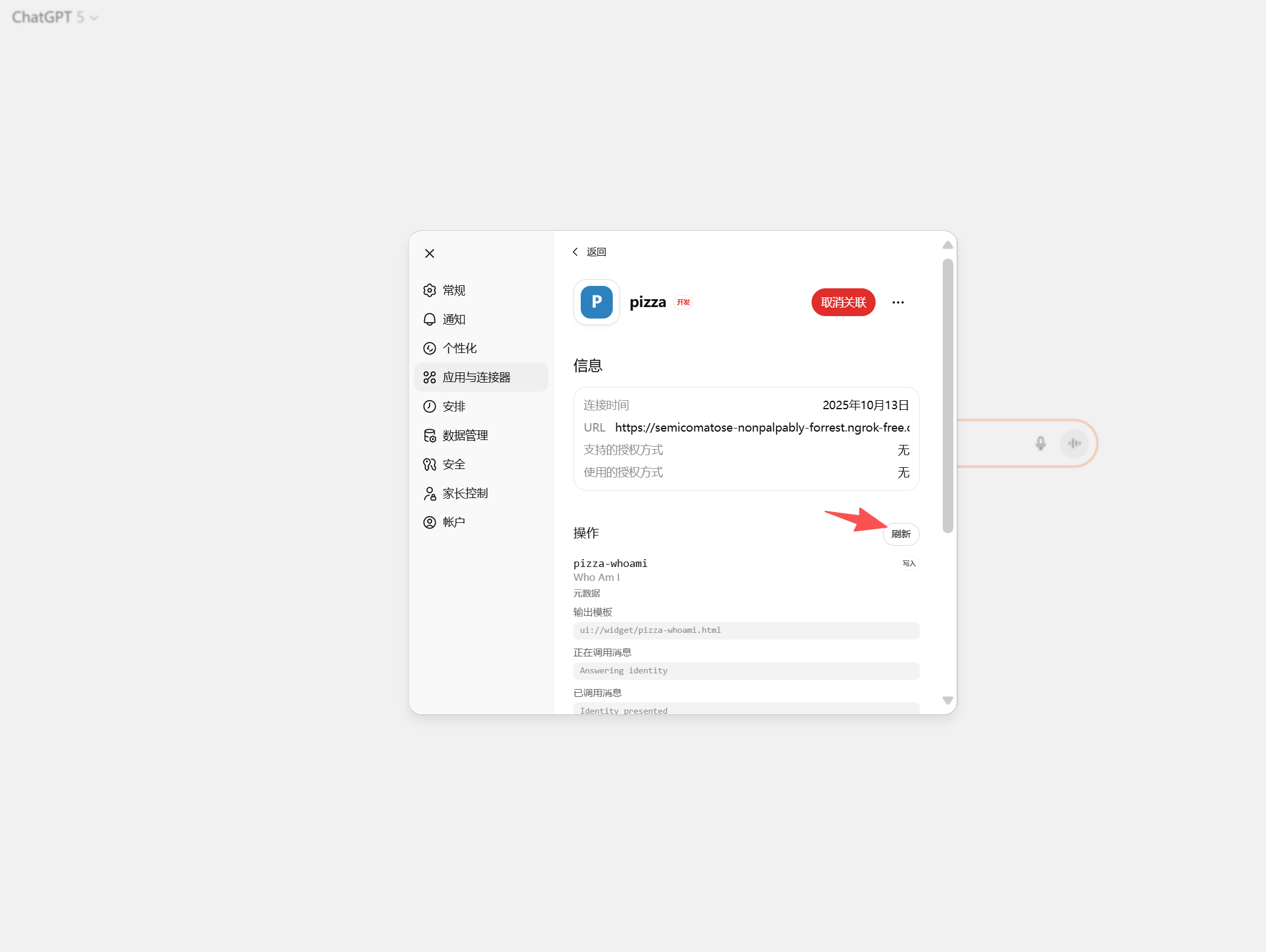
在ChatGPT刷新连接器
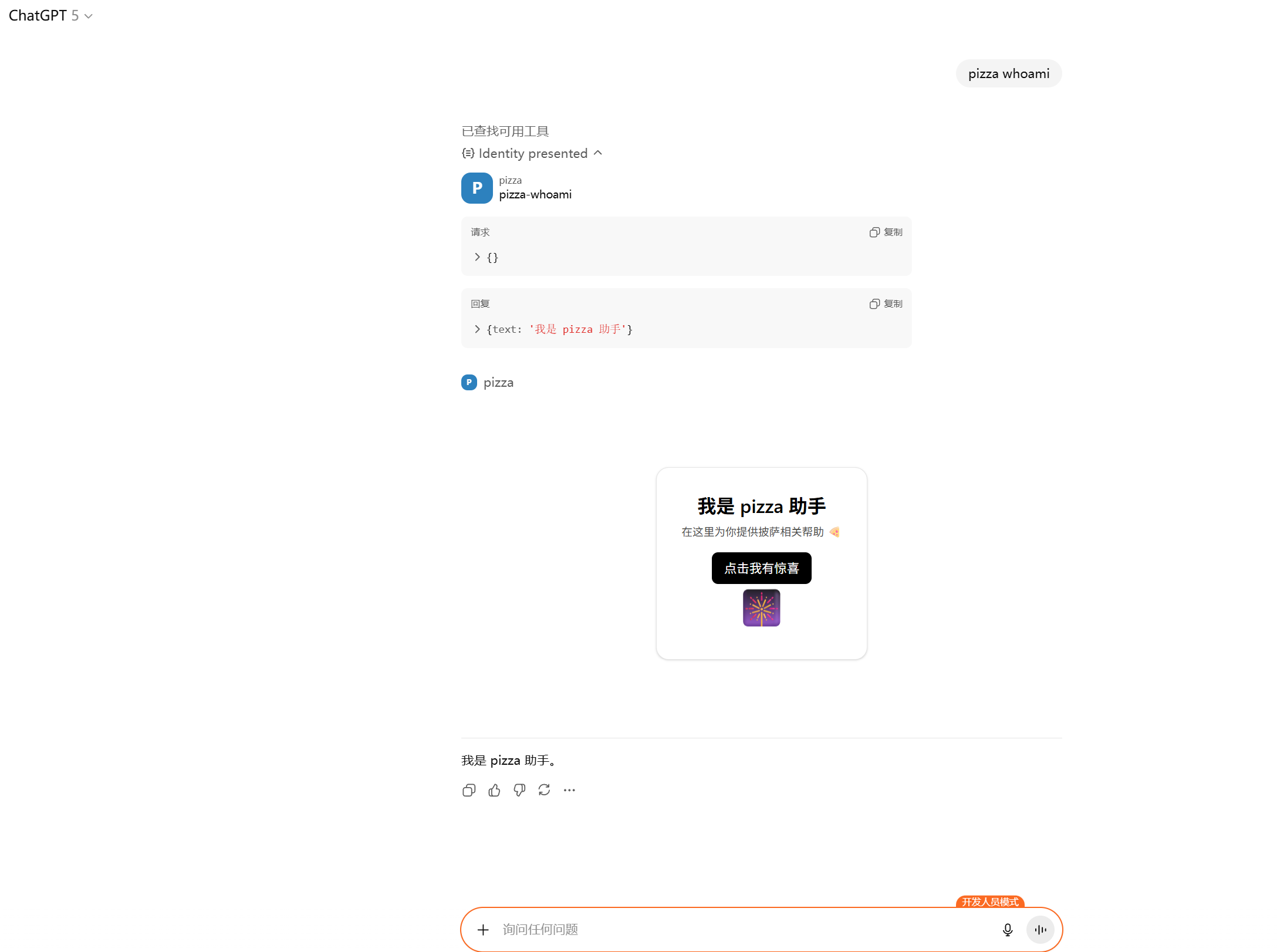
测试使用
pizza 是谁
pizza 点单





 扫一扫
扫一扫


 634
634

 被折叠的 条评论
为什么被折叠?
被折叠的 条评论
为什么被折叠?
 到【灌水乐园】发言





