


前置知识
通讯方式:stdio
stdio:standard input and output 标准输入输出

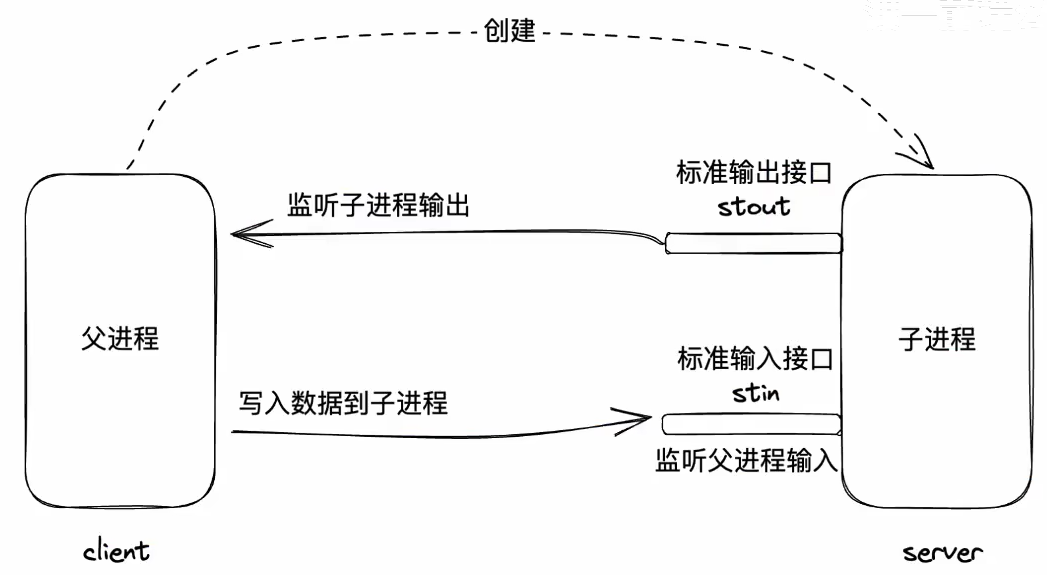
process.stdout.write(process.pid + '\n') // 标准输出流
process.stdin.on('data', data=>{ // 标准输入流的监听
const resp = `回复:${data}\n`process.stdout.write(resp)
})
通信格式:JSON-RPC
request
{
"jsonrpc": "2.0",
"method": "sum",
"params": {
"a": 5,
"b": 6
},
"id": 1,
}
response
{
"jsonrpc": "2.0","result": 11,
"id": 1,
}
MCP
MCP是一套标准协议,它规定了应用程序之间如何通信
如何通信:
1、通信方式:
stdio:推荐,高效,简洁,本地
http:可远程
2、通信格式:基于JSON-RPC的进一步规范
官网地址:https://modelcontextprotocol.io/
基本规范
1、初始化 initialize
request
{
"jsonrpc": "2.0",
"id": 1,
"method": "initialize", //固定为 initialize
"params":{
"protocolVersion": "2025-06-18", // MCP版本从官网Specification这个里面获取
"capabilities":{
"roots":{
"listChanged": true
}
} ,
"sampling": {},
"elicitation": {}
},
"clientInfo": { // 告知服务器客户端的信息"name": "ExampleClient",
"title": "Example Client Display Name","version": "1.0.0",
}
}
response
{
"jsonrpc": "2.0",
"id": 1,
"result":{
"protocolVersion": "2025-06-18", // MCP版本从官网Specification这个里面获取
"capabilities":{ // 代表服务器有哪些功能
"logging":{},
"prompts":{
"listChanged": true
},
"resources":{
"subscribe": true,
"listChanged": true
},
"tools":{"listChanged": true
}
} ,
"serverInfo": { // 服务端信息
"name": "ExampleServer",
"title": "Example Server Display Name","version": "1.0.0",
},
"instructions": "Optional instructions for the client"}
}
2、工具发现 tools/list
服务器有哪些工具函数可以提供客户端调用
request
{
"jsonrpc": "2.0",
"id": 1,
"method": "tools/list",
"params": {}
}
response
{
"jsonrpc": "2.0",
"id": 1,
"result":{
"tools": [
{"name": "get_weather"
"title": "Weather Information Provider""description": "Get current weather information for a location",
"inputSchema": {
"type": "object","properties": {
"location": {
"type": "string",
"description":" City name or zip"}
},
"required": ["location"]
}}
]}
}
3、工具调用 tools/call
request
{
"jsonrpc": "2.0",
"id": 1,
"method": "tools/call", //工具调用
"params": {
"name": "get_weather", // 工具名,对应工具发现中的name
"arguments": { // 工具参数,需要和工具发现中的结构一致
"location": "New York"
}}
}
response
{
"jsonrpc": "2.0",
"id": 1,
"result":{
"content": [ // 函数结果需要放到 content 字段中,如果有多个,使用数据
{// 函数结果的类型
// 支持的类型
// https://modelcontextprotocol.io/specification/2025-06-18/server/tools#tool-result
"type": 'text',
"text": "72°F"}
]}
}
MCP Server 的调试工具
直接运行
npx @modelcontextprotocol/inspector
MSP SDK
使用 @modelcontextprotocol/sdk 可以更方便的开发 MCP Server
pnpm install @modelcontextprotocol/sdk
对接AI应用程序原理图
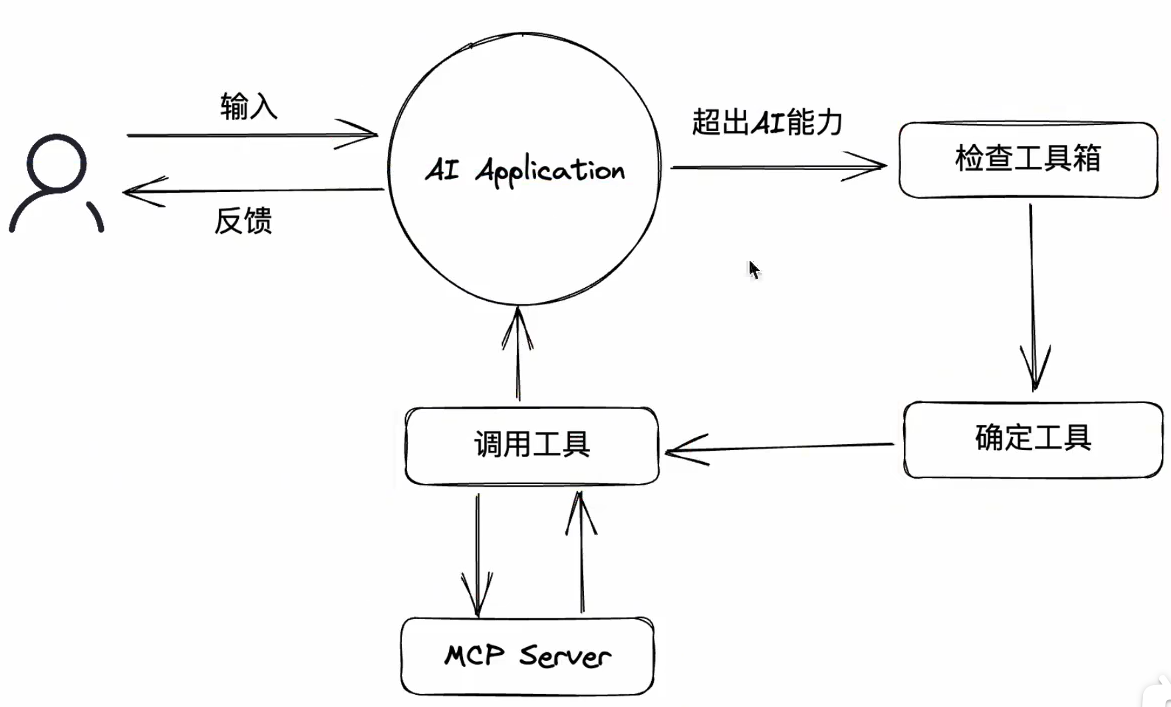
两个核心概念
MCP Host:往往指代AI应用本身,用于发现MCP Server以及其中的工具列表
MCP Client:用于和 MCP Server通信的客户端,往往在Host内部开启,通常情况下,启动一个MCP Server,就会开启一个MCP Client
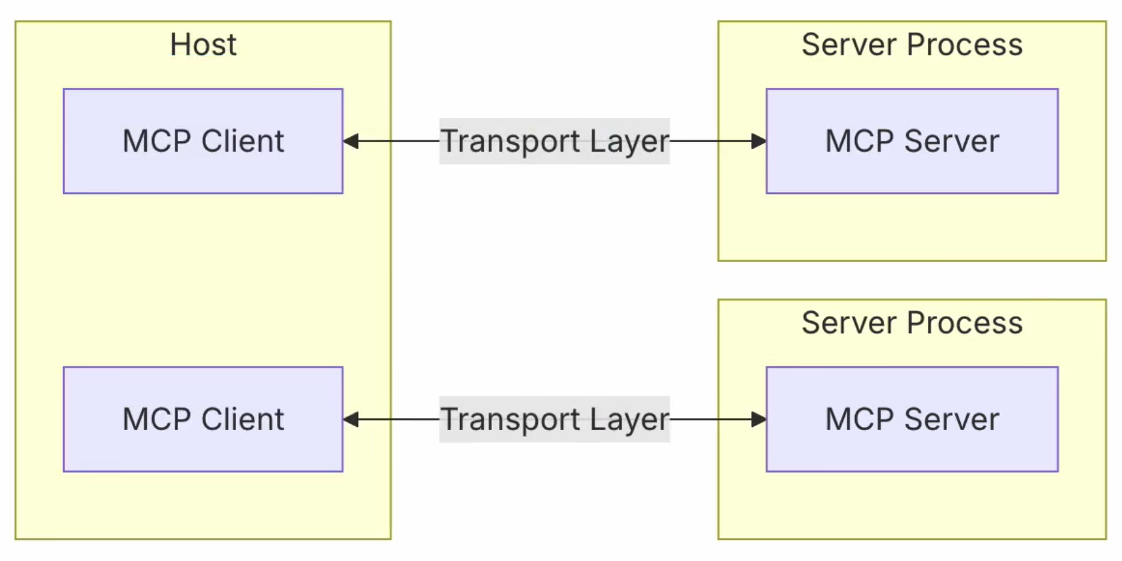
重新认识MCP
MCP,全称 Model Context Protocal,模型上下文协议,其指在为AI与外部程序之间建立通信标准,从而使得外部程序可以被部署到任意AI
MCP资源局和平台
1、https://github.com/modelcontextprotocol/servers
2、https://mcpservers.org/
3、https://mcp.so/
4、https://modelscope.cn/mcp
安全依赖审计工具
npm audit





 扫一扫
扫一扫


 25万+
25万+

 被折叠的 条评论
为什么被折叠?
被折叠的 条评论
为什么被折叠?
 到【灌水乐园】发言





