



 本文深入探讨了组合模式的设计理念,展示了如何通过将对象组织成树形结构来表达部分与整体的关系,使用户能够一致地操作单个对象和组合对象。通过C#示例代码,详细解释了组合模式的实现方式及其在树形菜单、文件管理和编程语言分类等场景的应用。
组合模式
将对象组合成树形结构以表示“部分——整体”的层次结构,使得用户对单个对象使用具有一致性。
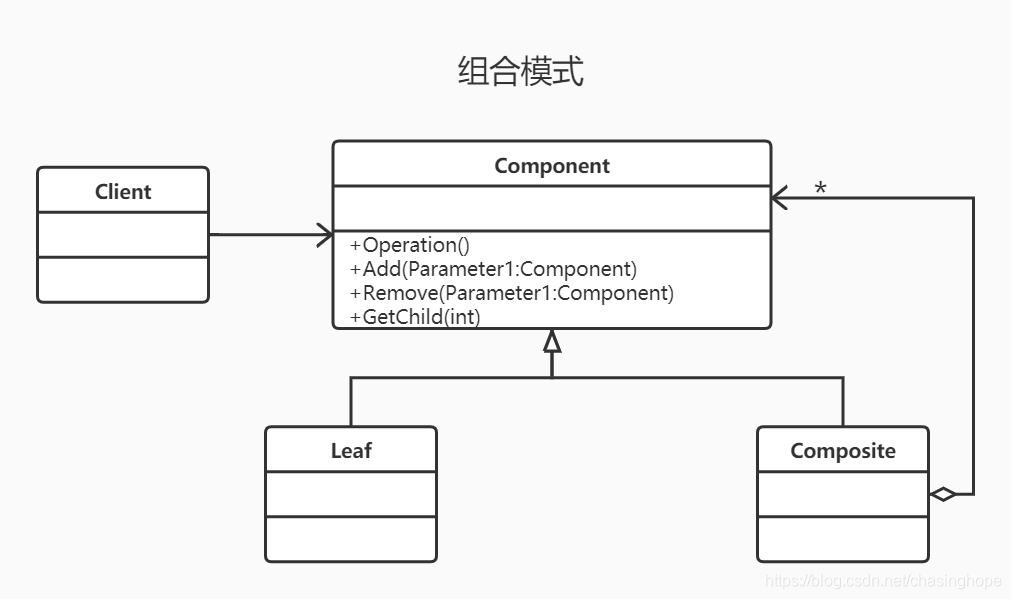
UML补充说明:树枝和叶子实现统一接口,树枝内部组合该接口,树枝内部组合该接口,并且含有内部属性 List,里面放 Component。
优缺点:
| 优点 | 缺点 |
|---|---|
| 高层模块调用简单。 | 在使用组合模式时,其叶子和树枝的声明都是实现类,而不是接口,违反了依赖倒置原则。 |
| 节点增加自由 | / |
| 总结:将相同类型的东西组合在一起形成一种特有的功能。 | |
|---|---|
C# 组合模式Demo
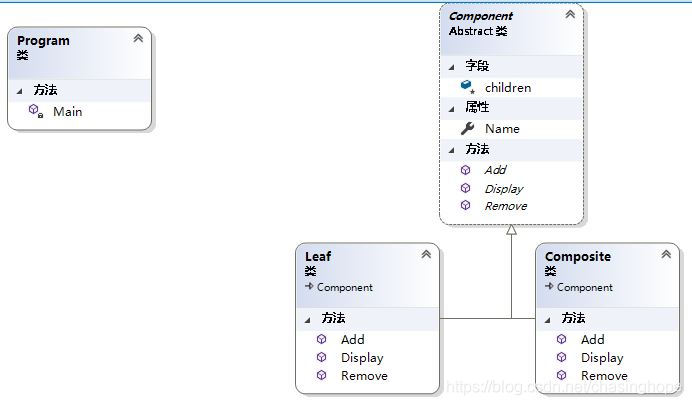
using System;
using System.Collections.Generic;
using System.Linq;
using System.Text;
using System.Threading.Tasks;

namespace CompositePattern
{
    class Program
    {
        static void Main(string[] args)
        {
            Composite root = new Composite() { Name = "root" };
            Composite net_tech = new Composite() { Name = "net技术" };


            net_tech.Add(new Leaf() { Name = "net新手" });
            net_tech.Add(new Leaf() { Name = "C#" });
            root.Add(net_tech);

            Composite language = new Composite() { Name = "编程语言" };
            language.Add(new Leaf() { Name = "Java" });
            root.Add(language);

            root.Display(1);
        }
    }

    public abstract class Component
    {
        protected List<Component> children = new List<Component>();
        public string Name { get; set; }

        public abstract void Add(Component component);
        public abstract void Remove(Component component);
        public abstract void Display(int depth);
    }

    public class Leaf : Component
    {
        public override void Add(Component component)
        {

        }
        public override void Remove(Component component)
        {

        }

        public override void Display(int depth)
        {
            Console.WriteLine(new string('-', depth) + "     " + this.Name);
        }
    }


    public class Composite : Component
    {
        public override void Add(Component component)
        {
            this.children.Add(component);
        }

        public override void Display(int depth)
        {
            Console.WriteLine(new string('-', depth)+"     "+this.Name    );
            /// 深度遍历
            foreach (var item in children)
            {
                item.Display(depth + 2);
            }
        }

        public override void Remove(Component component)
        {
            this.children.Remove(component);
        }
    }
}
测试结果:
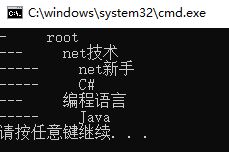
Hints:
使用场景:部分、整体场景,如树形菜单,文件、文件夹的管理。
参考资料
https://www.runoob.com/design-pattern/composite-pattern.html
更多:





 扫一扫
扫一扫


 576
576

 被折叠的 条评论
为什么被折叠?
被折叠的 条评论
为什么被折叠?
 到【灌水乐园】发言





