


 本文档详细记录了在Cocos2d-x中如何实现喇叭滚动播放功能,通过设置定时器操控ScrollView控件达到类似跑马灯的效果。文章提供了关键的代码示例,帮助开发者节省实现该功能的时间。
很多项目都会有喇叭滚动播放消息的功能,这里做记录方便后来人查阅,节省开发时间。
原理很简单,就是使用定时器来操作ScrollView控件,下面直接上代码。
函数申明:
	//----------喇叭---------------
	void scheduleNotice(float t);
	void setNotice(string strNotice);
	string strMessage;
定时器的启动与关闭:
void LoginScene::onEnter()
{
	log("----onEnter----");
	schedule(schedule_selector(LoginScene::scheduleNotice), 0.01f);
	//schedule(schedule_selector(LoginScene::scheduleNotice), 1.0f);
}
void LoginScene::onExit()
{
	log("----onExit----");
	this->unschedule(schedule_selector(LoginScene::scheduleNotice));
}
有的项目结构不同,定时器会没有启动,可以检查下类入口函数是否调用onEnter();函数。
如果类继承自CCLayer则调用CCLayer::onEnter();继承自CCNode则是CCNode::onEnter();
下面是2个函数的实现部分:
//----------喇叭---------------
void LoginScene::scheduleNotice(float t)
{
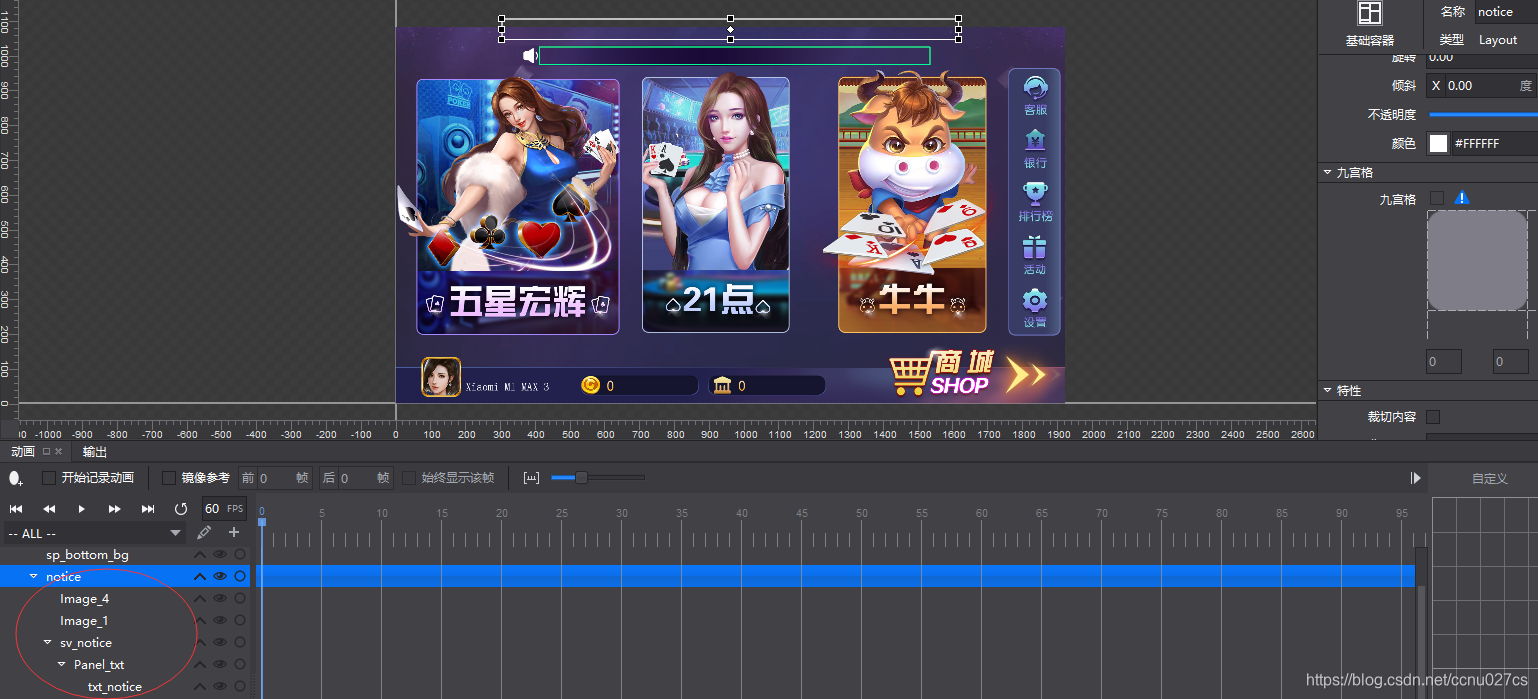
	Widget* pNotice = static_cast<Widget *>(this->csb->getChildByName("notice"));
	pNotice->setTouchEnabled(false);
	ui::ScrollView* pScroll = static_cast<ui::ScrollView *>(pNotice->getChildByName("sv_notice"));
	pScroll->setTouchEnabled(false);

	Widget* pWidget = static_cast<Widget *>(pScroll->getChildByName("Panel_txt"));
	pWidget->setTouchEnabled(false);
	//pScroll->setDirection(SCROLLVIEW_DIR_HORIZONTAL);
	Text* pLabel = static_cast<Text *>(pWidget->getChildByName("txt_notice"));
	int nTextLen = 0;
	if (pLabel){
		nTextLen = pLabel->getString().length();
	}

	float width1 = pWidget->getContentSize().width;
	float x = pWidget->getPositionX();

	static int s_nUpdateTimes = 0;
	bool bSetNotice = false;
	if (nTextLen <= 0 && (s_nUpdateTimes > 300)){
		bSetNotice = true;
	}

	if (x + width1 > 0 && !bSetNotice){
		pWidget->setPositionX(x - 1.5f);
		if (nTextLen <= 0){
			s_nUpdateTimes++;
		}
	}
	else
	{
		if (!strMessage.empty())
		{
			setNotice(strMessage);
			s_nUpdateTimes = 0;
		}
		else
		{
			if (s_nUpdateTimes > 300){
				s_nUpdateTimes = 0;
			}
			else
			{
				s_nUpdateTimes += 1;
			}
		}

		setNotice(strMessage);
	}
}

void LoginScene::setNotice(string strNotice)
{
	Widget* pNotice = static_cast<Widget *>(this->csb->getChildByName("notice"));
	ui::ScrollView* pScroll = static_cast<ui::ScrollView *>(pNotice->getChildByName("sv_notice"));
	CCSize scrollSize = pScroll->getContentSize();

	Widget* pWidget = static_cast<Widget *>(pScroll->getChildByName("Panel_txt"));
	Text* pLabel = static_cast<Text *>(pWidget->getChildByName("txt_notice"));

	if (pLabel)
	{
		pLabel->setTouchEnabled(false);
		pLabel->setText(strNotice);
		CCSize labelSize = pLabel->getContentSize();
		pScroll->setInnerContainerSize(CCSize(1120, scrollSize.height));
		pWidget->setContentSize(labelSize);
		pWidget->setPosition(Vec2(1120, pWidget->getPosition().y));
	}
}





 扫一扫
扫一扫


 5259
5259

 被折叠的 条评论
为什么被折叠?
被折叠的 条评论
为什么被折叠?
 到【灌水乐园】发言





