 Elasticsearch索引创建指南



1.创建索引
创建 1 个索引,需满足以下要求:
- 名称:
test-index - 别名:
log-index - 指定为写入索引
- 尽量包含不同的字段类型,包含中文,开启索引和统计
- 初始分片数为 3 3 3
- 副本数为 1 1 1
- 刷新频率 15 15 15 秒
PUT /test-index
{
  "settings": {
    "number_of_shards": 3,
    "number_of_replicas": 1,
    "refresh_interval": "15s"
  },
  "aliases": {
    "log-index": {
      "is_write_index": true
    }
  },
  "mappings": {
    "properties": {
      "timestamp": {
        "type": "date",
        "format": "yyyy-MM-dd HH:mm:ss||epoch_millis"
      },
      "log_level": {
        "type": "keyword"
      },
      "message": {
        "type": "text",
        "analyzer": "ik_max_word",
        "search_analyzer": "ik_smart",
        "fielddata": true
      },
      "user_id": {
        "type": "long"
      },
      "ip_address": {
        "type": "ip"
      },
      "response_time": {
        "type": "float"
      },
      "status_code": {
        "type": "integer"
      },
      "is_success": {
        "type": "boolean"
      },
      "tags": {
        "type": "keyword"
      },
      "request_body": {
        "type": "text",
        "index": false
      },
      "geo_location": {
        "type": "geo_point"
      },
      "request_count": {
        "type": "integer",
        "doc_values": true
      },
      "metadata": {
        "type": "object",
        "enabled": true
      },
      "create_time": {
        "type": "date"
      }
    }
  }
}
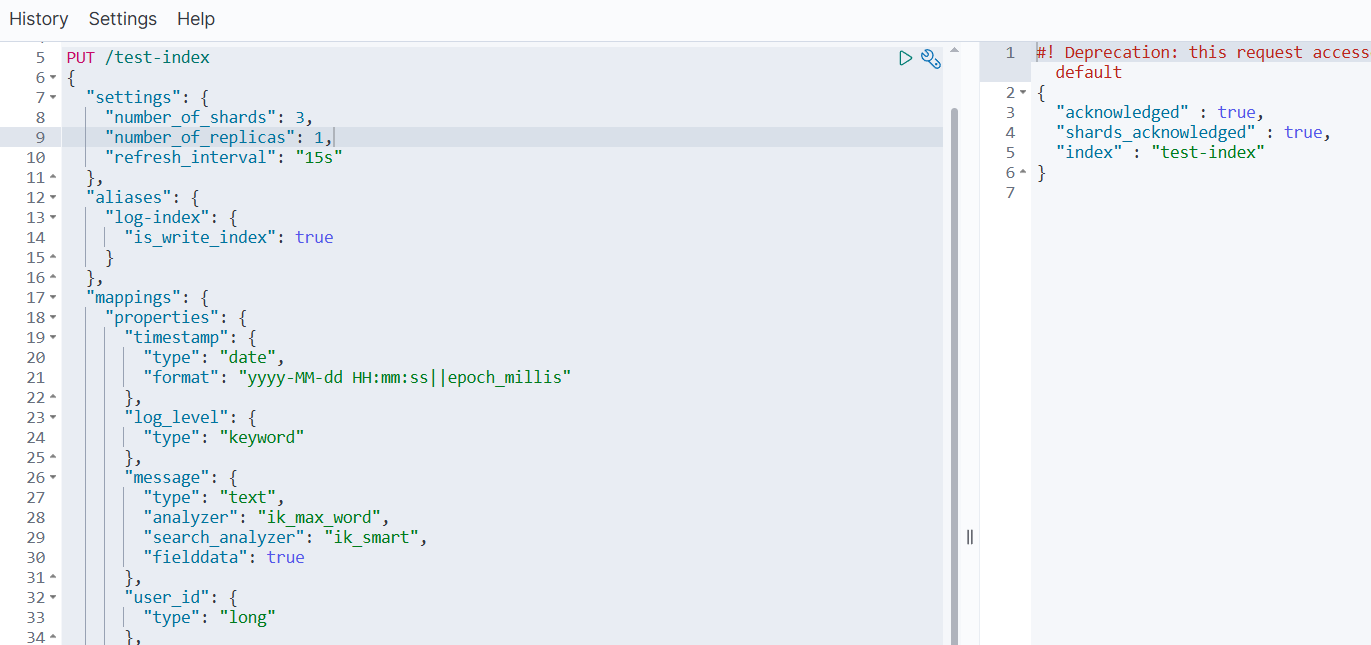
1.1 关键配置说明
- 1️⃣ 基础设置
number_of_shards: 3- 3 个主分片number_of_replicas: 1- 每个主分片 1 个副本refresh_interval: "15s"- 15 秒刷新频率
- 2️⃣ 别名与写入索引
aliases中定义了log-index别名is_write_index: true指定该别名为写入索引
- 3️⃣ 字段类型多样性
date- 时间戳类型keyword- 精确值类型(日志级别、标签)text- 全文检索类型(支持中文分词)long/integer/float- 数值类型boolean- 布尔类型ip- IP地址类型geo_point- 地理位置类型object- 对象类型
- 4️⃣ 中文支持与统计
- 使用
ik_max_word和ik_smart分析器处理中文 "fielddata": true和"doc_values": true开启字段数据统计
- 使用
1.2 重要提示
-
1️⃣ IK分析器:确保您的 Elasticsearch 已安装 IK 中文分词插件,否则需要移除
analyzer配置或改用标准分析器。 -
2️⃣ 索引操作:创建后如需修改设置,可以使用:
PUT /test-index/_settings { "refresh_interval": "15s", "number_of_replicas": 1 } -
3️⃣ 验证索引:创建完成后可以通过以下命令验证:
GET /test-index
GET /_cat/indices/test-index?v
2.摄入管道
PUT /test-index
{
  "settings": {
    "number_of_shards": 3,
    "number_of_replicas": 1,
    "refresh_interval": "15s",
    "index": {
      "default_pipeline": "log-index_pipeline"
    }
  },
  // 其他配置
}
"default_pipeline": "log-index_pipeline" 这行配置的意思是:
为此索引设置一个默认的 摄入管道(Ingest Pipeline),名为 log-index_pipeline。
2.1 详细说明
1️⃣ 什么是 Ingest Pipeline(摄入管道)?
- 它相当于一个 数据处理的流水线 或 中间件。
- 在文档被正式索引(存入磁盘)之前,它可以对文档进行各种预处理和转换。
- 您可以把它想象成数据库中的 “
触发器”(Trigger)或数据处理脚本。
2️⃣ 它是如何工作的?
数据写入的流程会变成这样:您的应用程序 → Elasticsearch → [Ingest Pipeline] → 索引存储
而不是直接的:您的应用程序 → Elasticsearch → 索引存储
3️⃣ 在这个配置中的作用
当您通过 log-index 别名或者直接向 test-index 索引写入数据时,Elasticsearch 会自动将数据先送入名为 log-index_pipeline 的管道进行处理,处理完成后再存入索引。
2.2 一个具体的例子
假设我们有一个管道,用于自动解析日志消息并添加时间戳:
首先,创建这个管道:
PUT _ingest/pipeline/log-index_pipeline
{
  "description": "为日志数据添加处理逻辑",
  "processors": [
    {
      "set": { // 添加一个字段
        "field": "processed_by",
        "value": "log_pipeline"
      }
    },
    {
      "script": { // 使用脚本处理
        "source": """
          // 如果是 ERROR 级别的日志,添加一个告警标签
          if (ctx.log_level == 'ERROR') {
            ctx.tags = ctx.tags ?: [];
            ctx.tags.add('needs_alert');
          }
        """
      }
    }
  ]
}
然后,当您写入数据时:
POST /log-index/_doc
{
  "timestamp": "2024-01-01 12:00:00",
  "log_level": "ERROR",
  "message": "数据库连接失败"
}
最终存入索引的数据会自动变成:
{
  "timestamp": "2024-01-01 12:00:00",
  "log_level": "ERROR",
  "message": "数据库连接失败",
  "processed_by": "log_pipeline", // 管道添加的字段
  "tags": ["needs_alert"] // 管道根据条件添加的标签
}
2.3 潜在用途
考虑到索引名为 test-index,别名是 log-index,这个管道可能被设计用于:
- 1️⃣ 数据清洗:清理或格式化日志消息
- 2️⃣ 字段提取:从原始消息中提取出结构化的字段(如从
"用户 [张三] 登录成功"中提取出用户名"张三") - 3️⃣ 数据丰富:根据 IP 地址添加地理位置信息
- 4️⃣ 数据转换:将字符串数字转换为真正的数值类型
2.4 重要提醒
❌ 如果您的集群中并不存在名为
log-index_pipeline的管道,那么这个索引创建命令将会失败!
您有两个选择:
选择一:删除此配置(如果您不需要管道)
PUT /test-index
{
  "settings": {
    "number_of_shards": 3,
    "number_of_replicas": 1,
    "refresh_interval": "15s"
    // 移除了 default_pipeline 配置
  },
  // ... 其他配置保持不变
}
选择二:先创建对应的管道
在执行索引创建命令前,先确保管道存在。
3.数据统计
字段数据统计 主要是指启用 fielddata 和 doc_values 功能,让 Elasticsearch 能够对文本字段进行 排序、聚合和脚本计算。
⭐ 推荐阅读:《【Elasticsearch】映射:fielddata 详解》
3.1 两种主要的字段数据机制
3.1.1 Fielddata(字段数据)
主要用于 text 类型的字段。
"message": {
  "type": "text",
  "analyzer": "ik_max_word",
  "search_analyzer": "ik_smart",
  "fielddata": true  // ← 这就是开启 fielddata
}
作用:让 text 字段支持:
- 聚合(Aggregations)
- 排序(Sorting)
- 脚本计算(Scripting)
代价:会消耗大量 堆内存,因为需要将倒排索引中的数据加载到内存中。
3.1.2 Doc Values(文档值)
主要用于非文本字段,默认开启。
"request_count": {
  "type": "integer",
  "doc_values": true  // ← 默认就是true,显式声明
}
作用:在索引时构建的列式存储,用于:
- 聚合
- 排序
- 脚本
优势:存储在磁盘上,使用时部分加载到内存,更加高效。
3.2 实际例子对比
3.2.1 场景:分析日志消息中的关键词频率
1️⃣ 没有开启 fielddata 时:
// 这个查询会失败!
GET /test-index/_search
{
  "aggs": {
    "popular_messages": {
      "terms": {
        "field": "message"  // ← text字段默认不能聚合
      }
    }
  }
}
错误信息:Fielddata is disabled on text fields by default...
2️⃣ 开启 fielddata 后:
// 这个查询可以成功!
GET /test-index/_search
{
  "aggs": {
    "popular_keywords": {
      "terms": {
        "field": "message.keyword"  // 或者使用message字段本身
      }
    }
  }
}
结果:可以统计出哪些关键词在日志中出现最频繁。
3.2.2 在您索引中的具体应用
在您之前的映射中,这些配置都涉及字段数据统计:
{
  "mappings": {
    "properties": {
      "message": {
        "type": "text",
        "analyzer": "ik_max_word",
        "search_analyzer": "ik_smart",
        "fielddata": true  // ← 开启文本字段数据统计
      },
      "request_count": {
        "type": "integer",
        "doc_values": true // ← 开启数值字段数据统计(其实默认就是true)
      },
      "log_level": {
        "type": "keyword"   // ← keyword类型默认就有doc_values
      }
    }
  }
}
3.2.3 实际使用场景
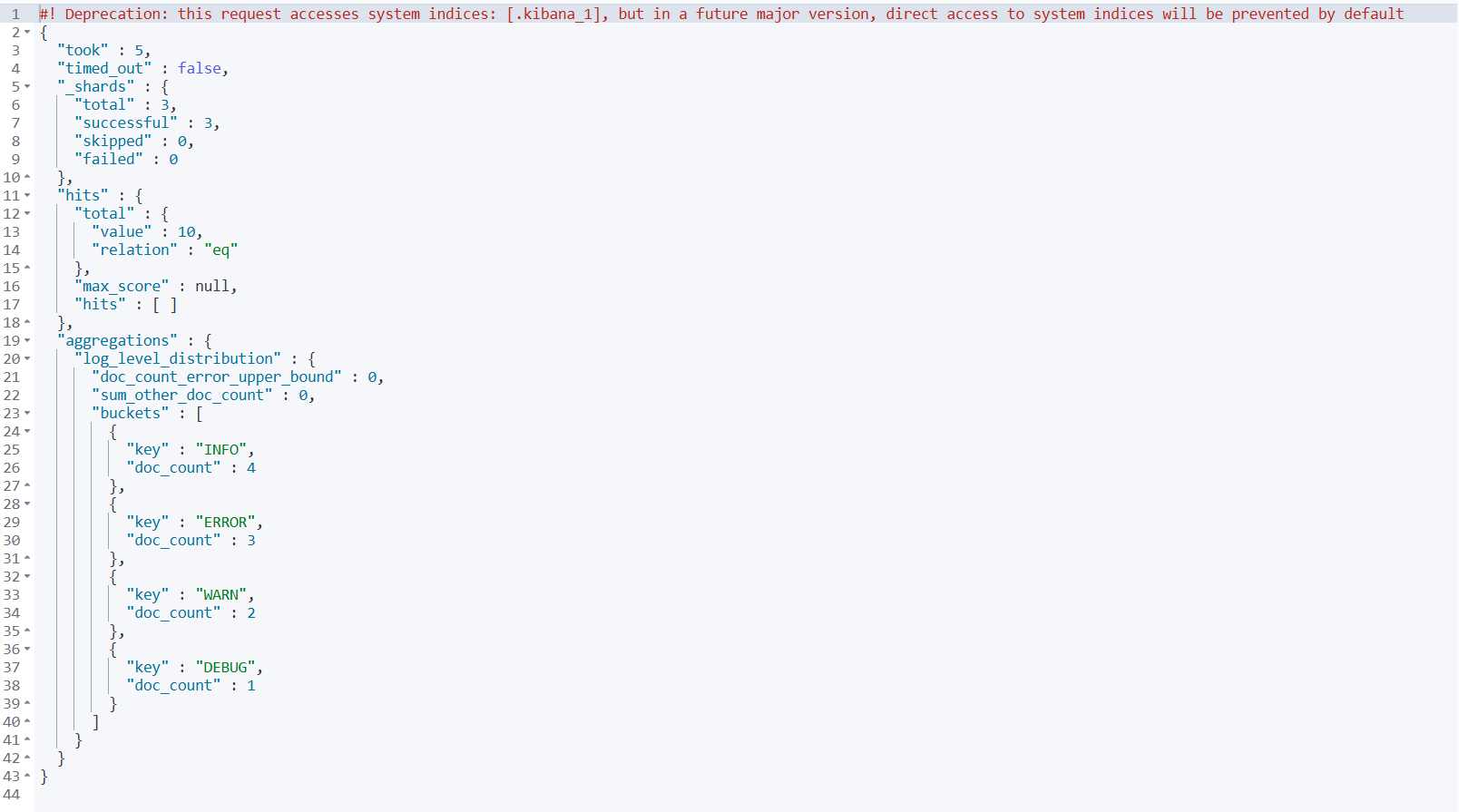
1️⃣ 日志级别统计
GET /test-index/_search
{
  "size": 0,
  "aggs": {
    "log_level_distribution": {
      "terms": {
        "field": "log_level"  // ← 依赖字段数据
      }
    }
  }
}
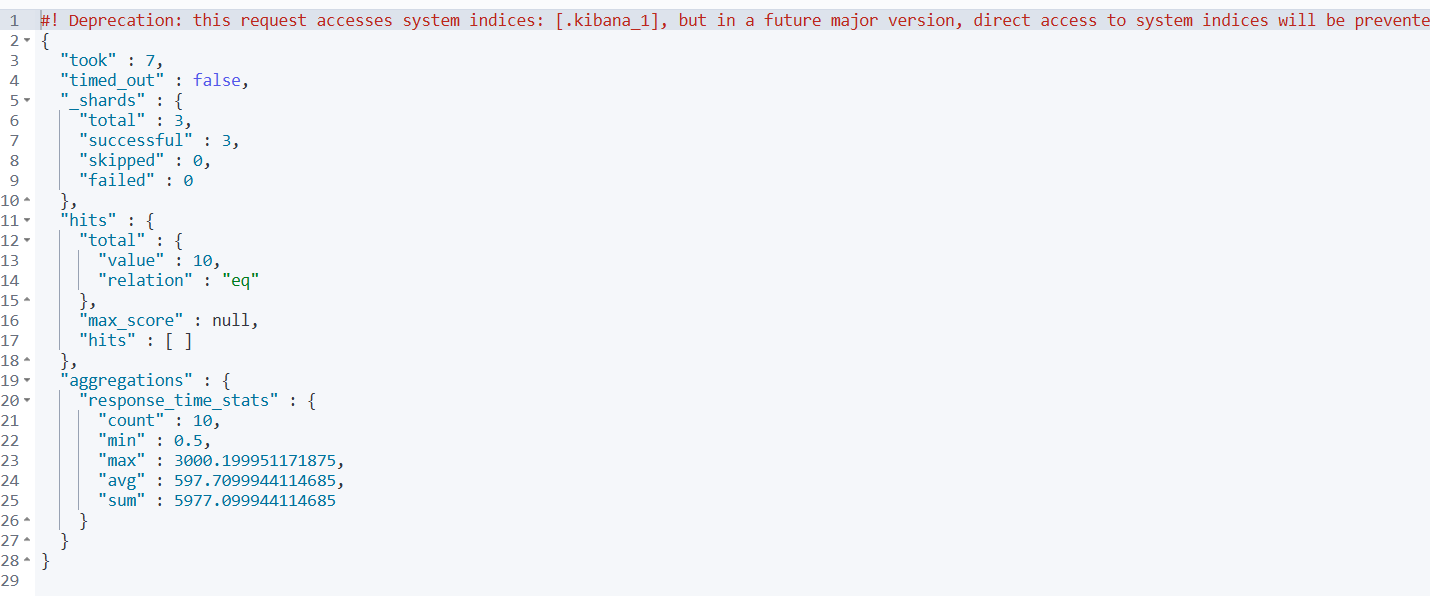
2️⃣ 响应时间分析
GET /test-index/_search
{
  "size": 0,
  "aggs": {
    "response_time_stats": {
      "stats": {
        "field": "response_time"  // ← 依赖字段数据
      }
    }
  }
}
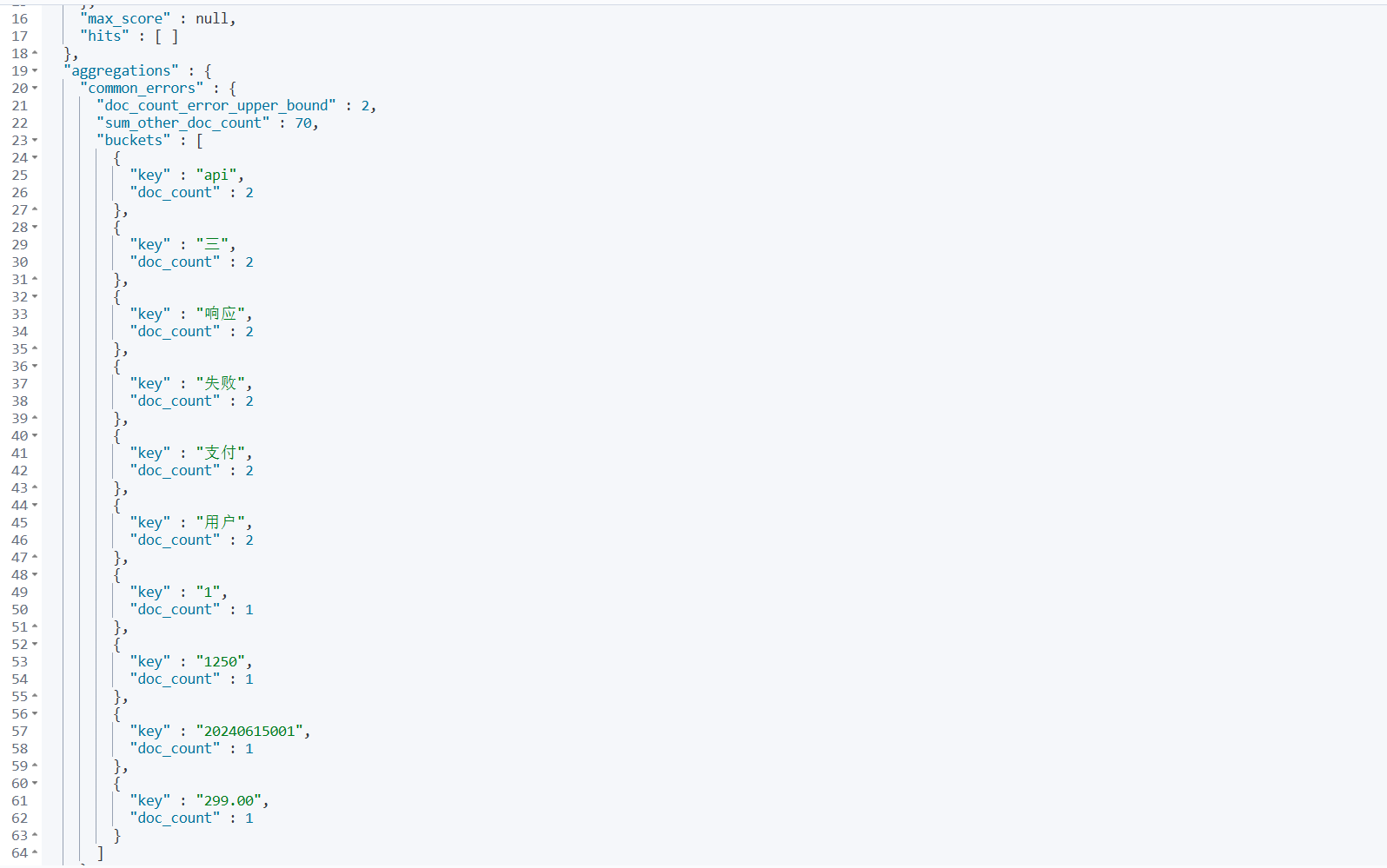
3️⃣ 按消息内容聚合(需要 fielddata)
GET /test-index/_search
{
  "size": 0,
  "aggs": {
    "common_errors": {
      "terms": {
        "field": "message"  // ← 这需要fielddata: true
      }
    }
  }
}
3.3 性能考虑
| 特性 | Fielddata | Doc Values |
|---|---|---|
| 存储位置 | 内存(堆) | 磁盘 |
| 构建时机 | 搜索时 | 索引时 |
| 内存占用 | 高 | 低 |
| 性能 | 快(全内存) | 较快 |
最佳实践:
- 对于
text字段,尽量避免开启fielddata,除非确实需要 - 对于聚合和排序,优先使用
keyword类型子字段 - 监控堆内存使用情况
3.4 总结
“开启字段数据统计” 就是通过配置 fielddata: true 和 doc_values: true,让 Elasticsearch 能够对字段值进行:
- ✅ 聚合分析
- ✅ 排序操作
- ✅ 脚本计算
- ✅ 统计计算
4.索引数据
4.1 核心区别
| 特性 | 开启索引(Indexing) | 开启字段数据统计(Fielddata) |
|---|---|---|
| 控制什么 | 是否 可被搜索 | 是否 可被聚合/排序 |
| 配置参数 | "index": true/false | "fielddata": true/false |
| 主要用途 | 全文检索、关键词搜索 | 聚合分析、排序、脚本计算 |
| 存储结构 | 倒排索引 | 列式存储(内存或磁盘) |
4.2 详细对比
4.2.1 开启索引(Indexing)
控制字段是否被加入 倒排索引,使其可被搜索。
{
  "request_body": {
    "type": "text",
    "index": false  // ← 这个字段不可被搜索
  },
  "message": {
    "type": "text",
    "index": true   // ← 这个字段可以被搜索(默认就是true)
  }
}
影响:
"index": false→ 该字段 无法被搜索"index": true→ 该字段 可以被搜索
例子:
// 这个搜索能成功(message字段可搜索)
GET /test-index/_search
{
  "query": {
    "match": {
      "message": "登录"
    }
  }
}
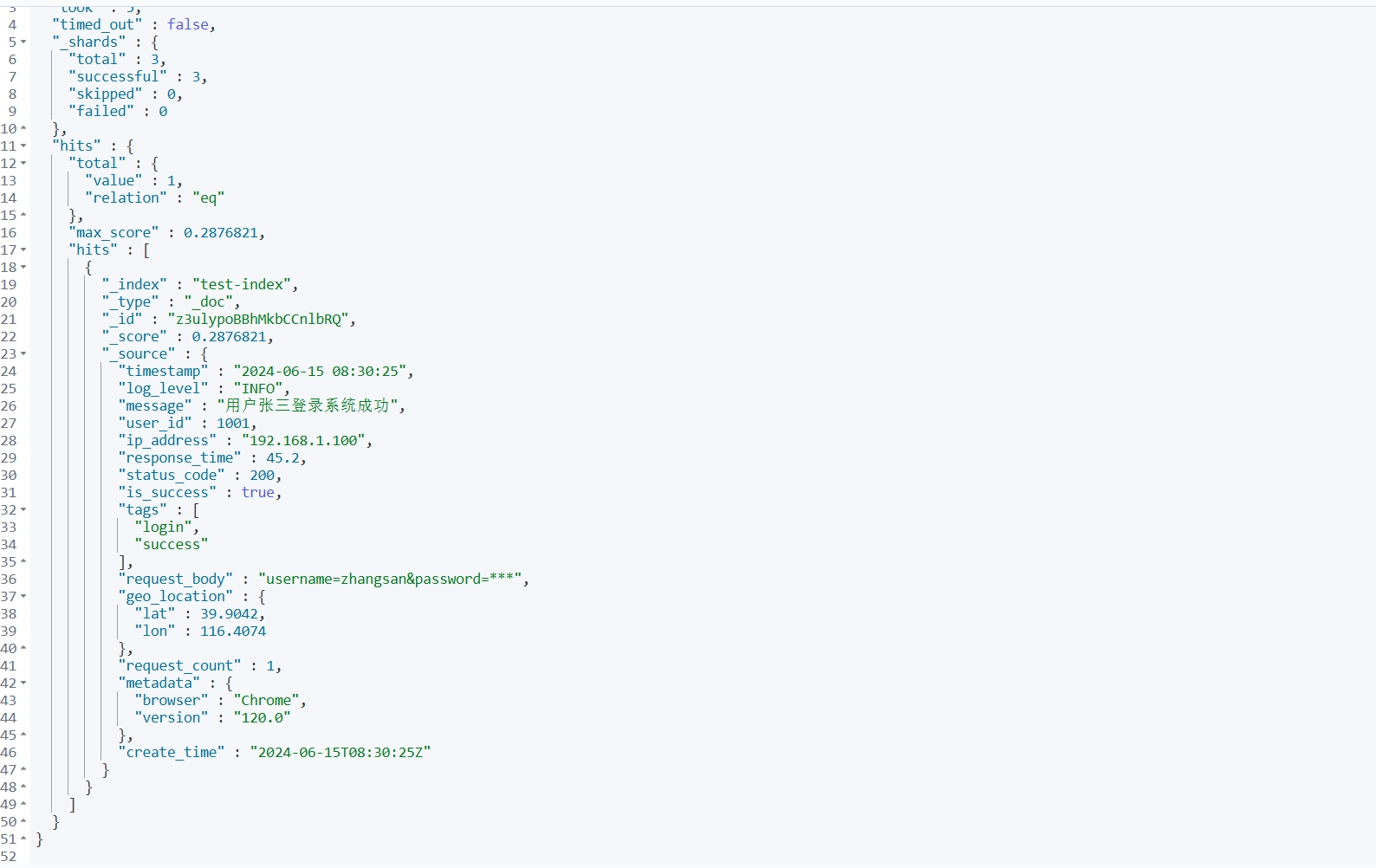
// 这个搜索会返回空结果(request_body字段不可搜索)
GET /test-index/_search
{
  "query": {
    "match": {
      "request_body": "某些内容"
    }
  }
}
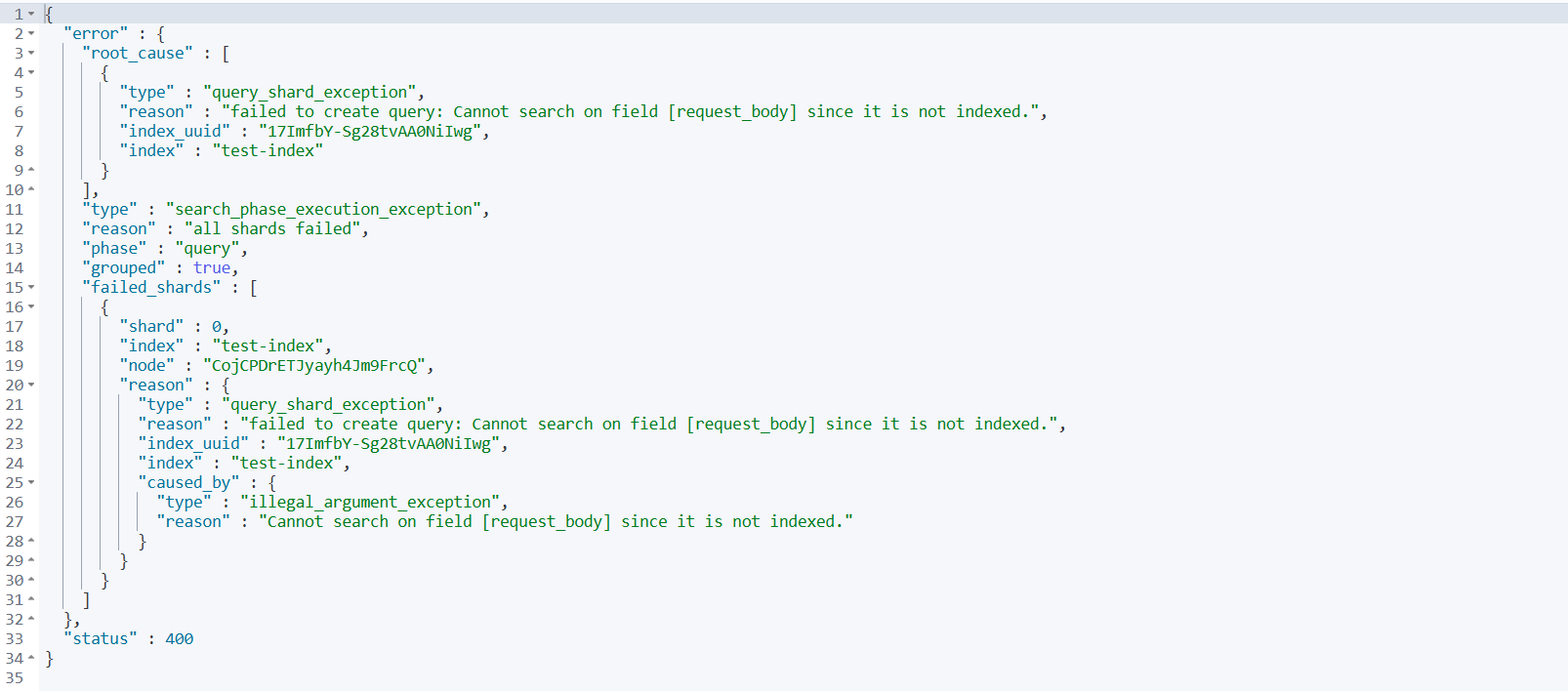
4.2.2 开启字段数据统计(Fielddata)
控制是否允许对 text 类型字段进行 聚合、排序 等操作。
{
  "message": {
    "type": "text",
    "fielddata": true  // ← 允许对这个text字段进行聚合和排序
  }
}
影响:
"fielddata": false→ 该字段 无法聚合、排序"fielddata": true→ 该字段 可以聚合、排序
例子:
// 这个聚合能成功(fielddata: true)
GET /test-index/_search
{
  "aggs": {
    "common_messages": {
      "terms": {
        "field": "message"  // ← 对text字段聚合
      }
    }
  }
}
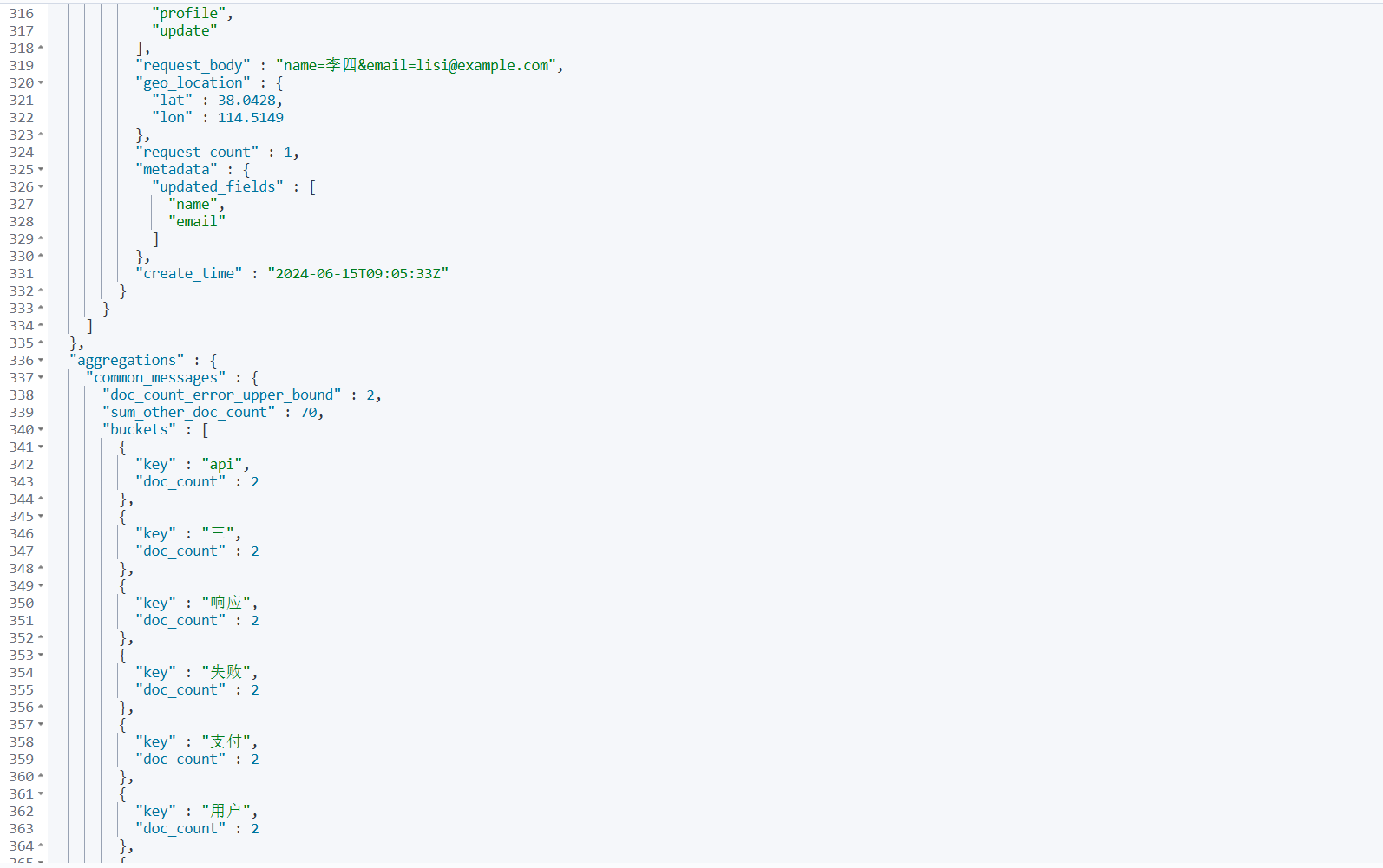
// 这个排序能成功(fielddata: true)
GET /test-index/_search
{
  "sort": [
    {
      "message": {
        "order": "asc"
      }
    }
  ]
}
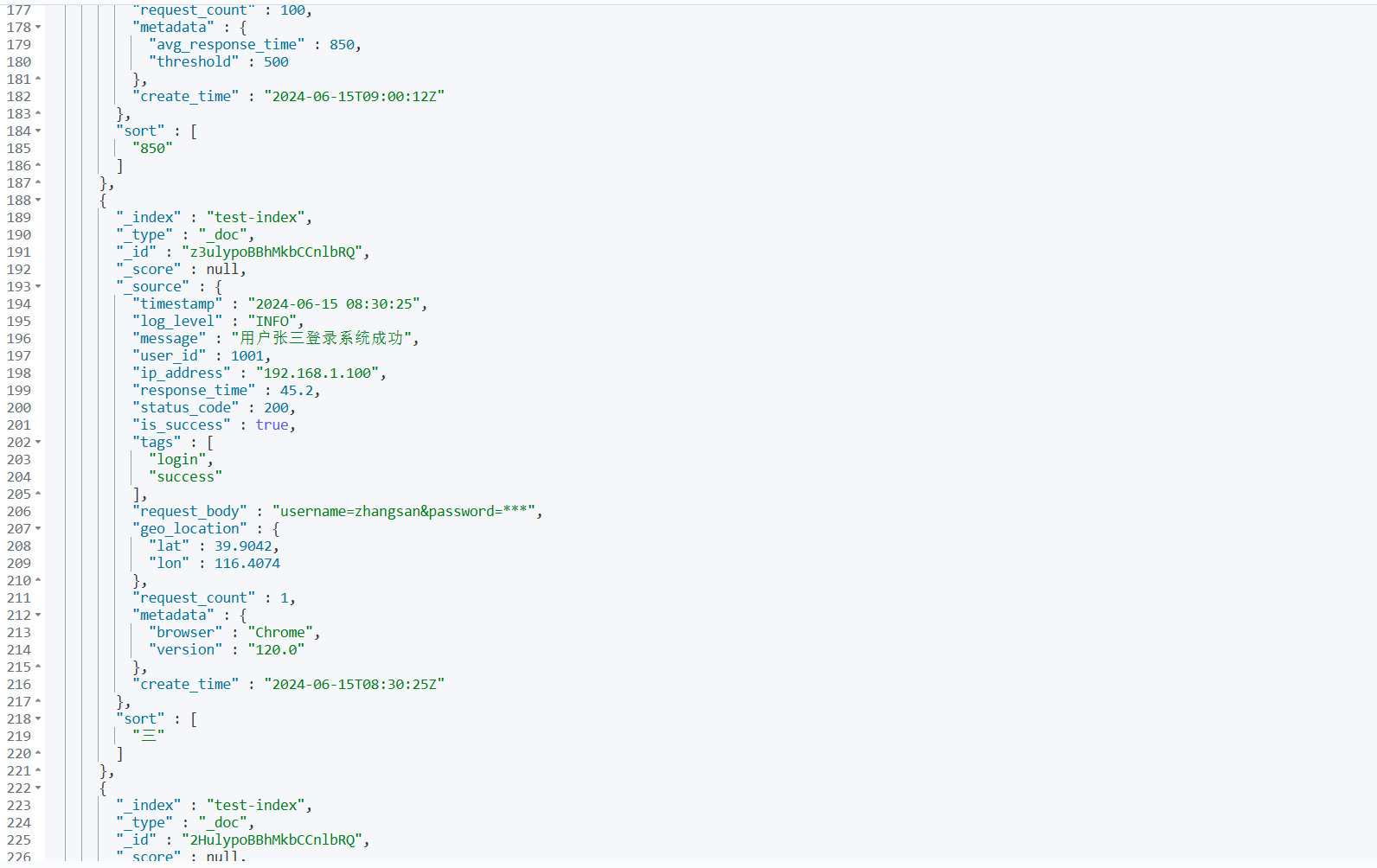
4.3 实际场景组合
4.3.1 场景1:只搜索不聚合
{
  "log_message": {
    "type": "text",
    "index": true,      // 可以被搜索
    "fielddata": false  // 但不能聚合排序(默认情况)
  }
}
4.3.2 场景2:只存储不搜索
{
  "raw_data": {
    "type": "text",
    "index": false,     // 不能被搜索
    "fielddata": false  // 也不能聚合
  }
}
4.3.3 场景3:搜索且聚合(消耗资源)
{
  "analyzed_content": {
    "type": "text",
    "index": true,      // 可以被搜索
    "fielddata": true   // 也可以聚合排序
  }
}
4.3.4 场景4:最佳实践方案
{
  "message": {
    "type": "text",
    "index": true,      // 用于全文搜索
    "fielddata": false, // 避免内存消耗
    "fields": {
      "keyword": {
        "type": "keyword"  // 用于聚合和排序
      }
    }
  }
}
4.4 在您之前配置中的体现
{
  "request_body": {
    "type": "text",
    "index": false       // ← 这个字段关闭了索引(不可搜索)
  },
  "message": {
    "type": "text",
    "analyzer": "ik_max_word",
    "search_analyzer": "ik_smart",
    "fielddata": true    // ← 这个字段开启了字段数据统计(可聚合)
    // 注意:这里没有写 "index",默认为true,所以也可搜索
  }
}
解读:
request_body:不可搜索("index": false)message:可搜索(默认"index": true)且 可聚合("fielddata": true)
4.5 总结
| 操作 | 依赖索引 ( index: true) | 依赖字段数据 ( fielddata: trueh) |
|---|---|---|
| 搜索/查询 | ✅ 必需 | ❌ 不需要 |
| 聚合分析 | ❌ 不需要 | ✅ 必需(针对 text 字段) |
| 排序操作 | ❌ 不需要 | ✅ 必需(针对 text 字段) |
| 脚本计算 | ❌ 不需要 | ✅ 必需 |
简单记忆:
- “开启索引” = 让字段 能被找到
- “开启字段数据统计” = 让字段 能被分析
5.测试数据
根据您之前定义的 test-index 映射生成 10 条符合格式的测试数据。
POST /test-index/_bulk
{"index":{}}
{"timestamp":"2024-06-15 08:30:25","log_level":"INFO","message":"用户张三登录系统成功","user_id":1001,"ip_address":"192.168.1.100","response_time":45.2,"status_code":200,"is_success":true,"tags":["login","success"],"request_body":"username=zhangsan&password=***","geo_location":{"lat":39.9042,"lon":116.4074},"request_count":1,"metadata":{"browser":"Chrome","version":"120.0"},"create_time":"2024-06-15T08:30:25Z"}
{"index":{}}
{"timestamp":"2024-06-15 08:32:10","log_level":"ERROR","message":"数据库连接超时,请检查网络配置","user_id":1002,"ip_address":"10.0.0.55","response_time":1500.5,"status_code":500,"is_success":false,"tags":["database","timeout","critical"],"request_body":"query=SELECT * FROM users","geo_location":{"lat":31.2304,"lon":121.4737},"request_count":3,"metadata":{"service":"user-service","thread_id":"thread-25"},"create_time":"2024-06-15T08:32:10Z"}
{"index":{}}
{"timestamp":"2024-06-15 08:35:42","log_level":"WARN","message":"内存使用率超过80%阈值","user_id":null,"ip_address":"172.16.10.20","response_time":0.5,"status_code":200,"is_success":true,"tags":["monitoring","memory"],"request_body":"","geo_location":{"lat":23.1291,"lon":113.2644},"request_count":1,"metadata":{"hostname":"server-01","memory_usage":82},"create_time":"2024-06-15T08:35:42Z"}
{"index":{}}
{"timestamp":"2024-06-15 08:40:15","log_level":"INFO","message":"订单ID 20240615001 支付成功,金额299.00元","user_id":1003,"ip_address":"192.168.1.150","response_time":120.3,"status_code":200,"is_success":true,"tags":["order","payment"],"request_body":"order_id=20240615001&amount=299.00","geo_location":{"lat":30.2741,"lon":120.1551},"request_count":1,"metadata":{"payment_gateway":"alipay","transaction_id":"txn_123456"},"create_time":"2024-06-15T08:40:15Z"}
{"index":{}}
{"timestamp":"2024-06-15 08:45:30","log_level":"DEBUG","message":"开始处理API请求 /api/v1/users/list","user_id":1004,"ip_address":"203.0.113.10","response_time":15.7,"status_code":200,"is_success":true,"tags":["api","debug"],"request_body":"page=1&size=20","geo_location":{"lat":22.3193,"lon":114.1694},"request_count":5,"metadata":{"endpoint":"/api/v1/users/list","method":"GET"},"create_time":"2024-06-15T08:45:30Z"}
{"index":{}}
{"timestamp":"2024-06-15 08:50:22","log_level":"ERROR","message":"文件上传失败:文件大小超过限制","user_id":1005,"ip_address":"192.168.1.200","response_time":320.8,"status_code":413,"is_success":false,"tags":["upload","file_size","error"],"request_body":"file=report.pdf","geo_location":{"lat":34.3416,"lon":108.9398},"request_count":2,"metadata":{"file_name":"report.pdf","file_size":"15MB","max_size":"10MB"},"create_time":"2024-06-15T08:50:22Z"}
{"index":{}}
{"timestamp":"2024-06-15 08:55:47","log_level":"INFO","message":"缓存刷新完成,共清理 1250 个过期条目","user_id":null,"ip_address":"10.0.1.100","response_time":45.0,"status_code":200,"is_success":true,"tags":["cache","cleanup"],"request_body":"action=refresh_cache","geo_location":{"lat":29.4316,"lon":106.9123},"request_count":1,"metadata":{"cache_type":"redis","cleaned_count":1250},"create_time":"2024-06-15T08:55:47Z"}
{"index":{}}
{"timestamp":"2024-06-15 09:00:12","log_level":"WARN","message":"API响应时间较慢,当前平均响应时间 850ms","user_id":null,"ip_address":"172.17.20.30","response_time":850.0,"status_code":200,"is_success":true,"tags":["performance","slow"],"request_body":"","geo_location":{"lat":36.0611,"lon":120.3783},"request_count":100,"metadata":{"avg_response_time":850,"threshold":500},"create_time":"2024-06-15T09:00:12Z"}
{"index":{}}
{"timestamp":"2024-06-15 09:05:33","log_level":"INFO","message":"用户李四修改个人资料信息","user_id":1006,"ip_address":"203.0.113.45","response_time":78.9,"status_code":200,"is_success":true,"tags":["profile","update"],"request_body":"name=李四&email=lisi@example.com","geo_location":{"lat":38.0428,"lon":114.5149},"request_count":1,"metadata":{"updated_fields":["name","email"]},"create_time":"2024-06-15T09:05:33Z"}
{"index":{}}
{"timestamp":"2024-06-15 09:10:18","log_level":"ERROR","message":"第三方服务调用失败:支付网关无响应","user_id":1007,"ip_address":"192.168.2.100","response_time":3000.2,"status_code":503,"is_success":false,"tags":["external_service","payment","timeout"],"request_body":"payment_data=encrypted","geo_location":{"lat":45.758,"lon":126.642},"request_count":3,"metadata":{"service_name":"payment-gateway","timeout_ms":5000},"create_time":"2024-06-15T09:10:18Z"}
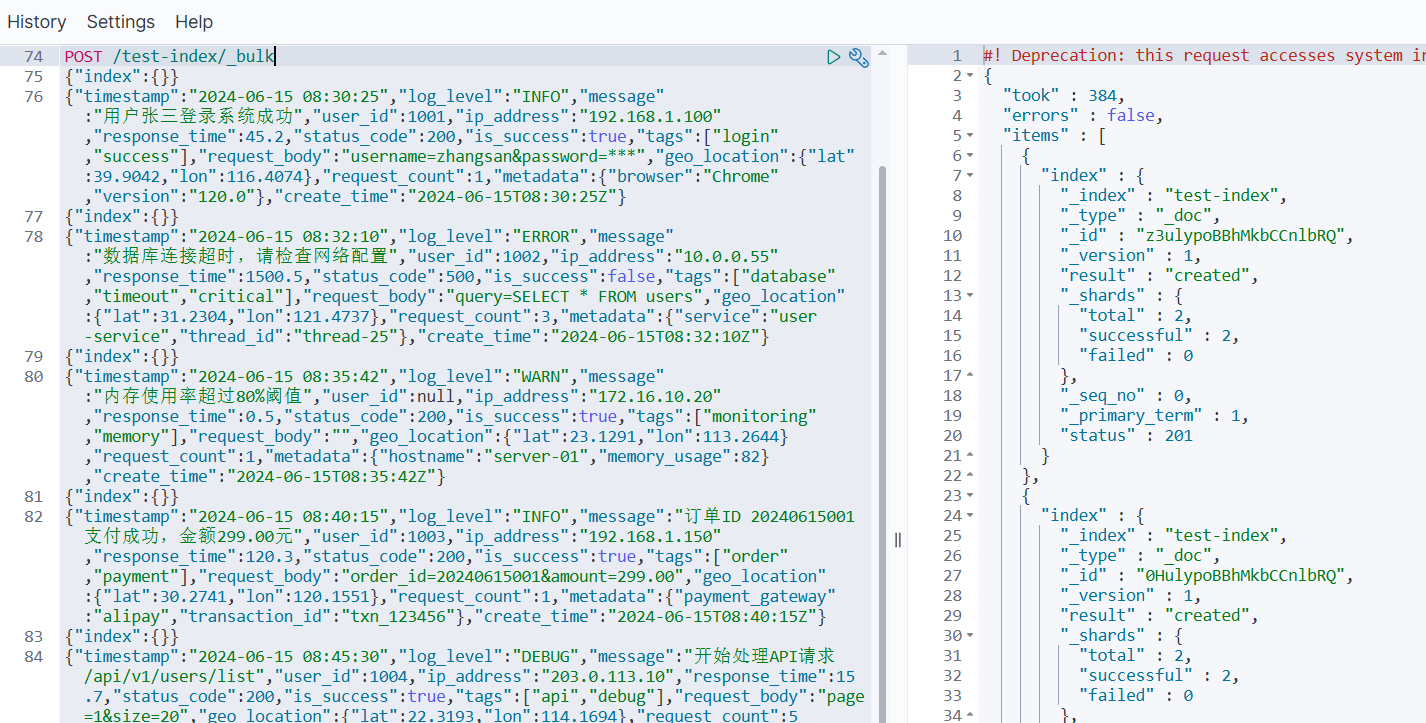
5.1 数据验证查询
插入数据后,您可以使用以下查询验证:
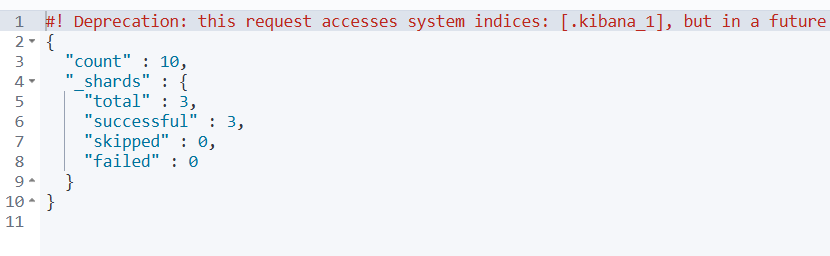
1️⃣ 查看数据总数
GET /test-index/_count
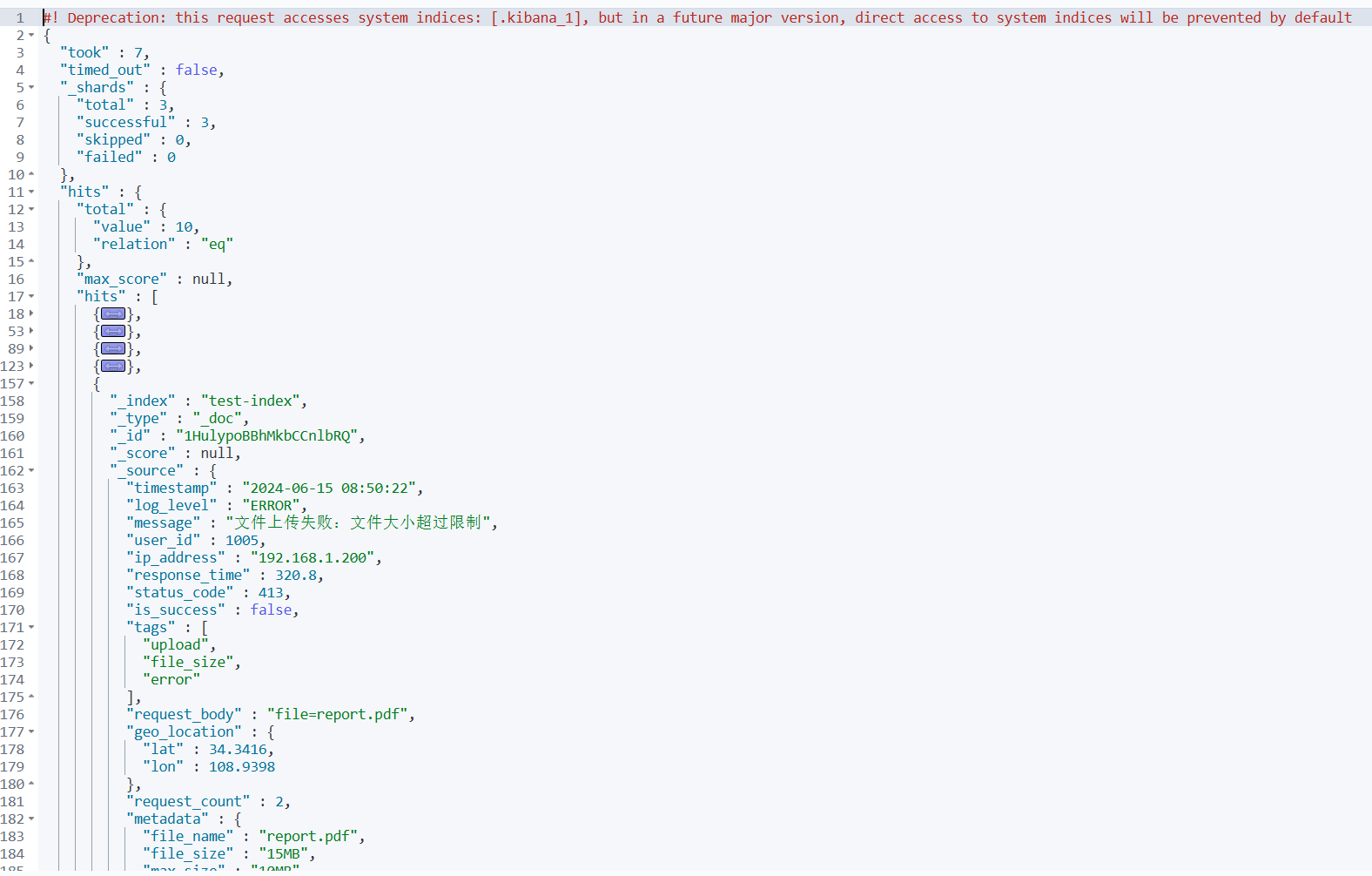
2️⃣ 查看最新几条数据
GET /test-index/_search
{
  "size": 5,
  "sort": [
    {
      "timestamp": {
        "order": "desc"
      }
    }
  ]
}
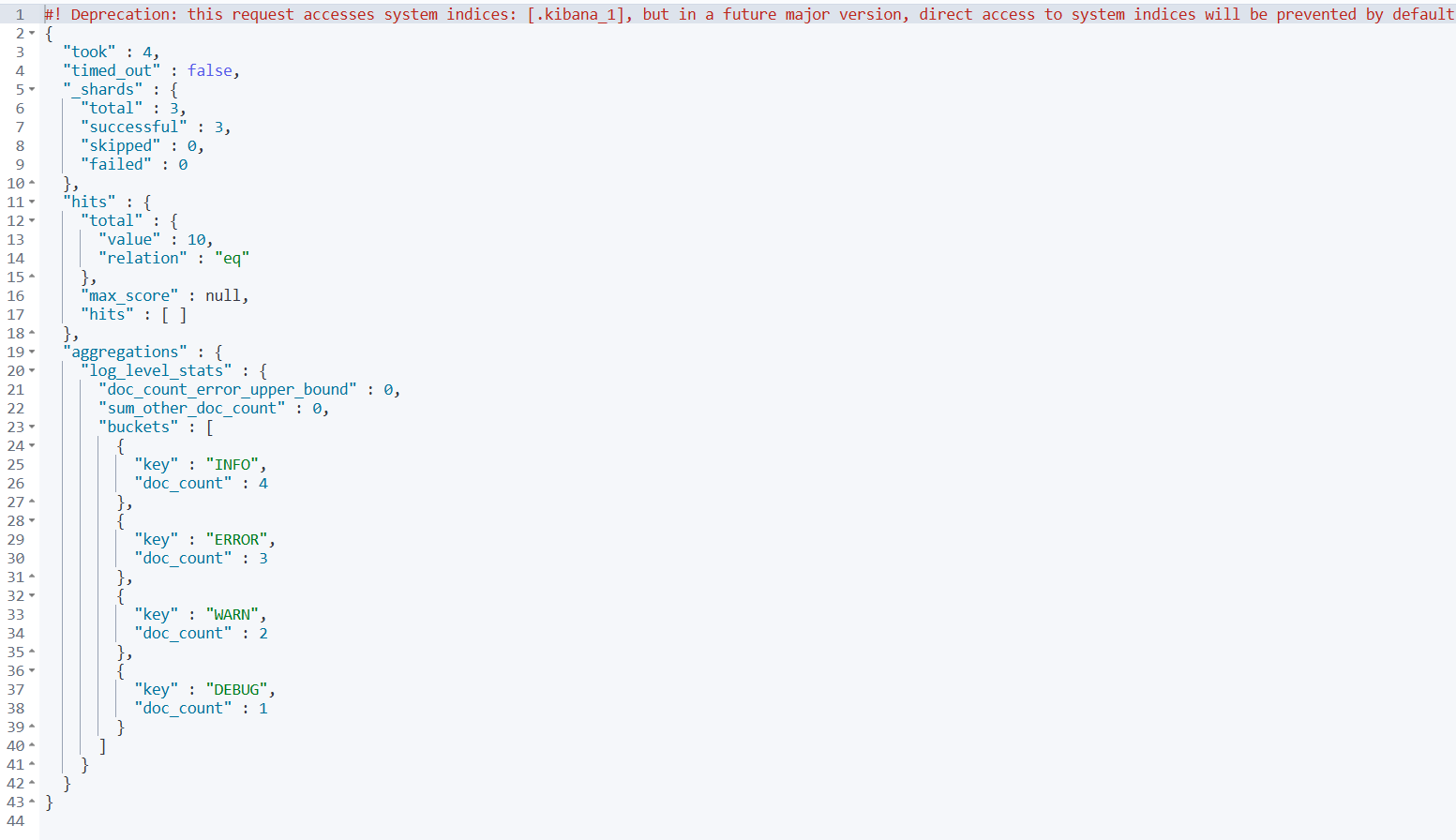
3️⃣ 测试字段数据统计 - 按日志级别聚合
GET /test-index/_search
{
  "size": 0,
  "aggs": {
    "log_level_stats": {
      "terms": {
        "field": "log_level"
      }
    }
  }
}
4️⃣ 测试中文搜索
GET /test-index/_search
{
  "query": {
    "match": {
      "message": "用户登录"
    }
  }
}
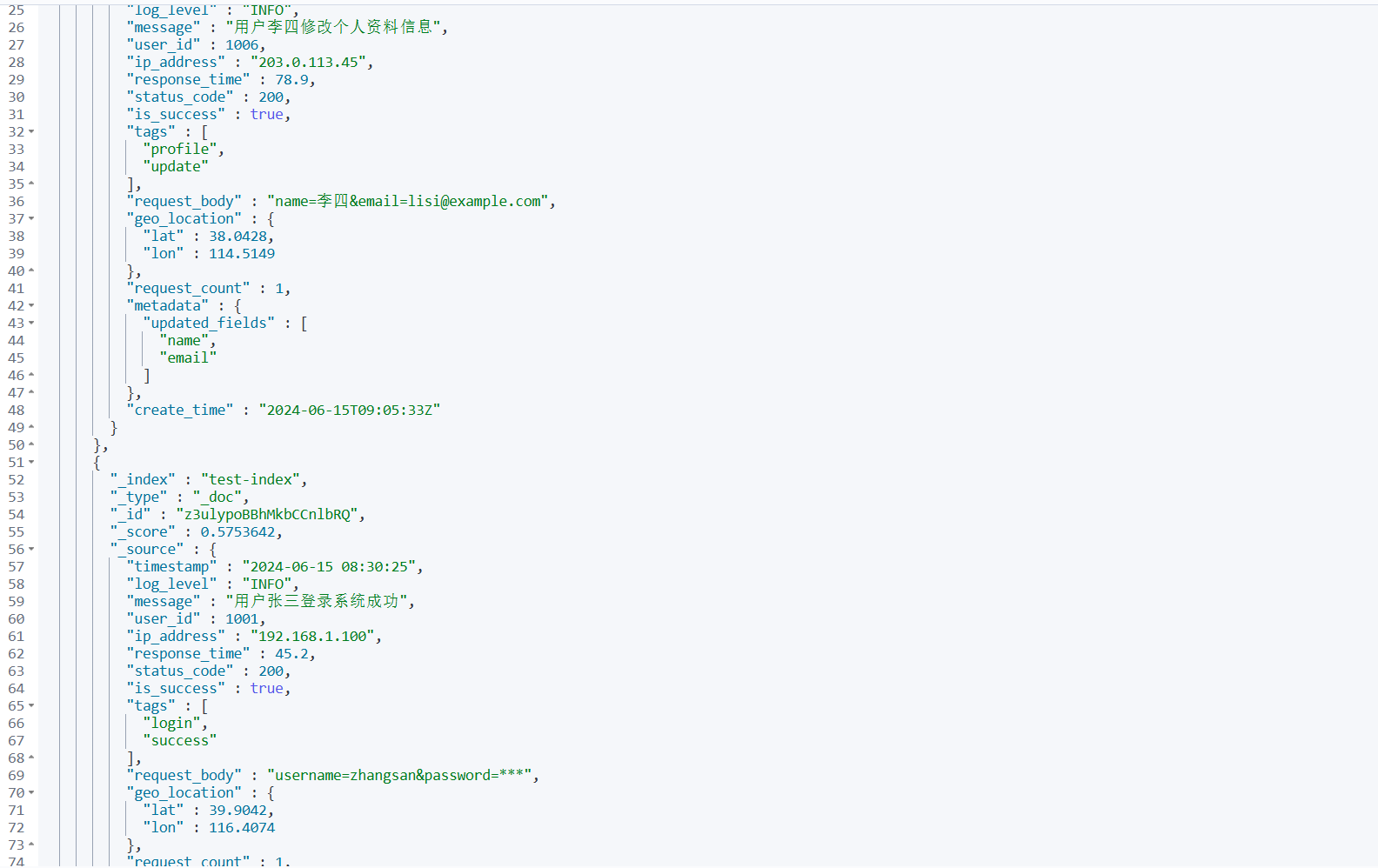
5.2 数据特点说明
这些测试数据具有以下特点:
- 覆盖所有字段类型:包含了映射中定义的所有字段类型
- 中文内容:
message字段包含丰富的中文文本 - 多样化的日志级别:INFO、ERROR、WARN、DEBUG
- 真实的地理位置:包含中国主要城市的经纬度
- 不同的IP地址段:内网 IP、公网 IP
- 多样的状态码:200、500、413、503
- 丰富的标签:不同类型的业务标签
- 完整的时间序列:按时间顺序排列的时间戳
这些数据非常适合测试搜索、聚合、排序等功能的完整性和性能。





 扫一扫
扫一扫


 1017
1017

 被折叠的 条评论
为什么被折叠?
被折叠的 条评论
为什么被折叠?
 到【灌水乐园】发言





