 Objective-C实现HTTP通信



文章的目的为了记录使用Objective-C 进行IOS app 开发学习的经历。本职为嵌入式软件开发,公司安排开发app,临时学习,完成app的开发。开发流程和要点有些记忆模糊,赶紧记录,防止忘记。
相关链接:
开源 Objective-C IOS 应用开发(一)macOS 的使用
开源 Objective-C IOS 应用开发(二)Xcode安装
开源 Objective-C IOS 应用开发(三)第一个iPhone的APP
开源 Objective-C IOS 应用开发(四)Xcode工程文件结构
开源 Objective-C IOS 应用开发(五)iOS操作(action)和输出口(Outlet)
开源 Objective-C IOS 应用开发(六)Objective-C 和 C语言
开源 Objective-C IOS 应用开发(七)Objective-C核心代码示例
开源 Objective-C IOS 应用开发(八)常见控件UI
开源 Objective-C IOS 应用开发(九)复杂控件-tableview
开源 Objective-C IOS 应用开发(十)数据持久化--文件
开源 Objective-C IOS 应用开发(十一)数据持久化--sqlite
开源 Objective-C IOS 应用开发(十二)通讯--ble
开源 Objective-C IOS 应用开发(十三)通讯--Http访问
开源 Objective-C IOS 应用开发(十四)传感器--陀螺仪和gps
开源 Objective-C IOS 应用开发(十五)通讯--蓝牙ble扫描
开源 Objective-C IOS 应用开发(十六)Storyboard模式下的纯代码界面
开源 Objective-C IOS 应用开发(十七)CAF音频的录制
开源 Objective-C IOS 应用开发(十八)音频的播放
开源 Objective-C IOS 应用开发(十九)视频的播放
开源 Objective-C IOS 应用开发(二十)多线程处理
开源 Objective-C IOS 应用开发(二十一)自定义控件--示波器
开源 Objective-C IOS 应用开发(二十二)自定义控件--车速仪表盘
推荐链接:
开源 Arkts 鸿蒙应用 开发(一)工程文件分析-优快云博客
开源 Arkts 鸿蒙应用 开发(二)封装库.har制作和应用-优快云博客
开源 Arkts 鸿蒙应用 开发(三)Arkts的介绍-优快云博客
开源 Arkts 鸿蒙应用 开发(四)布局和常用控件-优快云博客
开源 Arkts 鸿蒙应用 开发(五)控件组成和复杂控件-优快云博客
开源 Arkts 鸿蒙应用 开发(六)数据持久--文件和首选项存储-优快云博客
开源 Arkts 鸿蒙应用 开发(七)数据持久--sqlite关系数据库-优快云博客
开源 Arkts 鸿蒙应用 开发(八)多媒体--相册和相机-优快云博客
开源 Arkts 鸿蒙应用 开发(九)通讯--tcp客户端-优快云博客
开源 Arkts 鸿蒙应用 开发(十)通讯--Http-优快云博客
开源 Arkts 鸿蒙应用 开发(十一)证书和包名修改-优快云博客
开源 Arkts 鸿蒙应用 开发(十二)传感器的使用-优快云博客
开源 Arkts 鸿蒙应用 开发(十三)音频--MP3播放_arkts avplayer播放音频 mp3-优快云博客
开源 Arkts 鸿蒙应用 开发(十四)线程--任务池(taskpool)-优快云博客
开源 Arkts 鸿蒙应用 开发(十五)自定义绘图控件--仪表盘-优快云博客
开源 Arkts 鸿蒙应用 开发(十六)自定义绘图控件--波形图-优快云博客
开源 Arkts 鸿蒙应用 开发(十七)通讯--http多文件下载-优快云博客
开源 Arkts 鸿蒙应用 开发(十八)通讯--Ble低功耗蓝牙服务器-优快云博客
推荐链接:
开源 java android app 开发(一)开发环境的搭建-优快云博客
开源 java android app 开发(二)工程文件结构-优快云博客
开源 java android app 开发(三)GUI界面布局和常用组件-优快云博客
开源 java android app 开发(四)GUI界面重要组件-优快云博客
开源 java android app 开发(五)文件和数据库存储-优快云博客
开源 java android app 开发(六)多媒体使用-优快云博客
开源 java android app 开发(七)通讯之Tcp和Http-优快云博客
开源 java android app 开发(八)通讯之Mqtt和Ble-优快云博客
开源 java android app 开发(九)后台之线程和服务-优快云博客
开源 java android app 开发(十)广播机制-优快云博客
开源 java android app 开发(十一)调试、发布-优快云博客
开源 java android app 开发(十二)封库.aar-优快云博客
本章内容主要是使用Http对网络进行访问,实现数据通讯。
目录:
1.手机演示
2.所有源码
3.源码分析
一、手机演示
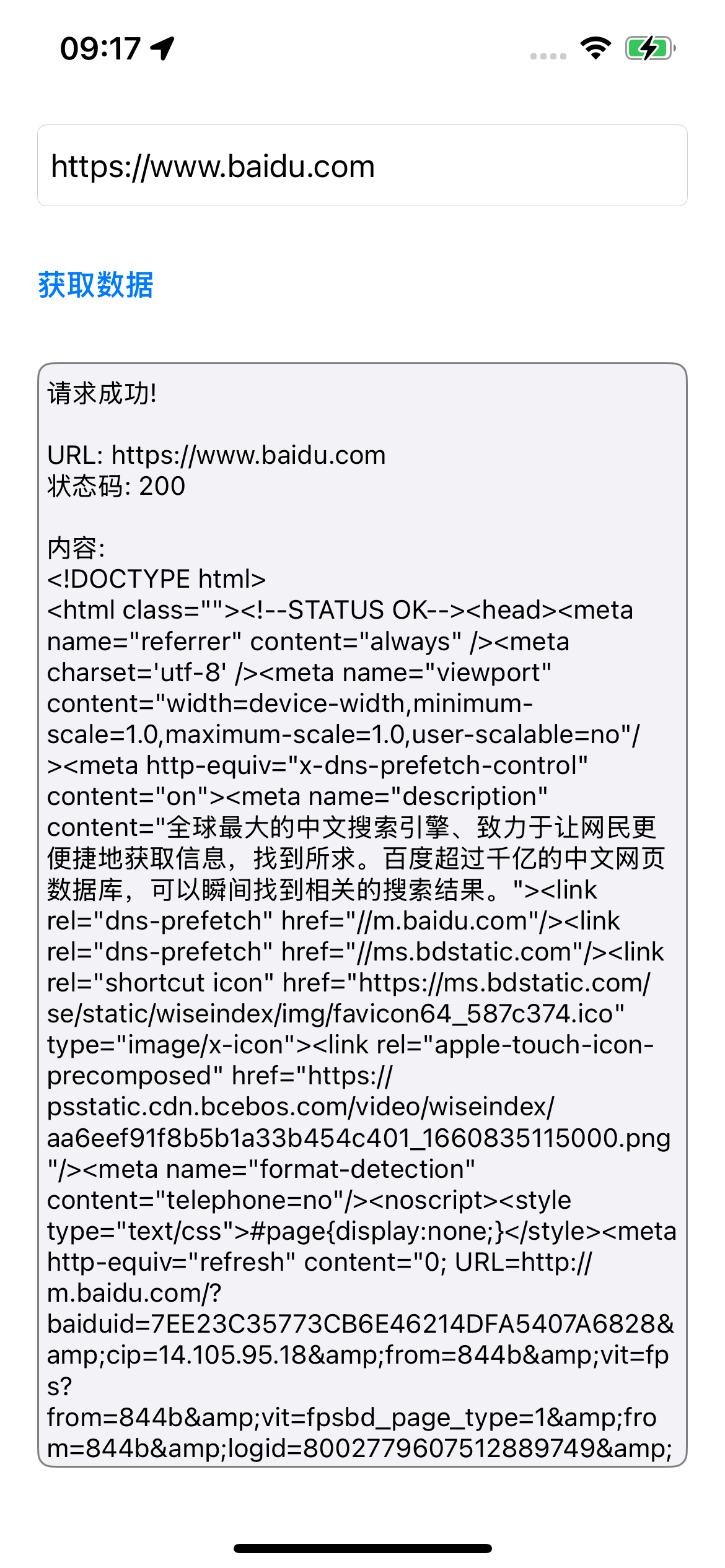
二、所有源码
AppDelegate.h文件
#import <UIKit/UIKit.h>

@interface AppDelegate : UIResponder <UIApplicationDelegate>

@property (strong, nonatomic) UIWindow *window;

@end
AppDelegate.m文件
#import "AppDelegate.h"
#import "ViewController.h"

@interface AppDelegate ()

@end

@implementation AppDelegate

- (BOOL)application:(UIApplication *)application didFinishLaunchingWithOptions:(NSDictionary *)launchOptions {

    self.window = [[UIWindow alloc] initWithFrame:[[UIScreen mainScreen] bounds]];
    self.window.backgroundColor = [UIColor whiteColor];

    ViewController *mainViewController = [[ViewController alloc] init];
    self.window.rootViewController = mainViewController;

    [self.window makeKeyAndVisible];

    return YES;
}

@end
ViewController.h文件
#import <UIKit/UIKit.h>

@interface ViewController : UIViewController

@property (nonatomic, strong) UITextField *urlTextField;
@property (nonatomic, strong) UITextView *resultTextView;
@property (nonatomic, strong) UIButton *fetchButton;
@property (nonatomic, strong) UIActivityIndicatorView *activityIndicator;

@end
ViewController.m文件
#import "ViewController.h"

@interface ViewController () <NSURLSessionDataDelegate>

@property (nonatomic, strong) NSMutableData *responseData;
@property (nonatomic, strong) NSURLSessionDataTask *dataTask;

@end

@implementation ViewController

- (void)viewDidLoad {
    [super viewDidLoad];
    [self setupUI];
    self.responseData = [NSMutableData data];
}

- (void)setupUI {
    self.view.backgroundColor = [UIColor systemBackgroundColor];
    self.title = @"HTTP请求工具";

    // 创建 URL 输入文本框
    self.urlTextField = [[UITextField alloc] init];
    self.urlTextField.placeholder = @"请输入URL地址";
    self.urlTextField.text = @"https://www.baidu.com"; // 使用https和完整地址
    self.urlTextField.borderStyle = UITextBorderStyleRoundedRect;
    self.urlTextField.keyboardType = UIKeyboardTypeURL;
    self.urlTextField.autocapitalizationType = UITextAutocapitalizationTypeNone;
    self.urlTextField.autocorrectionType = UITextAutocorrectionTypeNo;
    self.urlTextField.translatesAutoresizingMaskIntoConstraints = NO;
    [self.view addSubview:self.urlTextField];

    // 创建获取按钮
    self.fetchButton = [UIButton buttonWithType:UIButtonTypeSystem];
    [self.fetchButton setTitle:@"获取数据" forState:UIControlStateNormal];
    [self.fetchButton addTarget:self action:@selector(fetchButtonTapped) forControlEvents:UIControlEventTouchUpInside];
    self.fetchButton.titleLabel.font = [UIFont boldSystemFontOfSize:16];
    self.fetchButton.translatesAutoresizingMaskIntoConstraints = NO;
    [self.view addSubview:self.fetchButton];

    // 创建活动指示器
    self.activityIndicator = [[UIActivityIndicatorView alloc] initWithActivityIndicatorStyle:UIActivityIndicatorViewStyleMedium];
    self.activityIndicator.translatesAutoresizingMaskIntoConstraints = NO;
    self.activityIndicator.hidesWhenStopped = YES;
    [self.view addSubview:self.activityIndicator];

    // 创建结果显示文本框
    self.resultTextView = [[UITextView alloc] init];
    self.resultTextView.layer.borderWidth = 1.0;
    self.resultTextView.layer.borderColor = [UIColor grayColor].CGColor;
    self.resultTextView.layer.cornerRadius = 8.0;
    self.resultTextView.editable = NO;
    self.resultTextView.translatesAutoresizingMaskIntoConstraints = NO;
    self.resultTextView.font = [UIFont systemFontOfSize:14];
    self.resultTextView.textColor = [UIColor labelColor];
    self.resultTextView.backgroundColor = [UIColor systemGray6Color];
    [self.view addSubview:self.resultTextView];

    // 设置自动布局约束
    [self setupConstraints];
}

- (void)setupConstraints {
    UILayoutGuide *safeArea = self.view.safeAreaLayoutGuide;

    [NSLayoutConstraint activateConstraints:@[
        // URL 文本框约束
        [self.urlTextField.topAnchor constraintEqualToAnchor:safeArea.topAnchor constant:20],
        [self.urlTextField.leadingAnchor constraintEqualToAnchor:safeArea.leadingAnchor constant:20],
        [self.urlTextField.trailingAnchor constraintEqualToAnchor:safeArea.trailingAnchor constant:-20],
        [self.urlTextField.heightAnchor constraintEqualToConstant:44],

        // 按钮约束
        [self.fetchButton.topAnchor constraintEqualToAnchor:self.urlTextField.bottomAnchor constant:20],
        [self.fetchButton.leadingAnchor constraintEqualToAnchor:safeArea.leadingAnchor constant:20],
        [self.fetchButton.heightAnchor constraintEqualToConstant:44],

        // 活动指示器约束
        [self.activityIndicator.centerYAnchor constraintEqualToAnchor:self.fetchButton.centerYAnchor],
        [self.activityIndicator.leadingAnchor constraintEqualToAnchor:self.fetchButton.trailingAnchor constant:10],

        // 结果显示文本框约束
        [self.resultTextView.topAnchor constraintEqualToAnchor:self.fetchButton.bottomAnchor constant:20],
        [self.resultTextView.leadingAnchor constraintEqualToAnchor:safeArea.leadingAnchor constant:20],
        [self.resultTextView.trailingAnchor constraintEqualToAnchor:safeArea.trailingAnchor constant:-20],
        [self.resultTextView.bottomAnchor constraintEqualToAnchor:safeArea.bottomAnchor constant:-20]
    ]];
}

- (void)fetchButtonTapped {
    // 如果已有任务在运行,先取消
    if (self.dataTask && self.dataTask.state == NSURLSessionTaskStateRunning) {
        [self.dataTask cancel];
        self.dataTask = nil;
    }

    // 修复:使用系统的字符串处理方法
    NSString *urlString = [self.urlTextField.text stringByTrimmingCharactersInSet:[NSCharacterSet whitespaceAndNewlineCharacterSet]];

    // 验证 URL
    if (urlString.length == 0) {
        [self showAlertWithTitle:@"错误" message:@"请输入URL地址"];
        return;
    }

    // 确保 URL 格式正确
    if (![urlString hasPrefix:@"http://"] && ![urlString hasPrefix:@"https://"]) {
        urlString = [@"https://" stringByAppendingString:urlString];
        self.urlTextField.text = urlString;
    }

    [self fetchDataFromURL:urlString];
}

- (void)fetchDataFromURL:(NSString *)urlString {
    // 清空之前的数据
    [self.responseData setLength:0];
    self.resultTextView.text = @"";

    // 显示加载状态
    [self.activityIndicator startAnimating];
    self.fetchButton.enabled = NO;
    [self.fetchButton setTitle:@"请求中..." forState:UIControlStateNormal];

    // 创建 URL 对象
    NSURL *url = [NSURL URLWithString:urlString];
    if (!url) {
        [self showError:@"无效的URL地址"];
        return;
    }

    // 创建 URLRequest
    NSMutableURLRequest *request = [NSMutableURLRequest requestWithURL:url];
    [request setHTTPMethod:@"GET"];
    [request setTimeoutInterval:30.0];
    [request setValue:@"Mozilla/5.0 (iPhone; CPU iPhone OS 16_0 like Mac OS X) AppleWebKit/605.1.15 (KHTML, like Gecko) Version/16.0 Mobile/15E148 Safari/604.1" forHTTPHeaderField:@"User-Agent"];

    // 创建 URLSession 配置
    NSURLSessionConfiguration *config = [NSURLSessionConfiguration defaultSessionConfiguration];
    config.requestCachePolicy = NSURLRequestReloadIgnoringLocalCacheData;

    // 创建 URLSession
    NSURLSession *session = [NSURLSession sessionWithConfiguration:config delegate:nil delegateQueue:[NSOperationQueue mainQueue]];

    // 创建数据任务
    __weak typeof(self) weakSelf = self;
    self.dataTask = [session dataTaskWithRequest:request completionHandler:^(NSData *data, NSURLResponse *response, NSError *error) {
        __strong typeof(weakSelf) strongSelf = weakSelf;
        if (!strongSelf) return;

        // 停止加载状态
        [strongSelf.activityIndicator stopAnimating];
        strongSelf.fetchButton.enabled = YES;
        [strongSelf.fetchButton setTitle:@"获取数据" forState:UIControlStateNormal];

        if (error) {
            if (error.code != NSURLErrorCancelled) {
                NSString *errorMessage = [NSString stringWithFormat:@"请求失败:\n%@", error.localizedDescription];
                [strongSelf showError:errorMessage];
            }
            return;
        }

        NSHTTPURLResponse *httpResponse = (NSHTTPURLResponse *)response;
        NSLog(@"HTTP状态码: %ld", (long)httpResponse.statusCode);

        if (httpResponse.statusCode != 200) {
            NSString *errorMessage = [NSString stringWithFormat:@"HTTP错误: %ld\n%@",
                                    (long)httpResponse.statusCode,
                                    [NSHTTPURLResponse localizedStringForStatusCode:httpResponse.statusCode]];
            [strongSelf showError:errorMessage];
            return;
        }

        if (data) {
            // 尝试多种编码方式解析数据
            NSString *content = [[NSString alloc] initWithData:data encoding:NSUTF8StringEncoding];
            if (!content) {
                // 如果UTF-8失败,尝试GBK编码(针对中文网站)
                NSStringEncoding gbkEncoding = CFStringConvertEncodingToNSStringEncoding(kCFStringEncodingGB_18030_2000);
                content = [[NSString alloc] initWithData:data encoding:gbkEncoding];
            }

            if (content) {
                // 限制显示长度,避免性能问题
                if (content.length > 5000) {
                    content = [[content substringToIndex:5000] stringByAppendingString:@"\n\n... (内容过长,已截断)"];
                }
                strongSelf.resultTextView.text = [NSString stringWithFormat:@"请求成功!\n\nURL: %@\n状态码: %ld\n\n内容:\n%@",
                                                urlString,
                                                (long)httpResponse.statusCode,
                                                content];
            } else {
                strongSelf.resultTextView.text = [NSString stringWithFormat:@"接收到二进制数据\n大小: %lu 字节\n内容类型: %@",
                                                (unsigned long)data.length,
                                                httpResponse.MIMEType ?: @"未知"];
            }
        } else {
            [strongSelf showError:@"没有接收到数据"];
        }
    }];

    // 开始任务
    [self.dataTask resume];
}

- (void)showError:(NSString *)errorMessage {
    self.resultTextView.text = errorMessage;
    NSLog(@"错误: %@", errorMessage);
}

- (void)showAlertWithTitle:(NSString *)title message:(NSString *)message {
    UIAlertController *alert = [UIAlertController alertControllerWithTitle:title
                                                                   message:message
                                                            preferredStyle:UIAlertControllerStyleAlert];

    UIAlertAction *okAction = [UIAlertAction actionWithTitle:@"确定"
                                                     style:UIAlertActionStyleDefault
                                                   handler:nil];
    [alert addAction:okAction];

    [self presentViewController:alert animated:YES completion:nil];
}

- (void)touchesBegan:(NSSet<UITouch *> *)touches withEvent:(UIEvent *)event {
    [self.view endEditing:YES];
}

- (void)dealloc {
    // 清理任务
    if (self.dataTask) {
        [self.dataTask cancel];
    }
}

@end
权限设置info.plist
        <key>NSAllowsArbitraryLoads</key>
        <true/>
        <key>NSAllowsArbitraryLoadsInWebContent</key>
        <true/>
三、源码分析
1. AppDelegate.h
功能分析:
-
继承自
UIResponder,遵循UIApplicationDelegate协议 -
声明
window属性作为应用的主窗口
2. AppDelegate.m
application:didFinishLaunchingWithOptions: 方法
功能:应用启动入口,初始化窗口和根视图控制器
3. ViewController.h
声明了4个界面组件属性:
-
urlTextField:URL输入框 -
resultTextView:结果显示框 -
fetchButton:获取按钮 -
activityIndicator:加载指示器
4. ViewController.m
@interface ViewController () <NSURLSessionDataDelegate>
@property (nonatomic, strong) NSMutableData *responseData;
@property (nonatomic, strong) NSURLSessionDataTask *dataTask;
@end
功能:私有属性和协议声明
viewDidLoad 方法
- (void)viewDidLoad {
[super viewDidLoad];
[self setupUI]; // 初始化界面
self.responseData = [NSMutableData data]; // 初始化数据容器
}
功能:视图控制器加载完成后的初始化工作
setupUI 方法
- (void)setupUI {
    // 设置背景色和标题
    self.view.backgroundColor = [UIColor systemBackgroundColor];
    self.title = @"HTTP请求工具";

    // 创建并配置URL输入框
    self.urlTextField = [[UITextField alloc] init];
    self.urlTextField.placeholder = @"请输入URL地址";
    self.urlTextField.text = @"https://www.baidu.com";
    self.urlTextField.borderStyle = UITextBorderStyleRoundedRect;
    self.urlTextField.keyboardType = UIKeyboardTypeURL;
    self.urlTextField.autocapitalizationType = UITextAutocapitalizationTypeNone;
    self.urlTextField.autocorrectionType = UITextAutocorrectionTypeNo;
    self.urlTextField.translatesAutoresizingMaskIntoConstraints = NO;
    [self.view addSubview:self.urlTextField];

    // 创建获取按钮
    self.fetchButton = [UIButton buttonWithType:UIButtonTypeSystem];
    [self.fetchButton setTitle:@"获取数据" forState:UIControlStateNormal];
    [self.fetchButton addTarget:self action:@selector(fetchButtonTapped) forControlEvents:UIControlEventTouchUpInside];
    // ... 其他按钮配置

    // 创建加载指示器
    self.activityIndicator = [[UIActivityIndicatorView alloc] initWithActivityIndicatorStyle:UIActivityIndicatorViewStyleMedium];
    // ... 指示器配置

    // 创建结果显示框
    self.resultTextView = [[UITextView alloc] init];
    self.resultTextView.layer.borderWidth = 1.0;
    self.resultTextView.layer.borderColor = [UIColor grayColor].CGColor;
    // ... 其他文本框配置

    [self setupConstraints]; // 设置布局约束
}功能:创建和配置所有界面组件
setupConstraints 方法
- (void)setupConstraints {
    UILayoutGuide *safeArea = self.view.safeAreaLayoutGuide;

    [NSLayoutConstraint activateConstraints:@[
        // URL文本框:顶部安全区域+20,左右各20,高度44
        [self.urlTextField.topAnchor constraintEqualToAnchor:safeArea.topAnchor constant:20],
        [self.urlTextField.leadingAnchor constraintEqualToAnchor:safeArea.leadingAnchor constant:20],
        [self.urlTextField.trailingAnchor constraintEqualToAnchor:safeArea.trailingAnchor constant:-20],
        [self.urlTextField.heightAnchor constraintEqualToConstant:44],

        // 按钮:在URL框下方20,左对齐,高度44
        [self.fetchButton.topAnchor constraintEqualToAnchor:self.urlTextField.bottomAnchor constant:20],
        [self.fetchButton.leadingAnchor constraintEqualToAnchor:safeArea.leadingAnchor constant:20],
        [self.fetchButton.heightAnchor constraintEqualToConstant:44],

        // 加载指示器:与按钮垂直居中,在按钮右侧10
        [self.activityIndicator.centerYAnchor constraintEqualToAnchor:self.fetchButton.centerYAnchor],
        [self.activityIndicator.leadingAnchor constraintEqualToAnchor:self.fetchButton.trailingAnchor constant:10],

        // 结果框:在按钮下方20,撑满剩余空间
        [self.resultTextView.topAnchor constraintEqualToAnchor:self.fetchButton.bottomAnchor constant:20],
        [self.resultTextView.leadingAnchor constraintEqualToAnchor:safeArea.leadingAnchor constant:20],
        [self.resultTextView.trailingAnchor constraintEqualToAnchor:safeArea.trailingAnchor constant:-20],
        [self.resultTextView.bottomAnchor constraintEqualToAnchor:safeArea.bottomAnchor constant:-20]
    ]];
}功能:使用Auto Layout设置界面布局
fetchButtonTapped 方法
- (void)fetchButtonTapped {
    // 取消正在进行的请求
    if (self.dataTask && self.dataTask.state == NSURLSessionTaskStateRunning) {
        [self.dataTask cancel];
        self.dataTask = nil;
    }

    // 处理URL输入
    NSString *urlString = [self.urlTextField.text stringByTrimmingCharactersInSet:[NSCharacterSet whitespaceAndNewlineCharacterSet]];

    // 验证输入
    if (urlString.length == 0) {
        [self showAlertWithTitle:@"错误" message:@"请输入URL地址"];
        return;
    }

    // 自动添加协议头
    if (![urlString hasPrefix:@"http://"] && ![urlString hasPrefix:@"https://"]) {
        urlString = [@"https://" stringByAppendingString:urlString];
        self.urlTextField.text = urlString;
    }

    [self fetchDataFromURL:urlString]; // 发起网络请求
}功能:按钮点击事件处理,输入验证和预处理
fetchDataFromURL: 方法
- (void)fetchDataFromURL:(NSString *)urlString {
    // 重置数据
    [self.responseData setLength:0];
    self.resultTextView.text = @"";

    // 显示加载状态
    [self.activityIndicator startAnimating];
    self.fetchButton.enabled = NO;
    [self.fetchButton setTitle:@"请求中..." forState:UIControlStateNormal];

    // 创建URL对象
    NSURL *url = [NSURL URLWithString:urlString];
    if (!url) {
        [self showError:@"无效的URL地址"];
        return;
    }

    // 配置请求
    NSMutableURLRequest *request = [NSMutableURLRequest requestWithURL:url];
    [request setHTTPMethod:@"GET"];
    [request setTimeoutInterval:30.0];
    [request setValue:@"Mozilla/5.0 (iPhone; CPU iPhone OS 16_0 like Mac OS X) AppleWebKit/605.1.15 (KHTML, like Gecko) Version/16.0 Mobile/15E148 Safari/604.1" forHTTPHeaderField:@"User-Agent"];

    // 配置会话
    NSURLSessionConfiguration *config = [NSURLSessionConfiguration defaultSessionConfiguration];
    config.requestCachePolicy = NSURLRequestReloadIgnoringLocalCacheData;

    NSURLSession *session = [NSURLSession sessionWithConfiguration:config delegate:nil delegateQueue:[NSOperationQueue mainQueue]];

    // 创建数据任务(使用weak/strong dance避免循环引用)
    __weak typeof(self) weakSelf = self;
    self.dataTask = [session dataTaskWithRequest:request completionHandler:^(NSData *data, NSURLResponse *response, NSError *error) {
        __strong typeof(weakSelf) strongSelf = weakSelf;
        if (!strongSelf) return;

        // 恢复UI状态
        [strongSelf.activityIndicator stopAnimating];
        strongSelf.fetchButton.enabled = YES;
        [strongSelf.fetchButton setTitle:@"获取数据" forState:UIControlStateNormal];

        // 错误处理
        if (error) {
            if (error.code != NSURLErrorCancelled) {
                NSString *errorMessage = [NSString stringWithFormat:@"请求失败:\n%@", error.localizedDescription];
                [strongSelf showError:errorMessage];
            }
            return;
        }

        // HTTP状态码检查
        NSHTTPURLResponse *httpResponse = (NSHTTPURLResponse *)response;
        NSLog(@"HTTP状态码: %ld", (long)httpResponse.statusCode);

        if (httpResponse.statusCode != 200) {
            NSString *errorMessage = [NSString stringWithFormat:@"HTTP错误: %ld\n%@",
                                    (long)httpResponse.statusCode,
                                    [NSHTTPURLResponse localizedStringForStatusCode:httpResponse.statusCode]];
            [strongSelf showError:errorMessage];
            return;
        }

        // 数据处理
        if (data) {
            // 尝试UTF-8解码
            NSString *content = [[NSString alloc] initWithData:data encoding:NSUTF8StringEncoding];
            if (!content) {
                // 尝试GBK解码(中文网站)
                NSStringEncoding gbkEncoding = CFStringConvertEncodingToNSStringEncoding(kCFStringEncodingGB_18030_2000);
                content = [[NSString alloc] initWithData:data encoding:gbkEncoding];
            }

            if (content) {
                // 内容截断处理
                if (content.length > 5000) {
                    content = [[content substringToIndex:5000] stringByAppendingString:@"\n\n... (内容过长,已截断)"];
                }
                strongSelf.resultTextView.text = [NSString stringWithFormat:@"请求成功!\n\nURL: %@\n状态码: %ld\n\n内容:\n%@",
                                                urlString,
                                                (long)httpResponse.statusCode,
                                                content];
            } else {
                // 二进制数据显示
                strongSelf.resultTextView.text = [NSString stringWithFormat:@"接收到二进制数据\n大小: %lu 字节\n内容类型: %@",
                                                (unsigned long)data.length,
                                                httpResponse.MIMEType ?: @"未知"];
            }
        } else {
            [strongSelf showError:@"没有接收到数据"];
        }
    }];

    [self.dataTask resume]; // 开始网络请求
}功能:核心网络请求逻辑,包含完整的错误处理和数据处理
辅助方法
showError: 方法
- (void)showError:(NSString *)errorMessage {
    self.resultTextView.text = errorMessage;  // 在结果框显示错误
    NSLog(@"错误: %@", errorMessage);          // 控制台日志
}功能:统一错误显示
showAlertWithTitle:message: 方法
- (void)showAlertWithTitle:(NSString *)title message:(NSString *)message {
    UIAlertController *alert = [UIAlertController alertControllerWithTitle:title
                                                                   message:message
                                                            preferredStyle:UIAlertControllerStyleAlert];

    UIAlertAction *okAction = [UIAlertAction actionWithTitle:@"确定"
                                                     style:UIAlertActionStyleDefault
                                                   handler:nil];
    [alert addAction:okAction];

    [self presentViewController:alert animated:YES completion:nil];
}功能:显示警告对话框
touchesBegan:withEvent: 方法
- (void)touchesBegan:(NSSet<UITouch *> *)touches withEvent:(UIEvent *)event {
    [self.view endEditing:YES]; // 点击空白处隐藏键盘
}功能:处理触摸事件以隐藏键盘
dealloc 方法
- (void)dealloc {
    if (self.dataTask) {
        [self.dataTask cancel]; // 清理网络任务
    }
}功能:对象销毁前的清理工作
架构总结
典型的MVC架构:
-
Model:网络请求和数据解析逻辑
-
View:通过代码创建的UI组件
-
Controller:
ViewController协调Model和View
应用流程:启动 → 创建界面 → 用户输入URL → 发起请求 → 处理响应 → 显示结果






 扫一扫
扫一扫


 被折叠的 条评论
为什么被折叠?
被折叠的 条评论
为什么被折叠?
 到【灌水乐园】发言





