



Reducing Binary Size of Qt Applications – Part 3: More Platforms
减少Qt应用程序的二进制大小——第3部分:更多平台
June 09, 2025 by Juha Vuolle | Comments
2025年6月9日 Juha Vuolle | 评论
Optimizing Qt builds on macOS, iOS, Windows, Android, WebAssembly, and Linux.
优化Qt构建在macOS、iOS、Windows、Android、WebAssembly和Linux上。
In Part 1 we introduced the Qt size optimization guide. Part 2 presented a concrete example on Raspberry Pi (Linux).
在第1部分中,我们介绍了Qt大小优化指南。第2部分给出了一个关于Raspberry Pi(Linux)的具体示例。
Linux is one of the many platforms supported by Qt – but what about optimizing size on the other platforms? Some configure options are platform dependent, and they don’t always transfer from one platform to the other.
Linux是Qt支持的众多平台之一,但优化其他平台的大小呢?一些配置选项取决于平台,它们并不总是从一个平台转移到另一个平台。
In this blog post, we’ll take a look at the other platforms. The main objective is to provide reference feature sets that can be used as a starting point for your own configurations.
在这篇博客文章中,我们将看看其他平台。主要目标是提供可作自己配置起点的参考功能集。
Reference Applications
参考应用程序
When creating a minimal Qt configuration, you need to decide what should still work. The better you know, the more you can reduce unnecessary features or make acceptable performance or security tradeoffs. For this purpose, we selected a handful of Quick example applications that should work with the configuration:
在创建最小Qt配置时,需要决定哪些配置仍然有效。了解得越多,就越能减少不必要的功能,或者做出可接受的性能或安全权衡。为此,我们选择了一些应该与配置配合使用的Quick示例应用程序:
- Coffeemachine - for comparison with previous blog
- Coffeemachine-与之前的博客进行比较
- Colorpalette Client - uses networking and https
- 调色板客户端-使用网络和https
- Gallery - uses most Qt Quick Controls
- 图库-使用大多数Qt Quick控件
- Calqlatr
- Simple application - minimalistic reference application that consists of a QML Window and Text element (a “hello world”).
- 简单应用程序-由QML窗口和文本元素(“hello world”)组成的简约参考应用程序。
Platforms
平台
We tested the configurations on these six platforms:
我们在这六个平台上测试了配置:
The codebase was a recent Qt dev branch (upcoming Qt 6.10). Most of the fixes needed for the minimal configurations to compile have also been picked back to Qt 6.9 and Qt 6.8.
代码库是最近的Qt开发分支(即将推出的Qt 6.10)。编译最小配置所需的大多数修复也被带回Qt 6.9和Qt 6.8。
Results
结果
The resulting configurations are best summarized by the CI configuration. The configurations on different platforms share most options but have their differences, too.
CI配置最能概括由此产生的配置。不同平台上的配置共享大多数选项,但也有差异。
Notably, most of the builds are static builds. A static build means that the application, Qt libraries, and Qt plugins are all compiled into a single executable. Static builds allow the compiler and linker to make powerful size optimizations as they can see the whole binary. Android is the exception as Qt for Android doesn’t support static builds at the moment.
值得注意的是,大多数构建都是静态构建。静态构建意味着应用程序、Qt库和Qt插件都被编译成一个可执行文件。静态构建允许编译器和链接器进行强大的大小优化,因为它们可以看到整个二进制文件。Android是个例外,因为Qt for Android目前不支持静态构建。
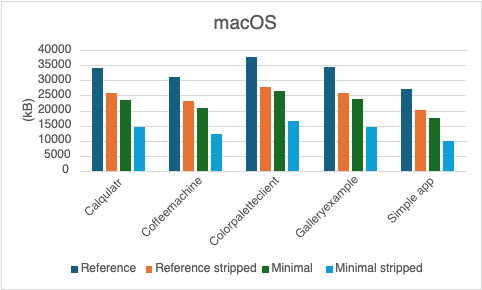
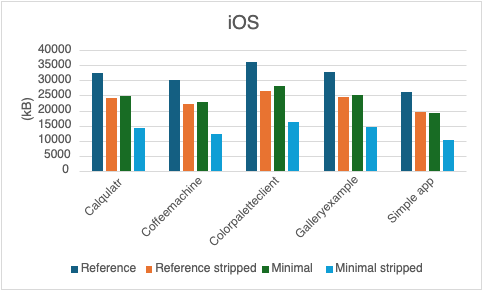
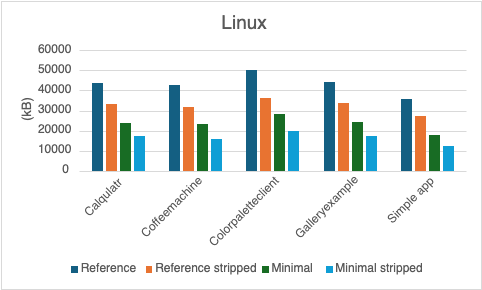
The charts below show the storage size for each application. Legend:
下图显示了每个应用程序的存储大小。说明:
- Reference: release application with default configuration
- 参考:使用默认配置发布应用程序
- Reference stripped: reference application whose symbols are stripped
- 剥离参考:符号被剥离的参考应用程序
- Minimal: application built with the minimal configuration
- 最小:使用最小配置构建的应用程序
- Minimal stripped: minimal application whose symbols are stripped
- 最小化剥离:符号被剥离的最小应用程序
MacOS (Sequoia 15.2):
iOS (18.2):
Linux (Ubuntu 24.04):
WebAssembly (emsdk 4.0.7):
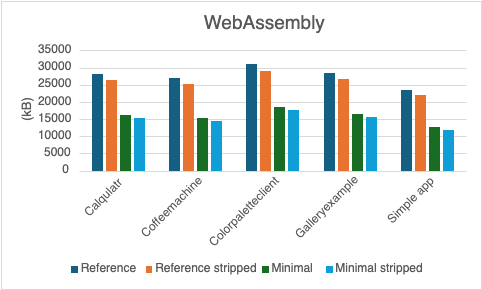
Notably the WebAssembly configuration uses LTO linker flags directly because the -ltcg option provided by Qt configure hits a compiler bug. That bug has been fixed recently so in the future you can use the ltcg option also on that platform.
值得注意的是,WebAssembly配置直接使用-ltcg链接器标志,因为Qt配置提供的-ltcg选项遇到了编译器错误。该错误最近已修复,因此将来也可以在该平台上使用ltcg选项。
Android (NDK 26.6.1):
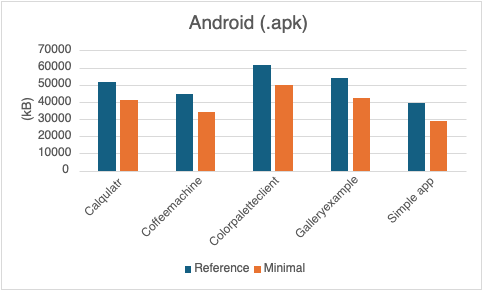
There are no separate “stripped” builds as the Android build process by default strips the binaries.
没有单独的“剥离”构建,因为默认情况下Android构建过程会剥离二进制文件。
Windows (11, MSVC 2022):
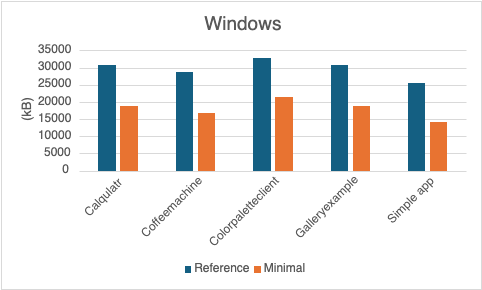
On Windows there are no separate stripped versions as stripping does not seem to be used or needed with MSVC (unlike with MinGW).
在Windows上,没有单独的剥离版本,因为MSVC似乎不使用或不需要剥离(与MinGW不同)。
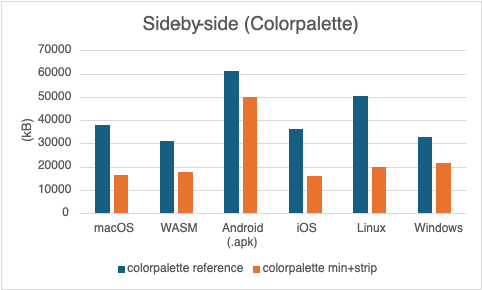
Side-by-side:
并排:
Let’s also have a look at the application sizes per platform, side-by-side. First the biggest application, Colorpalette:
让我们并排看看每个平台的应用程序大小。第一个最大的应用程序,调色板:
Then the smallest application, the simple app:
然后是最小的应用程序,简单的应用程序:
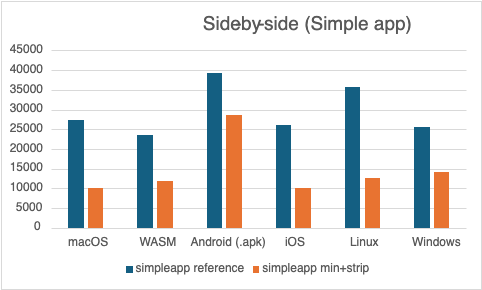
On all platforms, size optimizations have a significant impact. Perhaps unsurprisingly, macOS and iOS sizes are almost identical. Android .apk is the largest in size. This is likely due to lack of static building support, and the bundling (androiddeployqt) may deploy more components than needed. Fortunately, the latter can be tuned manually, see this blog post.
在所有平台上,尺寸优化都会产生重大影响。也许并不奇怪,macOS和iOS的大小几乎相同。Android.apk是最大的。这可能是由于缺乏静态构建支持,捆绑(androiddeployqt)可能会部署比所需更多的组件。幸运的是,后者可以手动调整,请参阅这篇博客文章。
Further Optimizations
进一步优化
We chose the minimal configuration such that the selected reference applications still work. But real production applications have specific needs and can be optimized further. Here are some examples:
我们选择了最小的配置,这样所选的参考应用程序仍然可以工作。但实际的生产应用程序有特定的需求,可以进一步优化。以下是一些示例:
- Disable networking if your application doesn’t need it (also good for security)
- 如果应用程序不需要网络,请禁用网络(这对安全也有好处)
- Disable all quickcontrols2-styles if not needed. Don’t build them and more importantly don’t import them.
- 如果不需要,禁用所有quickcontrols2样式。不要构建它们,更重要的是不要导入它们。
- Disable more image formats – for instance, SVG support is clearly visible on the binary size breakdown
- 禁用更多图像格式——例如,SVG支持在二进制大小细分中清晰可见
- Disable settings if not needed – settings are also quite clearly visible on the binary size breakdown
- 如果不需要,请禁用设置——设置在二进制大小细分中也很明显
And much more. Many features like shortcuts support remain in the minimal configuration because the reference applications use them – but maybe your application doesn’t.
还有更多。许多功能,如快捷方式支持,仍然保持在最低配置中,因为参考应用程序使用它们——但也许应用程序没有。
I Disabled a Feature and Now Qt Doesn’t Compile
禁用了一个功能,现在Qt无法编译
The configurations presented here required several small code fixes to compile. This is somewhat understandable as it’s not pragmatic to compile all possible feature combinations (theoretically speaking, there are more feature combinations than there are atoms in the visible universe).
这里介绍的配置需要几个小代码修复才能编译。这在一定程度上是可以理解的,因为编译所有可能的特征组合是不切实际的(从理论上讲,可见宇宙中的特征组合比原子还多)。
Luckily, the fixes needed are typically quite small and trivial. When you configure non-standard feature sets and encounter issues with something you think should work, please file a report at Qt Bug Tracker or submit a patch.
幸运的是,所需的修复通常非常小且微不足道。当配置非标准功能集并遇到认为应该工作的问题时,请在Qt Bug Tracker上提交报告或提交补丁。
Conclusion
结论
Feature selection and build flags can greatly impact the size of the Qt libraries and applications. The better the application needs are known, the more can be optimized. The minimal configuration presented here can work as a good starting point for your own minimized configuration.
功能选择和构建标志会极大地影响Qt库和应用程序的大小。对应用程序需求了解得越多,就越能进行优化。这里介绍的最小配置可以作为自己的最小配置的良好起点。
It should be noted that a size-minimized application is, however, not ideal for development time. At development time you should have the tools and symbols needed available. Furthermore, compiling applications statically with link-time code generation is slower than making a shared build.
然而,应该指出的是,对于开发时间来说,尺寸最小化的应用程序并不理想。在开发阶段,应该拥有所需的工具和符号。此外,使用链接时代码生成静态编译应用程序比进行共享构建要慢。





 扫一扫
扫一扫


 820
820

 被折叠的 条评论
为什么被折叠?
被折叠的 条评论
为什么被折叠?
 到【灌水乐园】发言





