



Comparing Data Serialization Formats: Code, Size, and Performance
比较数据序列化格式:代码、大小和性能
November 03, 2025 by Dennis Oberst | Comments
2025年11月3日 Dennis Oberst发表|评论
In this post, we explore different approaches for data serialization, comparing the key well-known formats for structure data. These are also all readily available for your Qt projects.
在这篇文章中,我们探索了数据序列化的不同方法,比较了结构数据的关键已知格式。这些也都可以随时用于Qt项目。
We made the comparisons by testing the QDataStream, XML, JSON, CBOR and Protobuf data serialization formats using a realistic scenario. As a result, differences were found in code, data size, and performance in terms of serialization and de-serialization times between each format. You can use these findings to help make informed decisions when choosing which one to use.
我们通过使用现实场景测试QDataStream、XML、JSON、CBOR和Protobuf数据序列化格式进行了比较。结果发现,每种格式在代码、数据大小和序列化和解序列化时间方面存在差异。在选择使用哪一种时,可以使用这些发现来帮助做出明智的决定。
You'll find detailed coverage of:
将找到以下内容的详细报道:
Remarks on Testing with Complex, Nested Data
关于复杂嵌套数据测试的备注
To properly test these formats, we use a task management data structure with multiple nesting levels and various Qt types including QUuid, QDateTime or QColor. This created a realistic scenario that challenges each data serialization method with complex, nested data.
为了正确测试这些格式,我们使用了一个具有多个嵌套级别和各种Qt类型(包括QUuid、QDateTime或QColor)的任务管理数据结构。这创造了一个现实的场景,用复杂的嵌套数据挑战每种数据序列化方法。
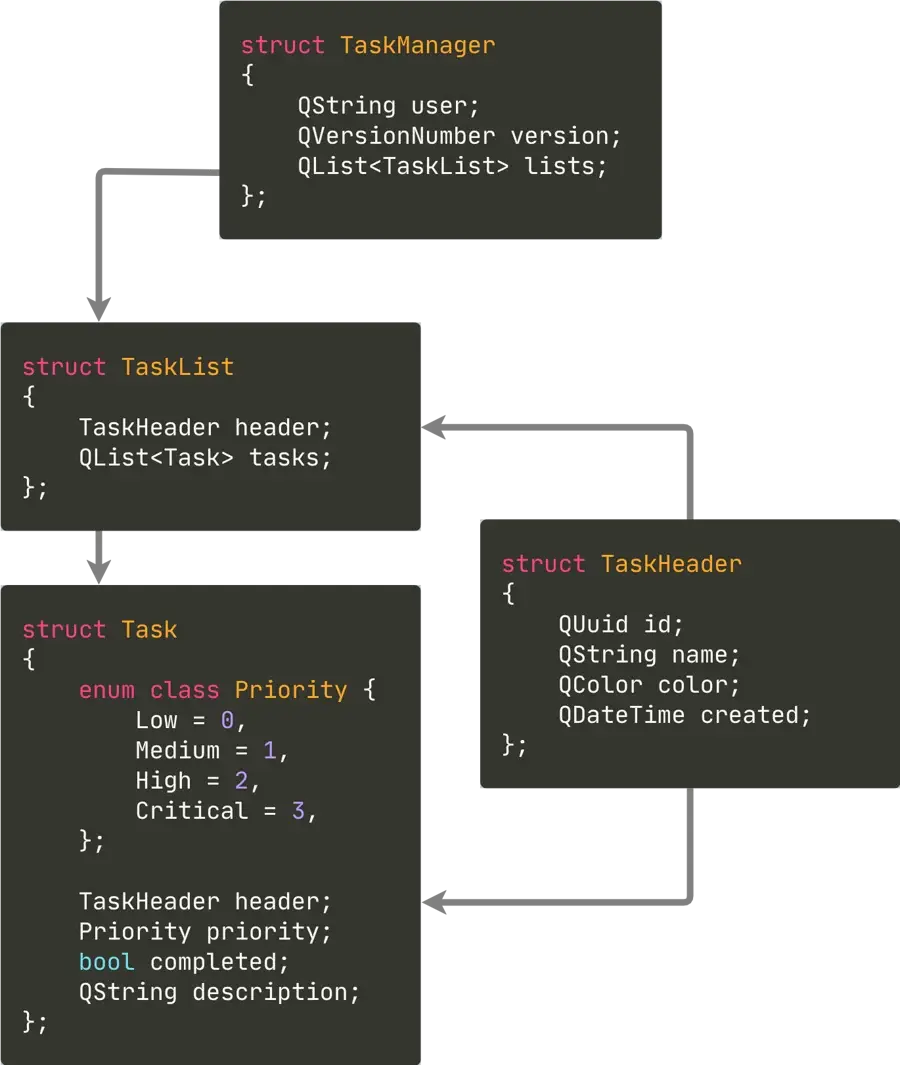
The next step was to write our Qt Test Benchmark. We generated a TaskManager with 10,000 tasks to provide substantial data for testing our data serialization formats. We declared the QtCoreSerialization and QtProtobuf functions to handle their respective formats:
下一步是编写Qt测试基准。我们生成了一个包含10000个任务的TaskManager,为测试我们的数据序列化格式提供了大量数据。我们声明了QtCoreSerialization和QtProtobuf函数来处理它们各自的格式:
#include "task_manager.h"

#include <QtTest/QTest>

TaskManager generateTasks(size_t amount);

class QtSerializationBenchmarks : public QObject
{
    Q_OBJECT

public:
    QtSerializationBenchmarks()
        : m_testData(generateTasks(10'000))
    {}

private slots:
    void QtCoreSerialization_data() const;
    void QtCoreSerialization();

    void QtProtobuf();

private:
    TaskManager m_testData;
};
How Each Data Serialization Format Was Tested
如何测试每种数据序列化格式
Now let’s go through the test for each format in detail.
现在,让我们详细介绍每种格式的测试。
Consistent Interface for QDataStream, XML, JSON, and CBOR
QDataStream、XML、JSON和CBOR的一致接口
There are various data serialization formats for structured data, as outlined in the Qt Core Serialization overview. We focused on general-purpose formats suitable for complex data structures, excluding application settings.
结构化数据有各种数据序列化格式,如Qt核心序列化概述中所述。我们专注于适用于复杂数据结构的通用格式,不包括应用程序设置。
The QDataStream, XML, JSON, and CBOR formats follow a consistent interface where a serialize function converts the TaskManager into its encoded form, and a deserialize function reconstructs the original object.
QDataStream、XML、JSON和CBOR格式遵循一致的接口,其中序列化函数将TaskManager转换为编码形式,反序列化函数重建原始对象。
We validated each round-trip by comparing the result with the input data:
我们通过将结果与输入数据进行比较来验证每次往返:
struct SerializationFormat {
    QByteArray (*serialize)(const TaskManager &);
    TaskManager (*deserialize)(const QByteArray &);
};

void QtSerializationBenchmarks::QtCoreSerialization_data() const {
    QTest::addColumn("format");

    QTest::newRow("QDataStream") << SerializationFormat{
        serializeDataStream, deserializeDataStream };
    QTest::newRow("XML") << SerializationFormat{
        serializeXml, deserializeXml };
    QTest::newRow("JSON") << SerializationFormat{
        serializeJson, deserializeJson };
    QTest::newRow("CBOR") << SerializationFormat{
        serializeCbor, deserializeCbor };
}

void QtSerializationBenchmarks::QtCoreSerialization()
{
    QFETCH(SerializationFormat, format);

    QByteArray encodedData;
    TaskManager taskManager;

    QBENCHMARK {
        encodedData = format.serialize(m_testData);
    }
    QBENCHMARK {
        taskManager = format.deserialize(encodedData);
    }
    QTest::setBenchmarkResult(encodedData.size(), QTest::BytesAllocated);

    QCOMPARE_EQ(taskManager, m_testData);
}
The QDataStream Test
QDataStream测试
QDataStream provides Qt's native binary data serialization format, using streaming operators for type-safe data handling. Any type can be serialized by implementing the input and output operators.
QDataStream提供Qt的原生二进制数据序列化格式,使用流运算符进行类型安全的数据处理。任何类型都可以通过实现输入和输出运算符来序列化。
For serialization, we defined output streaming operators for each data structure, maintaining consistent field order throughout the hierarchy.
对于序列化,我们为每个数据结构定义了输出流运算符,在整个层次结构中保持一致的字段顺序。
#include <QtCore/QDataStream>

QDataStream &operator<<(QDataStream &stream, const TaskHeader &header) {
    return stream << header.id << header.name << header.created << header.color;
}
QDataStream &operator<<(QDataStream &stream, const Task &task) {
    return stream << task.header << task.description << qint8(task.priority) << task.completed;
}
QDataStream &operator<<(QDataStream &stream, const TaskList &list) {
    return stream << list.header << list.tasks;
}
QDataStream &operator<<(QDataStream &stream, const TaskManager &manager) {
    return stream << manager.user << manager.version << manager.lists;
}

QByteArray serializeDataStream(const TaskManager &manager)
{
    QByteArray data;
    QDataStream stream(&data, QIODevice::WriteOnly);
    stream.setVersion(QDataStream::Qt_6_10);
    stream << manager;
    return data;
}
For deserialization, we implemented matching input operators that read fields in the exact same sequence to ensure data integrity.
对于反序列化,我们实现了匹配的输入运算符,以完全相同的顺序读取字段,以确保数据完整性。
QDataStream &operator>>(QDataStream &stream, TaskHeader &header) {
    return stream >> header.id >> header.name >> header.created >> header.color;
}
QDataStream &operator>>(QDataStream &stream, Task &task) {
    qint8 priority;
    stream >> task.header >> task.description >> priority >> task.completed;
    task.priority = Task::Priority(priority);
    return stream;
}
QDataStream &operator>>(QDataStream &stream, TaskList &list) {
    return stream >> list.header >> list.tasks;
}
QDataStream &operator>>(QDataStream &stream, TaskManager &manager) {
    return stream >> manager.user >> manager.version >> manager.lists;
}

TaskManager deserializeDataStream(const QByteArray &data)
{
    TaskManager manager;
    QDataStream stream(data);
    stream.setVersion(QDataStream::Qt_6_10);
    stream >> manager;
    return manager;
}
The XML Test
XML测试
Qt provides XML serialization through QXmlStreamWriter and QXmlStreamReader. Unlike QDataStream's Qt-specific binary format, XML uses a widely recognized standard that ensures interoperability across different systems and programming languages.
Qt通过QXmlStreamWriter和QXmlStreamReader提供XML序列化。与QDataStream的Qt特定二进制格式不同,XML使用广泛认可的标准,确保不同系统和编程语言之间的互操作性。
For serialization, we use QXmlStreamWriter to convert our data hierarchy into XML elements and attributes:
对于序列化,我们使用QXmlStreamWriter将数据层次结构转换为XML元素和属性:
#include <QtCore/QXmlStreamWriter>

void encodeXmlHeader(QXmlStreamWriter &writer, const TaskHeader &header) {
    writer.writeAttribute("id"_L1, header.id.toString(QUuid::WithoutBraces));
    writer.writeAttribute("name"_L1, header.name);
    writer.writeAttribute("color"_L1, header.color.name());
    writer.writeAttribute("created"_L1, header.created.toString(Qt::ISODate));
}
void encodeXmlTask(QXmlStreamWriter &writer, const Task &task) {
    writer.writeStartElement("task"_L1);
    encodeXmlHeader(writer, task.header);
    writer.writeAttribute("priority"_L1, QString::number(qToUnderlying(task.priority)));
    writer.writeAttribute("completed"_L1, task.completed ? "true"_L1 : "false"_L1);
    writer.writeCharacters(task.description);
    writer.writeEndElement();
}
void encodeXmlTaskList(QXmlStreamWriter &writer, const TaskList &list) {
    writer.writeStartElement("tasklist"_L1);
    encodeXmlHeader(writer, list.header);
    for (const auto &task : list.tasks)
        encodeXmlTask(writer, task);
    writer.writeEndElement();
}
void encodeXmlTaskManager(QXmlStreamWriter &writer, const TaskManager &manager) {
    writer.writeStartElement("taskmanager"_L1);
    writer.writeAttribute("user"_L1, manager.user);
    writer.writeAttribute("version"_L1, manager.version.toString());
    for (const auto &list : manager.lists)
        encodeXmlTaskList(writer, list);
    writer.writeEndElement();
}

QByteArray serializeXml(const TaskManager &manager)
{
    QByteArray data;
    QXmlStreamWriter writer(&data);

    writer.writeStartDocument();
    encodeXmlTaskManager(writer, manager);
    writer.writeEndDocument();

    return data;
}
For deserialization, QXmlStreamReader processes the XML document sequentially. We traverse elements using readNextStartElement() and extract data from attributes to reconstruct our object hierarchy:
对于反序列化,QXmlStreamReader按顺序处理XML文档。我们使用readNextStartElement()遍历元素,并从属性中提取数据以重建我们的对象层次结构:
#include <QtCore/QXmlStreamReader>

TaskHeader decodeXmlHeader(const QXmlStreamAttributes &attrs) {
    return TaskHeader {
        .id = QUuid(attrs.value("id"_L1).toString()),
        .name = attrs.value("name"_L1).toString(),
        .color = QColor(attrs.value("color"_L1).toString()),
        .created = QDateTime::fromString(attrs.value("created"_L1).toString(), Qt::ISODate)
    };
}
Task decodeXmlTask(QXmlStreamReader &reader) {
    const auto attrs = reader.attributes();
    return Task {
        .header = decodeXmlHeader(attrs),
        .priority = Task::Priority(attrs.value("priority"_L1).toInt()),
        .completed = attrs.value("completed"_L1) == "true"_L1,
        .description = reader.readElementText(),
    };
}
TaskList decodeXmlTaskList(QXmlStreamReader &reader) {
    const auto attrs = reader.attributes();
    return TaskList {
        .header = decodeXmlHeader(attrs),
        .tasks = [](auto &reader) {
            QList tasks;
            while (reader.readNextStartElement() && reader.name() == "task"_L1)
                tasks.append(decodeXmlTask(reader));
            return tasks;
        }(reader)
    };
}
TaskManager decodeXmlTaskManager(QXmlStreamReader &reader) {
    const auto attrs = reader.attributes();
    return TaskManager {
        .user = attrs.value("user"_L1).toString(),
        .version = QVersionNumber::fromString(attrs.value("version"_L1).toString()),
        .lists = [](auto &reader) {
            QList taskLists;
            while (reader.readNextStartElement() && reader.name() == "tasklist"_L1)
                taskLists.append(decodeXmlTaskList(reader));
            return taskLists;
        }(reader)
    };
}

TaskManager deserializeXml(const QByteArray &data)
{
    QXmlStreamReader reader(data);

    while (reader.readNextStartElement() && reader.name() == "taskmanager")
        return decodeXmlTaskManager(reader);

    return {};
}
The JSON Test
JSON测试
Qt provides JSON serialization through QJsonDocument, QJsonObject, and QJsonArray. JSON offers a human-readable text format that's become the standard for web APIs and configuration files.
Qt通过QJsonDocument、QJsonObject和QJsonArray提供JSON序列化。JSON提供了一种人类可读的文本格式,已成为web API和配置文件的标准。
For serialization, we build a JSON document by converting each data structure to QJsonObject with helper functions for nested types:
对于序列化,我们通过使用嵌套类型的辅助函数将每个数据结构转换为QJsonObject来构建JSON文档:
#include <QtCore/QJsonArray>
#include <QtCore/QJsonDocument>
#include <QtCore/QJsonObject>

QJsonValue encodeJsonHeader(const TaskHeader &header) {
    return QJsonObject{
        { "id"_L1, header.id.toString(QUuid::WithoutBraces) },
        { "name"_L1, header.name },
        { "color"_L1, header.color.name() },
        { "created"_L1, header.created.toString(Qt::ISODate) }
    };
}
QJsonValue encodeJsonTask(const Task &task) {
    return QJsonObject{
        { "header"_L1, encodeJsonHeader(task.header) },
        { "description"_L1, task.description },
        { "priority"_L1, qToUnderlying(task.priority) },
        { "completed"_L1, task.completed }
    };
}
QJsonValue encodeJsonTaskList(const TaskList &list) {
    return QJsonObject{
        { "header"_L1, encodeJsonHeader(list.header) },
        { "tasks"_L1, [](const auto &tasks) {
            QJsonArray array;
            for (const auto &t : tasks)
                array.append(encodeJsonTask(t));
            return array;
        }(list.tasks) }
    };
}
QJsonValue encodeJsonTaskManager(const TaskManager &manager) {
    return QJsonObject{
        { "user"_L1, manager.user },
        { "version"_L1, manager.version.toString() },
        { "lists"_L1, [](const auto &lists) {
            QJsonArray array;
            for (const auto &l : lists)
                array.append(encodeJsonTaskList(l));
            return array;
        }(manager.lists) }
    };
}

QByteArray serializeJson(const TaskManager &manager)
{
    return QJsonDocument(encodeJsonTaskManager(manager))
        .toJson(QJsonDocument::Compact);
}
For deserialization, we parse the JSON document and extract values by key, converting QJsonArray to lists and QJsonObject to nested structures:
对于反序列化,我们解析JSON文档并按键提取值,将QJsonArray转换为列表,QJsonObject转换为嵌套结构:
TaskHeader decodeJsonHeader(const QJsonObject &obj) {
    return {
        .id = QUuid(obj["id"_L1].toString()),
        .name = obj["name"_L1].toString(),
        .color = QColor(obj["color"_L1].toString()),
        .created = QDateTime::fromString(obj["created"_L1].toString(), Qt::ISODate)
    };
}
Task decodeJsonTask(const QJsonObject &obj) {
    return {
        .header = decodeJsonHeader(obj["header"_L1].toObject()),
        .priority = Task::Priority(obj["priority"_L1].toInt()),
        .completed = obj["completed"_L1].toBool(),
        .description = obj["description"_L1].toString()
    };
}
TaskList decodeJsonTaskList(const QJsonObject &obj) {
    return {
        .header = decodeJsonHeader(obj["header"_L1].toObject()),
        .tasks = [](const auto &obj) {
            QList tasks;
            for (const auto &taskValue : obj["tasks"_L1].toArray())
                tasks.append(decodeJsonTask(taskValue.toObject()));
            return tasks;
        }(obj)
    };
}
TaskManager decodeJsonTaskManager(const QJsonObject &obj) {
    return {
        .user = obj["user"_L1].toString(),
        .version = QVersionNumber::fromString(obj["version"_L1].toString()),
        .lists = [](const auto &obj) {
            QList lists;
            for (const auto &listValue : obj["lists"_L1].toArray())
                lists.append(decodeJsonTaskList(listValue.toObject()));
            return lists;
        }(obj)
    };
}

TaskManager deserializeJson(const QByteArray &data)
{
    const auto jsonRoot = QJsonDocument::fromJson(data).object();
    return decodeJsonTaskManager(jsonRoot);
}
The CBOR Test
CBOR测试
CBOR (Concise Binary Object Representation) provides a compact binary alternative to JSON. Qt offers native support for it through the QCborValue, QCborMap, and QCborArray classes, as well as the QCborStreamReader and QCborStreamWriter APIs.
CBOR(简明二进制对象表示)为JSON提供了一种紧凑的二进制替代方案。Qt通过QCborValue、QCborMap和QCborArray类以及QCborStreamReader和QCborStreamWriter API为其提供本机支持。
The serialization process is very similar to JSON — each field of the TaskManager is written as a key–value pair. However, the resulting data is stored in a compact binary form, which makes it more space-efficient and faster to parse:
序列化过程与JSON非常相似——TaskManager的每个字段都是作为键值对编写的。然而,结果数据以紧凑的二进制形式存储,这使得它更节省空间,解析速度更快:
#include <QtCore/QCborArray>
#include <QtCore/QCborMap>
#include <QtCore/QCborValue>

QCborMap encodeCborHeader(const TaskHeader &header) {
    return {
        { "id"_L1, QCborValue(header.id) },
        { "name"_L1, header.name },
        { "color"_L1, header.color.name() },
        { "created"_L1, QCborValue(header.created) }
    };
}
QCborMap encodeCborTask(const Task &task) {
    return {
        {"header"_L1, encodeCborHeader(task.header)},
        {"description"_L1, task.description},
        {"priority"_L1, qToUnderlying(task.priority)},
        {"completed"_L1, task.completed}
    };
}
QCborMap encodeCborTaskList(const TaskList &list) {
    return {
        { "header"_L1, encodeCborHeader(list.header) },
        { "tasks"_L1, [](const auto &tasks) {
            QCborArray tasksArray;
            for (const auto &t : tasks)
                tasksArray.append(encodeCborTask(t));
            return tasksArray;
        }(list.tasks) }
    };
}
QCborMap encodeCborTaskManager(const TaskManager &manager) {
    return {
        { "user"_L1, manager.user },
        { "version"_L1, manager.version.toString() },
        { "lists"_L1, [](const auto &lists) {
            QCborArray listsArray;
            for (const auto &l : lists)
                listsArray.append(encodeCborTaskList(l));
            return listsArray;
        }(manager.lists) }
    };
}

QByteArray serializeCbor(const TaskManager &manager)
{
    return QCborValue(encodeCborTaskManager(manager)).toCbor();
}
For deserialization, the CBOR data is read back into corresponding Qt types using QCborValue or by manually traversing the CBOR structure. This allows an easy round-trip between JSON and CBOR representations while maintaining the same logical structure:
对于反序列化,使用QCborValue或手动遍历CBOR结构将CBOR数据读回相应的Qt类型。这允许JSON和CBOR表示之间的简单往返,同时保持相同的逻辑结构:
TaskHeader decodeCborHeader(const QCborMap &map) {
    return TaskHeader{
        .id = map["id"_L1].toUuid(),
        .name = map["name"_L1].toString(),
        .color = QColor(map["color"_L1].toString()),
        .created = map["created"_L1].toDateTime(),
    };
}
Task decodeCborTask(const QCborMap &map) {
    return Task{
        .header = decodeCborHeader(map["header"_L1].toMap()),
        .priority = Task::Priority(map["priority"_L1].toInteger()),
        .completed = map["completed"_L1].toBool(),
        .description = map["description"_L1].toString()
    };
}
TaskList decodeCborTaskList(const QCborMap &map) {
    return TaskList {
        .header = decodeCborHeader(map["header"_L1].toMap()),
        .tasks = [](const auto &map) {
            QList tasks;
            for (const auto &taskValue : map["tasks"_L1].toArray())
                tasks.append(decodeCborTask(taskValue.toMap()));
            return tasks;
        }(map)
    };
}
TaskManager decodeCborTaskManager(const QCborMap &map) {
    return TaskManager {
        .user = map["user"_L1].toString(),
        .version = QVersionNumber::fromString(map["version"_L1].toString()),
        .lists = [](const auto &map) {
            QList lists;
            for (const auto &listValue : map["lists"_L1].toArray())
                lists.append(decodeCborTaskList(listValue.toMap()));
            return lists;
        }(map)
    };
}

TaskManager deserializeCbor(const QByteArray &data)
{
    const auto cborRoot = QCborValue::fromCbor(data).toMap();
    return decodeCborTaskManager(cborRoot);
}
The Protobuf Test
Protobuf测试
Protobuf uses an interface definition language (IDL) to define data structures in .proto files. The protocol buffer compiler then generates the serialization code, making the implementation concise and type-safe. Unlike the other formats where we manually handle serialization logic, Protobuf automatically generates efficient binary serialization code from the schema definition.
Protobuf使用接口定义语言(IDL)在.proto文件中定义数据结构。然后,协议缓冲区编译器生成序列化代码,使实现简洁且类型安全。与我们手动处理序列化逻辑的其他格式不同,Protobuf会根据模式定义自动生成高效的二进制序列化代码。
We defined our data structure using Protobuf's IDL syntax. The QtProtobufQtCoreTypes and QtProtobufQtGuiTypes modules provide automatic conversions for Qt types like QUuid, QDateTime or QColor, allowing seamless integration with Qt's type system:
我们使用Protobuf的IDL语法定义了我们的数据结构。QtProtobufQtCoreTypes和QtProtobafQtGuiTypes模块为QUuid、QDateTime或QColor等Qt类型提供自动转换,允许与Qt的类型系统无缝集成:
syntax = "proto3";

package proto;

import "QtCore/QtCore.proto";
import "QtGui/QtGui.proto";

message TaskHeader {
    QtCore.QUuid id = 1;
    string name = 2;
    QtGui.QColor color = 3;
    QtCore.QDateTime crated = 4;
}

message Task {
    enum Priority {
        Low = 0;
        Medium = 1;
        High = 2;
        Critical = 3;
    }
    TaskHeader header = 1;
    Priority priority = 2;
    bool completed = 3;
    string description = 4;
}

message TaskList {
    TaskHeader header = 1;
    repeated Task tasks = 2;
}

message TaskManager {
    string user = 1;
    QtCore.QVersionNumber version = 2;
    repeated TaskList lists = 5;
}
The task_manager.qpb.h header was generated from our .proto file definition. We implemented a conversion operator in the TaskManager struct to bridge between our native type and the generated proto::TaskManager.
task_manager.qpb.h头是根据.proto文件定义生成的。我们在TaskManager结构中实现了一个转换运算符,以在我们的本机类型和生成的proto::TaskManager之间架起桥梁。
After converting our test data to the proto format, the QProtobufSerializer handles the actual binary serialization and deserialization, reducing the complex data transformation to straightforward API calls:
在将我们的测试数据转换为proto格式后,QProtobufSerializer处理实际的二进制序列化和反序列化,将复杂的数据转换减少为简单的API调用:
#include "task_manager.qpb.h"
#include <QtProtobuf/QProtobufSerializer>
#include <QtProtobufQtCoreTypes/QtProtobufQtCoreTypes>
#include <QtProtobufQtGuiTypes/QtProtobufQtGuiTypes>

TaskManager::operator proto::TaskManager() const {
    proto::TaskManager protoManager;
    protoManager.setUser(user);
    protoManager.setVersion(version);

    auto readHeader = [](TaskHeader header) {
        proto::TaskHeader h;
        h.setId_proto(header.id);
        h.setName(header.name);
        h.setColor(header.color);
        h.setCrated(header.created);
        return h;
    };

    QList protoLists;
    for (const auto &list : lists) {
        proto::TaskList protoList;
        protoList.setHeader(readHeader(list.header));
        QList protoTasks;
        for (const auto &task : list.tasks) {
            proto::Task t;
            t.setHeader(readHeader(task.header));
            t.setDescription(task.description);
            t.setPriority(proto::Task::Priority(task.priority));
            t.setCompleted(task.completed);
            protoTasks.append(t);
        }
        protoList.setTasks(std::move(protoTasks));
        protoLists.append(std::move(protoList));
    }
    protoManager.setLists(std::move(protoLists));
    return protoManager;
}

void QtSerializationBenchmarks::QtProtobuf()
{
    const proto::TaskManager protoTestData = m_testData;

    QtProtobuf::registerProtobufQtCoreTypes();
    QtProtobuf::registerProtobufQtGuiTypes();
    QProtobufSerializer serializer;

    QByteArray encodedData;
    proto::TaskManager protoTaskManager;

    QBENCHMARK {
        encodedData = serializer.serialize(&protoTestData);
    }
    QBENCHMARK {
        serializer.deserialize(&protoTaskManager, encodedData);
    }
    QTest::setBenchmarkResult(encodedData.size(), QTest::BytesAllocated);

    QCOMPARE_EQ(protoTaskManager, protoTestData);
}
Results: How the Data Serialization Formats Compare
结果:数据序列化格式如何比较
We benchmarked each serialization format using a TaskManager containing 10'000 tasks distributed across multiple task lists. The tests were conducted using Qt 6.10.0 on macOS with an ARM64 architecture.
我们使用TaskManager对每种序列化格式进行了基准测试,TaskManager包含分布在多个任务列表中的10000个任务。这些测试是在具有ARM64架构的macOS上使用Qt 6.10.0进行的。
Here’s a summary of the data serialization format test results:
以下是数据序列化格式测试结果的摘要:
| Format | Serialisation Time | Deserialisation Time | Serialized Size |
| QDataStream | 0.50 ms | 1 ms | 1127 KB |
| XML | 6.5 ms | 7.5 ms | 1757 KB |
| JSON | 14 ms | 6 ms | 2005 KB |
| CBOR | 10 ms | 6.7 ms | 1691 KB |
| QtProtobuf | 10 ms | 7.7 ms | 890 KB |
How QDataStream Compares
QDataStream如何比较
QDataStream proved to be the fastest format overall, achieving sub-millisecond serialization times and quick deserialization. Its use of simple streaming operators makes it highly efficient within Qt-based applications. However, since it is tightly coupled to Qt, QDataStream is best suited for internal data handling or temporary storage within Qt environments.
QDataStream被证明是整体上最快的格式,实现了亚毫秒级的序列化时间和快速的反序列化。它使用简单的流式操作符,使其在基于Qt的应用程序中非常高效。然而,由于QDataStream与Qt紧密耦合,它最适合Qt环境中的内部数据处理或临时存储。
- Fastest performance
- 最快的性能
- Highly efficient within Qt applications
- Qt应用程序内高效
- Limited interoperability
- 有限的互操作性
When Is XML a Good Choice?
XML什么时候是好的选择?
XML offers a human-readable, text-based structure with strong support for standardized schemas. It remains a flexible choice for systems that require transparency or manual editing. Although the resulting files are relatively large due to its verbose syntax, XML performs efficiently in most practical use cases and is well-suited for configuration and data exchange with legacy systems.
XML提供了一种人类可读的、基于文本的结构,对标准化模式有很强的支持。对于需要透明度或手动编辑的系统来说,它仍然是一个灵活的选择。尽管由于其冗长的语法,生成的文件相对较大,但XML在大多数实际用例中表现高效,非常适合与遗留系统进行配置和数据交换。
- Human-readable and standardized
- 人类可读和标准化
- Very flexible
- 灵活
- Larger file size
- 文件大小更大
What Is JSON Best for?
JSON最适合做什么?
JSON remains a widely adopted format thanks to its universal compatibility and simplicity. It is particularly well-suited for web applications and network protocols, where lightweight data exchange is essential. While deserialization is fast, serialization is comparatively slower, and the resulting files are the largest among the tested formats. Despite these drawbacks, JSON’s readability and broad ecosystem support make it a reliable choice for APIs and cross-platform data interchange.
JSON由于其通用兼容性和简单性,仍然是一种被广泛采用的格式。它特别适合于web应用程序和网络协议,在这些应用程序和协议中,轻量级数据交换至关重要。虽然反序列化很快,但序列化相对较慢,生成的文件是测试格式中最大的。尽管存在这些缺点,JSON的可读性和广泛的生态系统支持使其成为API和跨平台数据交换的可靠选择。
- Universally compatible and widely adopted
- 普遍兼容和广泛采用
- Fast deserialization, but slower serialization
- 快速反序列化,但序列化速度较慢
- Larger output size
- 更大的输出尺寸
Is CBOR Better than JSON?
CBOR比JSON更好吗?
CBOR provides a compact binary representation of JSON-like data structures, combining structural familiarity with reduced storage requirements compared to JSON. Although its performance is moderate compared to QDataStream, it offers a good balance between compactness and interoperability. CBOR is especially suitable for network protocols or scenarios where JSON compatibility is desired with improved efficiency.
CBOR提供了类似JSON的数据结构的紧凑二进制表示,与JSON相比,它将结构熟悉性与减少的存储要求相结合。尽管与QDataStream相比,它的性能适中,但它在紧凑性和互操作性之间提供了良好的平衡。CBOR特别适用于需要JSON兼容性和提高效率的网络协议或场景。
- Compact format with JSON-like structure
- 具有类似JSON结构的紧凑格式
- Balances efficiency and interoperability
- 平衡效率和互操作性
- Ideal when JSON compatibility is needed with compactness
- 当需要JSON兼容性和紧凑性时,这是理想的选择
What is Protobuf Best for?
Protobuf最适合做什么?
Protobuf achieved the smallest serialized output, thanks to its efficient binary encoding and schema-based structure. It enforces strong typing, making data transmission and storage more predictable and safe. However, the need for code generation and the associated conversion overhead can add complexity to development workflows. Protobuf is particularly advantageous for high-volume data storage or network transmission where bandwidth and space efficiency are critical.
Protobuf实现了最小的序列化输出,这要归功于其高效的二进制编码和基于模式的结构。它强制执行强打字,使数据传输和存储更具可预测性和安全性。然而,对代码生成的需求和相关的转换开销可能会增加开发工作流程的复杂性。Protobuf对于带宽和空间效率至关重要的大容量数据存储或网络传输特别有利。
- Smallest serialized size
- 最小序列化大小
- Generated code handles serialization automatically
- 生成的代码自动处理序列化
- Safer data access by using schema-based types
- 通过使用基于模式的类型实现更安全的数据访问
Conclusion
结论
Choosing the right data serialization format depends on your specific use case, whether you want to optimize for performance, size, readability, or cross-platform compatibility. Where QDataStream excels in speed within Qt environments, formats like JSON and XML offer broader interoperability. CBOR and Protobuf provide balance between efficiency and structure, with Protobuf delivering the most compact output.
选择正确的数据序列化格式取决于特定用例,无论是想优化性能、大小、可读性还是跨平台兼容性。在Qt环境中,QDataStream在速度上表现出色,而JSON和XML等格式则提供了更广泛的互操作性。CBOR和Protobuf在效率和结构之间实现了平衡,Protobuf提供了最紧凑的输出。
By understanding the strengths and trade-offs of each data serialization method, you can make informed decisions to optimize your application for speed, scalability, and maintainability.
通过了解每种数据序列化方法的优势和权衡,您可以做出明智的决定,优化应用程序的速度、可扩展性和可维护性。
You can find the benchmark code referenced in this post here.
可以在此处找到本文中引用的基准代码。
Learn more about Qt's data handling capabilities here.
在此处了解有关Qt数据处理功能的更多信息。





 扫一扫
扫一扫


 被折叠的 条评论
为什么被折叠?
被折叠的 条评论
为什么被折叠?
 到【灌水乐园】发言





