



 QtDesignStudio3.2现已发布,此版本在macOS上支持fat二进制文件,显著提升了M1系统的性能,并新增了几个现成的3D粒子效果。设计师和开发者可以利用该工具快速创建复杂用户界面的原型。
Qt Design Studio 3.2 Released
Qt Design Studio 3.2发布
Wednesday March 30, 2022 by Thomas Hartmann | Comments
2022年3月30日星期三托马斯·哈特曼 | 评论
We are happy to announce the release of Qt Design Studio 3.2.
我们很高兴地宣布Qt Design Studio 3.2的发布。
Qt Design Studio is a UI design and development tool that enables designers and developers to rapidly prototype and develop complex UIs. Qt Design Studio outputs a functional user interface as code so developers can use it as-is making integration and cooperation a breeze. To get an impression, you should watch this video.
Qt Design Studio是一种用户界面设计和开发工具,它使设计师和开发人员能够快速原型化和开发复杂的用户界面。Qt Design Studio将功能用户界面输出为代码,这样开发人员就可以使用它,从而轻松实现集成和协作。为了给人留下印象,你应该看这段视频。
For detailed information about Qt Design Studio, visit the online documentation page.
有关Qt Design Studio的详细信息,请访问在线文档页面。
Qt Design Studio 3.2 does now support fat binaries on macOS which significantly increases performance on M1-based systems.
Qt Design Studio 3.2现在在macOS上支持fat二进制文件,这显著提高了基于M1的系统的性能。
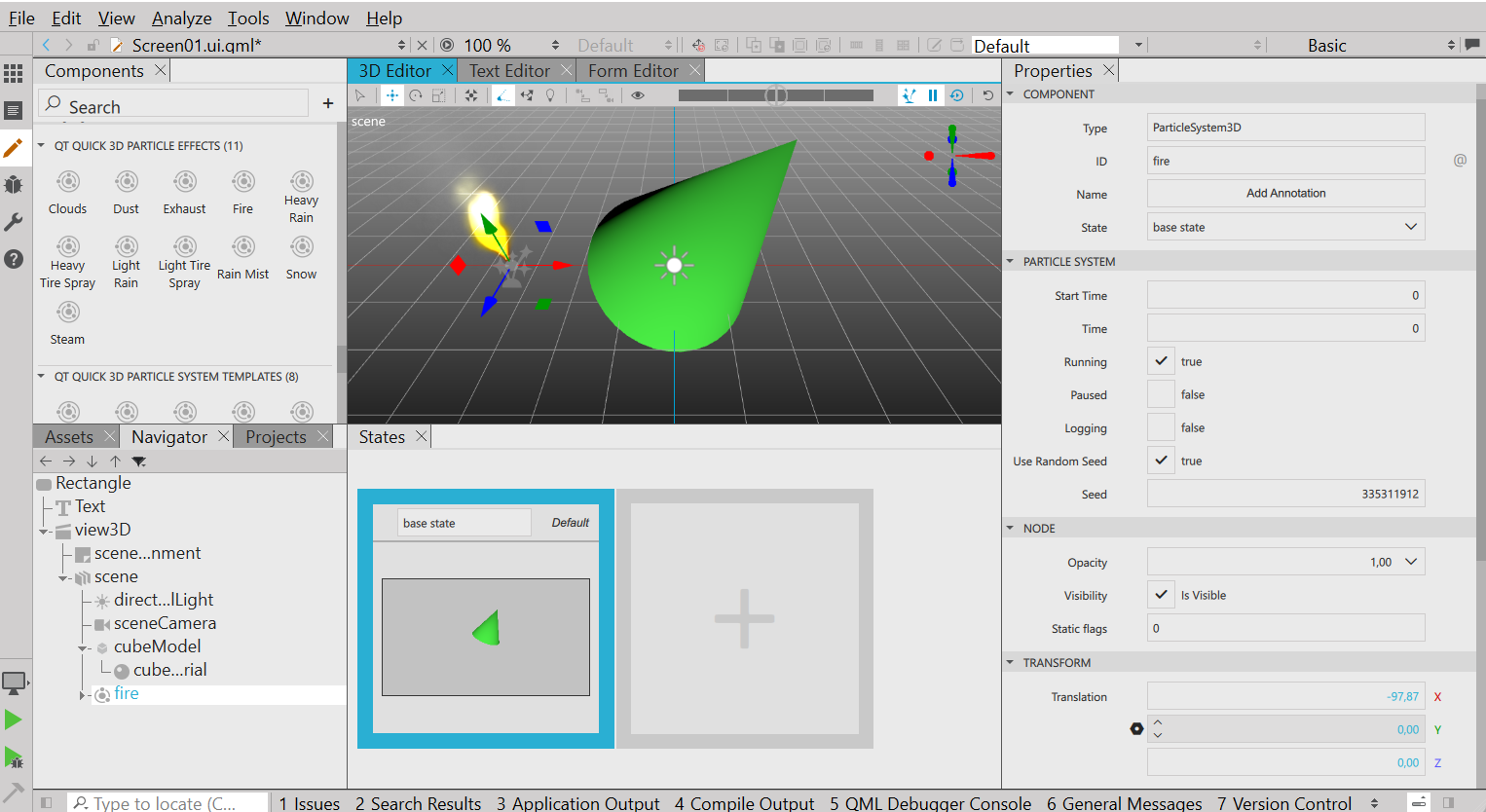
We added a few ready-made 3D particle-effects. These can be used simply by pulling them into your 3D scene. When you use these, you don't need to manually specify particle system details separately. We will be adding more of these easy-to-access 3D components later on.
我们添加了一些现成的3D粒子效果。只需将它们拉入3D场景即可使用。使用这些时,不需要单独手动指定粒子系统详细信息。稍后,我们将添加更多这些易于访问的3D组件。
Getting Started
入门
As with the previous versions, Qt Design Studio 3.2 is also available as a free Community Edition that is part of the online installer. The Community and Professional Editions lacks Photoshop, Sketch, Figma, and Adobe XD bridges, that are included in the Enterprise Edition and also the Simulink integration and multi-language editor support.
与之前的版本一样,Qt Design Studio 3.2也可以作为在线安装程序的一部分作为免费社区版提供。社区版和专业版缺少Photoshop、Sketch、Figma和Adobe XD bridges,这些都包含在企业版中,还缺少Simulink集成和多语言编辑器支持。
Qt Design Studio 3.2 is available under Tools > Qt Design Studio 3.2.0 in the online installer.
Qt Design Studio 3.2可在在线安装程序的工具>Qt Design Studio 3.2.0下获得。
You can find the latest online documentation for Qt Design Studio 3.2 here. The documentation is also available from inside Qt Design Studio.
你可以在这里找到Qt Design Studio 3.2的最新在线文档。这些文档也可以从Qt Design Studio内部获得。
The welcome page of Qt Design Studio contains examples and links to video tutorials to help you get started.
Qt Design Studio的欢迎页面包含示例和视频教程链接,帮助您入门。
Of course Qt Design Studio contains many more bug fixes and small improvements. Please check the change log for more details.
当然,Qt Design Studio包含了更多的错误修复和小的改进。请查看更改日志以了解更多详细信息。
Please post issues you find or suggestions you have in our bug tracker.
请在我们的bug追踪器中发布您发现的问题或建议。





 扫一扫
扫一扫


 1908
1908

 被折叠的 条评论
为什么被折叠?
被折叠的 条评论
为什么被折叠?
 到【灌水乐园】发言





