



实在是受不了老师讲解,前面的吐槽不说了,还有一点就是代码编辑没有放大,看不清写的什么(已经是超清了)
我现在是用自己的理解来构建游戏,所以代码与老师可能出入非常大
新生成卡片相关
卡片堆叠
在父组件中加了 layout 组件,并设置了非 node 属性设置
无论后续代码中如何改变坐标,卡片位置不会变化
要么 layout 组件删除,要么设置成 node 属性
简易示例
    start() {
        s2_bg.inthis = this
        ts_music.getinthis().on_bgm2()  //  背景音播放
        for (let index = 0; index < 10; index++) {
            this.on_card_re(0 , index)
        }
    }
    on_card_re(num : 0 | 1 | 2 , lv : number){
        let card = new Node
        if (num == 0){card = instantiate(this.card0)}
        else if (num == 1){card = instantiate(this.card1)}
        else if (num == 2){card = instantiate(this.card2)}

        this.ui_blol.addChild(card)
        card.setPosition(new Vec3(0,0))     //  设置初始位置
        this.arr_car.push(card)     //  加入数组
        card.setPosition(randomRangeInt(-30 , 30) , randomRangeInt(-30 , 30))   //  设置偏移

        let ca = card.getComponent(ts_card)
        if (ca){ca.lv = lv}
    }
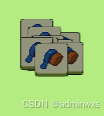
卡片属性
利用官方脚本
export class ts_card extends Component
所以可以直接引用
        let ca = card.getComponent(ts_card)
        if (ca){ca.lv = lv}
卡片随机
卡片随机,牵涉到几个方面
- 层级随机
- 卡片本身随机
- 卡片位置随机
本身随机是独立的,影响不大
位置随机分两块
一 坐标随机
二 区块随机
层级牵涉到是否可点击
随机卡片
随机区块
随机层级
随机坐标
判断使用几个卡片
判断使用几组卡片(3个相同卡片为一组)
判断使用几个区块
轮流塞入各个区块
卡片随机代码
	/**生成卡片 */
    on_refresh(){
        /**实例化所有卡 */
        for (let id1 = 0; id1 < this.game_bao; id1++) {
            for (let id2 = 0; id2 < 3; id2++) {
                let ca = this.on_card_inst(this.game_car[id1])
                if (ca){this.arr_card.push(ca)} //  加入所有数组
                else {console.log(`实例化异常`)}
            }
        }
        /**打乱数组 */
        this.arr_card = this.on_rand_arr(this.arr_card)  //  打乱数组
        console.log(`打乱结束 分组开始`)
        /**分区块数组 */
        let num1 = 1    //  区块位
        for (let c of this.arr_card){
            let ca = c.getComponent(ts_card)
            if (num1 == 1){
                this.arr_car1.push(c)
                ca.block = 1
                ca.lv = this.arr_car1.length
            }
            else if (num1 == 2){
                this.arr_car2.push(c)
                ca.block = 2
                ca.lv = this.arr_car2.length
            }
            else if (num1 == 3){
                this.arr_car3.push(c)
                ca.block = 3
                ca.lv = this.arr_car3.length
            }
            else {console.log(`num 异常`)}

            num1 += 1
            if (num1 == this.game_blo + 1){num1 = 1}
        }
        console.log(`分组结束 倒叙开始`)
        /**倒叙添加父节点 */
        if (this.arr_car1.length > 0){
            for (let id = this.arr_car1.length; id > 0; id--) {
                this.arr_car1[id - 1].setParent(this.ui_blo1)
                if (id == 1){this.on_change_act(this.arr_car1[id-1] , true)}
            }
        }
        if (this.arr_car2.length > 0){
            for (let id = this.arr_car2.length; id > 0; id--) {
                this.arr_car2[id - 1].setParent(this.ui_blo2)
                if (id == 1){this.on_change_act(this.arr_car2[id-1] , true)}
            }
        }
        if (this.arr_car3.length > 0){
            for (let id = this.arr_car3.length; id > 0; id--) {
                this.arr_car3[id - 1].setParent(this.ui_blo3)
                if (id == 1){this.on_change_act(this.arr_car3[id-1] , true)}
            }
        }
        /**设置随机坐标 */
        for (let c of this.arr_card){
            let pos = new Vec3(randomRangeInt(-60,60),randomRangeInt(-60,60))
            c.setPosition(pos)
        }
    }
    /**预制体实例化 */
    on_card_inst(num : number){
        if (num == 0){return instantiate(this.card0)}
        else if (num == 1){return instantiate(this.card1)}
        else if (num == 2){return instantiate(this.card2)}
        else if (num == 3){return instantiate(this.card3)}
        else if (num == 4){return instantiate(this.card4)}
        else if (num == 5){return instantiate(this.card5)}
        else if (num == 6){return instantiate(this.card6)}
        else if (num == 7){return instantiate(this.card7)}
        else if (num == 8){return instantiate(this.card8)}
        else if (num == 9){return instantiate(this.card9)}
        else if (num == 10){return instantiate(this.card10)}
        else if (num == 11){return instantiate(this.card11)}
        else if (num == 12){return instantiate(this.card12)}
        else if (num == 13){return instantiate(this.card13)}
        else {return null}
    }
    /**随机重置数组 */
    on_rand_arr(arr : Node[]){
        for (let id1 = arr.length -1; id1 > 0; id1--) {
            const j = Math.floor( Math.random() * id1 + 1);
            [arr[id1] , arr[j] = arr[j] , arr[id1]]
        }
        return arr
    }
    /**变更可点击操作 */
    on_change_act(no : Node , boo : boolean){
        let ca = no.getComponent(ts_card)
        ca.touch = boo
        const zi = no.getChildByName(`block`)
        if (zi == null){console.log(`card 获取 block 异常`) ; return}
        zi.active = !boo     //  设置是否可见
        console.log(`on_change_act 完成`)
    }
制作卡片预制体
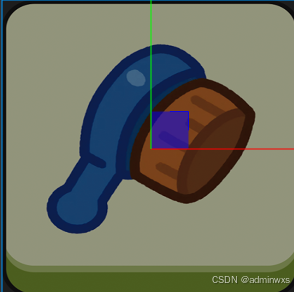
其实简单的说就是原本图片,加个纯色图片
纯色图设置成半透明
音频太多(后续精简)
图片太大(后续降低分辨率)
后续优化后才利于上传(大小不能超过5M)
卡片脚本
import { _decorator, Camera, Component, EventTouch, Node, UITransform, Vec2, Vec3 } from 'cc';
import { s2_bg } from './s2_bg';
const { ccclass, property } = _decorator;

@ccclass('ts_card')
export class ts_card extends Component {
    static inthis : ts_card
    static getthis() : ts_card{return this.inthis}
    //  加入 @property 的参数,可以通过 node.getComponent(脚本名) 访问修改
    @property lv : number = 0         //  层级
    //@property offset = new Vec3()     //  偏移坐标
    @property touch : boolean = false  //  是否可点击
    @property block : number = 0      //  存在区块 123生成区块 0移出区块 -1等待区块

    start() {
        ts_card.inthis = this
        this.node.on(Node.EventType.TOUCH_END , this.on_touch , this)
        //this.scheduleOnce(this.on_active() , 1)     // 创建后延迟1秒
    }
    update(deltaTime: number) {

    }
    on_touch(e:EventTouch){
        console.log(`点击触发` , this.node.name)
        let ca = this.node.getComponent(ts_card)
        if (ca.touch == false){return}
        const rect = this.node.getComponent(UITransform).getBoundingBoxToWorld()    //  获取盒子世界坐标
        const loc = e.getLocation() //  获取屏幕点击坐标
        const pw = new Vec3()
        const bg = s2_bg.getthis()
        bg.cam.screenToWorld(new Vec3(loc.x , loc.y) , pw) //  屏幕点击坐标转换到世界坐标
        if (rect.contains(new Vec2(pw.x , pw.y))){{
            console.log("点击确认")
            if (this.touch == false){return}
            bg.on_change_wait(this.node)
        }}
        else {`点击异常`}
    }
}





 扫一扫
扫一扫


 1162
1162

 被折叠的 条评论
为什么被折叠?
被折叠的 条评论
为什么被折叠?
 到【灌水乐园】发言





