



1.创建高德账户:首页 | 高德控制台
2.创建Key:我的应用 | 高德控制台
3.获取API:天气查询 - 高德地图 API
var client = new RestClient("https://restapi.amap.com/v3/weather/weatherInfo?Key=");
client.Timeout = -1;
var request = new RestRequest(Method.GET);
IRestResponse response = client.Execute(request);
Console.WriteLine(response.Content);4.获取目标城市编码表:相关下载-Web服务 API | 高德地图API
4.改为unity中的请求方式:
  void Start()
    {
        StartCoroutine(RequestForWeather());
    }

[Serializable]
    public class WeatherResponse
    {
        public string status;
        public string count;
        public string info;
        public string infocode;
        public Live[] lives;
    }

    [Serializable]
    public class Live
    {
        public string province;
        public string city;
        public string adcode;
        public string weather;
        public string temperature;
        public string winddirection;
        public string windpower;
        public string humidity;
        public string reporttime;
        public string temperature_float;
        public string humidity_float;
    }

IEnumerator RequestForWeather()
    {
        string key = "123456";//自己的Key
        string city = "320320"; // 可根据需要赋值
        string extensions = "base"; // 可根据需要赋值
        string output = "JSON"; // 可根据需要赋值
        string url = $"https://restapi.amap.com/v3/weather/weatherInfo?Key={key}&city={city}&extensions={extensions}&output={output}";
        using (UnityEngine.Networking.UnityWebRequest request = UnityEngine.Networking.UnityWebRequest.Get(url))
        {
            yield return request.SendWebRequest();

#if UNITY_2020_1_OR_NEWER
            if (request.result == UnityEngine.Networking.UnityWebRequest.Result.ConnectionError || request.result == UnityEngine.Networking.UnityWebRequest.Result.ProtocolError)
#else
            if (request.isNetworkError || request.isHttpError)
#endif
            {
                Debug.LogError(request.error);
            }
            else
            {
                Debug.Log(request.downloadHandler.text);
                try
                {
                    WeatherResponse weatherResponse = JsonUtility.FromJson<WeatherResponse>(request.downloadHandler.text);
                    if (weatherResponse != null && weatherResponse.lives != null && weatherResponse.lives.Length > 0)
                    {
                        //根据自己的需求解析
                        string date = DateTime.Now.ToString("yyyy-MM-dd");
                        string time = DateTime.Now.ToString("HH:mm");
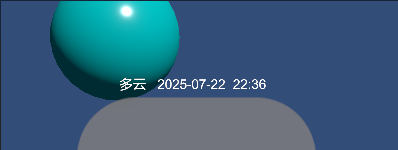
                        weatherText.text = $"{live.weather}   {date}  {time}";
                    }
                    else
                    {
                        weatherText.text = "未获取到天气信息";
                    }
                }
                catch (Exception ex)
                {
                    weatherText.text = "解析天气信息失败: " + ex.Message;
                }
            }
        }
    }
结果:





 扫一扫
扫一扫


 6241
6241

 被折叠的 条评论
为什么被折叠?
被折叠的 条评论
为什么被折叠?
 到【灌水乐园】发言





