


 本文介绍了Unity中利用BestHttp和UnityWebRequest进行大文件上传下载的方法,包括设置Content-Type、读取文件为byte[]、处理上传下载进度。在IIS上,针对大文件上传需调整MaxBufferSize和MaxReceivedMessageSize参数,并解决.mimeType问题,通过添加或修改IIS网站的MIME类型来支持特定文件扩展名。
下载比较简单,只要有个网页路径就行 网页路径示例:http://192.168.1.21:8013/Data/LocationSystem.exe
但是上传不行,客户端上传之后,服务端需要设置接收方法。把接收数据保存到服务端
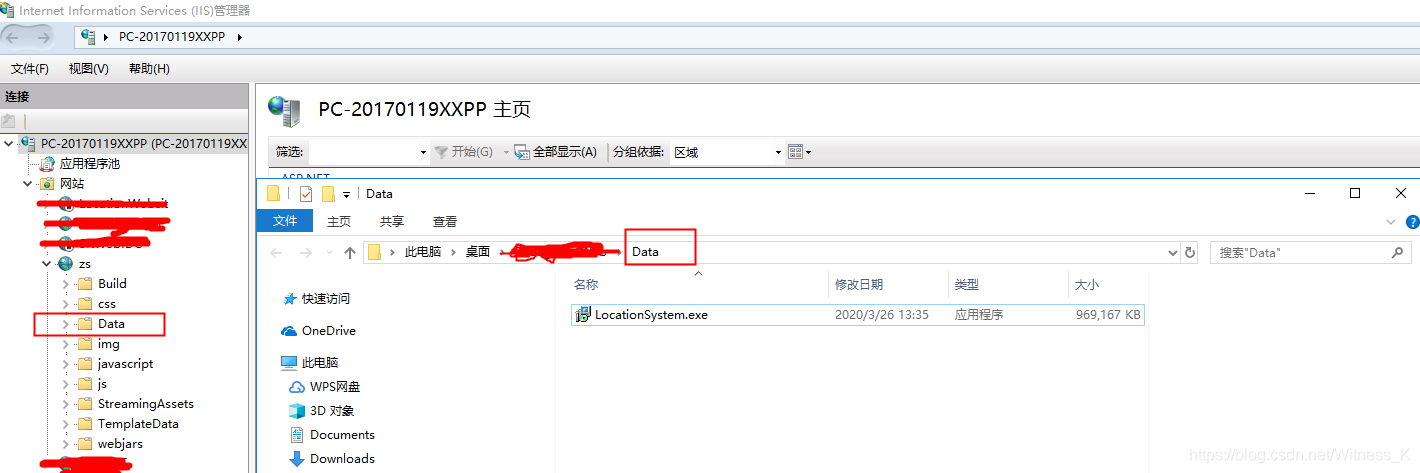
在IIS上挂载一个网站,里面链接到我们上传下载的文件夹
URI:http://192.168.1.21:8013/Data 本地路径:C:\Users\Administrator\Desktop\网页所在文件夹\Data
1.客户端
项目内使用了BestHttpPro插件,所以默认用了这个插件,去实现上传和下载的功能
A.使用BestHttp下载文件:
[ContextMenu("Download")]
public void StartDownload()
{
var request = new HTTPRequest(new System.Uri("http://192.168.1.21:8013/Data/LocationSystem.exe"), (req, resp) => {
//下载完成之后执行
List<byte[]> fragments = resp.GetStreamedFragments();
// 把下载的文件保存到E盘根目录
using (FileStream fs = new FileStream(@"E:\LocationSystem1.exe", FileMode.Append))
foreach (byte[] data in fragments) fs.Write(data, 0, data.Length);
if (resp.IsStreamingFinished) Debug.Log("Download finished!");
});
request.UseStreaming = true;
request.StreamFragmentSize = 1 * 1024 * 1024;// 1 megabyte
request.DisableCache = true;// already saving to a file, so turn off caching
request.OnProgress = OnLoadProgress;
request.Send();
}
//下载进度
void OnLoadProgress(HTTPRequest request, int download, int length)
{
float progressPercent = (download / (float)length) * 100.0f;
Debug.Log("Download: " + progressPercent.ToString("F2") + "%");
}
B:使用BestHttp上传文件:
[ContextMenu("UploadRawData")]
public void UploadSecond()
{
StartCoroutine(UploadFiles());
}
public IEnumerator UploadFiles()
{
string serverUrl = "http://localhost:8733/api/fileTransfer/uploadFiles";
var request = new HTTPRequest(new System.Uri(serverUrl), HTTPMethods.Post, OnFinished);
string fileName = @"E:\xxx.txt";
byte[] data = FileContent(fileName);
string fileName2 = @"E:\LocationSystem1.exe";
byte[] data2 = FileContent(fileName2);
request.AddBinaryData("BigFile", data, "xxxttttt1.txt");
request.AddBinaryData("BigFile", data2, "xxxeeeeee2.exe");
request.SetHeader("Content-Type", "application/octet-stream");
request.OnUploadProgress = OnUploadProgress;
request.DisableCache = true;
request.Send();
yield return null;
}
void OnFinished(HTTPRequest originalRequest, HTTPResponse response)
{
Debug.Log("finished...");
Debug.Log("Response:"+response.DataAsText);
}
void OnUploadProgress(HTTPRequest request, long uploaded, long length)
{
float progressPercent = (uploaded / (float)length) * 100.0f;
Debug.Log("Uploaded: " + progressPercent.ToString("F2") + "%");
}
C:使用UnityWebRequest上传文件(对应的,也可以使用这个下载文件)
[ContextMenu("PostWebapi")]
public void StartPost()
{
StartCoroutine(PostObject("http://localhost:8733/api/fileTransfer/uploadFiles", null, null));
}
public IEnumerator PostObject(string url, Action callback, Action<string> errorCallback)
{
string[] path = new string[2];
path[0] = @"E:\ZTest\xxx.txt";
path[1] = @"E:\ZTest\xxxeee.tx
 最低0.47元/天 解锁文章






 扫一扫
扫一扫


 5658
5658


 到【灌水乐园】发言



