DeepSeek-V3.2实验版发布,国产芯片Day0适配,API大幅降价!

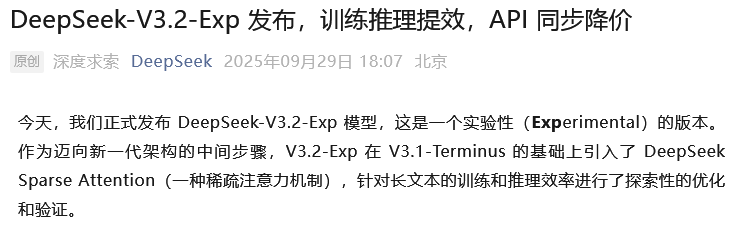
29日晚,DeepSeek发布了DeepSeek-V3.2-Exp实验版模型。
图片

而且是“作为迈向新一代架构的中间步骤”,难道DeepSeek-V4要来啦?

图片

言归正传,我们一起看看Exp版本究竟如何。

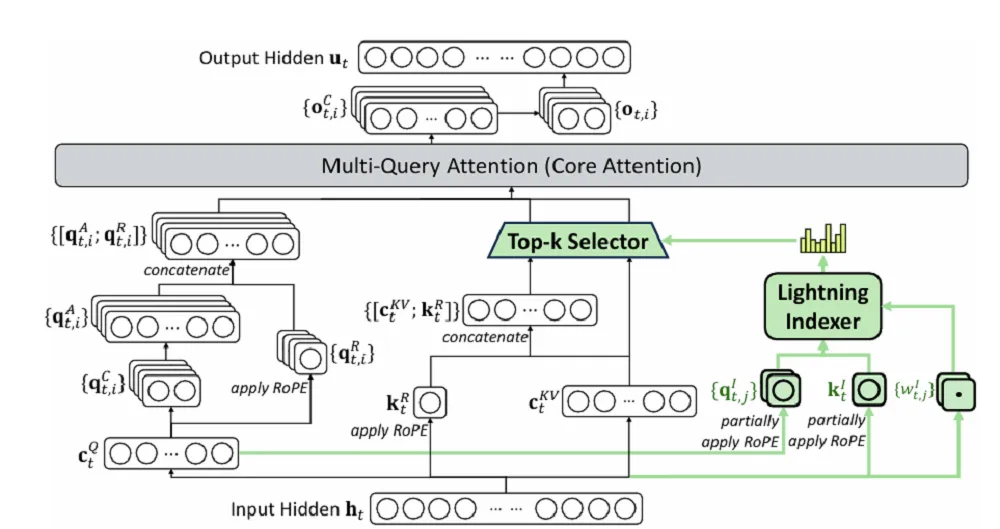
V3.2-Exp在上一个版本的基础上引入DeepSeek Sparse Attention,简称DSA,是一种稀疏注意力机制。
图片

有了DSA,模型学会了抓重点。它会用一个叫“闪电索引器”(Lightning Indexer)的组件,飞快地扫一眼全文,找出和当前任务最相关的那一小撮关键信息,然后只让这些关键信息参与核心计算。

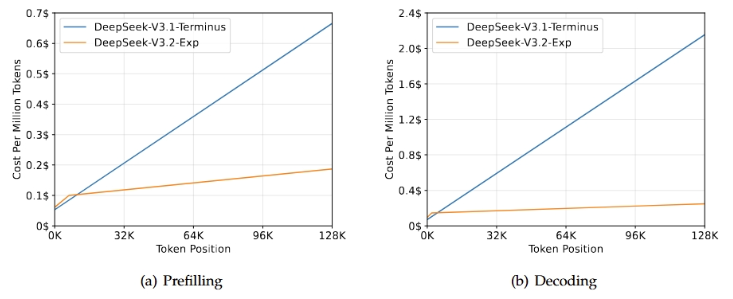
这么一来,计算的复杂度就从二次方级别,降到了近似线性水平。
图片

这个改进,在几乎不影响模型输出效果的前提下,实现了长文本训练和推理效率的大幅提升。
图片

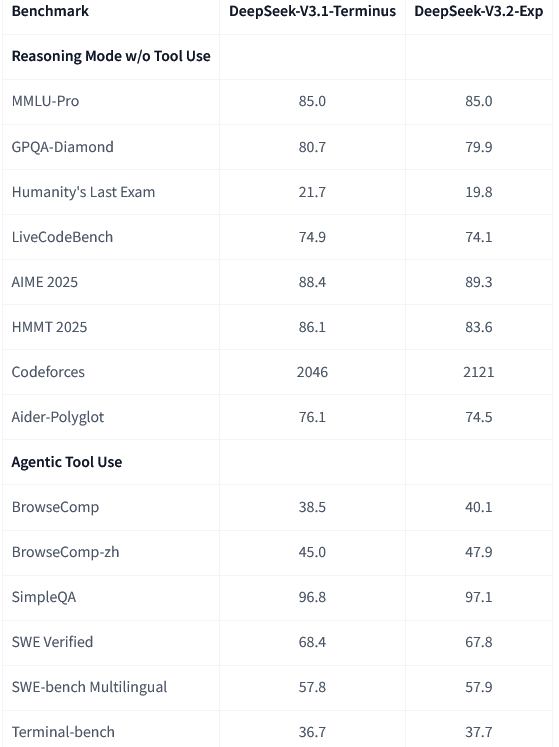
新模型V3.2-Exp和上一代V3.1-Terminus放在一起,用同样的设置跑了一遍,各领域的公开评测集结果显示,两者的表现基本持平。

开源和降价,一步到位

新模型DeepSeek-V3.2-Exp已经在Huggingface和魔搭社区开源了。

连开发过程中设计和实现的很多新的GPU算子都开源了,而且还提供了两个版本:TileLang版和CUDA版。

TileLang是一种高级语言,方便社区里的研究人员做实验、快速迭代想法。

CUDA是更底层的语言,效率更高,适合追求极致性能的开发者。

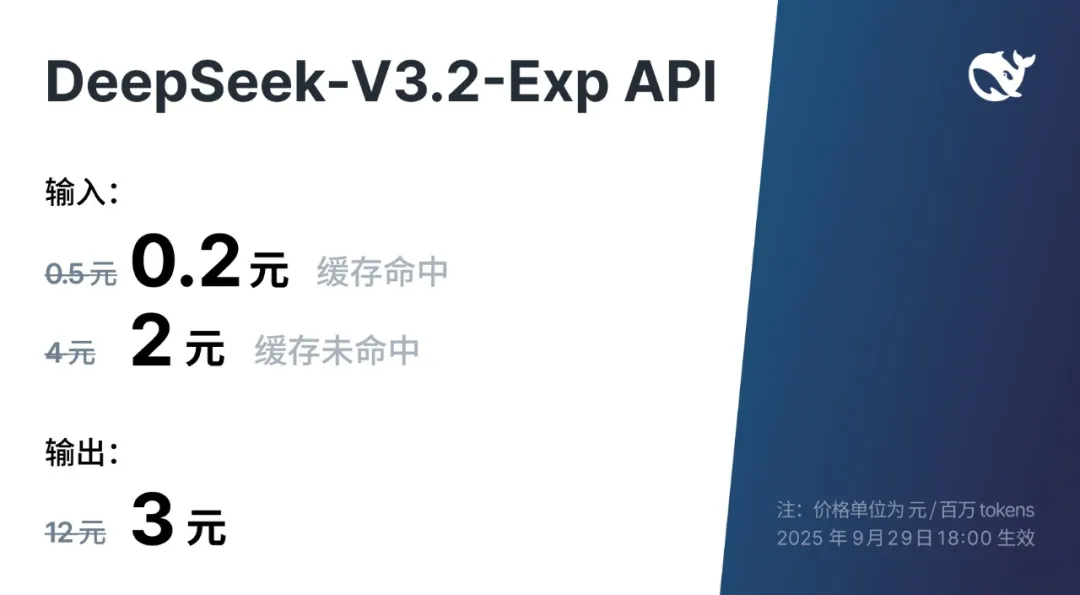
得益于新架构带来的成本降低,官方API的价格也立刻下调了。
图片

开发者调用DeepSeek API的成本,降低了50%以上。

降价最狠的是输出token的价格。

现在,让DeepSeek-V3.2-Exp模型输出100万个token,只要3块钱。

这个价格,是上一代V3.1系列模型的四分之一。

目前,官方的App、网页端和小程序,都已经用上了最新的V3.2-Exp模型。

为了方便开发者对比验证新旧模型的差异,官方还临时保留了V3.1-Terminus的API接口,相当贴心。

国产软硬件厂商,光速跟进

新模型刚一发布,国内的硬件和云服务厂商就宣布“Day 0”适配。

所谓“Day 0”,就是发布当天就支持。
图片

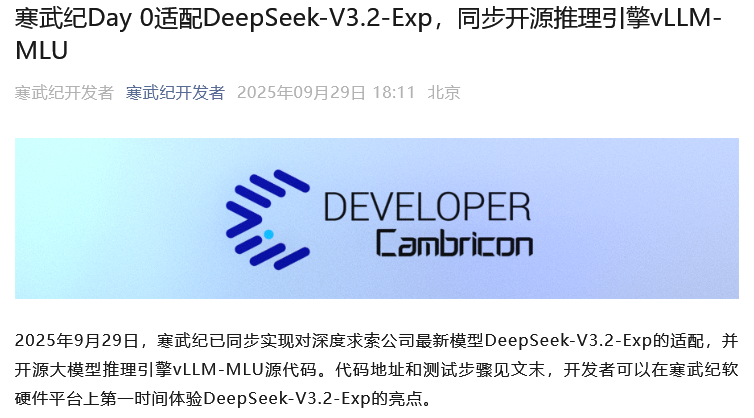
寒武纪真快。

在深度求索官宣模型开源之后,仅仅过了4分钟,寒武纪就发文,宣布同步实现对新模型的Day 0适配,并且开源了自家的推理引擎vLLM-MLU。

寒武纪表示,此前对DeepSeek系列模型进行了深入的软硬件协同性能优化,达成了业界领先的算力利用率水平。

针对本次的DeepSeek-V3.2-Exp新模型架构,他们通过Triton算子开发快速适配,再用自家的BangC融合算子进行性能优化,实现了很高的计算效率。

新模型的稀疏注意力机制,叠加上寒武纪的计算效率,可以大幅降低长序列场景下的成本。
图片

华为旗下的昇腾芯片也快速通过vLLM和SGLang等推理框架,完成了对新模型的适配部署,并且把推理代码和算子实现都开源了。

根据他们的测试,DeepSeek-V3.2-Exp在昇腾设备上处理128K的长序列文本,首个token的输出耗时低于2秒,后续每个token的输出耗时低于30毫秒。

速度很快。

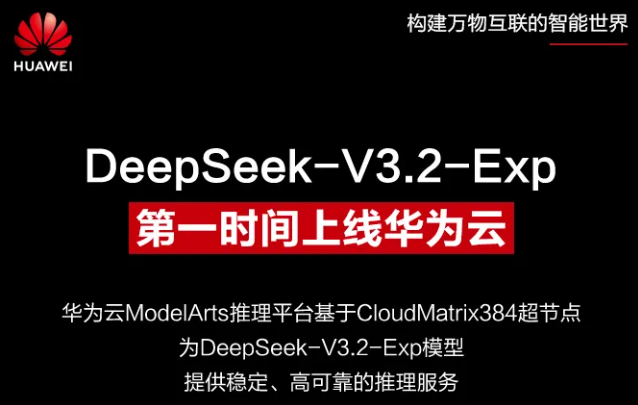
华为云更是基于CloudMatrix 384超节点,来为模型提供稳定可靠的推理服务,最大能支持160K的上下文长度。
图片

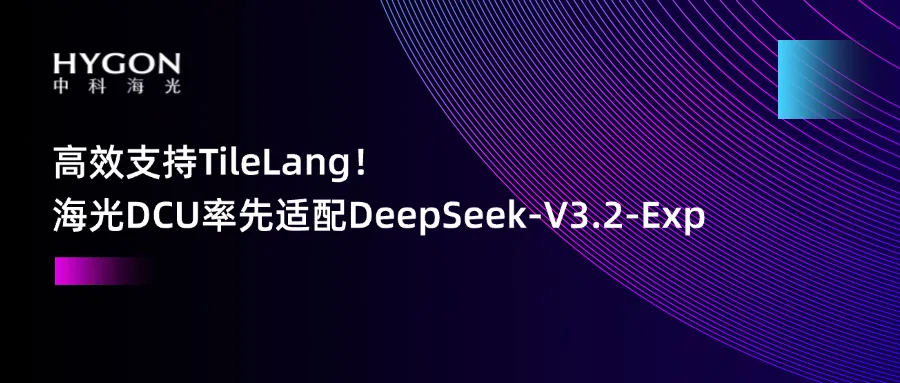
海光信息的DCU(深度计算处理器)同样率先实现了对DeepSeek-V3.2-Exp的Day 0高效适配和优化,确保算力“零等待”部署。

除了芯片厂商,云平台也纷纷跟进。

华为云、PPIO派欧云、优刻得(UCloud)等云平台,都已经宣布上线了DeepSeek-V3.2-Exp。

整个国产AI产业链,围绕着一个新模型的发布,展现出了惊人的协同效率。

上手体验如何?

新模型发布,自然少不了各路网友和开发者的上手体验。

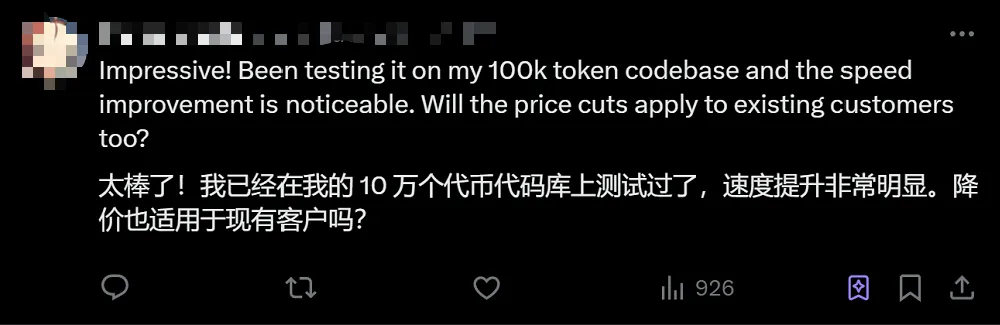
有位网友在社交媒体上分享,他用一个包含10万个token的代码库测试了新模型,最直观的感受就是,速度提升非常明显。
图片

不过,这个新模型毕竟是个“实验版”,在实际使用中,也暴露出了一些问题。

它似乎为了追求效率和简洁,在某些能力上做出了妥协。

比如在编程任务上,有评测显示,新模型V3.2-Exp生成的代码,比上一代V3.1-Terminus要简短得多。

在信息检索任务上,也出现了类似的情况。新模型似乎变“懒”了。

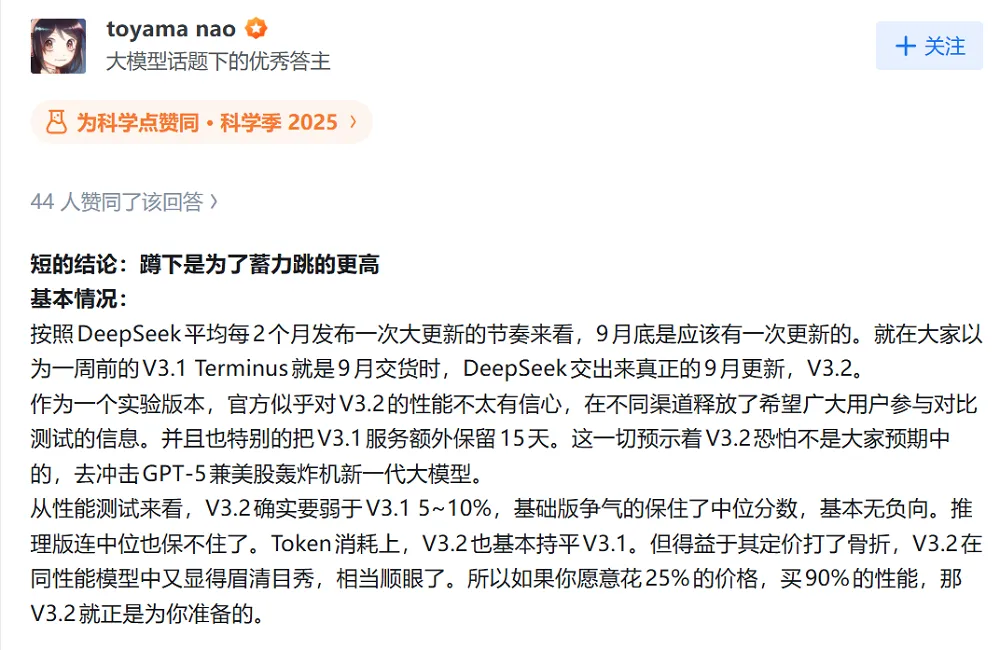
知乎博主@toyama nao在测评后也指出了类似的问题,他认为V3.2-Exp在工作记忆、计算精度稳定性等方面有明显短板,还容易陷入死循环。
图片

当然,深度求索官方也坦言,V3.2-Exp作为一个实验性版本,虽然在公开评测集上验证了有效性,但还需要在用户的真实场景中进行更大规模的测试,来排除某些场景下效果不佳的可能性。

架构创新,可能比眼前的性能更重要

作为一个实验性的“中间步骤”,DeepSeek-V3.2-Exp更大的价值,或许不在于它当前在某些任务上的表现,而在于它在模型架构上做出的探索。

前面提到的DSA注意力机制,目前还处在原型期,除了闪电索引器(Lightning Indexer),还有一个细粒度的token选择机制。

闪电索引器负责快速评估查询token和历史token的相关性,然后从选择机制里只挑选最相关的一部分上下文,送入注意力计算环节。

这个架构上的创新,直接带来了成本和效率的优化。

在训练方法上,深度求索也采用了“继续预训练+后训练”的组合拳。

继续预训练分两步走。

第一步,先在稠密模式下,短暂训练那个“闪电索引器”,让它的输出结果和标准的注意力机制保持一致。

第二步,再引入稀疏选择机制,让模型慢慢适应新的、更高效的计算方式,相当于让它从“地毯式搜索”学会“精准打击”。

预训练完成后,还有后训练阶段,主要用了专家蒸馏和混合强化学习两种技术。

专家蒸馏,就是针对数学、编程、推理等不同领域,分别训练出各自的“专家模型”,然后想办法把这些专家的“知识”,压缩进一个通用的模型里。

混合强化学习,则是把推理能力、智能体能力和人类对齐训练,都统一在一个强化学习阶段完成,避免了传统分阶段训练容易出现“学了新的忘了旧的”的问题。

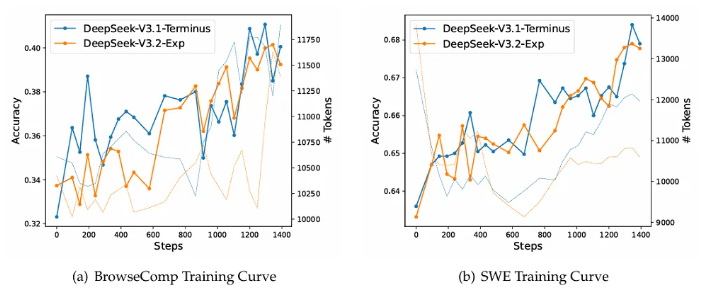
在所有测试环境中,长序列推理的开销都明显降低,证明DSA机制在真实部署场景中很有用。

同时,新模型的训练曲线和上一代模型一样稳定,也说明这种新架构在收敛性上没有额外的风险。
图片

这次深度求索的探索,无论从技术架构的创新,还是对整个国产AI生态的带动,都值得关注。

参考资料:

https://github.com/Cambricon/vllm-mlu

https://huggingface.co/deepseek-ai/DeepSeek-V3.2-Exp

https://modelscope.cn/models/deepseek-ai/DeepSeek-V3.2-Exp

https://github.com/deepseek-ai/DeepSeek-V3.2-Exp/blob/main/DeepSeek_V3_2.pdf

END

Table of Contents Introduction Model Summary Model Downloads Evaluation Results Chat Website & API Platform How to Run Locally License Citation Contact 1. Introduction We present DeepSeek-V3, a strong Mixture-of-Experts (MoE) language model with 671B total parameters with 37B activated for each token. To achieve efficient inference and cost-effective training, DeepSeek-V3 adopts Multi-head Latent Attention (MLA) and DeepSeekMoE architectures, which were thoroughly validated in DeepSeek-V2. Furthermore, DeepSeek-V3 pioneers an auxiliary-loss-free strategy for load balancing and sets a multi-token prediction training objective for stronger performance. We pre-train DeepSeek-V3 on 14.8 trillion diverse and high-quality tokens, followed by Supervised Fine-Tuning and Reinforcement Learning stages to fully harness its capabilities. Comprehensive evaluations reveal that DeepSeek-V3 outperforms other open-source models and achieves performance comparable to leading closed-source models. Despite its excellent performance, DeepSeek-V3 requires only 2.788M H800 GPU hours for its full training. In addition, its training process is remarkably stable. Throughout the entire training process, we did not experience any irrecoverable loss spikes or perform any rollbacks. 2. Model Summary Architecture: Innovative Load Balancing Strategy and Training Objective On top of the efficient architecture of DeepSeek-V2, we pioneer an auxiliary-loss-free strategy for load balancing, which minimizes the performance degradation that arises from encouraging load balancing. We investigate a Multi-Token Prediction (MTP) objective and prove it beneficial to model performance. It can also be used for speculative decoding for inference acceleration. Pre-Training: Towards Ultimate Training Efficiency We design an FP8 mixed precision training framework and, for the first time, validate the feasibility and effectiveness of FP8 training on an extremely large-scale model. Through co-design of algorithms, frameworks, and hardware, we overcome the communication bottleneck in cross-node MoE training, nearly achieving full computation-communication overlap. This significantly enhances our training efficiency and reduces the training costs, enabling us to further scale up the model size without additional overhead. At an economical cost of only 2.664M H800 GPU hours, we complete the pre-training of DeepSeek-V3 on 14.8T tokens, producing the currently strongest open-source base model. The subsequent training stages after pre-training require only 0.1M GPU hours. Post-Training: Knowledge Distillation from DeepSeek-R1 We introduce an innovative methodology to distill reasoning capabilities from the long-Chain-of-Thought (CoT) model, specifically from one of the DeepSeek R1 series models, into standard LLMs, particularly DeepSeek-V3. Our pipeline elegantly incorporates the verification and reflection patterns of R1 into DeepSeek-V3 and notably improves its reasoning performance. Meanwhile, we also maintain a control over the output style and length of DeepSeek-V3. 3. Model Downloads Model #Total Params #Activated Params Context Length Download DeepSeek-V3-Base 671B 37B 128K 🤗 Hugging Face DeepSeek-V3 671B 37B 128K 🤗 Hugging Face Note The total size of DeepSeek-V3 models on Hugging Face is 685B, which includes 671B of the Main Model weights and 14B of the Multi-Token Prediction (MTP) Module weights. To ensure optimal performance and flexibility, we have partnered with open-source communities and hardware vendors to provide multiple ways to run the model locally. For step-by-step guidance, check out Section 6: How_to Run_Locally. For developers looking to dive deeper, we recommend exploring README_WEIGHTS.md for details on the Main Model weights and the Multi-Token Prediction (MTP) Modules. Please note that MTP support is currently under active development within the community, and we welcome your contributions and feedback. 4. Evaluation Results Base Model Standard Benchmarks Benchmark (Metric) # Shots DeepSeek-V2 Qwen2.5 72B LLaMA3.1 405B DeepSeek-V3 Architecture - MoE Dense Dense MoE # Activated Params - 21B 72B 405B 37B # Total Params - 236B 72B 405B 671B English Pile-test (BPB) - 0.606 0.638 0.542 0.548 BBH (EM) 3-shot 78.8 79.8 82.9 87.5 MMLU (Acc.) 5-shot 78.4 85.0 84.4 87.1 MMLU-Redux (Acc.) 5-shot 75.6 83.2 81.3 86.2 MMLU-Pro (Acc.) 5-shot 51.4 58.3 52.8 64.4 DROP (F1) 3-shot 80.4 80.6 86.0 89.0 ARC-Easy (Acc.) 25-shot 97.6 98.4 98.4 98.9 ARC-Challenge (Acc.) 25-shot 92.2 94.5 95.3 95.3 HellaSwag (Acc.) 10-shot 87.1 84.8 89.2 88.9 PIQA (Acc.) 0-shot 83.9 82.6 85.9 84.7 WinoGrande (Acc.) 5-shot 86.3 82.3 85.2 84.9 RACE-Middle (Acc.) 5-shot 73.1 68.1 74.2 67.1 RACE-High (Acc.) 5-shot 52.6 50.3 56.8 51.3 TriviaQA (EM) 5-shot 80.0 71.9 82.7 82.9 NaturalQuestions (EM) 5-shot 38.6 33.2 41.5 40.0 AGIEval (Acc.) 0-shot 57.5 75.8 60.6 79.6 Code HumanEval (Pass@1) 0-shot 43.3 53.0 54.9 65.2 MBPP (Pass@1) 3-shot 65.0 72.6 68.4 75.4 LiveCodeBench-Base (Pass@1) 3-shot 11.6 12.9 15.5 19.4 CRUXEval-I (Acc.) 2-shot 52.5 59.1 58.5 67.3 CRUXEval-O (Acc.) 2-shot 49.8 59.9 59.9 69.8 Math GSM8K (EM) 8-shot 81.6 88.3 83.5 89.3 MATH (EM) 4-shot 43.4 54.4 49.0 61.6 MGSM (EM) 8-shot 63.6 76.2 69.9 79.8 CMath (EM) 3-shot 78.7 84.5 77.3 90.7 Chinese CLUEWSC (EM) 5-shot 82.0 82.5 83.0 82.7 C-Eval (Acc.) 5-shot 81.4 89.2 72.5 90.1 CMMLU (Acc.) 5-shot 84.0 89.5 73.7 88.8 CMRC (EM) 1-shot 77.4 75.8 76.0 76.3 C3 (Acc.) 0-shot 77.4 76.7 79.7 78.6 CCPM (Acc.) 0-shot 93.0 88.5 78.6 92.0 Multilingual MMMLU-non-English (Acc.) 5-shot 64.0 74.8 73.8 79.4 Note Best results are shown in bold. Scores with a gap not exceeding 0.3 are considered to be at the same level. DeepSeek-V3 achieves the best performance on most benchmarks, especially on math and code tasks. For more evaluation details, please check our paper. Context Window Evaluation results on the Needle In A Haystack (NIAH) tests. DeepSeek-V3 performs well across all context window lengths up to 128K. Chat Model Standard Benchmarks (Models larger than 67B) Benchmark (Metric) DeepSeek V2-0506 DeepSeek V2.5-0905 Qwen2.5 72B-Inst. Llama3.1 405B-Inst. Claude-3.5-Sonnet-1022 GPT-4o 0513 DeepSeek V3 Architecture MoE MoE Dense Dense - - MoE # Activated Params 21B 21B 72B 405B - - 37B # Total Params 236B 236B 72B 405B - - 671B English MMLU (EM) 78.2 80.6 85.3 88.6 88.3 87.2 88.5 MMLU-Redux (EM) 77.9 80.3 85.6 86.2 88.9 88.0 89.1 MMLU-Pro (EM) 58.5 66.2 71.6 73.3 78.0 72.6 75.9 DROP (3-shot F1) 83.0 87.8 76.7 88.7 88.3 83.7 91.6 IF-Eval (Prompt Strict) 57.7 80.6 84.1 86.0 86.5 84.3 86.1 GPQA-Diamond (Pass@1) 35.3 41.3 49.0 51.1 65.0 49.9 59.1 SimpleQA (Correct) 9.0 10.2 9.1 17.1 28.4 38.2 24.9 FRAMES (Acc.) 66.9 65.4 69.8 70.0 72.5 80.5 73.3 LongBench v2 (Acc.) 31.6 35.4 39.4 36.1 41.0 48.1 48.7 Code HumanEval-Mul (Pass@1) 69.3 77.4 77.3 77.2 81.7 80.5 82.6 LiveCodeBench (Pass@1-COT) 18.8 29.2 31.1 28.4 36.3 33.4 40.5 LiveCodeBench (Pass@1) 20.3 28.4 28.7 30.1 32.8 34.2 37.6 Codeforces (Percentile) 17.5 35.6 24.8 25.3 20.3 23.6 51.6 SWE Verified (Resolved) - 22.6 23.8 24.5 50.8 38.8 42.0 Aider-Edit (Acc.) 60.3 71.6 65.4 63.9 84.2 72.9 79.7 Aider-Polyglot (Acc.) - 18.2 7.6 5.8 45.3 16.0 49.6 Math AIME 2024 (Pass@1) 4.6 16.7 23.3 23.3 16.0 9.3 39.2 MATH-500 (EM) 56.3 74.7 80.0 73.8 78.3 74.6 90.2 CNMO 2024 (Pass@1) 2.8 10.8 15.9 6.8 13.1 10.8 43.2 Chinese CLUEWSC (EM) 89.9 90.4 91.4 84.7 85.4 87.9 90.9 C-Eval (EM) 78.6 79.5 86.1 61.5 76.7 76.0 86.5 C-SimpleQA (Correct) 48.5 54.1 48.4 50.4 51.3 59.3 64.8 Note All models are evaluated in a configuration that limits the output length to 8K. Benchmarks containing fewer than 1000 samples are tested multiple times using varying temperature settings to derive robust final results. DeepSeek-V3 stands as the best-performing open-source model, and also exhibits competitive performance against frontier closed-source models. Open Ended Generation Evaluation Model Arena-Hard AlpacaEval 2.0 DeepSeek-V2.5-0905 76.2 50.5 Qwen2.5-72B-Instruct 81.2 49.1 LLaMA-3.1 405B 69.3 40.5 GPT-4o-0513 80.4 51.1 Claude-Sonnet-3.5-1022 85.2 52.0 DeepSeek-V3 85.5 70.0 Note English open-ended conversation evaluations. For AlpacaEval 2.0, we use the length-controlled win rate as the metric. 5. Chat Website & API Platform You can chat with DeepSeek-V3 on DeepSeek's official website: chat.deepseek.com We also provide OpenAI-Compatible API at DeepSeek Platform: platform.deepseek.com 6. How to Run Locally DeepSeek-V3 can be deployed locally using the following hardware and open-source community software: DeepSeek-Infer Demo: We provide a simple and lightweight demo for FP8 and BF16 inference. SGLang: Fully support the DeepSeek-V3 model in both BF16 and FP8 inference modes, with Multi-Token Prediction coming soon. LMDeploy: Enables efficient FP8 and BF16 inference for local and cloud deployment. TensorRT-LLM: Currently supports BF16 inference and INT4/8 quantization, with FP8 support coming soon. vLLM: Support DeepSeek-V3 model with FP8 and BF16 modes for tensor parallelism and pipeline parallelism. LightLLM: Supports efficient single-node or multi-node deployment for FP8 and BF16. AMD GPU: Enables running the DeepSeek-V3 model on AMD GPUs via SGLang in both BF16 and FP8 modes. Huawei Ascend NPU: Supports running DeepSeek-V3 on Huawei Ascend devices in both INT8 and BF16. Since FP8 training is natively adopted in our framework, we only provide FP8 weights. If you require BF16 weights for experimentation, you can use the provided conversion script to perform the transformation. Here is an example of converting FP8 weights to BF16: cd inference python fp8_cast_bf16.py --input-fp8-hf-path /path/to/fp8_weights --output-bf16-hf-path /path/to/bf16_weights Note Hugging Face's Transformers has not been directly supported yet. 6.1 Inference with DeepSeek-Infer Demo (example only) System Requirements Note Linux with Python 3.10 only. Mac and Windows are not supported. Dependencies: torch==2.4.1 triton==3.0.0 transformers==4.46.3 safetensors==0.4.5 Model Weights & Demo Code Preparation First, clone our DeepSeek-V3 GitHub repository: git clone https://github.com/deepseek-ai/DeepSeek-V3.git Navigate to the inference folder and install dependencies listed in requirements.txt. Easiest way is to use a package manager like conda or uv to create a new virtual environment and install the dependencies. cd DeepSeek-V3/inference pip install -r requirements.txt Download the model weights from Hugging Face, and put them into /path/to/DeepSeek-V3 folder. Model Weights Conversion Convert Hugging Face model weights to a specific format: python convert.py --hf-ckpt-path /path/to/DeepSeek-V3 --save-path /path/to/DeepSeek-V3-Demo --n-experts 256 --model-parallel 16 Run Then you can chat with DeepSeek-V3: torchrun --nnodes 2 --nproc-per-node 8 --node-rank $RANK --master-addr $ADDR generate.py --ckpt-path /path/to/DeepSeek-V3-Demo --config configs/config_671B.json --interactive --temperature 0.7 --max-new-tokens 200 Or batch inference on a given file: torchrun --nnodes 2 --nproc-per-node 8 --node-rank $RANK --master-addr $ADDR generate.py --ckpt-path /path/to/DeepSeek-V3-Demo --config configs/config_671B.json --input-file $FILE 6.2 Inference with SGLang (recommended) SGLang currently supports MLA optimizations, DP Attention, FP8 (W8A8), FP8 KV Cache, and Torch Compile, delivering state-of-the-art latency and throughput performance among open-source frameworks. Notably, SGLang v0.4.1 fully supports running DeepSeek-V3 on both NVIDIA and AMD GPUs, making it a highly versatile and robust solution. SGLang also supports multi-node tensor parallelism, enabling you to run this model on multiple network-connected machines. Multi-Token Prediction (MTP) is in development, and progress can be tracked in the optimization plan. Here are the launch instructions from the SGLang team: https://github.com/sgl-project/sglang/tree/main/benchmark/deepseek_v3 6.3 Inference with LMDeploy (recommended) LMDeploy, a flexible and high-performance inference and serving framework tailored for large language models, now supports DeepSeek-V3. It offers both offline pipeline processing and online deployment capabilities, seamlessly integrating with PyTorch-based workflows. For comprehensive step-by-step instructions on running DeepSeek-V3 with LMDeploy, please refer to here: InternLM/lmdeploy#2960 6.4 Inference with TRT-LLM (recommended) TensorRT-LLM now supports the DeepSeek-V3 model, offering precision options such as BF16 and INT4/INT8 weight-only. Support for FP8 is currently in progress and will be released soon. You can access the custom branch of TRTLLM specifically for DeepSeek-V3 support through the following link to experience the new features directly: https://github.com/NVIDIA/TensorRT-LLM/tree/main/examples/deepseek_v3. 6.5 Inference with vLLM (recommended) vLLM v0.6.6 supports DeepSeek-V3 inference for FP8 and BF16 modes on both NVIDIA and AMD GPUs. Aside from standard techniques, vLLM offers pipeline parallelism allowing you to run this model on multiple machines connected by networks. For detailed guidance, please refer to the vLLM instructions. Please feel free to follow the enhancement plan as well. 6.6 Inference with LightLLM (recommended) LightLLM v1.0.1 supports single-machine and multi-machine tensor parallel deployment for DeepSeek-R1 (FP8/BF16) and provides mixed-precision deployment, with more quantization modes continuously integrated. For more details, please refer to LightLLM instructions. Additionally, LightLLM offers PD-disaggregation deployment for DeepSeek-V2, and the implementation of PD-disaggregation for DeepSeek-V3 is in development. 6.7 Recommended Inference Functionality with AMD GPUs In collaboration with the AMD team, we have achieved Day-One support for AMD GPUs using SGLang, with full compatibility for both FP8 and BF16 precision. For detailed guidance, please refer to the SGLang instructions. 6.8 Recommended Inference Functionality with Huawei Ascend NPUs The MindIE framework from the Huawei Ascend community has successfully adapted the BF16 version of DeepSeek-V3. For step-by-step guidance on Ascend NPUs, please follow the instructions here. 7. License This code repository is licensed under the MIT License. The use of DeepSeek-V3 Base/Chat models is subject to the Model License. DeepSeek-V3 series (including Base and Chat) supports commercial use. 8. Citation @misc{deepseekai2024deepseekv3technicalreport, title={DeepSeek-V3 Technical Report}, author={DeepSeek-AI}, year={2024}, eprint={2412.19437}, archivePrefix={arXiv}, primaryClass={cs.CL}, url={https://arxiv.org/abs/2412.19437}, } 9. Contact If you have any questions, please raise an issue or contact us at service@deepseek.com.
07-12
### 本地部署 DeepSeek 模型并接入 PyCharm 实现 AI 编程的完整指南 #### 1. 安装 PyCharm PyCharm 是一款广泛使用的 Python 开发工具,支持专业(Professional)和社区(Community)。用户可以从 [PyCharm 官网](https://www.jetbrains.com/pycharm/) 下载安装包,并根据操作系统选择合适的本进行安装。安装完成后,启动 PyCharm 并创建一个 Python 项目。 #### 2. 安装 Ollama Ollama 是一个用于在本地运行大语言模型的工具。访问 [Ollama 官网](https://ollama.com/download) 下载适用于 Windows 或 Linux 的安装包。对于 Linux 用户,可以使用以下命令下载并解压: ```bash curl -L https://ollama.com/download/ollama-linux-amd64.tgz -o ollama-linux-amd64.tgz sudo tar -C /usr -xzf ollama-linux-amd64.tgz ``` 如果网络不稳定,可以直接从浏览器下载安装包并上传至服务器后解压。解压完成后,通过 `ollama serve` 启动服务,并使用 `ollama -v` 验证是否成功运行[^1]。 为了确保每次系统重启后 Ollama 自动启动,可以将其配置为 systemd 服务。创建用户和组后,在 `/etc/systemd/system/ollama.service` 中添加以下内容: ```ini [Unit] Description=Ollama Service After=network-online.target [Service] ExecStart=/usr/bin/ollama serve User=ollama Group=ollama Restart=always RestartSec=3 Environment="PATH=$PATH" [Install] WantedBy=default.target ``` 保存后重新加载 systemd 配置并启用服务: ```bash sudo systemctl daemon-reload sudo systemctl start ollama.service sudo systemctl enable ollama.service ``` #### 3. 下载 DeepSeek 模型 通过 Ollama 命令行下载 DeepSeek 模型,例如 `deepseek-r1:1.5b` 或 `deepseek-r1:7b`: ```bash ollama run deepseek-r1:1.5b ollama run deepseek-r1:7b ``` 模型默认存储路径如下: - macOS: `~/.ollama/models` - Linux: `/usr/share/ollama/.ollama/models` - Windows: `C:\Users\%username%\.ollama\models` 下载完成后,可以在命令行中验证模型是否正常运行。 #### 4. 在 PyCharm 中集成 DeepSeek 模型 ##### 4.1 安装 Proxy AI 插件 打开 PyCharm,进入 **Settings → Plugins**,搜索 "Proxy AI" 并安装插件(注意选择下载量超过 1 万的官方插件)[^2]。安装完成后,重启 PyCharm。 ##### 4.2 配置 Ollama 服务 进入 **Settings → Tools → CodeGPT → Providers**,添加一个新的 Provider,选择 Ollama(Local),填写以下信息: - **API Endpoint**: `http://localhost:11434/api/generate` - **Model**: `deepseek-r1:7b` (与本地部署的模型本一致) - **API Key**: 留空(因为是本地服务) 点击 **Test Connection** 验证连接是否成功。 ##### 4.3 设置提示词模板 在 **Prompts** 板块中,可以编辑提示词模板以适配 DeepSeek 模型。例如: ```text You are an AI programming assistant, based on the DeepSeek model. Please provide suggestions for code completion and optimization. ``` ##### 4.4 配置模型参数 进入 **Configuration** 板块,设置模型参数: - **Model**: `deepseek-coder` - **Temperature**: `0.7` (控制生成文本的随机性) - **Max Tokens**: `2048` (单次响应的最大长度) #### 5. 使用 DeepSeek 进行 AI 编程 完成上述配置后,可以在 PyCharm 中编写代码时使用 DeepSeek 提供的智能建议。尝试输入部分代码,查看插件是否能提供合适的补全或优化建议。DeepSeek 模型的响应时间通常在 1~2 秒之间,适合快速交互式编程[^1]。 ---
评论
添加红包

请填写红包祝福语或标题

红包个数最小为10个

红包金额最低5元

当前余额3.43前往充值 >
需支付:10.00
成就一亿技术人!
领取后你会自动成为博主和红包主的粉丝 规则
hope_wisdom
发出的红包
实付
使用余额支付
点击重新获取
扫码支付
钱包余额 0

抵扣说明:

1.余额是钱包充值的虚拟货币,按照1:1的比例进行支付金额的抵扣。
2.余额无法直接购买下载,可以购买VIP、付费专栏及课程。

余额充值


