





PowerShell递归目录文件名冲突检查脚本
问题背景概述
工作中改bug的时候遇到的问题,后台game played次数对不上。问题在于同一目录下不能同时存在目录名和文件名相同名字的情况,这种情况会导致平台后台计算有误。因此,需要排查资源目录下所有的同名目录和文件名。
由于资源文件庞大,查看同一目录然后逐个对比极为繁琐,因此,我选择专门设计能够递归检查目录及其所有子目录中文件名与目录名的冲突情况的PowerShell脚本运行以检查问题所在。下面,我将给出我的完整脚本:Check-Recursive-FileDir-Conflict.ps1。希望这个脚本能帮助到您。
完整脚本:Check-Recursive-FileDir-Conflict.ps1
param(
    [string]$Path = ".",
    [switch]$ShowSummary,
    [switch]$ExportCsv,
    [string]$CsvPath = "file_dir_conflicts.csv"
)

function Get-RecursiveFileDirConflicts {
    param(
        [string]$SearchPath
    )

    $allConflicts = @()

    # 获取当前目录的所有直接子项
    $items = Get-ChildItem -Path $SearchPath

    # 分离当前目录下的文件和目录
    $currentFiles = $items | Where-Object { !$_.PSIsContainer }
    $currentDirs = $items | Where-Object { $_.PSIsContainer }

    # 创建当前目录下目录名的查找表(不区分大小写)
    $currentDirNames = @{}
    $currentDirs | ForEach-Object {
        $currentDirNames[$_.Name.ToLower()] = $_.FullName
    }

    # 检查当前目录下的文件名与目录名冲突
    foreach ($file in $currentFiles) {
        $fileNameWithoutExt = [System.IO.Path]::GetFileNameWithoutExtension($file.Name)
        $matchingDirPath = $currentDirNames[$fileNameWithoutExt.ToLower()]

        if ($matchingDirPath) {
            $allConflicts += [PSCustomObject]@{
                ConflictLocation = $SearchPath
                FileName = $file.Name
                FilePath = $file.FullName
                DirName = [System.IO.Path]::GetFileName($matchingDirPath)
                DirPath = $matchingDirPath
                FileSize = "$([math]::Round($file.Length/1KB, 2)) KB"
                FileDate = $file.LastWriteTime.ToString('yyyy-MM-dd HH:mm')
                ConflictLevel = "同级目录"
                Depth = (Get-DirectoryDepth -Path $SearchPath)
            }
        }
    }

    # 检查当前目录下的子目录内部冲突
    foreach ($dir in $currentDirs) {
        # 递归检查子目录内部的冲突
        $subDirConflicts = Get-RecursiveFileDirConflicts -SearchPath $dir.FullName
        $allConflicts += $subDirConflicts

        # 检查子目录中的文件是否与当前目录中的其他子目录同名
        $subDirFiles = Get-ChildItem -Path $dir.FullName -File -Recurse
        foreach ($subFile in $subDirFiles) {
            $subFileNameWithoutExt = [System.IO.Path]::GetFileNameWithoutExtension($subFile.Name)
            $matchingPeerDirPath = $currentDirNames[$subFileNameWithoutExt.ToLower()]

            if ($matchingPeerDirPath -and $matchingPeerDirPath -ne $dir.FullName) {
                $allConflicts += [PSCustomObject]@{
                    ConflictLocation = $SearchPath
                    FileName = $subFile.Name
                    FilePath = $subFile.FullName
                    DirName = [System.IO.Path]::GetFileName($matchingPeerDirPath)
                    DirPath = $matchingPeerDirPath
                    FileSize = "$([math]::Round($subFile.Length/1KB, 2)) KB"
                    FileDate = $subFile.LastWriteTime.ToString('yyyy-MM-dd HH:mm')
                    ConflictLevel = "跨子目录"
                    Depth = (Get-DirectoryDepth -Path $subFile.DirectoryName)
                }
            }
        }
    }

    return $allConflicts
}

function Get-DirectoryDepth {
    param([string]$Path)
    return ($Path -split '[\\/]').Count
}

function Show-ConflictDetails {
    param(
        [array]$Conflicts
    )

    if ($Conflicts.Count -eq 0) {
        Write-Host "`n✅ 未发现任何文件名与目录名冲突!" -ForegroundColor Green
        return 0
    }

    Write-Host "`n🚨 发现 $($Conflicts.Count) 个文件名与目录名冲突:" -ForegroundColor Red

    # 按冲突位置分组显示
    $conflictsByLocation = $Conflicts | Group-Object ConflictLocation | Sort-Object { (Get-DirectoryDepth -Path $_.Name) }

    $locationNumber = 1
    foreach ($locationGroup in $conflictsByLocation) {
        Write-Host "`n" + "="*70 -ForegroundColor Blue
        Write-Host "📍 冲突位置 #$locationNumber : $($locationGroup.Name)" -ForegroundColor Cyan
        Write-Host "="*70 -ForegroundColor Blue

        $conflictsByType = $locationGroup.Group | Group-Object { "$($_.FileName)->$($_.DirName) ($($_.ConflictLevel))" }

        $conflictNumber = 1
        foreach ($conflictGroup in $conflictsByType) {
            Write-Host "`n  🔥 冲突 #$conflictNumber" -ForegroundColor Yellow
            $firstConflict = $conflictGroup.Group[0]
            Write-Host "     冲突类型: $($firstConflict.ConflictLevel)" -ForegroundColor Magenta
            Write-Host "     冲突名称: '$($firstConflict.FileName)' ←→ '$($firstConflict.DirName)'" -ForegroundColor White

            foreach ($conflict in $conflictGroup.Group) {
                Write-Host "`n     文件位置:" -ForegroundColor Gray
                Write-Host "       📄 $($conflict.FilePath)" -ForegroundColor DarkGray
                Write-Host "         大小: $($conflict.FileSize) | 修改时间: $($conflict.FileDate)" -ForegroundColor DarkGray

                Write-Host "     目录位置:" -ForegroundColor Gray
                Write-Host "       📁 $($conflict.DirPath)" -ForegroundColor DarkGray
            }
            $conflictNumber++
        }
        $locationNumber++
    }

    return $Conflicts.Count
}

function Show-Summary {
    param(
        [string]$SearchPath,
        [array]$Conflicts,
        [int]$totalConflicts
    )

    Write-Host "`n" + "="*80 -ForegroundColor Green
    Write-Host "📊 递归文件名与目录名冲突检查摘要" -ForegroundColor Green
    Write-Host "="*80 -ForegroundColor Green

    Write-Host "扫描目录: $(Resolve-Path $SearchPath)" -ForegroundColor White
    Write-Host "发现冲突总数: $totalConflicts 个" -ForegroundColor $(if ($totalConflicts -gt 0) { "Red" } else { "Green" })

    if ($totalConflicts -gt 0) {
        # 按冲突类型统计
        $byConflictType = $Conflicts | Group-Object ConflictLevel
        Write-Host "`n按冲突类型统计:" -ForegroundColor Yellow
        foreach ($typeGroup in $byConflictType) {
            Write-Host "  $($typeGroup.Name): $($typeGroup.Count) 个" -ForegroundColor Gray
        }

        # 按目录深度统计
        $byDepth = $Conflicts | Group-Object Depth | Sort-Object Name
        Write-Host "`n按目录深度统计:" -ForegroundColor Yellow
        foreach ($depthGroup in $byDepth) {
            Write-Host "  深度 $($depthGroup.Name): $($depthGroup.Count) 个冲突" -ForegroundColor Gray
        }

        # 最常见的冲突名称
        $commonNames = $Conflicts | Group-Object { [System.IO.Path]::GetFileNameWithoutExtension($_.FileName) } |
                      Sort-Object Count -Descending | Select-Object -First 5
        Write-Host "`n最常见的冲突名称:" -ForegroundColor Yellow
        foreach ($nameGroup in $commonNames) {
            Write-Host "  '$($nameGroup.Name)': $($nameGroup.Count) 次" -ForegroundColor Gray
        }

        Write-Host "`n💡 建议解决方案:" -ForegroundColor Cyan
        Write-Host "  1. 重命名文件或目录以避免冲突" -ForegroundColor DarkCyan
        Write-Host "  2. 重新组织目录结构,将冲突文件移动到专用目录" -ForegroundColor DarkCyan
        Write-Host "  3. 对于跨子目录冲突,考虑使用命名空间或前缀" -ForegroundColor DarkCyan
        Write-Host "  4. 删除不必要的文件或目录" -ForegroundColor DarkCyan
    }

    Write-Host "="*80 -ForegroundColor Green
}

function Export-ConflictsToCsv {
    param(
        [array]$Conflicts,
        [string]$OutputPath
    )

    try {
        # 创建简化版本用于导出
        $exportData = $Conflicts | Select-Object @(
            @{Name="冲突位置"; Expression={$_.ConflictLocation}},
            @{Name="文件名"; Expression={$_.FileName}},
            @{Name="文件路径"; Expression={$_.FilePath}},
            @{Name="目录名"; Expression={$_.DirName}},
            @{Name="目录路径"; Expression={$_.DirPath}},
            @{Name="文件大小"; Expression={$_.FileSize}},
            @{Name="修改时间"; Expression={$_.FileDate}},
            @{Name="冲突类型"; Expression={$_.ConflictLevel}},
            @{Name="目录深度"; Expression={$_.Depth}}
        )

        $exportData | Export-Csv -Path $OutputPath -NoTypeInformation -Encoding UTF8
        Write-Host "`n📁 冲突报告已导出到: $OutputPath" -ForegroundColor Green
    }
    catch {
        Write-Host "`n❌ 导出CSV文件时出错: $($_.Exception.Message)" -ForegroundColor Red
    }
}

# 主程序
try {
    # 检查路径是否存在
    if (-not (Test-Path $Path)) {
        Write-Host "错误: 路径 '$Path' 不存在!" -ForegroundColor Red
        exit 1
    }

    # 解析相对路径为绝对路径
    $Path = Resolve-Path $Path

    Write-Host "开始递归检查文件名与目录名冲突..." -ForegroundColor Cyan
    Write-Host "根目录: $Path" -ForegroundColor Cyan
    Write-Host "这可能需要一些时间,请稍候..." -ForegroundColor Yellow

    # 执行递归冲突检查
    $conflicts = Get-RecursiveFileDirConflicts -SearchPath $Path

    # 显示冲突详情
    $totalConflicts = Show-ConflictDetails -Conflicts $conflicts

    # 显示摘要
    Show-Summary -SearchPath $Path -Conflicts $conflicts -totalConflicts $totalConflicts

    # 导出到CSV(如果指定)
    if ($ExportCsv -and $totalConflicts -gt 0) {
        Export-ConflictsToCsv -Conflicts $conflicts -OutputPath $CsvPath
    }

} catch {
    Write-Host "`n❌ 发生错误: $($_.Exception.Message)" -ForegroundColor Red
    Write-Host "详细错误信息:" -ForegroundColor Red
    Write-Host $_.Exception.StackTrace -ForegroundColor DarkRed
}
使用方法说明
我遇到的问题
执行步骤
1,右键打开文件,点击“编辑”
执行PowerShell的时候,我遇到了如下所示问题:
.\Check-DuplicateFiles.ps1 : 无法加载文件 E:\Check-DuplicateFiles.ps1,因为在此系统上禁止运行脚本。有关详细信息,请参阅 https:/go.microsoft.com/fwlink/?LinkID=135
170 中的 about_Execution_Policies。
所在位置 行:1 字符: 1
+ .\Check-DuplicateFiles.ps1
+ ~~~~~~~~~~~~~~~~~~~~~~~~~~
    + CategoryInfo          : SecurityError: (:) [],PSSecurityException
    + FullyQualifiedErrorId : UnauthorizedAccess
该问题的详细分析我会另外写一篇博客,并在完成时附上链接更新在这个博客中,现在,让我们看该怎么样解决这个问题。
这个问题出现的原因可能是Win10系统下PowerShell禁止执行脚本。
2,临时绕过方法
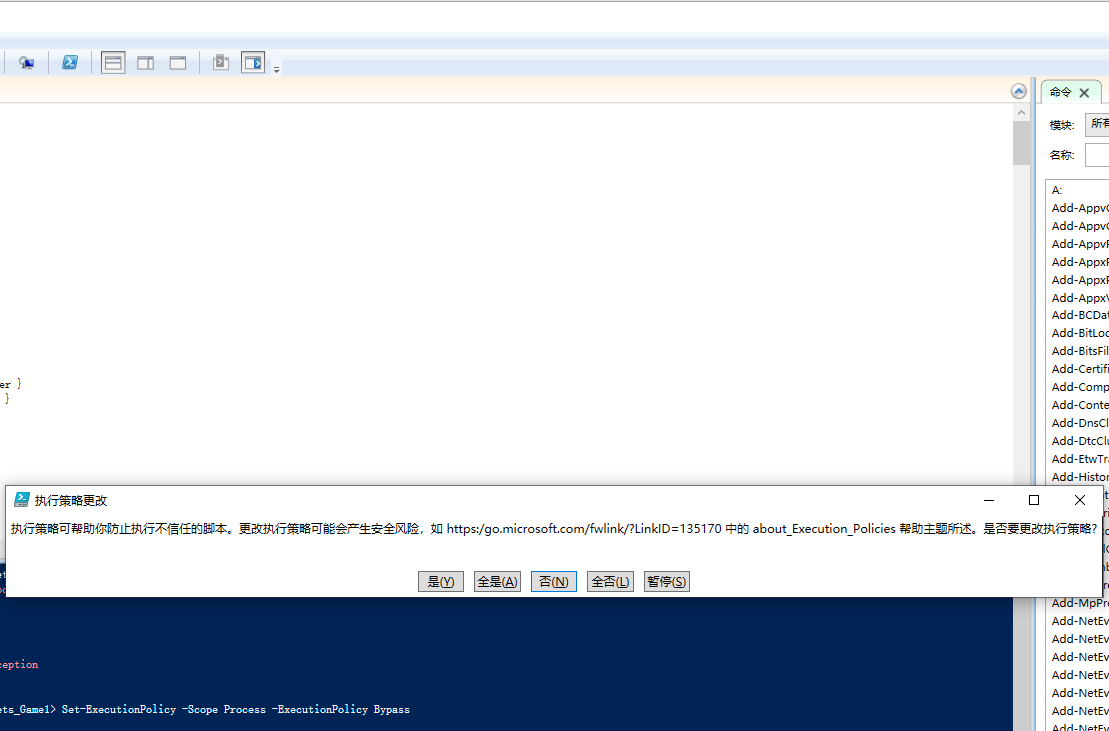
Set-ExecutionPolicy -Scope Process -ExecutionPolicy Bypass
执行结果如下图,点击“是”:
3 运行脚本
# 基本用法 - 检查当前目录及其所有子目录
.\Check-Recursive-FileDir-Conflict.ps1

# 检查指定目录
.\Check-Recursive-FileDir-Conflict.ps1 -Path "C:\MyProject"

# 显示详细摘要
.\Check-Recursive-FileDir-Conflict.ps1 -ShowSummary

# 导出结果到CSV文件
.\Check-Recursive-FileDir-Conflict.ps1 -ExportCsv

# 指定CSV导出路径
.\Check-Recursive-FileDir-Conflict.ps1 -ExportCsv -CsvPath "my_conflicts_report.csv"

# 组合使用所有选项
.\Check-Recursive-FileDir-Conflict.ps1 -Path "C:\MyProject" -ShowSummary -ExportCsv
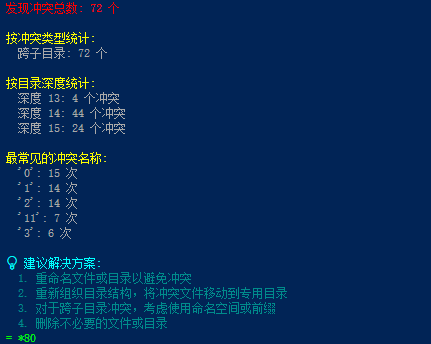
4 执行结果
基本用法:
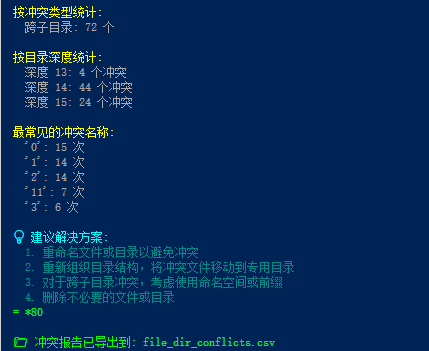
导出CSV文件:

脚本功能特点
- 完全递归检查:检查目录及其所有子目录中的文件名与目录名冲突
- 多层次冲突检测:
- 同级目录冲突:同一目录下的文件与子目录同名
- 跨子目录冲突:子目录中的文件与其他子目录同名
- 深度分析:显示冲突发生的目录深度
- 详细统计:按冲突类型、目录深度、常见名称等进行统计
- 导出功能:可将结果导出为CSV文件供进一步分析
- 彩色可视化输出:清晰的层级结构和冲突信息展示
输出示例
开始递归检查文件名与目录名冲突...
根目录: C:\TestProject
这可能需要一些时间,请稍候...

🚨 发现 5 个文件名与目录名冲突:

======================================================================
📍 冲突位置 #1 : C:\TestProject
======================================================================

  🔥 冲突 #1
     冲突类型: 同级目录
     冲突名称: 'readme.txt' ←→ 'readme'

     文件位置:
       📄 C:\TestProject\readme.txt
         大小: 2.1 KB | 修改时间: 2024-01-15 10:30

     目录位置:
       📁 C:\TestProject\readme

======================================================================
📍 冲突位置 #2 : C:\TestProject\src\components
======================================================================

  🔥 冲突 #1
     冲突类型: 跨子目录
     冲突名称: 'Button.js' ←→ 'Button'

     文件位置:
       📄 C:\TestProject\src\components\Form\Button.js
         大小: 5.2 KB | 修改时间: 2024-01-15 11:20

     目录位置:
       📁 C:\TestProject\src\components\Button

📊 递归文件名与目录名冲突检查摘要
================================================================================
扫描目录: C:\TestProject
发现冲突总数: 5 个

按冲突类型统计:
  同级目录: 3 个
  跨子目录: 2 个

按目录深度统计:
  深度 2: 3 个冲突
  深度 4: 2 个冲突

最常见的冲突名称:
  'readme': 2 次
  'Button': 1 次
  'config': 1 次
  'utils': 1 次

💡 建议解决方案:
  1. 重命名文件或目录以避免冲突
  2. 重新组织目录结构,将冲突文件移动到专用目录
  3. 对于跨子目录冲突,考虑使用命名空间或前缀
  4. 删除不必要的文件或目录
================================================================================

📁 冲突报告已导出到: file_dir_conflicts.csv
总结
这个脚本能够深入检查目录结构中的所有层次,找出各种类型的文件名与目录名冲突,并提供详细的报告和解决方案建议。





 扫一扫
扫一扫


 913
913

 被折叠的 条评论
为什么被折叠?
被折叠的 条评论
为什么被折叠?
 到【灌水乐园】发言





