


原理
人工建立势场,将障碍物设置成斥力,目标设置成吸引力,进行力的矢量相加,最后算出合力的方向。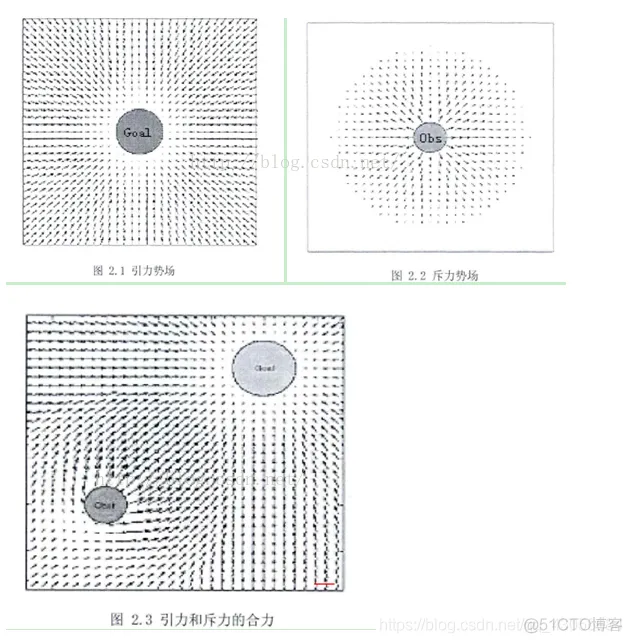
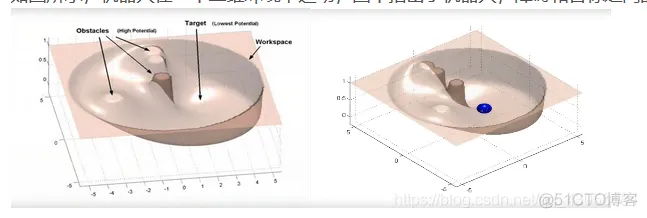
引力场
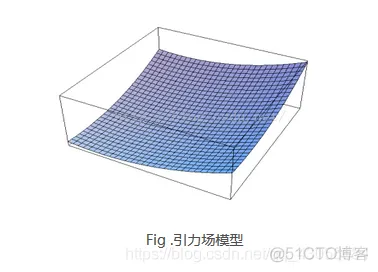
常用的引力函数:
这里的ε是尺度因子.ρ(q,q_goal)表示物体当前状态与目标的距离。引力场有了,那么引力就是引力场对距离的导数(类比物理里面W=FX):

斥力场
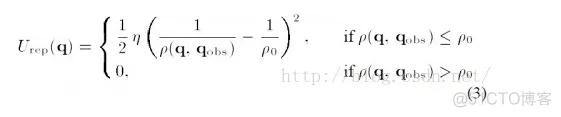
公式(3)是传统的斥力场公式。公式中η是斥力尺度因子,ρ(q,q_obs)代表物体和障碍物之间的距离。ρ_0代表每个障碍物的影响半径。换言之,离开一定的距离,障碍物就对物体没有斥力影响。
斥力就是斥力场的梯度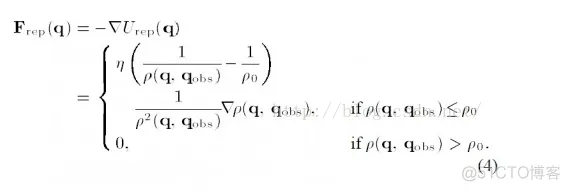
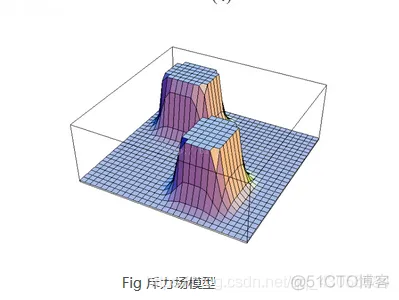
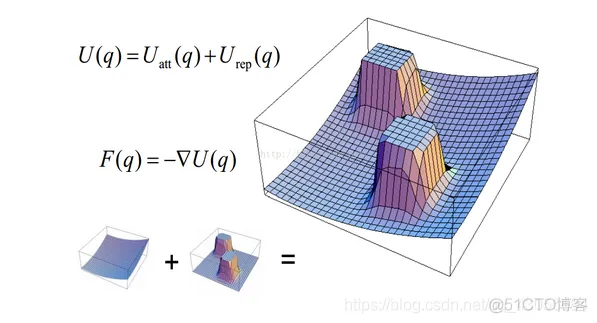
总的场就是斥力场合引力场的叠加,也就是U=U_att+U_rep,总的力也是对对应的分力的叠加,如下图所示:
优点:
简单实用,有良好的实时性
结构简单,便于底层的实时控制,在实时壁障和平滑的轨迹控制方面得到广泛的应用
缺点:
- 当目标点距离较远的话,引力将变得特别大,相对较小的斥力下,物体路径可能会碰到障碍物
- 当目标点附近有障碍物时,斥力将非常大,引力相对较小,物体很难到达目标点
- 在某个点,引力斥力刚好相等,方向相反,物体容易陷入局部最优解或震荡
- 容易陷入局部最优解
改进:
- 对于碰到障碍物的问题,可以通过修正引力函数来解决,避免距离过大导致引力过大。
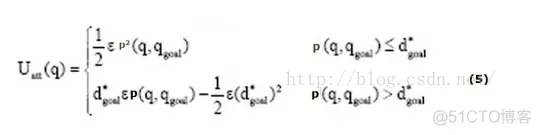 和(1)式相比,(5)式增加了范围限定。d*_goal 给定了一个阈值限定了目标和物体之间的距离。对应的梯度也就是引力相应变成:
- 目标点附近有障碍物导致目标不可达的问题,引入一种新的斥力函数

这里在原有斥力场的基础上,加上了目标和物体距离的影响,(n是正数,我看到有篇文献上n=2)。直观上来说,物体靠近目标时,虽然斥力场要增大,但是距离在减少,所以在一定程度上可以起到对斥力场的拖拽作用
相应斥力变成: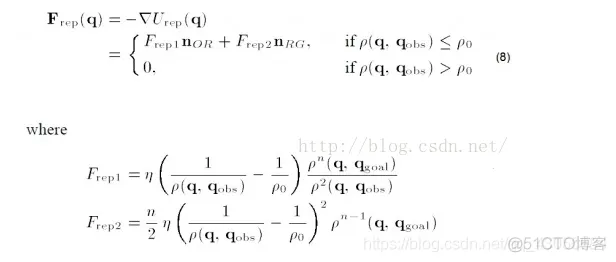
所以可以看到这里引力分为两个部分,编程时要格外注意
- 局部最优问题是一个人工势场法的一个大问题,这里可以通过加一个随机扰动,让物体跳出局部最优值。类似于梯度下降法局部最优值的解决方案。
function varargout = AFM(varargin)
% AFM MATLAB code for AFM.fig
%      AFM, by itself, creates a new AFM or raises the existing
%      singleton*.
%
%      H = AFM returns the handle to a new AFM or the handle to
%      the existing singleton*.
%
%      AFM('CALLBACK',hObject,eventData,handles,...) calls the local
%      function named CALLBACK in AFM.M with the given input arguments.
%
%      AFM('Property','Value',...) creates a new AFM or raises the
%      existing singleton*.  Starting from the left, property value pairs are
%      applied to the GUI before AFM_OpeningFcn gets called.  An
%      unrecognized property name or invalid value makes property application
%      stop.  All inputs are passed to AFM_OpeningFcn via varargin.
%
%      *See GUI Options on GUIDE's Tools out.  Choose "GUI allows only one
%      instance to run (singleton)".
%
% See also: GUIDE, GUIDATA, GUIHANDLES

% Edit the above text to modify the response to help AFM

% Last Modified by GUIDE v2.5 28-Nov-2013 20:49:25

% Begin initialization code - DO NOT EDIT
gui_Singleton = 1;
gui_State = struct('gui_Name',       mfilename, ...
                   'gui_Singleton',  gui_Singleton, ...
                   'gui_OpeningFcn', @AFM_OpeningFcn, ...
                   'gui_OutputFcn',  @AFM_OutputFcn, ...
                   'gui_LayoutFcn',  [] , ...
                   'gui_Callback',   []);
if nargin && ischar(varargin{1})
    gui_State.gui_Callback = str2func(varargin{1});
end

if nargout
    [varargout{1:nargout}] = gui_mainfcn(gui_State, varargin{:});
else
    gui_mainfcn(gui_State, varargin{:});
end
% End initialization code - DO NOT EDIT


% --- Executes just before AFM is made visible.
function AFM_OpeningFcn(hObject, eventdata, handles, varargin)
% This function has no output args, see OutputFcn.
% hObject    handle to figure
% eventdata  reserved - to be defined in a future version of MATLAB
% handles    structure with handles and user data (see GUIDATA)
% varargin   command line arguments to AFM (see VARARGIN)

% Choose default command line output for AFM
handles.output = hObject;

% Update handles structure
guidata(hObject, handles);

% UIWAIT makes AFM wait for user response (see UIRESUME)
% uiwait(handles.figure1);


% --- Outputs from this function are returned to the command line.
function varargout = AFM_OutputFcn(hObject, eventdata, handles)
% varargout  cell array for returning output args (see VARARGOUT);
% hObject    handle to figure
% eventdata  reserved - to be defined in a future version of MATLAB
% handles    structure with handles and user data (see GUIDATA)

% Get default command line output from handles structure
varargout{1} = handles.output;


% --- Executes during object creation, after setting all properties.
function axes4_CreateFcn(hObject, eventdata, handles)
Xo=[0 0];%起点位置
k=1;%计算引力需要的增益系数
m=1;%计算斥力的增益系数
%n=3;%障碍个数
longth=1.2;%步长
J=2000;%循环迭代次数
%如果不能实现预期目标,可能也与初始的增益系数,Po设置的不合适有关。
K=0;%初始化
%[m_Obs,m_ObsR]=Obs_Generate([5 10],[20 80],[10 80],n);
Xj=Xo;%j=1循环初始,将车的起始坐标赋给Xj
axis([-20 120 -20 120]);
axis equal;
hold on;
axis off;
%set(gcf,'color','y')
%fill([-10,110,110,-10],[-10 -10 110 110],'w')
fill([-20,120,120,-20],[-20 -20 120 120],'y')
%title ('人工势场路径规划');
text(-5,-5,'  Start','FontSize',12);
fill([95,120,120,95],[-20 -20 10 10],'w')
text(100,5,'Notes:','FontSize',12)
plot(101,-5,'sb','markerfacecolor','b');
text(101,-5,'  Robot','FontSize',12);
plot(101,-15,'om','markerfacecolor','m');
text(101,-15,'  Ball','FontSize',12);
plot(0,0,'bs')
car=plot(0,0,'sb','markerfacecolor','b');
%car_name=text(0,0,'  ','FontSize',12);
object=plot(0,100,'om','markerfacecolor','m');
%object_name=text(0,100,'  Ball','FontSize',12);
but=1;
x_obs=1;
y_obs=1;

% hObject    handle to axes4 (see GCBO)
% eventdata  reserved - to be defined in a future version of MATLAB
% handles    empty - handles not created until after all CreateFcns called

% Hint: place code in OpeningFcn to populate axes4
% --- Executes on button press in pushbutton1.
function pushbutton1_Callback(hObject, eventdata, handles)
%main
%%%%%%%%%%%%%%%%%%%%%初始化参数%%%%%%%%%%%%%%%%%%%%%%%%%%%%%%%5
Xo=[0 0];%起点位置
k=1;%计算引力需要的增益系数
m=1;%计算斥力的增益系数
%n=3;%障碍个数
longth=1.2;%步长
%循环迭代次数
J=2000;
%如果不能实现预期目标,可能也与初始的增益系数,Po设置的不合适有关。
K=0;%初始化
%[m_Obs,m_ObsR]=Obs_Generate([5 10],[20 80],[10 80],n);
Xj=Xo;%j=1循环初始,将车的起始坐标赋给Xj
axis([-20 120 -20 120]);
axis equal;
hold on;
axis off;
%set(gcf,'color','y')
%fill([-10,110,110,-10],[-10 -10 110 110],'w')
fill([-20,120,120,-20],[-20 -20 120 120],'y')
%title ('人工势场路径规划');
text(-5,-5,'  Start','FontSize',12);
fill([95,120,120,95],[-20 -20 10 10],'w')
text(100,5,'Notes:','FontSize',12)
plot(101,-5,'sb','markerfacecolor','b');
text(101,-5,'  Robot','FontSize',12);
plot(101,-15,'om','markerfacecolor','m');
text(101,-15,'  Ball','FontSize',12);
plot(0,0,'bs')
car=plot(0,0,'sb','markerfacecolor','b');
%car_name=text(0,0,'  ','FontSize',12);
object=plot(0,100,'om','markerfacecolor','m');
%object_name=text(0,100,'  Ball','FontSize',12);
but=1;
x_obs=1;
y_obs=1;
%pause(1);
%选取障碍
%h=msgbox('单击鼠标左键选择障碍,单击右键完成选择','提示');
%uiwait(h,10);
%if ishandle(h) == 1
 %   delete(h);
%end
num_obs=1;
while but == 1
    [x_obs,y_obs,but] = ginput(1);
    if but==1
    m_Obs(num_obs,:)=[x_obs y_obs];
    m_ObsR(num_obs)=3;
    %m_Obs=[0 40;20 70;60 50];
    Po=min(m_ObsR)/0.5;
    % for i=1:n
    Theta=0:pi/20:pi;
    xx =m_Obs(num_obs,1)+cos(Theta)*m_ObsR(num_obs);
    yy= m_Obs(num_obs,2)+sin(Theta)*m_ObsR(num_obs);
    fill(xx,yy,'w')
    Theta=pi:pi/20:2*pi;
    xx =m_Obs(num_obs,1)+cos(Theta)*m_ObsR(num_obs);
    yy= m_Obs(num_obs,2)+sin(Theta)*m_ObsR(num_obs);
    fill(xx,yy,'k')
    num_obs=num_obs+1;

    end
    %plot(xx,yy,'LineWidth',2);

   % xval=floor(xval);
   % yval=floor(yval);
   % MAP(xval,yval)=-1;%Put on the closed list as well
   % plot(xval+.5,yval+.5,'ro');
end%End of While loop
num_obs=num_obs-1;
%object=plot(0,100,'om');
%car=plot(Xo(1),Xo(2),'sb');
%car_name=text(Xo(1),Xo(2),'Robot','FontSize',12);
%object_name=text(0,100,'Ball','FontSize',12);
%startFlag=pushbutton2_Callback(hObject, eventdata, handles);
uiwait;
%***************初始化结束,开始主体循环******************
for j=1:J%循环开始
  %  if j<200
        x=j/1.5;y=100;
   % else
    %    x=100;y=100;
    %end
    m_Target=[x,y];
    Goal(j,1)=m_Target(1);
    Goal(j,2)=m_Target(2);
    Current(j,1)=Xj(1);%Goal保存走过的每个点的坐标。刚开始先将起点放进该向量
    Current(j,2)=Xj(2);
%调用计算角度模块
   [angle_att,angle_rep]=compute_angle(Xj,m_Target,m_Obs,num_obs);
%调用计算引力模块
   [Fatt,Uatt(j)]=compute_Attract(Xj,m_Target,k,angle_att);
%调用计算斥力模块
    [Frep,Fatt_add,Urep(j)]=compute_repulsion(Xj,m_Target,m_Obs,m_ObsR,...
        m,angle_att,angle_rep,num_obs,Po);
 %计算合力和方向
[Position_angle(j)]=compute_Ftotal(Fatt,Frep,Fatt_add,num_obs);
%计算车的下一步位置
    Xnext(1)=Xj(1)+longth*cos(Position_angle(j));
    Xnext(2)=Xj(2)+longth*sin(Position_angle(j));
    %保存车的每一个位置在向量中
    Xj=Xnext;
  % Draw(Xj,m_Obs,m_Target,n);
    %判断
 %   if (Is_Reach(Xj,m_Target,longth)==1)%是应该完全相等的时候算作到达,
 %还是只是接近就可以?现在按完全相等的时候编程。
  %     K=j;%记录迭代到多少次,到达目标。
   %    break;
       %记录此时的j值
   % end%如果不符合if的条件,重新返回循环,继续执行。
   if x>=100&&Is_Reach(Xj,m_Target,longth)==1
        break;
   end
X=Current(j,1);
Y=Current(j,2);
A=Goal(j,1);
B=Goal(j,2);
delete(car);
car=plot(X,Y,'sb','markerfacecolor','b');
%v=plot(X,Y,'ro','linewidth',2);
%set(v,'Color',[1,0,0])
%plot(Xo(1),Xo(2),'ms');
delete(object);
object=plot(A,B,'om','markerfacecolor','m');
%delete(car_name);
%car_name=text(X,Y,'  Robot','FontSize',12);
%delete(object_name);
%object_name=text(A,B,'  Ball','FontSize',12);
pause(0.05)
end%大循环结束
%****************************以下是图形显示部分****************************
%画势场分析图
%Draw(Uatt,Urep);
%画模型效果图
%Draw_Model(Xo,Current,m_Obs,m_ObsR,m_Target,n);
%画总体势场分布图
%Draw_Potential(Xo,m_Obs,m,m_ObsR,Po,m_Target,k,n,[0 100],[0 100]);
clear;
% --- Executes on button press in pushbutton2.
function pushbutton2_Callback(hObject, eventdata, handles)
uiresume;
% hObject    handle to pushbutton1 (see GCBO)
% eventdata  reserved - to be defined in a future version of MATLAB
% handles    structure with handles and user data (see GUIDATA)

% --- Executes on button press in pushbutton3.
function pushbutton3_Callback(hObject, eventdata, handles)
uiwait;
% hObject    handle to pushbutton3 (see GCBO)
% eventdata  reserved - to be defined in a future version of MATLAB
% handles    structure with handles and user data (see GUIDATA)
% --- Executes on button press in pushbutton4.
function pushbutton4_Callback(hObject, eventdata, handles)
uiresume;
% hObject    handle to pushbutton4 (see GCBO)
% eventdata  reserved - to be defined in a future version of MATLAB
% handles    structure with handles and user data (see GUIDATA)
% --- Executes on button press in pushbutton5.
function pushbutton5_Callback(hObject, eventdata, handles)

Xo=[0 0];%起点位置
k=1;%计算引力需要的增益系数
m=1;%计算斥力的增益系数
%n=3;%障碍个数
longth=1.2;%步长
J=2000;%循环迭代次数
%如果不能实现预期目标,可能也与初始的增益系数,Po设置的不合适有关。
K=0;%初始化
%[m_Obs,m_ObsR]=Obs_Generate([5 10],[20 80],[10 80],n);
Xj=Xo;%j=1循环初始,将车的起始坐标赋给Xj
axis([-20 120 -20 120]);
axis equal;
hold on;
axis off;
%set(gcf,'color','y')
%fill([-10,110,110,-10],[-10 -10 110 110],'w')
fill([-20,120,120,-20],[-20 -20 120 120],'y')
%title ('人工势场路径规划');
text(-5,-5,'  Start','FontSize',12);
fill([95,120,120,95],[-20 -20 10 10],'w')
text(100,5,'Notes:','FontSize',12)
plot(101,-5,'sb','markerfacecolor','b');
text(101,-5,'  Robot','FontSize',12);
plot(101,-15,'om','markerfacecolor','m');
text(101,-15,'  Ball','FontSize',12);
plot(0,0,'bs')
car=plot(0,0,'sb','markerfacecolor','b');
%car_name=text(0,0,'  ','FontSize',12);
object=plot(0,100,'om','markerfacecolor','m');
%object_name=text(0,100,'  Ball','FontSize',12);
but=1;
x_obs=1;
y_obs=1;
% hObject    handle to pushbutton5 (see GCBO)
% eventdata  reserved - to be defined in a future version of MATLAB
% handles    structure with handles and user data (see GUIDATA)


% --------------------------------------------------------------------
function Untitled_1_Callback(hObject, eventdata, handles)
% hObject    handle to Untitled_1 (see GCBO)
% eventdata  reserved - to be defined in a future version of MATLAB
% handles    structure with handles and user data (see GUIDATA)


% --------------------------------------------------------------------
function help_Callback(hObject, eventdata, handles)

% hObject    handle to help (see GCBO)
% eventdata  reserved - to be defined in a future version of MATLAB
% handles    structure with handles and user data (see GUIDATA)


% --------------------------------------------------------------------
function state_Callback(hObject, eventdata, handles)
aa=['1.进入仿真界面,单击<绘制障碍> 功能键在工作窗口绘制障碍' ...
    char(10) '2.绘制障碍结束,单击右键完成绘制,十字光标消失表示完成' ...
    char(10) '3.点击 <演示> 功能键,将按预订算法自动演示' ...
    char(10) '4.点击 <暂停> 功能键,演示过程将暂停运行,点击 <继续> 功能键后,将从暂停位置继续演示' char(10)...
    '5.点击 <重置> 功能键,仿真界面将回到初始状态,重新等待操作'];
msgbox(aa,'使用说明');
% hObject    handle to state (see GCBO)
% eventdata  reserved - to be defined in a future version of MATLAB
% handles    structure with handles and user data (see GUIDATA)


% --------------------------------------------------------------------
function about_Callback(hObject, eventdata, handles)
msgbox('               北航自动化','关于');
% hObject    handle to about (see GCBO)
% eventdata  reserved - to be defined in a future version of MATLAB
% handles    structure with handles and user data (see GUIDATA)


% --------------------------------------------------------------------
function menu_Callback(hObject, eventdata, handles)
% hObject    handle to out (see GCBO)
% eventdata  reserved - to be defined in a future version of MATLAB
% handles    structure with handles and user data (see GUIDATA)


% --------------------------------------------------------------------
function out_Callback(hObject, eventdata, handles)
selection=questdlg(['是否退出演示窗口?'], ...
['退出'],'Yes','No','Yes');%当选择退出按钮时,得出一个问是否确定关闭的框
if strcmp(selection,'No')
    return;
else
    if strcmp(selection,'Yes')
    clc; %当选择关闭时,清空所有matla输入面上的所有错误信息,同时关闭图像窗口
    clear all;
    delete(gcf);
    else
        return;
    end
end

% hObject    handle to out (see GCBO)
% eventdata  reserved - to be defined in a future version of MATLAB
% handles    structure with handles and user data (see GUIDATA)
- 1.
- 2.
- 3.
- 4.
- 5.
- 6.
- 7.
- 8.
- 9.
- 10.
- 11.
- 12.
- 13.
- 14.
- 15.
- 16.
- 17.
- 18.
- 19.
- 20.
- 21.
- 22.
- 23.
- 24.
- 25.
- 26.
- 27.
- 28.
- 29.
- 30.
- 31.
- 32.
- 33.
- 34.
- 35.
- 36.
- 37.
- 38.
- 39.
- 40.
- 41.
- 42.
- 43.
- 44.
- 45.
- 46.
- 47.
- 48.
- 49.
- 50.
- 51.
- 52.
- 53.
- 54.
- 55.
- 56.
- 57.
- 58.
- 59.
- 60.
- 61.
- 62.
- 63.
- 64.
- 65.
- 66.
- 67.
- 68.
- 69.
- 70.
- 71.
- 72.
- 73.
- 74.
- 75.
- 76.
- 77.
- 78.
- 79.
- 80.
- 81.
- 82.
- 83.
- 84.
- 85.
- 86.
- 87.
- 88.
- 89.
- 90.
- 91.
- 92.
- 93.
- 94.
- 95.
- 96.
- 97.
- 98.
- 99.
- 100.
- 101.
- 102.
- 103.
- 104.
- 105.
- 106.
- 107.
- 108.
- 109.
- 110.
- 111.
- 112.
- 113.
- 114.
- 115.
- 116.
- 117.
- 118.
- 119.
- 120.
- 121.
- 122.
- 123.
- 124.
- 125.
- 126.
- 127.
- 128.
- 129.
- 130.
- 131.
- 132.
- 133.
- 134.
- 135.
- 136.
- 137.
- 138.
- 139.
- 140.
- 141.
- 142.
- 143.
- 144.
- 145.
- 146.
- 147.
- 148.
- 149.
- 150.
- 151.
- 152.
- 153.
- 154.
- 155.
- 156.
- 157.
- 158.
- 159.
- 160.
- 161.
- 162.
- 163.
- 164.
- 165.
- 166.
- 167.
- 168.
- 169.
- 170.
- 171.
- 172.
- 173.
- 174.
- 175.
- 176.
- 177.
- 178.
- 179.
- 180.
- 181.
- 182.
- 183.
- 184.
- 185.
- 186.
- 187.
- 188.
- 189.
- 190.
- 191.
- 192.
- 193.
- 194.
- 195.
- 196.
- 197.
- 198.
- 199.
- 200.
- 201.
- 202.
- 203.
- 204.
- 205.
- 206.
- 207.
- 208.
- 209.
- 210.
- 211.
- 212.
- 213.
- 214.
- 215.
- 216.
- 217.
- 218.
- 219.
- 220.
- 221.
- 222.
- 223.
- 224.
- 225.
- 226.
- 227.
- 228.
- 229.
- 230.
- 231.
- 232.
- 233.
- 234.
- 235.
- 236.
- 237.
- 238.
- 239.
- 240.
- 241.
- 242.
- 243.
- 244.
- 245.
- 246.
- 247.
- 248.
- 249.
- 250.
- 251.
- 252.
- 253.
- 254.
- 255.
- 256.
- 257.
- 258.
- 259.
- 260.
- 261.
- 262.
- 263.
- 264.
- 265.
- 266.
- 267.
- 268.
- 269.
- 270.
- 271.
- 272.
- 273.
- 274.
- 275.
- 276.
- 277.
- 278.
- 279.
- 280.
- 281.
- 282.
- 283.
- 284.
- 285.
- 286.
- 287.
- 288.
- 289.
- 290.
- 291.
- 292.
- 293.
- 294.
- 295.
- 296.
- 297.
- 298.
- 299.
- 300.
- 301.
- 302.
- 303.
- 304.
- 305.
- 306.
- 307.
- 308.
- 309.
- 310.
- 311.
- 312.
- 313.
- 314.
- 315.
- 316.
- 317.
- 318.
- 319.
- 320.
- 321.
- 322.
- 323.
- 324.
- 325.
- 326.
- 327.
- 328.
- 329.
- 330.
- 331.
- 332.
- 333.
- 334.
- 335.
- 336.
- 337.
- 338.
- 339.
- 340.
- 341.
- 342.
- 343.
- 344.
- 345.
- 346.
- 347.
- 348.
- 349.
- 350.
- 351.
- 352.
- 353.
- 354.
- 355.
- 356.
- 357.
- 358.
- 359.
- 360.
- 361.
- 362.
- 363.
- 364.
- 365.
- 366.
- 367.
- 368.
- 369.
- 370.
- 371.
- 372.
- 373.
- 374.
- 375.
- 376.
- 377.
- 378.
- 379.
- 380.
- 381.
- 382.
- 383.





 扫一扫
扫一扫


 812
812

 被折叠的 条评论
为什么被折叠?
被折叠的 条评论
为什么被折叠?
 到【灌水乐园】发言





