function varargout = IdentifyEnglish(varargin)
% IDENTIFYENGLISH MATLAB code for IdentifyEnglish.fig
%      IDENTIFYENGLISH, by itself, creates a new IDENTIFYENGLISH or raises the existing
%      singleton*.
%
%      H = IDENTIFYENGLISH returns the handle to a new IDENTIFYENGLISH or the handle to
%      the existing singleton*.
%
%      IDENTIFYENGLISH('CALLBACK',hObject,eventData,handles,...) calls the local
%      function named CALLBACK in IDENTIFYENGLISH.M with the given input arguments.
%
%      IDENTIFYENGLISH('Property','Value',...) creates a new IDENTIFYENGLISH or raises the
%      existing singleton*.  Starting from the left, property value pairs are
%      applied to the GUI before IdentifyEnglish_OpeningFcn gets called.  An
%      unrecognized property name or invalid value makes property application
%      stop.  All inputs are passed to IdentifyEnglish_OpeningFcn via varargin.
%
%      *See GUI Options on GUIDE's Tools menu.  Choose "GUI allows only one
%      instance to run (singleton)".
%
% See also: GUIDE, GUIDATA, GUIHANDLES

% Edit the above text to modify the response to help IdentifyEnglish

% Last Modified by GUIDE v2.5 05-May-2019 16:46:08

% Begin initialization code - DO NOT EDIT
gui_Singleton = 1;
gui_State = struct('gui_Name',       mfilename, ...
                   'gui_Singleton',  gui_Singleton, ...
                   'gui_OpeningFcn', @IdentifyEnglish_OpeningFcn, ...
                   'gui_OutputFcn',  @IdentifyEnglish_OutputFcn, ...
                   'gui_LayoutFcn',  [] , ...
                   'gui_Callback',   []);
if nargin && ischar(varargin{1})
    gui_State.gui_Callback = str2func(varargin{1});
end

if nargout
    [varargout{1:nargout}] = gui_mainfcn(gui_State, varargin{:});
else
    gui_mainfcn(gui_State, varargin{:});
end
% End initialization code - DO NOT EDIT


% --- Executes just before IdentifyEnglish is made visible.
function IdentifyEnglish_OpeningFcn(hObject, eventdata, handles, varargin)
% This function has no output args, see OutputFcn.
% hObject    handle to figure
% eventdata  reserved - to be defined in a future version of MATLAB
% handles    structure with handles and user data (see GUIDATA)
% varargin   command line arguments to IdentifyEnglish (see VARARGIN)

% Choose default command line output for IdentifyEnglish
handles.output = hObject;

% Update handles structure
guidata(hObject, handles);

% UIWAIT makes IdentifyEnglish wait for user response (see UIRESUME)
% uiwait(handles.figure1);
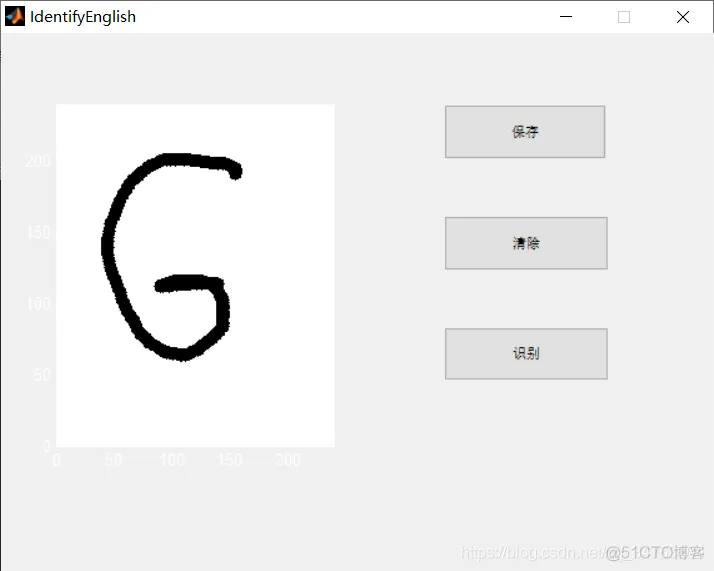
axis([0 240 0 240]);

% --- Outputs from this function are returned to the command line.
function varargout = IdentifyEnglish_OutputFcn(hObject, eventdata, handles)
% varargout  cell array for returning output args (see VARARGOUT);
% hObject    handle to figure
% eventdata  reserved - to be defined in a future version of MATLAB
% handles    structure with handles and user data (see GUIDATA)

% Get default command line output from handles structure
varargout{1} = handles.output;
clc;

% --- Executes on button press in pushbuttonSave.
function pushbuttonSave_Callback(hObject, eventdata, handles)
% hObject    handle to pushbuttonSave (see GCBO)
% eventdata  reserved - to be defined in a future version of MATLAB
% handles    structure with handles and user data (see GUIDATA)
[f, p] = uiputfile({'*.bmp'},'save image file');%打开用于保存文件的对话框
str = strcat(p,f);  %连接两个字符串(把路径和文件串联起来)
px = getframe(handles.axes1);%使用 getframe 来将图像捕获为影片帧。
CurImg = frame2im(px);%然后,frame2im将捕获的影片帧转换为图像数据。
imwrite(CurImg,str,'bmp');


% --- Executes on mouse press over figure background, over a disabled or
% --- inactive control, or over an axes background.
function figure1_WindowButtonDownFcn(hObject, eventdata, handles)
% hObject    handle to figure1 (see GCBO)
% eventdata  reserved - to be defined in a future version of MATLAB
% handles    structure with handles and user data (see GUIDATA)
global ButtonDown pos1
if strcmp(get(gcf,'SelectionType'),'normal')
    ButtonDown = 1;
    pos1 = get(handles.axes1,'CurrentPoint');
%     disp(pos1);
end


% --- Executes on mouse motion over figure - except title and menu.
function figure1_WindowButtonMotionFcn(hObject, eventdata, handles)
% hObject    handle to figure1 (see GCBO)
% eventdata  reserved - to be defined in a future version of MATLAB
% handles    structure with handles and user data (see GUIDATA)
global ButtonDown pos1
if(ButtonDown == 1)
    pos = get(handles.axes1,'CurrentPoint');
    line([pos1(1,1) pos(1,1)],[pos1(1,2) pos(1,2)],'LineStyle','-','LineWidth',8,'color','black','marker','.','markerSize',25);
pos1 = pos;
end


% --- Executes on mouse press over figure background, over a disabled or
% --- inactive control, or over an axes background.
function figure1_WindowButtonUpFcn(hObject, eventdata, handles)
% hObject    handle to figure1 (see GCBO)
% eventdata  reserved - to be defined in a future version of MATLAB
% handles    structure with handles and user data (see GUIDATA)
global ButtonDown
ButtonDown = 0;


% --- Executes on button press in pushbuttonClear.
function pushbuttonClear_Callback(hObject, eventdata, handles)
% hObject    handle to pushbuttonClear (see GCBO)
% eventdata  reserved - to be defined in a future version of MATLAB
% handles    structure with handles and user data (see GUIDATA)
cla;

% --- Executes on button press in pushbuttonIdentify.
function pushbuttonIdentify_Callback(hObject, eventdata, handles)
% hObject    handle to pushbuttonIdentify (see GCBO)
% eventdata  reserved - to be defined in a future version of MATLAB
% handles    structure with handles and user data (see GUIDATA)
strSample = 'pattern.mat';
px = getframe(handles.axes1);
CurImg = frame2im(px);
%figure; imshow(CurImg);
CurFea = GetFeature(CurImg);%把CurImg属性改成为5x5
load('pattern.mat');
label = Identify(pattern,CurFea);
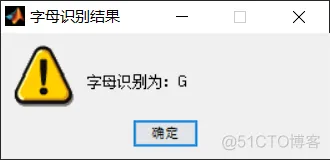
% msgbox(['字母识别为: ' label],'msg');
str = ['字母识别为:',label];
f = warndlg(str,'字母识别结果');
- 1.
- 2.
- 3.
- 4.
- 5.
- 6.
- 7.
- 8.
- 9.
- 10.
- 11.
- 12.
- 13.
- 14.
- 15.
- 16.
- 17.
- 18.
- 19.
- 20.
- 21.
- 22.
- 23.
- 24.
- 25.
- 26.
- 27.
- 28.
- 29.
- 30.
- 31.
- 32.
- 33.
- 34.
- 35.
- 36.
- 37.
- 38.
- 39.
- 40.
- 41.
- 42.
- 43.
- 44.
- 45.
- 46.
- 47.
- 48.
- 49.
- 50.
- 51.
- 52.
- 53.
- 54.
- 55.
- 56.
- 57.
- 58.
- 59.
- 60.
- 61.
- 62.
- 63.
- 64.
- 65.
- 66.
- 67.
- 68.
- 69.
- 70.
- 71.
- 72.
- 73.
- 74.
- 75.
- 76.
- 77.
- 78.
- 79.
- 80.
- 81.
- 82.
- 83.
- 84.
- 85.
- 86.
- 87.
- 88.
- 89.
- 90.
- 91.
- 92.
- 93.
- 94.
- 95.
- 96.
- 97.
- 98.
- 99.
- 100.
- 101.
- 102.
- 103.
- 104.
- 105.
- 106.
- 107.
- 108.
- 109.
- 110.
- 111.
- 112.
- 113.
- 114.
- 115.
- 116.
- 117.
- 118.
- 119.
- 120.
- 121.
- 122.
- 123.
- 124.
- 125.
- 126.
- 127.
- 128.
- 129.
- 130.
- 131.
- 132.
- 133.
- 134.
- 135.
- 136.
- 137.
- 138.
- 139.
- 140.
- 141.
- 142.
- 143.
- 144.
- 145.
- 146.
- 147.
- 148.










 扫一扫
扫一扫


 948
948

 被折叠的 条评论
为什么被折叠?
被折叠的 条评论
为什么被折叠?
 到【灌水乐园】发言





