 蚁群算法解决TSP问题


一、蚁群算法简介
蚁群算法是对自然界蚂蚁的寻径方式进行模似而得出的一种仿生算法:蚂蚁在运动过程中,能够在它所经过的路径上留下信息素(pheromone)的物质进行信息传递,而且蚂蚁在运动过程中能够感知这种物质,并以此指导自己的运动方向。由大量蚂蚁组成的蚁群集体行为便表现出一种信息正反馈现象:某一路径上走过的蚂蚁越多,则后来者选择该路径的概率就越大。蚁群算法具有分布计算、信息正反馈和启发式搜索的特征,本质上是进化算法中的一种启发式全局优化算法。
二、TSP问题(旅行商问题)
T S P 问 题 可 以 用 一 个 带 权 完 全 图G=(N,A)来表示,其中N是带有n=|N|点(城市)的集合,A是完全连接这些点的边的集合。每一条边(i,j)属于A都带有一个权值,它代表城市i与城市j之间的距离。TSP问题就是要找到图中的最短哈密尔顿回路。

1、构建图:构建图与问题描述图是一致的,成份的集合C对应着点的集合(即:C=N),连接对应着边的集合(即L=A),且每一条边都带有一个权值,代表点i和j之间的距离。
2、约束条件:所有城市都要被访问且每个城市最多只能被访问一次。
3、信息素和启发式信息:TSP 问题中的信息素表示在访问城市i后直接访问城市j的期望度。启发式信息值一般与城市i和城市j的距离成反比。
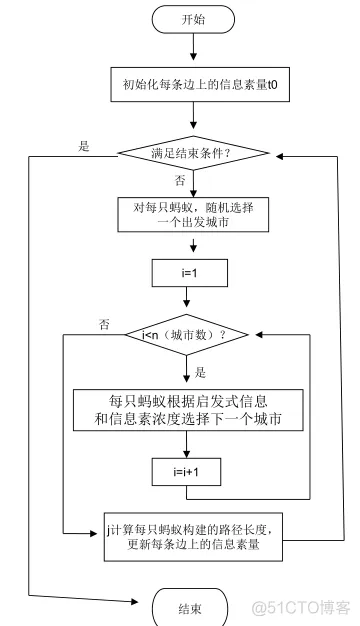
4、解的构建:每只蚂蚁最初都从随机选择出来的城市出发,每经过一次迭代蚂蚁就向解中添加一个还没有访问过的城市。当所有城市都被蚂蚁访问过之后,解的构建就终止。
三、实现流程及伪代码

-
function varargout = AntColonyVRPGUI(varargin) % ANTCOLONYVRPGUI M-file for AntColonyVRPGUI.fig % ANTCOLONYVRPGUI, by itself, creates a new ANTCOLONYVRPGUI or raises the existing % singleton*. % % H = ANTCOLONYVRPGUI returns the handle to a new ANTCOLONYVRPGUI or the handle to % the existing singleton*. % % ANTCOLONYVRPGUI('CALLBACK',hObject,eventData,handles,...) calls the local % function named CALLBACK in ANTCOLONYVRPGUI.M with the given input arguments. % % ANTCOLONYVRPGUI('Property','Value',...) creates a new ANTCOLONYVRPGUI or raises the % existing singleton*. Starting from the left, property value pairs are % applied to the GUI before AntColonyVRPGUI_OpeningFcn gets called. An % unrecognized property name or invalid value makes property application % stop. All inputs are passed to AntColonyVRPGUI_OpeningFcn via varargin. % % *See GUI Options on GUIDE's Tools menu. Choose "GUI allows only one % instance to run (singleton)". % % See also: GUIDE, GUIDATA, GUIHANDLES % Edit the above text to modify the response to help AntColonyVRPGUI % Last Modified by GUIDE v2.5 11-Jun-2015 00:13:48 % Begin initialization code - DO NOT EDIT gui_Singleton = 1; gui_State = struct('gui_Name', mfilename, ... 'gui_Singleton', gui_Singleton, ... 'gui_OpeningFcn', @AntColonyVRPGUI_OpeningFcn, ... 'gui_OutputFcn', @AntColonyVRPGUI_OutputFcn, ... 'gui_LayoutFcn', [] , ... 'gui_Callback', []); if nargin && ischar(varargin{1}) gui_State.gui_Callback = str2func(varargin{1}); end if nargout [varargout{1:nargout}] = gui_mainfcn(gui_State, varargin{:}); else gui_mainfcn(gui_State, varargin{:}); end % End initialization code - DO NOT EDIT % --- Executes just before AntColonyVRPGUI is made visible. function AntColonyVRPGUI_OpeningFcn(hObject, eventdata, handles, varargin) % This function has no output args, see OutputFcn. % hObject handle to figure % eventdata reserved - to be defined in a future version of MATLAB % handles structure with handles and user data (see GUIDATA) % varargin command line arguments to AntColonyVRPGUI (see VARARGIN) % Choose default command line output for AntColonyVRPGUI handles.output = hObject; %% change !!!!!!!!!!!!!!!!!!!!!!!!!!!!!!!!!!!!!!!!!!!!!!!!!!!!!!!!!!!!!!!!! handles.ismdvrp = true; %!!! %% if handles.ismdvrp == true [handles.initClusters, handles.coordinates] = INIT; handles.clusters = handles.initClusters; set(handles.uipanelBases,'Visible','on'); create_init_plot_MDVRP(handles.coordinates, handles.clusters); else %initialization [vehicles,demands,dist_stations,dist_bases] = INIT_VRP; handles.vehicles = vehicles; handles.demands = demands; handles.distances_stations = dist_stations; handles.distances_bases = dist_bases; set(handles.uipanelBases,'Visible','off'); end % Update handles structure guidata(hObject, handles); % UIWAIT makes AntColonyVRPGUI wait for user response (see UIRESUME) % uiwait(handles.figure1); % --- Outputs from this function are returned to the command line. function varargout = AntColonyVRPGUI_OutputFcn(hObject, eventdata, handles) % varargout cell array for returning output args (see VARARGOUT); % hObject handle to figure % eventdata reserved - to be defined in a future version of MATLAB % handles structure with handles and user data (see GUIDATA) % Get default command line output from handles structure varargout{1} = handles.output; % --- Executes on selection change in algorithmPopupmenu. function algorithmPopupmenu_Callback(hObject, eventdata, handles) % hObject handle to algorithmPopupmenu (see GCBO) % eventdata reserved - to be defined in a future version of MATLAB % handles structure with handles and user data (see GUIDATA) % Hints: contents = cellstr(get(hObject,'String')) returns algorithmPopupmenu contents as cell array % contents{get(hObject,'Value')} returns selected item from algorithmPopupmenu %set invisible error messages set(handles.errorMandatoryEditFields,'Visible','off'); %erase text in edit fields set(handles.evaporationPheromoneEdit,'String',''); set(handles.attractStationEdit,'String',''); set(handles.increasePheromoneEdit,'String',''); set(handles.amountPheromoneEdit,'String',''); set(handles.eliteAntsEdit,'String',''); %set disabled all edit fields set(handles.evaporationPheromoneEdit,'Enable','off'); set(handles.attractStationEdit,'Enable','off'); set(handles.increasePheromoneEdit,'Enable','off'); set(handles.amountPheromoneEdit,'Enable','off'); set(handles.eliteAntsEdit,'Enable','off'); %set disabled run button set(handles.runButton,'Enable','off'); %set to 0 all results set(handles.lengthWayText,'String','-'); set(handles.subroutesNText,'String','-'); set(handles.timeSpentText,'String','-'); if handles.ismdvrp == true %set invisible bases' listbox set(handles.listboxBases,'Visible','off'); set(handles.totalLengthText,'Visible','off'); set(handles.totalLengthText,'String','-'); set(handles.totalLengthLabel,'Visible','off'); %clear plot cla; create_init_plot_MDVRP(handles.coordinates, handles.clusters); end %clear plot %cla; %clear legend legend('off'); val = get(hObject,'Value'); if val ~= 1 %not placeholder's text (not be executed) if val ~= 2 %not Clark-Wright algorithm %enable edit fields if val == 5 %AntAlg with elite ants set(handles.eliteAntsEdit,'Enable','on'); end set(handles.evaporationPheromoneEdit,'Enable','on'); set(handles.attractStationEdit,'Enable','on'); set(handles.increasePheromoneEdit,'Enable','on'); set(handles.amountPheromoneEdit,'Enable','on'); end %enable run button set(handles.runButton,'Enable','on'); end % --- Executes during object creation, after setting all properties. function algorithmPopupmenu_CreateFcn(hObject, eventdata, handles) % hObject handle to algorithmPopupmenu (see GCBO) % eventdata reserved - to be defined in a future version of MATLAB % handles empty - handles not created until after all CreateFcns called % Hint: popupmenu controls usually have a white background on Windows. % See ISPC and COMPUTER. if ispc && isequal(get(hObject,'BackgroundColor'), get(0,'defaultUicontrolBackgroundColor')) set(hObject,'BackgroundColor','white'); end function evaporationPheromoneEdit_Callback(hObject, eventdata, handles) % hObject handle to evaporationPheromoneEdit (see GCBO) % eventdata reserved - to be defined in a future version of MATLAB % handles structure with handles and user data (see GUIDATA) % Hints: get(hObject,'String') returns contents of evaporationPheromoneEdit as text % str2double(get(hObject,'String')) returns contents of evaporationPheromoneEdit as a double % --- Executes during object creation, after setting all properties. function evaporationPheromoneEdit_CreateFcn(hObject, eventdata, handles) % hObject handle to evaporationPheromoneEdit (see GCBO) % eventdata reserved - to be defined in a future version of MATLAB % handles empty - handles not created until after all CreateFcns called % Hint: edit controls usually have a white background on Windows. % See ISPC and COMPUTER. if ispc && isequal(get(hObject,'BackgroundColor'), get(0,'defaultUicontrolBackgroundColor')) set(hObject,'BackgroundColor','white'); end function attractStationEdit_Callback(hObject, eventdata, handles) % hObject handle to attractStationEdit (see GCBO) % eventdata reserved - to be defined in a future version of MATLAB % handles structure with handles and user data (see GUIDATA) % Hints: get(hObject,'String') returns contents of attractStationEdit as text % str2double(get(hObject,'String')) returns contents of attractStationEdit as a double % --- Executes during object creation, after setting all properties. function attractStationEdit_CreateFcn(hObject, eventdata, handles) % hObject handle to attractStationEdit (see GCBO) % eventdata reserved - to be defined in a future version of MATLAB % handles empty - handles not created until after all CreateFcns called % Hint: edit controls usually have a white background on Windows. % See ISPC and COMPUTER. if ispc && isequal(get(hObject,'BackgroundColor'), get(0,'defaultUicontrolBackgroundColor')) set(hObject,'BackgroundColor','white'); end function increasePheromoneEdit_Callback(hObject, eventdata, handles) % hObject handle to increasePheromoneEdit (see GCBO) % eventdata reserved - to be defined in a future version of MATLAB % handles structure with handles and user data (see GUIDATA) % Hints: get(hObject,'String') returns contents of increasePheromoneEdit as text % str2double(get(hObject,'String')) returns contents of increasePheromoneEdit as a double % --- Executes during object creation, after setting all properties. function increasePheromoneEdit_CreateFcn(hObject, eventdata, handles) % hObject handle to increasePheromoneEdit (see GCBO) % eventdata reserved - to be defined in a future version of MATLAB % handles empty - handles not created until after all CreateFcns called % Hint: edit controls usually have a white background on Windows. % See ISPC and COMPUTER. if ispc && isequal(get(hObject,'BackgroundColor'), get(0,'defaultUicontrolBackgroundColor')) set(hObject,'BackgroundColor','white'); end function amountPheromoneEdit_Callback(hObject, eventdata, handles) % hObject handle to amountPheromoneEdit (see GCBO) % eventdata reserved - to be defined in a future version of MATLAB % handles structure with handles and user data (see GUIDATA) % Hints: get(hObject,'String') returns contents of amountPheromoneEdit as text % str2double(get(hObject,'String')) returns contents of amountPheromoneEdit as a double % --- Executes during object creation, after setting all properties. function amountPheromoneEdit_CreateFcn(hObject, eventdata, handles) % hObject handle to amountPheromoneEdit (see GCBO) % eventdata reserved - to be defined in a future version of MATLAB % handles empty - handles not created until after all CreateFcns called % Hint: edit controls usually have a white background on Windows. % See ISPC and COMPUTER. if ispc && isequal(get(hObject,'BackgroundColor'), get(0,'defaultUicontrolBackgroundColor')) set(hObject,'BackgroundColor','white'); end function eliteAntsEdit_Callback(hObject, eventdata, handles) % hObject handle to eliteAntsEdit (see GCBO) % eventdata reserved - to be defined in a future version of MATLAB % handles structure with handles and user data (see GUIDATA) % Hints: get(hObject,'String') returns contents of eliteAntsEdit as text % str2double(get(hObject,'String')) returns contents of eliteAntsEdit as a double % --- Executes during object creation, after setting all properties. function eliteAntsEdit_CreateFcn(hObject, eventdata, handles) % hObject handle to eliteAntsEdit (see GCBO) % eventdata reserved - to be defined in a future version of MATLAB % handles empty - handles not created until after all CreateFcns called % Hint: edit controls usually have a white background on Windows. % See ISPC and COMPUTER. if ispc && isequal(get(hObject,'BackgroundColor'), get(0,'defaultUicontrolBackgroundColor')) set(hObject,'BackgroundColor','white'); end % --- Executes on button press in runButton. function runButton_Callback(hObject, eventdata, handles) % hObject handle to runButton (see GCBO) % eventdata reserved - to be defined in a future version of MATLAB % handles structure with handles and user data (see GUIDATA) %clear legend legend('off'); %clear plot %cla; %set invisible error messages set(handles.errorMandatoryEditFields,'Visible','off'); indexAlg = get(handles.algorithmPopupmenu,'Value'); if indexAlg ~= 1 %not placeholder's text (not be executed) if indexAlg ~= 2 %not Clark-Wright algorithm if indexAlg == 5 %AntAlg with elite ants if isempty(get(handles.eliteAntsEdit,'String')) set(handles.errorMandatoryEditFields,'Visible','on'); return; end end if ( isempty(get(handles.evaporationPheromoneEdit,'String')) || ... isempty(get(handles.attractStationEdit,'String')) || ... isempty(get(handles.increasePheromoneEdit,'String')) || ... isempty(get(handles.amountPheromoneEdit,'String')) ) set(handles.errorMandatoryEditFields,'Visible','on'); return; end end %set disabled run button set(handles.runButton,'Enable','off'); if handles.ismdvrp == true clusters = runAlgorithmMDVRP(indexAlg, handles); handles.clusters = clusters; listbox=findall(gcf,'tag','listboxBases'); guidata(listbox,handles); %select first value in bases' listbox set(handles.listboxBases,'Value',1); listboxBases_Callback(listbox, eventdata, handles); else runAlgorithmVRP(indexAlg, handles); end %set enabled run button set(handles.runButton,'Enable','on'); %set enabled zoom tools set(handles.toolZoomIn,'Enable','on'); set(handles.toolZoomOut,'Enable','on'); %set enabled pan tool set(handles.toolPan,'Enable','on'); zoom reset; end function [clusters] = runAlgorithmMDVRP(index, handles) if index ~= 1 if index ~= 2 e = str2double(get(handles.evaporationPheromoneEdit,'String')); alpha = str2double(get(handles.attractStationEdit,'String')); beta = str2double(get(handles.increasePheromoneEdit,'String')); tau0 = str2double(get(handles.amountPheromoneEdit,'String')); E = str2double(get(handles.eliteAntsEdit,'String')); end try tStart = tic; %start spent time clusters = handles.initClusters; handles.clusters = clusters; basesName = cell(1,length(clusters)+1); basesName{1} = 'Full view'; for c = 1:length(clusters) switch index case 2 %Clark-Wright [ Route, RouteLength, vehicles ] = Clark_Wright_VRP( ... clusters(c).demands, clusters(c).diststations, ... clusters(c).distbases, clusters(c).vehicles_capacity ); case 3 %Ant-minpath [Route, RouteLength, vehicles] = ANT_colony_algorithm_VRP_minpath( ... clusters(c).diststations, clusters(c).distbases, ... clusters(c).demands, [e alpha beta tau0], clusters(c).vehicles_capacity ); case 4 %Ant-partition [Route, RouteLength, vehicles] = ANT_colony_algorithm_VRP( ... clusters(c).diststations, clusters(c).distbases, ... clusters(c).demands, [e alpha beta tau0], clusters(c).vehicles_capacity ); case 5 %Ant-elite ants [Route, RouteLength, vehicles] = ANT_colony_algorithm_VRP_with_elite_ants( ... clusters(c).diststations, clusters(c).distbases, ... clusters(c).demands, [e alpha beta tau0 E], clusters(c).vehicles_capacity ); end handles.clusters(c).mdvrp = changeStations(clusters, vehicles, RouteLength, Route, c); basesName{c + 1} = sprintf('Base #%d',c); %saving bases that need to be added to listbox end tElapsed = toc(tStart); %end spent time catch ME msgbox(strcat('Error occured: ',ME.message),'Error','error'); end clusters = handles.clusters; %clear plot cla; create_plot_route_with_vehicles_MDVRP(handles.coordinates, handles.clusters); set(handles.timeSpentText,'String',sprintf('%fs',tElapsed)); set(handles.listboxBases, 'String', basesName); set(handles.listboxBases, 'Visible','on'); set(handles.totalLengthText,'String',num2str(getTotalLength(handles.clusters))); set(handles.totalLengthText,'Visible','on'); set(handles.totalLengthLabel,'Visible','on'); end function [mdvrp] = changeStations(clusters, vehicles, LR, R, clusterN) mdvrp = struct('length_route',[],'vehicles',[],'simpleVehicles',[],'num_of_subroutes',[]); len = length(vehicles); mdvrp.simpleVehicles = vehicles; for v = 1:len vehicles(v).route(vehicles(v).route == 1) = 0; len_route = length(vehicles(v).route); for vr = 1:len_route if vehicles(v).route(vr) ~= 0 %羼腓 礤 徉玎 vehicles(v).route(vr) = clusters(clusterN).stations(vehicles(v).route(vr)-1); end end end mdvrp.num_of_subroutes = number_of_subroutes(R); mdvrp.length_route = LR; mdvrp.vehicles = vehicles; function [tlength] = getTotalLength(clusters) tlength = 0; clen = length(clusters); for c = 1:clen tlength = tlength + clusters(c).mdvrp.length_route; end function runAlgorithmVRP(index, handles) if index ~= 1 if index ~= 2 e = str2double(get(handles.evaporationPheromoneEdit,'String')); alpha = str2double(get(handles.attractStationEdit,'String')); beta = str2double(get(handles.increasePheromoneEdit,'String')); tau0 = str2double(get(handles.amountPheromoneEdit,'String')); E = str2double(get(handles.eliteAntsEdit,'String')); end try tStart = tic; %start spent time switch index case 2 %Clark-Wright [Route,RouteLength,vehicles] = Clark_Wright_VRP( handles.demands, ... handles.distances_stations, handles.distances_bases, handles.vehicles ); case 3 %Ant-minpath [Route,RouteLength,vehicles] = ANT_colony_algorithm_VRP_minpath( handles.distances_stations,... handles.distances_bases, handles.demands, [e alpha beta tau0], handles.vehicles); case 4 %Ant-partition [Route,RouteLength,vehicles] = ANT_colony_algorithm_VRP( handles.distances_stations, ... handles.distances_bases, handles.demands, [e alpha beta tau0], handles.vehicles); case 5 %Ant-elite ants [Route,RouteLength,vehicles] = ANT_colony_algorithm_VRP_with_elite_ants( ... handles.distances_stations, handles.distances_bases, handles.demands, ... [e alpha beta tau0 E], handles.vehicles); end tElapsed = toc(tStart); %end spent time create_plot_route_with_vehicles( add_bases_to_distances(handles.distances_stations, ... handles.distances_bases), vehicles, [0 handles.demands] ); catch ME msgbox(strcat('Error occured: ',ME.message),'Error','error'); end set(handles.lengthWayText,'String',num2str(RouteLength)); set(handles.subroutesNText,'String',num2str(number_of_subroutes(Route))); set(handles.timeSpentText,'String',sprintf('%fs',tElapsed)); end % -------------------------------------------------------------------- function dataTooltip_ClickedCallback(hObject, eventdata, handles) % hObject handle to dataTooltip (see GCBO) % eventdata reserved - to be defined in a future version of MATLAB % handles structure with handles and user data (see GUIDATA) % -------------------------------------------------------------------- function algorithmTooltip_ClickedCallback(hObject, eventdata, handles) % hObject handle to algorithmTooltip (see GCBO) % eventdata reserved - to be defined in a future version of MATLAB % handles structure with handles and user data (see GUIDATA) % --- Executes on selection change in listboxBases. function listboxBases_Callback(hObject, eventdata, handles) % hObject handle to listboxBases (see GCBO) % eventdata reserved - to be defined in a future version of MATLAB % handles structure with handles and user data (see GUIDATA) % Hints: contents = cellstr(get(hObject,'String')) returns listboxBases contents as cell array % contents{get(hObject,'Value')} returns selected item from listboxBases %clear legend legend('off'); %clear plot cla; index = get(handles.listboxBases,'value') - 1; if index == 0 %if user want to see the full graph of routes create_plot_route_with_vehicles_MDVRP(handles.coordinates, handles.clusters); set(handles.lengthWayText,'String','-'); set(handles.subroutesNText,'String','-'); else create_plot_of_base_MDVRP(handles.coordinates, handles.clusters, index); set(handles.lengthWayText,'String',num2str(handles.clusters(index).mdvrp.length_route)); set(handles.subroutesNText,'String',num2str(handles.clusters(index).mdvrp.num_of_subroutes)); end % --- Executes during object creation, after setting all properties. function listboxBases_CreateFcn(hObject, eventdata, handles) % hObject handle to listboxBases (see GCBO) % eventdata reserved - to be defined in a future version of MATLAB % handles empty - handles not created until after all CreateFcns called % Hint: listbox controls usually have a white background on Windows. % See ISPC and COMPUTER. if ispc && isequal(get(hObject,'BackgroundColor'), get(0,'defaultUicontrolBackgroundColor')) set(hObject,'BackgroundColor','white'); end % -------------------------------------------------------------------- function aboutMenu_Callback(hObject, eventdata, handles) % hObject handle to aboutMenu (see GCBO) % eventdata reserved - to be defined in a future version of MATLAB % handles structure with handles and user data (see GUIDATA) About %call gui About.m % -------------------------------------------------------------------- function fileMenu_Callback(hObject, eventdata, handles) % hObject handle to fileMenu (see GCBO) % eventdata reserved - to be defined in a future version of MATLAB % handles structure with handles and user data (see GUIDATA) % -------------------------------------------------------------------- function anotherVRPSubmenu_Callback(hObject, eventdata, handles) % hObject handle to anotherVRPSubmenu (see GCBO) % eventdata reserved - to be defined in a future version of MATLAB % handles structure with handles and user data (see GUIDATA) % -------------------------------------------------------------------- function newDataSubmenu_Callback(hObject, eventdata, handles) % hObject handle to newDataSubmenu (see GCBO) % eventdata reserved - to be defined in a future version of MATLAB % handles structure with handles and user data (see GUIDATA)- 1.
- 2.
- 3.
- 4.
- 5.
- 6.
- 7.
- 8.
- 9.
- 10.
- 11.
- 12.
- 13.
- 14.
- 15.
- 16.
- 17.
- 18.
- 19.
- 20.
- 21.
- 22.
- 23.
- 24.
- 25.
- 26.
- 27.
- 28.
- 29.
- 30.
- 31.
- 32.
- 33.
- 34.
- 35.
- 36.
- 37.
- 38.
- 39.
- 40.
- 41.
- 42.
- 43.
- 44.
- 45.
- 46.
- 47.
- 48.
- 49.
- 50.
- 51.
- 52.
- 53.
- 54.
- 55.
- 56.
- 57.
- 58.
- 59.
- 60.
- 61.
- 62.
- 63.
- 64.
- 65.
- 66.
- 67.
- 68.
- 69.
- 70.
- 71.
- 72.
- 73.
- 74.
- 75.
- 76.
- 77.
- 78.
- 79.
- 80.
- 81.
- 82.
- 83.
- 84.
- 85.
- 86.
- 87.
- 88.
- 89.
- 90.
- 91.
- 92.
- 93.
- 94.
- 95.
- 96.
- 97.
- 98.
- 99.
- 100.
- 101.
- 102.
- 103.
- 104.
- 105.
- 106.
- 107.
- 108.
- 109.
- 110.
- 111.
- 112.
- 113.
- 114.
- 115.
- 116.
- 117.
- 118.
- 119.
- 120.
- 121.
- 122.
- 123.
- 124.
- 125.
- 126.
- 127.
- 128.
- 129.
- 130.
- 131.
- 132.
- 133.
- 134.
- 135.
- 136.
- 137.
- 138.
- 139.
- 140.
- 141.
- 142.
- 143.
- 144.
- 145.
- 146.
- 147.
- 148.
- 149.
- 150.
- 151.
- 152.
- 153.
- 154.
- 155.
- 156.
- 157.
- 158.
- 159.
- 160.
- 161.
- 162.
- 163.
- 164.
- 165.
- 166.
- 167.
- 168.
- 169.
- 170.
- 171.
- 172.
- 173.
- 174.
- 175.
- 176.
- 177.
- 178.
- 179.
- 180.
- 181.
- 182.
- 183.
- 184.
- 185.
- 186.
- 187.
- 188.
- 189.
- 190.
- 191.
- 192.
- 193.
- 194.
- 195.
- 196.
- 197.
- 198.
- 199.
- 200.
- 201.
- 202.
- 203.
- 204.
- 205.
- 206.
- 207.
- 208.
- 209.
- 210.
- 211.
- 212.
- 213.
- 214.
- 215.
- 216.
- 217.
- 218.
- 219.
- 220.
- 221.
- 222.
- 223.
- 224.
- 225.
- 226.
- 227.
- 228.
- 229.
- 230.
- 231.
- 232.
- 233.
- 234.
- 235.
- 236.
- 237.
- 238.
- 239.
- 240.
- 241.
- 242.
- 243.
- 244.
- 245.
- 246.
- 247.
- 248.
- 249.
- 250.
- 251.
- 252.
- 253.
- 254.
- 255.
- 256.
- 257.
- 258.
- 259.
- 260.
- 261.
- 262.
- 263.
- 264.
- 265.
- 266.
- 267.
- 268.
- 269.
- 270.
- 271.
- 272.
- 273.
- 274.
- 275.
- 276.
- 277.
- 278.
- 279.
- 280.
- 281.
- 282.
- 283.
- 284.
- 285.
- 286.
- 287.
- 288.
- 289.
- 290.
- 291.
- 292.
- 293.
- 294.
- 295.
- 296.
- 297.
- 298.
- 299.
- 300.
- 301.
- 302.
- 303.
- 304.
- 305.
- 306.
- 307.
- 308.
- 309.
- 310.
- 311.
- 312.
- 313.
- 314.
- 315.
- 316.
- 317.
- 318.
- 319.
- 320.
- 321.
- 322.
- 323.
- 324.
- 325.
- 326.
- 327.
- 328.
- 329.
- 330.
- 331.
- 332.
- 333.
- 334.
- 335.
- 336.
- 337.
- 338.
- 339.
- 340.
- 341.
- 342.
- 343.
- 344.
- 345.
- 346.
- 347.
- 348.
- 349.
- 350.
- 351.
- 352.
- 353.
- 354.
- 355.
- 356.
- 357.
- 358.
- 359.
- 360.
- 361.
- 362.
- 363.
- 364.
- 365.
- 366.
- 367.
- 368.
- 369.
- 370.
- 371.
- 372.
- 373.
- 374.
- 375.
- 376.
- 377.
- 378.
- 379.
- 380.
- 381.
- 382.
- 383.
- 384.
- 385.
- 386.
- 387.
- 388.
- 389.
- 390.
- 391.
- 392.
- 393.
- 394.
- 395.
- 396.
- 397.
- 398.
- 399.
- 400.
- 401.
- 402.
- 403.
- 404.
- 405.
- 406.
- 407.
- 408.
- 409.
- 410.
- 411.
- 412.
- 413.
- 414.
- 415.
- 416.
- 417.
- 418.
- 419.
- 420.
- 421.
- 422.
- 423.
- 424.
- 425.
- 426.
- 427.
- 428.
- 429.
- 430.
- 431.
- 432.
- 433.
- 434.
- 435.
- 436.
- 437.
- 438.
- 439.
- 440.
- 441.
- 442.
- 443.
- 444.
- 445.
- 446.
- 447.
- 448.
- 449.
- 450.
- 451.
- 452.
- 453.
- 454.
- 455.
- 456.
- 457.
- 458.
- 459.
- 460.
- 461.
- 462.
- 463.
- 464.
- 465.
- 466.
- 467.
- 468.
- 469.
- 470.
- 471.
- 472.
- 473.
- 474.
- 475.
- 476.
- 477.
- 478.
- 479.
- 480.
- 481.
- 482.
- 483.
- 484.
- 485.
- 486.
- 487.
- 488.
- 489.
- 490.
- 491.
- 492.
- 493.
- 494.
- 495.
- 496.
- 497.
- 498.
- 499.
- 500.
- 501.
- 502.
- 503.
- 504.
- 505.
- 506.
- 507.
- 508.
- 509.
- 510.
- 511.
- 512.
- 513.
- 514.
- 515.
- 516.
- 517.
- 518.
- 519.
- 520.
- 521.
- 522.
- 523.
- 524.
- 525.
- 526.
- 527.
- 528.
- 529.
- 530.
- 531.
- 532.
- 533.
- 534.
- 535.
- 536.
- 537.
- 538.





 扫一扫
扫一扫


 142
142

 被折叠的 条评论
为什么被折叠?
被折叠的 条评论
为什么被折叠?
 到【灌水乐园】发言





