


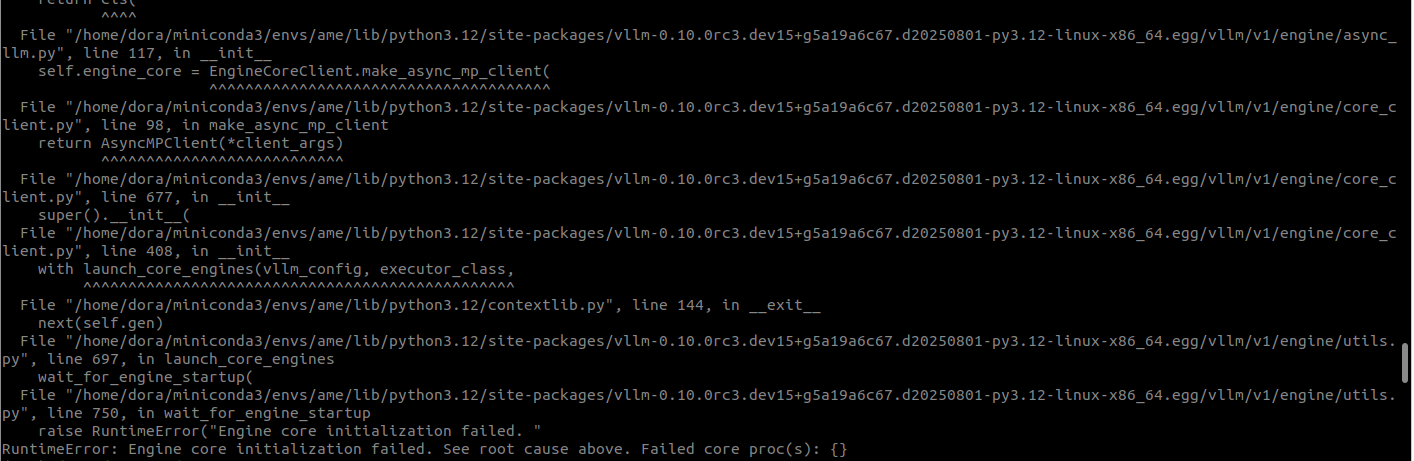
原先是想通过vllm来本地部署原生的RoboBrain2.0-7B模型,但头一次接触,不太懂参数含义,运行时报错,报错如下:
(ame) dora@dora:~/adora_ws$ python -m vllm.entrypoints.openai.api_server \
    --model ./RoboBrain2.0-7B \
    --gpu-memory-utilization 0.88 \
    --max-model-len 8192 \
    --max-num-seqs 128 \
    --port 4567 \
    --trust-remote-code \
    --enable-chunked-prefill \
    --pipeline-parallel-size 1
INFO 08-02 16:50:03 [__init__.py:235] Automatically detected platform cuda.
INFO 08-02 16:50:04 [api_server.py:1758] vLLM API server version 0.10.0rc3.dev15+g5a19a6c67.d20250801
INFO 08-02 16:50:04 [cli_args.py:264] non-default args: {'port': 4567, 'model': './RoboBrain2.0-7B', 'trust_remote_code': True, 'max_model_len': 8192, 'gpu_memory_utilization': 0.88, 'max_num_seqs': 128, 'enable_chunked_prefill': True}
INFO 08-02 16:50:07 [config.py:1605] Using max model len 8192
INFO 08-02 16:50:07 [config.py:2416] Chunked prefill is enabled with max_num_batched_tokens=2048.
INFO 08-02 16:50:09 [__init__.py:235] Automatically detected platform cuda.
INFO 08-02 16:50:10 [core.py:574] Waiting for init message from front-end.
INFO 08-02 16:50:10 [core.py:72] Initializing a V1 LLM engine (v0.10.0rc3.dev15+g5a19a6c67.d20250801) with config: model='./RoboBrain2.0-7B', speculative_config=None, tokenizer='./RoboBrain2.0-7B', skip_tokenizer_init=False, tokenizer_mode=auto, revision=None, override_neuron_config={}, tokenizer_revision=None, trust_remote_code=True, dtype=torch.bfloat16, max_seq_len=8192, download_dir=None, load_format=auto, tensor_parallel_size=1, pipeline_parallel_size=1, disable_custom_all_reduce=False, quantization=None, enforce_eager=False, kv_cache_dtype=auto,  device_config=cuda, decoding_config=DecodingConfig(backend='auto', disable_fallback=False, disable_any_whitespace=False, disable_additional_properties=False, reasoning_backend=''), observability_config=ObservabilityConfig(show_hidden_metrics_for_version=None, otlp_traces_endpoint=None, collect_detailed_traces=None), seed=0, served_model_name=./RoboBrain2.0-7B, num_scheduler_steps=1, multi_step_stream_outputs=True, enable_prefix_caching=True, chunked_prefill_enabled=True, use_async_output_proc=True, pooler_config=None, compilation_config={"level":3,"debug_dump_path":"","cache_dir":"","backend":"","custom_ops":[],"splitting_ops":["vllm.unified_attention","vllm.unified_attention_with_output","vllm.mamba_mixer2"],"use_inductor":true,"compile_sizes":[],"inductor_compile_config":{"enable_auto_functionalized_v2":false},"inductor_passes":{},"use_cudagraph":true,"cudagraph_num_of_warmups":1,"cudagraph_capture_sizes":[256,248,240,232,224,216,208,200,192,184,176,168,160,152,144,136,128,120,112,104,96,88,80,72,64,56,48,40,32,24,16,8,4,2,1],"cudagraph_copy_inputs":false,"full_cuda_graph":false,"max_capture_size":256,"local_cache_dir":null}
[W802 16:50:11.690758880 ProcessGroupNCCL.cpp:915] Warning: TORCH_NCCL_AVOID_RECORD_STREAMS is the default now, this environment variable is thus deprecated. (function operator())
[Gloo] Rank 0 is connected to 0 peer ranks. Expected number of connected peer ranks is : 0
[Gloo] Rank 0 is connected to 0 peer ranks. Expected number of connected peer ranks is : 0
[Gloo] Rank 0 is connected to 0 peer ranks. Expected number of connected peer ranks is : 0
[Gloo] Rank 0 is connected to 0 peer ranks. Expected number of connected peer ranks is : 0
[Gloo] Rank 0 is connected to 0 peer ranks. Expected number of connected peer ranks is : 0
INFO 08-02 16:50:11 [parallel_state.py:1102] rank 0 in world size 1 is assigned as DP rank 0, PP rank 0, TP rank 0, EP rank 0
WARNING 08-02 16:50:12 [profiling.py:276] The sequence length (8192) is smaller than the pre-defined worst-case total number of multimodal tokens (32768). This may cause certain multi-modal inputs to fail during inference. To avoid this, you should increase `max_model_len` or reduce `mm_counts`.
WARNING 08-02 16:50:12 [topk_topp_sampler.py:59] FlashInfer is not available. Falling back to the PyTorch-native implementation of top-p & top-k sampling. For the best performance, please install FlashInfer.
INFO 08-02 16:50:12 [gpu_model_runner.py:1843] Starting to load model ./RoboBrain2.0-7B...
INFO 08-02 16:50:12 [gpu_model_runner.py:1875] Loading model from scratch...
WARNING 08-02 16:50:12 [vision.py:91] Current `vllm-flash-attn` has a bug inside vision module, so we use xformers backend instead. You can run `pip install flash-attn` to use flash-attention backend.
INFO 08-02 16:50:12 [cuda.py:290] Using Flash Attention backend on V1 engine.
ERROR 08-02 16:50:12 [core.py:634] EngineCore failed to start.
ERROR 08-02 16:50:12 [core.py:634] Traceback (most recent call last):
ERROR 08-02 16:50:12 [core.py:634]   File "/home/dora/miniconda3/envs/ame/lib/python3.12/site-packages/vllm-0.10.0rc3.dev15+g5a19a6c67.d20250801-py3.12-linux-x86_64.egg/vllm/v1/engine/core.py", line 625, in run_engine_core
ERROR 08-02 16:50:12 [core.py:634]     engine_core = EngineCoreProc(*args, **kwargs)
ERROR 08-02 16:50:12 [core.py:634]                   ^^^^^^^^^^^^^^^^^^^^^^^^^^^^^^^
ERROR 08-02 16:50:12 [core.py:634]   File "/home/dora/miniconda3/envs/ame/lib/python3.12/site-packages/vllm-0.10.0rc3.dev15+g5a19a6c67.d20250801-py3.12-linux-x86_64.egg/vllm/v1/engine/core.py", line 443, in __init__
ERROR 08-02 16:50:12 [core.py:634]     super().__init__(vllm_config, executor_class, log_stats,
ERROR 08-02 16:50:12 [core.py:634]   File "/home/dora/miniconda3/envs/ame/lib/python3.12/site-packages/vllm-0.10.0rc3.dev15+g5a19a6c67.d20250801-py3.12-linux-x86_64.egg/vllm/v1/engine/core.py", line 78, in __init__
ERROR 08-02 16:50:12 [core.py:634]     self.model_executor = executor_class(vllm_config)
ERROR 08-02 16:50:12 [core.py:634]                           ^^^^^^^^^^^^^^^^^^^^^^^^^^^
ERROR 08-02 16:50:12 [core.py:634]   File "/home/dora/miniconda3/envs/ame/lib/python3.12/site-packages/vllm-0.10.0rc3.dev15+g5a19a6c67.d20250801-py3.12-linux-x86_64.egg/vllm/executor/executor_base.py", line 53, in __init__
ERROR 08-02 16:50:12 [core.py:634]     self._init_executor()
ERROR 08-02 16:50:12 [core.py:634]   File "/home/dora/miniconda3/envs/ame/lib/python3.12/site-packages/vllm-0.10.0rc3.dev15+g5a19a6c67.d20250801-py3.12-linux-x86_64.egg/vllm/executor/uniproc_executor.py", line 49, in _init_executor
ERROR 08-02 16:50:12 [core.py:634]     self.collective_rpc("load_model")
ERROR 08-02 16:50:12 [core.py:634]   File "/home/dora/miniconda3/envs/ame/lib/python3.12/site-packages/vllm-0.10.0rc3.dev15+g5a19a6c67.d20250801-py3.12-linux-x86_64.egg/vllm/executor/uniproc_executor.py", line 58, in collective_rpc
ERROR 08-02 16:50:12 [core.py:634]     answer = run_method(self.driver_worker, method, args, kwargs)
ERROR 08-02 16:50:12 [core.py:634]              ^^^^^^^^^^^^^^^^^^^^^^^^^^^^^^^^^^^^^^^^^^^^^^^^^^^^
ERROR 08-02 16:50:12 [core.py:634]   File "/home/dora/miniconda3/envs/ame/lib/python3.12/site-packages/vllm-0.10.0rc3.dev15+g5a19a6c67.d20250801-py3.12-linux-x86_64.egg/vllm/utils/__init__.py", line 2986, in run_method
ERROR 08-02 16:50:12 [core.py:634]     return func(*args, **kwargs)
ERROR 08-02 16:50:12 [core.py:634]            ^^^^^^^^^^^^^^^^^^^^^
ERROR 08-02 16:50:12 [core.py:634]   File "/home/dora/miniconda3/envs/ame/lib/python3.12/site-packages/vllm-0.10.0rc3.dev15+g5a19a6c67.d20250801-py3.12-linux-x86_64.egg/vllm/v1/worker/gpu_worker.py", line 201, in load_model
ERROR 08-02 16:50:12 [core.py:634]     self.model_runner.load_model(eep_scale_up=eep_scale_up)
ERROR 08-02 16:50:12 [core.py:634]   File "/home/dora/miniconda3/envs/ame/lib/python3.12/site-packages/vllm-0.10.0rc3.dev15+g5a19a6c67.d20250801-py3.12-linux-x86_64.egg/vllm/v1/worker/gpu_model_runner.py", line 1876, in load_model
ERROR 08-02 16:50:12 [core.py:634]     self.model = model_loader.load_model(
ERROR 08-02 16:50:12 [core.py:634]                  ^^^^^^^^^^^^^^^^^^^^^^^^
ERROR 08-02 16:50:12 [core.py:634]   File "/home/dora/miniconda3/envs/ame/lib/python3.12/site-packages/vllm-0.10.0rc3.dev15+g5a19a6c67.d20250801-py3.12-linux-x86_64.egg/vllm/model_executor/model_loader/base_loader.py", line 44, in load_model
ERROR 08-02 16:50:12 [core.py:634]     model = initialize_model(vllm_config=vllm_config,
ERROR 08-02 16:50:12 [core.py:634]             ^^^^^^^^^^^^^^^^^^^^^^^^^^^^^^^^^^^^^^^^^
ERROR 08-02 16:50:12 [core.py:634]   File "/home/dora/miniconda3/envs/ame/lib/python3.12/site-packages/vllm-0.10.0rc3.dev15+g5a19a6c67.d20250801-py3.12-linux-x86_64.egg/vllm/model_executor/model_loader/utils.py", line 67, in initialize_model
ERROR 08-02 16:50:12 [core.py:634]     return model_class(vllm_config=vllm_config, prefix=prefix)
ERROR 08-02 16:50:12 [core.py:634]            ^^^^^^^^^^^^^^^^^^^^^^^^^^^^^^^^^^^^^^^^^^^^^^^^^^^
ERROR 08-02 16:50:12 [core.py:634]   File "/home/dora/miniconda3/envs/ame/lib/python3.12/site-packages/vllm-0.10.0rc3.dev15+g5a19a6c67.d20250801-py3.12-linux-x86_64.egg/vllm/model_executor/models/qwen2_5_vl.py", line 862, in __init__
ERROR 08-02 16:50:12 [core.py:634]     self.language_model = init_vllm_registered_model(
ERROR 08-02 16:50:12 [core.py:634]                           ^^^^^^^^^^^^^^^^^^^^^^^^^^^
ERROR 08-02 16:50:12 [core.py:634]   File "/home/dora/miniconda3/envs/ame/lib/python3.12/site-packages/vllm-0.10.0rc3.dev15+g5a19a6c67.d20250801-py3.12-linux-x86_64.egg/vllm/model_executor/models/utils.py", line 316, in init_vllm_registered_model
ERROR 08-02 16:50:12 [core.py:634]     return initialize_model(vllm_config=vllm_config, prefix=prefix)
ERROR 08-02 16:50:12 [core.py:634]            ^^^^^^^^^^^^^^^^^^^^^^^^^^^^^^^^^^^^^^^^^^^^^^^^^^^^^^^^
ERROR 08-02 16:50:12 [core.py:634]   File "/home/dora/miniconda3/envs/ame/lib/python3.12/site-packages/vllm-0.10.0rc3.dev15+g5a19a6c67.d20250801-py3.12-linux-x86_64.egg/vllm/model_executor/model_loader/utils.py", line 67, in initialize_model
ERROR 08-02 16:50:12 [core.py:634]     return model_class(vllm_config=vllm_config, prefix=prefix)
ERROR 08-02 16:50:12 [core.py:634]            ^^^^^^^^^^^^^^^^^^^^^^^^^^^^^^^^^^^^^^^^^^^^^^^^^^^
ERROR 08-02 16:50:12 [core.py:634]   File "/home/dora/miniconda3/envs/ame/lib/python3.12/site-packages/vllm-0.10.0rc3.dev15+g5a19a6c67.d20250801-py3.12-linux-x86_64.egg/vllm/model_executor/models/qwen2.py", line 454, in __init__
ERROR 08-02 16:50:12 [core.py:634]     self.lm_head = ParallelLMHead(config.vocab_size,
ERROR 08-02 16:50:12 [core.py:634]                    ^^^^^^^^^^^^^^^^^^^^^^^^^^^^^^^^^
ERROR 08-02 16:50:12 [core.py:634]   File "/home/dora/miniconda3/envs/ame/lib/python3.12/site-packages/vllm-0.10.0rc3.dev15+g5a19a6c67.d20250801-py3.12-linux-x86_64.egg/vllm/model_executor/layers/vocab_parallel_embedding.py", line 449, in __init__
ERROR 08-02 16:50:12 [core.py:634]     super().__init__(num_embeddings, embedding_dim, params_dtype,
ERROR 08-02 16:50:12 [core.py:634]   File "/home/dora/miniconda3/envs/ame/lib/python3.12/site-packages/vllm-0.10.0rc3.dev15+g5a19a6c67.d20250801-py3.12-linux-x86_64.egg/vllm/model_executor/layers/vocab_parallel_embedding.py", line 266, in __init__
ERROR 08-02 16:50:12 [core.py:634]     self.quant_method.create_weights(self,
ERROR 08-02 16:50:12 [core.py:634]   File "/home/dora/miniconda3/envs/ame/lib/python3.12/site-packages/vllm-0.10.0rc3.dev15+g5a19a6c67.d20250801-py3.12-linux-x86_64.egg/vllm/model_executor/layers/vocab_parallel_embedding.py", line 34, in create_weights
ERROR 08-02 16:50:12 [core.py:634]     weight = Parameter(torch.empty(sum(output_partition_sizes),
ERROR 08-02 16:50:12 [core.py:634]                        ^^^^^^^^^^^^^^^^^^^^^^^^^^^^^^^^^^^^^^^^
ERROR 08-02 16:50:12 [core.py:634]   File "/home/dora/miniconda3/envs/ame/lib/python3.12/site-packages/torch/utils/_device.py", line 103, in __torch_function__
ERROR 08-02 16:50:12 [core.py:634]     return func(*args, **kwargs)
ERROR 08-02 16:50:12 [core.py:634]            ^^^^^^^^^^^^^^^^^^^^^
ERROR 08-02 16:50:12 [core.py:634] torch.OutOfMemoryError: CUDA out of memory. Tried to allocate 1.02 GiB. GPU 0 has a total capacity of 15.48 GiB of which 251.69 MiB is free. Process 3061 has 195.38 MiB memory in use. Including non-PyTorch memory, this process has 15.01 GiB memory in use. Of the allocated memory 14.63 GiB is allocated by PyTorch, and 161.52 MiB is reserved by PyTorch but unallocated. If reserved but unallocated memory is large try setting PYTORCH_CUDA_ALLOC_CONF=expandable_segments:True to avoid fragmentation.  See documentation for Memory Management  (https://pytorch.org/docs/stable/notes/cuda.html#environment-variables)
Process EngineCore_0:
Traceback (most recent call last):
  File "/home/dora/miniconda3/envs/ame/lib/python3.12/multiprocessing/process.py", line 314, in _bootstrap
    self.run()
  File "/home/dora/miniconda3/envs/ame/lib/python3.12/multiprocessing/process.py", line 108, in run
    self._target(*self._args, **self._kwargs)
  File "/home/dora/miniconda3/envs/ame/lib/python3.12/site-packages/vllm-0.10.0rc3.dev15+g5a19a6c67.d20250801-py3.12-linux-x86_64.egg/vllm/v1/engine/core.py", line 638, in run_engine_core
    raise e
  File "/home/dora/miniconda3/envs/ame/lib/python3.12/site-packages/vllm-0.10.0rc3.dev15+g5a19a6c67.d20250801-py3.12-linux-x86_64.egg/vllm/v1/engine/core.py", line 625, in run_engine_core
    engine_core = EngineCoreProc(*args, **kwargs)
                  ^^^^^^^^^^^^^^^^^^^^^^^^^^^^^^^
  File "/home/dora/miniconda3/envs/ame/lib/python3.12/site-packages/vllm-0.10.0rc3.dev15+g5a19a6c67.d20250801-py3.12-linux-x86_64.egg/vllm/v1/engine/core.py", line 443, in __init__
    super().__init__(vllm_config, executor_class, log_stats,
  File "/home/dora/miniconda3/envs/ame/lib/python3.12/site-packages/vllm-0.10.0rc3.dev15+g5a19a6c67.d20250801-py3.12-linux-x86_64.egg/vllm/v1/engine/core.py", line 78, in __init__
    self.model_executor = executor_class(vllm_config)
                          ^^^^^^^^^^^^^^^^^^^^^^^^^^^
  File "/home/dora/miniconda3/envs/ame/lib/python3.12/site-packages/vllm-0.10.0rc3.dev15+g5a19a6c67.d20250801-py3.12-linux-x86_64.egg/vllm/executor/executor_base.py", line 53, in __init__
    self._init_executor()
  File "/home/dora/miniconda3/envs/ame/lib/python3.12/site-packages/vllm-0.10.0rc3.dev15+g5a19a6c67.d20250801-py3.12-linux-x86_64.egg/vllm/executor/uniproc_executor.py", line 49, in _init_executor
    self.collective_rpc("load_model")
  File "/home/dora/miniconda3/envs/ame/lib/python3.12/site-packages/vllm-0.10.0rc3.dev15+g5a19a6c67.d20250801-py3.12-linux-x86_64.egg/vllm/executor/uniproc_executor.py", line 58, in collective_rpc
    answer = run_method(self.driver_worker, method, args, kwargs)
             ^^^^^^^^^^^^^^^^^^^^^^^^^^^^^^^^^^^^^^^^^^^^^^^^^^^^
  File "/home/dora/miniconda3/envs/ame/lib/python3.12/site-packages/vllm-0.10.0rc3.dev15+g5a19a6c67.d20250801-py3.12-linux-x86_64.egg/vllm/utils/__init__.py", line 2986, in run_method
    return func(*args, **kwargs)
           ^^^^^^^^^^^^^^^^^^^^^
  File "/home/dora/miniconda3/envs/ame/lib/python3.12/site-packages/vllm-0.10.0rc3.dev15+g5a19a6c67.d20250801-py3.12-linux-x86_64.egg/vllm/v1/worker/gpu_worker.py", line 201, in load_model
    self.model_runner.load_model(eep_scale_up=eep_scale_up)
  File "/home/dora/miniconda3/envs/ame/lib/python3.12/site-packages/vllm-0.10.0rc3.dev15+g5a19a6c67.d20250801-py3.12-linux-x86_64.egg/vllm/v1/worker/gpu_model_runner.py", line 1876, in load_model
    self.model = model_loader.load_model(
                 ^^^^^^^^^^^^^^^^^^^^^^^^
  File "/home/dora/miniconda3/envs/ame/lib/python3.12/site-packages/vllm-0.10.0rc3.dev15+g5a19a6c67.d20250801-py3.12-linux-x86_64.egg/vllm/model_executor/model_loader/base_loader.py", line 44, in load_model
    model = initialize_model(vllm_config=vllm_config,
            ^^^^^^^^^^^^^^^^^^^^^^^^^^^^^^^^^^^^^^^^^
  File "/home/dora/miniconda3/envs/ame/lib/python3.12/site-packages/vllm-0.10.0rc3.dev15+g5a19a6c67.d20250801-py3.12-linux-x86_64.egg/vllm/model_executor/model_loader/utils.py", line 67, in initialize_model
    return model_class(vllm_config=vllm_config, prefix=prefix)
           ^^^^^^^^^^^^^^^^^^^^^^^^^^^^^^^^^^^^^^^^^^^^^^^^^^^
  File "/home/dora/miniconda3/envs/ame/lib/python3.12/site-packages/vllm-0.10.0rc3.dev15+g5a19a6c67.d20250801-py3.12-linux-x86_64.egg/vllm/model_executor/models/qwen2_5_vl.py", line 862, in __init__
    self.language_model = init_vllm_registered_model(
                          ^^^^^^^^^^^^^^^^^^^^^^^^^^^
  File "/home/dora/miniconda3/envs/ame/lib/python3.12/site-packages/vllm-0.10.0rc3.dev15+g5a19a6c67.d20250801-py3.12-linux-x86_64.egg/vllm/model_executor/models/utils.py", line 316, in init_vllm_registered_model
    return initialize_model(vllm_config=vllm_config, prefix=prefix)
           ^^^^^^^^^^^^^^^^^^^^^^^^^^^^^^^^^^^^^^^^^^^^^^^^^^^^^^^^
  File "/home/dora/miniconda3/envs/ame/lib/python3.12/site-packages/vllm-0.10.0rc3.dev15+g5a19a6c67.d20250801-py3.12-linux-x86_64.egg/vllm/model_executor/model_loader/utils.py", line 67, in initialize_model
    return model_class(vllm_config=vllm_config, prefix=prefix)
           ^^^^^^^^^^^^^^^^^^^^^^^^^^^^^^^^^^^^^^^^^^^^^^^^^^^
  File "/home/dora/miniconda3/envs/ame/lib/python3.12/site-packages/vllm-0.10.0rc3.dev15+g5a19a6c67.d20250801-py3.12-linux-x86_64.egg/vllm/model_executor/models/qwen2.py", line 454, in __init__
    self.lm_head = ParallelLMHead(config.vocab_size,
                   ^^^^^^^^^^^^^^^^^^^^^^^^^^^^^^^^^
  File "/home/dora/miniconda3/envs/ame/lib/python3.12/site-packages/vllm-0.10.0rc3.dev15+g5a19a6c67.d20250801-py3.12-linux-x86_64.egg/vllm/model_executor/layers/vocab_parallel_embedding.py", line 449, in __init__
    super().__init__(num_embeddings, embedding_dim, params_dtype,
  File "/home/dora/miniconda3/envs/ame/lib/python3.12/site-packages/vllm-0.10.0rc3.dev15+g5a19a6c67.d20250801-py3.12-linux-x86_64.egg/vllm/model_executor/layers/vocab_parallel_embedding.py", line 266, in __init__
    self.quant_method.create_weights(self,
  File "/home/dora/miniconda3/envs/ame/lib/python3.12/site-packages/vllm-0.10.0rc3.dev15+g5a19a6c67.d20250801-py3.12-linux-x86_64.egg/vllm/model_executor/layers/vocab_parallel_embedding.py", line 34, in create_weights
    weight = Parameter(torch.empty(sum(output_partition_sizes),
                       ^^^^^^^^^^^^^^^^^^^^^^^^^^^^^^^^^^^^^^^^
  File "/home/dora/miniconda3/envs/ame/lib/python3.12/site-packages/torch/utils/_device.py", line 103, in __torch_function__
    return func(*args, **kwargs)
           ^^^^^^^^^^^^^^^^^^^^^
torch.OutOfMemoryError: CUDA out of memory. Tried to allocate 1.02 GiB. GPU 0 has a total capacity of 15.48 GiB of which 251.69 MiB is free. Process 3061 has 195.38 MiB memory in use. Including non-PyTorch memory, this process has 15.01 GiB memory in use. Of the allocated memory 14.63 GiB is allocated by PyTorch, and 161.52 MiB is reserved by PyTorch but unallocated. If reserved but unallocated memory is large try setting PYTORCH_CUDA_ALLOC_CONF=expandable_segments:True to avoid fragmentation.  See documentation for Memory Management  (https://pytorch.org/docs/stable/notes/cuda.html#environment-variables)
[rank0]:[W802 16:50:13.071911493 ProcessGroupNCCL.cpp:1521] Warning: WARNING: destroy_process_group() was not called before program exit, which can leak resources. For more info, please see https://pytorch.org/docs/stable/distributed.html#shutdown (function operator())
Traceback (most recent call last):
  File "<frozen runpy>", line 198, in _run_module_as_main
  File "<frozen runpy>", line 88, in _run_code
  File "/home/dora/miniconda3/envs/ame/lib/python3.12/site-packages/vllm-0.10.0rc3.dev15+g5a19a6c67.d20250801-py3.12-linux-x86_64.egg/vllm/entrypoints/openai/api_server.py", line 1859, in <module>
    uvloop.run(run_server(args))
  File "/home/dora/miniconda3/envs/ame/lib/python3.12/site-packages/uvloop-0.21.0-py3.12-linux-x86_64.egg/uvloop/__init__.py", line 109, in run
    return __asyncio.run(
           ^^^^^^^^^^^^^^
  File "/home/dora/miniconda3/envs/ame/lib/python3.12/asyncio/runners.py", line 195, in run
    return runner.run(main)
           ^^^^^^^^^^^^^^^^
  File "/home/dora/miniconda3/envs/ame/lib/python3.12/asyncio/runners.py", line 118, in run
    return self._loop.run_until_complete(task)
           ^^^^^^^^^^^^^^^^^^^^^^^^^^^^^^^^^^^
  File "uvloop/loop.pyx", line 1518, in uvloop.loop.Loop.run_until_complete
  File "/home/dora/miniconda3/envs/ame/lib/python3.12/site-packages/uvloop-0.21.0-py3.12-linux-x86_64.egg/uvloop/__init__.py", line 61, in wrapper
    return await main
           ^^^^^^^^^^
  File "/home/dora/miniconda3/envs/ame/lib/python3.12/site-packages/vllm-0.10.0rc3.dev15+g5a19a6c67.d20250801-py3.12-linux-x86_64.egg/vllm/entrypoints/openai/api_server.py", line 1794, in run_server
    await run_server_worker(listen_address, sock, args, **uvicorn_kwargs)
  File "/home/dora/miniconda3/envs/ame/lib/python3.12/site-packages/vllm-0.10.0rc3.dev15+g5a19a6c67.d20250801-py3.12-linux-x86_64.egg/vllm/entrypoints/openai/api_server.py", line 1814, in run_server_worker
    async with build_async_engine_client(args, client_config) as engine_client:
               ^^^^^^^^^^^^^^^^^^^^^^^^^^^^^^^^^^^^^^^^^^^^^^
  File "/home/dora/miniconda3/envs/ame/lib/python3.12/contextlib.py", line 210, in __aenter__
    return await anext(self.gen)
           ^^^^^^^^^^^^^^^^^^^^^
  File "/home/dora/miniconda3/envs/ame/lib/python3.12/site-packages/vllm-0.10.0rc3.dev15+g5a19a6c67.d20250801-py3.12-linux-x86_64.egg/vllm/entrypoints/openai/api_server.py", line 159, in build_async_engine_client
    async with build_async_engine_client_from_engine_args(
               ^^^^^^^^^^^^^^^^^^^^^^^^^^^^^^^^^^^^^^^^^^^
  File "/home/dora/miniconda3/envs/ame/lib/python3.12/contextlib.py", line 210, in __aenter__
    return await anext(self.gen)
           ^^^^^^^^^^^^^^^^^^^^^
  File "/home/dora/miniconda3/envs/ame/lib/python3.12/site-packages/vllm-0.10.0rc3.dev15+g5a19a6c67.d20250801-py3.12-linux-x86_64.egg/vllm/entrypoints/openai/api_server.py", line 195, in build_async_engine_client_from_engine_args
    async_llm = AsyncLLM.from_vllm_config(
                ^^^^^^^^^^^^^^^^^^^^^^^^^^
  File "/home/dora/miniconda3/envs/ame/lib/python3.12/site-packages/vllm-0.10.0rc3.dev15+g5a19a6c67.d20250801-py3.12-linux-x86_64.egg/vllm/v1/engine/async_llm.py", line 163, in from_vllm_config
    return cls(
           ^^^^
  File "/home/dora/miniconda3/envs/ame/lib/python3.12/site-packages/vllm-0.10.0rc3.dev15+g5a19a6c67.d20250801-py3.12-linux-x86_64.egg/vllm/v1/engine/async_llm.py", line 117, in __init__
    self.engine_core = EngineCoreClient.make_async_mp_client(
                       ^^^^^^^^^^^^^^^^^^^^^^^^^^^^^^^^^^^^^^
  File "/home/dora/miniconda3/envs/ame/lib/python3.12/site-packages/vllm-0.10.0rc3.dev15+g5a19a6c67.d20250801-py3.12-linux-x86_64.egg/vllm/v1/engine/core_client.py", line 98, in make_async_mp_client
    return AsyncMPClient(*client_args)
           ^^^^^^^^^^^^^^^^^^^^^^^^^^^
  File "/home/dora/miniconda3/envs/ame/lib/python3.12/site-packages/vllm-0.10.0rc3.dev15+g5a19a6c67.d20250801-py3.12-linux-x86_64.egg/vllm/v1/engine/core_client.py", line 677, in __init__
    super().__init__(
  File "/home/dora/miniconda3/envs/ame/lib/python3.12/site-packages/vllm-0.10.0rc3.dev15+g5a19a6c67.d20250801-py3.12-linux-x86_64.egg/vllm/v1/engine/core_client.py", line 408, in __init__
    with launch_core_engines(vllm_config, executor_class,
         ^^^^^^^^^^^^^^^^^^^^^^^^^^^^^^^^^^^^^^^^^^^^^^^^
  File "/home/dora/miniconda3/envs/ame/lib/python3.12/contextlib.py", line 144, in __exit__
    next(self.gen)
  File "/home/dora/miniconda3/envs/ame/lib/python3.12/site-packages/vllm-0.10.0rc3.dev15+g5a19a6c67.d20250801-py3.12-linux-x86_64.egg/vllm/v1/engine/utils.py", line 697, in launch_core_engines
    wait_for_engine_startup(
  File "/home/dora/miniconda3/envs/ame/lib/python3.12/site-packages/vllm-0.10.0rc3.dev15+g5a19a6c67.d20250801-py3.12-linux-x86_64.egg/vllm/v1/engine/utils.py", line 750, in wait_for_engine_startup
    raise RuntimeError("Engine core initialization failed. "
RuntimeError: Engine core initialization failed. See root cause above. Failed core proc(s): {}
开始以为是环境依赖问题,搜集资料,有人说
1.是升级transformers版本可以解决:关于RTX50系列显卡(5080/5090/5090D)CUDA12.8版本部署vllm服务相关步骤整理_cuda 12.8-优快云博客
https://github.com/vllm-project/vllm/issues/17618 https://github.com/vllm-project/vllm/issues/17618
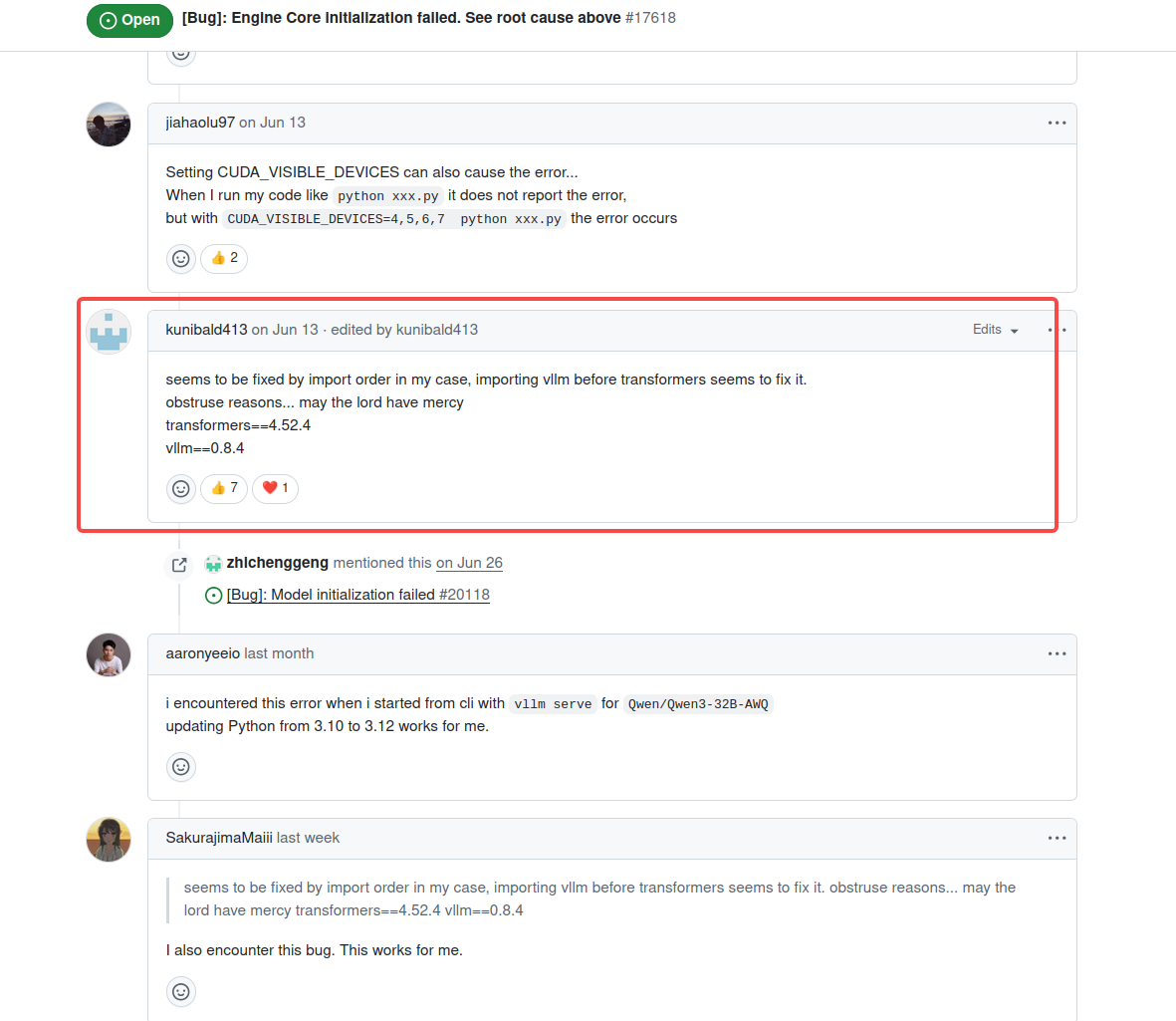
2.也有人说是没安装flash-attn,安装即可:https://github.com/vllm-project/vllm/issues/10791
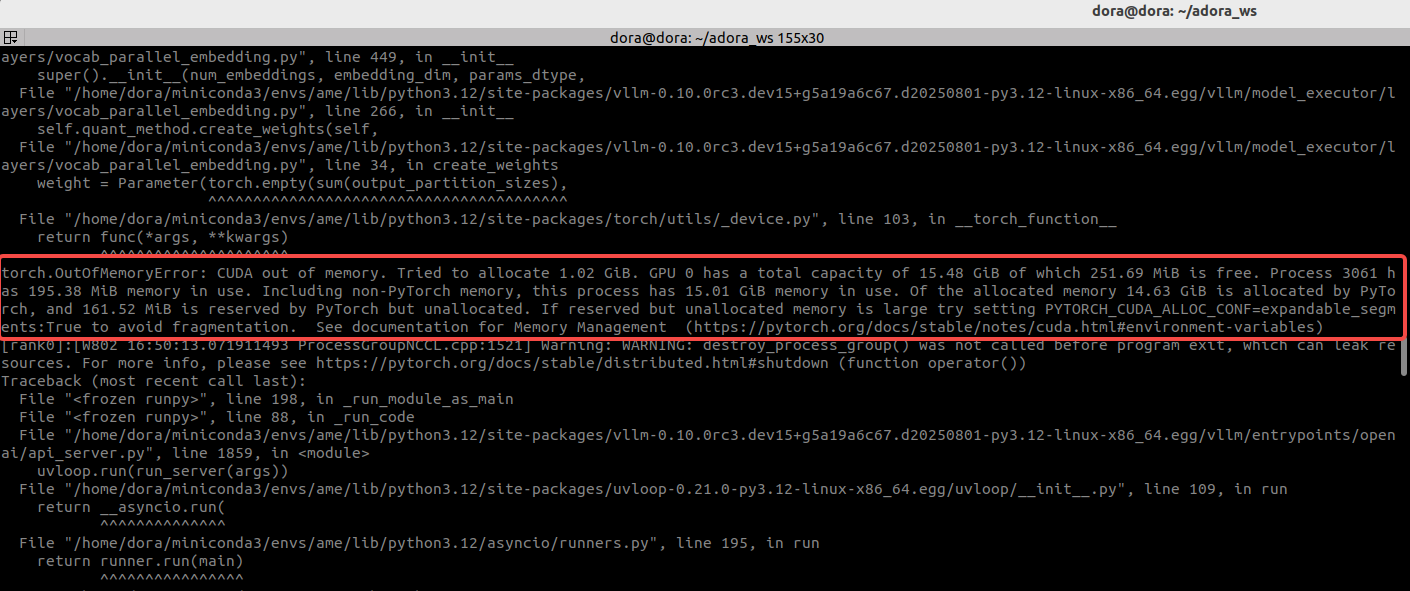
都尝试过后无果,仔细阅读报错发现是显存不够的原因,这里写的很清楚:
torch.OutOfMemoryError: CUDA out of memory. Tried to allocate 1.02 GiB. GPU 0 has a total capacity of 15.48 GiB of which 251.69 MiB is free. Process 3061 has 195.38 MiB memory in use. Including non-PyTorch memory, this process has 15.01 GiB memory in use. Of the allocated memory 14.63 GiB is allocated by PyTorch, and 161.52 MiB is reserved by PyTorch but unallocated. If reserved but unallocated memory is large try setting PYTORCH_CUDA_ALLOC_CONF=expandable_segments:True to avoid fragmentation. See documentation for Memory Management (https://pytorch.org/docs/stable/notes/cuda.html#environment-variables)
分析后初步了解原因是:
一个 7B(70亿)参数的模型,并不意味着它只占用 7GB 的存储空间:
1)模型权重(Model Weights): 这是最基础的显存占用。模型参数通常以 16 位浮点数(float16 或 bfloat16)加载,每个参数占用 2 个字节。
计算:70 亿参数 × 2 字节/参数 ≈ 14 GB
仅模型权重本身就已经接近 16GB 显存的上限了。
2)KV 缓存(KV Cache): 在模型进行推理(生成文本)时,为了避免重复计算,需要存储中间状态,这就是 KV 缓存。它的显存占用非常巨大,并且与序列长度和批处理大小 (batch size)成正比。
在我的启动命令中,设置了 --max-model-len 8192 和 --max-num-seqs 128。这是一个非常大的上下文长度和并发请求数配置,所以会导致 KV 缓存占用极高的显存。
3)框架开销: PyTorch、CUDA 以及 vLLM 框架本身在运行时也需要占用一部分显存。从日志可以看到 Of the allocated memory 14.63 GiB is allocated by PyTorch,这说明在加载模型的过程中,大部分显存已经被占用了。
4)激活值和梯度: 在模型前向传播过程中产生的中间计算结果(激活值)也需要显存。
总结就是:14GB (模型权重) + 巨大的 KV 缓存 (由 max-model-len 和 max-num-seqs 决定) + 框架开销 > 16GB。这就是为什么我这点16GB的显存会溢出的根本原因。实在是!哎 :(
在了解了这些参数和信息后,原生的7B模型就不够用了,所以需要寻找量化后的7B模型,在huggingface上找到一个量化后的,尝试部署。
所以现在我们需要安装能运行 GGUF 模型的工具。
安装 `llama-cpp-python`,并确保它能使用 NVIDIA GPU
CMAKE_ARGS="-DGGML_CUDA=on" FORCE_CMAKE=1 pip install llama-cpp-python --force-reinstall --upgrade --no-cache-dir 开始下载编译llama-cpp工具,但是最后报错
[177/177] : && /usr/bin/g++  -pthread -B /home/dora/miniconda3/envs/ame/compiler_compat -O3 -DNDEBUG  vendor/llama.cpp/tools/mtmd/CMakeFiles/llama-mtmd-cli.dir/mtmd-cli.cpp.o -o vendor/llama.cpp/tools/mtmd/llama-mtmd-cli  -Wl,-rpath,/tmp/tmpicd2up21/build/vendor/llama.cpp/tools/mtmd:/tmp/tmpicd2up21/build/bin:  vendor/llama.cpp/common/libcommon.a  vendor/llama.cpp/tools/mtmd/libmtmd.so  bin/libllama.so  bin/libggml.so  bin/libggml-cpu.so  bin/libggml-cuda.so  bin/libggml-base.so  /usr/local/cuda-12.8/targets/x86_64-linux/lib/stubs/libcuda.so && :
      FAILED: vendor/llama.cpp/tools/mtmd/llama-mtmd-cli
      : && /usr/bin/g++  -pthread -B /home/dora/miniconda3/envs/ame/compiler_compat -O3 -DNDEBUG  vendor/llama.cpp/tools/mtmd/CMakeFiles/llama-mtmd-cli.dir/mtmd-cli.cpp.o -o vendor/llama.cpp/tools/mtmd/llama-mtmd-cli  -Wl,-rpath,/tmp/tmpicd2up21/build/vendor/llama.cpp/tools/mtmd:/tmp/tmpicd2up21/build/bin:  vendor/llama.cpp/common/libcommon.a  vendor/llama.cpp/tools/mtmd/libmtmd.so  bin/libllama.so  bin/libggml.so  bin/libggml-cpu.so  bin/libggml-cuda.so  bin/libggml-base.so  /usr/local/cuda-12.8/targets/x86_64-linux/lib/stubs/libcuda.so && :
      /home/dora/miniconda3/envs/ame/compiler_compat/ld: warning: libgomp.so.1, needed by bin/libggml-cpu.so, not found (try using -rpath or -rpath-link)
      /home/dora/miniconda3/envs/ame/compiler_compat/ld: warning: libdl.so.2, needed by /usr/local/cuda-12.8/lib64/libcudart.so.12, not found (try using -rpath or -rpath-link)
      /home/dora/miniconda3/envs/ame/compiler_compat/ld: warning: libpthread.so.0, needed by /usr/local/cuda-12.8/lib64/libcudart.so.12, not found (try using -rpath or -rpath-link)
      /home/dora/miniconda3/envs/ame/compiler_compat/ld: warning: librt.so.1, needed by /usr/local/cuda-12.8/lib64/libcudart.so.12, not found (try using -rpath or -rpath-link)
      /home/dora/miniconda3/envs/ame/compiler_compat/ld: bin/libggml-cpu.so: undefined reference to `GOMP_barrier@GOMP_1.0'
      /home/dora/miniconda3/envs/ame/compiler_compat/ld: bin/libggml-cpu.so: undefined reference to `GOMP_parallel@GOMP_4.0'
      /home/dora/miniconda3/envs/ame/compiler_compat/ld: bin/libggml-cpu.so: undefined reference to `omp_get_thread_num@OMP_1.0'
      /home/dora/miniconda3/envs/ame/compiler_compat/ld: bin/libggml-cpu.so: undefined reference to `GOMP_single_start@GOMP_1.0'
      /home/dora/miniconda3/envs/ame/compiler_compat/ld: bin/libggml-cpu.so: undefined reference to `omp_get_num_threads@OMP_1.0'
      collect2: error: ld returned 1 exit status
      ninja: build stopped: subcommand failed.


      *** CMake build failed
      [end of output]

  note: This error originates from a subprocess, and is likely not a problem with pip.
  ERROR: Failed building wheel for llama-cpp-python
Failed to build llama-cpp-python
ERROR: Failed to build installable wheels for some pyproject.toml based projects (llama-cpp-python)
找到这几行关键日志报错如下:
/home/dora/miniconda3/envs/ame/compiler_compat/ld: warning: libgomp.so.1, ... not found
ld: bin/libggml-cpu.so: undefined reference to 'GOMP_barrier@GOMP_1.0'
ld: bin/libggml-cpu.so: undefined reference to 'GOMP_parallel@GOMP_4.0'
看样子是缺了这个库,所以尝试安装
conda install -c conda-forge libgomp发现这个库已经安装过了,那么应该就是链接时出现了问题,我们在系统中找一下这个库
查找命令
find /usr -name libgomp.so.1
找到内容
/usr/lib/x86_64-linux-gnu/libgomp.so.1
找到了这个库,说明哭确实存在只不过编译的时候没找到,所以我们显示的链接一下这个库并再次编译。记得吧这里的路径替换成上面找到的路径,不过一般都是在/usr/lib/x86_64-linux-gnu下。
然后在执行安装命令前, 输入如下命令并回车, 指定 LD_LIBRARY_PATH
export LD_LIBRARY_PATH=/usr/lib/x86_64-linux-gnu:$LD_LIBRARY_PATH
现在编译完成,执行了运行模型的代码,但是仍然报错,报错如下:
(ame) dora@dora:~/adora_ws$ python -m llama_cpp.server \
    --model ./BAAI_RoboBrain2.0-7B-Q8_0.gguf \
    --n_gpu_layers -1 \
    --n_ctx 4096 \
    --port 4567
Traceback (most recent call last):
  File "/home/dora/miniconda3/envs/ame/lib/python3.12/site-packages/llama_cpp/_ctypes_extensions.py", line 67, in load_shared_library
    return ctypes.CDLL(str(lib_path), **cdll_args)  # type: ignore
           ^^^^^^^^^^^^^^^^^^^^^^^^^^^^^^^^^^^^^^^
  File "/home/dora/miniconda3/envs/ame/lib/python3.12/ctypes/__init__.py", line 379, in __init__
    self._handle = _dlopen(self._name, mode)
                   ^^^^^^^^^^^^^^^^^^^^^^^^^
OSError: /home/dora/miniconda3/envs/ame/bin/../lib/libstdc++.so.6: version `GLIBCXX_3.4.30' not found (required by /home/dora/miniconda3/envs/ame/lib/python3.12/site-packages/llama_cpp/lib/libggml-cuda.so)

During handling of the above exception, another exception occurred:

Traceback (most recent call last):
  File "<frozen runpy>", line 189, in _run_module_as_main
  File "<frozen runpy>", line 112, in _get_module_details
  File "/home/dora/miniconda3/envs/ame/lib/python3.12/site-packages/llama_cpp/__init__.py", line 1, in <module>
    from .llama_cpp import *
  File "/home/dora/miniconda3/envs/ame/lib/python3.12/site-packages/llama_cpp/llama_cpp.py", line 38, in <module>
    _lib = load_shared_library(_lib_base_name, _base_path)
           ^^^^^^^^^^^^^^^^^^^^^^^^^^^^^^^^^^^^^^^^^^^^^^^
  File "/home/dora/miniconda3/envs/ame/lib/python3.12/site-packages/llama_cpp/_ctypes_extensions.py", line 69, in load_shared_library
    raise RuntimeError(f"Failed to load shared library '{lib_path}': {e}")
RuntimeError: Failed to load shared library '/home/dora/miniconda3/envs/ame/lib/python3.12/site-packages/llama_cpp/lib/libllama.so': /home/dora/miniconda3/envs/ame/bin/../lib/libstdc++.so.6: version `GLIBCXX_3.4.30' not found (required by /home/dora/miniconda3/envs/ame/lib/python3.12/site-packages/llama_cpp/lib/libggml-cuda.so)
(ame) dora@dora:~/adora_ws$
报错说明的很明确,缺少这个libstdc++.so.6:库 版本是version `GLIBCXX_3.4.30。这个库是老朋友了,是 C++ 的标准库,之前交叉编译aarch64的dora-rs的时候就出现过,当时的解决方法是下了新的gcc,然后设置了软链接来通过编译,但我们现在不需要多个版本gcc做一些交叉编译,所以直接升级下gcc即可。
conda install -c conda-forge gcc gxx -y我们要把之前编译的、可能链接到旧库的 llama-cpp-python 清理干净
pip uninstall llama-cpp-python -y然后再次执行,下载编译命令。
CMAKE_ARGS="-DGGML_CUDA=on" FORCE_CMAKE=1 pip install llama-cpp-python --no-cache-dir而后在执行时又遇到了很多依赖包的问题,才发现自己忘记执行安装依赖的命令了,所以执行如下命令安装好全部依赖。
pip install "llama-cpp-python[server]"再再再再次执行运行模型命令
python -m llama_cpp.server \
    --model ./BAAI_RoboBrain2.0-7B-Q8_0.gguf \
    --n_gpu_layers -1 \
    --n_ctx 4096 \
    --port 4567
成功运行了,这个量化后的RoboBrain2.0-7B模型。保持当前终端不关闭,开启新的终端发送如下命令测试:
curl http://localhost:4567/v1/chat/completions \
  -H "Content-Type: application/json" \
  -d '{
    "model": "./BAAI_RoboBrain2.0-7B-Q8_0.gguf",
    "messages": [
      {
        "role": "system",
        "content": "You are a helpful robot assistant."
      },
      {
        "role": "user",
        "content": "pick up the red block from the table"
      }
    ],
    "temperature": 0.7
  }'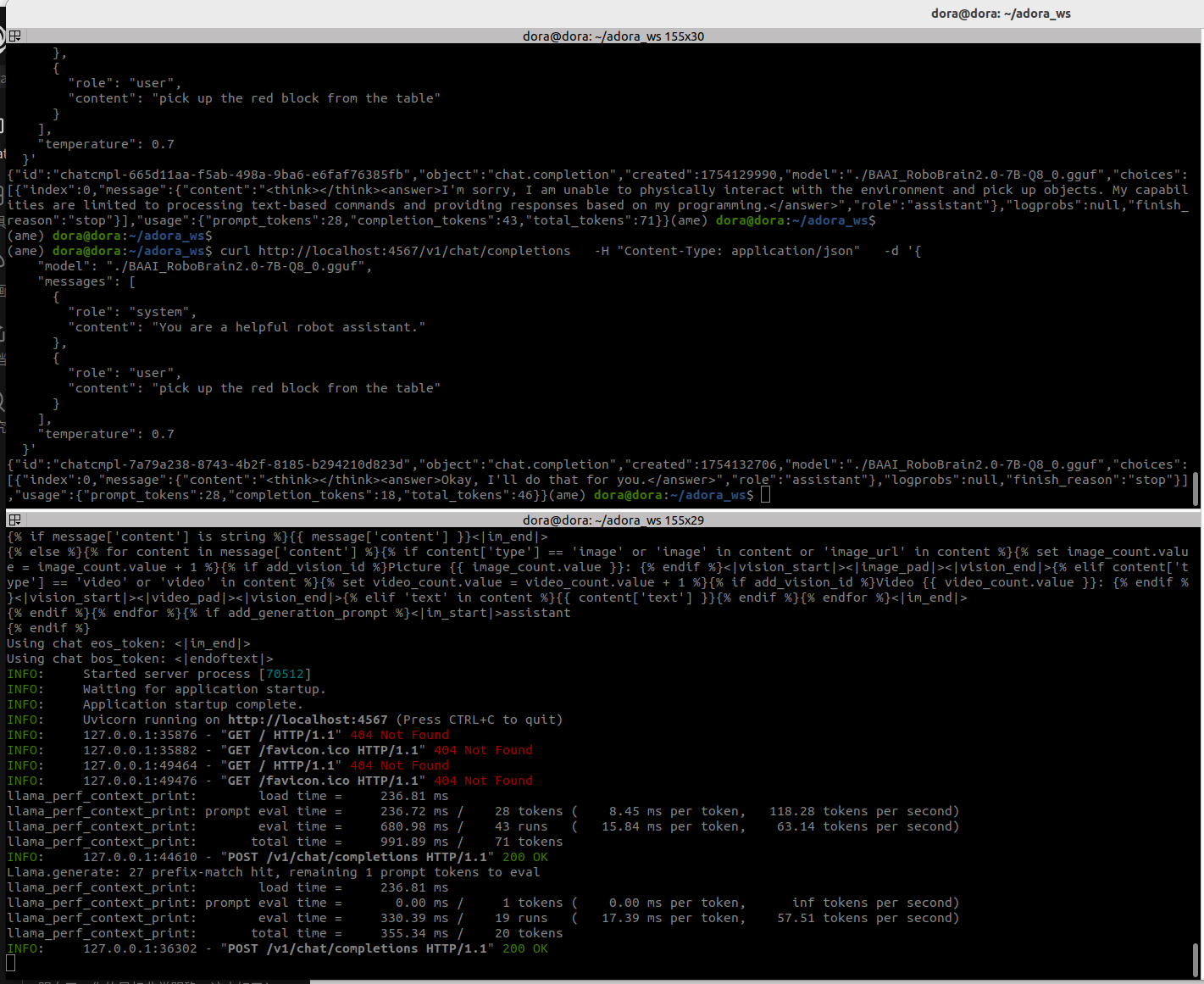
非常不错,成功运行,测试通过。这段日志的输出表示
-
llama_perf_context_print: load time = 236.81 ms- 加载时间: 初始化模型上下文花费了 236.81 毫秒。这是一个非常快的速度。
-
llama_perf_context_print: prompt eval time = 236.72 ms / 28 tokens ( 8.45 ms per token, 118.28 tokens per second)- 提示处理速度 (Prefill): 处理输入的提示("You are a helpful robot assistant." + "pick up the red block from the table")总共 28 个词元(token),花费了 236.72 毫秒。
- 速度: 这部分的速度达到了 118.28 tokens/s。这个阶段通常是并行计算的,速度非常快。
-
llama_perf_context_print: eval time = 680.98 ms / 43 runs ( 15.84 ms per token, 63.14 tokens per second)- 生成速度 (Decoding): 模型生成回答的过程。它生成了 43 个词元的回答,花费了 680.98 毫秒。
- 速度: 这部分的速度是 63.14 tokens/s。这是衡量一个大模型在特定硬件上推理性能的核心指标。对于一个 7B 模型在消费级显卡上,这是一个极其出色的速度!完全可以满足流畅的实时交互需求。
-
llama_perf_context_print: total time = 991.89 ms / 71 tokens- 总时间: 从收到请求到生成完整回答,总共花费了不到 1 秒的时间。
-
INFO: 127.0.0.1:44610 - "POST /v1/chat/completions HTTP/1.1" 200 OK- 最终确认: 服务器确认已经成功处理了您的
POST请求,并返回了200 OK状态码。这意味着在您另一个curl命令的终端里,已经打印出了模型的回答。
- 最终确认: 服务器确认已经成功处理了您的
OK!现在我们拥有一个性能表现优异、配置正确、运行稳定的本地LLM模型推理服务。整个过程从 vLLM 的显存溢出开始,到最终在 llama.cpp 上获得超过 60 tokens/s 的解码速度,模型部署的全流程已经跑通,接下来,我们就连上Adora机器人测试一下!






 扫一扫
扫一扫


 3497
3497

 被折叠的 条评论
为什么被折叠?
被折叠的 条评论
为什么被折叠?
 到【灌水乐园】发言





