


参考文档:
SwanLab入门深度学习:Qwen3大模型指令微调 - 肖祥 - 博客园
vLLM:让大语言模型推理更高效的新一代引擎 —— 原理详解一_vllm 原理-优快云博客
概述
为了实现对100+个标签的多标签文本分类任务,前期调用gpt-4o进行prompt优化,实现了较高的准确率,积累了大量的语料。后续利用积累的语料对大模型进行微调,部署自己的服务,取代gpt的API调用。因为显卡大小有限,仅有一个16G的显卡,因此选择了小参数量的qwen3-1.7B模型进行指令微调,将100+个标签拆解为两个任务来做,使用LoRA训练各自的adapter,这样可以通过加载不同的adapter,最终实现100+个标签的多标签文本分类任务。
环境介绍
python                            3.12
torch                             2.7.1+cu128
transformers                      4.54.0
vllm                              0.10.0
实现过程
为了快速实现,复用了参考文章的代码,做了比较微小的调整,追加了指标评估部分和vllm推理部分,结构如下:
project/
├── train.py # 训练模型
├── predict.py # 推理/预测
├── predict_vllm.py # vllm推理/预测
├── evaluate.py # 指标评估
- 模型训练
# train.py

import json
import pandas as pd
import torch
from datasets import Dataset
from modelscope import snapshot_download, AutoTokenizer
from swanlab.integration.huggingface import SwanLabCallback
from peft import LoraConfig, TaskType, get_peft_model
from transformers import AutoModelForCausalLM, TrainingArguments, Trainer, DataCollatorForSeq2Seq
import os
import swanlab


def dataset_jsonl_transfer(origin_path, new_path):
    """
    将原始数据集转换为大模型微调所需数据格式的新数据集
    """
    messages = []

    # 读取旧的JSONL文件
    with open(origin_path, "r", encoding="utf-8") as file:
        for line in file:
            # 解析每一行的json数据
            data = json.loads(line)
            context = data["text"]
            catagory = data["category"]
            label = data["output"]
            message = {
                "instruction": "你是一个文本分类领域的专家,你会接收到一段文本和几个潜在的分类选项,请输出文本内容的正确类型",
                "input": f"文本:{context},类型选型:{catagory}",
                "output": str(label),
            }
            messages.append(message)

    # 保存重构后的JSONL文件
    with open(new_path, "w", encoding="utf-8") as file:
        for message in messages:
            file.write(json.dumps(message, ensure_ascii=False) + "\n")


def process_func(example):
    """
    将数据集进行预处理
    """
    MAX_LENGTH = 800
    instruction = tokenizer(
        f"<|im_start|>system\n你是一个文本分类领域的专家,你会接收到一段文本和几个潜在的分类选项,请输出文本内容的正确类型<|im_end|>\n<|im_start|>user\n{example['input']}<|im_end|>\n<|im_start|>assistant\n",
        add_special_tokens=False,
    )
    response = tokenizer(f"{example['output']}", add_special_tokens=False)
    input_ids = instruction["input_ids"] + \
                response["input_ids"] + [tokenizer.pad_token_id]
    attention_mask = (
            instruction["attention_mask"] + response["attention_mask"] + [1]
    )
    # 构建labels(只计算答案部分的loss)
    # 将输入部分的labels设为-100(不计算loss)
    labels = [-100] * len(instruction["input_ids"]) + \
             response["input_ids"] + [tokenizer.pad_token_id]
    # 为了保持标签的完整性,截断部分尚需优化,可选择优先级截断策略,优先保留前几句和后几句
    if len(input_ids) > MAX_LENGTH:  # 做一个截断
        input_ids = input_ids[:MAX_LENGTH]
        attention_mask = attention_mask[:MAX_LENGTH]
        labels = labels[:MAX_LENGTH]
    return {"input_ids": input_ids, "attention_mask": attention_mask, "labels": labels}


def predict(messages, model, tokenizer):
    device = "cuda"
    text = tokenizer.apply_chat_template(
        messages,
        tokenize=False,
        add_generation_prompt=True
    )
    model_inputs = tokenizer([text], return_tensors="pt").to(device)

    generated_ids = model.generate(
        model_inputs.input_ids,
        max_new_tokens=512
    )
    generated_ids = [
        output_ids[len(input_ids):] for input_ids, output_ids in zip(model_inputs.input_ids, generated_ids)
    ]

    response = tokenizer.batch_decode(
        generated_ids, skip_special_tokens=True)[0]
    return response


# 在modelscope上下载Qwen模型到本地目录下
# model_dir = snapshot_download("qwen/Qwen2-1.5B-Instruct", cache_dir="./", revision="master")
model_name = "/home/emma/.cache/modelscope/hub/models/Qwen/Qwen3-1.7B"

# Transformers加载模型权重
tokenizer = AutoTokenizer.from_pretrained(model_name)
model = AutoModelForCausalLM.from_pretrained(model_name, device_map="auto", torch_dtype=torch.bfloat16)

model.enable_input_require_grads()  # 开启梯度检查点时,要执行该方法

# 加载、处理数据集和测试集
train_dataset_path = "./multi_classification_data/train.jsonl"  # "./zh_cls_fudan-news/train.jsonl"
test_dataset_path = "./multi_classification_data/test.jsonl"    #"./zh_cls_fudan-news/test.jsonl"

train_jsonl_new_path = "new_train.jsonl"
test_jsonl_new_path = "new_test.jsonl"

if not os.path.exists(train_jsonl_new_path):
    dataset_jsonl_transfer(train_dataset_path, train_jsonl_new_path)
if not os.path.exists(test_jsonl_new_path):
    dataset_jsonl_transfer(test_dataset_path, test_jsonl_new_path)

# 得到训练集
train_df = pd.read_json(train_jsonl_new_path, lines=True)
train_ds = Dataset.from_pandas(train_df)
train_dataset = train_ds.map(
    process_func, remove_columns=train_ds.column_names)

config = LoraConfig(
    task_type=TaskType.CAUSAL_LM,
    target_modules=["q_proj", "k_proj", "v_proj",
                    "o_proj", "gate_proj", "up_proj", "down_proj"],
    inference_mode=False,  # 训练模式
    r=32,  # Lora 秩
    lora_alpha=64,  # Lora alaph,具体作用参见 Lora 原理
    lora_dropout=0.1,  # Dropout 比例
)

model = get_peft_model(model, config)

# 打印可训练参数信息
print("=== PEFT模型参数统计 ===")
model.print_trainable_parameters()

args = TrainingArguments(
    output_dir="./output/Qwen3-cls_wanle_r64",       # "./output/Qwen3-zh_cls_fudan-news",
    per_device_train_batch_size=4,
    gradient_accumulation_steps=4,
    logging_steps=10,
    num_train_epochs=2,
    save_steps=100,
    learning_rate=1e-4,
    save_on_each_node=True,
    gradient_checkpointing=True,
    report_to="none",
    dataloader_drop_last=True,  # 关键设置
)

swanlab_callback = SwanLabCallback(
    project="Qwen3-fintune",
    experiment_name="Qwen3-1.7B-r32",
    description="使用通义千问Qwen3-1.7B型在cls_wanle数据集上微调。",
    config={
        "model": "Qwen/Qwen3-1.7B",
        "dataset": "ly/cls_wanle_cls50",
    }
)
# 开始微调
trainer = Trainer(
    model=model,
    args=args,
    train_dataset=train_dataset,
    data_collator=DataCollatorForSeq2Seq(tokenizer=tokenizer, padding=True),
    callbacks=[swanlab_callback],
)

trainer.train()

# 保存模型和分词器
output_dir = "./output/Qwen3-cls_wanle_r32"  # "./output/Qwen3-zh_cls_fudan-news"
# 保存整个模型
model.save_pretrained(output_dir, save_config=True)
tokenizer.save_pretrained(output_dir)

# 用测试集的前10条,测试模型
test_df = pd.read_json(test_jsonl_new_path, lines=True)[:10]

test_text_list = []
for index, row in test_df.iterrows():
    instruction = row['instruction']
    input_value = row['input']

    messages = [
        {"role": "system", "content": f"{instruction}"},
        {"role": "user", "content": f"{input_value}"}
    ]

    response = predict(messages, model, tokenizer)
    messages.append({"role": "assistant", "content": f"{response}"})
    result_text = f"{messages[0]}\n\n{messages[1]}\n\n{messages[2]}"
    test_text_list.append(swanlab.Text(result_text, caption=response))

swanlab.log({"Prediction": test_text_list})
swanlab.finish()
- 推理/预测
# predict.py 推理/预测

import torch
from transformers import AutoTokenizer, AutoModelForCausalLM
import pandas as pd
import json


# 设置模型路径(微调后的模型保存路径)
model_path = "./output/Qwen3-cls_wanle_r8"  # 替换为你的模型保存路径

# 加载微调后的模型和分词器
tokenizer = AutoTokenizer.from_pretrained(
    model_path, use_fast=False, trust_remote_code=True, model_type="qwen")
model = AutoModelForCausalLM.from_pretrained(
    model_path, device_map="auto", torch_dtype=torch.bfloat16, trust_remote_code=True, model_type="qwen")
device = model.device

# 开启模型评估模式
model.eval()


def predict(model, input_text):
    # 构造Prompt
    messages = [
        {"role": "system", "content": '你是一个文本分类领域的专家,你会接收到一段文本和几个潜在的分类选项,请输出文本内容的正确类型。'
                                      '请只输出分类结果,不要包含任何其他内容。'},
        {"role": "user", "content": input_text}
    ]

    # 对输入数据进行编码
    input_ids = tokenizer.apply_chat_template(
        messages, tokenize=True, return_tensors="pt").to(model.device)

    # 生成响应
    outputs = model.generate(
        input_ids,
        max_new_tokens=30,  # 设置最大新生成的 tokens 数量
        do_sample=False,     # 禁用采样,使用贪心解码
        temperature=0.7,     # 温度参数,值越低生成结果越确定
        num_beams=5,         # 设置束宽度为5
        early_stopping=True  # 启用提前终止
    )

    # 对生成的响应进行解码
    response = tokenizer.decode(outputs[0], skip_special_tokens=True).strip()

    # 提取最后的内容
    last_line = response.split("\n")[-1].strip()  # 获取最后一行
    final_result = last_line

    # print("\n最终分类结果:", final_result)
    return final_result


# 得到训练集
test_jsonl_new_path = "new_test.jsonl"
test_df = pd.read_json(test_jsonl_new_path, lines=True)
predict_path = "new_test_res.jsonl"

# 保存重构后的JSONL文件
with open(predict_path, "w", encoding="utf-8") as file:
    for input_text, output_text in zip(test_df["input"], test_df["output"]):
        res = {"input": input_text, "output": output_text, "prediction": predict(model, input_text)}
        print(output_text)
        print(predict(model, input_text))
        file.write(json.dumps(res, ensure_ascii=False) + "\n")
推理速度:
predict time: 392.27 seconds
total requests: 1119
vllm speed: 2.85 samples/second
vLLM加速推理
vLLM推理速度远快于transformers推理速度
# vllm_predict.py 推理/预测

# 模型加载
from vllm import LLM, SamplingParams
from vllm.lora.request import LoRARequest
from transformers import AutoTokenizer
import pandas as pd
import json, time


base_path = "/home/emma/.cache/modelscope/hub/models/Qwen/Qwen3-1.7B"
lora_path1 = "./output/Qwen3-cls_wanle_r8"   # 适配器路径

# 创建模型
llm = LLM(
    model=base_path,
    enable_lora=True,
    max_model_len=2048,
    dtype="auto",
    gpu_memory_utilization=0.7,  # 默认0.9
    # max_lora_rank=64
)
tokenizer = AutoTokenizer.from_pretrained(base_path)
print("base model load success!")


# 定义LoRA请求
lora_request1 = LoRARequest("adapter_v1", 1, lora_path=lora_path1)  #参数说明: lora_name="adapter_v1" 自定义名称; lora_int_id=1 唯一整数 ID; lora_path=lora_path1 本地适配器路径;

# 设置生成所需参数
sampling_params = SamplingParams(
    max_tokens=20,       # 可能需要更多空间
    temperature=0.0,
    # repetition_penalty=1.2
)


# 单条推理
def predict_single(prompt):
    # 通过prompts构造prompt_token_ids
    temp_prompts = [tokenizer.apply_chat_template(
        [{"role": "system", "content": '你是一个文本分类领域的专家,你会接收到一段文本和几个潜在的分类选项,请输出文本内容的正确类型。请只输出分类结果,不要包含任何其他内容。'},
         {"role": "user", "content": prompt}],
        tokenize=False, add_generation_wohaisprompt=True, enable_thinking=False)]

    # print("加载Lora1进行模型推理:")
    # 调用generate时,请求调用lora参数
    outputs = llm.generate(sampling_params=sampling_params, prompts=temp_prompts,
                           lora_request=lora_request1)
    # 输出结果
    generated_text = outputs[0].outputs[0].text
    return generated_text


# 批量推理
def predict_batch(prompts):
    # 通过prompts构造prompt_token_ids
    temp_prompts = [tokenizer.apply_chat_template(
        [{"role": "system", "content": '你是一个文本分类领域的专家,你会接收到一段文本和几个潜在的分类选项,请输出文本内容的正确类型。请只输出分类结果,不要包含任何其他内容。'},
         {"role": "user", "content": prompt}],
        tokenize=False, add_generation_wohaisprompt=True, enable_thinking=False) for prompt in prompts]

    # print("加载Lora1进行模型推理:")
    # 调用generate时,请求调用lora参数
    outputs = llm.generate(sampling_params=sampling_params, prompts=temp_prompts,
                           lora_request=lora_request1)
    return outputs


# 得到训练集
test_jsonl_new_path = "new_test.jsonl"
test_df = pd.read_json(test_jsonl_new_path, lines=True)
predict_path = "new_test_res_vllm.jsonl"

# 构造输入数据
inputs, labels = [], []
for input_text, output_text in zip(test_df["input"], test_df["output"]):
    inputs.append(input_text)
    labels.append(output_text)

# 耗时计算
start = time.time()
outputs = predict_batch(inputs)
end = time.time()
print(f"predict time: {end - start:.2f} seconds")
print(f"total requests: {len(inputs)}")
print(f"vllm speed: {len(inputs) / (end - start):.2f} samples/second")

# 保存预测结果
with open(predict_path, "w", encoding="utf-8") as file:
    for input_text, label, output in zip(inputs, labels, outputs):
        pred = output.outputs[0].text
        if not pred:
            pred = ["其他"]
        res = {"input": input_text, "output": label, "prediction": pred}
        file.write(json.dumps(res, ensure_ascii=False) + "\n")
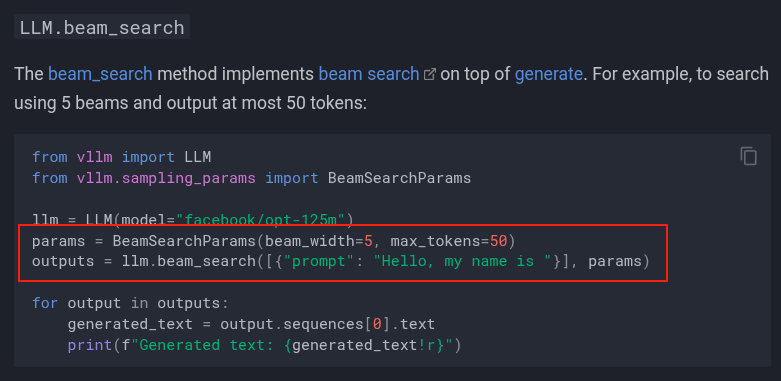
beam search在vLLM的V1版本中依然支持,见Generative Models - vLLM
日志
INFO 07-31 16:00:04 [config.py:2434] Chunked prefill is enabled with max_num_batched_tokens=8192.
INFO 07-31 16:00:04 [core.py:572] Waiting for init message from front-end.
INFO 07-31 16:00:04 [core.py:71] Initializing a V1 LLM engine (v0.10.0) with config: model='/home/emma/.cache/modelscope/hub/models/Qwen/Qwen3-1.7B', speculative_config=None, tokenizer='/home/emma/.cache/modelscope/hub/models/Qwen/Qwen3-1.7B', skip_tokenizer_init=False, tokenizer_mode=auto, revision=None, override_neuron_config={}, tokenizer_revision=None, trust_remote_code=False, dtype=torch.bfloat16, max_seq_len=2048, download_dir=None, load_format=LoadFormat.AUTO, tensor_parallel_size=1, pipeline_parallel_size=1, disable_custom_all_reduce=False, quantization=None, enforce_eager=False, kv_cache_dtype=auto,  device_config=cuda, decoding_config=DecodingConfig(backend='auto', disable_fallback=False, disable_any_whitespace=False, disable_additional_properties=False, reasoning_backend=''), observability_config=ObservabilityConfig(show_hidden_metrics_for_version=None, otlp_traces_endpoint=None, collect_detailed_traces=None), seed=0, served_model_name=/home/emma/.cache/modelscope/hub/models/Qwen/Qwen3-1.7B, num_scheduler_steps=1, multi_step_stream_outputs=True, enable_prefix_caching=True, chunked_prefill_enabled=True, use_async_output_proc=True, pooler_config=None, compilation_config={"level":3,"debug_dump_path":"","cache_dir":"","backend":"","custom_ops":[],"splitting_ops":["vllm.unified_attention","vllm.unified_attention_with_output","vllm.mamba_mixer2"],"use_inductor":true,"compile_sizes":[],"inductor_compile_config":{"enable_auto_functionalized_v2":false},"inductor_passes":{},"use_cudagraph":true,"cudagraph_num_of_warmups":1,"cudagraph_capture_sizes":[512,504,496,488,480,472,464,456,448,440,432,424,416,408,400,392,384,376,368,360,352,344,336,328,320,312,304,296,288,280,272,264,256,248,240,232,224,216,208,200,192,184,176,168,160,152,144,136,128,120,112,104,96,88,80,72,64,56,48,40,32,24,16,8,4,2,1],"cudagraph_copy_inputs":false,"full_cuda_graph":false,"max_capture_size":512,"local_cache_dir":null}
INFO 07-31 16:00:05 [parallel_state.py:1102] rank 0 in world size 1 is assigned as DP rank 0, PP rank 0, TP rank 0, EP rank 0
WARNING 07-31 16:00:05 [topk_topp_sampler.py:59] FlashInfer is not available. Falling back to the PyTorch-native implementation of top-p & top-k sampling. For the best performance, please install FlashInfer.
INFO 07-31 16:00:05 [gpu_model_runner.py:1843] Starting to load model /home/emma/.cache/modelscope/hub/models/Qwen/Qwen3-1.7B...
INFO 07-31 16:00:05 [gpu_model_runner.py:1875] Loading model from scratch...
INFO 07-31 16:00:05 [cuda.py:290] Using Flash Attention backend on V1 engine.
上图中红框表示正在使用 FlashAttention 的 V1 版本 作为注意力计算后端。
显存占用情况分析:
INFO 07-31 10:45:03 [default_loader.py:262] Loading weights took 0.41 seconds
INFO 07-31 10:45:03 [punica_selector.py:19] Using PunicaWrapperGPU.
INFO 07-31 10:45:03 [gpu_model_runner.py:1892] Model loading took 3.2480 GiB and 0.509056 seconds
INFO 07-31 10:45:09 [backends.py:530] Using cache directory: /home/emma/.cache/vllm/torch_compile_cache/7fe05d07ef/rank_0_0/backbone for vLLM's torch.compile
INFO 07-31 10:45:09 [backends.py:541] Dynamo bytecode transform time: 5.43 s
INFO 07-31 10:45:12 [backends.py:161] Directly load the compiled graph(s) for dynamic shape from the cache, took 3.176 s
INFO 07-31 10:45:14 [monitor.py:34] torch.compile takes 5.43 s in total
INFO 07-31 10:45:15 [gpu_worker.py:255] Available KV cache memory: 6.15 GiB
INFO 07-31 10:45:15 [kv_cache_utils.py:833] GPU KV cache size: 57,600 tokens
INFO 07-31 10:45:15 [kv_cache_utils.py:837] Maximum concurrency for 2,048 tokens per request: 28.12x
INFO 07-31 10:45:22 [gpu_model_runner.py:2485] Graph capturing finished in 7 secs, took 0.84 GiB
INFO 07-31 10:45:22 [core.py:193] init engine (profile, create kv cache, warmup model) took 18.89 seconds
推理速度详情:
Adding requests: 100%|██████████| 1119/1119 [00:00<00:00, 1554.98it/s]
Processed prompts: 100%|██████████| 1119/1119 [00:25<00:00, 44.37it/s, est. speed input: 13767.59 toks/s, output: 244.55 toks/s]

predict time: 25.99 seconds
total requests: 1119
vllm speed: 43.05 samples/second
推理速度对比
| 指标 | TRANSFORMERS | VLLM | 提升 |
| 吞吐量 | 2.8 req/s | 43 req/s | 15x |
可以看出推理速度最终提升至15倍,做了实验验证,其中约5倍是贪心搜索(即束宽=1时的束搜索)带来的,约3倍是vLLM带来的,叠加起来等于5x3=15倍。
指标评估
此部分为qwen生成的代码,用于评估抛去“其他”这个标签之后的分类效果
# evaluate.py 指标评估

import json
from collections import defaultdict


def calculate_metrics_from_jsonl(file_path: str) -> dict:
    """
    从jsonl文件中读取结果并计算多标签分类的准确率和召回率

    Args:
        file_path: jsonl文件路径

    Returns:
        包含每个标签的准确率、召回率和文本数量的字典
    """

    # 统计每个标签的相关信息
    tag_stats = defaultdict(lambda: {
        'tp': 0,  # True Positive
        'fp': 0,  # False Positive
        'fn': 0,  # False Negative
        'support': 0  # 实际包含该标签的文本数量
    })

    total_samples = 0
    error_count = 0

    categories = ['三轮车游览', '丛林飞跃', '主题公园', '乘雪橇', '体育场馆游览', '公共假期', '其他', '冬', '冲浪',
                  '动物园游览', '博物馆体验', '历史文化类体验', '古城古镇之旅', '品酒之旅', '嘟嘟车游览', '坐船游览',
                  '城堡之旅', '城市漫步', '城市骑行', '夏', '大众文化类体验', '寺庙教堂', '展览馆体验', '工厂参观之旅',
                  '帆伞', '帆船', '建筑类体验', '当地洗浴', '当地特色', '徒步', '快艇尾波冲浪', '戏剧演出', '户外观光',
                  '摩托艇', '攀岩', '旅拍', '时尚之旅', '春', '服饰体验', '桑拿', '模拟飞行器', '水上乐园',
                  '水上飞机游览', '水族馆游览', '水疗', '水翼船', '沙漠游览', '泡温泉', '洞穴探秘', '浮潜']

    # 读取jsonl文件
    with open(file_path, 'r', encoding='utf-8') as f:
        for line_num, line in enumerate(f, 1):
            if line.strip():
                try:
                    item = json.loads(line.strip())
                    total_samples += 1

                    # 解析真实的标签
                    true_labels = item.get('output', [])
                    if isinstance(true_labels, str):
                        # 如果是字符串格式,需要解析
                        true_labels = eval(true_labels) if true_labels.startswith('[') else [true_labels]

                    # 解析预测的标签
                    # pred_labels = item.get('prediction', [])
                    # if isinstance(pred_labels, str):
                    #     # 如果是字符串格式,需要解析
                    #     pred_labels = eval(pred_labels) if pred_labels.startswith('[') else [pred_labels]
                    pred_labels = item.get('prediction', '')
                    pred_labels = [x for x in categories if x in pred_labels]

                    # 转换为集合以便计算
                    true_labels_set = set(true_labels)
                    pred_labels_set = set(pred_labels)

                    # 统计每个标签在当前样本中的情况
                    all_labels = true_labels_set.union(pred_labels_set)

                    for label in all_labels:
                        if label in true_labels_set and label in pred_labels_set:
                            # 真正例
                            tag_stats[label]['tp'] += 1
                        elif label not in true_labels_set and label in pred_labels_set:
                            # 假正例
                            tag_stats[label]['fp'] += 1
                        elif label in true_labels_set and label not in pred_labels_set:
                            # 假负例
                            tag_stats[label]['fn'] += 1

                        # 统计实际包含该标签的文本数量
                        if label in true_labels_set:
                            tag_stats[label]['support'] += 1

                except Exception as e:
                    error_count += 1
                    print(f"第{line_num}行处理错误: {e}")
                    continue

    print(f"总共处理了 {total_samples} 个样本,错误 {error_count} 个")

    # 计算每个标签的准确率和召回率
    metrics = {}
    for label, stats in tag_stats.items():
        tp = stats['tp']
        fp = stats['fp']
        fn = stats['fn']
        support = stats['support']

        # 准确率 = TP / (TP + FP)
        precision = tp / (tp + fp) if (tp + fp) > 0 else 0.0

        # 召回率 = TP / (TP + FN)
        recall = tp / (tp + fn) if (tp + fn) > 0 else 0.0

        # F1分数
        f1 = 2 * (precision * recall) / (precision + recall) if (precision + recall) > 0 else 0.0

        metrics[label] = {
            'precision': precision,
            'recall': recall,
            'f1': f1,
            'support': support,
            'tp': tp,
            'fp': fp,
            'fn': fn
        }

    return metrics


def print_detailed_metrics(metrics: dict):
    """
    打印详细的指标结果
    """
    if not metrics:
        print("没有找到有效的标签数据")
        return

    print(f"\n{'标签':<35} {'准确率':<10} {'召回率':<10} {'F1分数':<10} {'支持数':<8} {'TP':<6} {'FP':<6} {'FN':<6}")
    print("=" * 110)

    # 按支持数排序
    sorted_items = sorted(metrics.items(), key=lambda x: x[1]['support'], reverse=True)

    for label, stats in sorted_items:
        print(f"{label:<35} {stats['precision']:<10.4f} {stats['recall']:<10.4f} "
              f"{stats['f1']:<10.4f} {stats['support']:<8} {stats['tp']:<6} {stats['fp']:<6} {stats['fn']:<6}")


def print_summary_metrics(metrics: dict):
    """
    打印摘要指标
    """
    if not metrics:
        print("没有找到有效的标签数据")
        return

    print(f"\n{'标签':<35} {'准确率':<10} {'召回率':<10} {'支持数':<8}")
    print("-" * 70)

    # 按支持数排序
    sorted_items = sorted(metrics.items(), key=lambda x: x[1]['support'], reverse=True)

    for label, stats in sorted_items:
        print(f"{label:<35} {stats['precision']:<10.4f} {stats['recall']:<10.4f} {stats['support']:<8}")


def calculate_overall_metrics(metrics: dict) -> dict:
    """
    计算整体指标(宏平均和微平均)
    """
    if not metrics:
        return {}

    # 宏平均
    macro_precision = sum(stats['precision'] for stats in metrics.values()) / len(metrics)
    macro_recall = sum(stats['recall'] for stats in metrics.values()) / len(metrics)
    macro_f1 = sum(stats['f1'] for stats in metrics.values()) / len(metrics)

    # 微平均
    total_tp = sum(stats['tp'] for stats in metrics.values())
    total_fp = sum(stats['fp'] for stats in metrics.values())
    total_fn = sum(stats['fn'] for stats in metrics.values())

    micro_precision = total_tp / (total_tp + total_fp) if (total_tp + total_fp) > 0 else 0.0
    micro_recall = total_tp / (total_tp + total_fn) if (total_tp + total_fn) > 0 else 0.0
    micro_f1 = 2 * (micro_precision * micro_recall) / (micro_precision + micro_recall) if (
                                                                                                      micro_precision + micro_recall) > 0 else 0.0

    return {
        'macro_precision': macro_precision,
        'macro_recall': macro_recall,
        'macro_f1': macro_f1,
        'micro_precision': micro_precision,
        'micro_recall': micro_recall,
        'micro_f1': micro_f1
    }


def save_metrics_to_csv(metrics: dict, output_file: str):
    """
    将指标保存为CSV格式
    """
    with open(output_file, 'w', encoding='utf-8') as f:
        f.write("标签,准确率,召回率,F1分数,支持数,TP,FP,FN\n")
        for label, stats in sorted(metrics.items(), key=lambda x: x[1]['support'], reverse=True):
            f.write(f'"{label}",{stats["precision"]:.4f},{stats["recall"]:.4f},'
                    f'{stats["f1"]:.4f},{stats["support"]},{stats["tp"]},{stats["fp"]},{stats["fn"]}\n')
    print(f"\n指标结果已保存到: {output_file}")


# 主函数
def main():
    # 替换为你的实际文件路径
    # input_file = "new_test_res.jsonl"  # 你的jsonl文件路径
    input_file = "new_test_res_vllm.jsonl"
    output_csv = "metrics_result_vllm.csv"  # 输出CSV文件路径

    try:
        # 计算指标
        print("正在计算指标...")
        metrics = calculate_metrics_from_jsonl(input_file)

        if not metrics:
            print("未找到任何有效数据")
            return

        # 打印详细结果
        print("\n=== 详细指标结果 ===")
        print_detailed_metrics(metrics)

        # 打印摘要结果
        print("\n=== 摘要指标结果 ===")
        print_summary_metrics(metrics)

        # 打印整体指标
        print("\n=== 整体指标 ===")
        overall_metrics = calculate_overall_metrics(metrics)
        print(f"宏平均 - 准确率: {overall_metrics['macro_precision']:.4f}, "
              f"召回率: {overall_metrics['macro_recall']:.4f}, "
              f"F1: {overall_metrics['macro_f1']:.4f}")
        print(f"微平均 - 准确率: {overall_metrics['micro_precision']:.4f}, "
              f"召回率: {overall_metrics['micro_recall']:.4f}, "
              f"F1: {overall_metrics['micro_f1']:.4f}")

        # 保存结果
        save_metrics_to_csv(metrics, output_csv)

    except FileNotFoundError:
        print(f"错误: 找不到文件 {input_file}")
    except Exception as e:
        print(f"处理过程中出现错误: {e}")


# 简化使用版本
def quick_analysis(file_path: str):
    """
    快速分析函数
    """
    metrics = calculate_metrics_from_jsonl(file_path)
    print_summary_metrics(metrics)
    return metrics


if __name__ == "__main__":
    # 使用方法1: 完整分析
    main()

    # 使用方法2: 快速分析(取消注释下面这行)
    # quick_analysis("your_file.jsonl")
微调前后效果对比
针对50个标签进行了指令微调,抛去了“其他”标签,效果如下:
transformers推理效果对比
束搜索配置
# 生成响应
outputs = model.generate(
    input_ids,
    max_new_tokens=20,  # 设置最大新生成的 tokens 数量
    do_sample=False,     # 禁用采样,使用贪心解码
    temperature=0.7,     # 温度参数,值越低生成结果越确定
    num_beams=5,         # 设置束宽度为5
    early_stopping=True  # 启用提前终止
)
微调前
=== 整体指标 ===
宏平均 - 准确率: 0.7172, 召回率: 0.4394, F1: 0.4770
微平均 - 准确率: 0.6476, 召回率: 0.3949, F1: 0.4906
r=8
=== 整体指标 ===
宏平均 - 准确率: 0.9124, 召回率: 0.8723, F1: 0.8873
微平均 - 准确率: 0.9002, 召回率: 0.8542, F1: 0.8766
r=16
宏平均 - 准确率: 0.8904, 召回率: 0.8693, F1: 0.8731
微平均 - 准确率: 0.8981, 召回率: 0.8549, F1: 0.8760
可以看出,微调后,准确率和召回率均得到了显著提升,r=8已经满足需要,具有较高的性价比。
vLLM推理效果对比
vLLM中没有找到对应的束搜索方法,使用了贪心搜索方法
# 生成所需参数设置
sampling_params = SamplingParams(
    max_tokens=20,
    temperature=0.0,
)
- 微调前
=== 整体指标 ===
宏平均 - 准确率: 0.6281, 召回率: 0.3851, F1: 0.4185
微平均 - 准确率: 0.6445, 召回率: 0.3980, F1: 0.4921- 微调后,r=8
=== PEFT模型参数统计 ===
trainable params: 8,716,288 || all params: 1,729,291,264 || trainable%: 0.5040
=== 整体指标 ===
宏平均 - 准确率: 0.8985, 召回率: 0.7724, F1: 0.8196
微平均 - 准确率: 0.8944, 召回率: 0.7752, F1: 0.8306- 微调后,r=16
=== PEFT模型参数统计 ===
trainable params: 17,432,576 || all params: 1,738,007,552 || trainable%: 1.0030
=== 整体指标 ===
宏平均 - 准确率: 0.8890, 召回率: 0.8043, F1: 0.8387
微平均 - 准确率: 0.8961, 召回率: 0.7957, F1: 0.8429- 微调后,准确率和召回率均得到了显著提升
- r=16效果有小幅提升
- 贪婪搜索方法相比束搜索方法,效果有一定程度的下降
注意事项
问题1:
批量推理时提示:A decoder-only architecture is being used, but right-padding was detected! For correct generation results, please set `padding_side='left'` when initializing the tokenizer.
为什么建议设置 padding_side='left'?
因为 decoder-only 模型使用因果注意力(causal attention),只能看到前面(左侧)的 token。如果右边填充(right-padding),模型会把填充的 pad_token 当作有效输入,导致生成结果错误或不稳定。
举例如下:
"input": "文本:在景区内自由活动,打卡拍照,休闲游玩,将在这里度过一个愉快的下午~农庄游玩台球、乒乓球、麻将、钓鱼(自备渔具)各项娱乐活动任其选,射箭、乡村保龄球、羽毛球、农场 KTV 免费玩,免费提供拔河绳、跳绳等团队活动道具,类型选型:['主题公园', '乘雪橇', ...... , '浮潜']" -- 此处只给了部分标签,大部分标签被省略
"output": "['其他']"
推理结果如下:
"prediction": "你是一个文本分类领域的专家,你会接收到一段文本和几个潜在的分类选项,请" -- batch模式下,padding_side='right'
"prediction": "大众文化类体验" -- batch模式下,padding_side='right'
问题2:batch模式下效果不如单条推理模式下的效果
例子同上
"prediction": "你是一个文本分类领域的专家,你会接收到一段文本和几个潜在的分类选项,请" -- batch模式下,padding_side='right'
"prediction": "其他" -- 单条模式下
问题3:vllm推理过程中问题
默认限制与调整
vLLM 默认最大 LoRA rank 为 16,若微调时 rank 超过此值(如 32 或 64),推理时会报错:
ValueError: LoRA rank X is greater than max_lora_rank 1613。需在启动推理服务时通过
--max-lora-rank参数手动提升限制,例如:python -m vllm.entrypoints.openai.api_server --max-lora-rank 64 --model your_model --enable-lora或在代码中配置:
llm = LLM(model="your_model", enable_lora=True, max_lora_rank=64)支持的范围
vLLM 官方支持的 rank 值包括 8、16、32、64。若需使用 rank=64,必须显式声明--max-lora-rank=646。多 LoRA 场景的限制
同时加载多个 LoRA 适配器时,
--max-lora-rank需设置为所有适配器中的 最大 rank 值(例如一个 rank=16,另一个 rank=32,则需设为 32)6。单批次支持的 LoRA 适配器数量由
--max-loras控制(默认上限 32),但硬件显存可能限制实际可加载数量64。






 扫一扫
扫一扫


 1万+
1万+

 被折叠的 条评论
为什么被折叠?
被折叠的 条评论
为什么被折叠?
 到【灌水乐园】发言





