Modelsim SE-64 10.4版本在WIN10-64位下找不到LICENSE的解决办法

针对ModelsimSE-6410.4版本在WIN10-64位系统中无法找到LICENSE的问题,本文详细记录了多种尝试方法及其失败原因,并分享了一种最终成功的解决方案,即在环境变量路径后添加许可文件名。

Modelsim SE-64 10.4版本在WIN10-64位下找不到LICENSE的解决办法

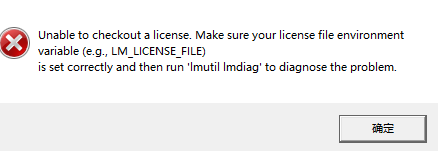
按照网上的方法破解后打开软件出现以下错误:
按照网上的

1、参考网上禁用网卡的方法失败;
2、参考网上用install.exe导入许可文件,结果我下载的版本没有install.exe,又失败。
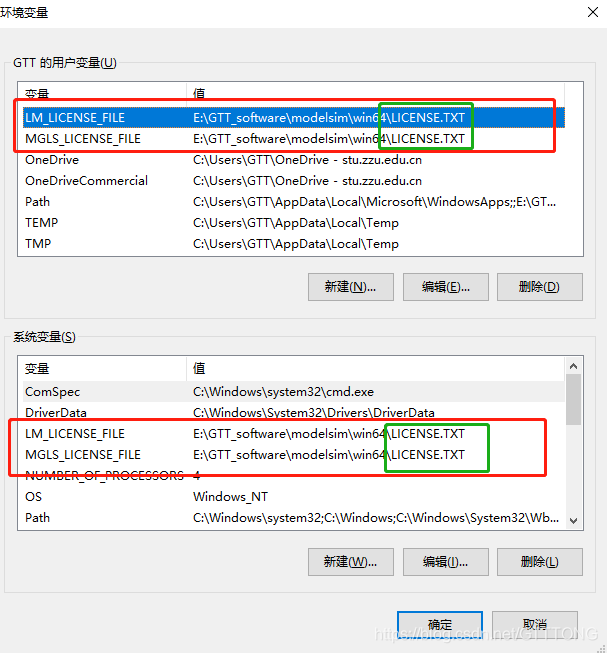
3、环境变量设置:有说MGLS_LICENSE_FILE :E:\GTT_software\modelsim\win64和LM_LICENSE_FILE:E:\GTT_software\modelsim\win64,干脆两个都加了,还是失败。

我最后的解决方法:在环境变量路径后面加上了许可文件的文件名,然后就可以了。
在这里插入图片描述

Determining the location of the ModelSim executable... Using: D:\ModelSim10.4\win64 To specify a ModelSim executable directory, select: Tools -> Options -> EDA Tool Options Note: if both ModelSim-Altera and ModelSim executables are available, ModelSim-Altera will be used. **** Generating the ModelSim Testbench **** quartus_eda --gen_testbench --check_outputs=on --tool=modelsim_oem --format=verilog counter10 -c counter10 --vector_source=D:/quartus13.1/work__space/counter10/Waveform.vwf --testbench_file=D:/quartus13.1/work__space/counter10/simulation/qsim/Waveform.vwf.vt Info: ******************************************************************* Info: Running Quartus II 64-Bit EDA Netlist Writer Info: Version 13.1.0 Build 162 10/23/2013 SJ Full Version Info: Copyright (C) 1991-2013 Altera Corporation. All rights reserved. Info: Your use of Altera Corporation's design tools, logic functions Info: and other software and tools, and its AMPP partner logic Info: functions, and any output files from any of the foregoing Info: (including device programming or simulation files), and any Info: associated documentation or information are expressly subject Info: to the terms and conditions of the Altera Program License Info: Subscription Agreement, Altera MegaCore Function License Info: Agreement, or other applicable license agreement, including, Info: without limitation, that your use is for the sole purpose of Info: programming logic devices manufactured by Altera and sold by Info: Altera or its authorized distributors. Please refer to the Info: applicable agreement for further details. Info: Processing started: Fri Jul 11 16:47:19 2025 Info: Command: quartus_eda --gen_testbench --check_outputs=on --tool=modelsim_oem --format=verilog counter10 -c counter10 --vector_source=D:/quartus13.1/work__space/counter10/Waveform.vwf --testbench_file=D:/quartus13.1/work__space/counter10/simulation/qsim/Waveform.vwf.
最新发布
07-12
评论 4
成就一亿技术人!
拼手气红包6.0元
还能输入1000个字符
 
红包 添加红包
表情包 插入表情
 条评论被折叠 查看
添加红包

请填写红包祝福语或标题

红包个数最小为10个

红包金额最低5元

当前余额3.43前往充值 >
需支付:10.00
成就一亿技术人!
领取后你会自动成为博主和红包主的粉丝 规则
hope_wisdom
发出的红包
实付
使用余额支付
点击重新获取
扫码支付
钱包余额 0

抵扣说明:

1.余额是钱包充值的虚拟货币,按照1:1的比例进行支付金额的抵扣。
2.余额无法直接购买下载,可以购买VIP、付费专栏及课程。

余额充值