
【2023.07.18】Guidance

文章探讨了在模型迭代过程中如何处理条件信息,包括Classifierguidance和classifier-freeguidance两种方法。Classifierguidance通过调整权重防止模型忽略条件,而classifier-freeguidance则直接学习条件分布。训练过程中,Classifierguidance需要额外训练分类器,而classifier-freeguidance允许无条件和有条件模型并行训练。

由于直接在每次迭代时增加条件如:,模型容易逐渐忽略条件信息。
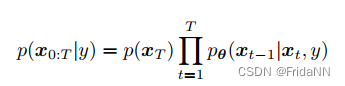
1.Classifier guidance

1)推导:

根据贝叶斯定理得到:
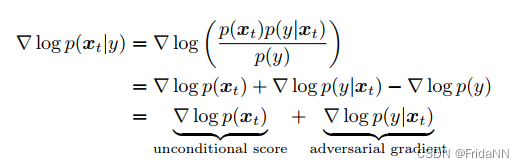
 增加权重后:

2)直观理解:

(1)权重

\gamma=0时,条件扩散模型忽略了 条件的存在。

随着\gamma的增加,给定条件,模型更容易产生在任意噪声程度下,会重复生成的样本。

(2)训练

模型需要额外训练分类器,因为模型需要能够处理任意噪声的输入。

2.classifier-free guidance
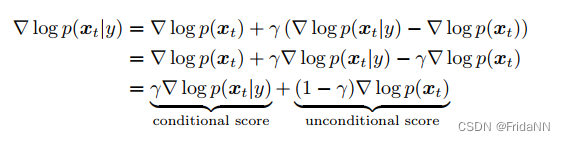
1)权重

\gamma=1:直接学习条件分布,忽略guidance。

\gamma> 1:优先学习条件分布,并且向着远离无条件分布的方向改进。即减少没有使用条件信息的样本的生成。

2)训练

无条件和有条件模型能同时被训练。只需在无条件信息时,用零替换条件信息。 


Starting C simulation ... D:/vitis202302/Vitis_HLS/2023.2/bin/vitis_hls.bat G:/vitis2023_project/SmoothProfileOnXAxisMean_NoGray_liangjing/SmoothProfileOnXAxisMean_NoGray/SmoothProfileOnXAxisMean_NoGray/csim.tcl INFO: [HLS 200-10] Running 'D:/vitis202302/Vitis_HLS/2023.2/bin/unwrapped/win64.o/vitis_hls.exe' INFO: [HLS 200-10] For user 'HP' on host 'desktop-qjs3vb7' (Windows NT_amd64 version 6.2) on Tue Jul 22 16:07:28 +0800 2025 INFO: [HLS 200-10] In directory 'G:/vitis2023_project/SmoothProfileOnXAxisMean_NoGray_liangjing' INFO: [HLS 200-2053] The vitis_hls executable is being deprecated. Consider using vitis-run --mode hls --tcl Sourcing Tcl script 'G:/vitis2023_project/SmoothProfileOnXAxisMean_NoGray_liangjing/SmoothProfileOnXAxisMean_NoGray/SmoothProfileOnXAxisMean_NoGray/csim.tcl' INFO: [HLS 200-1510] Running: source G:/vitis2023_project/SmoothProfileOnXAxisMean_NoGray_liangjing/SmoothProfileOnXAxisMean_NoGray/SmoothProfileOnXAxisMean_NoGray/csim.tcl INFO: [HLS 200-1510] Running: open_project SmoothProfileOnXAxisMean_NoGray INFO: [HLS 200-10] Opening project 'G:/vitis2023_project/SmoothProfileOnXAxisMean_NoGray_liangjing/SmoothProfileOnXAxisMean_NoGray'. INFO: [HLS 200-1510] Running: set_top SmoothProfileOnXAxisMean INFO: [HLS 200-1510] Running: add_files src/SmoothProfileOnXAxisMean.cpp INFO: [HLS 200-10] Adding design file 'src/SmoothProfileOnXAxisMean.cpp' to the project INFO: [HLS 200-1510] Running: add_files -tb src/SmoothProfileOnXAxisMean_test.cpp INFO: [HLS 200-10] Adding test bench file 'src/SmoothProfileOnXAxisMean_test.cpp' to the project INFO: [HLS 200-1510] Running: open_solution SmoothProfileOnXAxisMean_NoGray -flow_target vivado INFO: [HLS 200-10] Opening solution 'G:/vitis2023_project/SmoothProfileOnXAxisMean_NoGray_liangjing/SmoothProfileOnXAxisMean_NoGray/SmoothProfileOnXAxisMean_NoGray'. INFO: [SYN 201-201] Setting up clock 'default' with a period of 5ns. INFO: [HLS 200-1611] Setting target device to 'xcku060-ffva1156-2-e' INFO: [HLS 200-1505] Using flow_target 'vivado' Resolution: For help on HLS 200-1505 see docs.xilinx.com/access/sources/dita/topic?Doc_Version=2023.2%20English&url=ug1448-hls-guidance&resourceid=200-1505.html INFO: [HLS 200-1510] Running: set_part xcku060-ffva1156-2-e INFO: [HLS 200-1510] Running: create_clock -period 5 -name default INFO: [HLS 200-1510] Running: csim_design -quiet INFO: [SIM 211-2] *************** CSIM start *************** INFO: [SIM 211-4] CSIM will launch GCC as the compiler. INFO: [HLS 200-2036] Building debug C Simulation binaries make: 'csim.exe' is up to date. ERROR [HLS SIM]: an hls::stream is read while empty, which may result in RTL simulation hanging. If this is not expected, execute C simulation in debug mode in the GUI and examine the source code location of the blocked hls::stream::read() call to debug. If this is expected, add -DALLOW_EMPTY_HLS_STREAM_READS to -cflags to turn this error into a warning and allow empty hls::stream reads to return the default value for the data type. @E Simulation failed: Function 'main' returns nonzero value '3'. ERROR: [SIM 211-100] 'csim_design' failed: nonzero return value. INFO: [SIM 211-3] *************** CSIM finish *************** INFO: [HLS 200-111] Finished Command csim_design CPU user time: 0 seconds. CPU system time: 0 seconds. Elapsed time: 1.599 seconds; current allocated memory: 0.469 MB. 4 while executing "source G:/vitis2023_project/SmoothProfileOnXAxisMean_NoGray_liangjing/SmoothProfileOnXAxisMean_NoGray/SmoothProfileOnXAxisMean_NoGray/csim.tcl" invoked from within "hls::main G:/vitis2023_project/SmoothProfileOnXAxisMean_NoGray_liangjing/SmoothProfileOnXAxisMean_NoGray/SmoothProfileOnXAxisMean_NoGray/csim.tcl" ("uplevel" body line 1) invoked from within "uplevel 1 hls::main {*}$newargs" (procedure "hls_proc" line 16) invoked from within "hls_proc [info nameofexecutable] $argv" INFO: [HLS 200-112] Total CPU user time: 2 seconds. Total CPU system time: 0 seconds. Total elapsed time: 3.495 seconds; peak allocated memory: 194.176 MB. Finished C simulation.
最新发布
07-23
I'm sorry to hear that you're having trouble running IDEA 2023.. Can you provide more details about the issue you're facing? Are there any error messages or specific steps that lead to the problem? Additionally, please make sure that your system meets the minimum requirements for running IDEA 2023.1. In the meantime, here are a few general troubleshooting steps you can try: 1. Check compatibility: Ensure that your operating system is compatible with IDEA 2023.1. You can find the system requirements on the JetBrains website. 2. Verify installation: Double-check that IDEA 2023.1 was installed correctly. Sometimes, a corrupted installation can cause issues. Try reinstalling the software and see if that resolves the problem. 3. Update Java: IDEA requires Java to run. Make sure you have the latest version of Java installed on your system. You can download it from the official Java website. 4. Check for conflicting software: Sometimes, other software or antivirus programs can interfere with IDEA's operation. Temporarily disable any antivirus or security software and see if that helps. 5. Clear caches: IDEA stores various caches that can sometimes cause issues. Try clearing the caches by going to "File" > "Invalidate Caches / Restart" and select "Invalidate and Restart." If none of these steps resolve the issue, I recommend reaching out to JetBrains support or consulting their community forums for further assistance. They will be able to provide more specific guidance based on your situation.
评论 1
成就一亿技术人!
拼手气红包6.0元
还能输入1000个字符
 
红包 添加红包
表情包 插入表情
 条评论被折叠 查看
添加红包

请填写红包祝福语或标题

红包个数最小为10个

红包金额最低5元

当前余额3.43前往充值 >
需支付:10.00
成就一亿技术人!
领取后你会自动成为博主和红包主的粉丝 规则
hope_wisdom
发出的红包
实付
使用余额支付
点击重新获取
扫码支付
钱包余额 0

抵扣说明:

1.余额是钱包充值的虚拟货币,按照1:1的比例进行支付金额的抵扣。
2.余额无法直接购买下载,可以购买VIP、付费专栏及课程。

余额充值


