1. 箭头函数
<!DOCTYPE html>
<html lang="en">

<head>
  <meta charset="UTF-8">
  <meta name="viewport" content="width=device-width, initial-scale=1.0">
  <title>Document</title>
</head>

<body>

  <!--
    箭头函数比函数表达式更简洁的一种写法
    箭头函数更适用于那些本来需要匿名函数的地方,写法更简单
  -->
  <script>
    // 普通函数
    const fn = function () {
      console.log('普通函数')
    }
    fn()

    // 箭头函数
    const fm = () => {
      console.log('箭头函数')
    }
    fm()
    const sum = (x, y) => {
      console.log(x + y)
    }
    sum(1, 2)
  </script>
</body>

</html>
2. 箭头函数简写
<!DOCTYPE html>
<html lang="en">

<head>
  <meta charset="UTF-8">
  <meta name="viewport" content="width=device-width, initial-scale=1.0">
  <title>Document</title>
</head>

<body>

  <!--
    有且仅有一个形参,可以省略小括号不写
    函数体只有一句代码,可以省略 { } 和 return
    函数体返回对象,需要使用小括号包裹对象
  -->
  <script>
    /* 当箭头函数只有一个参数时,可以省略参数的小括号,
    其余个数不能省略(没有参数也需要写小括号) */
    const fn1 = (x) => {
      console.log(x)
    }
    fn1(1) // 1

    const fn2 = x => {
      console.log(x)
    }
    fn2(2) // 2

    /* 当箭头函数的函数体只有一句代码 可以省略函数体大括号,
    这句代码就是返回值(可以不用写return) */
    const fn3 = (x, y) => {
      return x + y
    }
    console.log(fn3(1, 2)) // 3

    const fn4 = (x, y) => x + y
    console.log(fn4(1, 2)) // 3

    /* 如果返回的是个对象,则需要把对象用小括号包裹 */
    const fn5 = () => {
      return { age: 18 }
    }
    console.log(fn5()) // {age: 18}
    // 未用小括号,返回值为undefined
    const fn6 = () => { age: 18 }
    console.log(fn6()) // undefined
    // 正确写法
    const fn7 = () => ({ age: 18 })
    console.log(fn7()) // {age: 18}

  </script>
</body>

</html>
3. arguments
<!DOCTYPE html>
<html lang="en">

<head>
  <meta charset="UTF-8">
  <meta name="viewport" content="width=device-width, initial-scale=1.0">
  <title>Document</title>
</head>

<body>

  <!--
    arguments对象(了解)
    arguments 只存在于函数中(但不能在箭头函数中使用)
    arguments 的作用是动态获取函数的实参
    可以通过for循环依次得到传递过来的实参
  -->
  <!--
    arguments 是一个伪数组,有长度有索引号
    但是没有 pop() push() 等数组方法
  -->
  <script>
    // 普通函数
    function fn1() {
      console.log(arguments)
      for (let i = 0; i < arguments.length; i++) {
        console.log(arguments[i])
      }
    }
    fn1(1, 4, 6, 7, 23, 35)

    // 箭头函数
    const fn2 = () => {
      console.log(arguments) // 控制台报错 arguments未定义
    }
    fn2()
  </script>
</body>

</html>
4. 剩余参数
<!DOCTYPE html>
<html lang="en">

<head>
  <meta charset="UTF-8">
  <meta name="viewport" content="width=device-width, initial-scale=1.0">
  <title>Document</title>
</head>

<body>

  <!--
    剩余参数(重点) :用于获取多余的实参,并形成一个真数组(arguments 是伪数组)
    也可以解决形参和实参个数不匹配的问题
  -->
  <!--
    ... 是语法符号,置于最末函数形参之前,用于获取多余的实参
    借助 ... 获取的剩余实参,是个真数组
    普通函数和箭头函数中都可以使用
  -->
  <script>
    // 普通函数
    function fn1(x, y, ...other) {
      console.log(x, y)
      console.log(other)
    }
    fn1(1, 4, 6, 7, 23, 35)

    // 箭头函数
    const fn2 = (x, y, ...nums) => {
      console.log(x, y)
      console.log(nums)
    }
    fn2(1, 4, 6, 7, 23, 35)
  </script>
</body>

</html>
5. 展开运算符
<!DOCTYPE html>
<html lang="en">

<head>
  <meta charset="UTF-8">
  <meta name="viewport" content="width=device-width, initial-scale=1.0">
  <title>Document</title>
</head>

<body>

  <!--
    展开运算符(…),将一个数组/对象进行展开,不会修改原数组
    典型运用场景: 求数组最大值(最小值)、合并数组等
  -->
  <!--
    展开运算符 or 剩余参数
    剩余参数:函数参数使用,把多个元素收集起来生成一个真数组 (凝聚)
    展开运算符:将数组展开成各个元素(拆散)
  -->
  <script>
    const arr1 = [1, 4, 6, 5, 23, 46, 67, 56]
    console.log(...arr1) // 1 4 6 5 23 46 67 56
    console.log(Math.max(...arr1)) // 67
    console.log(Math.min(...arr1)) // 1

    const arr2 = [1, 20, 30, 5, 6]

    // 展开运算符 合并数组arr1和arr2
    const arr3 = [...arr1, ...arr2]
    console.log(arr3) // [1, 4, 6, 5, 23, 46, 67, 56, 1, 20, 30, 5, 6]

    // concat 合并数组arr1和arr2
    const arr4 = arr1.concat(arr2)
    console.log(arr4) // [1, 4, 6, 5, 23, 46, 67, 56, 1, 20, 30, 5, 6]
  </script>
</body>

</html>
6. 解构数组
<!DOCTYPE html>
<html lang="en">

<head>
  <meta charset="UTF-8">
  <meta name="viewport" content="width=device-width, initial-scale=1.0">
  <title>Document</title>
</head>

<body>

  <!--
    解构赋值:
      可以将数组中的值或对象的属性取出,赋值给其他变量
      把一个事物的结构进行拆解
  -->
  <script>
    // 数组解构 右侧数组的值将被赋值给左侧的变量
    const [a, b, c] = [1, 2, 3]
    console.log(a) // 1
    console.log(b) // 2
    console.log(c) // 3

    // 交换两个变量
    // JS中小括号()和中括号[]开头时,括号前需加分号(或加到上行末尾)
    let x = 1
    let y = 2
    console.log(x, y); // 1 2 (此行末尾需加分号)
    [y, x] = [x, y]
    console.log(x, y) // 2 1
  </script>
</body>

</html>
7. 案例1_数组解构
<!DOCTYPE html>
<html lang="en">

<head>
  <meta charset="UTF-8">
  <meta name="viewport" content="width=device-width, initial-scale=1.0">
  <title>Document</title>
</head>

<body>

  <script>
    function getValue() {
      // 函数返回值可为多个数据 需用[ , ]包裹
      return [12, 23]
    }
    let arr = getValue()
    const [a, b] = arr
    console.log(a, b) // 12 23

  </script>
</body>

</html>
8. 解构数组_变量和值不匹配时
<!DOCTYPE html>
<html lang="en">

<head>
  <meta charset="UTF-8">
  <meta name="viewport" content="width=device-width, initial-scale=1.0">
  <title>Document</title>
</head>

<body>

  <!-- 数组解构:变量和值不匹配的情况 -->
  <script>
    // 1. 变量多值少 多余的变量将被赋值为undefined
    const [a1, b1, c1] = [1, 2]
    console.log(a1, b1, c1) // 1 2 undefined

    // 2. 变量多值少 防止有undefined传递值的情况,可以设置默认值
    const [a2, b2, c2 = 0] = [1, 2]
    console.log(a2, b2, c2) // 1 2 0

    // 3. 变量少值多 多出的值直接忽略
    const [a3, b3] = [1, 2, 3, 4, 5]
    console.log(a3, b3) // 1 2

    // 4. 变量少值多 利用剩余参数(返回为数组)
    const [a4, b4, ...nums] = [1, 2, 3, 4, 5]
    console.log(a4, b4) // 1 2
    console.log(nums) // [3, 4, 5]

    // 5. 按需导入,忽略某些值
    const [a5, b5, , d5] = [1, 2, 3, 4]
    console.log(a5, b5, d5) // 1 2 4

    // 6. 多维数组的解构
    const [a6, [b6, c6]] = [1, [2, 3]]
    console.log(a6, b6, c6) // 1 2 3
  </script>
</body>

</html>
9. 解构对象
<!DOCTYPE html>
<html lang="en">

<head>
  <meta charset="UTF-8">
  <meta name="viewport" content="width=device-width, initial-scale=1.0">
  <title>Document</title>
</head>

<body>

  <!-- 对象解构赋值:可以将对象的属性取出,赋值给其他变量 -->
  <!--
    注意:
    ➢ 对象的属性名一定要和变量名相同
    ➢ 变量名如果没有和对象属性名相同的则默认是 undefined
    ➢ 注意解构的变量名不要和外面的变量名冲突,否则报错
  -->
  <script>
    const ym = { name: '杨幂', age: 18 }
    const { name, age } = ym
    console.log(name, age) // 杨幂 18
    // name是JS保留字 起名时尽量避开
    // 原名是name,改名后使用旧名name,输出为空

    const pig = { pName: '佩奇', pAge: 6 }
    const { pName: pigName, pAge } = pig
    console.log(pigName, pAge) // 佩奇 6
    console.log(pName) // 报错 pName未定义

  </script>
</body>

</html>
10. 解构对象数组
<!DOCTYPE html>
<html lang="en">

<head>
  <meta charset="UTF-8">
  <meta name="viewport" content="width=device-width, initial-scale=1.0">
  <title>Document</title>
</head>

<body>

  <script>
    // 对象数组基本解构方法,后期数组内多个对象时配合遍历解构
    const student = [
      { stuName: 'Tom', age: 18 }
    ]
    const [{ stuName, age }] = student
    console.log(stuName, age) // Tom 18

  </script>
</body>

</html>
11. 解构多级对象
<!DOCTYPE html>
<html lang="en">

<head>
  <meta charset="UTF-8">
  <meta name="viewport" content="width=device-width, initial-scale=1.0">
  <title>Document</title>
</head>

<body>

  <script>
    const monkey = {
      mkName: '孙悟空',
      family: {
        teacher: '唐僧',
        brother1: '猪八戒',
        brother2: '沙僧'
      }
    }

    // const { mkName, family } = monkey
    // console.log(mkName, family)
    // 孙悟空 {teacher: '唐僧', brother1: '猪八戒', brother2: '沙僧'}

    const { mkName, family: { brother1, brother2 } } = monkey
    console.log(mkName, brother1, brother2) // 孙悟空 猪八戒 沙僧

  </script>
</body>

</html>
12. 案例2_多级对象解构
<!DOCTYPE html>
<html lang="en">

<head>
  <meta charset="UTF-8">
  <meta name="viewport" content="width=device-width, initial-scale=1.0">
  <title>Document</title>
</head>

<body>

  <script>
    const msg = {
      "code": 200,
      "msg": "获取新闻列表成功",
      "data": [
        {
          "id": 1,
          "title": "5G商用自己,三大运用商收入下降",
          "count": 58
        },
        {
          "id": 2,
          "title": "国际媒体头条速览",
          "count": 56
        },
        {
          "id": 3,
          "title": "乌克兰和俄罗斯持续冲突",
          "count": 1669
        },
      ]
    }

    // 传参时,形参也可以解构对象
    function render1({ data }) {
      console.log(data)
    }
    render1(msg)

    // 防止msg里面的data名字混淆,要求渲染函数里面的数据名改为myData
    function render2({ data: myData }) {
      console.log(myData)
    }
    render2(msg)
  </script>
</body>

</html>
13. 案例3_渲染页面(解构)
<!DOCTYPE html>
<html lang="en">

<head>
  <meta charset="UTF-8">
  <meta http-equiv="X-UA-Compatible" content="IE=edge">
  <meta name="viewport" content="width=device-width, initial-scale=1.0">
  <title>商品渲染</title>
  <style>
    * {
      margin: 0;
      padding: 0;
      box-sizing: border-box;
    }

    .list {
      width: 990px;
      margin: 0 auto;
      display: flex;
      flex-wrap: wrap;
      padding-top: 100px;
    }

    .item {
      width: 240px;
      margin-left: 10px;
      padding: 20px 30px;
      transition: all .5s;
      margin-bottom: 20px;
    }

    .item:nth-child(4n) {
      margin-left: 0;
    }

    .item:hover {
      box-shadow: 0px 0px 5px rgba(0, 0, 0, 0.2);
      transform: translate3d(0, -4px, 0);
      cursor: pointer;
    }

    .item img {
      width: 100%;
    }

    .item .name {
      font-size: 18px;
      margin-bottom: 10px;
      color: #666;
    }

    .item .price {
      font-size: 22px;
      color: firebrick;
    }

    .item .price::before {
      content: "¥";
      font-size: 14px;
    }
  </style>
</head>

<body>
  <div class="list">
    <!--
      <div class="item">
      <img src="" alt="">
      <p class="name"></p>
      <p class="price"></p>
      </div>
    -->
  </div>
  <script>
    const goodsList = [
      {
        id: '4001172',
        name: '称心如意手摇咖啡磨豆机咖啡豆研磨机',
        price: '289.00',
        picture: 'https://yanxuan-item.nosdn.127.net/84a59ff9c58a77032564e61f716846d6.jpg',
      },
      {
        id: '4001594',
        name: '日式黑陶功夫茶组双侧把茶具礼盒装',
        price: '288.00',
        picture: 'https://yanxuan-item.nosdn.127.net/3346b7b92f9563c7a7e24c7ead883f18.jpg',
      },
      {
        id: '4001009',
        name: '竹制干泡茶盘正方形沥水茶台品茶盘',
        price: '109.00',
        picture: 'https://yanxuan-item.nosdn.127.net/2d942d6bc94f1e230763e1a5a3b379e1.png',
      },
      {
        id: '4001874',
        name: '古法温酒汝瓷酒具套装白酒杯莲花温酒器',
        price: '488.00',
        picture: 'https://yanxuan-item.nosdn.127.net/44e51622800e4fceb6bee8e616da85fd.png',
      },
      {
        id: '4001649',
        name: '大师监制龙泉青瓷茶叶罐',
        price: '139.00',
        picture: 'https://yanxuan-item.nosdn.127.net/4356c9fc150753775fe56b465314f1eb.png',
      },
      {
        id: '3997185',
        name: '与众不同的口感汝瓷白酒杯套组1壶4杯',
        price: '108.00',
        picture: 'https://yanxuan-item.nosdn.127.net/8e21c794dfd3a4e8573273ddae50bce2.jpg',
      },
      {
        id: '3997403',
        name: '手工吹制更厚实白酒杯壶套装6壶6杯',
        price: '99.00',
        picture: 'https://yanxuan-item.nosdn.127.net/af2371a65f60bce152a61fc22745ff3f.jpg',
      },
      {
        id: '3998274',
        name: '德国百年工艺高端水晶玻璃红酒杯2支装',
        price: '139.00',
        picture: 'https://yanxuan-item.nosdn.127.net/8896b897b3ec6639bbd1134d66b9715c.jpg',
      },
    ]

    let str = ''
    /* for (let i = 0; i < goodsList.length; i++) {
      str += `
          <div class="item">
          <img src="${goodsList[i].picture}" alt="">
          <p class="name">${goodsList[i].name}</p>
          <p class="price">${goodsList[i].price}</p>
          </div>
        `
    } */
    for (let i = 0; i < goodsList.length; i++) {
      // 解构对象
      const { name, price, picture } = goodsList[i]
      str += `
          <div class="item">
          <img src="${picture}" alt="">
          <p class="name">${name}</p>
          <p class="price">${price}</p>
          </div>
        `
    }
    document.querySelector('.list').innerHTML = str
  </script>
</body>

</html>
14. forEach遍历数组
<!DOCTYPE html>
<html lang="en">

<head>
  <meta charset="UTF-8">
  <meta name="viewport" content="width=device-width, initial-scale=1.0">
  <title>Document</title>
</head>

<body>

  <!-- forEach遍历数组元素 不返回数组 -->
  <script>
    const names = ['Tom', 'Jerry', 'Taylor']
    names.forEach((el, index) => {
      /*
        element是数组元素,简写为el
        index是数组元素的索引号
      */
      console.log(el, index)
    })
    /*
      Tom 0
      Jerry 1
      Taylor 2
    */
  </script>
</body>

</html>
15. map迭代数组
<!DOCTYPE html>
<html lang="en">

<head>
  <meta charset="UTF-8">
  <meta name="viewport" content="width=device-width, initial-scale=1.0">
  <title>Document</title>
</head>

<body>

  <!-- map迭代数组 遍历数组处理数据,并且返回新的数 -->
  <!--
    map 也称为映射。映射指两个元素的集之间元素相互“对应”的关系。
    map重点在于有返回值,forEach没有返回值(undefined)
  -->
  <script>
    const myColor1 = ['红', '绿', '蓝']
    console.log(myColor1) // ['红', '绿', '蓝']

    const myColor2 = myColor1.map((el, index) => {
      return el + '色'
    })
    console.log(myColor2) // ['红色', '绿色', '蓝色']

  </script>
</body>

</html>
16. join拼接数组元素
<!DOCTYPE html>
<html lang="en">

<head>
  <meta charset="UTF-8">
  <meta name="viewport" content="width=device-width, initial-scale=1.0">
  <title>Document</title>
</head>

<body>

  <!-- join拼接数组元素 用于把数组中的所有元素连接成一个字符串 -->
  <script>
    const myColor = ['红色', '绿色', '蓝色']
    console.log(myColor.join('')) // 红色绿色蓝色
    console.log(myColor.join('--')) // 红色--绿色--蓝色
  </script>
</body>

</html>
17. 案例4_渲染页面(map+join)
<!DOCTYPE html>
<html lang="en">

<head>
  <meta charset="UTF-8">
  <meta http-equiv="X-UA-Compatible" content="IE=edge">
  <meta name="viewport" content="width=device-width, initial-scale=1.0">
  <title>商品渲染</title>
  <style>
    * {
      margin: 0;
      padding: 0;
      box-sizing: border-box;
    }

    .list {
      width: 990px;
      margin: 0 auto;
      display: flex;
      flex-wrap: wrap;
      padding-top: 100px;
    }

    .item {
      width: 240px;
      margin-left: 10px;
      padding: 20px 30px;
      transition: all .5s;
      margin-bottom: 20px;
    }

    .item:nth-child(4n) {
      margin-left: 0;
    }

    .item:hover {
      box-shadow: 0px 0px 5px rgba(0, 0, 0, 0.2);
      transform: translate3d(0, -4px, 0);
      cursor: pointer;
    }

    .item img {
      width: 100%;
    }

    .item .name {
      font-size: 18px;
      margin-bottom: 10px;
      color: #666;
    }

    .item .price {
      font-size: 22px;
      color: firebrick;
    }

    .item .price::before {
      content: "¥";
      font-size: 14px;
    }
  </style>
</head>

<body>
  <div class="list">
    <!--
      <div class="item">
      <img src="" alt="">
      <p class="name"></p>
      <p class="price"></p>
      </div>
    -->
  </div>
  <script>
    const goodsList = [
      {
        id: '4001172',
        name: '称心如意手摇咖啡磨豆机咖啡豆研磨机',
        price: '289.00',
        picture: 'https://yanxuan-item.nosdn.127.net/84a59ff9c58a77032564e61f716846d6.jpg',
      },
      {
        id: '4001594',
        name: '日式黑陶功夫茶组双侧把茶具礼盒装',
        price: '288.00',
        picture: 'https://yanxuan-item.nosdn.127.net/3346b7b92f9563c7a7e24c7ead883f18.jpg',
      },
      {
        id: '4001009',
        name: '竹制干泡茶盘正方形沥水茶台品茶盘',
        price: '109.00',
        picture: 'https://yanxuan-item.nosdn.127.net/2d942d6bc94f1e230763e1a5a3b379e1.png',
      },
      {
        id: '4001874',
        name: '古法温酒汝瓷酒具套装白酒杯莲花温酒器',
        price: '488.00',
        picture: 'https://yanxuan-item.nosdn.127.net/44e51622800e4fceb6bee8e616da85fd.png',
      },
      {
        id: '4001649',
        name: '大师监制龙泉青瓷茶叶罐',
        price: '139.00',
        picture: 'https://yanxuan-item.nosdn.127.net/4356c9fc150753775fe56b465314f1eb.png',
      },
      {
        id: '3997185',
        name: '与众不同的口感汝瓷白酒杯套组1壶4杯',
        price: '108.00',
        picture: 'https://yanxuan-item.nosdn.127.net/8e21c794dfd3a4e8573273ddae50bce2.jpg',
      },
      {
        id: '3997403',
        name: '手工吹制更厚实白酒杯壶套装6壶6杯',
        price: '99.00',
        picture: 'https://yanxuan-item.nosdn.127.net/af2371a65f60bce152a61fc22745ff3f.jpg',
      },
      {
        id: '3998274',
        name: '德国百年工艺高端水晶玻璃红酒杯2支装',
        price: '139.00',
        picture: 'https://yanxuan-item.nosdn.127.net/8896b897b3ec6639bbd1134d66b9715c.jpg',
      },
    ]

    const goodsList1 = goodsList.map((el, index) => {
      const { picture, name, price } = el
      return `
        <div div class="item" >
          <img src="${picture}" alt="">
          <p class="name">${name}</p>
          <p class="price">${price}</p>
        </div>
      `
    })
    console.log(goodsList1) // goodsList1现为字符串数组
    // console.log(goodsList1.join(''))

    document.querySelector('.list').innerHTML = goodsList1.join('')

  </script>
</body>

</html>
18. reduce累计器
<!DOCTYPE html>
<html lang="en">

<head>
  <meta charset="UTF-8">
  <meta name="viewport" content="width=device-width, initial-scale=1.0">
  <title>Document</title>
</head>

<body>

  <!-- reduce累计器 返回累计处理的结果,经常用于求和等 -->
  <!-- arr.reduce(function(上一次值,当前值){},初始值) -->
  <!--
    reduce 执行过程:
      1.如果有起始值,则把初始值累加到里面;
        如果没有起始值, 则上一次值以数组的第一个数组元素的值
      2.每一次循环,把返回值给做为 下一次循环的上一次值
      3.如果有起始值,则 起始值做为上一次值
  -->
  <script>
    // 1. 数组
    const arr = [10, 20, 30]
    const sum1 = arr.reduce((prev, current) => {
      return prev + current
    })
    console.log(sum1) // 60

    const sum2 = arr.reduce((prev, current) => {
      return prev + current
    }, 100)
    console.log(sum2) // 160

    // 2. 对象数组(对象数组.reduce 必须写初始值)
    const Peason = [
      {
        name: '张三',
        salary: 10000
      }, {
        name: '李四',
        salary: 15000
      }, {
        name: '王五',
        salary: 20000
      }
    ]
    // 未设初始值(错误)
    const salary1 = Peason.reduce((prev, current) => {
      return prev + current.salary
    })
    console.log(salary1) // [object Object]1500020000
    // 设置初始值
    const salary2 = Peason.reduce((prev, current) => {
      return prev + current.salary
    }, 0)
    console.log(salary2) // 45000
  </script>
</body>

</html>
19. 案例5_购物车
<!DOCTYPE html>
<html lang="en">

<head>
  <meta charset="UTF-8" />
  <meta http-equiv="X-UA-Compatible" content="IE=edge" />
  <meta name="viewport" content="width=device-width, initial-scale=1.0" />
  <title>Document</title>
  <style>
    * {
      margin: 0;
      padding: 0;
      box-sizing: border-box;
    }

    .list {
      width: 990px;
      margin: 100px auto 0;
    }

    .item {
      padding: 15px;
      transition: all 0.5s;
      display: flex;
      border-top: 1px solid #e4e4e4;
    }

    .item:nth-child(4n) {
      margin-left: 0;
    }

    .item:hover {
      cursor: pointer;
      background-color: #f5f5f5;
    }

    .item img {
      width: 80px;
      height: 80px;
      margin-right: 10px;
    }

    .item .name {
      font-size: 18px;
      margin-right: 10px;
      color: #333;
      flex: 2;
    }

    .item .name .tag {
      display: block;
      padding: 2px;
      font-size: 12px;
      color: #999;
    }

    .item .price,
    .item .sub-total {
      font-size: 18px;
      color: firebrick;
      flex: 1;
    }

    .item .price::before,
    .item .sub-total::before,
    .amount::before {
      content: '¥';
      font-size: 12px;
    }

    .item .spec {
      flex: 2;
      color: #888;
      font-size: 14px;
    }

    .item .count {
      flex: 1;
      color: #aaa;
    }

    .total {
      width: 990px;
      margin: 0 auto;
      display: flex;
      justify-content: flex-end;
      border-top: 1px solid #e4e4e4;
      padding: 20px;
    }

    .total .amount {
      font-size: 18px;
      color: firebrick;
      font-weight: bold;
      margin-right: 50px;
    }
  </style>
</head>

<body>
  <div class="list">
    <!-- <div class="item">
      <img src="https://yanxuan-item.nosdn.127.net/84a59ff9c58a77032564e61f716846d6.jpg" alt="">
      <p class="name">称心如意手摇咖啡磨豆机咖啡豆研磨机 </p>
      <p class="price">289.90</p>
      <p class="count">x2</p>
      <p class="sub-total">579.80</p>
    </div> -->
  </div>
  <div class="total">
    <div>
      合计:
      <span class="amount">1000.00</span>
    </div>
  </div>
  <script>
    const goodsList = [
      {
        id: '4001172',
        name: '称心如意手摇咖啡磨豆机咖啡豆研磨机',
        price: 289.9,
        picture:
          'https://yanxuan-item.nosdn.127.net/84a59ff9c58a77032564e61f716846d6.jpg',
        count: 2,
        spec: { color: '白色' },
      },
      {
        id: '4001009',
        name: '竹制干泡茶盘正方形沥水茶台品茶盘',
        price: 109.8,
        picture:
          'https://yanxuan-item.nosdn.127.net/2d942d6bc94f1e230763e1a5a3b379e1.png',
        count: 3,
        spec: { size: '40cm*40cm', color: '黑色' },
      },
      {
        id: '4001874',
        name: '古法温酒汝瓷酒具套装白酒杯莲花温酒器',
        price: 488,
        picture:
          'https://yanxuan-item.nosdn.127.net/44e51622800e4fceb6bee8e616da85fd.png',
        count: 1,
        spec: { color: '青色', sum: '一大四小' },
        gift: '500g茶叶,羽毛球',
      },
      {
        id: '4001649',
        name: '大师监制龙泉青瓷茶叶罐',
        price: 139,
        picture:
          'https://yanxuan-item.nosdn.127.net/4356c9fc150753775fe56b465314f1eb.png',
        count: 2,
        spec: { size: '小号', color: '紫色' },
        gift: '50g茶叶,清洗球',
      },
    ]

    // 数字转字符串 toFixed(保留小数位数) 默认不保留 四舍五入
    let str = goodsList.map((el, index) => {
      const { name, price, picture, count } = el
      return `
        <div class="item">
          <img src="${picture}" alt="">
          <p class="name">${name}</p>
          <p class="price">${price.toFixed(2)}</p>
          <p class="count">x${count}</p>
          <p class="sub-total">${(price * count).toFixed(2)}</p>
        </div>
      `
    }).join('')
    document.querySelector('.list').innerHTML = str

    let amount = goodsList.reduce((prev, current) => {
      return prev + current.count * current.price
    }, 0)
    document.querySelector('.amount').innerHTML = amount.toFixed(2)
  </script>
</body>

</html>
20. 作业
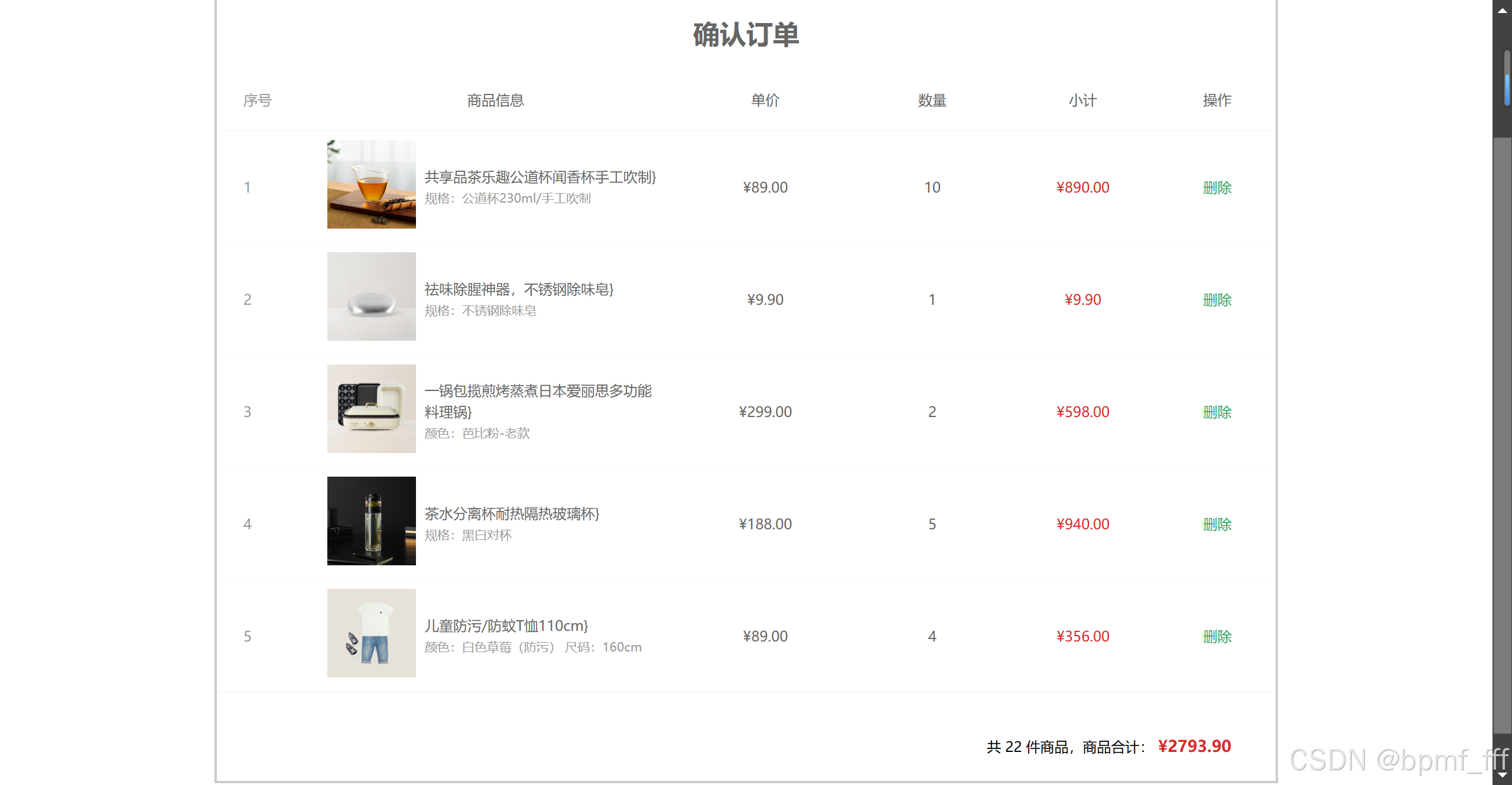
20.1 确认订单页面
<!DOCTYPE html>
<html lang="en">

<head>
  <meta charset="UTF-8" />
  <meta http-equiv="X-UA-Compatible" content="IE=edge" />
  <meta name="viewport" content="width=device-width, initial-scale=1.0" />
  <title>Document</title>
  <style>
    * {
      margin: 0;
      padding: 0;
      box-sizing: border-box;
    }

    a {
      text-decoration: none;
    }

    .xtx-cart-page .container {
      width: 1200px;
      margin: 50px auto;
      border: 3px solid #ccc;
    }

    .xtx-cart-page h3 {
      text-align: center;
      font-size: 30px;
      margin: 20px 0;
    }

    .tc {
      text-align: center;
    }

    .tc .xtx-numbox {
      margin: 0 auto;
      width: 120px;
    }

    .red {
      color: #db2828;
    }

    .green {
      color: #32aa66;
    }

    .f16 {
      font-size: 16px;
    }

    .goods {
      display: flex;
      align-items: center;
    }

    .goods img {
      width: 100px;
      height: 100px;
    }

    .goods>div {
      width: 280px;
      font-size: 16px;
      padding-left: 10px;
    }

    .goods>div .attr {
      font-size: 14px;
      color: #999;
    }

    .action {
      display: flex;
      background: #fff;
      margin-top: 20px;
      height: 80px;
      align-items: center;
      font-size: 16px;
      justify-content: space-between;
      padding: 0 30px;
    }

    .action .xtx-checkbox {
      color: #999;
    }

    .action .batch a {
      margin-left: 20px;
    }

    .action .red {
      font-size: 18px;
      margin-right: 20px;
      font-weight: bold;
    }

    .tit {
      color: #666;
      font-size: 16px;
      font-weight: normal;
      line-height: 50px;
    }

    .xtx-cart-page .cart {
      background: #fff;
      color: #666;
    }

    .xtx-cart-page .cart table {
      border-spacing: 0;
      border-collapse: collapse;
      line-height: 24px;
    }

    .xtx-cart-page .cart table th,
    .xtx-cart-page .cart table td {
      padding: 10px;
      border-bottom: 1px solid #f5f5f5;
    }

    .xtx-cart-page .cart table th:first-child,
    .xtx-cart-page .cart table td:first-child {
      text-align: left;
      padding-left: 30px;
      color: #999;
    }

    .xtx-cart-page .cart table th {
      font-size: 16px;
      font-weight: normal;
      line-height: 50px;
    }

    .box {
      width: 1200px;
      margin: 0 auto;
    }

    .box p {
      height: 30px;
      line-height: 30px;
    }
  </style>
</head>

<body>
  <!-- ---------------------- 题目区域 --------------------------- -->
  <div class="box">
    <p>题目说明:</p>
    <p>1. 基于 arr(代码中已准备) 渲染下面购物车列表</p>
    <p>2. 基于 arr 计算 底部总价 和 总数量</p>
    <p>3. 实现 删除功能</p>
  </div>

  <!-- ---------------------- 代码区域 ---------------------------- -->
  <div class="xtx-cart-page">
    <div class="container">
      <div class="cart">
        <h3>确认订单</h3>
        <table>
          <thead>
            <tr>
              <th width="120">序号</th>
              <th width="400">商品信息</th>
              <th width="220">单价</th>
              <th width="180">数量</th>
              <th width="180">小计</th>
              <th width="140">操作</th>
            </tr>
          </thead>
          <!-- 商品列表 -->
          <tbody>
            <tr>
              <td>1</td>
              <td>
                <div class="goods">
                  <a href="#/"><img src="https://yanxuan-item.nosdn.127.net/6aaff130c1d97c60f9931e00734bbad6.png"
                      alt=""></a>
                  <div>
                    <p class="name ellipsis">
                      共享品茶乐趣公道杯闻香杯手工吹制
                    </p>
                    <p class="attr">规格:公道杯230ml/手工吹制</p>
                  </div>
                </div>
              </td>
              <td class="tc">
                <p>¥89.00</p>
              </td>
              <td class="tc">10</td>
              <td class="tc">
                <p class="f16 red">¥890.00</p>
              </td>
              <td class="tc">
                <p><a class="green" href="javascript:;" onclick="del()">删除</a></p>
              </td>
            </tr>
          </tbody>
        </table>
      </div>
      <!-- 操作栏 -->
      <div class="action">
        <div class="batch"></div>
        <div class="total">
          共 9 件商品,商品合计:
          <span class="red">¥1800</span>
        </div>
      </div>
    </div>
  </div>

  <script>
    const arr = [
      {
        id: '1652038',
        attrsText: '规格:公道杯230ml/手工吹制',
        name: '共享品茶乐趣公道杯闻香杯手工吹制',
        price: '89.00',
        picture:
          'https://yanxuan-item.nosdn.127.net/6aaff130c1d97c60f9931e00734bbad6.png',
        count: 10,
      },
      {
        id: '1096001',
        attrsText: '规格:不锈钢除味皂',
        name: '祛味除腥神器,不锈钢除味皂',
        price: '9.90',
        picture:
          'https://yanxuan-item.nosdn.127.net/b38f9ac476ec494235f4aa80fc8e198c.png',
        count: 1,
      },
      {
        id: '3446012',
        attrsText: '颜色:芭比粉-老款',
        name: '一锅包揽煎烤蒸煮日本爱丽思多功能料理锅',
        price: '299.00',
        picture:
          'https://yanxuan-item.nosdn.127.net/667dbc276e46e31b5a00869b9b1b8ef3.png',
        count: 2,
      },
      {
        id: '1652037',
        attrsText: '规格:黑白对杯',
        name: '茶水分离杯耐热隔热玻璃杯',
        price: '188.00',
        picture:
          'https://yanxuan-item.nosdn.127.net/a09de222ed32efa8ffe359b1d5780574.jpg',
        count: 5,
      },
      {
        id: '3504000',
        name: '儿童防污/防蚊T恤110cm',
        attrsText: '颜色:白色草莓(防污) 尺码:160cm',
        price: '89.00',
        picture:
          'https://yanxuan-item.nosdn.127.net/f899c55f36cb74232abb349234d9e676.png',
        count: 4,
      },
    ]

    function render() {
      const tbody = document.querySelector('.cart tbody')
      const action = document.querySelector('.action')

      // 利用map+join渲染数据到页面上
      const str = arr.map((el, index) => {
        const { name, attrsText, price, picture, count } = el
        return `
          <tr>
            <td>${index + 1}</td>
            <td>
              <div class="goods">
                <a href="#/"><img src="${picture}"
                    alt=""></a>
                <div>
                  <p class="name ellipsis">
                  ${name}}
                  </p>
                  <p class="attr">${attrsText}</p>
                </div>
              </div>
            </td>
            <td class="tc">
              <p>¥${price}</p>
            </td>
            <td class="tc">${count}</td>
            <td class="tc">
              <p class="f16 red">¥${(price * count).toFixed(2)}</p>
            </td>
            <td class="tc">
              <p><a class="green" href="javascript:;" onclick="del(${index})">删除</a></p>
            </td>
          </tr>
        `
      }).join('')
      // document.querySelector('.cart tbody').innerHTML = str
      tbody.innerHTML = str

      // 利用reduce来求和
      // 箭头函数 省略大括号和return
      const totalCount = arr.reduce((prev, current) => prev + current.count, 0)
      const totalPrice = arr.reduce((prev, current) => prev + current.count * current.price, 0)
      /* const totalCount = arr.reduce((prev, current) => {
        return prev + current.count
      }, 0)
      const totalPrice = arr.reduce((prev, current) => {
        return prev + current.count * current.price
      }, 0).toFixed(2) */

      action.innerHTML = `
        <div class="batch"></div>
        <div class="total">
          共 ${totalCount} 件商品,商品合计:
        <span class="red">¥${totalPrice.toFixed(2)}</span>
        </div>
      `
      /* document.querySelector('.total').innerHTML = `
        共 ${totalCount} 件商品,商品合计:
        <span class="red">¥${totalPrice.toFixed(2)}</span>
      ` */
    }
    render()

    // 利用splice来删除数据
    function del(index) {
      arr.splice(index, 1)
      render()
    }

  </script>
</body>

</html>
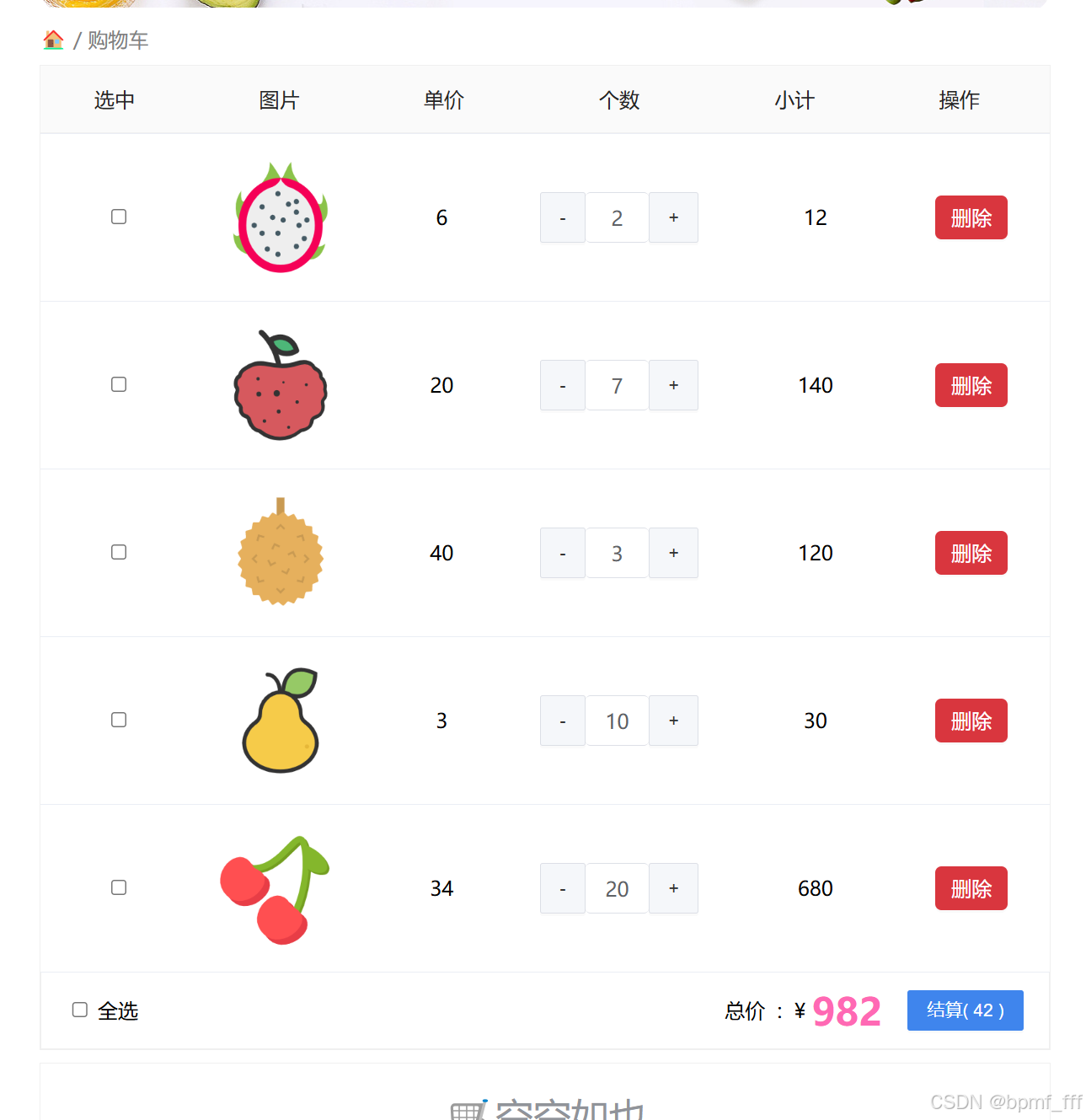
20.2 水果列表_二次开发题
<!DOCTYPE html>
<html lang="en">
<head>
<meta charset="UTF-8" />
<meta http-equiv="X-UA-Compatible" content="IE=edge" />
<meta name="viewport" content="width=device-width, initial-scale=1.0" />
<link rel="stylesheet" href="./css/inputnumber.css" />
<link rel="stylesheet" href="./css/index.css" />
<title>购物车</title>
</head>
<body>
<div class="app-container" id="app">
<!-- 顶部banner -->
<div class="banner-box"><img src="./img/fruit.jpg" alt="" /></div>
<!-- 面包屑 -->
<div class="breadcrumb">
<span>🏠</span>
/
<span>购物车</span>
</div>
<!-- 购物车主体 -->
<div class="main">
<div class="table">
<!-- 头部 -->
<div class="thead">
<div class="tr">
<div class="th">选中</div>
<div class="th th-pic">图片</div>
<div class="th">单价</div>
<div class="th num-th">个数</div>
<div class="th">小计</div>
<div class="th">操作</div>
</div>
</div>
<!-- 身体 -->
<div class="tbody">
<div class="tr active">
<div class="td"><input type="checkbox" checked /></div>
<div class="td"><img src="./img/火龙果.png" alt="" /></div>
<div class="td">6</div>
<div class="td">
<div class="my-input-number">
<button class="decrease"> - </button>
<span class="my-input__inner">2</span>
<button class="increase"> + </button>
</div>
</div>
<div class="td">12</div>
<div class="td"><a href="javascript:;" onclick="del(0)">删除</a></div>
</div>
<!-- 需要渲染的列表 核心代码区域 -->
<div class="tr">
<div class="td"><input type="checkbox" /></div>
<div class="td"><img src="./img/荔枝.png" alt="" /></div>
<div class="td">7</div>
<div class="td">
<div class="my-input-number">
<button disabled class="decrease"> - </button>
<span class="my-input__inner">1</span>
<button class="increase"> + </button>
</div>
</div>
<div class="td">14</div>
<div class="td"><a href="javascript:;" onclick="del(0)">删除</a></div>
</div>
</div>
</div>
<!-- 底部 -->
<div class="bottom">
<!-- 全选 -->
<label class="check-all">
<input type="checkbox" />
全选
</label>
<div class="right-box">
<!-- 所有商品总价 -->
<span class="price-box">总价 : ¥ <span class="price">24</span></span>
<!-- 结算按钮 -->
<button class="pay">结算( 6 )</button>
</div>
</div>
</div>
<!-- 空车 -->
<div class="empty">🛒空空如也</div>
</div>
<script>
const fruit = [
{
icon: './img/火龙果.png',
num: 2,
price: 6,
},
{
icon: './img/荔枝.png',
num: 7,
price: 20,
},
{
icon: './img/榴莲.png',
num: 3,
price: 40,
},
{
icon: './img/鸭梨.png',
num: 10,
price: 3,
},
{
icon: './img/樱桃.png',
num: 20,
price: 34,
}
]
function render() {
// 渲染购物车列表数据,使用map+join配合实现
/* const str = fruit.map((el, index) => {
const { icon, num, price } = el */
const str = fruit.map(({ icon, num, price }, index) => {
return `
<div class="tr">
<div class="td"><input type="checkbox" /></div>
<div class="td"><img src="${icon}" alt="" /></div>
<div class="td">${price}</div>
<div class="td">
<div class="my-input-number">
<button disabled class="decrease"> - </button>
<span class="my-input__inner">${num}</span>
<button class="increase"> + </button>
</div>
</div>
<div class="td">${(price * num)}</div>
<div class="td"><a href="javascript:;" onclick="del(${index})">删除</a></div>
</div>
`
}).join('')
document.querySelector('.tbody').innerHTML = str
// 求和功能用reduce实现
/* const Price = fruit.reduce((prev, current) => {
return prev + current.price * current.num
}, 0)
const Count = fruit.reduce((prev, current) => {
return prev + current.num
}, 0) */
const Price = fruit.reduce((prev, current) => prev + current.price * current.num, 0)
const Count = fruit.reduce((prev, current) => prev + current.num, 0)
document.querySelector('.right-box').innerHTML = `
<span class="price-box">总价 : ¥ <span class="price">${Price}</span></span>
<button class="pay">结算( ${Count} )</button>
`
}
render()
function del(index) {
fruit.splice(index, 1)
render()
}
</script>
</body>
</html>
20.3 暂时性锁区
<!DOCTYPE html>
<html lang="en">

<head>
  <meta charset="UTF-8">
  <meta name="viewport" content="width=device-width, initial-scale=1.0">
  <title>Document</title>
</head>

<body>
  <!-- 暂时性死区 -->
  <!-- 在代码块内,使用let命令声明变量之前,该变量都是不可用的。
    这在语法上,称为“暂时性死区” -->
  <script>
    let tmp = 123

    if (true) {
      tmp = 'abc'
      console.log(tmp) // 报错:在初始化之前无法访问'tmp'
      let tmp
    }
  </script>
</body>

</html>








 扫一扫
扫一扫


 1498
1498

 被折叠的 条评论
为什么被折叠?
被折叠的 条评论
为什么被折叠?
 到【灌水乐园】发言





