


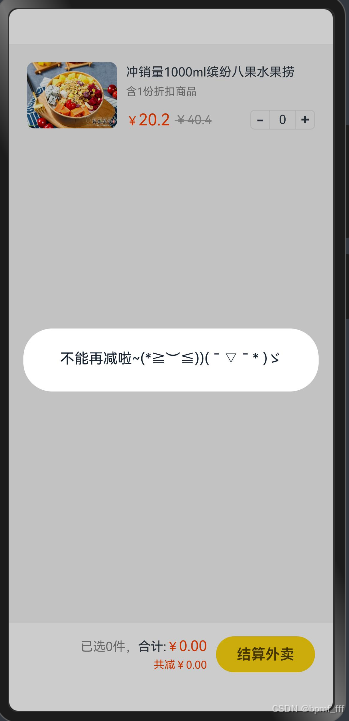
1. 案例-美团购物车
@Entry
@Component
struct Index {

  @State count:number =0

  build() {
    Column() {
      Column() {
        // 产品
        Row({ space: 10}){
          // 图片
          Image($r('app.media.product1'))
            .width(100)
            .borderRadius(8)
          // 文字
          Column({space: 10}) {
            Column({ space: 6}) {
              Text('冲销量1000ml缤纷八果水果捞')
                .lineHeight(20)
                .fontSize(14)
              Text('含1份折扣商品')
                .fontSize(12)
                .fontColor('#7f7f7f')
            }
            .width('100%')
            .alignItems(HorizontalAlign.Start)
            Row(){
              // 价格
              Row({ space: 5}) {
                Text() {
                  Span('¥')
                    .fontSize(14)
                  Span('20.2')
                    .fontSize(18)
                }
                .fontColor('#ff4000')
                Text() {
                  Span('¥')
                  Span('40.4')
                }
                .fontSize(14)
                .fontColor('#999')
                .decoration({type: TextDecorationType.LineThrough, color: '#999'})
              }
              // 加减
              Row() {
                Text('-')
                  .width(22)
                  .height(22)
                  .border({width:1, color: '#e1e1e1', radius: {topLeft: 5, bottomLeft: 5}})
                  .textAlign(TextAlign.Center)
                  .fontWeight(700)
                  .onClick(()=>{
                    if (this.count>0) {
                      this.count--
                    }else {
                      AlertDialog.show({message:'不能再减啦~(*≧︶≦))( ̄▽ ̄* )ゞ'})
                    }
                  })
                Text(this.count.toString())
                  .height(22)
                  .border({width: { top:1, bottom: 1 }, color: '#e1e1e1'})
                  .padding({left: 10, right: 10})
                  .fontSize(14)
                Text('+')
                  .width(22)
                  .height(22)
                  .border({width:1, color: '#e1e1e1', radius: {topRight: 5, bottomRight: 5}})
                  .textAlign(TextAlign.Center)
                  .fontWeight(700)
                  .onClick(()=>{
                    this.count++
                  })
              }
            }
            .width('100%')
            .justifyContent(FlexAlign.SpaceBetween)
          }
          .height(75)
          .layoutWeight(1)
          .justifyContent(FlexAlign.SpaceBetween)
        }
        .width('100%')
        .alignItems(VerticalAlign.Top)
        .padding(20)

        // 结算
        Row({ space: 10 }){
          // 价格
          Column({space: 5}) {
            Text() {
              Span(`已选${this.count}件,`)
                .fontColor('#848484')
              Span('合计:')
              Span('¥')
                .fontColor('#fd4104')
              Span((20.2*this.count).toFixed(2))
                .fontColor('#fd4104')
                .fontSize(16)
            }
            .fontSize(14)
            Text(`共减¥${(20.2*this.count).toFixed(2)}`)
              .fontColor('#fd4104')
              .fontSize(12)
          }
          .alignItems(HorizontalAlign.End)
          // 结算按钮
          Button('结算外卖')
            .width(110)
            .height(40)
            .backgroundColor('#fed70e')
            .fontColor('#564200')
            .fontSize(16)
            .fontWeight(600)
        }
        .width('100%')
        .height(70)
        .backgroundColor('#fff')
        .position({x:0, y: '100%'})
        .translate({y: '-100%'})
        .padding({ left: 20, right: 20 })
        .justifyContent(FlexAlign.End)
      }
    }
    .width('100%')
    .height('100%')
    .backgroundColor('#f3f3f3')
  }
}
2. 数组
增 push unshift
数组名.push(数据1, 数据2, ...)、 数组名.unshift(数据1, 数据2, ...)
// 数组增加和删除数据
// 'Rose' 'Lisa' 'Taylor'
let names:string[]=['Tom','Jack','Jerry']
console.log('',names)

// 1. 增加
// 1.1 数组开头新增数据
// names.unshift('Rose')
// 返回值: (返回值指的是操作后的结果) 增加数据之后的元素个数,即数组的新长度
console.log('',names.unshift('Rose'))
console.log('',names)
// 1.2 数组最后新增数据
// names.push('Lisa')
console.log('',names.push('Lisa'))
console.log('',names)

删 pop shift
数组名.pop()、数组名.shift()
// 数组增加和删除数据
// 'Rose' 'Lisa' 'Taylor'
let names:string[]=['Tom','Jack','Jerry','Rose','Lisa']
console.log('',names)

// 2. 删除
// 2.1 数组开头删除数据
// 返回值: 删除的数据
console.log('',names.shift())
console.log('',names)
// 2.2 数组最后删除数据
console.log('',names.pop())
console.log('',names)

改
数组名[下标] = 新值
查
数组名[下标]
任意位置添加/删除数组元素
语法: 数组名.splice(起始位置, 删除的个数, 新增元素1, 新增元素2, ......)
注意: 如果不写该参数,代表从开始的位置起,删除往后所有的元素
返回值: 删除的元素组成的新数组
// 数组增加和删除数据
// 'Rose' 'Lisa' 'Taylor'
let names: string[] = ['Tom', 'Jack', 'Jerry', 'Rose', 'Lisa']
console.log('', names)

// 开头删除一个数据后 新增一个
console.log('', names.splice(0, 1, 'Taylor'))
console.log('', names)
// 最后删除一个数据后 新增一个
console.log('', names.splice((names.length)-1, 1, 'Taylor'))
console.log('', names)

3. if
// 表达式: 可以被求值的代码,并将其计算出一个结果
// 语句: 一段可以执行的代码,是一个行为,例如分支语句和循环语句

let age: number = 16
if (age >= 18) {
  console.log('年龄达到规定,可以进入网吧')
} else {
  console.log('年龄未达到规定,禁止进入')
}

let score:number = 71
if (score>=90){
  AlertDialog.show({message:'优秀'})
}else if(score>=70){
  AlertDialog.show({message:'良好'})
}else if (score>=60){
  AlertDialog.show({message:'及格'})
}else {
  AlertDialog.show({message:'不及格'})
}
// 括号内的判断表达式不可被打乱顺序,若打乱顺序需&&连接
4. switch
// switch case break default
/* 基础语法
  switch (表达式) {
  case 值1:
    与值1匹配执行的语句
    break
  case 值2:
    与值2匹配执行的语句
    break
  default:
    以上都未成功匹配执行的代码
}*/
// 区间判断用if,判断是否相等用switch
// 如果没有break语句,会发生switch穿透现象
let fruit: string = '橘子'

switch (fruit) {
  case '苹果':
    console.log('苹果5元/斤')
    break
  case '橘子':
    console.log('橘子3元/斤')
    break
  default:
    console.log('不好意思,您查询的水果已售完')
}
5. 条件表达式/三元运算符
// 条件表达式 三元运算符
// 条件 ? 条件成立执行的表达式 : 条件不成立执行的表达式
let num1: number = 20
let num2: number = 30

num1 > num2 ? num1 : num2
console.log('较大值为',num1 > num2 ? num1 : num2)
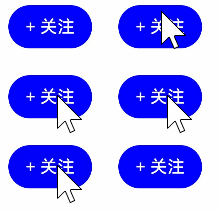
6. 案例-单击切换
@Entry
@Component
struct Index {
  @State isFollowed: boolean = false

  build() {
    Column() {
      Button(this.isFollowed ? '已关注' : '+ 关注')
        .backgroundColor(this.isFollowed ? Color.Orange : Color.Blue)
        .onClick(() => {
          this.isFollowed = !this.isFollowed
        })
    }
    .height('100%')
    .width('100%')
  }
}
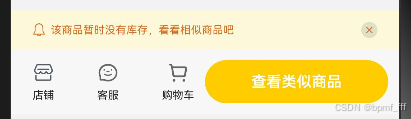
7. 案例-京东加购
@Entry
@Component
struct Index {
  @State count: number = 0
  @State isOpacity: number = 1

  build() {
    Column() {
      Column() {
        // 底部菜单
        Row({ space: 10 }) {
          // 左侧菜单
          Row() {
            Column({ space: 5 }) {
              Image($r('app.media.ic_dianpu'))
                .width(20)
              Text('店铺')
                .fontSize(10)
                .fontColor('#262626')
            }

            Column({ space: 5 }) {
              Image($r('app.media.ic_kefu'))
                .width(20)
                .fillColor('#666')
              Text('客服')
                .fontSize(10)
                .fontColor('#262626')
            }

            Column({ space: 5 }) {
              Image($r('app.media.ic_cart2'))
                .width(20)
                .fillColor('#666')
              Text('购物车')
                .fontSize(10)
                .fontColor('#262626')
            }
          }
          .layoutWeight(1)
          .justifyContent(FlexAlign.SpaceBetween)

          if (this.count > 0) {
            // 右侧按钮 -- 可以购买
            Row({ space: 5 }) {
              Button('加入购物车')
                .width(105)
                .height(40)
                .backgroundColor('#ffcc00')
                .fontSize(14)
                .fontWeight(600)
              Button('立即购买')
                .width(105)
                .height(40)
                .backgroundColor('#f92c1b')
                .fontSize(14)
                .fontWeight(600)
            }
          } else {
            // 右侧按钮 -- 不能购买
            Row() {
              Button('查看类似商品')
                .width(170)
                .height(40)
                .backgroundColor('#ffcc00')
                .fontSize(14)
                .fontWeight(600)
            }
          }


        }
        .width('100%')
        .height(60)
        .backgroundColor('#f7f7f7')
        .padding({ left: 20, right: 10 })

        if (this.count <= 0) {
          // 消息提示:库存 <= 0 显示,否则隐藏
          Row() {
            // 左侧
            Row({ space: 5 }) {
              Image($r('app.media.ic_lingdang'))
                .width(12)
                .fillColor('#de6a1c')
              Text('该商品暂时没有库存,看看相似商品吧')
                .fontSize(10)
                .fontColor('#de6a1c')
            }

            // 右侧
            Image($r('app.media.ic_close'))
              .width(15)
              .padding(3)
              .fillColor('#d0662c')
              .backgroundColor('rgba(0,0,0,0.1)')
              .borderRadius(8)
              .onClick(() => {
                this.isOpacity = 0
              })
          }
          .width('100%')
          .height(36)
          .backgroundColor('#fbf9da')
          .position({ x: 0, y: '-36' })
          .padding({ left: 20, right: 20 })
          .justifyContent(FlexAlign.SpaceBetween)
          .opacity(this.isOpacity)
        }

      }
      .position({ x: 0, y: '100%' })
      .translate({ y: '-100%' })
    }
    .width('100%')
    .height('100%')
    .padding({ bottom: 20 })
    .backgroundColor('#f2f2f2')
  }
}





 扫一扫
扫一扫


 445
445

 被折叠的 条评论
为什么被折叠?
被折叠的 条评论
为什么被折叠?
 到【灌水乐园】发言





