


1. 字符串拼接
加号拼接
模板字符串
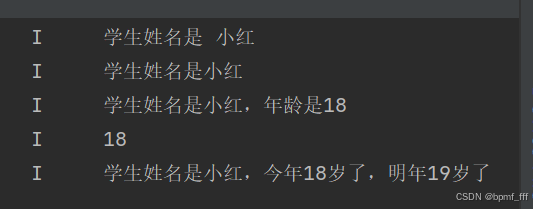
// 字符串拼接

// 数据类型(string等)全小写
let name: string = '小红'
let age: number = 18
console.log('学生姓名是', name)

// 加号拼接
console.log('学生姓名是' + name)
console.log('学生姓名是' + name + ',年龄是' + age)
// console.log 语法要求,第一个参数必须是字符串
console.log('' + age);
// 模板字符串 反引号`` ${}里支持基本运算
console.log(`学生姓名是${name},今年${age}岁了,明年${age+1}岁了`);
2. 数据类型转换
string转number
Number()
parseInt()
parseFloat()
// 数据类型转换
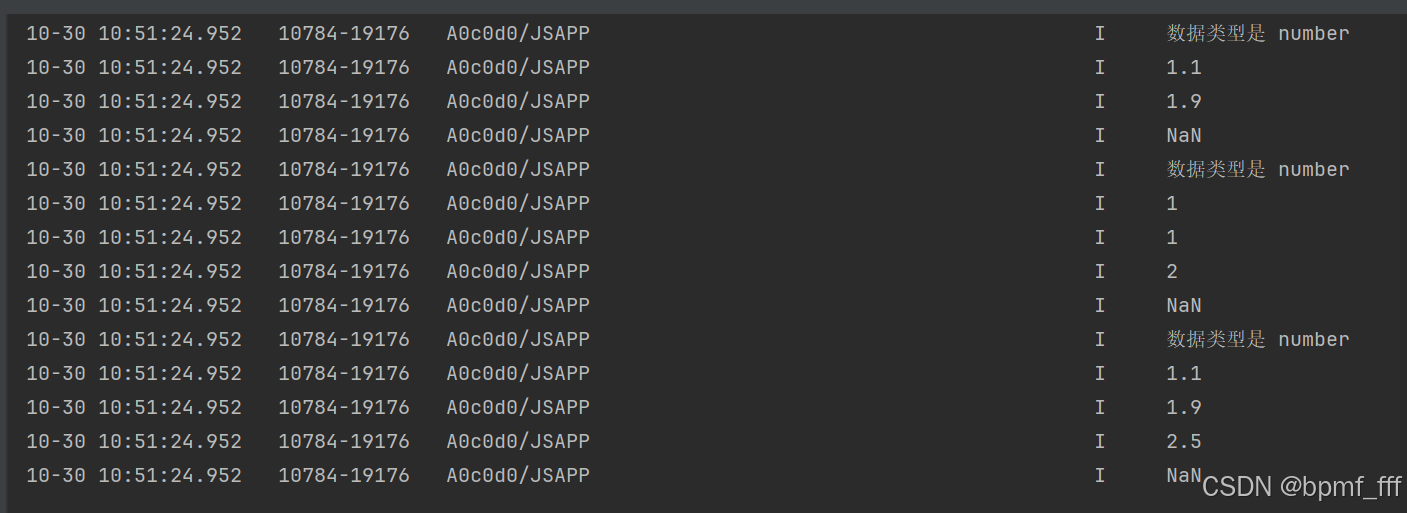
let str1:string = '1.1'
let str2:string = '1.9'
let str3:string = '2.5aa'
let str4:string = 'b2.5a'

// string转number 字符串转数字
/* 1. Number():将字符串类型数据转换为数字型,转换失败返回NaN(字符串中包含非数字)
   2. parseInt():去掉小数部分将字符串类型转为数字型,转换失败返回NaN
   3. parseFloat():保留小数部分将字符串类型转为数字型,转换失败返回NaN
 */
// typeof 检测数据类型(简单数据类型支持的比较好)

// 1. Number() 将字符串原样转数字类型
console.log('数据类型是',typeof Number(str1))
console.log('',Number(str1))
console.log('',Number(str2))
// NaN(not a number) 不是一个数字
console.log('',Number(str3))

// 2. parseInt()
console.log('数据类型是',typeof parseInt(str1))
console.log('',parseInt(str1))
console.log('',parseInt(str2))
console.log('',parseInt(str3))
console.log('',parseInt(str4))

// 3. parseFloat
console.log('数据类型是',typeof parseFloat(str1))
console.log('',parseFloat(str1))
console.log('',parseFloat(str2))
console.log('',parseFloat(str3))
console.log('',parseFloat(str4))
number转string
toString()
toFixed()
// 数据类型转换
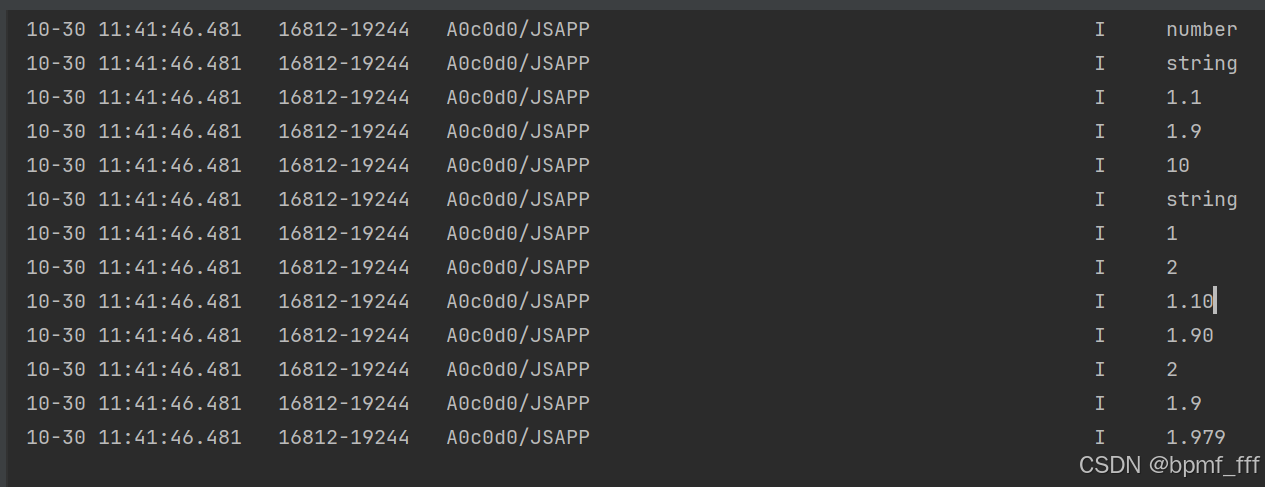
let num1:number = 1.1
let num2:number = 1.9
let num3:number = 2
let num4:number = 1.95
let num5:number = 1.97865
// number转string 数字转字符串
// 1. toString(数字):转几进制
console.log(typeof num1)
console.log(typeof num1.toString())
console.log(num1.toString())
console.log(num2.toString())
console.log(num3.toString(2))

// 2. toFixed(数字):保留指定的小数位数(四舍五入)
console.log(typeof num1.toFixed())
console.log(num1.toFixed())
console.log(num2.toFixed())
console.log(num1.toFixed(2))
console.log(num2.toFixed(2))
console.log(num4.toFixed())
console.log(num4.toFixed(1))
console.log(num5.toFixed(3))
转boolean
Boolean()
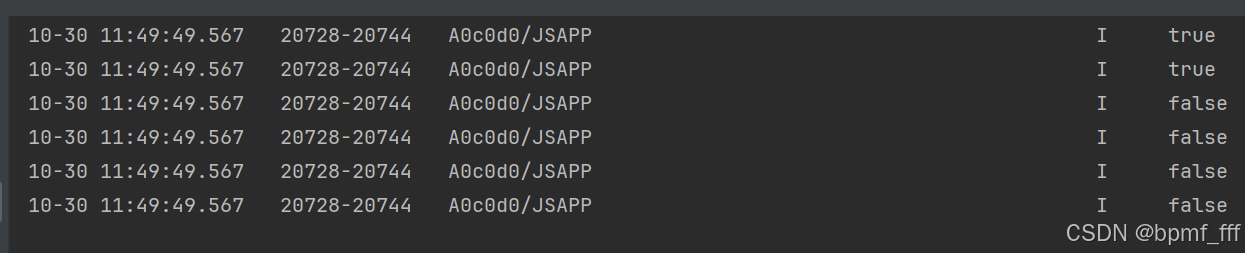
// 正常数据转成true,不正常数据转false
// 不正常(undefined、0、NaN、null...)
console.log('',Boolean(1))
console.log('',Boolean('小红'))
console.log('',Boolean(0))
console.log('',Boolean(undefined))
console.log('',Boolean(NaN))
console.log('',Boolean(null))
3. 状态管理 state
// let/const定义数据时可以不加数据类型,自动推断
let name:string = 'Tom'
let age = 20

@Entry
@Component
struct Index {
  // 定义状态时,必须定义数据类型,且必须有初始值
  @State hi:string = 'hello'

  build() {
    Column() {
      Text(name)
        .fontSize(50)
        .fontWeight(FontWeight.Bold)
      // 状态用法
      Text(this.hi)
        .fontSize(50)
        .fontWeight(FontWeight.Bold)
    }
    .height('100%')
    .width('100%')
  }
}

4. 点击事件 onClick
// 点击事件 组件被点击时触发的事件
// onClick( (参数) => {} )

@Entry
@Component
struct Index {

  @State name:string = '小红'
  @State clickedNum:boolean = false

  build() {
    Column() {
      Text(this.name)
        .fontSize(50)
        .fontWeight(FontWeight.Bold)
        .onClick(()=>{
         this.name = '大红'
        })

      // 点击次数单数→单,未点击或点击次数双数→0/双
      Text(this.clickedNum?'单':'0/双')
        .fontSize(50)
        .fontWeight(FontWeight.Bold)
        .onClick(()=>{
          this.clickedNum = !this.clickedNum
        })
    }
    .height('100%')
    .width('100%')
  }
}

5. 案例-单击隐藏红包
// 案例-单击隐藏红包
/*状态使用时步骤
 1.定义状态( @State )
 2.使用状态( this.xxx )
 3.点击修改状态数据( onClick(()=>{}) )
 */

// 方法1. opacity
// 方法2:visibility
@Entry
@Component
struct Index {
  // @State opacityNum: number = 1
  @State isVisible:Visibility = Visibility.Visible

  build() {
    Column() {
      Column() {
        Image($r('app.media.coupon_float_left'))
        Image($r('app.media.ic_close'))
          .width(16)
          .height(16)
          .backgroundColor('rgba(0,0,0,0.2)')
          .padding(3)
          .borderRadius(8)
          .position({ x: 0, y: 0 })
          /*.onClick(() => {
            this.opacityNum = 0
          })*/
          .onClick(()=>{
            this.isVisible = Visibility.Hidden
          })
      }
      .width(50)
      .height(50)
      .position({ x: '85%', y: '80%' })
      // 透明度 1不透明,0透明
      // .opacity(this.opacityNum)
      // 显示隐藏功能的属性 Hidden隐藏 Visible显示
      .visibility(this.isVisible)
    }
  }
}

6. 运算符 Operators
算术运算符 Arithmetic Operators (+ - * / %)
// 运算符
// 1.算数运算符
let num1: number = 10
let num2: number = 4
let num3: number = 20
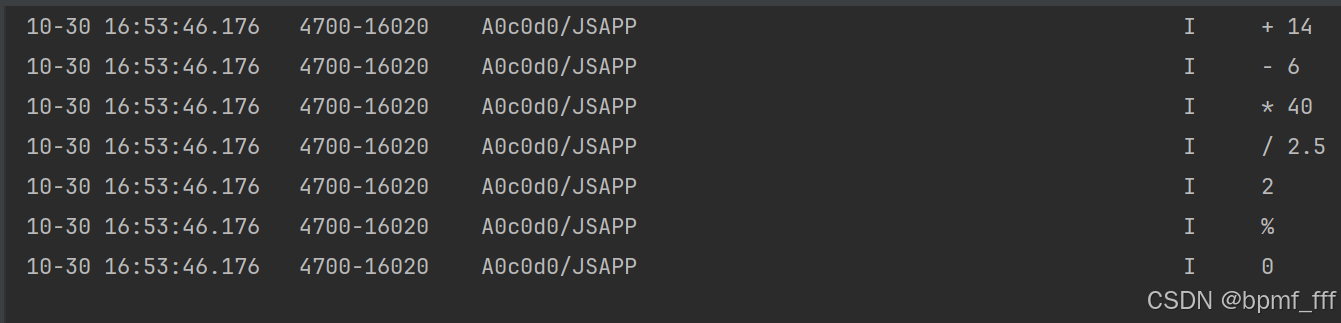
console.log('+', num1 + num2) //14
console.log('-', num1 - num2) //6
console.log('*', num1 * num2) //40
console.log('/', num1 / num2) //2.5
console.log('', num1 % num2) //2
console.log('%', num3 % num2)
console.log('', num3 % num2) //0
赋值运算符 Assignment Operators (+=)
// 2.赋值运算符
let age: number = 18
console.log('年龄是', age)
// age = age + 1
age += 1
console.log('年龄是', age)
一元运算符 unary operator (++ --)
// 一元运算符
/*常见一元运算符:++和--
  后置写法:先赋值再自增/自减
  前置写法:先自增/自减再赋值*/
let num1 :number = 2
let num2 :number
let num3 :number
// i++ 先赋值后自增
num2 = num1++
console.log('num1,num2',num1,num2) //3 2
// ++i 先自增后赋值
num3 = ++num1
console.log('num1,num3',num1,num3) //4 4
比较运算符
用来判断条件,比较两个数据大小、是否相等,根据比较结果返回一个布尔值(true / false)。
>、>=、<、<=、==、!=
逻辑运算符
与&&、或||、非!
运算符优先级
|
优先级 |
顺序 |
|
1 |
( ) |
|
2 |
++、--、! |
|
3 |
先 *、/、% 后 +、- |
|
4 |
>、>=、<、<= |
|
5 |
==、!= |
|
6 |
先 && 后 || |
|
7 |
= |
7. 案例-点赞
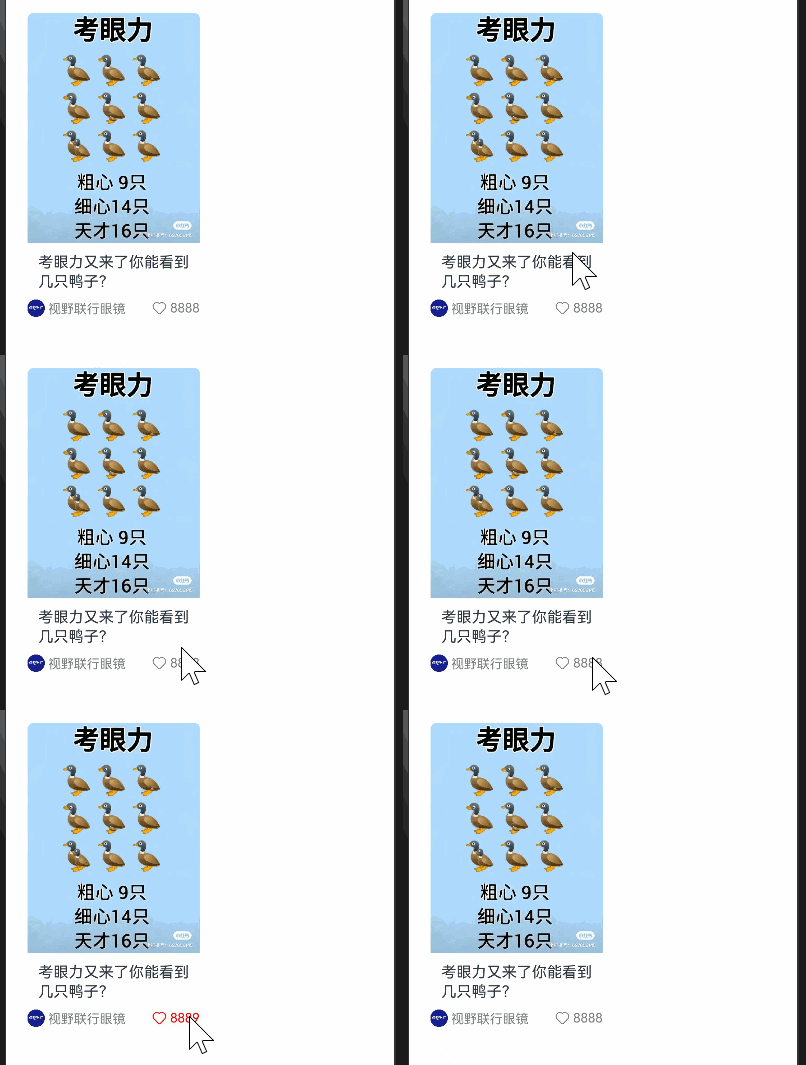
重要代码行数:4 38 44
@Entry
@Component
struct Index {
  @State likeNum: number = 8888
  // 联合类型
  // @State likeColor: string | Color = '#7e7e7e'
  @State likeColor: ResourceColor = '#7e7e7e'
  @State isClicked: boolean = false

  build() {
    Column() {
      Column({ space: 8 }) {
        // 图片
        Image($r('app.media.eyes'))
          .width('100%')
          .borderRadius({ topLeft: 6, topRight: 6 })
        // 标题文字
        Text('考眼力又来了你能看到几只鸭子?')
          .lineHeight(18)
          .fontSize(14)
          .padding({ left: 5, right: 5 })
        // 来源 + 点赞
        Row() {
          // 来源
          Text() {
            ImageSpan($r('app.media.avatar'))
              .width(16)
              .margin({ right: 3 })
            Span('视野联行眼镜')
              .fontSize(12)
              .fontColor('#7e7e7e')
          }

          // 点赞
          Row({ space: 3 }) {
            Image($r('app.media.ic_like'))
              .width(14)
              .fillColor(this.likeColor)
            Text(this.likeNum.toString())
              .fontSize(12)
              .fontColor(this.likeColor)
          }

          // 点击事件 加判断可取消点赞
          .onClick(() => {
            this.isClicked = !this.isClicked
            if (this.isClicked) {
              this.likeNum += 1
              this.likeColor = Color.Red
            } else {
              this.likeNum -= 1
              this.likeColor = '#7e7e7e'
            }
          })
        }
        .width('100%')
        .justifyContent(FlexAlign.SpaceBetween)
      }
      .width('50%')
    }
    .padding(20)
  }
}
8. 作业1_点击关闭提示
// 作业1 点击关闭提示
@Entry
@Component
struct Index {
  @State isVisible:Visibility = Visibility.Visible
  build() {
    Column(){
      Row({space:10}){
        Text('登录领现金,可微信提现')
          .fontSize(14)
          .fontColor(Color.White)
          .layoutWeight(1)
        Button('登录')
          .height(26)
          .fontSize(14)
          .fontColor(Color.White)
          .backgroundColor('#ea5c5b')
        Image($r('app.media.ic_close'))
          .width(14)
          .fillColor(Color.White)
          .onClick(()=>{
            this.isVisible = Visibility.Hidden
          })
      }
      .width('100%')
      .height(34)
      .padding({left:10,right:10})
      .borderRadius(17)
      .backgroundColor('#8d666666')
      .position({y:'100%'})
      .translate({y:'-100%'})
      .visibility(this.isVisible)
    }
    .width('100%')
    .height('100%')
    .padding({left:10,right:10})
    .backgroundColor(Color.Orange)
  }
}

9. 作业2_信息拼接
// 信息拼接
interface Gender {
  sex: string,
  notice: string
}

@Entry
@Component
struct Index {
  @State city: string[] = ['北京', '上海', '广州', '深圳', '杭州']
  // @State gender:string[]=['男','女']
  @State selectCity: string = '北京'
  // @State selectGender:string = '帅哥'
  @State gender: Gender[] = [
    {
      sex: '男',
      notice: '帅哥'
    },
    {
      sex: '女',
      notice: '美女'
    }
  ]
  @State realNotice: string = '帅哥'

  build() {
    Column() {
      // 信息拼接
      Column({ space: 10 }) {
        // 所在省市
        Column({ space: 10 }) {
          Text('所在省市:')
            .fontWeight(FontWeight.Bold)
          Flex({ wrap: FlexWrap.Wrap, justifyContent: FlexAlign.SpaceBetween }) {
            ForEach(this.city, (item: string, index: number) => {
              Text(item)
                .padding(5)
                .border({
                  width: 1,
                  color: Color.Orange,
                  radius: 5
                })
                .onClick(() => {
                  this.selectCity = this.city[index]
                })
            })
          }
        }
        .width('100%')
        .alignItems(HorizontalAlign.Start)

        // 性别
        Column({ space: 10 }) {
          Text('性别:')
            .fontWeight(FontWeight.Bold)
          Row({ space: 10 }) {
            ForEach(this.gender, (item: Gender, index: number) => {
              Text(item.sex)
                .padding(5)
                .border({
                  width: 1,
                  color: Color.Orange,
                  radius: 5
                })
                .onClick(() => {
                  this.realNotice = this.gender[index].notice
                })
            })
          }
        }
        .width('100%')
        .alignItems(HorizontalAlign.Start)

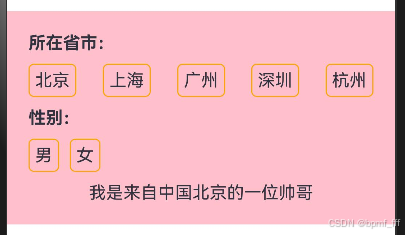
        Text(`我是来自中国${this.selectCity}的一位${this.realNotice}`)
      }
      .padding(20)
      .backgroundColor(Color.Pink)
    }
    .width('100%')
    .height('100%')
  }
}
// 241101 @Builder
@Entry
@Component
struct Index {
  @State selectCity:string = ''
  @State descGender:string = '美女'
  @Builder
  city(cityName: string) {
    Text(cityName)
      .padding(5)
      .border({
        width: 1,
        color: Color.Orange,
        radius: 5
      })
      .onClick(() => {
        this.selectCity = cityName
      })
      .margin({right:5,bottom:5})
  }

  build() {
    Column() {
      // 信息拼接
      Column({ space: 10 }) {
        // 所在省市
        Column({ space: 10 }) {
          Text('所在省市:')
            .fontWeight(FontWeight.Bold)
          Flex({ wrap: FlexWrap.Wrap, }) {
            this.city('北京')
            this.city('上海')
            this.city('石家庄')
            this.city('黑龙江')
            this.city('深圳')
            this.city('杭州')
            this.city('连云港')
          }
        }
        .width('100%')
        .alignItems(HorizontalAlign.Start)

        // 性别
        Column({ space: 10 }) {
          Text('性别:')
            .fontWeight(FontWeight.Bold)
          Row({ space: 10 }) {
            Text('男')
              .padding(5)
              .border({
                width: 1,
                color: Color.Orange,
                radius: 5
              })
            .onClick(() => {
              this.descGender = '帅哥'
            })
            Text('女')
              .padding(5)
              .border({
                width: 1,
                color: Color.Orange,
                radius: 5
              })
              .onClick(() => {
                this.descGender = '美女'
              })
          }
        }
        .width('100%')
        .alignItems(HorizontalAlign.Start)

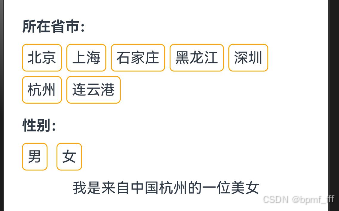
        Text(`我是来自中国${this.selectCity}的一位${this.descGender}`)
      }
      .padding(20)
      // .backgroundColor(Color.Pink)
    }
    .width('100%')
    .height('100%')
  }
}





 扫一扫
扫一扫


 9262
9262

 被折叠的 条评论
为什么被折叠?
被折叠的 条评论
为什么被折叠?
 到【灌水乐园】发言





