


241021
1. 对象
// 对象:描述一个物体的特征(属性)和行为(方法,箭头函数),可以存储多个数据
// 接口名习惯首字母大写,(不是硬性要求)
// 通过interface接口约定对象的结构和类型
interface Person{
  // 特征
  name:string
  age:number
  // 可选属性
  weight?:number

  // 定义方法,描述对象的具体行为(跳舞),用箭头函数
  // 可选 ?: 只能作用于属性,不能作用于方法
  // dance?: ()=>void 报错
  dance: ()=>void
  // dance: ()=>number

  // 定义方法 传入参数
  sing:(song:string)=>void

  // 定义方法 输出返回值为number
  say:()=>number
}

// 属性之间要用逗号隔开
let ym:Person = {
  name:'杨幂',
  age:18,
  weight:95,
  dance:()=>{
    console.log('跳舞')
    // return 100
  },
  sing:(song:string)=>{
    console.log('杨幂说','我来唱一首',song)
  },
  say:()=>{ return 100 },
}
// console是内置对象
// console.log('ym体重是',ym.weight);
// dance方法未设置返回值,函数外部不能直接使用函数内部结果
// console.log('ym dance是',ym.dance());
//
// ym.dance()
ym.sing('爱的供养')
// console.log('say方法返回值为',ym.say())

// 定义对象并赋值时属性可打乱
/*let Taylor:Person = {
  age:21,
  // weight:110,
  name:'Taylor Swift',
  dance:()=>{
    console.log('Love story')
  },
}*/
// Taylor.dance()
// console.log('Taylor年龄是',Taylor.age)
2. 联合类型
// union type
// 联合类型 |隔开了具体的数据类型->放大变量的取值范围
// 男/女/保密,但也可传入其他字符串,不太严谨
// let gender : string | number = 'man'

// 联合类型分割了具体的字符串数据-> 缩小变量的取值范围
let gender: 'man'|'woman'|'secret'
gender = 'woman'
// gender:'A'
// gender = 'A'
3. 枚举类型
// enum type
// 枚举类型 特殊的数据类型,约定变量只能在一组范围内选择
// 枚举类型名字和别名推荐首字母大写 好记联合,不好记枚举
/*enum 枚举名 {
  常量1 = 值,
  常量2 = 值,
  ......
}*/
// 枚举定义后不能修改内部常量值
enum MyColor{
  Red = '#ff0f29',
  Orange = '#ff7100',
  Green = '#30b30e'
}
let txtColor : MyColor = MyColor.Red
4. 模板代码含义
// @装饰器 起到修饰作用

// 程序入口
@Entry

// 组件 鸿蒙界面开发最小单位是组件
// component下行代码是组件
@Component

// Index 组件名
struct Index {
  // @State message: string = 'Hello World';

  // build构建,构建界面,界面的内容都放到build里面
  build() {
    /*RelativeContainer() {
      Text(this.message)
        .id('HelloWorld')
        .fontSize(50)
        .fontWeight(FontWeight.Bold)
        .alignRules({
          center: { anchor: '__container__', align: VerticalAlign.Center },
          middle: { anchor: '__container__', align: HorizontalAlign.Center }
        })
    }
    .height('100%')
    .width('100%')*/
  }
}
5. 文本属性
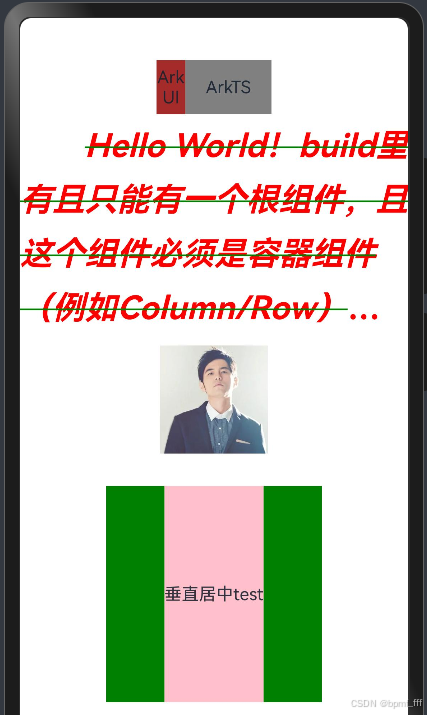
@Entry
@Component
struct Index {
  // build构建,构建界面,界面的内容都放到build里面
  // build里有且只能有一个根组件,且这个组件必须是容器组件(例如Column/Row)
  build() {
    Column(){
      // 通用属性:width、height、backgroundColor...
      Row(){
        Text('ArkUI')
          .textAlign(TextAlign.Center)
            //尺寸单位:1vp≈3px
          .width('80px')
          .height(50)
          .backgroundColor(Color.Brown)
        Text('ArkTS')
          .textAlign(TextAlign.Center)
          .width(80)
          .height(50)
          .backgroundColor(Color.Gray)
      }

      // 文本属性练习
      Text('Hello World!build里有且只能有一个根组件,且这个组件必须是容器组件(例如Column/Row)Hello World!Hello World!')
        .width('100%')
        .height('30%')
          // 1.字体大小
        .fontSize(30)
          // 2.字体颜色
        .fontColor(Color.Red)
          // 3.字体样式 斜体...
        .fontStyle(FontStyle.Italic)
          // 4.字体粗细
        .fontWeight(FontWeight.Bold)
          // 5.文本行高
        .lineHeight(50)
          // 6.文本修饰线 decor...
        .decoration({
          type:TextDecorationType.LineThrough,
          color:Color.Green
        })
          // 7.文本水平对齐方式
        .textAlign(TextAlign.Start)
          // 8.文本垂直对齐方式
        .align(Alignment.Top)
          // 9.文本首行缩进
        .textIndent(60)
          // 10.文本溢出
          // 10.1文本超长显示方式 {}
        .textOverflow({overflow:TextOverflow.Ellipsis})
          // 10.2最大行数
        .maxLines(4)

      // 图片
      Image($r('app.media.zhoujielun'))
        .width(100)
        // .height()

      Column(){
        Text('垂直居中test')
          .height(200)
          //   Text组件默认垂直居中
          // .width()
          // .lineHeight(200)
          .backgroundColor(Color.Pink)
      }
      .width(200)
      .height(200)
      .margin({top:30})
      .backgroundColor(Color.Green)
    }
    .width('100%')
    // .backgroundColor(Color.Yellow)
  }
}
6. 图片
@Entry
@Component
struct Index {
  build() {
    Column(){
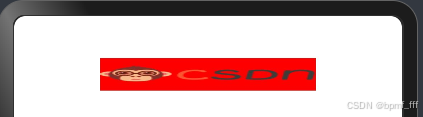
      Image('https://img-home.csdnimg.cn/images/20201124032511.png')
        // 图片尺寸控制
        .width(200)
        .height(30)
        .backgroundColor(Color.Red)
        // 设置宽高小于图片本身尺寸,造成图片部分丢失

        // 设置图片宽高比,亦丢失
        // .aspectRatio(10)

        // alt 占位图 图片加载不出来时所显示的内容
        .alt($r('app.media.app_icon'))

        // 图片填充 objectFit
        .objectFit(ImageFit.Cover)
        .objectFit(ImageFit.Contain)
        .objectFit(ImageFit.Fill)
    }
    .width('100%')
  }
}
7. 作业1_新闻标题
@Entry
@Component
struct Index {
  build() {
    Column(){
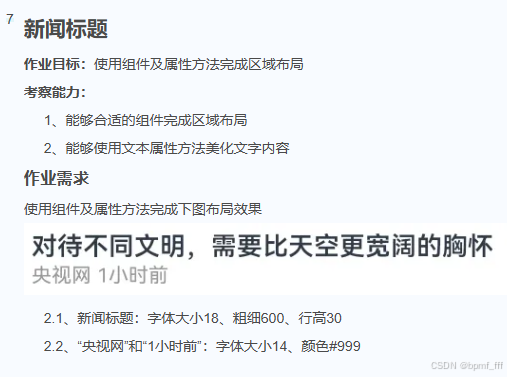
      Text('对待不同文明,需要比天空更宽阔的胸怀')
        .fontSize(18)
        .fontWeight(600)
        .lineHeight(30)
        .width('100%')
      Row({space:5}){
        Text('央视网')
          .fontSize(14)
          .fontColor('#999')
        Text('1小时前')
          .fontSize(14)
          .fontColor('#999')
      }
      .width('100%')
    }
    .padding(10)
    .width('100%')
  }
}

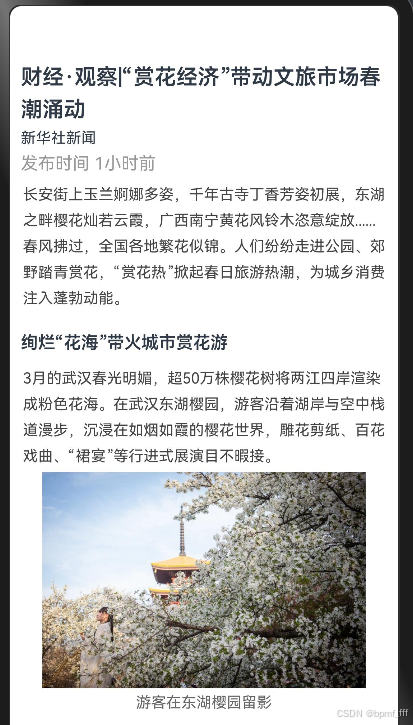
8. 作业2_新闻详情
@Entry
@Component
struct Index {
  build() {
    Column({space:5}){
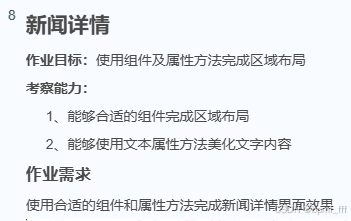
      Text('财经·观察|“赏花经济”带动文旅市场春潮涌动')
        .width('100%')
        .fontSize(20)
        .lineHeight(30)
        .fontWeight(600)
      Text('新华社新闻')
        .width('100%')
        .fontSize(14)
      Text('发布时间 1小时前')
        .width('100%')
        .lineHeight(20)
        .fontColor('#999999')
      Text('长安街上玉兰婀娜多姿,千年古寺丁香芳姿初展,东湖之畔樱花灿若云霞,广西南宁黄花风铃木恣意绽放......春风拂过,全国各地繁花似锦。人们纷纷走进公园、郊野踏青赏花,“赏花热”掀起春日旅游热潮,为城乡消费注入蓬勃动能。')
        .fontSize(14)
        .lineHeight(24)
        .fontColor('#444444')
      Text('绚烂“花海”带火城市赏花游')
        .width('100%')
        .lineHeight(40)
        .fontWeight(600)
      Text('3月的武汉春光明媚,超50万株樱花树将两江四岸渲染成粉色花海。在武汉东湖樱园,游客沿着湖岸与空中栈道漫步,沉浸在如烟如霞的樱花世界,雕花剪纸、百花戏曲、“裙宴”等行进式展演目不暇接。')
        .fontSize(14)
        .lineHeight(24)
        .fontColor('#444444')
      Image($r('app.media.pic'))
        .width(300)
      Text('游客在东湖樱园留影')
        .fontSize(14)
        .fontColor('#666666')
    }
    .padding(10)
    .width('100%')
  }
}
9. 作业3_掘金文章简介
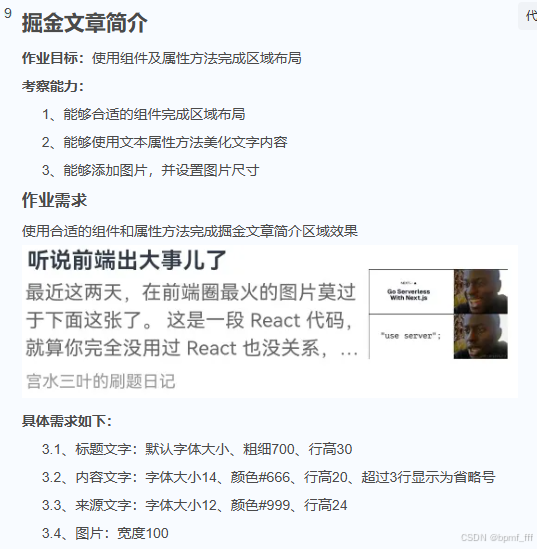
@Entry
@Component
struct Index {
  build() {
    Row(){
      Column(){
        Text('听说前端出大事儿了')
          .width('100%')
          .fontWeight(700)
          .lineHeight(30)
        Text('最近这两天,在前端圈最火的图片莫过于下面这张了。 这是一段 React 代码,就算你完全没用过 React 也没关系,一眼看过去就能看到其中')
          .fontSize(14)
          .fontColor('#666')
          .lineHeight(20)
          .maxLines(3)
          .textOverflow({overflow:TextOverflow.Ellipsis})
        Text('宫水三叶的刷题日记')
          .width('100%')
          .fontSize(12)
          .fontColor('#999')
          .lineHeight(24)
      }
      .width(230)

      Image($r('app.media.web'))
        .width(100)
    }
    .padding(10)
    .width('100%')
    .justifyContent(FlexAlign.SpaceBetween)
  }
}

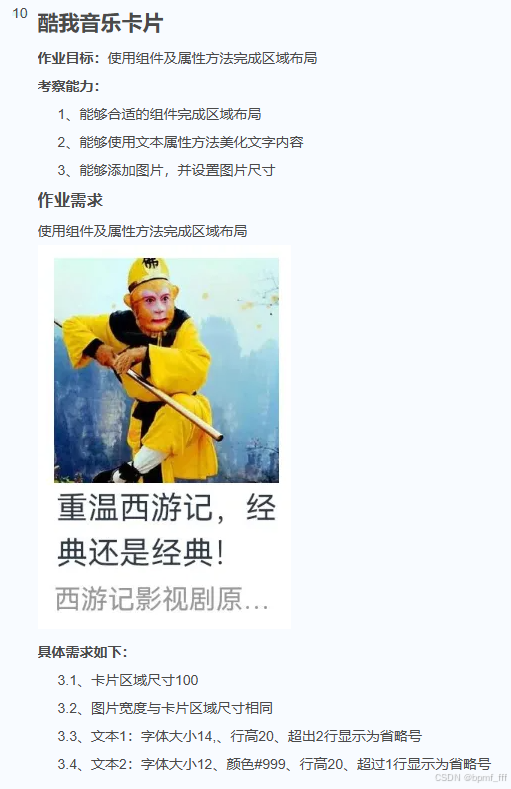
10. 作业4_酷我音乐卡片
@Entry
@Component
struct Index {
  build() {
    Column(){
      Image($r('app.media.sunwukong'))
        .width(100)
      Text('重温西游记,经典还是经典!')
        .fontSize(14)
        .lineHeight(20)
        .maxLines(2)
        .textOverflow({overflow:TextOverflow.Ellipsis})
      Text('西游记影视剧原声续篇')
        .fontSize(12)
        .fontColor('#999')
        .lineHeight(20)
        .maxLines(1)
        .textOverflow({overflow:TextOverflow.Ellipsis})
    }
    .width(100)
    .margin(10)
  }
}





 扫一扫
扫一扫


 1639
1639

 被折叠的 条评论
为什么被折叠?
被折叠的 条评论
为什么被折叠?
 到【灌水乐园】发言





