



 本文详细介绍了如何使用百度语音合成API进行语音合成的过程。从创建应用到获取AppID、ApiKey和SecretKey,再到安装Python SDK并运行示例代码,最后保存合成的语音为MP3文件。适合初学者快速上手。
step1:
打开链接https://cloud.baidu.com/product/speech/tts,点击“立即使用”;

step2:
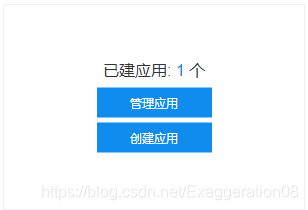
点击创建应用;
step3:
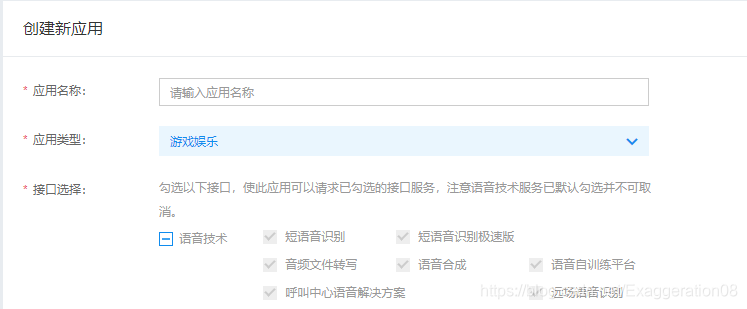
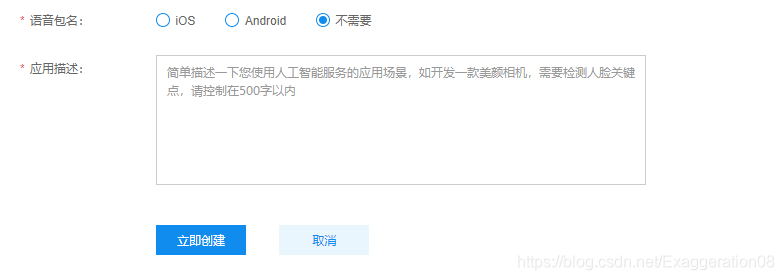
填写基本信息
step4:
安装python SDK
pip3 install baidu-aipstep5:
创建python文件,复制以下代码
#encoding:utf8
from aip import AipSpeech

""" 你的 APPID AK SK """
APP_ID = '你的 App ID'
API_KEY = '你的 Api Key'
SECRET_KEY = '你的 Secret Key'

client = AipSpeech(APP_ID, API_KEY, SECRET_KEY)
result = client.synthesis(text = '你好百度', options={'vol':5})

if not isinstance(result,dict):
    with open('audio.mp3','wb') as f:
        f.write(result)
else:print(result)
代码参考博客:https://blog.youkuaiyun.com/Nicholas_Wong/article/details/80819763





 扫一扫
扫一扫


 616
616

 被折叠的 条评论
为什么被折叠?
被折叠的 条评论
为什么被折叠?
 到【灌水乐园】发言





