





 配置iOS通用链接涉及创建apple-app-site-association文件,确保是JSON格式但不带.json后缀。使用在线工具如sojson.com进行JSON解析。正确填写appID,并将文件上传至服务器根目录或.well-known子目录。在Xcode中添加Associated Domains,例如applinks:xxx.com。在AppDelegate实现通用链接支持。通过开发者中心验证Associated Domains,并在设备控制台检查通用链接配置文件下载状态。遇到问题,如控制台显示错误,可能与appID填写错误有关,需检查并修正。
- 配置apple-app-site-association文件,注意是json格式,但是没有.json后缀。介绍一个解析json的工具(网页版):https://www.sojson.com/
- apple-app-site-association文件中appID的写法,请参考另一篇文章通用链接:appID到底该怎么填写?
- 将文件上传到服务器(域名)的根目录下或者.well-known的子目录下。这里介绍一个解析域名里的该配置文件的网址:AASA Validator | Branch
- 在xcode中添加域名:添加Associated Domains,并添加域名:applinks:xxx.com
- 实现AppDelegate里支持通用链接的实现方法:
- (BOOL)application:(UIApplication *)application continueUserActivity:(NSUserActivity *)userActivity restorationHandler:(void (^)(NSArray<id<UIUserActivityRestoring>> * _Nullable))restorationHandler {

    //自己的实现代码

  return [WXApi handleOpenUniversalLink:userActivity delegate:self];

}- 最后在进入开发者中心,打开该产品下的Associated Domains。
- 测试通用链接:域名+paths。在备忘录里长按该链接,会弹出以应用名打开的选项就说明成功了。
这里介绍一个很强大的工具。 Xcode中的控制台,以xcode13.4.1为例:在window-devices and simulators中选择连接的设备,然后在设备信息右边点击open console。可以跟踪应用启动的时候通用链接配置文件是否下载成功。如果发现该信息说明已经下载成功,通用链接功能正常。如图:
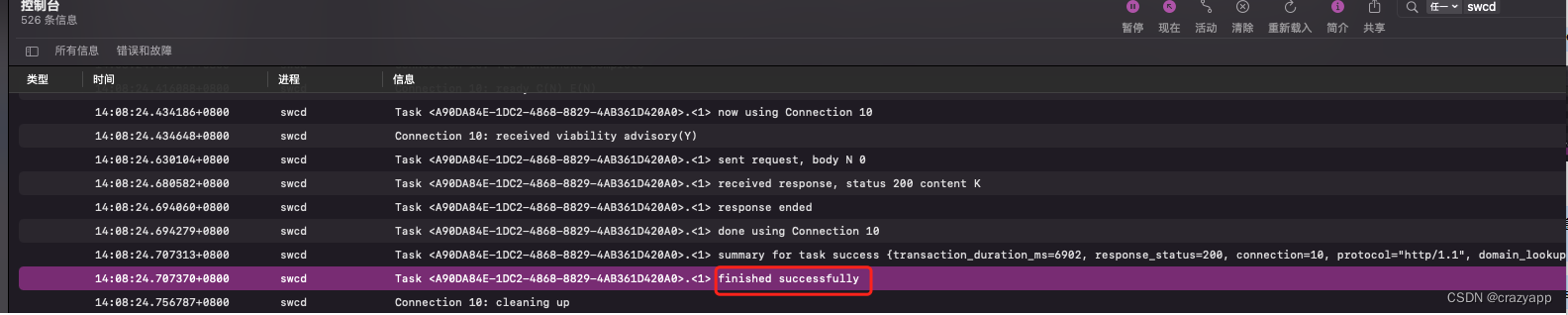
如果使用控制台看到了如下错误信息:
Error getting enterprise-managed associated domains data. If this device is not enterprise-managed, this is normal: Error Domain=SWCErrorDomain Code=1701 "Failed to get associated domain data from ManagedConfiguration framework." UserInfo={NSDebugDescription=Failed to get associated domain data from ManagedConfiguration framework., Line=298, Function=<private>}可能是服务器里的apple-app-site-association文件信息填写有误,我的就是出现了appID填写错误,修改后就正常了。





 扫一扫
扫一扫


 3746
3746

 被折叠的 条评论
为什么被折叠?
被折叠的 条评论
为什么被折叠?
 到【灌水乐园】发言





