


在构建AI智能体(Agent)系统时,工具(Tools)是连接AI模型与外部世界的桥梁。agno作为新一代轻量级多模态Agent框架,以其blazing fast agents with a minimal memory footprint的特性,正在重新定义Agent开发的标准。本文将深入探讨agno的工具系统,从架构设计到实战应用,帮助您全面掌握这个强大的框架。
1. 工具系统概述
1.1 工具的作用和意义
在agno框架中,Tools are functions that helps Agno Agents to interact with the external world。工具让Agent变得真正"智能化",使其能够:
- 扩展能力边界:通过工具,Agent可以搜索网络、查询数据库、调用API、发送邮件等
- 实现实时交互:连接外部系统,获取最新信息和动态数据
- 执行具体操作:从被动的对话转变为主动的任务执行者
- 多模态处理:Agno is built from the ground up to work seamlessly with various media types,支持文本、图像、音频和视频的原生处理
1.2 agno工具架构设计
agno的工具系统采用了极简而高效的架构设计:
# 基础架构示例from agno.agent import Agentfrom agno.tools import tool, Toolkit# 工具可以是简单的函数@tooldef my_tool(param: str) -> str: """工具描述""" returnf"处理结果: {param}"# 也可以是复杂的工具包class MyToolkit(Toolkit): def __init__(self): super().__init__( name="my_toolkit", tools=[self.tool1, self.tool2] )
性能优势:
- Agent creation in Agno clocks in at about 2μs per agent, which is ~10,000x faster than LangGraph
- Agno agents use just ~3.75 KiB of memory on average—~50x less than LangGraph agents
1.3 工具调用流程
agno的工具调用流程遵循以下步骤:
- 意图识别:Agent分析用户输入,确定需要调用的工具
- 参数提取:从上下文中提取工具所需的参数
- 并行执行:Agno Agents can execute multiple tools concurrently,支持异步并发执行
- 结果处理:收集工具返回结果,整合到响应中
- 错误处理:优雅处理工具执行中的异常
2. 内置工具详解
agno提供了80+ pre-built toolkits,覆盖了大多数常见场景。让我们深入了解几个核心工具包:
2.1 DuckDuckGoTools:网络搜索
DuckDuckGo工具包提供隐私优先的网络搜索能力:
from agno.agent import Agentfrom agno.models.openai import OpenAIChatfrom agno.tools.duckduckgo import DuckDuckGoToolsagent = Agent( model=OpenAIChat(id="gpt-4o-mini"), tools=[DuckDuckGoTools()], show_tool_calls=True, # 显示工具调用过程 markdown=True)# 使用示例agent.print_response("最新的AI技术发展趋势是什么?", stream=True)
2.2 YFinanceTools:金融数据
专为金融分析设计的工具包,提供实时股票数据:
from agno.tools.yfinance import YFinanceToolsfinance_agent = Agent( model=OpenAIChat(id="gpt-4o"), tools=[ YFinanceTools( stock_price=True, # 股票价格 analyst_recommendations=True, # 分析师建议 company_info=True, # 公司信息 company_news=True # 公司新闻 ) ], instructions=["使用表格展示数据", "突出关键指标"], markdown=True)# 获取NVIDIA的详细分析报告finance_agent.print_response("分析NVDA的投资价值", stream=True)
2.3 GoogleSearchTools:谷歌搜索
提供更全面的搜索结果,适合深度研究:
from agno.tools.google_search import GoogleSearchToolsresearch_agent = Agent( tools=[GoogleSearchTools()], instructions=["总是包含信息来源", "验证信息的时效性"])
2.4 其他常用工具介绍
agno还提供了丰富的工具生态系统:
- GitHub Tools:代码仓库搜索和管理
- Gmail Tools:邮件发送和接收
- Slack Tools:团队协作消息
- SQL Tools:数据库查询操作
- File System Tools:文件系统操作
- Newspaper Tools:新闻内容提取
- Pandas Tools:数据分析处理
3. 自定义工具开发
虽然内置工具丰富,但in most cases, you will write your own tools。让我们深入了解如何开发自定义工具。
3.1 Tool基类结构
使用装饰器创建简单工具:
from agno.tools import toolfrom agno.utils.log import logger@tool( show_result=True, # 显示工具执行结果 stop_after_tool_call=True# 调用后停止执行)def custom_calculator(expression: str) -> str: """ 计算数学表达式 Args: expression: 要计算的数学表达式 Returns: 计算结果 """ try: result = eval(expression) logger.info(f"计算完成: {expression} = {result}") returnf"计算结果:{result}" except Exception as e: logger.error(f"计算失败: {e}") returnf"错误:无法计算 {expression}"
3.2 工具开发规范
创建复杂的工具包需要继承Toolkit类:
from typing import Listfrom agno.tools import Toolkitfrom agno.utils.log import loggerimport subprocessclass ShellTools(Toolkit): """系统命令行工具包""" def __init__(self, allowed_commands: List[str] = None, **kwargs): self.allowed_commands = allowed_commands or ["ls", "pwd", "echo"] super().__init__( name="shell_tools", tools=[self.run_command, self.check_process], **kwargs ) def run_command(self, command: str, args: str = "") -> str: """ 执行系统命令 Args: command: 要执行的命令 args: 命令参数 Returns: 命令输出结果 """ if command notin self.allowed_commands: returnf"错误:命令 {command} 不在允许列表中" try: full_command = f"{command} {args}".strip() logger.info(f"执行命令: {full_command}") result = subprocess.run( full_command.split(), capture_output=True, text=True, timeout=10 ) if result.returncode != 0: returnf"命令执行失败: {result.stderr}" return result.stdout except subprocess.TimeoutExpired: return"错误:命令执行超时" except Exception as e: logger.error(f"命令执行异常: {e}") returnf"错误:{str(e)}" def check_process(self, process_name: str) -> str: """检查进程状态""" try: result = subprocess.run( ["ps", "aux"], capture_output=True, text=True ) processes = [ line for line in result.stdout.split('\n') if process_name in line ] if processes: returnf"找到 {len(processes)} 个匹配的进程:\n" + "\n".join(processes[:5]) else: returnf"未找到名为 {process_name} 的进程" except Exception as e: returnf"检查进程失败: {str(e)}"
3.3 参数验证和错误处理
良好的参数验证和错误处理是工具可靠性的关键:
from typing import Optionalfrom pydantic import BaseModel, Field, validatorimport requestsclass APIRequest(BaseModel): """API请求参数模型""" url: str = Field(..., description="API端点URL") method: str = Field("GET", description="HTTP方法") headers: Optional[dict] = Field(None, description="请求头") timeout: int = Field(30, ge=1, le=300, description="超时时间(秒)") @validator('method') def validate_method(cls, v): allowed_methods = ['GET', 'POST', 'PUT', 'DELETE'] if v.upper() notin allowed_methods: raise ValueError(f"方法必须是 {allowed_methods} 之一") return v.upper() @validator('url') def validate_url(cls, v): ifnot v.startswith(('http://', 'https://')): raise ValueError("URL必须以http://或https://开头") return v@tooldef api_caller(request_data: dict) -> str: """ 调用外部API Args: request_data: API请求参数 Returns: API响应结果 """ try: # 参数验证 req = APIRequest(**request_data) # 执行请求 response = requests.request( method=req.method, url=req.url, headers=req.headers, timeout=req.timeout ) # 检查响应状态 response.raise_for_status() # 返回结果 returnf"状态码: {response.status_code}\n内容: {response.text[:500]}" except requests.exceptions.Timeout: return"错误:请求超时" except requests.exceptions.ConnectionError: return"错误:无法连接到服务器" except requests.exceptions.HTTPError as e: returnf"HTTP错误: {e}" except Exception as e: logger.error(f"API调用失败: {e}") returnf"错误:{str(e)}"
3.4 异步工具实现
agno完全支持异步工具,这对于I/O密集型操作特别重要:
import asynciofrom agno.tools import toolfrom agno.utils.log import logger@toolasyncdef async_data_fetcher(sources: List[str]) -> str: """ 异步获取多个数据源 Args: sources: 数据源URL列表 Returns: 合并的数据结果 """ asyncdef fetch_single(source: str): logger.info(f"开始获取: {source}") try: # 模拟异步HTTP请求 await asyncio.sleep(1) # 实际应用中使用aiohttp returnf"数据来自 {source}" except Exception as e: logger.error(f"获取失败 {source}: {e}") returnNone # 并发获取所有数据源 tasks = [fetch_single(source) for source in sources] results = await asyncio.gather(*tasks) # 过滤并合并结果 valid_results = [r for r in results if r isnotNone] if valid_results: return"\n".join(valid_results) else: return"错误:无法获取任何数据"# 异步工具在Agent中的使用asyncdef main(): agent = Agent( model=OpenAIChat(id="gpt-4o-mini"), tools=[async_data_fetcher], show_tool_calls=True ) # 异步执行 response = await agent.arun( "从以下源获取数据: api.example1.com, api.example2.com" ) print(response.content)# 运行异步主函数asyncio.run(main())
4. 工具组合模式
在复杂场景中,单个工具往往不够用。agno支持多种工具组合模式来构建强大的Agent系统。
4.1 串行工具链
串行执行工具,每个工具的输出作为下一个工具的输入:
class DataPipeline(Toolkit): """数据处理管道工具包""" def __init__(self): super().__init__( name="data_pipeline", tools=[self.fetch_data, self.process_data, self.generate_report] ) self.intermediate_data = None def fetch_data(self, source: str) -> str: """步骤1: 获取原始数据""" logger.info(f"获取数据从: {source}") # 模拟数据获取 self.intermediate_data = {"source": source, "raw_data": [1, 2, 3, 4, 5]} return"数据获取成功" def process_data(self, operation: str) -> str: """步骤2: 处理数据""" ifnot self.intermediate_data: return"错误:请先获取数据" logger.info(f"处理数据: {operation}") if operation == "sum": result = sum(self.intermediate_data["raw_data"]) elif operation == "average": data = self.intermediate_data["raw_data"] result = sum(data) / len(data) else: returnf"不支持的操作: {operation}" self.intermediate_data["processed"] = result returnf"处理完成: {result}" def generate_report(self) -> str: """步骤3: 生成报告""" ifnot self.intermediate_data or"processed"notin self.intermediate_data: return"错误:没有处理后的数据" report = f""" ## 数据分析报告 - 数据源: {self.intermediate_data['source']} - 原始数据: {self.intermediate_data['raw_data']} - 处理结果: {self.intermediate_data['processed']} - 生成时间: {datetime.now().strftime('%Y-%m-%d %H:%M:%S')} """ return report# 使用串行工具链pipeline_agent = Agent( model=OpenAIChat(id="gpt-4o"), tools=[DataPipeline()], instructions=["按顺序执行数据处理步骤"], show_tool_calls=True)
4.2 并行工具执行
Agno Agents can execute multiple tools concurrently, allowing you to process function calls that the model makes efficiently:
import asynciofrom typing import List, Dictclass ParallelSearchTools(Toolkit): """并行搜索工具包""" def __init__(self): super().__init__( name="parallel_search", tools=[self.multi_source_search] ) asyncdef search_single_source(self, source: str, query: str) -> Dict: """搜索单个数据源""" logger.info(f"搜索 {source}: {query}") # 模拟不同延迟的搜索 if source == "database": await asyncio.sleep(0.5) return {"source": source, "results": ["DB结果1", "DB结果2"]} elif source == "api": await asyncio.sleep(1.0) return {"source": source, "results": ["API结果1", "API结果2"]} elif source == "cache": await asyncio.sleep(0.1) return {"source": source, "results": ["缓存结果1", "缓存结果2"]} else: await asyncio.sleep(2.0) return {"source": source, "results": ["其他结果"]} asyncdef multi_source_search(self, query: str, sources: List[str]) -> str: """ 并行搜索多个数据源 Args: query: 搜索查询 sources: 数据源列表 Returns: 合并的搜索结果 """ start_time = asyncio.get_event_loop().time() # 创建并发任务 tasks = [ self.search_single_source(source, query) for source in sources ] # 并行执行所有搜索 results = await asyncio.gather(*tasks, return_exceptions=True) execution_time = asyncio.get_event_loop().time() - start_time # 处理结果 successful_results = [] failed_sources = [] for i, result in enumerate(results): if isinstance(result, Exception): failed_sources.append(sources[i]) logger.error(f"搜索失败 {sources[i]}: {result}") else: successful_results.append(result) # 格式化输出 output = f"并行搜索完成(耗时: {execution_time:.2f}秒)\n\n" for result in successful_results: output += f"### {result['source']}:\n" output += "\n".join(f"- {r}"for r in result['results']) output += "\n\n" if failed_sources: output += f"失败的源: {', '.join(failed_sources)}\n" return output
4.3 条件工具选择
基于条件动态选择要执行的工具:
class ConditionalTools(Toolkit): """条件工具选择器""" def __init__(self): super().__init__( name="conditional_tools", tools=[self.smart_router] ) # 注册可用工具 self.tool_registry = { "text": self.process_text, "number": self.process_number, "date": self.process_date, "json": self.process_json } def detect_data_type(self, data: str) -> str: """检测数据类型""" import json from datetime import datetime # 尝试解析为数字 try: float(data) return"number" except ValueError: pass # 尝试解析为日期 try: datetime.fromisoformat(data) return"date" except: pass # 尝试解析为JSON try: json.loads(data) return"json" except: pass # 默认为文本 return"text" def smart_router(self, data: str, preferred_tool: str = None) -> str: """ 智能路由到合适的处理工具 Args: data: 要处理的数据 preferred_tool: 优先使用的工具 Returns: 处理结果 """ # 如果指定了工具且存在,优先使用 if preferred_tool and preferred_tool in self.tool_registry: tool = self.tool_registry[preferred_tool] logger.info(f"使用指定工具: {preferred_tool}") else: # 自动检测并选择工具 data_type = self.detect_data_type(data) tool = self.tool_registry.get(data_type) logger.info(f"自动选择工具: {data_type}") if tool: return tool(data) else: returnf"无法处理数据类型: {data}" def process_text(self, data: str) -> str: """处理文本数据""" word_count = len(data.split()) char_count = len(data) returnf"文本分析:{word_count}个词,{char_count}个字符" def process_number(self, data: str) -> str: """处理数字数据""" num = float(data) returnf"数字分析:值={num}, 平方={num**2}, 平方根={num**0.5:.2f}" def process_date(self, data: str) -> str: """处理日期数据""" from datetime import datetime dt = datetime.fromisoformat(data) returnf"日期分析:{dt.strftime('%Y年%m月%d日 %H:%M:%S')}" def process_json(self, data: str) -> str: """处理JSON数据""" import json obj = json.loads(data) returnf"JSON分析:{len(obj)}个键,类型={type(obj).__name__}"
4.4 工具结果聚合
多个工具的结果需要智能聚合:
class AggregationTools(Toolkit): """结果聚合工具包""" def __init__(self): super().__init__( name="aggregation_tools", tools=[self.aggregate_results] ) def aggregate_results( self, results: List[Dict], strategy: str = "merge" ) -> str: """ 聚合多个工具的执行结果 Args: results: 工具执行结果列表 strategy: 聚合策略 (merge, summarize, vote, weighted) Returns: 聚合后的结果 """ ifnot results: return"没有结果需要聚合" if strategy == "merge": # 简单合并所有结果 merged = {} for result in results: if isinstance(result, dict): merged.update(result) else: merged[f"result_{len(merged)}"] = result return json.dumps(merged, ensure_ascii=False, indent=2) elif strategy == "summarize": # 生成摘要 summary = "## 结果摘要\n\n" for i, result in enumerate(results, 1): summary += f"{i}. {self._summarize_single(result)}\n" return summary elif strategy == "vote": # 投票机制(适用于分类结果) votes = {} for result in results: key = str(result.get("decision", result)) votes[key] = votes.get(key, 0) + 1 winner = max(votes.items(), key=lambda x: x[1]) returnf"投票结果:{winner[0]}({winner[1]}票)" elif strategy == "weighted": # 加权平均(适用于数值结果) if all(isinstance(r.get("value"), (int, float)) for r in results): total_weight = sum(r.get("weight", 1) for r in results) weighted_sum = sum( r["value"] * r.get("weight", 1) for r in results ) returnf"加权平均值:{weighted_sum / total_weight:.2f}" else: return"加权策略需要数值类型的结果" else: returnf"未知的聚合策略: {strategy}" def _summarize_single(self, result: any) -> str: """生成单个结果的摘要""" if isinstance(result, dict): returnf"{result.get('source', '未知源')}: {result.get('value', result)}" else: return str(result)[:100]
5. 调试和监控
工具系统的调试和监控对于生产环境至关重要。agno提供了Monitor agent sessions and performance in real-time on agno.com的能力。
5.1 show_tool_calls参数使用
show_tool_calls是调试的利器:
# 开发阶段:显示详细的工具调用信息dev_agent = Agent( model=OpenAIChat(id="gpt-4o"), tools=[DuckDuckGoTools(), YFinanceTools()], show_tool_calls=True, # 显示工具调用细节 markdown=True)# 生产环境:隐藏工具调用细节prod_agent = Agent( model=OpenAIChat(id="gpt-4o"), tools=[DuckDuckGoTools(), YFinanceTools()], show_tool_calls=False, # 隐藏内部细节 markdown=True)# 条件性显示debug_mode = os.getenv("DEBUG", "false").lower() == "true"agent = Agent( model=OpenAIChat(id="gpt-4o"), tools=[CustomTools()], show_tool_calls=debug_mode)
5.2 工具调用日志
实现完善的日志系统:
import loggingfrom datetime import datetimefrom typing import Any, Dictfrom agno.utils.log import logger# 配置日志logging.basicConfig( level=logging.INFO, format='%(asctime)s - %(name)s - %(levelname)s - %(message)s', handlers=[ logging.FileHandler('agent_tools.log'), logging.StreamHandler() ])class LoggedToolkit(Toolkit): """带日志记录的工具包基类""" def __init__(self, name: str, **kwargs): super().__init__(name=name, **kwargs) self.call_history = [] def log_tool_call( self, tool_name: str, args: Dict[str, Any], result: Any, duration: float, error: Exception = None ): """记录工具调用""" call_record = { "timestamp": datetime.now().isoformat(), "tool": tool_name, "args": args, "result": str(result)[:200] if result elseNone, "duration": duration, "error": str(error) if error elseNone } self.call_history.append(call_record) # 记录到日志文件 if error: logger.error(f"工具调用失败: {tool_name}", extra=call_record) else: logger.info(f"工具调用成功: {tool_name}", extra=call_record) # 可选:发送到监控系统 self._send_to_monitoring(call_record) def _send_to_monitoring(self, record: Dict): """发送到外部监控系统""" # 这里可以集成Prometheus、Grafana、DataDog等 pass def get_call_statistics(self) -> Dict: """获取调用统计信息""" ifnot self.call_history: return {"total_calls": 0} total_calls = len(self.call_history) successful_calls = sum( 1for call in self.call_history if call["error"] isNone ) avg_duration = sum( call["duration"] for call in self.call_history ) / total_calls return { "total_calls": total_calls, "successful_calls": successful_calls, "failure_rate": (total_calls - successful_calls) / total_calls, "average_duration": avg_duration, "last_call": self.call_history[-1]["timestamp"] }
5.3 性能分析
监控和优化工具性能:
import timeimport tracemallocfrom functools import wrapsfrom typing import Callabledef performance_monitor(func: Callable) -> Callable: """性能监控装饰器""" @wraps(func) def wrapper(*args, **kwargs): # 开始内存追踪 tracemalloc.start() start_memory = tracemalloc.get_traced_memory()[0] # 记录开始时间 start_time = time.perf_counter() try: # 执行函数 result = func(*args, **kwargs) # 计算性能指标 end_time = time.perf_counter() end_memory = tracemalloc.get_traced_memory()[0] duration = end_time - start_time memory_used = (end_memory - start_memory) / 1024 / 1024# MB # 记录性能数据 logger.info( f"性能分析 - {func.__name__}: " f"耗时={duration:.3f}秒, " f"内存={memory_used:.2f}MB" ) # 性能预警 if duration > 5.0: logger.warning(f"{func.__name__} 执行时间过长: {duration:.3f}秒") if memory_used > 100: logger.warning(f"{func.__name__} 内存使用过高: {memory_used:.2f}MB") return result finally: tracemalloc.stop() return wrapper# 使用性能监控class PerformanceAwareTools(Toolkit): def __init__(self): super().__init__( name="performance_tools", tools=[self.heavy_computation] ) @performance_monitor def heavy_computation(self, n: int) -> str: """模拟计算密集型任务""" result = sum(i ** 2for i in range(n)) returnf"计算结果: {result}"# 批量性能测试def benchmark_tools(agent: Agent, test_cases: List[str], iterations: int = 10): """工具性能基准测试""" results = [] for test_case in test_cases: times = [] for _ in range(iterations): start = time.perf_counter() agent.run(test_case) times.append(time.perf_counter() - start) avg_time = sum(times) / len(times) min_time = min(times) max_time = max(times) results.append({ "test_case": test_case, "avg_time": avg_time, "min_time": min_time, "max_time": max_time }) return results
5.4 常见问题排查
工具系统的常见问题及解决方案:
class ToolDebugger: """工具调试助手""" @staticmethod def diagnose_tool_issue(error: Exception, context: Dict) -> str: """诊断工具问题""" diagnosis = f"## 工具问题诊断\n\n" diagnosis += f"错误类型: {type(error).__name__}\n" diagnosis += f"错误信息: {str(error)}\n\n" # 常见问题模式匹配 if isinstance(error, TimeoutError): diagnosis += "### 诊断:超时问题\n" diagnosis += "- 检查网络连接\n" diagnosis += "- 增加超时时间设置\n" diagnosis += "- 考虑使用异步工具\n" elif isinstance(error, ValueError): diagnosis += "### 诊断:参数验证失败\n" diagnosis += f"- 检查输入参数: {context.get('args')}\n" diagnosis += "- 验证参数类型和格式\n" diagnosis += "- 查看工具文档字符串\n" elif isinstance(error, ImportError): diagnosis += "### 诊断:依赖缺失\n" diagnosis += "- 安装缺失的包\n" diagnosis += f"- 运行: pip install {str(error).split()[-1]}\n" elif"rate limit"in str(error).lower(): diagnosis += "### 诊断:速率限制\n" diagnosis += "- 实现请求限流\n" diagnosis += "- 使用缓存减少请求\n" diagnosis += "- 考虑批量处理\n" else: diagnosis += "### 通用建议\n" diagnosis += "- 检查工具实现代码\n" diagnosis += "- 添加更多错误处理\n" diagnosis += "- 启用详细日志\n" return diagnosis @staticmethod def validate_tool_setup(toolkit: Toolkit) -> Dict: """验证工具设置""" validation_results = { "valid": True, "issues": [], "warnings": [] } # 检查工具是否正确注册 ifnot hasattr(toolkit, 'tools') ornot toolkit.tools: validation_results["valid"] = False validation_results["issues"].append("工具列表为空") # 检查每个工具 for tool in getattr(toolkit, 'tools', []): # 检查是否有文档字符串 ifnot tool.__doc__: validation_results["warnings"].append( f"{tool.__name__} 缺少文档字符串" ) # 检查是否有类型注解 ifnot hasattr(tool, '__annotations__'): validation_results["warnings"].append( f"{tool.__name__} 缺少类型注解" ) return validation_results# 使用调试工具debugger = ToolDebugger()try: # 工具调用 result = some_tool.execute()except Exception as e: # 自动诊断问题 diagnosis = debugger.diagnose_tool_issue( e, context={"args": {"param": "value"}} ) print(diagnosis)
最佳实践建议
基于agno工具系统的设计理念和实践经验,这里总结一些最佳实践:
1. 工具设计原则
- 单一职责:每个工具只做一件事,但要做好
- 明确的接口:清晰的参数和返回值定义
- 充分的文档:详细的docstring和类型注解
- 优雅的降级:处理失败情况,提供有用的错误信息
2. 性能优化
- 利用并发
- 实现缓存:避免重复的计算或API调用
- 批量处理:合并多个小请求为一个大请求
- 资源管理:正确释放连接、文件句柄等资源
3. 安全考虑
- 输入验证:严格验证所有外部输入
- 权限控制:限制敏感操作的访问
- 审计日志:记录所有工具调用
- 沙箱执行:在受限环境中运行不信任的代码
总结
agno的工具系统展现了现代AI Agent框架的设计理念:简单、高效、可扩展。通过本文的深入探讨,我们了解了:
- 架构优势:agno以其极致的性能和最小的内存占用,为大规模Agent部署提供了坚实基础
- 丰富生态:80+内置工具包覆盖了大部分应用场景
- 灵活扩展:简洁的自定义工具开发接口让扩展变得轻松
- 组合模式:串行、并行、条件选择等模式满足复杂业务需求
- 生产就绪:完善的调试、监控和性能分析工具链
agno正在重新定义Agent开发的标准。无论您是构建简单的聊天机器人,还是复杂的多Agent协作系统,agno的工具系统都能提供强大而灵活的支持。
那么,如何系统的去学习大模型LLM?
作为一名深耕行业的资深大模型算法工程师,我经常会收到一些评论和私信,我是小白,学习大模型该从哪里入手呢?我自学没有方向怎么办?这个地方我不会啊。如果你也有类似的经历,一定要继续看下去!这些问题啊,也不是三言两语啊就能讲明白的。
所以我综合了大模型的所有知识点,给大家带来一套全网最全最细的大模型零基础教程。在做这套教程之前呢,我就曾放空大脑,以一个大模型小白的角度去重新解析它,采用基础知识和实战项目相结合的教学方式,历时3个月,终于完成了这样的课程,让你真正体会到什么是每一秒都在疯狂输出知识点。
由于篇幅有限,⚡️ 朋友们如果有需要全套 《2025全新制作的大模型全套资料》,扫码获取~
👉大模型学习指南+路线汇总👈
我们这套大模型资料呢,会从基础篇、进阶篇和项目实战篇等三大方面来讲解。

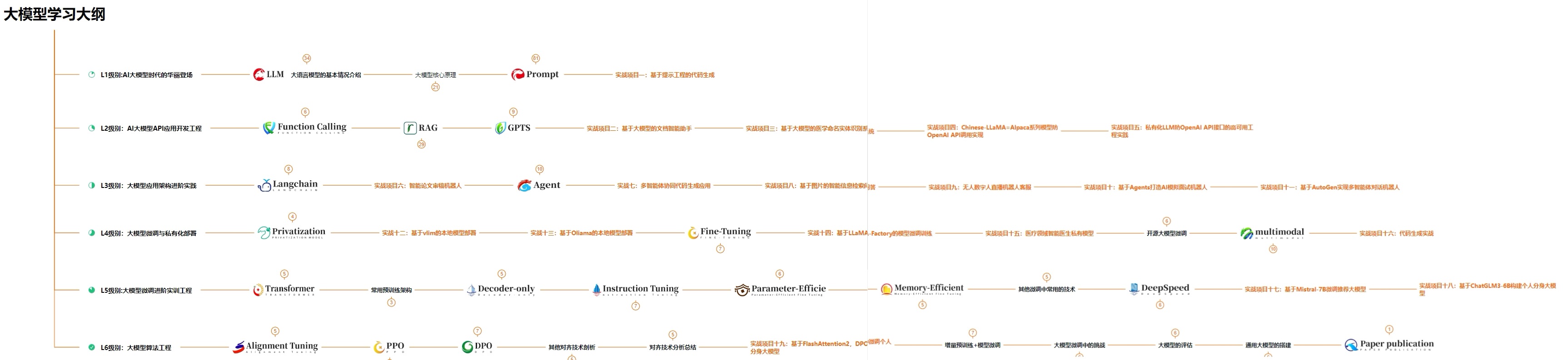
👉①.基础篇👈
基础篇里面包括了Python快速入门、AI开发环境搭建及提示词工程,带你学习大模型核心原理、prompt使用技巧、Transformer架构和预训练、SFT、RLHF等一些基础概念,用最易懂的方式带你入门大模型。

👉②.进阶篇👈
接下来是进阶篇,你将掌握RAG、Agent、Langchain、大模型微调和私有化部署,学习如何构建外挂知识库并和自己的企业相结合,学习如何使用langchain框架提高开发效率和代码质量、学习如何选择合适的基座模型并进行数据集的收集预处理以及具体的模型微调等等。

👉③.实战篇👈
实战篇会手把手带着大家练习企业级的落地项目(已脱敏),比如RAG医疗问答系统、Agent智能电商客服系统、数字人项目实战、教育行业智能助教等等,从而帮助大家更好的应对大模型时代的挑战。

👉④.福利篇👈
最后呢,会给大家一个小福利,课程视频中的所有素材,有搭建AI开发环境资料包,还有学习计划表,几十上百G素材、电子书和课件等等,只要你能想到的素材,我这里几乎都有。我已经全部上传到优快云,朋友们如果需要可以微信扫描下方优快云官方认证二维码免费领取【保证100%免费】
相信我,这套大模型系统教程将会是全网最齐全 最易懂的小白专用课!!





 扫一扫
扫一扫


 628
628

 被折叠的 条评论
为什么被折叠?
被折叠的 条评论
为什么被折叠?
 到【灌水乐园】发言





