Face Morph Using OpenCV — C++ / Python

本文详细介绍如何使用OpenCV在C++和Python中实现面部融合技术。通过检测面部特征点和Delaunay三角剖分,智能地混合两张面部图片,创建过渡效果。文章提供了代码下载链接,并解释了关键步骤,如对应点查找、三角形仿射变换和Alpha混合。

Face Morph Using OpenCV — C++ / Python

In this tutorial we will learn how to morph one face into another using OpenCV.

I have chosen to use the photos of the top three American Presidential candidates, but this is not a political post and I have no political agenda. And yes, that is the prettiest picture of Donald Trump I could find!

You can download the code and images used in this post by subscribing to our newsletter here.

In my previous posts I have covered Facial Landmark Detection andDelaunay Triangulation. It is a good idea to review those posts to better understand this one.

Image Morphing

Image morphing was first used extensively in the movie Willow using a technique developed at Industrial Light and Magic. A scene from the movie is shown below.


The idea behind Image Morphing is rather simple. Given two images Iand J we want to create an in-between image M by blending images Iand J. The blending of images I and J is controlled by a parameter \alphathat is between 0 and 1 ( 0 \leq \alpha \leq 1 ). When \alpha is 0, the morph M looks like I, and when \alpha is 1, M looks exactly like J. Naively, you can blend the images using the following equation at every pixel (x, y)

  \[ M (x, y) = ( 1 - \alpha ) I (x, y) + \alpha J (x , y) \]

However, using the above equation to generate a blend between the image of Secretary Hillary Clinton and Senator Ted Cruz with \alpha set to 0.5, you will get the following terrible results.
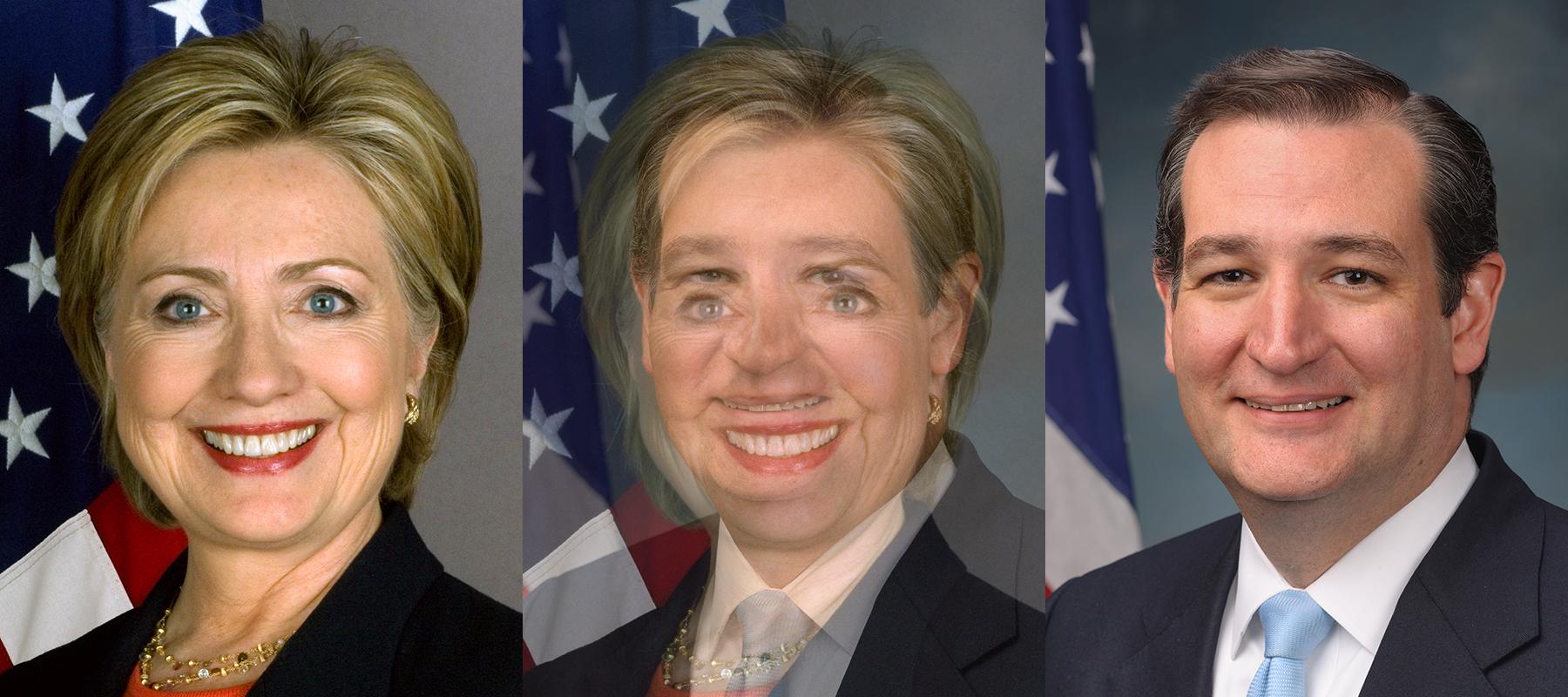
Bad Morphing Example ( Naive Blending )

The resulting image is disturbing, but it also screams a solution at you. It begs you to somehow align the eyes and the mouth before blending the images. You get similar disturbing results when you try to blend two different political ideologies without first aligning the minds, but I digress.

So, to morph image I into image J we need to first establish pixel correspondence between the two images. In other words, for every pixel(x_i, y_i) in image I, we need to find it’s corresponding pixel (x_j, y_j) in image J. Suppose we have magically found these correspondences, we can blend the images in two steps. First, we need to calculate the location (x_m, y_m) of the pixel in the morphed image. It is given by the following equation

(1) \begin{align*}  x_m &= (1 - \alpha) x_i + \alpha x_j \\ y_m &= (1 - \alpha) y_i + \alpha y_j \end{align*}

Second, we need to find the intensity of the pixel at (x_m, y_m) using the following equation

(2) \begin{equation*} M(x_m,y_m) = (1 - \alpha) I(x_i, y_i) + \alpha J(x_j, y_j) \end{equation*}

That’s it. We are done. Now, Let’s go and vote for Trump. Kidding! Just like Trump, I left out some important details. Finding a corresponding point in image J for every pixel in image I is about as difficult as building a 10 ft wall between the United States and Mexico. It can be done, but it is expensive and not really necessary.

But it is very easy to find a few point correspondences. For morphing two dissimilar objects, like a cat’s face and a human’s face, we can click on a few points on the two images to establish correspondences and interpolate the results for the rest of the pixels. We will next see how Face Morphing is done in detail, but the same technique can be applied to any two objects.

Face Morphing : Step by Step

Morphing two faces can be done using the following steps. For simplicity, we will assume the images are of the same size, but it is not a necessity.

1. Find Point Correspondences using Facial Feature Detection
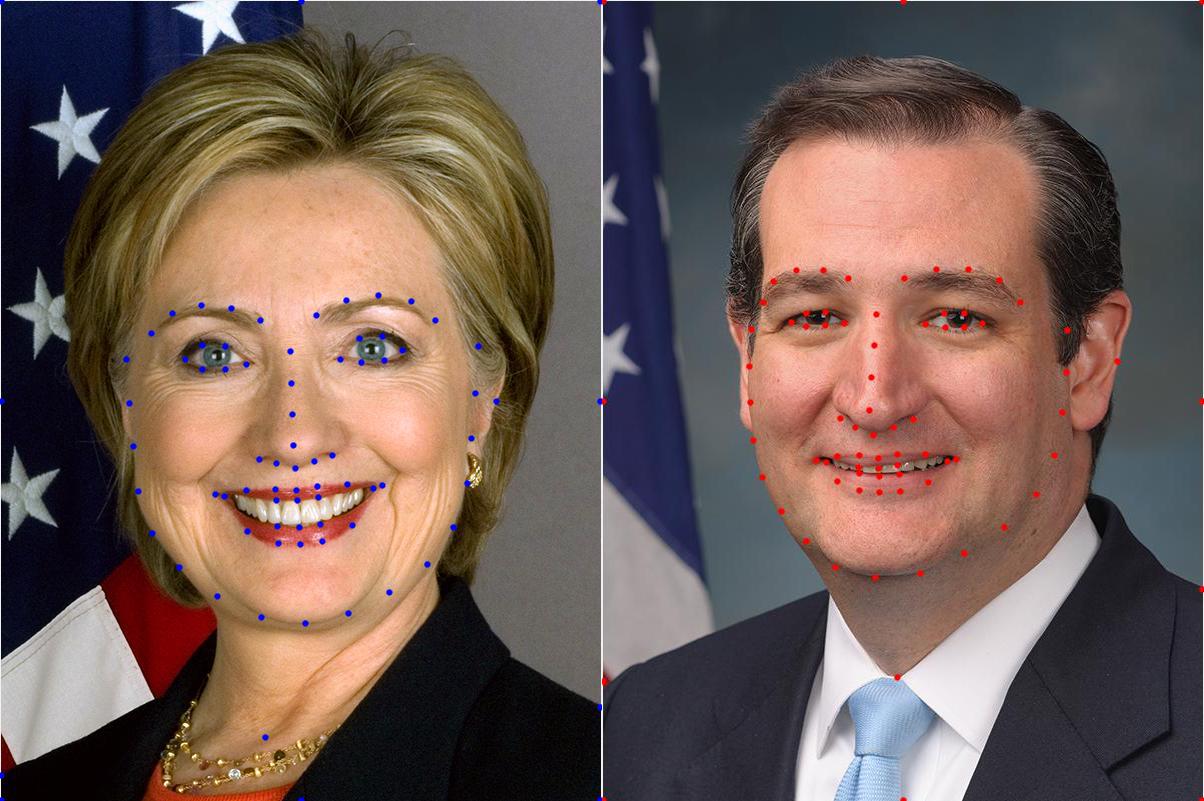
Point correspondences for Face Morphing

Let’s start by obtaining corresponding points. First, we can get a lot of points by automatically ( or manually ) by detecting facial feature points. I used dlib to detect 68 corresponding points. Next, I added four more points ( one on the right hand side ear, one on the neck, and two on the shoulders ). Finally, I added the corners of the image and half way points between those corners as corresponding points as well. Needless to say, one can add a few more points around the head and neck to get even better results, or remove the manually clicked points to get slightly worse ( but fully automatic ) results.

2. Delaunay Triangulation

From the previous step we have two sets of 80 points — one set per image. We can calculate the average of corresponding points in the two sets and obtain a single set of 80 points. On this set of average points we perform Delaunay Triangulation. The result of Delaunay triangulation is a list of triangles represented by the indices of points in the 80 points array. In this particular case the triangulation produces 149 triangles connecting the 80 points. The triangulation is stored as an array of three columns. The first few rows of the triangulation is shown below.

Triangulation
38 40 37
35 30 29
38 37 20
18 37 36
33 32 30

It shows that points 38, 40 and 37 form a triangle and so on. The triangulation is shown on the two images below.
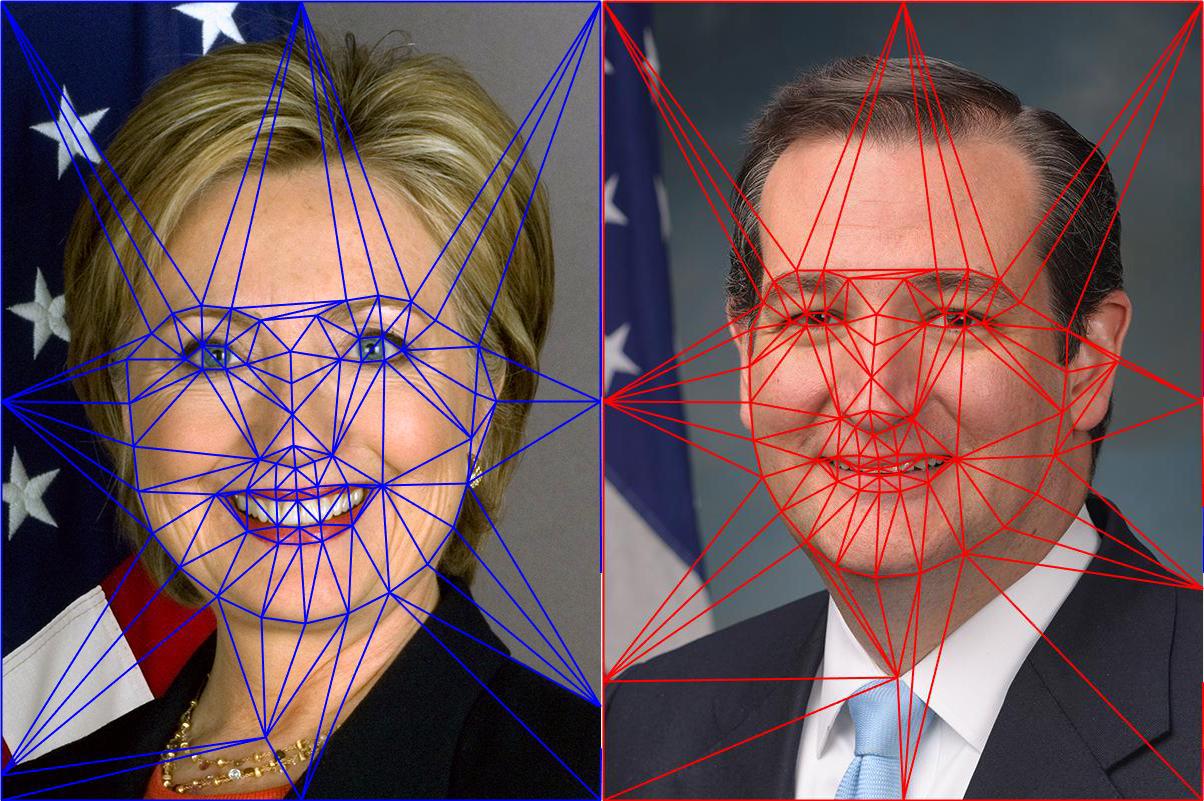
Delaunay Triangulation for Face Morphing

Notice the triangles in the two images capture approximately similar regions. We had started with point correspondences and now, because of triangulation, we have triangle ( or region ) correspondences.

3. Warping images and alpha blending

To understand the description below better, download the code and images by subscribing to our newsletter here.

We are now in a position to intelligently blend the two images. As mentioned before, the amount of blending will be controlled by a parameter \alpha. Create a morph using the following steps.

  1. Find location of feature points in morphed image : In the morphed image M, we can find the locations of all 80 points (x_m, y_m) using equation (1).
  2. Calculate affine transforms : So we have a set of 80 points in image 1, another set of 80 points in image 2 and a third set of 80 points in the morphed image. We also know the triangulation defined over these points. Pick a triangle in image 1 and the corresponding triangle in the morphed image and calculate the affine transform that maps the three corners of the triangle in image 1 to the three corners of the corresponding triangle in the morphed image. In OpenCV, this can be done usinggetAffineTransform . Calculate an affine transform for every pair of 149 triangles. Finally, repeat the process of image 2 and the morphed image.
  3. Warp triangles : For each triangle in image 1, use the affine transform calculated in the previous step to transform all pixels inside the triangle to the morphed image. Repeat this for all triangles in image 1 to obtain a warped version of image 1. Similarly, obtain a warped version for image 2. In OpenCV this is achieved by using the function warpAffine. However, warpAffine takes in an image and not a triangle. The trick is to calculate a bounding box for the triangle, warp all pixels inside the bounding box using warpAffine, and then mask the pixels outside the triangle. The triangular mask is created using fillConvexPoly. Be sure to use blendMode BORDER_REFLECT_101 while using warpAffine. It hides the seams better than Secretary Clinton hides her emails.
  4. Alpha blend warped images : In the previous step we obtained warped version of image 1 and image 2. These two images can be alpha blended using equation (2), and this is your final morphed image. In the code I have provided warping triangles and alpha blending them is combined in a single step.

Face Morphing Results

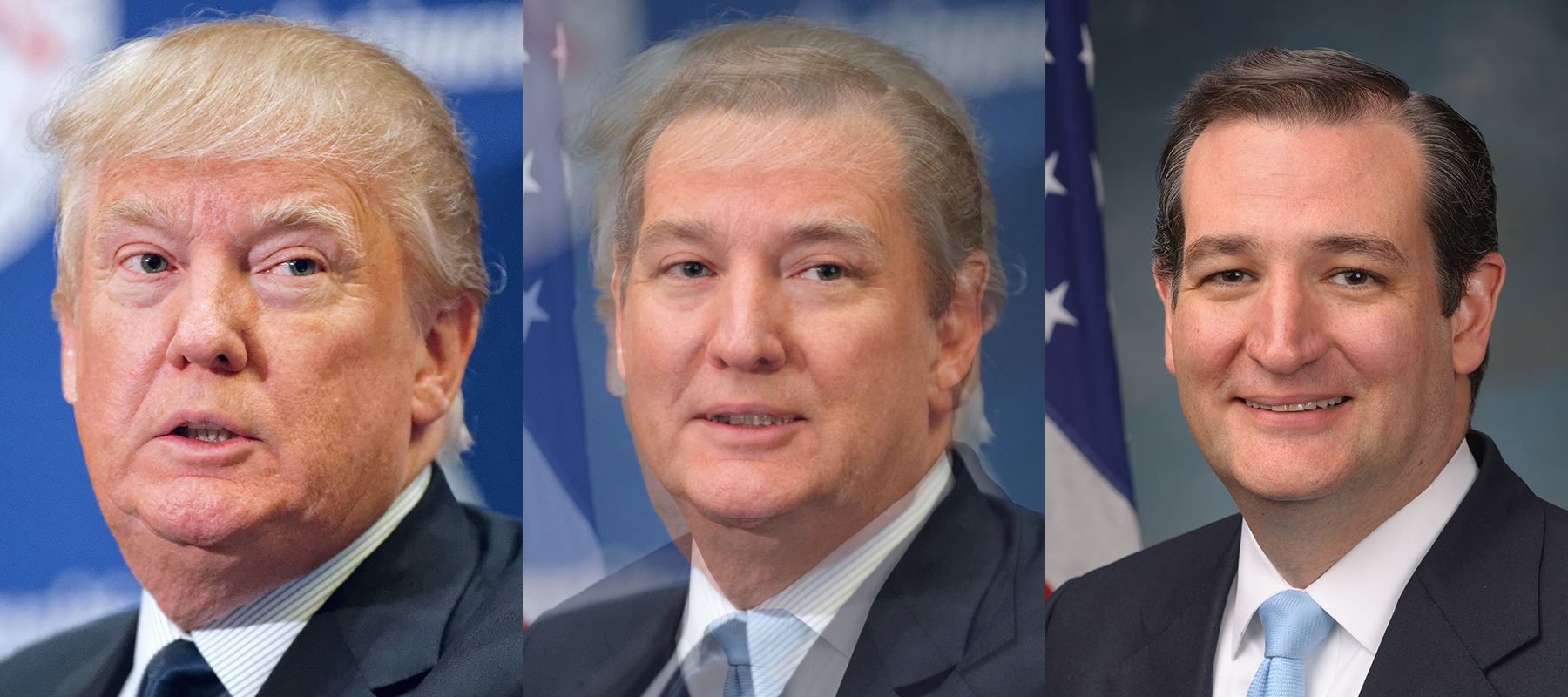
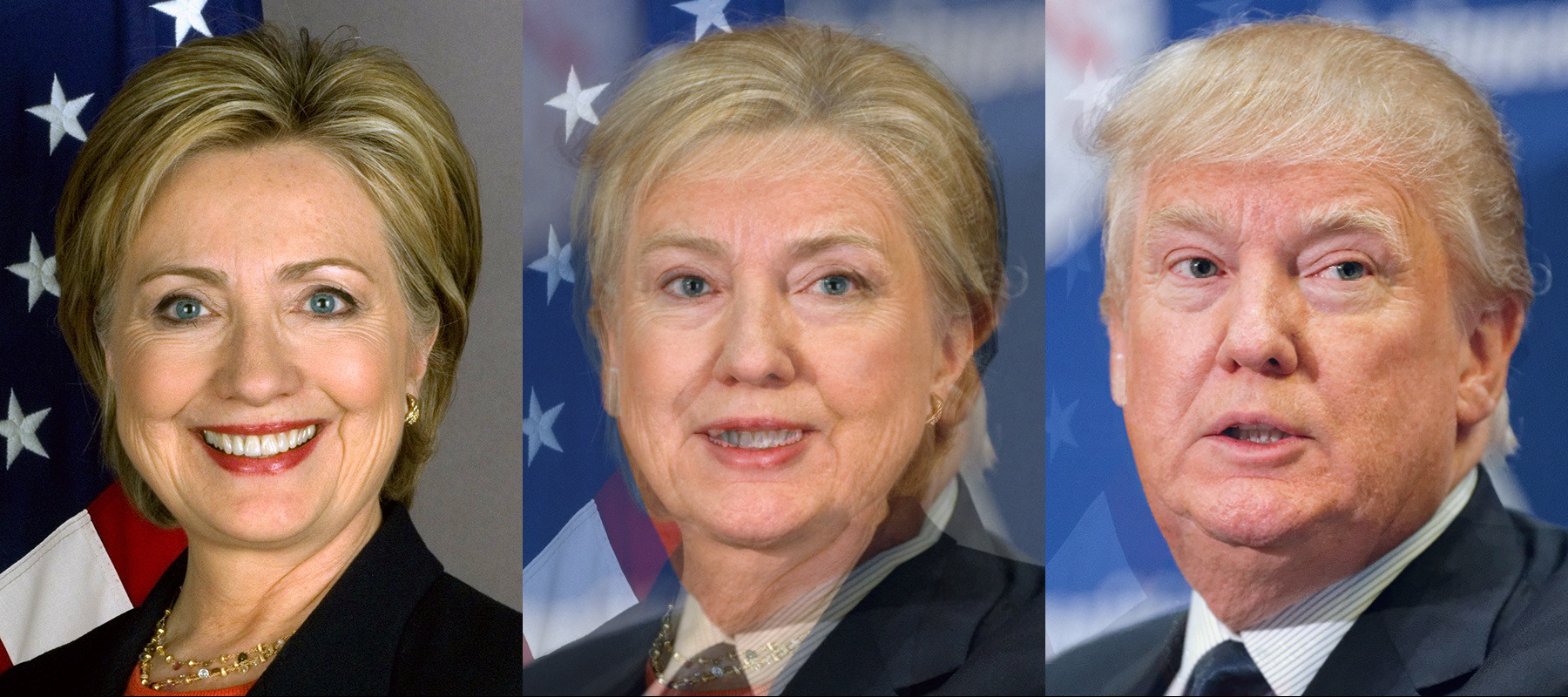
The results of applying the above technique are shown below. The image in the center is a 50% blend of the image on the left and the right. The video on the top of this page shows an animation with different alpha values. Animation is a cheap trick that hides a lot of flaws in a morph; Senator Ted Cruz would love it.

Most facial features are very well aligned. The part of the image outside the face is not so well aligned because we have fewer corresponding points in that region. One can manually add additional points to fix mis-alignments and get better results.
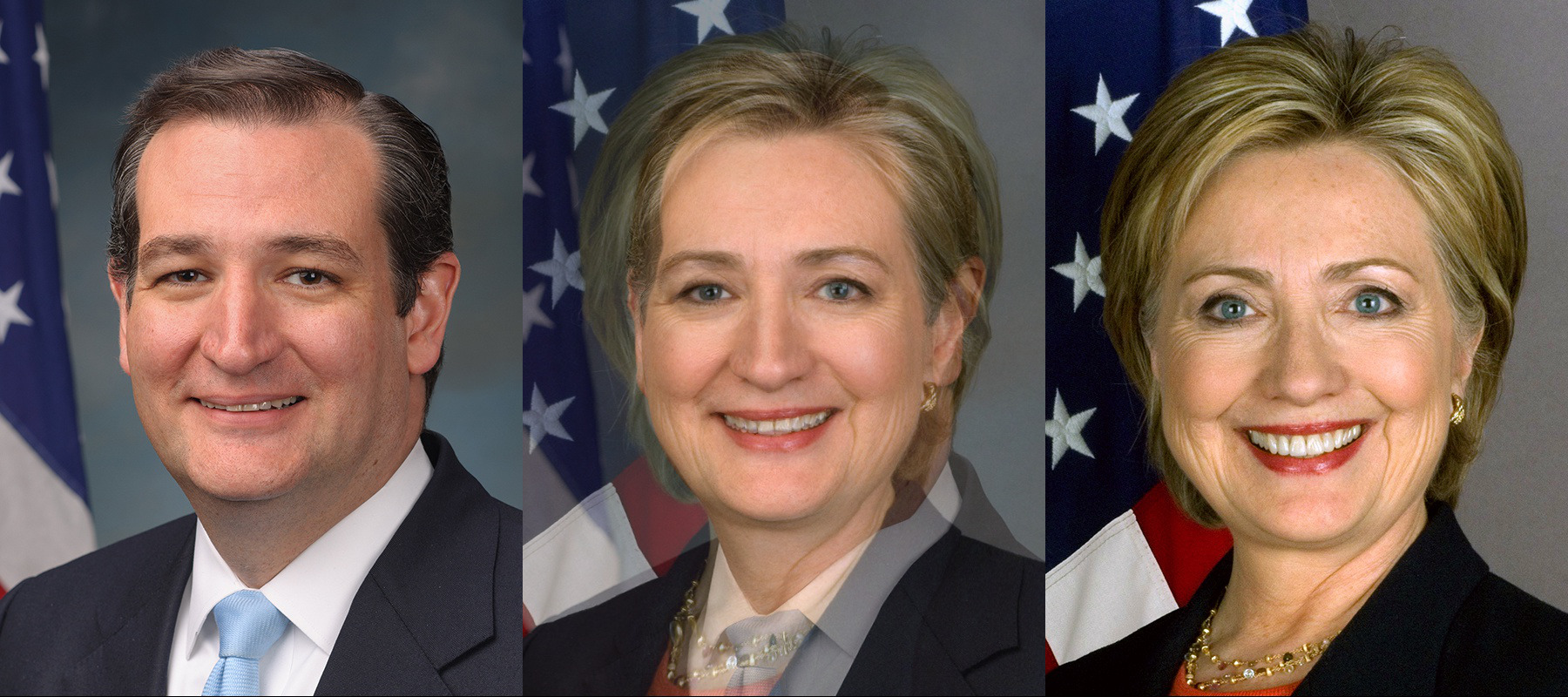
Ted Cruz Hillary Clinton Morph

Face Morph : Hillary Clinton and Donald Trump

Morphing Donald Trump and Ted Cruz

Subscribe & Download Code

If you liked this article and would like to download code (C++ and Python) and example images used in this post, please subscribe to our newsletter. You will also receive a free Computer Vision Resourceguide. In our newsletter we share OpenCV tutorials and examples written in C++/Python, and Computer Vision and Machine Learning algorithms and news.

Subscribe Now

Image Credits

The images of Secretary Hillary Clinton and Senator Ted Cruz are in the Public Domain, while the image of Donald Trump is licensed under Creative Commons Attribution-Share Alike 2.0 Generic license.

FILED UNDER: FACEHOW-TOTUTORIAL TAGGED WITH: DLIBFACE MORPHINGOPENCV

LOAD COMMENTS

>------ 已启动生成: 项目: opencv_imgproc_SSE4_1, 配置: Release x64 ------ 2>------ 已启动生成: 项目: opencv_imgproc_AVX512_SKX, 配置: Release x64 ------ 3>------ 已启动生成: 项目: opencv_imgproc_AVX2, 配置: Release x64 ------ 4>------ 已启动生成: 项目: opencv_imgproc_AVX, 配置: Release x64 ------ 5>------ 已启动生成: 项目: opencv_features2d_SSE4_1, 配置: Release x64 ------ 6>------ 已启动生成: 项目: opencv_features2d_AVX512_SKX, 配置: Release x64 ------ 7>------ 已启动生成: 项目: opencv_features2d_AVX2, 配置: Release x64 ------ 8>------ 已启动生成: 项目: opencv_dnn_AVX512_SKX, 配置: Release x64 ------ 9>------ 已启动生成: 项目: opencv_dnn_AVX2, 配置: Release x64 ------ 10>------ 已启动生成: 项目: opencv_dnn_AVX, 配置: Release x64 ------ 11>------ 已启动生成: 项目: opencv_cudev, 配置: Release x64 ------ 12>------ 已启动生成: 项目: opencv_core_SSE4_2, 配置: Release x64 ------ 13>------ 已启动生成: 项目: opencv_core_SSE4_1, 配置: Release x64 ------ 14>------ 已启动生成: 项目: opencv_core_AVX512_SKX, 配置: Release x64 ------ 15>------ 已启动生成: 项目: opencv_core_AVX2, 配置: Release x64 ------ 16>------ 已启动生成: 项目: opencv_core_AVX, 配置: Release x64 ------ 1>accum.sse4_1.cpp 1>box_filter.sse4_1.cpp 1>color_hsv.sse4_1.cpp 1>color_rgb.sse4_1.cpp 1>color_yuv.sse4_1.cpp 1>filter.sse4_1.cpp 1>median_blur.sse4_1.cpp 1>morph.sse4_1.cpp 1>smooth.sse4_1.cpp 1>imgwarp.sse4_1.cpp 1>resize.sse4_1.cpp 2>sumpixels.avx512_skx.cpp 5>sift.sse4_1.cpp 6>sift.avx512_skx.cpp 3>accum.avx2.cpp 3>bilateral_filter.avx2.cpp 3>box_filter.avx2.cpp 3>color_hsv.avx2.cpp 3>color_rgb.avx2.cpp 3>color_yuv.avx2.cpp 3>filter.avx2.cpp 3>median_blur.avx2.cpp 3>morph.avx2.cpp 3>smooth.avx2.cpp 3>sumpixels.avx2.cpp 3>imgwarp.avx2.cpp 3>resize.avx2.cpp 8>layers_common.avx512_skx.cpp 9>layers_common.avx2.cpp 4>accum.avx.cpp 4>corner.avx.cpp 10>conv_block.avx.cpp 10>conv_depthwise.avx.cpp 10>conv_winograd_f63.avx.cpp 10>fast_gemm_kernels.avx.cpp 10>layers_common.avx.cpp 7>sift.avx2.cpp 7>fast.avx2.cpp 14>matmul.avx512_skx.cpp 13>arithm.sse4_1.cpp 13>matmul.sse4_1.cpp 15>arithm.avx2.cpp 15>convert.avx2.cpp 15>convert_scale.avx2.cpp 12>stat.sse4_2.cpp 15>count_non_zero.avx2.cpp 15>has_non_zero.avx2.cpp 15>mathfuncs_core.avx2.cpp 15>matmul.avx2.cpp 15>mean.avx2.cpp 15>merge.avx2.cpp 15>split.avx2.cpp 15>stat.avx2.cpp 15>sum.avx2.cpp 11>stub.cpp 6>opencv_features2d_AVX512_SKX.vcxproj -> E:\opencv-build\build\modules\features2d\opencv_features2d_AVX512_SKX.dir\Release\opencv_features2d_AVX512_SKX.lib 17>------ 已启动生成: 项目: opencv_calib3d_AVX2, 配置: Release x64 ------ 16>mathfuncs_core.avx.cpp 5>opencv_features2d_SSE4_1.vcxproj -> E:\opencv-build\build\modules\features2d\opencv_features2d_SSE4_1.dir\Release\opencv_features2d_SSE4_1.lib 9>layers_common.avx2.cpp 17>undistort.avx2.cpp 4>opencv_imgproc_AVX.vcxproj -> E:\opencv-build\build\modules\imgproc\opencv_imgproc_AVX.dir\Release\opencv_imgproc_AVX.lib 18>------ 已启动生成: 项目: gen_opencv_python_source, 配置: Release x64 ------ 2>opencv_imgproc_AVX512_SKX.vcxproj -> E:\opencv-build\build\modules\imgproc\opencv_imgproc_AVX512_SKX.dir\Release\opencv_imgproc_AVX512_SKX.lib 11> 正在创建库 E:/opencv-build/build/lib/Release/opencv_cudev4110.lib 和对象 E:/opencv-build/build/lib/Release/opencv_cudev4110.exp 8>layers_common.avx512_skx.cpp 10>opencv_dnn_AVX.vcxproj -> E:\opencv-build\build\modules\dnn\opencv_dnn_AVX.dir\Release\opencv_dnn_AVX.lib 7>opencv_features2d_AVX2.vcxproj -> E:\opencv-build\build\modules\features2d\opencv_features2d_AVX2.dir\Release\opencv_features2d_AVX2.lib 11>opencv_cudev.vcxproj -> E:\opencv-build\build\bin\Release\opencv_cudev4110.dll 3>opencv_imgproc_AVX2.vcxproj -> E:\opencv-build\build\modules\imgproc\opencv_imgproc_AVX2.dir\Release\opencv_imgproc_AVX2.lib 12>opencv_core_SSE4_2.vcxproj -> E:\opencv-build\build\modules\core\opencv_core_SSE4_2.dir\Release\opencv_core_SSE4_2.lib 1>opencv_imgproc_SSE4_1.vcxproj -> E:\opencv-build\build\modules\imgproc\opencv_imgproc_SSE4_1.dir\Release\opencv_imgproc_SSE4_1.lib 13>opencv_core_SSE4_1.vcxproj -> E:\opencv-build\build\modules\core\opencv_core_SSE4_1.dir\Release\opencv_core_SSE4_1.lib 15>opencv_core_AVX2.vcxproj -> E:\opencv-build\build\modules\core\opencv_core_AVX2.dir\Release\opencv_core_AVX2.lib 16>opencv_core_AVX.vcxproj -> E:\opencv-build\build\modules\core\opencv_core_AVX.dir\Release\opencv_core_AVX.lib 9>conv_block.avx2.cpp 9>conv_depthwise.avx2.cpp 9>conv_winograd_f63.avx2.cpp 9>fast_gemm_kernels.avx2.cpp 17>opencv_calib3d_AVX2.vcxproj -> E:\opencv-build\build\modules\calib3d\opencv_calib3d_AVX2.dir\Release\opencv_calib3d_AVX2.lib 14>opencv_core_AVX512_SKX.vcxproj -> E:\opencv-build\build\modules\core\opencv_core_AVX512_SKX.dir\Release\opencv_core_AVX512_SKX.lib 19>------ 已启动生成: 项目: opencv_core, 配置: Release x64 ------ 8>opencv_dnn_AVX512_SKX.vcxproj -> E:\opencv-build\build\modules\dnn\opencv_dnn_AVX512_SKX.dir\Release\opencv_dnn_AVX512_SKX.lib 19>cmake_pch.cxx 9>opencv_dnn_AVX2.vcxproj -> E:\opencv-build\build\modules\dnn\opencv_dnn_AVX2.dir\Release\opencv_dnn_AVX2.lib 19>opencl_kernels_core.cpp 19>algorithm.cpp 19>arithm.cpp 19>arithm.dispatch.cpp 19>array.cpp 19>async.cpp 19>batch_distance.cpp 19>bindings_utils.cpp 19>buffer_area.cpp 19>channels.cpp 19>check.cpp 19>command_line_parser.cpp 19>conjugate_gradient.cpp 19>convert.dispatch.cpp 19>convert_c.cpp 19>convert_scale.dispatch.cpp 19>copy.cpp 19>count_non_zero.dispatch.cpp 19>cuda_gpu_mat.cpp 19>cuda_gpu_mat_nd.cpp 19>cuda_host_mem.cpp 19>cuda_info.cpp 19>cuda_stream.cpp 19>datastructs.cpp 19>directx.cpp 19>downhill_simplex.cpp 19>dxt.cpp 19>gl_core_3_1.cpp 19>glob.cpp 19>hal_internal.cpp 19>has_non_zero.dispatch.cpp 19>kmeans.cpp 19>lapack.cpp 19>lda.cpp 19>logger.cpp 19>lpsolver.cpp 19>D:\Visual Studio\VC\Tools\MSVC\14.43.34808\include\xutility(506,82): warning C4267: “参数”: 从“size_t”转换到“const unsigned int”,可能丢失数据 19>(编译源文件“../../../opencv/modules/core/src/cuda_stream.cpp”) 19> D:\Visual Studio\VC\Tools\MSVC\14.43.34808\include\xutility(506,82): 19> 模板实例化上下文(最早的实例化上下文)为 19> E:\opencv-build\opencv\modules\core\src\cuda_stream.cpp(468,13): 19> 查看对正在编译的函数 模板 实例化“cv::Ptr<cv::cuda::Stream::Impl> cv::makePtr<cv::cuda::Stream::Impl,size_t>(const size_t &)”的引用 19> E:\opencv-build\opencv\modules\core\include\opencv2\core\cvstd_wrapper.hpp(146,27): 19> 查看对正在编译的函数 模板 实例化“std::shared_ptr<T> std::make_shared<_Tp,const size_t&>(const size_t &)”的引用 19> with 19> [ 19> T=cv::cuda::Stream::Impl, 19> _Tp=cv::cuda::Stream::Impl 19> ] 19> D:\Visual Studio\VC\Tools\MSVC\14.43.34808\include\memory(2903,46): 19> 查看对正在编译的函数 模板 实例化“std::_Ref_count_obj2<_Ty>::_Ref_count_obj2<const size_t&>(const size_t &)”的引用 19> with 19> [ 19> _Ty=cv::cuda::Stream::Impl 19> ] 19> D:\Visual Studio\VC\Tools\MSVC\14.43.34808\include\memory(2092,18): 19> 查看对正在编译的函数 模板 实例化“void std::_Construct_in_place<_Ty,const size_t&>(_Ty &,const size_t &) noexcept(false)”的引用 19> with 19> [ 19> _Ty=cv::cuda::Stream::Impl 19> ] 19>lut.cpp 19>mathfuncs.cpp 19>mathfuncs_core.dispatch.cpp 19>matmul.dispatch.cpp 19>matrix.cpp 19>matrix_c.cpp 19>matrix_decomp.cpp 19>matrix_expressions.cpp 19>matrix_iterator.cpp 19>matrix_operations.cpp 19>matrix_sparse.cpp 19>matrix_transform.cpp 19>matrix_wrap.cpp 19>mean.dispatch.cpp 19>merge.dispatch.cpp 19>minmax.cpp 19>norm.cpp 19>ocl.cpp 19>opencl_clblas.cpp 19>opencl_clfft.cpp 19>opencl_core.cpp 19>opengl.cpp 19>out.cpp 19>ovx.cpp 19>parallel_openmp.cpp 19>parallel_tbb.cpp 19>parallel_impl.cpp 19>pca.cpp 19>persistence.cpp 19>persistence_base64_encoding.cpp 19>persistence_json.cpp 19>persistence_types.cpp 19>persistence_xml.cpp 19>persistence_yml.cpp 19>rand.cpp 19>softfloat.cpp 19>split.dispatch.cpp 19>stat.dispatch.cpp 19>stat_c.cpp 19>stl.cpp 19>sum.dispatch.cpp 19>system.cpp 19>tables.cpp 19>trace.cpp 19>types.cpp 19>umatrix.cpp 19>datafile.cpp 19>filesystem.cpp 19>logtagconfigparser.cpp 19>logtagmanager.cpp 19>samples.cpp 19>va_intel.cpp 19>alloc.cpp 19>parallel.cpp 19>parallel.cpp 19> 正在创建库 E:/opencv-build/build/lib/Release/opencv_core4110.lib 和对象 E:/opencv-build/build/lib/Release/opencv_core4110.exp 19>LINK : warning LNK4098: 默认库“LIBCMT”与其他库的使用冲突;请使用 /NODEFAULTLIB:library 19>opencv_core.vcxproj -> E:\opencv-build\build\bin\Release\opencv_core4110.dll 19>已完成生成项目“opencv_core.vcxproj”的操作。 20>------ 已启动生成: 项目: opencv_version_win32, 配置: Release x64 ------ 21>------ 已启动生成: 项目: opencv_version, 配置: Release x64 ------ 22>------ 已启动生成: 项目: opencv_signal, 配置: Release x64 ------ 23>------ 已启动生成: 项目: opencv_ml, 配置: Release x64 ------ 24>------ 已启动生成: 项目: opencv_imgproc, 配置: Release x64 ------ 25>------ 已启动生成: 项目: opencv_flann, 配置: Release x64 ------ 26>------ 已启动生成: 项目: opencv_cudaarithm, 配置: Release x64 ------ 20>opencv_version.cpp 22>cmake_pch.cxx 23>cmake_pch.cxx 25>cmake_pch.cxx 21>opencv_version.cpp 26>cmake_pch.cxx 24>cmake_pch.cxx 22>opencv_signal_main.cpp 22>signal_resample.cpp 23>opencv_ml_main.cpp 23>ann_mlp.cpp 23>boost.cpp 23>data.cpp 23>em.cpp 23>gbt.cpp 23>inner_functions.cpp 23>kdtree.cpp 23>knearest.cpp 23>lr.cpp 23>nbayes.cpp 23>rtrees.cpp 23>svm.cpp 23>svmsgd.cpp 23>testset.cpp 23>tree.cpp 21>opencv_version.vcxproj -> E:\opencv-build\build\bin\Release\opencv_version.exe 24>opencl_kernels_imgproc.cpp 24>opencv_imgproc_main.cpp 24>accum.cpp 24>accum.dispatch.cpp 24>approx.cpp 24>bilateral_filter.dispatch.cpp 24>blend.cpp 24>box_filter.dispatch.cpp 24>canny.cpp 20>opencv_version_win32.vcxproj -> E:\opencv-build\build\bin\Release\opencv_version_win32.exe 24>clahe.cpp 24>color.cpp 24>color_hsv.dispatch.cpp 24>color_lab.cpp 24>color_rgb.dispatch.cpp 24>color_yuv.dispatch.cpp 24>colormap.cpp 24>connectedcomponents.cpp 24>contours.cpp 24>contours_approx.cpp 24>contours_common.cpp 24>contours_link.cpp 25>opencv_flann_main.cpp 24>contours_new.cpp 24>convhull.cpp 25>flann.cpp 24>corner.cpp 25>miniflann.cpp 24>cornersubpix.cpp 22> 正在创建库 E:/opencv-build/build/lib/Release/opencv_signal4110.lib 和对象 E:/opencv-build/build/lib/Release/opencv_signal4110.exp 26>opencv_cudaarithm_main.cpp 24>demosaicing.cpp 26>arithm.cpp 24>deriv.cpp 26>core.cpp 24>distransform.cpp 24>drawing.cpp 24>emd.cpp 24>emd_new.cpp 24>featureselect.cpp 26>element_operations.cpp 24>filter.dispatch.cpp 26>lut.cpp 26>reductions.cpp 24>floodfill.cpp 24>gabor.cpp 24>generalized_hough.cpp 24>geometry.cpp 24>grabcut.cpp 24>hershey_fonts.cpp 24>histogram.cpp 24>hough.cpp 24>imgwarp.cpp 24>intelligent_scissors.cpp 24>intersection.cpp 24>linefit.cpp 24>lsd.cpp 24>main.cpp 23> 正在创建库 E:/opencv-build/build/lib/Release/opencv_ml4110.lib 和对象 E:/opencv-build/build/lib/Release/opencv_ml4110.exp 24>matchcontours.cpp 24>median_blur.dispatch.cpp 24>min_enclosing_triangle.cpp 24>moments.cpp 24>morph.dispatch.cpp 24>phasecorr.cpp 24>pyramids.cpp 24>resize.cpp 24>rotcalipers.cpp 24>samplers.cpp 24>segmentation.cpp 24>shapedescr.cpp 24>smooth.dispatch.cpp 24>spatialgradient.cpp 24>stackblur.cpp 22>opencv_signal.vcxproj -> E:\opencv-build\build\bin\Release\opencv_signal4110.dll 24>subdivision2d.cpp 24>sumpixels.dispatch.cpp 24>tables.cpp 24>templmatch.cpp 24>thresh.cpp 24>utils.cpp 23>opencv_ml.vcxproj -> E:\opencv-build\build\bin\Release\opencv_ml4110.dll 26> 正在创建库 E:/opencv-build/build/lib/Release/opencv_cudaarithm4110.lib 和对象 E:/opencv-build/build/lib/Release/opencv_cudaarithm4110.exp 26>LINK : warning LNK4098: 默认库“LIBCMT”与其他库的使用冲突;请使用 /NODEFAULTLIB:library 26>opencv_cudaarithm.vcxproj -> E:\opencv-build\build\bin\Release\opencv_cudaarithm4110.dll 26>已完成生成项目“opencv_cudaarithm.vcxproj”的操作。 25> 正在创建库 E:/opencv-build/build/lib/Release/opencv_flann4110.lib 和对象 E:/opencv-build/build/lib/Release/opencv_flann4110.exp 25>opencv_flann.vcxproj -> E:\opencv-build\build\bin\Release\opencv_flann4110.dll 27>------ 已启动生成: 项目: opencv_surface_matching, 配置: Release x64 ------ 27>cmake_pch.cxx 24> 正在创建库 E:/opencv-build/build/lib/Release/opencv_imgproc4110.lib 和对象 E:/opencv-build/build/lib/Release/opencv_imgproc4110.exp 24>opencv_imgproc.vcxproj -> E:\opencv-build\build\bin\Release\opencv_imgproc4110.dll 28>------ 已启动生成: 项目: opencv_reg, 配置: Release x64 ------ 29>------ 已启动生成: 项目: opencv_quality, 配置: Release x64 ------ 30>------ 已启动生成: 项目: opencv_plot, 配置: Release x64 ------ 31>------ 已启动生成: 项目: opencv_phase_unwrapping, 配置: Release x64 ------ 32>------ 已启动生成: 项目: opencv_intensity_transform, 配置: Release x64 ------ 33>------ 已启动生成: 项目: opencv_imgcodecs, 配置: Release x64 ------ 34>------ 已启动生成: 项目: opencv_img_hash, 配置: Release x64 ------ 35>------ 已启动生成: 项目: opencv_hfs, 配置: Release x64 ------ 36>------ 已启动生成: 项目: opencv_fuzzy, 配置: Release x64 ------ 37>------ 已启动生成: 项目: opencv_features2d, 配置: Release x64 ------ 38>------ 已启动生成: 项目: opencv_dnn, 配置: Release x64 ------ 39>------ 已启动生成: 项目: opencv_cudawarping, 配置: Release x64 ------ 40>------ 已启动生成: 项目: opencv_cudafilters, 配置: Release x64 ------ 31>cmake_pch.cxx 30>cmake_pch.cxx 29>cmake_pch.cxx 32>cmake_pch.cxx 28>map.cpp 28>mapaffine.cpp 28>mapper.cpp 28>mappergradaffine.cpp 28>mappergradeuclid.cpp 28>mappergradproj.cpp 28>mappergradshift.cpp 28>mappergradsimilar.cpp 28>mapperpyramid.cpp 28>mapprojec.cpp 28>mapshift.cpp 34>cmake_pch.cxx 36>cmake_pch.cxx 27>opencv_surface_matching_main.cpp 27>icp.cpp 40>cmake_pch.cxx 27>pose_3d.cpp 27>ppf_helpers.cpp 27>ppf_match_3d.cpp 35>cmake_pch.cxx 27>t_hash_int.cpp 38>cmake_pch.cxx 39>cmake_pch.cxx 29>opencv_quality_main.cpp 29>qualitybrisque.cpp 29>qualitygmsd.cpp 34>opencv_img_hash_main.cpp 32>opencv_intensity_transform_main.cpp 31>opencv_phase_unwrapping_main.cpp 30>opencv_plot_main.cpp 29>qualitymse.cpp 29>qualityssim.cpp 34>average_hash.cpp 34>block_mean_hash.cpp 34>color_moment_hash.cpp 31>histogramphaseunwrapping.cpp 32>bimef.cpp 34>img_hash_base.cpp 32>intensity_transform.cpp 30>plot.cpp 34>marr_hildreth_hash.cpp 34>phash.cpp 35>opencv_hfs_main.cpp 34>radial_variance_hash.cpp 35>hfs.cpp 35>hfs_core.cpp 35>magnitude.cpp 36>opencv_fuzzy_main.cpp 36>fuzzy_F0_math.cpp 36>fuzzy_F1_math.cpp 36>fuzzy_image.cpp 35>merge.cpp 35>gslic_engine.cpp 35>slic.cpp 33>cmake_pch.cxx 40>opencv_cudafilters_main.cpp 40>filtering.cpp 27> 正在创建库 E:/opencv-build/build/lib/Release/opencv_surface_matching4110.lib 和对象 E:/opencv-build/build/lib/Release/opencv_surface_matching4110.exp 39>opencv_cudawarping_main.cpp 38>opencl_kernels_dnn.cpp 28> 正在创建库 E:/opencv-build/build/lib/Release/opencv_reg4110.lib 和对象 E:/opencv-build/build/lib/Release/opencv_reg4110.exp 39>pyramids.cpp 39>remap.cpp 39>resize.cpp 39>warp.cpp 38>opencv_dnn_main.cpp 38>opencv-caffe.pb.cc 38>opencv-onnx.pb.cc 38>attr_value.pb.cc 38>function.pb.cc 38>graph.pb.cc 38>op_def.pb.cc 38>tensor.pb.cc 38>tensor_shape.pb.cc 38>types.pb.cc 38>versions.pb.cc 38>caffe_importer.cpp 38>caffe_io.cpp 38>caffe_shrinker.cpp 38>darknet_importer.cpp 38>darknet_io.cpp 31> 正在创建库 E:/opencv-build/build/lib/Release/opencv_phase_unwrapping4110.lib 和对象 E:/opencv-build/build/lib/Release/opencv_phase_unwrapping4110.exp 32> 正在创建库 E:/opencv-build/build/lib/Release/opencv_intensity_transform4110.lib 和对象 E:/opencv-build/build/lib/Release/opencv_intensity_transform4110.exp 29> 正在创建库 E:/opencv-build/build/lib/Release/opencv_quality4110.lib 和对象 E:/opencv-build/build/lib/Release/opencv_quality4110.exp 27>opencv_surface_matching.vcxproj -> E:\opencv-build\build\bin\Release\opencv_surface_matching4110.dll 38>debug_utils.cpp 28>opencv_reg.vcxproj -> E:\opencv-build\build\bin\Release\opencv_reg4110.dll 30> 正在创建库 E:/opencv-build/build/lib/Release/opencv_plot4110.lib 和对象 E:/opencv-build/build/lib/Release/opencv_plot4110.exp 38>dnn.cpp 38>dnn_params.cpp 38>dnn_read.cpp 38>dnn_utils.cpp 32>opencv_intensity_transform.vcxproj -> E:\opencv-build\build\bin\Release\opencv_intensity_transform4110.dll 38>graph_simplifier.cpp 31>opencv_phase_unwrapping.vcxproj -> E:\opencv-build\build\bin\Release\opencv_phase_unwrapping4110.dll 38>halide_scheduler.cpp 38>ie_ngraph.cpp 38>init.cpp 35> 正在创建库 E:/opencv-build/build/lib/Release/opencv_hfs4110.lib 和对象 E:/opencv-build/build/lib/Release/opencv_hfs4110.exp 35>LINK : warning LNK4098: 默认库“LIBCMT”与其他库的使用冲突;请使用 /NODEFAULTLIB:library 30>opencv_plot.vcxproj -> E:\opencv-build\build\bin\Release\opencv_plot4110.dll 34> 正在创建库 E:/opencv-build/build/lib/Release/opencv_img_hash4110.lib 和对象 E:/opencv-build/build/lib/Release/opencv_img_hash4110.exp 38>layers_rvp052.cpp 38>quantization_utils.cpp 38>layer.cpp 38>layer_factory.cpp 29>opencv_quality.vcxproj -> E:\opencv-build\build\bin\Release\opencv_quality4110.dll 38>accum_layer.cpp 38>arg_layer.cpp 38>attention_layer.cpp 36> 正在创建库 E:/opencv-build/build/lib/Release/opencv_fuzzy4110.lib 和对象 E:/opencv-build/build/lib/Release/opencv_fuzzy4110.exp 38>blank_layer.cpp 38>concat_layer.cpp 38>const_layer.cpp 38>correlation_layer.cpp 38>conv_depthwise.cpp 38>conv_winograd_f63.cpp 38>conv_winograd_f63.dispatch.cpp 38>convolution.cpp 38>fast_gemm.cpp 38>fast_norm.cpp 38>softmax.cpp 38>crop_and_resize_layer.cpp 38>cumsum_layer.cpp 38>depth_space_ops_layer.cpp 38>detection_output_layer.cpp 34>opencv_img_hash.vcxproj -> E:\opencv-build\build\bin\Release\opencv_img_hash4110.dll 38>einsum_layer.cpp 38>expand_layer.cpp 33>opencv_imgcodecs_main.cpp 35>opencv_hfs.vcxproj -> E:\opencv-build\build\bin\Release\opencv_hfs4110.dll 39> 正在创建库 E:/opencv-build/build/lib/Release/opencv_cudawarping4110.lib 和对象 E:/opencv-build/build/lib/Release/opencv_cudawarping4110.exp 33>bitstrm.cpp 33>exif.cpp 33>grfmt_avif.cpp 39>LINK : warning LNK4098: 默认库“LIBCMT”与其他库的使用冲突;请使用 /NODEFAULTLIB:library 38>flatten_layer.cpp 33>grfmt_base.cpp 38>flow_warp_layer.cpp 38>gather_elements_layer.cpp 33>grfmt_bmp.cpp 33>grfmt_exr.cpp 33>grfmt_gdal.cpp 33>grfmt_gdcm.cpp 33>grfmt_gif.cpp 33>grfmt_hdr.cpp 33>grfmt_jpeg.cpp 38>gather_layer.cpp 38>gemm_layer.cpp 33>grfmt_jpeg2000.cpp 33>grfmt_jpeg2000_openjpeg.cpp 40> 正在创建库 E:/opencv-build/build/lib/Release/opencv_cudafilters4110.lib 和对象 E:/opencv-build/build/lib/Release/opencv_cudafilters4110.exp 33>grfmt_jpegxl.cpp 40>LINK : warning LNK4098: 默认库“LIBCMT”与其他库的使用冲突;请使用 /NODEFAULTLIB:library 38>group_norm_layer.cpp 33>grfmt_pam.cpp 38>instance_norm_layer.cpp 33>grfmt_pfm.cpp 33>grfmt_png.cpp 33>grfmt_pxm.cpp 33>grfmt_spng.cpp 36>opencv_fuzzy.vcxproj -> E:\opencv-build\build\bin\Release\opencv_fuzzy4110.dll 33>grfmt_sunras.cpp 33>grfmt_tiff.cpp 33>grfmt_webp.cpp 38>layer_norm.cpp 38>layers_common.cpp 33>loadsave.cpp 33>rgbe.cpp 33>utils.cpp 38>lrn_layer.cpp 38>matmul_layer.cpp 38>max_unpooling_layer.cpp 38>mvn_layer.cpp 38>nary_eltwise_layers.cpp 38>normalize_bbox_layer.cpp 38>not_implemented_layer.cpp 38>padding_layer.cpp 38>permute_layer.cpp 38>prior_box_layer.cpp 39>opencv_cudawarping.vcxproj -> E:\opencv-build\build\bin\Release\opencv_cudawarping4110.dll 39>已完成生成项目“opencv_cudawarping.vcxproj”的操作。 35>已完成生成项目“opencv_hfs.vcxproj”的操作。 38>proposal_layer.cpp 38>recurrent_layers.cpp 38>reduce_layer.cpp 38>region_layer.cpp 38>reorg_layer.cpp 38>reshape_layer.cpp 38>resize_layer.cpp 38>scatterND_layer.cpp 38>scatter_layer.cpp 40>opencv_cudafilters.vcxproj -> E:\opencv-build\build\bin\Release\opencv_cudafilters4110.dll 38>shuffle_channel_layer.cpp 38>slice_layer.cpp 33>LINK : fatal error LNK1181: 无法打开输入文件“E:\Anaconda\Library\bin\avif.dll” 38>split_layer.cpp 40>已完成生成项目“opencv_cudafilters.vcxproj”的操作。 38>tile_layer.cpp 33>已完成生成项目“opencv_imgcodecs.vcxproj”的操作 - 失败。 41>------ 已启动生成: 项目: opencv_videoio, 配置: Release x64 ------ 42>------ 已启动生成: 项目: opencv_cudaimgproc, 配置: Release x64 ------ 38>topk_layer.cpp 38>legacy_backend.cpp 38>model.cpp 38>net.cpp 38>net_cann.cpp 37>cmake_pch.cxx 38>net_impl_backend.cpp 38>net_impl.cpp 38>net_impl_fuse.cpp 38>net_openvino.cpp 38>net_quantization.cpp 38>nms.cpp 38>common.cpp 38>math_functions.cpp 38>ocl4dnn_conv_spatial.cpp 38>ocl4dnn_inner_product.cpp 38>ocl4dnn_lrn.cpp 38>ocl4dnn_pool.cpp 38>ocl4dnn_softmax.cpp 38>onnx_graph_simplifier.cpp 38>onnx_importer.cpp 41>cmake_pch.cxx 38>op_cann.cpp 38>op_cuda.cpp 38>op_halide.cpp 38>op_inf_engine.cpp 38>op_timvx.cpp 38>op_vkcom.cpp 38>op_webnn.cpp 38>registry.cpp 38>tf_graph_simplifier.cpp 38>tf_importer.cpp 42>cmake_pch.cxx 38>tf_io.cpp 38>tflite_importer.cpp 38>THDiskFile.cpp 38>THFile.cpp 38>THGeneral.cpp 38>torch_importer.cpp 38>conv_1x1_fast_spv.cpp 38>conv_depthwise_3x3_spv.cpp 38>conv_depthwise_spv.cpp 38>conv_implicit_gemm_spv.cpp 38>gemm_spv.cpp 38>nary_eltwise_binary_forward_spv.cpp 38>spv_shader.cpp 38>buffer.cpp 38>command.cpp 38>context.cpp 38>fence.cpp 38>internal.cpp 37>opencl_kernels_features2d.cpp 37>opencv_features2d_main.cpp 37>affine_feature.cpp 38>op_base.cpp 38>op_conv.cpp 37>agast.cpp 37>agast_score.cpp 37>akaze.cpp 37>bagofwords.cpp 37>blobdetector.cpp 37>brisk.cpp 37>draw.cpp 37>dynamic.cpp 38>op_matmul.cpp 38>op_naryEltwise.cpp 38>pipeline.cpp 38>tensor.cpp 37>evaluation.cpp 37>fast.cpp 37>fast_score.cpp 38>vk_functions.cpp 37>feature2d.cpp 37>gftt.cpp 38>vk_loader.cpp 37>kaze.cpp 37>AKAZEFeatures.cpp 37>KAZEFeatures.cpp 37>fed.cpp 37>nldiffusion_functions.cpp 37>keypoint.cpp 37>main.cpp 37>matchers.cpp 37>mser.cpp 37>orb.cpp 37>sift.dispatch.cpp 42>opencv_cudaimgproc_main.cpp 42>bilateral_filter.cpp 42>blend.cpp 42>canny.cpp 42>color.cpp 42>connectedcomponents.cpp 42>corners.cpp 42>generalized_hough.cpp 42>gftt.cpp 42>histogram.cpp 42>hough_circles.cpp 42>hough_lines.cpp 42>hough_segments.cpp 42>match_template.cpp 42>mean_shift.cpp 42>moments.cpp 42>mssegmentation.cpp 41>opencv_videoio_main.cpp 41>backend_static.cpp 41>cap.cpp 41>cap_dshow.cpp 41>cap_images.cpp 41>cap_mjpeg_decoder.cpp 41>cap_mjpeg_encoder.cpp 41>cap_msmf.cpp 41>obsensor_stream_channel_msmf.cpp 41>obsensor_uvc_stream_channel.cpp 41>cap_obsensor_capture.cpp 41>container_avi.cpp 41>videoio_c.cpp 41>videoio_registry.cpp 38>backend.cpp 42> 正在创建库 E:/opencv-build/build/lib/Release/opencv_cudaimgproc4110.lib 和对象 E:/opencv-build/build/lib/Release/opencv_cudaimgproc4110.exp 42>LINK : warning LNK4098: 默认库“LIBCMT”与其他库的使用冲突;请使用 /NODEFAULTLIB:library 42>opencv_cudaimgproc.vcxproj -> E:\opencv-build\build\bin\Release\opencv_cudaimgproc4110.dll 42>已完成生成项目“opencv_cudaimgproc.vcxproj”的操作。 43>------ 已启动生成: 项目: opencv_photo, 配置: Release x64 ------ 37> 正在创建库 E:/opencv-build/build/lib/Release/opencv_features2d4110.lib 和对象 E:/opencv-build/build/lib/Release/opencv_features2d4110.exp 43>cmake_pch.cxx 41>backend_plugin.cpp 37>opencv_features2d.vcxproj -> E:\opencv-build\build\bin\Release\opencv_features2d4110.dll 44>------ 已启动生成: 项目: opencv_saliency, 配置: Release x64 ------ 45>------ 已启动生成: 项目: opencv_line_descriptor, 配置: Release x64 ------ 46>------ 已启动生成: 项目: opencv_cudafeatures2d, 配置: Release x64 ------ 47>------ 已启动生成: 项目: opencv_calib3d, 配置: Release x64 ------ 38>batch_norm_layer.cpp 44>cmake_pch.cxx 45>cmake_pch.cxx 46>cmake_pch.cxx 47>cmake_pch.cxx 38>convolution_layer.cpp 41>LINK : fatal error LNK1181: 无法打开输入文件“..\..\lib\Release\opencv_imgcodecs4110.lib” 41>已完成生成项目“opencv_videoio.vcxproj”的操作 - 失败。 48>------ 已启动生成: 项目: opencv_highgui, 配置: Release x64 ------ 49>------ 已启动生成: 项目: opencv_cudacodec, 配置: Release x64 ------ 43>opencl_kernels_photo.cpp 43>opencv_photo_main.cpp 43>align.cpp 43>calibrate.cpp 43>contrast_preserve.cpp 43>denoise_tvl1.cpp 43>denoising.cpp 43>denoising.cuda.cpp 43>hdr_common.cpp 43>inpaint.cpp 43>merge.cpp 43>npr.cpp 43>seamless_cloning.cpp 43>seamless_cloning_impl.cpp 43>tonemap.cpp 48>cmake_pch.cxx 49>cmake_pch.cxx 44>opencv_saliency_main.cpp 44>CmFile.cpp 44>CmShow.cpp 44>FilterTIG.cpp 44>ValStructVec.cpp 44>objectnessBING.cpp 44>motionSaliency.cpp 44>motionSaliencyBinWangApr2014.cpp 44>objectness.cpp 44>saliency.cpp 44>staticSaliency.cpp 44>staticSaliencyFineGrained.cpp 44>staticSaliencySpectralResidual.cpp 47>opencl_kernels_calib3d.cpp 47>opencv_calib3d_main.cpp 47>ap3p.cpp 47>calibinit.cpp 47>calibration.cpp 47>calibration_base.cpp 45>opencv_line_descriptor_main.cpp 47>calibration_handeye.cpp 45>LSDDetector.cpp 45>binary_descriptor.cpp 47>checkchessboard.cpp 47>chessboard.cpp 47>circlesgrid.cpp 45>binary_descriptor_matcher.cpp 47>compat_ptsetreg.cpp 47>dls.cpp 47>epnp.cpp 47>fisheye.cpp 47>five-point.cpp 45>draw.cpp 47>fundam.cpp 47>homography_decomp.cpp 47>ippe.cpp 47>levmarq.cpp 46>opencv_cudafeatures2d_main.cpp 46>brute_force_matcher.cpp 46>fast.cpp 47>main.cpp 46>feature2d_async.cpp 47>p3p.cpp 46>orb.cpp 47>polynom_solver.cpp 38>elementwise_layers.cpp 47>ptsetreg.cpp 47>quadsubpix.cpp 47>rho.cpp 47>solvepnp.cpp 47>sqpnp.cpp 47>stereo_geom.cpp 47>stereobm.cpp 47>stereosgbm.cpp 47>triangulate.cpp 47>undistort.dispatch.cpp 47>upnp.cpp 47>bundle.cpp 47>degeneracy.cpp 47>dls_solver.cpp 47>essential_solver.cpp 47>estimator.cpp 47>fundamental_solver.cpp 45> 正在创建库 E:/opencv-build/build/lib/Release/opencv_line_descriptor4110.lib 和对象 E:/opencv-build/build/lib/Release/opencv_line_descriptor4110.exp 44> 正在创建库 E:/opencv-build/build/lib/Release/opencv_saliency4110.lib 和对象 E:/opencv-build/build/lib/Release/opencv_saliency4110.exp 47>gamma_values.cpp 47>homography_solver.cpp 47>local_optimization.cpp 47>pnp_solver.cpp 46> 正在创建库 E:/opencv-build/build/lib/Release/opencv_cudafeatures2d4110.lib 和对象 E:/opencv-build/build/lib/Release/opencv_cudafeatures2d4110.exp 47>quality.cpp 38>eltwise_layer.cpp 47>ransac_solvers.cpp 47>sampler.cpp 46>LINK : warning LNK4098: 默认库“LIBCMT”与其他库的使用冲突;请使用 /NODEFAULTLIB:library 43> 正在创建库 E:/opencv-build/build/lib/Release/opencv_photo4110.lib 和对象 E:/opencv-build/build/lib/Release/opencv_photo4110.exp 47>termination.cpp 43>LINK : warning LNK4098: 默认库“LIBCMT”与其他库的使用冲突;请使用 /NODEFAULTLIB:library 47>utils.cpp 49>E:\opencv-build\opencv_contrib\modules\cudacodec\src\video_decoder.hpp(107,118): error C2065: “cudaVideoSurfaceFormat_YUV444”: 未声明的标识符 49>(编译源文件“CMakeFiles/opencv_cudacodec.dir/cmake_pch.cxx”) 49>E:\opencv-build\opencv_contrib\modules\cudacodec\src\video_decoder.hpp(107,19): error C2737: “type”: 必须初始化 const 对象 49>(编译源文件“CMakeFiles/opencv_cudacodec.dir/cmake_pch.cxx”) 49>已完成生成项目“opencv_cudacodec.vcxproj”的操作 - 失败。 45>opencv_line_descriptor.vcxproj -> E:\opencv-build\build\bin\Release\opencv_line_descriptor4110.dll 44>opencv_saliency.vcxproj -> E:\opencv-build\build\bin\Release\opencv_saliency4110.dll 46>opencv_cudafeatures2d.vcxproj -> E:\opencv-build\build\bin\Release\opencv_cudafeatures2d4110.dll 43>opencv_photo.vcxproj -> E:\opencv-build\build\bin\Release\opencv_photo4110.dll 48>opencv_highgui_main.cpp 48>backend.cpp 48>roiSelector.cpp 48>window.cpp 48>window_w32.cpp 43>已完成生成项目“opencv_photo.vcxproj”的操作。 50>------ 已启动生成: 项目: opencv_xphoto, 配置: Release x64 ------ 46>已完成生成项目“opencv_cudafeatures2d.vcxproj”的操作。 50>bm3d_image_denoising.cpp 50>dct_image_denoising.cpp 50>grayworld_white_balance.cpp 50>inpainting.cpp 50>learning_based_color_balance.cpp 50>oilpainting.cpp 38>fully_connected_layer.cpp 50>simple_color_balance.cpp 50>tonemap.cpp 48>LINK : fatal error LNK1181: 无法打开输入文件“..\..\lib\Release\opencv_videoio4110.lib” 48>已完成生成项目“opencv_highgui.vcxproj”的操作 - 失败。 51>------ 已启动生成: 项目: opencv_visualisation, 配置: Release x64 ------ 52>------ 已启动生成: 项目: opencv_ts, 配置: Release x64 ------ 53>------ 已启动生成: 项目: opencv_bioinspired, 配置: Release x64 ------ 54>------ 已启动生成: 项目: opencv_annotation, 配置: Release x64 ------ 51>opencv_visualisation.cpp 54>opencv_annotation.cpp 52>cmake_pch.cxx 53>cmake_pch.cxx 38>pooling_layer.cpp 38>scale_layer.cpp 53>opencl_kernels_bioinspired.cpp 53>opencv_bioinspired_main.cpp 53>basicretinafilter.cpp 53>imagelogpolprojection.cpp 53>magnoretinafilter.cpp 53>parvoretinafilter.cpp 53>retina.cpp 53>retina_ocl.cpp 53>retinacolor.cpp 53>retinafasttonemapping.cpp 53>retinafilter.cpp 53>transientareassegmentationmodule.cpp 54>LINK : fatal error LNK1181: 无法打开输入文件“..\..\lib\Release\opencv_highgui4110.lib” 54>已完成生成项目“opencv_annotation.vcxproj”的操作 - 失败。 52>cuda_perf.cpp 52>cuda_test.cpp 52>ocl_perf.cpp 52>ocl_test.cpp 52>ts.cpp 52>ts_arrtest.cpp 52>ts_func.cpp 52>ts_gtest.cpp 52>ts_perf.cpp 52>ts_tags.cpp 38>softmax_layer.cpp 53>LINK : fatal error LNK1181: 无法打开输入文件“..\..\lib\Release\opencv_highgui4110.lib” 51>LINK : fatal error LNK1181: 无法打开输入文件“..\..\lib\Release\opencv_highgui4110.lib” 53>已完成生成项目“opencv_bioinspired.vcxproj”的操作 - 失败。 51>已完成生成项目“opencv_visualisation.vcxproj”的操作 - 失败。 38>batch_norm_layer.cpp 50> 正在创建库 E:/opencv-build/build/lib/Release/opencv_xphoto4110.lib 和对象 E:/opencv-build/build/lib/Release/opencv_xphoto4110.exp 50>opencv_xphoto.vcxproj -> E:\opencv-build\build\bin\Release\opencv_xphoto4110.dll 38>convolution_layer.cpp 52>opencv_ts.vcxproj -> E:\opencv-build\build\lib\Release\opencv_ts4110.lib 38>elementwise_layers.cpp 38>eltwise_layer.cpp 38>fully_connected_layer.cpp 38>pooling_layer.cpp 47> 正在创建库 E:/opencv-build/build/lib/Release/opencv_calib3d4110.lib 和对象 E:/opencv-build/build/lib/Release/opencv_calib3d4110.exp 47>opencv_calib3d.vcxproj -> E:\opencv-build\build\bin\Release\opencv_calib3d4110.dll 55>------ 已启动生成: 项目: opencv_structured_light, 配置: Release x64 ------ 56>------ 已启动生成: 项目: opencv_shape, 配置: Release x64 ------ 57>------ 已启动生成: 项目: opencv_rgbd, 配置: Release x64 ------ 58>------ 已启动生成: 项目: opencv_rapid, 配置: Release x64 ------ 59>------ 已启动生成: 项目: opencv_cudastereo, 配置: Release x64 ------ 60>------ 已启动生成: 项目: opencv_ccalib, 配置: Release x64 ------ 55>cmake_pch.cxx 56>cmake_pch.cxx 57>cmake_pch.cxx 58>cmake_pch.cxx 60>cmake_pch.cxx 59>cmake_pch.cxx 38>scale_layer.cpp 58>opencv_rapid_main.cpp 55>opencv_structured_light_main.cpp 58>histogram.cpp 58>rapid.cpp 55>graycodepattern.cpp 55>sinusoidalpattern.cpp 56>opencv_shape_main.cpp 56>aff_trans.cpp 56>emdL1.cpp 56>haus_dis.cpp 56>hist_cost.cpp 56>sc_dis.cpp 60>opencv_ccalib_main.cpp 56>tps_trans.cpp 60>ccalib.cpp 60>multicalib.cpp 60>omnidir.cpp 60>randpattern.cpp 59>opencv_cudastereo_main.cpp 57>opencl_kernels_rgbd.cpp 59>disparity_bilateral_filter.cpp 57>opencv_rgbd_main.cpp 59>stereobm.cpp 57>colored_kinfu.cpp 57>colored_tsdf.cpp 57>depth_cleaner.cpp 57>depth_registration.cpp 57>depth_to_3d.cpp 57>dqb.cpp 57>dynafu.cpp 57>dynafu_tsdf.cpp 59>stereobp.cpp 59>stereocsbp.cpp 57>fast_icp.cpp 59>stereosgm.cpp 57>hash_tsdf.cpp 59>util.cpp 57>kinfu.cpp 57>kinfu_frame.cpp 57>large_kinfu.cpp 57>linemod.cpp 57>nonrigid_icp.cpp 57>normal.cpp 57>odometry.cpp 57>plane.cpp 57>pose_graph.cpp 57>tsdf.cpp 57>tsdf_functions.cpp 57>utils.cpp 57>volume.cpp 57>warpfield.cpp 38>softmax_layer.cpp 58> 正在创建库 E:/opencv-build/build/lib/Release/opencv_rapid4110.lib 和对象 E:/opencv-build/build/lib/Release/opencv_rapid4110.exp 55> 正在创建库 E:/opencv-build/build/lib/Release/opencv_structured_light4110.lib 和对象 E:/opencv-build/build/lib/Release/opencv_structured_light4110.exp 56> 正在创建库 E:/opencv-build/build/lib/Release/opencv_shape4110.lib 和对象 E:/opencv-build/build/lib/Release/opencv_shape4110.exp 59> 正在创建库 E:/opencv-build/build/lib/Release/opencv_cudastereo4110.lib 和对象 E:/opencv-build/build/lib/Release/opencv_cudastereo4110.exp 59>LINK : warning LNK4098: 默认库“LIBCMT”与其他库的使用冲突;请使用 /NODEFAULTLIB:library 55>opencv_structured_light.vcxproj -> E:\opencv-build\build\bin\Release\opencv_structured_light4110.dll 58>opencv_rapid.vcxproj -> E:\opencv-build\build\bin\Release\opencv_rapid4110.dll 56>opencv_shape.vcxproj -> E:\opencv-build\build\bin\Release\opencv_shape4110.dll 61>------ 已启动生成: 项目: opencv_xfeatures2d, 配置: Release x64 ------ 59>opencv_cudastereo.vcxproj -> E:\opencv-build\build\bin\Release\opencv_cudastereo4110.dll 59>已完成生成项目“opencv_cudastereo.vcxproj”的操作。 60>LINK : fatal error LNK1181: 无法打开输入文件“..\..\lib\Release\opencv_highgui4110.lib” 60>已完成生成项目“opencv_ccalib.vcxproj”的操作 - 失败。 61>cmake_pch.cxx 61>opencl_kernels_xfeatures2d.cpp 61>opencv_xfeatures2d_main.cpp 61>affine_feature2d.cpp 61>beblid.cpp 61>brief.cpp 61>daisy.cpp 61>ellipticKeyPoint.cpp 61>fast.cpp 61>freak.cpp 61>gms.cpp 61>harris_lapace_detector.cpp 61>latch.cpp 61>Match.cpp 61>Point.cpp 61>PointPair.cpp 61>lucid.cpp 61>msd.cpp 61>pct_signatures.cpp 61>grayscale_bitmap.cpp 61>pct_clusterizer.cpp 61>pct_sampler.cpp 61>pct_signatures_sqfd.cpp 61>stardetector.cpp 61>surf.cpp 61>surf.cuda.cpp 61>surf.ocl.cpp 61>tbmr.cpp 61>xfeatures2d_init.cpp 57> 正在创建库 E:/opencv-build/build/lib/Release/opencv_rgbd4110.lib 和对象 E:/opencv-build/build/lib/Release/opencv_rgbd4110.exp 38> 正在创建库 E:/opencv-build/build/lib/Release/opencv_dnn4110.lib 和对象 E:/opencv-build/build/lib/Release/opencv_dnn4110.exp 38>LINK : warning LNK4098: 默认库“LIBCMT”与其他库的使用冲突;请使用 /NODEFAULTLIB:library 57>opencv_rgbd.vcxproj -> E:\opencv-build\build\bin\Release\opencv_rgbd4110.dll 38>opencv_dnn.vcxproj -> E:\opencv-build\build\bin\Release\opencv_dnn4110.dll 38>已完成生成项目“opencv_dnn.vcxproj”的操作。 62>------ 已启动生成: 项目: opencv_video, 配置: Release x64 ------ 63>------ 已启动生成: 项目: opencv_text, 配置: Release x64 ------ 64>------ 已启动生成: 项目: opencv_objdetect, 配置: Release x64 ------ 65>------ 已启动生成: 项目: opencv_model_diagnostics, 配置: Release x64 ------ 66>------ 已启动生成: 项目: opencv_mcc, 配置: Release x64 ------ 67>------ 已启动生成: 项目: opencv_dnn_superres, 配置: Release x64 ------ 68>------ 已启动生成: 项目: opencv_dnn_objdetect, 配置: Release x64 ------ 63>cmake_pch.cxx 62>cmake_pch.cxx 65>model_diagnostics.cpp 64>cmake_pch.cxx 66>cmake_pch.cxx 67>cmake_pch.cxx 68>cmake_pch.cxx 63>opencv_text_main.cpp 63>erfilter.cpp 63>ocr_beamsearch_decoder.cpp 63>ocr_hmm_decoder.cpp 63>ocr_holistic.cpp 63>ocr_tesseract.cpp 63>text_detectorCNN.cpp 63>text_detector_swt.cpp 62>opencl_kernels_video.cpp 64>opencl_kernels_objdetect.cpp 62>opencv_video_main.cpp 62>bgfg_KNN.cpp 62>bgfg_gaussmix2.cpp 64>opencv_objdetect_main.cpp 64>apriltag_quad_thresh.cpp 62>camshift.cpp 64>zmaxheap.cpp 64>aruco_board.cpp 64>aruco_detector.cpp 64>aruco_dictionary.cpp 62>dis_flow.cpp 64>aruco_utils.cpp 64>charuco_detector.cpp 62>ecc.cpp 62>kalman.cpp 68>opencv_dnn_objdetect_main.cpp 62>lkpyramid.cpp 62>optflowgf.cpp 62>optical_flow_io.cpp 64>barcode.cpp 64>abs_decoder.cpp 62>tracker_feature.cpp 64>hybrid_binarizer.cpp 64>super_scale.cpp 64>utils.cpp 64>ean13_decoder.cpp 62>tracker_feature_set.cpp 64>ean8_decoder.cpp 64>upcean_decoder.cpp 62>tracker_mil_model.cpp 68>core_detect.cpp 62>tracker_mil_state.cpp 62>tracker_model.cpp 64>bardetect.cpp 62>tracker_sampler.cpp 62>tracker_sampler_algorithm.cpp 62>tracker_state_estimator.cpp 62>tracking_feature.cpp 64>cascadedetect.cpp 62>tracking_online_mil.cpp 64>cascadedetect_convert.cpp 64>detection_based_tracker.cpp 62>tracker.cpp 64>face_detect.cpp 62>tracker_dasiamrpn.cpp 64>face_recognize.cpp 62>tracker_goturn.cpp 64>graphical_code_detector.cpp 64>hog.cpp 62>tracker_mil.cpp 67>opencv_dnn_superres_main.cpp 64>main.cpp 64>qrcode.cpp 64>qrcode_encoder.cpp 62>tracker_nano.cpp 62>tracker_vit.cpp 62>variational_refinement.cpp 67>dnn_superres.cpp 66>opencv_mcc_main.cpp 66>bound_min.cpp 66>ccm.cpp 66>charts.cpp 66>checker_detector.cpp 66>checker_model.cpp 66>color.cpp 66>colorspace.cpp 66>common.cpp 66>debug.cpp 66>distance.cpp 66>graph_cluster.cpp 66>io.cpp 66>linearize.cpp 66>mcc.cpp 66>operations.cpp 66>utils.cpp 66>wiener_filter.cpp 65>opencv_model_diagnostics.vcxproj -> E:\opencv-build\build\bin\Release\opencv_model_diagnostics.exe 68>LINK : fatal error LNK1181: 无法打开输入文件“..\..\lib\Release\opencv_highgui4110.lib” 68>已完成生成项目“opencv_dnn_objdetect.vcxproj”的操作 - 失败。 67> 正在创建库 E:/opencv-build/build/lib/Release/opencv_dnn_superres4110.lib 和对象 E:/opencv-build/build/lib/Release/opencv_dnn_superres4110.exp 67>opencv_dnn_superres.vcxproj -> E:\opencv-build\build\bin\Release\opencv_dnn_superres4110.dll 63> 正在创建库 E:/opencv-build/build/lib/Release/opencv_text4110.lib 和对象 E:/opencv-build/build/lib/Release/opencv_text4110.exp 62> 正在创建库 E:/opencv-build/build/lib/Release/opencv_video4110.lib 和对象 E:/opencv-build/build/lib/Release/opencv_video4110.exp 63>opencv_text.vcxproj -> E:\opencv-build\build\bin\Release\opencv_text4110.dll 69>------ 已启动生成: 项目: opencv_datasets, 配置: Release x64 ------ 62>opencv_video.vcxproj -> E:\opencv-build\build\bin\Release\opencv_video4110.dll 70>------ 已启动生成: 项目: opencv_ximgproc, 配置: Release x64 ------ 71>------ 已启动生成: 项目: opencv_cudabgsegm, 配置: Release x64 ------ 72>------ 已启动生成: 项目: opencv_bgsegm, 配置: Release x64 ------ 69>ar_hmdb.cpp 71>cmake_pch.cxx 69>ar_sports.cpp 69>dataset.cpp 69>fr_adience.cpp 72>cmake_pch.cxx 69>fr_lfw.cpp 69>gr_chalearn.cpp 69>gr_skig.cpp 69>hpe_humaneva.cpp 69>hpe_parse.cpp 70>cmake_pch.cxx 69>ir_affine.cpp 69>ir_robot.cpp 69>is_bsds.cpp 69>is_weizmann.cpp 69>msm_epfl.cpp 69>msm_middlebury.cpp 69>or_imagenet.cpp 66> 正在创建库 E:/opencv-build/build/lib/Release/opencv_mcc4110.lib 和对象 E:/opencv-build/build/lib/Release/opencv_mcc4110.exp 69>or_mnist.cpp 66>opencv_mcc.vcxproj -> E:\opencv-build\build\bin\Release\opencv_mcc4110.dll 69>or_pascal.cpp 69>or_sun.cpp 69>pd_caltech.cpp 69>pd_inria.cpp 69>slam_kitti.cpp 69>slam_tumindoor.cpp 69>sr_bsds.cpp 69>sr_div2k.cpp 69>sr_general100.cpp 69>tr_chars.cpp 69>tr_icdar.cpp 69>tr_svt.cpp 64> 正在创建库 E:/opencv-build/build/lib/Release/opencv_objdetect4110.lib 和对象 E:/opencv-build/build/lib/Release/opencv_objdetect4110.exp 69>track_alov.cpp 69>track_vot.cpp 69>util.cpp 71>opencv_cudabgsegm_main.cpp 71>mog.cpp 71>mog2.cpp 64>opencv_objdetect.vcxproj -> E:\opencv-build\build\bin\Release\opencv_objdetect4110.dll 73>------ 已启动生成: 项目: opencv_xobjdetect, 配置: Release x64 ------ 74>------ 已启动生成: 项目: opencv_wechat_qrcode, 配置: Release x64 ------ 75>------ 已启动生成: 项目: opencv_interactive-calibration, 配置: Release x64 ------ 76>------ 已启动生成: 项目: opencv_face, 配置: Release x64 ------ 77>------ 已启动生成: 项目: opencv_cudalegacy, 配置: Release x64 ------ 78>------ 已启动生成: 项目: opencv_aruco, 配置: Release x64 ------ 70>opencl_kernels_ximgproc.cpp 70>opencv_ximgproc_main.cpp 70>adaptive_manifold_filter_n.cpp 70>anisodiff.cpp 70>bilateral_texture_filter.cpp 70>brightedges.cpp 70>deriche_filter.cpp 70>disparity_filters.cpp 70>domain_transform.cpp 70>dtfilter_cpu.cpp 70>edge_drawing.cpp 70>edgeaware_filters_common.cpp 70>edgeboxes.cpp 70>edgepreserving_filter.cpp 70>estimated_covariance.cpp 70>fast_hough_transform.cpp 70>fast_line_detector.cpp 70>fbs_filter.cpp 70>fgs_filter.cpp 70>find_ellipses.cpp 70>fourier_descriptors.cpp 70>graphsegmentation.cpp 70>guided_filter.cpp 72>opencv_bgsegm_main.cpp 72>bgfg_gaussmix.cpp 72>bgfg_gmg.cpp 72>bgfg_gsoc.cpp 72>bgfg_subcnt.cpp 70>joint_bilateral_filter.cpp 76>cmake_pch.cxx 70>l0_smooth.cpp 70>lsc.cpp 70>niblack_thresholding.cpp 70>paillou_filter.cpp 75>calibController.cpp 70>peilin.cpp 70>quaternion.cpp 70>radon_transform.cpp 75>calibPipeline.cpp 75>frameProcessor.cpp 72>synthetic_seq.cpp 73>cmake_pch.cxx 75>main.cpp 70>ridgedetectionfilter.cpp 75>parametersController.cpp 70>rolling_guidance_filter.cpp 70>scansegment.cpp 70>seeds.cpp 70>run_length_morphology.cpp 70>selectivesearchsegmentation.cpp 70>slic.cpp 75>rotationConverters.cpp 74>cmake_pch.cxx 70>sparse_match_interpolators.cpp 70>structured_edge_detection.cpp 78>cmake_pch.cxx 70>thinning.cpp 70>weighted_median_filter.cpp 77>cmake_pch.cxx 71> 正在创建库 E:/opencv-build/build/lib/Release/opencv_cudabgsegm4110.lib 和对象 E:/opencv-build/build/lib/Release/opencv_cudabgsegm4110.exp 71>LINK : warning LNK4098: 默认库“LIBCMT”与其他库的使用冲突;请使用 /NODEFAULTLIB:library 61>boostdesc.cpp 71>opencv_cudabgsegm.vcxproj -> E:\opencv-build\build\bin\Release\opencv_cudabgsegm4110.dll 74>opencv_wechat_qrcode_main.cpp 69>LINK : fatal error LNK1181: 无法打开输入文件“..\..\lib\Release\opencv_imgcodecs4110.lib” 74>binarizermgr.cpp 74>decodermgr.cpp 74>align.cpp 74>ssd_detector.cpp 74>imgsource.cpp 74>super_scale.cpp 74>wechat_qrcode.cpp 74>binarizer.cpp 74>binarybitmap.cpp 74>adaptive_threshold_mean_binarizer.cpp 74>fast_window_binarizer.cpp 74>global_histogram_binarizer.cpp 74>hybrid_binarizer.cpp 74>simple_adaptive_binarizer.cpp 74>bitarray.cpp 70>LINK : fatal error LNK1181: 无法打开输入文件“..\..\lib\Release\opencv_imgcodecs4110.lib” 72> 正在创建库 E:/opencv-build/build/lib/Release/opencv_bgsegm4110.lib 和对象 E:/opencv-build/build/lib/Release/opencv_bgsegm4110.exp 74>bitmatrix.cpp 74>bitsource.cpp 74>bytematrix.cpp 74>characterseteci.cpp 74>decoder_result.cpp 69>已完成生成项目“opencv_datasets.vcxproj”的操作 - 失败。 79>------ 已启动生成: 项目: opencv_tracking, 配置: Release x64 ------ 70>已完成生成项目“opencv_ximgproc.vcxproj”的操作 - 失败。 71>已完成生成项目“opencv_cudabgsegm.vcxproj”的操作。 80>------ 已启动生成: 项目: opencv_optflow, 配置: Release x64 ------ 74>detector_result.cpp 74>greyscale_luminance_source.cpp 74>greyscale_rotated_luminance_source.cpp 74>grid_sampler.cpp 74>imagecut.cpp 74>kmeans.cpp 74>perspective_transform.cpp 74>genericgf.cpp 74>genericgfpoly.cpp 74>reed_solomon_decoder.cpp 74>str.cpp 74>stringutils.cpp 74>unicomblock.cpp 74>errorhandler.cpp 74>luminance_source.cpp 74>bitmatrixparser.cpp 61>logos.cpp 74>datablock.cpp 78>opencv_aruco_main.cpp 74>datamask.cpp 74>decoded_bit_stream_parser.cpp 78>aruco.cpp 74>decoder.cpp 78>aruco_calib.cpp 74>mode.cpp 78>charuco.cpp 74>alignment_pattern.cpp 74>alignment_pattern_finder.cpp 76>opencv_face_main.cpp 74>detector.cpp 76>bif.cpp 74>finder_pattern.cpp 74>finder_pattern_finder.cpp 76>eigen_faces.cpp 74>finder_pattern_info.cpp 74>pattern_result.cpp 76>face_alignment.cpp 74>error_correction_level.cpp 74>format_information.cpp 76>face_basic.cpp 76>facemark.cpp 76>facemarkAAM.cpp 76>facemarkLBF.cpp 76>facerec.cpp 76>fisher_faces.cpp 76>getlandmarks.cpp 74>qrcode_reader.cpp 74>version.cpp 76>lbph_faces.cpp 76>mace.cpp 76>predict_collector.cpp 74>reader.cpp 74>result.cpp 76>regtree.cpp 74>resultpoint.cpp 80>cmake_pch.cxx 76>trainFacemark.cpp 72>opencv_bgsegm.vcxproj -> E:\opencv-build\build\bin\Release\opencv_bgsegm4110.dll 75>LINK : fatal error LNK1181: 无法打开输入文件“..\..\lib\Release\opencv_highgui4110.lib” 73>opencv_xobjdetect_main.cpp 75>已完成生成项目“opencv_interactive-calibration.vcxproj”的操作 - 失败。 73>feature_evaluator.cpp 73>lbpfeatures.cpp 73>waldboost.cpp 79>cmake_pch.cxx 73>wbdetector.cpp 61>Logos.cpp 77>opencv_cudalegacy_main.cpp 77>NCV.cpp 77>bm.cpp 77>bm_fast.cpp 77>calib3d.cpp 77>fgd.cpp 77>gmg.cpp 77>graphcuts.cpp 77>image_pyramid.cpp 77>interpolate_frames.cpp 77>needle_map.cpp 61>vgg.cpp 78> 正在创建库 E:/opencv-build/build/lib/Release/opencv_aruco4110.lib 和对象 E:/opencv-build/build/lib/Release/opencv_aruco4110.exp 73>LINK : fatal error LNK1181: 无法打开输入文件“..\..\lib\Release\opencv_imgcodecs4110.lib” 73>已完成生成项目“opencv_xobjdetect.vcxproj”的操作 - 失败。 81>------ 已启动生成: 项目: opencv_waldboost_detector, 配置: Release x64 ------ 78>opencv_aruco.vcxproj -> E:\opencv-build\build\bin\Release\opencv_aruco4110.dll 81>waldboost_detector.cpp 77> 正在创建库 E:/opencv-build/build/lib/Release/opencv_cudalegacy4110.lib 和对象 E:/opencv-build/build/lib/Release/opencv_cudalegacy4110.exp 80>opencl_kernels_optflow.cpp 80>opencv_optflow_main.cpp 80>deepflow.cpp 80>interfaces.cpp 80>motempl.cpp 80>pcaflow.cpp 80>geo_interpolation.cpp 80>rlof_localflow.cpp 80>rlofflow.cpp 77>LINK : warning LNK4098: 默认库“LIBCMT”与其他库的使用冲突;请使用 /NODEFAULTLIB:library 80>simpleflow.cpp 80>sparse_matching_gpc.cpp 80>sparsetodenseflow.cpp 80>tvl1flow.cpp 76> 正在创建库 E:/opencv-build/build/lib/Release/opencv_face4110.lib 和对象 E:/opencv-build/build/lib/Release/opencv_face4110.exp 74> 正在创建库 E:/opencv-build/build/lib/Release/opencv_wechat_qrcode4110.lib 和对象 E:/opencv-build/build/lib/Release/opencv_wechat_qrcode4110.exp 77>opencv_cudalegacy.vcxproj -> E:\opencv-build\build\bin\Release\opencv_cudalegacy4110.dll 77>已完成生成项目“opencv_cudalegacy.vcxproj”的操作。 82>------ 已启动生成: 项目: opencv_cudaobjdetect, 配置: Release x64 ------ 79>opencl_kernels_tracking.cpp 79>opencv_tracking_main.cpp 79>augmented_unscented_kalman.cpp 79>feature.cpp 79>featureColorName.cpp 79>gtrUtils.cpp 79>kuhn_munkres.cpp 79>mosseTracker.cpp 79>multiTracker.cpp 79>multiTracker_alt.cpp 79>onlineBoosting.cpp 79>tldDataset.cpp 79>tldDetector.cpp 79>tldEnsembleClassifier.cpp 79>tldModel.cpp 79>tldTracker.cpp 79>tldUtils.cpp 79>tracker.cpp 74>opencv_wechat_qrcode.vcxproj -> E:\opencv-build\build\bin\Release\opencv_wechat_qrcode4110.dll 76>opencv_face.vcxproj -> E:\opencv-build\build\bin\Release\opencv_face4110.dll 79>trackerBoosting.cpp 79>trackerBoostingModel.cpp 79>trackerCSRT.cpp 79>trackerCSRTScaleEstimation.cpp 79>trackerCSRTSegmentation.cpp 79>trackerCSRTUtils.cpp 79>trackerFeature.cpp 81>LINK : fatal error LNK1181: 无法打开输入文件“..\..\..\..\lib\Release\opencv_highgui4110.lib” 79>trackerFeatureSet.cpp 79>trackerKCF.cpp 79>trackerMIL_legacy.cpp 79>trackerMedianFlow.cpp 79>trackerSampler.cpp 81>已完成生成项目“opencv_waldboost_detector.vcxproj”的操作 - 失败。 79>trackerSamplerAlgorithm.cpp 79>trackerStateEstimator.cpp 79>tracking_by_matching.cpp 79>tracking_utils.cpp 79>twist.cpp 79>unscented_kalman.cpp 61> 正在创建库 E:/opencv-build/build/lib/Release/opencv_xfeatures2d4110.lib 和对象 E:/opencv-build/build/lib/Release/opencv_xfeatures2d4110.exp 61>LINK : warning LNK4098: 默认库“LIBCMT”与其他库的使用冲突;请使用 /NODEFAULTLIB:library 80>LINK : fatal error LNK1181: 无法打开输入文件“..\..\lib\Release\opencv_ximgproc4110.lib” 80>已完成生成项目“opencv_optflow.vcxproj”的操作 - 失败。 83>------ 已启动生成: 项目: opencv_cudaoptflow, 配置: Release x64 ------ 61>opencv_xfeatures2d.vcxproj -> E:\opencv-build\build\bin\Release\opencv_xfeatures2d4110.dll 61>已完成生成项目“opencv_xfeatures2d.vcxproj”的操作。 84>------ 已启动生成: 项目: opencv_stitching, 配置: Release x64 ------ 82>cmake_pch.cxx 83>cmake_pch.cxx 84>cmake_pch.cxx 79>LINK : fatal error LNK1181: 无法打开输入文件“..\..\lib\Release\opencv_datasets4110.lib” 79>已完成生成项目“opencv_tracking.vcxproj”的操作 - 失败。 85>------ 已启动生成: 项目: opencv_stereo, 配置: Release x64 ------ 85>cmake_pch.cxx 83>brox.cpp 83>farneback.cpp 83>nvidiaOpticalFlow.cpp 83>pyrlk.cpp 83>tvl1flow.cpp 83>opencv_cudaoptflow_main.cpp 83>E:\opencv-build\opencv_contrib\modules\cudaoptflow\src\nvidiaOpticalFlow.cpp(52,10): error C1083: 无法打开包括文件: “nvOpticalFlowCuda.h”: No such file or directory 83>(编译源文件“../../../opencv_contrib/modules/cudaoptflow/src/nvidiaOpticalFlow.cpp”) 82>opencv_cudaobjdetect_main.cpp 82>cascadeclassifier.cpp 82>hog.cpp 83>已完成生成项目“opencv_cudaoptflow.vcxproj”的操作 - 失败。 86>------ 已启动生成: 项目: opencv_videostab, 配置: Release x64 ------ 87>------ 已启动生成: 项目: opencv_superres, 配置: Release x64 ------ 85>opencv_stereo_main.cpp 85>descriptor.cpp 85>quasi_dense_stereo.cpp 85>stereo_binary_bm.cpp 85>stereo_binary_sgbm.cpp 86>cmake_pch.cxx 87>cmake_pch.cxx 84>opencl_kernels_stitching.cpp 84>opencv_stitching_main.cpp 84>autocalib.cpp 84>blenders.cpp 84>camera.cpp 84>exposure_compensate.cpp 84>matchers.cpp 84>motion_estimators.cpp 84>seam_finders.cpp 84>stitcher.cpp 84>timelapsers.cpp 84>util.cpp 84>warpers.cpp 84>warpers_cuda.cpp 85>LINK : fatal error LNK1181: 无法打开输入文件“..\..\lib\Release\opencv_tracking4110.lib” 85>已完成生成项目“opencv_stereo.vcxproj”的操作 - 失败。 82> 正在创建库 E:/opencv-build/build/lib/Release/opencv_cudaobjdetect4110.lib 和对象 E:/opencv-build/build/lib/Release/opencv_cudaobjdetect4110.exp 82>LINK : warning LNK4098: 默认库“LIBCMT”与其他库的使用冲突;请使用 /NODEFAULTLIB:library 82>opencv_cudaobjdetect.vcxproj -> E:\opencv-build\build\bin\Release\opencv_cudaobjdetect4110.dll 82>已完成生成项目“opencv_cudaobjdetect.vcxproj”的操作。 86>opencv_videostab_main.cpp 86>deblurring.cpp 86>fast_marching.cpp 86>frame_source.cpp 86>global_motion.cpp 86>inpainting.cpp 86>log.cpp 86>motion_stabilizing.cpp 86>optical_flow.cpp 86>outlier_rejection.cpp 86>stabilizer.cpp 86>wobble_suppression.cpp 84> 正在创建库 E:/opencv-build/build/lib/Release/opencv_stitching4110.lib 和对象 E:/opencv-build/build/lib/Release/opencv_stitching4110.exp 84>LINK : warning LNK4098: 默认库“LIBCMT”与其他库的使用冲突;请使用 /NODEFAULTLIB:library 87>opencl_kernels_superres.cpp 87>opencv_superres_main.cpp 87>btv_l1.cpp 87>btv_l1_cuda.cpp 87>frame_source.cpp 87>input_array_utility.cpp 87>optical_flow.cpp 87>super_resolution.cpp 84>opencv_stitching.vcxproj -> E:\opencv-build\build\bin\Release\opencv_stitching4110.dll 84>已完成生成项目“opencv_stitching.vcxproj”的操作。 87>LINK : fatal error LNK1181: 无法打开输入文件“..\..\lib\Release\opencv_cudacodec4110.lib” 87>已完成生成项目“opencv_superres.vcxproj”的操作 - 失败。 86>LINK : fatal error LNK1181: 无法打开输入文件“..\..\lib\Release\opencv_videoio4110.lib” 86>已完成生成项目“opencv_videostab.vcxproj”的操作 - 失败。 88>------ 已启动生成: 项目: opencv_python3, 配置: Release x64 ------ 88>LINK : fatal error LNK1181: 无法打开输入文件“..\..\lib\Release\opencv_xobjdetect4110.lib” 88>已完成生成项目“opencv_python3.vcxproj”的操作 - 失败。 89>------ 已启动生成: 项目: INSTALL, 配置: Release x64 ------ 89>1> 89>-- Install configuration: "Release" 89>CMake Error at cmake_install.cmake:36 (file): 89> file INSTALL cannot find 89> "E:/opencv-build/build/3rdparty/ippicv/ippicv_win/icv/readme.htm": No 89> error. 89> 89> 89>D:\Visual Studio\MSBuild\Microsoft\VC\v170\Microsoft.CppCommon.targets(166,5): error MSB3073: 命令“setlocal 89>D:\Visual Studio\MSBuild\Microsoft\VC\v170\Microsoft.CppCommon.targets(166,5): error MSB3073: D:\CMake\bin\cmake.exe -DBUILD_TYPE=Release -P cmake_install.cmake 89>D:\Visual Studio\MSBuild\Microsoft\VC\v170\Microsoft.CppCommon.targets(166,5): error MSB3073: if %errorlevel% neq 0 goto :cmEnd 89>D:\Visual Studio\MSBuild\Microsoft\VC\v170\Microsoft.CppCommon.targets(166,5): error MSB3073: :cmEnd 89>D:\Visual Studio\MSBuild\Microsoft\VC\v170\Microsoft.CppCommon.targets(166,5): error MSB3073: endlocal & call :cmErrorLevel %errorlevel% & goto :cmDone 89>D:\Visual Studio\MSBuild\Microsoft\VC\v170\Microsoft.CppCommon.targets(166,5): error MSB3073: :cmErrorLevel 89>D:\Visual Studio\MSBuild\Microsoft\VC\v170\Microsoft.CppCommon.targets(166,5): error MSB3073: exit /b %1 89>D:\Visual Studio\MSBuild\Microsoft\VC\v170\Microsoft.CppCommon.targets(166,5): error MSB3073: :cmDone 89>D:\Visual Studio\MSBuild\Microsoft\VC\v170\Microsoft.CppCommon.targets(166,5): error MSB3073: if %errorlevel% neq 0 goto :VCEnd 89>D:\Visual Studio\MSBuild\Microsoft\VC\v170\Microsoft.CppCommon.targets(166,5): error MSB3073: :VCEnd”已退出,代码为 1。 89>已完成生成项目“INSTALL.vcxproj”的操作 - 失败。 ========== 生成: 67 成功,22 失败,15 最新,0 已跳过 ========== ========== 生成 于 22:55 完成,耗时 03:12.593 分钟 ==========
05-13
评论
成就一亿技术人!
拼手气红包6.0元
还能输入1000个字符
 
红包 添加红包
表情包 插入表情
 条评论被折叠 查看
添加红包

请填写红包祝福语或标题

红包个数最小为10个

红包金额最低5元

当前余额3.43前往充值 >
需支付:10.00
成就一亿技术人!
领取后你会自动成为博主和红包主的粉丝 规则
hope_wisdom
发出的红包
实付
使用余额支付
点击重新获取
扫码支付
钱包余额 0

抵扣说明:

1.余额是钱包充值的虚拟货币,按照1:1的比例进行支付金额的抵扣。
2.余额无法直接购买下载,可以购买VIP、付费专栏及课程。

余额充值