


第一章:C语言的输入与输出
C语言中我们用到的最频繁的输入输出方式就是scanf ()与printf()。 scanf(): 从标准输入设备(键盘)读取数据,并将值存放在变量中。printf(): 将指定的文字/字符串输出到标准输出设备(屏幕)。注意宽度输出和精度输出控制。C语言借助了相应的缓冲区来进行输入与输出。如下图所示:
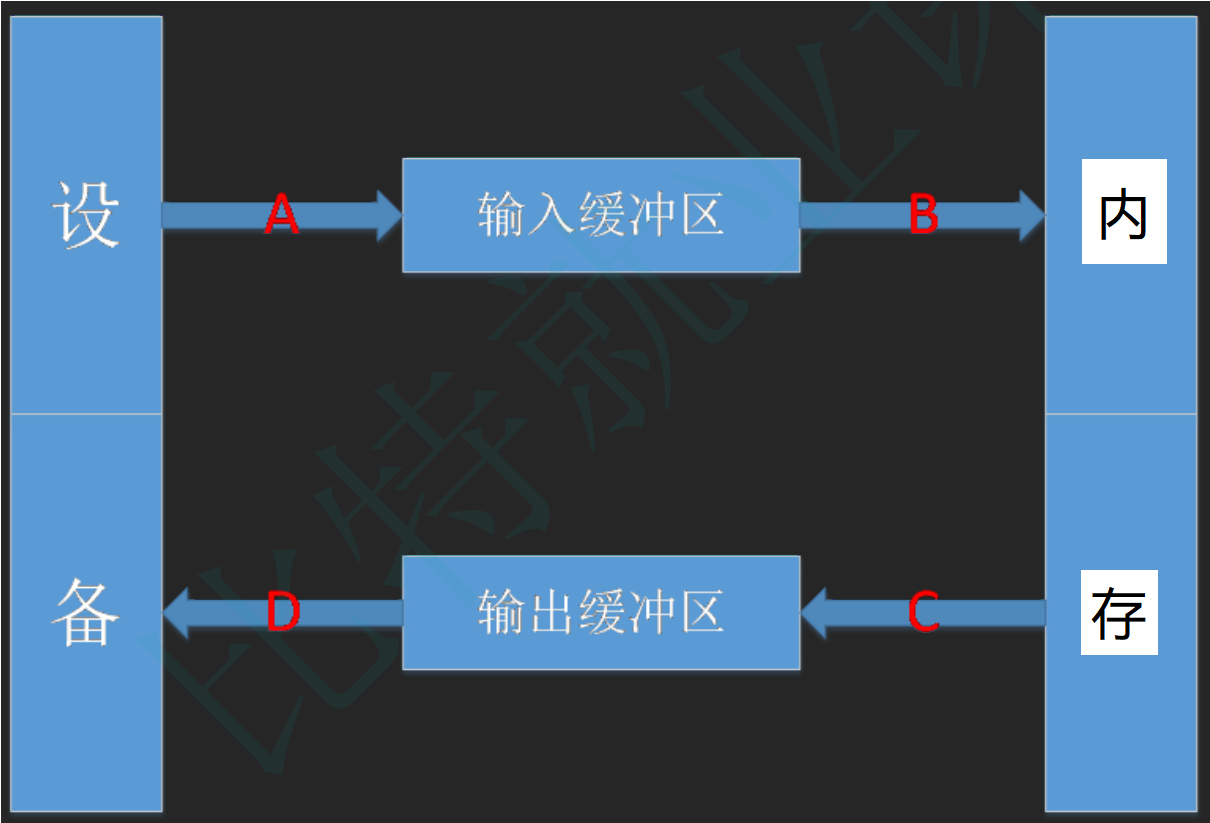
对输入输出缓冲区的理解:
- 可以屏蔽掉低级I/O的实现,低级I/O的实现依赖操作系统本身内核的实现,所以如果能够屏蔽这部分的差异,可以很容易写出可移植的程序。
- 可以使用这部分的内容实现“行”读取的行为,对于计算机而言是没有“行”这个概念,有了这部分,就可以定义“行”的概念,然后解析缓冲区的内容,返回一个“行”。
第二章:流是什么
“流”即是流动的意思,是物质从一处向另一处流动的过程,是对一种有序连续且具有方向性的数据( 其单位可以是bit,byte,packet )的抽象描述。
C++流是指信息从外部输入设备(如键盘)向计算机内部(如内存)输入和从内存向外部输出设备(显示器)输出的过程。这种输入输出的过程被形象的比喻为“流”。
它的特性是:有序连续、具有方向性
为了实现这种流动,C++定义了I/O标准类库,这些每个类都称为流/流类,用以完成某方面的功能
第三章:C++IO流
C++系统实现了一个庞大的类库,其中ios为基类,其他类都是直接或间接派生自ios类
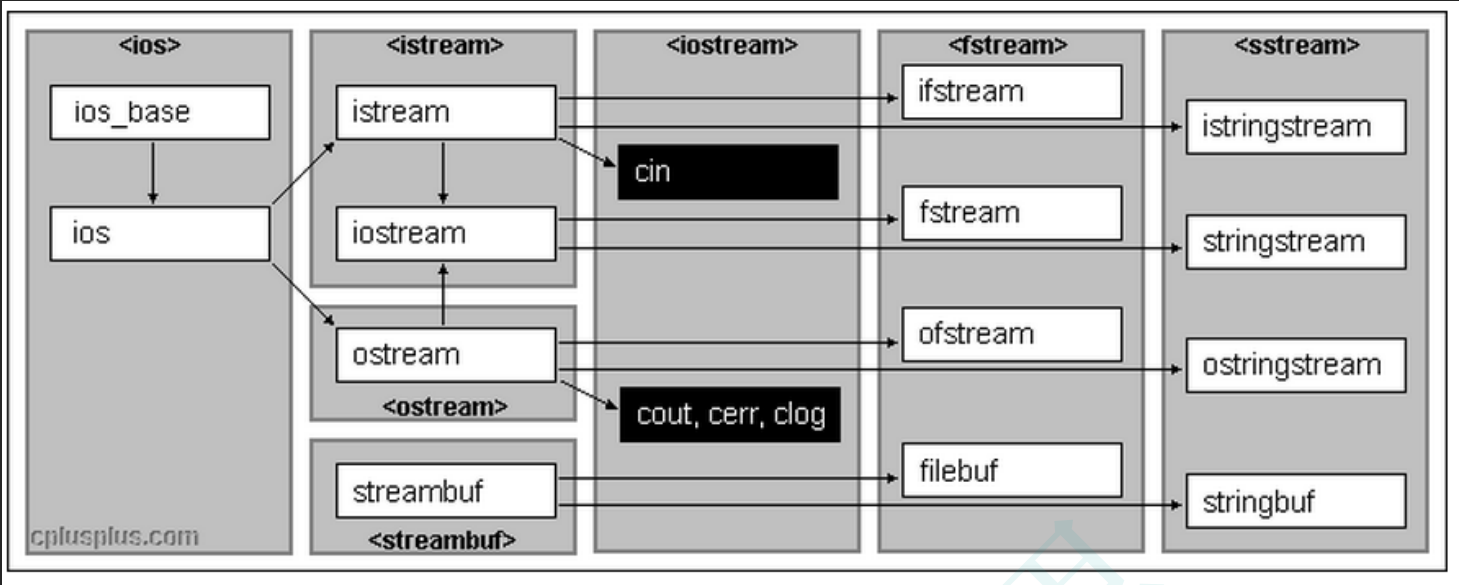
3.1 C++标准IO流
C++标准库提供了4个全局流对象cin、cout、cerr、clog,使用cout进行标准输出,即数据从内存流向控制台(显示器)。使用cin进行标准输入即数据通过键盘输入到程序中,同时C++标准库还提供了cerr用来进行标准错误的输出,以及clog进行日志的输出,从上图可以看出,cout、cerr、clog是ostream类的三个不同的对象,因此这三个对象现在基本没有区别,只是应用场景不同。
在使用时候必须要包含文件并引入std标准命名空间。
注意:
1. cin为缓冲流。键盘输入的数据保存在缓冲区中,当要提取时,是从缓冲区中拿。如果一次输入过多,会留在那儿慢慢用,如果输入错了,必须在回车之前修改,如果回车键按下就无法挽回了。只有把输入缓冲区中的数据取完后,才要求输入新的数据。
2. 输入的数据类型必须与要提取的数据类型一致,否则出错。出错只是在流的状态字state中对应位置,程序继续。
3. 空格和回车都可以作为数据之间的分格符,所以多个数据可以在一行输入,也可以分行输入。但如果是字符型和字符串,则空格(ASCII码为32)无法用cin输入,字符串中也不能有空格。回车符也无法读入。
4. cin和cout可以直接输入和输出内置类型数据,原因:标准库已经将所有内置类型的输入和输出全部重载了:
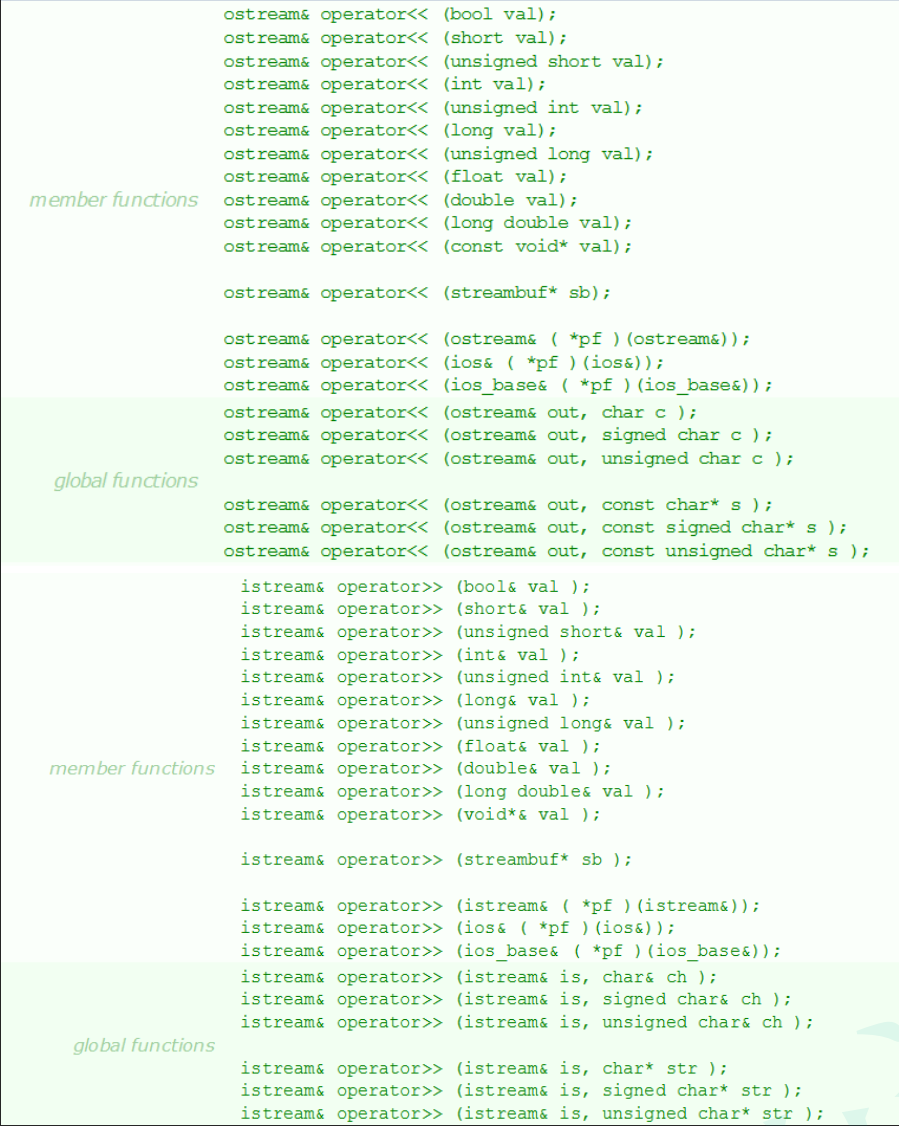
5. 对于自定义类型,如果要支持cin和cout的标准输入输出,需要对<<和>>进行重载。
6. 在线OJ中的输入和输出:
- 对于IO类型的算法,一般都需要循环输入:
- 输出:严格按照题目的要求进行,多一个少一个空格都不行。
- 连续输入时,vs系列编译器下在输入ctrl+Z时结束
// 单个元素循环输入
while (cin >> a) {
	// ...
}
// 多个元素循环输入
while (c >> a >> b >> c) {
	// ...
}
// 整行接收
while (cin >> str) {
	// ...
}
7. istream类型对象转换为逻辑条件判断值
istream& operator>> (int& val);
explicit operator bool() const;
http://www.cplusplus.com/reference/istream/istream/operator%3E%3E/
http://www.cplusplus.com/reference/ios/ios/operator_bool/
实际上我们看到使用while(cin>>i)去流中提取对象数据时,调用的是operator>>,返回值是istream类型的对象,那么这里可以做逻辑条件值,源自于istream的对象又调用了operator bool,operator bool调用时如果接收流失败,或者有结束标志,则返回false。
类型转换
- 内置类型之间,相近类型可以转换
- 构造函数,其他类型转换成自定义类型,有构造函数就可以支持:自定义类型 <- 内置类型,自定义类型 <- 自定义类型
- operator type() 内置类型 <- 自定义类型
// 自定义类型 <- 内置类型
class C {
public:
	C(int x) {}
};

// 自定义类型 <- 自定义类型
class D {
public:
	D(const C& c) {}
};

// 内置类型 <- 自定义类型
class E {
public:
	operator int() {
		// ...
		return 0;
	}
};

int main() {
	int* p = nullptr;
	int i = (int)p;

	// 自定义类型 <- 内置类型
	C c1 = 11;
	string s1 = "xxxx";

	// 自定义类型 <- 自定义类型
	D d = c1;
	list<int> lt;
	list<int>::const_iterator it = lt.begin();

	// 内置类型 <- 自定义类型
	E e;
	int x = e;
	cout << x << endl;

	return 0;
}
C++ IO流,使用面向对象+运算符重载的方式能更好的兼容自定义类型,流插入和流提取
class Date {
	friend ostream& operator << (ostream& out, const Date& d);
	friend istream& operator >> (istream& in, Date& d);
public:
	Date(int year = 1, int month = 1, int day = 1)
		:_year(year)
		, _month(month)
		, _day(day) {
	}
	operator bool() {
		// 这里是随意写的,假设输入_year为0,则结束
		if (_year == 0)
			return false;
		else
			return true;
	}
private:
	int _year;
	int _month;
	int _day;
};
istream& operator >> (istream& in, Date& d) {
	in >> d._year >> d._month >> d._day;
	return in;
}
ostream& operator << (ostream& out, const Date& d) {
	out << d._year << " " << d._month << " " << d._day;
	return out;
}
// C++ IO流,使用面向对象+运算符重载的方式
// 能更好的兼容自定义类型,流插入和流提取
int main() {
	// 自动识别类型的本质--函数重载
	// 内置类型可以直接使用--因为库里面ostream类型已经实现了
	int i = 1;
	double j = 2.2;
	cout << i << endl;
	cout << j << endl;
	// 自定义类型则需要我们自己重载<< 和 >>
	Date d(2022, 4, 10);
	cout << d;
	while (d) {
		cin >> d;
		cout << d;
	}
	return 0;
}
3.2 C++文件IO流
C++根据文件内容的数据格式分为二进制文件和文本文件。采用文件流对象操作文件的一般步骤:
1. 定义一个文件流对象
- ifstream ifile(只输入用)
- ofstream ofile(只输出用)
- fstream iofile(既输入又输出用)
2. 使用文件流对象的成员函数打开一个磁盘文件,使得文件流对象和磁盘文件之间建立联系
3. 使用提取和插入运算符对文件进行读写操作,或使用成员函数进行读写
4. 关闭文件
1. 二进制读写
class Date {
	friend ostream& operator << (ostream& out, const Date& d);
	friend istream& operator >> (istream& in, Date& d);
public:
	Date(int year = 1, int month = 1, int day = 1)
		:_year(year)
		, _month(month)
		, _day(day) {
	}
	operator bool() {
		// 这里是随意写的,假设输入_year为0,则结束
		if (_year == 0) return false;
		else return true;
	}
private:
	int _year;
	int _month;
	int _day;
};
istream& operator >> (istream& in, Date& d) {
	in >> d._year >> d._month >> d._day;
	return in;
}
ostream& operator << (ostream& out, const Date& d) {
	out << d._year << " " << d._month << " " << d._day;
	return out;
}

struct ServerInfo {
	//string s;
	//改为string报错。写入和读取的string的_str指向同一块空间
	//同一进程就是浅拷贝,不同进程发生野指针
	//二进制读写不要用容器,容器没有存数据,而是指向数据的指针
	char _address[32];
	double _x;
	Date _date;
};
class BinIO {
public:
	BinIO(const char* filename = "info.bin")
		:_filename(filename) {
	}

	void Write(const ServerInfo& winfo) {
		ofstream ofs(_filename, ofstream::out | ofstream::binary);
		ofs.write((char*)&winfo, sizeof(winfo));
	}

	void Read(ServerInfo& rinfo) {
		ifstream ifs(_filename, ifstream::in | ifstream::binary);
		ifs.read((char*)&rinfo, sizeof(rinfo));
	}
private:
	string _filename;
};

//写
int main() {
	ServerInfo winfo = { "192.0.0.1", 12.13, { 2022, 4, 10 } };
	BinIO bin;
	bin.Write(winfo);
	return 0;
}

//读
int main() {
	ServerInfo rinfo = {};
	BinIO bin;
	bin.Read(rinfo);
	return 0;
}
2. 文本读写
class Date {
	friend ostream& operator << (ostream& out, const Date& d);
	friend istream& operator >> (istream& in, Date& d);
public:
	Date(int year = 1, int month = 1, int day = 1)
		:_year(year)
		, _month(month)
		, _day(day) {
	}
	operator bool() {
		// 这里是随意写的,假设输入_year为0,则结束
		if (_year == 0) return false;
		else return true;
	}
private:
	int _year;
	int _month;
	int _day;
};
istream& operator >> (istream& in, Date& d) {
	in >> d._year >> d._month >> d._day;
	return in;
}
ostream& operator << (ostream& out, const Date& d) {
	out << d._year << " " << d._month << " " << d._day;
	return out;
}

struct ServerInfo {
	char _address[100];
	double _x;
	Date _date;
};
class TextIO {
public:
	TextIO(const char* filename = "info.text")
		:_filename(filename) {
	}

    // C++文件流的优势就是可以对内置类型和自定义类型,都使用一样的方式,去流插入和流提取数据
    // 当然这里自定义类型Date需要重载>> 和 <<
    // istream& operator >> (istream& in, Date& d)
    // ostream& operator << (ostream& out, const Date& d)
	void Write(const ServerInfo& winfo) {
		ofstream ofs(_filename);
		ofs << winfo._address << endl;
		ofs << winfo._x << endl;
		ofs << winfo._date << endl;
	}
	void Read(ServerInfo& rinfo) {
		ifstream ifs(_filename);
		ifs >> rinfo._address;
		ifs >> rinfo._x;
		ifs >> rinfo._date;
	}
private:
	string _filename;
};

//写
//格式化数据 → 文本字符串
int main() {
	ServerInfo winfo = { "https://legacy.cplusplus.com/reference/istream/istream/", 12.13, { 2022, 4, 10 } };
	TextIO text;
	text.Write(winfo);

	////C语言转换
	//double x = 1.111;
	//char buff[128];
	//sprintf(buff, "%lf", x);//将格式化数据写入字符串

	////C++
	//to_string(x);
	return 0;
}

//读
//文本字符串 → 格式化数据
int main() {
	ServerInfo rinfo = {};
	TextIO text;
	text.Read(rinfo);
	cout << rinfo._address << endl;
	cout << rinfo._x << endl;
	cout << rinfo._date << endl;
	return 0;
}
第四章:stringstream的简单介绍
在C语言中,如果想要将一个整形变量的数据转化为字符串格式,如何去做?
- 使用itoa()函数
- 使用sprintf()函数
但是两个函数在转化时,都得需要先给出保存结果的空间,那空间要给多大呢,就不太好界定,而且转化格式不匹配时,可能还会得到错误的结果甚至程序崩溃。
int main() {
	int n = 123456789;
	char s1[32];
	_itoa(n, s1, 10);
	char s2[32];
	sprintf(s2, "%d", n);
	char s3[32];
	sprintf(s3, "%f", n);
	return 0;
}
在C++中,可以使用stringstream类对象来避开此问题。
在程序中如果想要使用stringstream,必须要包含头文件。在该头文件下,标准库三个类:istringstream、ostringstream 和 stringstream,分别用来进行流的输入、输出和输入输出操作,本文主要介绍stringstream。
stringstream主要可以用来:
1. 将数值类型数据格式化为字符串
int main() {
	int a = 12345678;
	string sa;
	// 将一个整形变量转化为字符串,存储到string类对象中
	stringstream s;
	s << a;
	s >> sa;
	// clear()
	// 注意多次转换时,必须使用clear将上次转换状态清空掉
	// stringstreams在转换结尾时(即最后一个转换后),会将其内部状态设置为badbit
	// 因此下一次转换是必须调用clear()将状态重置为goodbit才可以转换
	// 但是clear()不会将stringstreams底层字符串清空掉

	// s.str("");
    // 将stringstream底层管理string对象设置成"",
    // 否则多次转换时,会将结果全部累积在底层string对象中

	s.str("");
	s.clear();   // 清空s, 不清空会转化失败
	double d = 12.34;
	s << d;
	s >> sa;
	string sValue;
	sValue = s.str();   // str()方法:返回stringsteam中管理的string类型
	cout << sValue << endl;
	return 0;
}int main() {
stringstream sstream;
// 将多个字符串放入 sstream 中
sstream << "first" << " " << "string,";
sstream << " second string";
cout << "strResult is: " << sstream.str() << endl;
// 清空 sstream
sstream.str("");
sstream << "third string";
cout << "After clear, strResult is: " << sstream.str() << endl;
return 0;
}SQL语句演示
int main() {
	//C语言SQL语句
	char sql1[128];
	char name[10];
	scanf("%s", name);
	sprintf(sql1, "select * from t_score where name = '%s'", name);
	printf("%s\n", sql1);


	//C++SQL语句
	string sql2;
	sql2 += "select * from t_score where name = '";
	sql2 += name;
	sql2 += "'";
	cout << sql2 << endl;


	//查询日期(自定义类型)
	string sql3;
	Date d(2025, 8, 6);
	//sql3 += "select * from t_data where date = '";
	//sql3 += d;//Date类型不能+=到string类型
	//sql3 += "'";

	//在内存中构建和格式化字符串 的流类。
    //ostringstream 并不是用于文件读写的,而是专门用于 在内存中构建和格式化字符串 的流类。
	ostringstream oss;//将自定义类型转换为字符串
	oss << d;
	sql3 += "select * from t_data where date = '";
	sql3 += oss.str();
	sql3 += "'";
	cout << sql3 << endl;

	//实践中用法
	ostringstream sqloss;
	sqloss << "select * from t_data where date = '" << d << "'";
	cout << sqloss.str() << endl;

	return 0;
}//序列化 - 将各种信息转换为字符串
//反序列化 - 将字符串转换为各种类型的数据
//更多用于网络
struct ChatInfo {
string _name; // 名字
int _id; //id
Date _date; //时间
string _msg;//聊天信息
};
int main() {
ChatInfo winfo = { "张三", 135246, { 2022, 4, 10 }, "晚上一起看电影吧" };
stringstream oss;
oss << winfo._name << endl;
oss << winfo._id << endl;
oss << winfo._date << endl;
oss << winfo._msg << endl;
cout << oss.str() << endl;
//网络输出
ChatInfo rinfo;
string str = oss.str();
stringstream iss(str);
iss >> rinfo._name;
iss >> rinfo._id;
iss >> rinfo._date;
iss >> rinfo._msg;
cout << "-------------------------------------------------------" << endl;
cout << "姓名:" << rinfo._name << "(" << rinfo._id << ") ";
cout << rinfo._date << endl;
cout << rinfo._name << ":>" << rinfo._msg << endl;
cout << "-------------------------------------------------------" << endl;
return 0;
} 153


 扫一扫


 被折叠的 条评论
为什么被折叠?
 到【灌水乐园】发言


