



一、性能问题:
-
IOPS:传统磁盘的IOPS大约50-200,SSD的IOPS大约几千到几十万之间,NVMe的IOPS大约几十万。
-
Througput:传统磁盘大约150Mb/s,SSD大约500Mbps,NVMe大于2,000Mb/s。
-
部署集群时推荐使用SSD或者NVMe存储Bluestore数据库和WAL日志。、
1、集群建议
1. 对象存储的建议:
RGW 对象存储往往都是声音和视频这样的多媒体大文件,对象存储会为每个bucket创建一个index,这个index也是存储中的一个对象,默认她可以存储100,000个对象索引,如果需要存储更多资料,需要进行shard分片提高性能,rgw_override_bucket_index_max_shards参数可以设置分片值,推荐值为100,000。
[root@clienta ~]# ceph config set global rgw_override_bucket_index_max_shards 100000
[root@clienta ~]# ceph config get mon rgw_override_bucket_index_max_shards
100000
2. 对于CephFS的建议:
MDS服务器会使用内存缓存数据,ceph通过mds_cache_memory_limit参数限制该缓存的大小,默认值为4GB,单位是字节。
[root@clienta ~]# ceph config get mds mds_cache_memory_limit
4294967296
3.网络建议:
推荐集群网络和客户端网络分离,生产服务器使用10GB或者更大的网络带宽,1GB网络不适合生产环境使用。
2、CRUSH选主的可能性(设置亲和性)
Use the ceph osd primary-affinity command to modify he primary affinity for an OSD. 使用ceph osd primary-affinity命令修改osd的主亲和性。
- 命令:ceph osd primary-affinity <osd_id> <value>
0 是 Primary Affinity 的值,范围是 0 到 1(或 0 到 1.0)。
- 0:表示 OSD 不会被选为 Primary OSD。
- 1 或 1.0:表示 OSD 始终会被选为 Primary OSD。
- 0.5:表示 OSD 有 50% 的概率被选为 Primary OSD。
[root@clienta ~]# ceph osd tree
ID  CLASS  WEIGHT   TYPE NAME         STATUS  REWEIGHT  PRI-AFF
-1         0.08817  root default
-3         0.02939      host serverc
 0    hdd  0.00980          osd.0         up   1.00000  1.00000
 1    hdd  0.00980          osd.1         up   1.00000  1.00000
未调整前,查看osd7被做为主OSD的次数为8次(每个电脑环境不同,该数字不固定)
[root@clienta ~]# ceph pg dump | grep active+clean | grep "\[7," | wc -l
dumped all
8
调整为0后,osd7不再被作为主OSD使用
[root@clienta ~]# ceph osd primary-affinity osd.7 0
此值合法范围为 0-1 ,其中 0 意为此 OSD 不能用作主的,1 意为 OSD 可用作主的;此权重小于 1 时, CRUSH 选择主 OSD 时选中它的可能性低.
[root@clienta ~]# ceph pg dump | grep active+clean | grep "\[7," | wc -l
调整为1后,osd7始终作为主OSD使用
[root@clienta ~]# ceph osd primary-affinity osd.7 1
3、查看性能统计数据
- 命令:ceph osd perf
[root@clienta ~]# ceph osd perf
osd  commit_latency(ms)  apply_latency(ms)
  7                   0                  0
  8                   0                  0
  6                   0                  0
  1                   0                  0
  0                   0                  0
  2                   0                  0
  3                   0                  0
  4                   0                  0
  5                   0                  0
- 命令:ceph tell osd.6 perf dump
[root@clienta ~]# ceph tell osd.6 perf dump
... ...
 "osd": {
        "op_wip": 0,
        "op": 52311,
        "op_in_bytes": 0,
        "op_out_bytes": 9138,
        "op_latency": {
            "avgcount": 52311,
            "sum": 57.811003342,
            "avgtime": 0.001105140
        },
 "op_r_latency": {
            "avgcount": 51131,
            "sum": 53.211853622,
            "avgtime": 0.001040696
        },
"op_w_latency": {
            "avgcount": 0,
            "sum": 0.000000000,
            "avgtime": 0.000000000
        },
        "op_rw_latency": {
            "avgcount": 1180,
            "sum": 4.599149720,
            "avgtime": 0.003897584
        },
4、数据校验
手动触发归置组的scrubbing。
在 Ceph 分布式存储系统中,ceph pg scrub 命令用于手动触发一个存储池的特定 placement group (PG) 的 scrub 操作。Scrubbing 是 Ceph 自动化数据维护过程的一部分,但有时候管理员可能需要手动触发 scrub 操作,例如在更换硬件或者怀疑数据损坏时。这有助于确保数据的健康状况并防止数据丢失。
- 命令:ceph pg scrub <poolid.pgid>
- 命令:ceph pg deep-scrub <poolid.pgid>
[ceph@serverc ~]$ ceph pg scrub 0.2e              //默认是一天做一次scrubbing
[ceph@serverc ~]$ ceph pg deep-scrub 0.2e         //默认7天做一次deepscrubbing
解释命令中的每个部分:执行 ceph pg scrub 0.2e 命令会对存储池 0 中的 PG 2e 执行 scrub 操作。Scrubbing 被用来检测硬件故障或数据损坏,并确保数据的一致性。
- ceph: 这是调用 Ceph 集群命令行工具的命令。
- pg: 表示操作针对 placement group,placement groups 是 Ceph 用来分散和管理数据的逻辑分区。
- scrub: 是一种数据校验操作,用于检查和验证 PG 中副本数据的一致性。Scrub 操作会读取所有副本的数据和元数据,比较它们以确保一致。
- 0.2e: 这是特定 placement group 的标识符,其中 0 是存储池的编号,2e 是 PG 的编号。每个 PG 在 Ceph 集群中都有一个唯一的标识符。
在 Ceph 中,通常有两种类型的 scrubbing:
- Scrub: 基本的数据校验,它会定期运行以检查每个 PG 的数据一致性。
- Deep Scrub (ceph pg deep-scrub): 更加深入的数据校验,除了执行常规的 scrub 操作外,还会读取每个对象的数据并与其他副本进行比较,以便检查潜在的损坏。
5、修复扫描
use the ceph pg repair command to fix scrubbing errors. 使用ceph pg repair命令修复扫描错误。
在 Ceph 分布式存储系统中,ceph pg repair 命令用于手动触发一个存储池中特定 placement group (PG) 的修复操作。
- 命令:ceph pg repair <poolid.pgid>
[ceph@serverc ~]$ ceph pg repair 0.2e
详细解释命令中的每个部分:执行 ceph pg repair 0.2e 命令会对存储池 0 中的 PG 2e 执行修复操作。这个操作通常在 scrub 检查后发现数据不一致时进行,修复操作会尝试解决 PG 中的数据不一致问题,例如通过从正确的副本覆盖不一致的副本来确保所有副本之间的数据一致性。
- ceph: 这是调用 Ceph 集群命令行工具的命令。
- pg: 表示操作针对 placement group,placement groups 是 Ceph 用来分散和管理数据的逻辑分区。
- repair: 表示将执行修复操作。这个操作旨在修复 PG 中检测到的不一致和问题。
- 0.2e: 这是特定 placement group 的标识符,其中 0 是存储池的编号,2e 是 PG 的编号。每个 PG 在 Ceph 集群中都有一个唯一的标识符。
注意:即使 repair 能够解决一些数据不一致问题,但并不是万能的。在某些情况下,数据可能已经丢失或损坏到无法通过 repair 恢复的程度。因此,定期的备份和测试恢复计划仍然是防止数据丢失的重要措施。 一般来说,repair 操作应该谨慎使用,并且在了解当前集群状态和潜在风险的情况下进行。在大型生产环境中,通常建议在执行此类操作之前与有经验的 Ceph 管理员或支持团队咨询。
二、附加:Openstack
Openstack is a collection of integrated open source services that implement a cloud computing system.RedHat Ceph Storage can provides a scalable storage solution that can be integrated into OpenStack in many different ways, replacing several OpenStack services.
Openstack是实现云计算系统的集成开源服务集合。RedHat Ceph Storage提供了一种可扩展的存储解决方案,可以通过多种方式集成到OpenStack中,替代多个OpenStack服务。
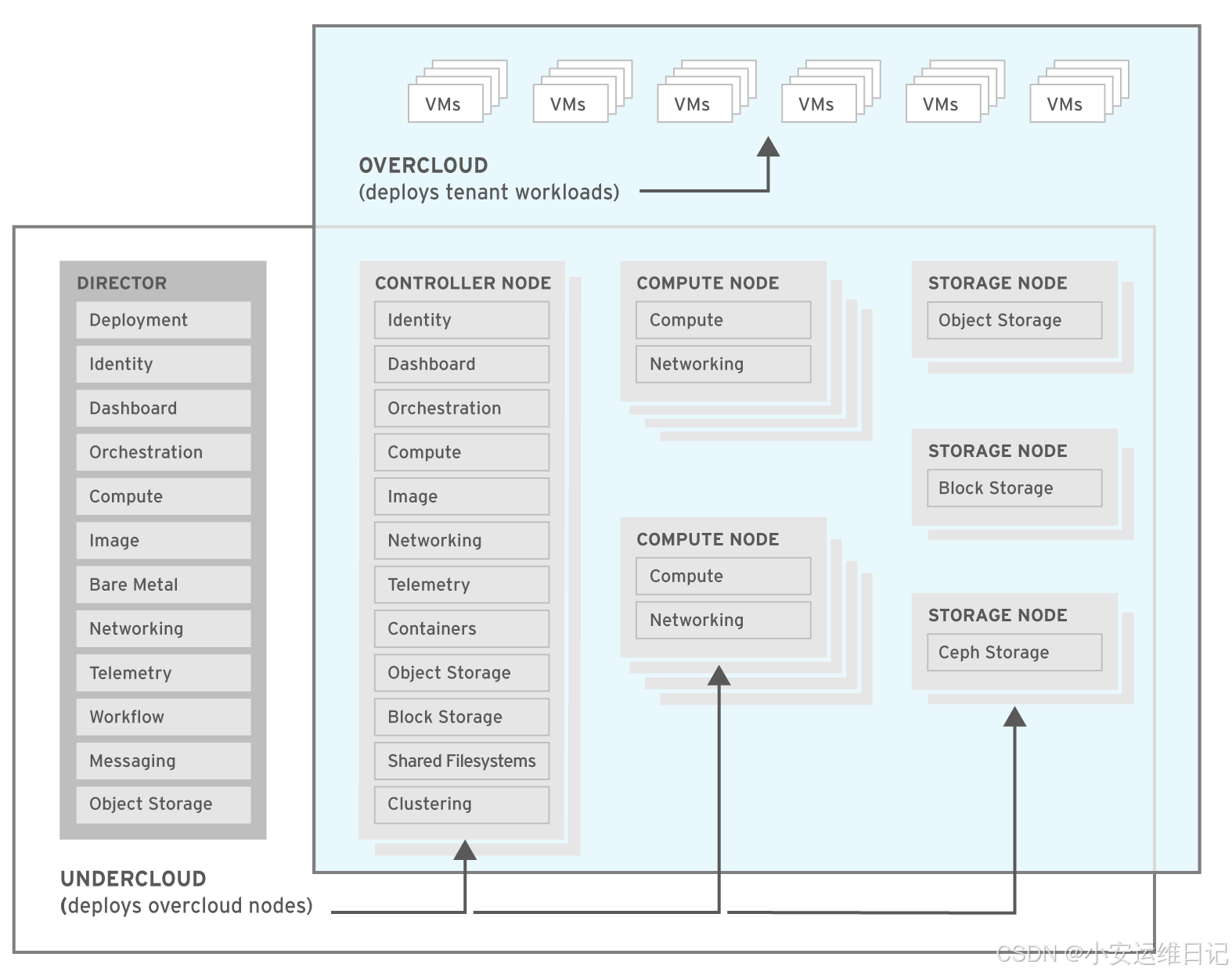
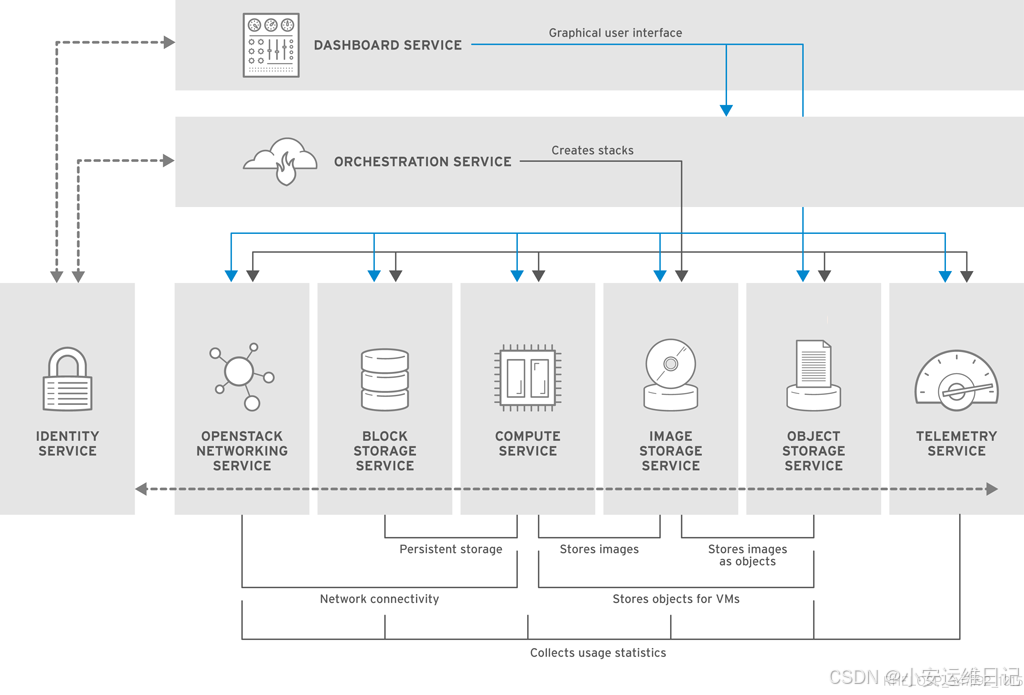
1、OpenStack组件描述
1)Dashborad service(Horizon)
-
Horizon is a browser-based interface for managing various OpenStack services.
-
The service provides a graphical user interface for operations such as launching instances, managing networking, and setting access controls.
Horizon是一个基于浏览器的界面,用于管理各种OpenStack服务。该服务为启动实例、管理网络和设置访问控制等操作提供了图形用户界面。
2)Identify service(Keystone)
-
A centralized keystone identity service provides authentication and authorization for other services.
-
The identity service also provides a central catalog of services and their associated end points, running in a particular OpenStack cloud.
集中式keystone身份服务为其他服务提供认证和授权。身份服务还提供服务及其关联端点的中央目录,在特定的OpenStack云中运行。
3)Networking service(Neutron)
-
Neutron is a software-defined networking service that helps to create networks, subnets, routers, and floating IP addresses.
Neutron是一个软件定义的网络服务,可以帮助创建网络、子网、路由器和浮动IP地址。
4)Block storage service(Cinder)
-
The Cinder service manages storage volumes for virtual machines. This is persistent block storage for the instances running in the Nova compute service.
Cinder服务用于管理虚拟机的存储卷。这是运行在Nova计算服务中的实例的持久块存储。
5)Compute service(Nova)
-
nova manages instances(virtual machines) running on nodes, providing virtual machines on demand.
nova管理运行在节点上的实例(虚拟机),按需提供虚拟机。
6)Image service(Glance)
-
The glance service acts as a registry for virtual machine images, allowing users to copy server images for immediate storage.
-
These images can be used as templates when setting up new instances.
glance服务充当虚拟机映像的注册表,允许用户复制服务器映像以进行即时存储。在设置新实例时,可以将这些映像用作模板。
7)Object storage service(Swift)
-
Swift provides object storage that allows users to store and retrieve files.
提供对象存储,允许用户存储和检索文件。
2、Ceph与Glance集成
Openstack Glance是Openstack服务,用于存储操作系统镜像。使用RESTful API, Glance服务可以发现、注册和检索云实例映像。Glance通过known_stores参数支持多种存储后端:
-
OpenStack Cinder
-
OpenStack Swift
-
RADOS Block Devices(RBD)
-
A directory on a local file system
-
Vmware ESX
Exercise:练习:
serverb是all in one的openstack.
[root@foundation0 ~]# ssh ceph@serverb
以 ceph 用户登录服务器,在ceph用户的主目录下创建 keystonerc_admin 文件
[ceph@serverb ~]$ vim  ~/keystonerc_admin
unset OS_SERVICE_TOKEN
export OS_USERNAME=admin
export OS_PASSWORD=9f0b699989a04a05
export OS_AUTH_URL=http://172.25.250.11:5000/v2.0
export PS1='[\u@\h \W(keystone_admin)]\$ '
export OS_TENANT_NAME=admin
export OS_REGION_NAME=RegionOne
获取keystonerc_admin凭据。
[ceph@serverb ~]$ source ~/keystonerc_admin
在服务器上,安装ceph-common包。修改/etc/ceph目录的属主和组为ceph用户和组。
[ceph@serverb ~(keystone_admin)]$ sudo yum -y install ceph-common
[ceph@serverb ~(keystone_admin)]$ sudo chown ceph:ceph /etc/ceph
以ceph用户登录到serverc,在serverc上以ceph用户创建一个名为images的池,包含128个pg。将镜像池应用程序类型设置为rbd。
[ceph@serverb ~(keystone_admin)]$ ssh ceph@serverc
[ceph@serverc ~]$ ceph osd pool create images 128                //创建名为images的池,包含128个pg
[ceph@serverc ~]$ ceph osd pool application enable images rbd    //镜像池应用程序类型设置为rbd
创建客户端。Ceph中的镜像用户。为MON守护进程和镜像池配置配置文件rbd。
[ceph@serverc ~]$ ceph auth get-or-create client.images mon 'profile rbd' osd 'profile rbd pool=images' \
-o /etc/ceph/ceph.client.images.keyring
使用ceph auth list命令验证客户端。使用正确的配置创建了images用户。
[ceph@serverc ~]$ ceph auth list
使用scp命令拷贝“/etc/ceph/ceph.conf”和“/etc/ceph/ceph.client.images.keyring”文件到服务器的/etc/ceph/目录。
[ceph@serverc ~]$ scp /etc/ceph/ceph.conf ceph@serverb:/etc/ceph/ceph.conf
[ceph@serverc ~]$ scp /etc/ceph/ceph.client.images.keyring \
ceph@serverb:/etc/ceph/ceph.client.images.keyring

[ceph@serverc ~]$ exit      //logout
在serverb服务器端,使用client.images验证对ceph集群的访问。
[ceph@serverb ~(keystone_admin)]$ ceph --id images -s
修改/etc/ceph/ceph.client.images.keyring文件的所属组。设置文件权限为0640。
[ceph@serverb ~(keystone_admin)]$ sudo chgrp glance /etc/ceph/ceph.client.images.keyring
[ceph@serverb ~(keystone_admin)]$ chmod 0640 /etc/ceph/ceph.client.images.keyring
取值范围:file、filesystem、http、https、rbd、cinder、vsphere…
[ceph@serverb ~(keystone_admin)]$ sudo vim /etc/glance/glance-api.conf
[glance_store]
stores=file,http,rbd                    #1874行
default_store = rbd                     #1907行
rbd_store_chunk_size = 8                #2371行(the size of each object an image will be broken down into.镜像将被分解成的每个对象的大小。)
rbd_store_pool = images                 #2392行
rbd_store_user = images                 #2411行
rbd_store_ceph_conf = /etc/ceph/ceph.conf      #2430行
rados_connect_timeout = 0                      #2449行
在 OpenStack 中,Glance 是负责虚拟机镜像管理的组件。/etc/glance/glance-api.conf 是 Glance API 服务器的配置文件,其中包含了一系列配置项来指定 Glance 的行为,包括存储后端、认证方式和其他服务相关的设置。 您的配置文件片段中提到的配置项属于 [glance_store] 部分,这个部分用来配置 Glance 中的存储后端。具体来说,这些项目表示:
- stores: 指定 Glance 可以使用的存储后端类型。在这里,配置了三种类型的存储:本地文件系统(file)、HTTP(http)和Ceph块设备(rbd,即 RADOS Block Device)。
- default_store: 设置默认的存储后端。当上传新的镜像到 Glance 时,如果没有指定存储后端,将使用这个默认值。在这里,将 Ceph 设置为默认存储后端。
- rbd_store_chunk_size: 设置当 Glance 将镜像存储到 Ceph 时,每个对象(chunk)的大小(以兆字节为单位)。8 表示每个对象的大小为 8 MB。这个大小决定了将一个大的镜像文件分割成多个小对象存储到 Ceph 时的分割粒度。
- rbd_store_pool: 指定 Ceph 集群中用于存储 Glance 镜像的 pool 名称。这里配置为 images。
- rbd_store_user: 指定连接到 Ceph 集群时使用的用户名称。这个用户需要有访问指定 pool 的权限。在这里,用户被设置为 images。
- rbd_store_ceph_conf: 指定 Ceph 集群的配置文件路径。Glance 会使用这个配置文件连接到 Ceph 集群。这里配置的路径是 /etc/ceph/ceph.conf。
- rados_connect_timeout: 设置连接到 Ceph 集群的超时时间(以秒为单位)。0 表示没有超时限制。如果 Glance 与 Ceph 集群的通信遇到问题,可能需要设置一个合适的超时时间来避免长时间挂起。
重启openstack-glance-api服务
[ceph@serverb ~(keystone_admin)]$ sudo systemctl restart openstack-glance-api
测试
[ceph@serverb ~(keystone_admin)]$ wget http://materials/small.img
在glance中创建一个新映像,并验证其关联的RBD映像已在ceph中创建。
[ceph@serverb ~(keystone_admin)]$ openstack image create  \
--container-format bare \
--disk-format raw \
--file ./small.img "small image"
使用client.images验证Glance镜像在镜像池中是否具有匹配的rbimage。检查RBD镜像与Glance镜像的ID是否一致。
[ceph@serverb ~(keystone_admin)]$ rados --id images -p images ls
[ceph@serverb ~(keystone_admin)]$ rados --id images info images/
注意:因为rbd_store_chunk_size配置了数字8。RBD映像已经创建了8MB对象(订单23)。
删除small image镜像。
[ceph@serverb ~(keystone_admin)]$ openstack image delete "small image"
3、Ceph与Cinder集成
Openstack的Cinder服务为云实例使用的虚拟机提供块存储。Cinder提供持久化块存储设备,可以挂载到云实例上。这些卷可以是可引导或不可引导的设备。
Glance和Cinder的区别在于Glance用于存储虚拟机镜像,即安装了可启动操作系统的虚拟磁盘。这些虚拟机映像可用于引导云映像。当云实例第一次启动时,Glance镜像可能会被拷贝到临时磁盘或Cinder block存储设备中。
Cinder存储节点默认使用本地物理存储对块存储进行备份。Cinder可以配置为使用Ceph作为块设备的备选后端存储解决方案。
Exercise:练习
serverb是all in one的openstack.
[root@foundation0 ~]# ssh ceph@serverc
在serverc上,在ceph集群中创建128 pg的卷池。
[ceph@serverc ~]$ ceph osd pool create volumes 128
设置卷池应用类型为rbd。
[ceph@serverc ~]$ ceph osd pool application enable volumes rbd
在ceph集群中创建一个名为client.volumes.的用户,为mon守护进程、镜像池和卷池配置配置文件rbd。验证用户是否具有正确的权限。
[ceph@serverc ~]$ ceph auth get-or-create client.volumes mon 'profile rbd' osd 'profile rbd pool=volumes, profile rbd pool=images' \
-o /etc/ceph/ceph.client.volumes.keyring

[ceph@serverc ~]$ ceph auth list
为客户端复制client.volumes用户密匙环到服务器的/etc/ceph/目录。
[ceph@serverc ~]$ scp /etc/ceph/ceph.client.volumes.keyring ceph@serverb:/etc/ceph/ceph.client.volumes.keyring
使用ceph auth get-key命令为client.volumes用户检索密钥并将其保存为文件。名为client.volumes.key 位于服务器上ceph用户的主目录中。
[ceph@serverc ~]$ ceph auth get-key client.volumes | ssh ceph@serverb tee ./client.volumes.key
以ceph用户查看服务器的状态。验证您可以作为 client.volumes 访问集群
[ceph@serverc ~]$ ssh ceph@serverb
[ceph@serverb ~]$ ceph --id volumes -s
在serverb服务器上,更改的/etc/ceph/ceph.client.volumes.keyring的组所有者文件为cinder。设置文件权限为0640
[ceph@serverb ~]$ sudo chgrp cinder /etc/ceph/ceph.client.volumes.keyring
[ceph@serverb ~]$ chmod 0640 /etc/ceph/ceph.client.volumes.keyring
使用uuidgen命令生成UUID,并将其保存到ceph用户主目录下的myuuid.txt文件中。
[ceph@serverb ~]$ uuidgen | tee ~/myuuid.txt
添加一个新的[ceph]段。使用上一步中生成的UUID。
[ceph@serverb ~]$ sudo  vim /etc/cinder/cinder.conf
[DEFAULT]
enabled_backends = ceph               #736行
glance_api_version = 2                #622行
#default_volume_type = iscsi          #700行注释(comment out this line using a pound sign(#) at the beginning of the line.)
…output omitted…

[ceph]
volume_driver=cinder.volume.drivers.rbd.RBDDriver
rbd_ceph_conf=/etc/ceph/ceph.conf
rbd_pool=volumes
rbd_user=volumes
rbd_secret_uuid=
rbd_max_clone_depth=5
rbd_store_chunk_size=4
rbd_flattern_volume_from_snapshot=false
volume_backend_name=ceph
rados_connect_timeout=-1
[ceph@serverb ~]$ sudo systemctl restart openstack-cinder-api
[ceph@serverb ~]$ sudo systemctl restart openstack-cinder-volume
[ceph@serverb ~]$ sudo systemctl restart openstack-cinder-scheduler

[ceph@serverb ~]$ sudo tail -20 /var/log/cinder/volume.log
… …
Initializing RPC dependent components of volume driver RBDDriver(1.2.0)
Driver post RPC initialization completed successfully.
4、用Ceph和RADOSGW代替Swift
OpenStack Swift服务为OpenStack的云安装提供对象存储服务,Swift提供了自己的本地API用于应用程序访问对象。RedHat Ceph Storage可以直接替代OpenStack Swift服务。RADOS网关通过OpenStack Swift接口为应用程序提供对象存储接口,并支持该接口的大部分特性。
Exercise:练习
log in to servera as the ceph user
[root@foundation0 ~]# ssh ceph@servera
[ceph@servera ~]$ ssh ceph@serverb grep OS_PASSWORD keystonerc_admin
[root@foundation0 ~]# ssh ceph@servera
[ceph@servera ~]$ sudo vim /etc/ceph/ceph.conf
[client.rgw.servara]
… …
rgw_keystone_url=http://serverb:35357
rgw_keystone_admin_user=admin
rgw_keystone_admin_password=9f0b699989a04a05
rgw_keystone_admin_tenant=admin
rgw_keystone_accepted_role=admin Member swiftoperator
rgw_keystone_token_cache_size=200
rgw_keystone_revocation_interval=300

[ceph@servera ~]$ sudo systemctl restart ceph-radosgw.target
在服务器上,源keystonerc_admin凭据。使用openstack service create命令为openstack Keystone环境配置对象存储服务。
[ceph@servera ~]$ ssh ceph@serverb
Password: redhat
[ceph@serverb ~]$ source ~/keystonerc_admin
[ceph@servera ~]$ openstack service create \
--description "Object Storage through RGW" \
--name swift \
object-store
使用openstack endpoint create命令创建与Swift服务关联的端点,指向RADOS网关Swift API端点。
[ceph@servera ~]$ openstack endpoint create \
--publicurl http://servera/swift/v1 \
--adminurl http://servera/swift/v1 \
--internalurl http://servera/swift/v1 \
--region RegionOne \
swift
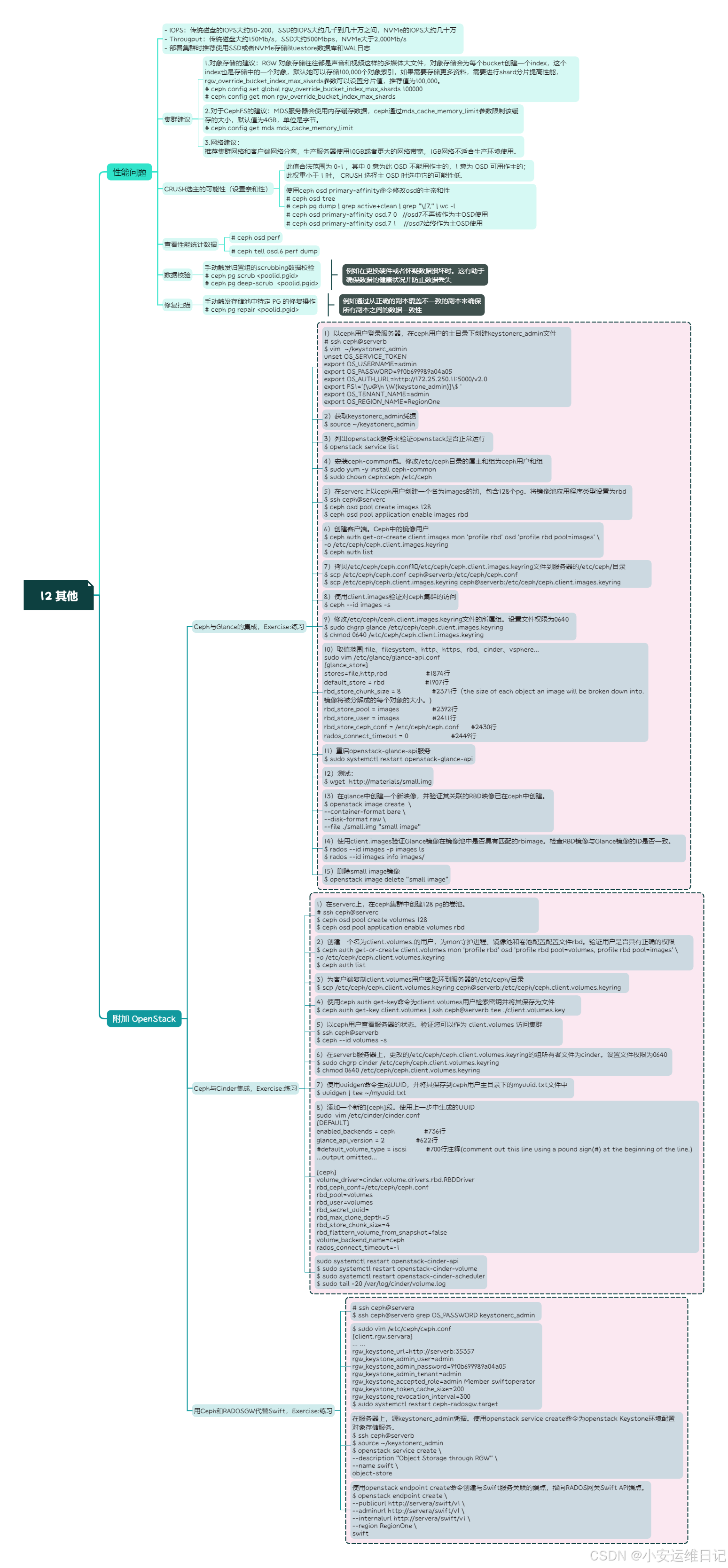
思维导图:
小结:
本篇为 【RHCA认证 - CL260 | Day12:存储集群性能建议】的学习笔记,希望这篇笔记可以让您初步了解集群相关建议、CRUSH设置亲和性、查看性能统计数据、数据校验、修复扫描等,不妨跟着我的笔记步伐亲自实践一下吧!
Tip:毕竟两个人的智慧大于一个人的智慧,如果你不理解本章节的内容或需要相关环境、视频,可评论666并私信小安,请放下你的羞涩,花点时间直到你真正的理解。





 扫一扫
扫一扫


 1264
1264

 被折叠的 条评论
为什么被折叠?
被折叠的 条评论
为什么被折叠?
 到【灌水乐园】发言





