



刚入门机器学习?别被复杂算法吓退!今天带大家吃透朴素贝叶斯——经典、简单、还超实用的概率分类算法,垃圾邮件识别、情感分析都靠它!新手也能轻松上手,文末附完整Python代码~
另外,我整理了朴素贝叶斯经典论文+代码合集,需要的的话自取~
➔➔➔➔点击查看原文,获取更多机器学习干货和资料! https://mp.weixin.qq.com/s/XpnOTIdKeh5pDyIWRpJzMQ
朴素贝叶斯
一、为什么新手先学朴素贝叶斯?
-
简单易理解:核心是“概率计算”,高中数学基础就能懂
-
速度快:训练只要统计数据,预测仅需乘除运算,大数据也能扛
-
实用场景多:文本分类(垃圾邮件/新闻分类)、情感分析、医疗诊断都常用
二、核心理论:3个关键知识点(带公式+例子)
朴素贝叶斯的本质是“用贝叶斯定理+条件独立性假设做分类”,拆解3个核心点:
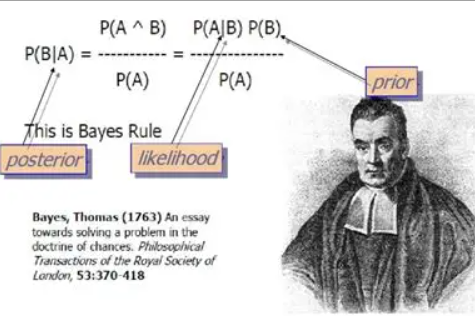
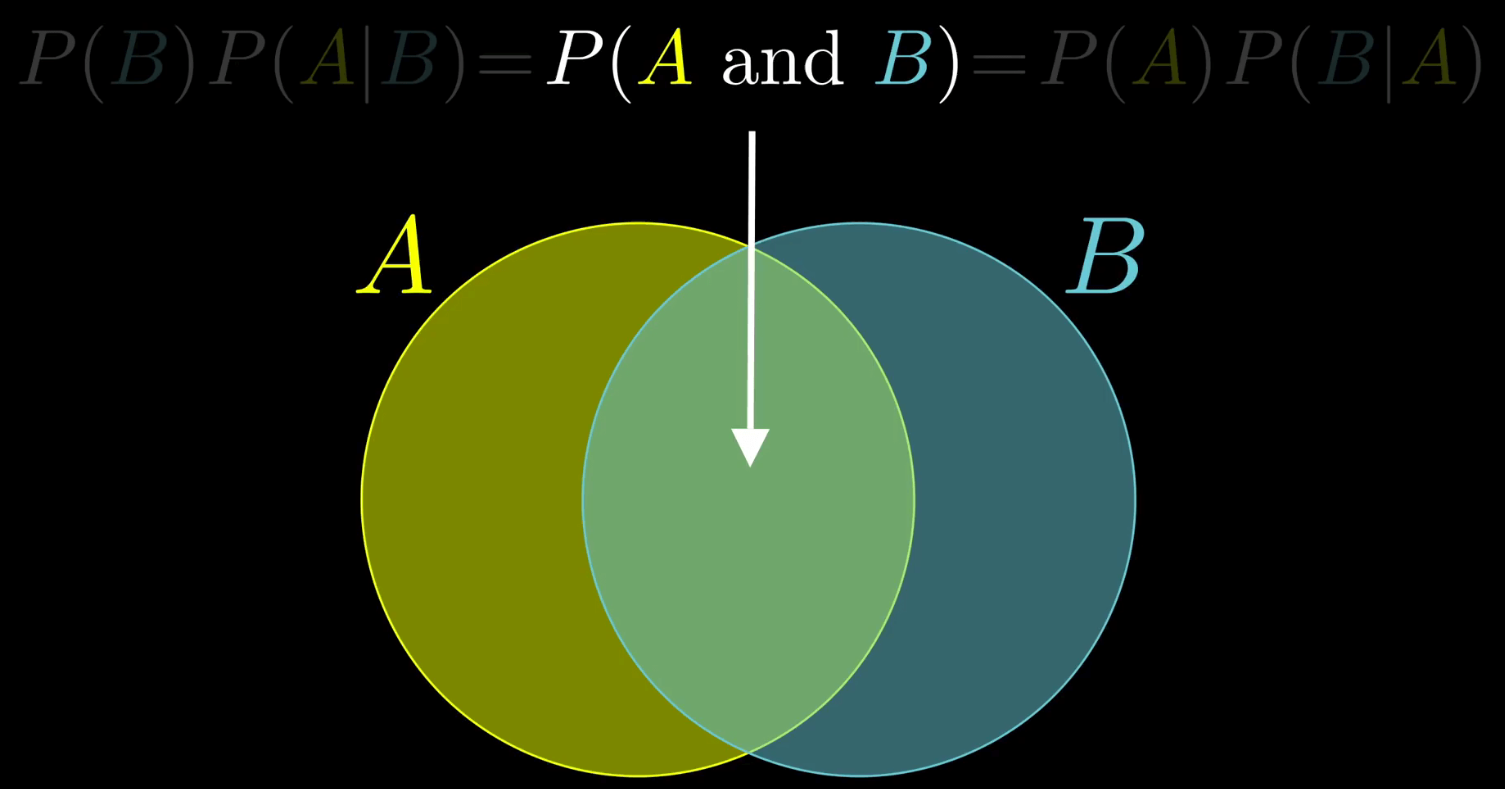
1. 基石:贝叶斯定理
用概率反推结果,公式超重要!
- 举个栗子:判断邮件是否为垃圾邮件(A=垃圾邮件,B=含“促销”关键词)
-
:先验概率→训练集中垃圾邮件占比(比如1000封里300封,就是0.3)
-
:似然概率→垃圾邮件中含“促销”的比例(300封里200封,约0.67)
-
:证据概率→所有邮件含“促销”的比例(1000封里250封,0.25)
-
:后验概率→含“促销”的邮件是垃圾邮件的概率(最终要算的!)
-
bayes定理
2. 关键假设:条件独立性
“朴素”的由来——假设给定类别后,所有特征互不影响。
比如判断垃圾邮件时,假设“含‘促销’”和“陌生发件人”这两个特征没关系(现实中可能有关,但这样计算会极大简化!)
公式表示(X是特征组,Y是类别):
3. 分类规则:选概率最大的类别
对新样本,计算它属于每个类别的“简化后验概率”,选最大的那个类别。
因为所有类别都要除以(证据概率),比较时可忽略,只算分子:
-
例子:新邮件含“促销”+“陌生发件人”,分别算“垃圾邮件”和“正常邮件”的概率,哪个大就归为哪类。
三、3种常见模型变种(新手速查)
根据特征类型选模型,一张表搞定:
| 模型名称 | 适用特征类型 | 分布假设 | 典型应用场景 |
|---|---|---|---|
| 高斯朴素贝叶斯 | 连续特征(如身高、体重) | 特征服从高斯分布 | 鸢尾花分类、房价预测 |
| 多项式朴素贝叶斯 | 离散计数特征(如词频) | 特征服从多项式分布 | 文本分类(统计单词出现次数) |
| 伯努利朴素贝叶斯 | 二元特征(0/1取值) | 特征服从伯努利分布 | 垃圾邮件识别(词是否出现) |
四、实战!Python完整代码(可直接跑)
用sklearn库实现,经典案例,新手复制到Jupyter就能运行~
案例:高斯朴素贝叶斯(鸢尾花分类)
处理连续特征,预测花的品种:
# 1. Import required libraries
from sklearn.datasets import load_iris
from sklearn.naive_bayes import GaussianNB
from sklearn.model_selection import train_test_split
from sklearn.metrics import accuracy_score, confusion_matrix
import matplotlib.pyplot as plt
import seaborn as sns
import numpy as np

# Set English font to avoid font errors (critical for non-Chinese environments)
plt.rcParams['font.sans-serif'] = ['Arial']
plt.rcParams['axes.unicode_minus'] = False  # Fix minus sign display

# 2. Load and prepare the Iris dataset
iris = load_iris()
X = iris.data  # Features: sepal length, sepal width, petal length, petal width
y = iris.target  # Labels: 0=Setosa, 1=Versicolor, 2=Virginica
feature_names = iris.feature_names  # Feature names (English by default)
target_names = iris.target_names    # Class names (English: 'setosa', 'versicolor', 'virginica')

# 3. Split data into training (70%) and test (30%) sets
X_train, X_test, y_train, y_test = train_test_split(
    X, y, test_size=0.3, random_state=42, stratify=y  # Stratify: keep class balance
)

# 4. Train Gaussian Naive Bayes model
model = GaussianNB()
model.fit(X_train, y_train)

# 5. Make predictions and evaluate accuracy
y_pred = model.predict(X_test)
accuracy = accuracy_score(y_test, y_pred)
print(f"Model Accuracy: {accuracy:.2f}")  # Typical output: ~0.98
print(f"True Labels (First 10): {y_test[:10]}")
print(f"Pred Labels (First 10): {y_pred[:10]}")

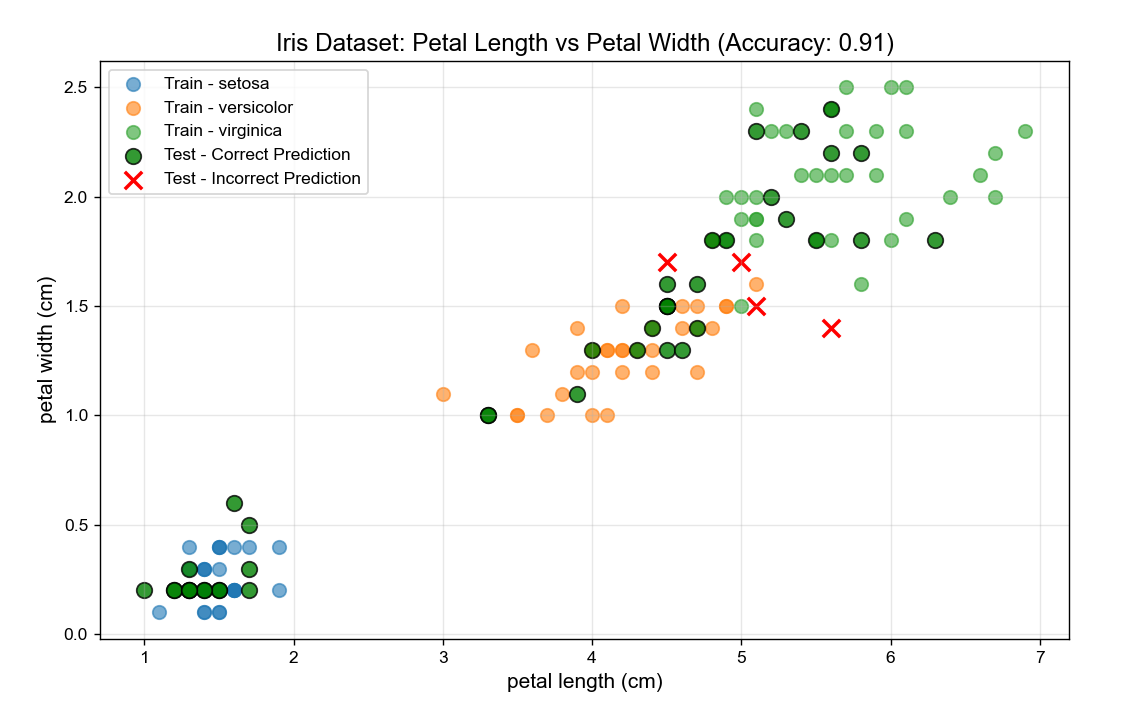
# 6. Plot 1: Scatter Plot of 2 Key Features (Petal Length vs Petal Width)
# We use petal features because they best separate Iris classes
plt.figure(figsize=(10, 6))
# Plot training data (for reference)
for i, target_name in enumerate(target_names):
    mask = y_train == i
    plt.scatter(
        X_train[mask, 2],  # Petal Length (3rd feature, index=2)
        X_train[mask, 3],  # Petal Width (4th feature, index=3)
        label=f"Train - {target_name}",
        alpha=0.6, s=60
    )
# Plot test data + predictions (highlight correct/incorrect)
correct_mask = y_test == y_pred
incorrect_mask = y_test != y_pred
plt.scatter(
    X_test[correct_mask, 2], X_test[correct_mask, 3],
    color='green', marker='o', s=80, edgecolor='black',
    label='Test - Correct Prediction', alpha=0.8
)
plt.scatter(
    X_test[incorrect_mask, 2], X_test[incorrect_mask, 3],
    color='red', marker='x', s=100, linewidth=2,
    label='Test - Incorrect Prediction', alpha=1.0
)

# Add labels and legend
plt.xlabel(feature_names[2], fontsize=12)
plt.ylabel(feature_names[3], fontsize=12)
plt.title(f'Iris Dataset: Petal Length vs Petal Width (Accuracy: {accuracy:.2f})', fontsize=14)
plt.legend(loc='upper left', fontsize=10)
plt.grid(alpha=0.3)
plt.show()

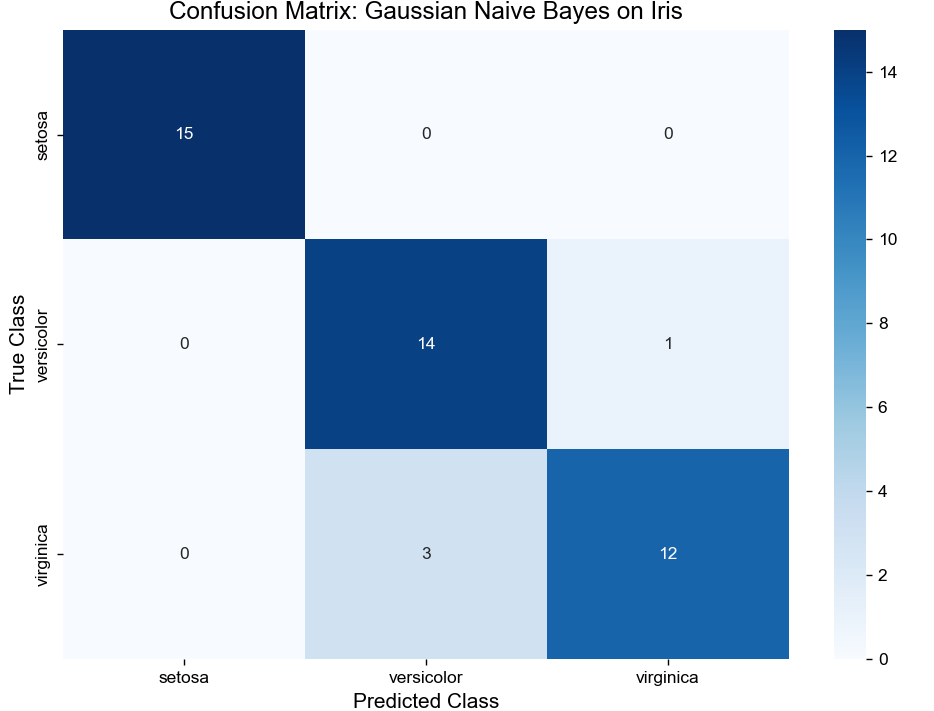
# 7. Plot 2: Confusion Matrix Heatmap (Evaluate Class-wise Performance)
cm = confusion_matrix(y_test, y_pred)  # Rows: True Labels, Columns: Predicted Labels

plt.figure(figsize=(8, 6))
# Create heatmap with annotations (show exact counts)
sns.heatmap(
    cm, annot=True, fmt='d', cmap='Blues',
    xticklabels=target_names,  # X-axis: Predicted classes
    yticklabels=target_names   # Y-axis: True classes
)
# Add labels and title
plt.xlabel('Predicted Class', fontsize=12)
plt.ylabel('True Class', fontsize=12)
plt.title('Confusion Matrix: Gaussian Naive Bayes on Iris', fontsize=14)
plt.tight_layout()  # Avoid label cutoff
plt.show()
最后
朴素贝叶斯是机器学习的“入门敲门砖”,理解它的概率逻辑,后续学复杂算法会更轻松!赶紧把代码复制跑一遍,感受概率分类的魔力吧~
➔➔➔➔点击查看原文,获取更多机器学习干货和资料!https://mp.weixin.qq.com/s/XpnOTIdKeh5pDyIWRpJzMQ





 扫一扫
扫一扫


 被折叠的 条评论
为什么被折叠?
被折叠的 条评论
为什么被折叠?
 到【灌水乐园】发言





