


 本文介绍了高通IPQ5018芯片的功能优势,它是一款用于Wi-Fi网络应用的高性能嵌入式处理器,支持802.11ac/ax等Wi-Fi标准。QCN6122和QCN6102是高性价比的Wi-Fi芯片,分别适用于不同需求场景。搭配使用可实现高速、高性能的Wi-Fi连接,适用于智能家庭、物联网和智能制造等领域。
IPQ5018 with QCN6122/QCN6102 to achieve high-performance high-speed Wi-Fi connection
Introduction of IPQ5018 and chip function advantages.
IPQ5018/IPQ5010,802.11ax,wifi 6e,QCN9074,2X2 2.4G support 2x WiFi 6E Card support BT5.1/
Dual-core ARM 64bit A53@1.0GHz Processor
512MB DDRL3L System Memory
4MB NOR Flash, 128MB NAND Flash
2x2 On-board 2.4GHz radio,up to 573Mbps physical Data Rate
Support BT5.1
M.2 Card Slot for 5G (QUECTEL RM 500Q-GL) ;
M.2 Card Slot for QCN9074 WIFI 6E Card
IPQ5018 is a high-performance embedded processor launched by Qualcomm, which is specially used for Wi-Fi network applications. It integrates a quad-core ARM Cortex-A53 processor and high-speed network connection, supports multiple Wi-Fi standards, including 802.11ac and 802.11ax, and is also compatible with 802.11a/b/g/n. IPQ5018 also supports a variety of peripheral interfaces, such as USB, PCIe, etc., which can be easily connected and communicated with other devices.
The main functions and advantages of the IPQ5018 chip are as follows:
High performance: IPQ5018 is equipped with a quad-core ARM Cortex-A53 processor with a main frequency of up to 1.0GHz, which provides powerful computing and processing capabilities and can handle a variety of data and applications.
High-speed network connection: IPQ5018 supports multiple Wi-Fi standards, including 802.11ac and 802.11ax, and is also compatible with 802.11a/b/g/n, supports dual-band Wi-Fi, and provides high-speed network connection and transmission speed.
Safe and reliable: The IPQ5018 chip integrates a variety of security functions and encryption algorithms, including WPA3 encryption, AES encryption, TLS/SSL, etc., which can ensure the safety and reliability of network data transmission.
Flexibility: IPQ5018 supports a variety of peripheral interfaces, such as USB, PCIe, etc., which can be easily connected and communicated with other devices, and also supports a variety of operating systems, including Linux, Android, etc., with high flexibility and reliability scalability.
Low power consumption: IPQ5018 adopts advanced manufacturing technology and energy-saving design, with low power consumption and heat, suitable for various embedded application scenarios, such as smart home, Internet of Things, smart manufacturing, etc.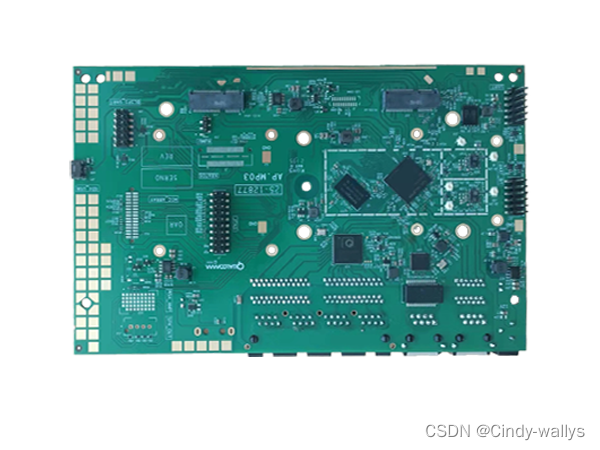
The difference between QCN6122 and QCN6102
Both QCN6122 and QCN6102 are high-performance Wi-Fi chips, mainly used in embedded and industrial applications, but there are the following differences between them:
Different architecture: QCN6122 adopts dual-core processor architecture, while QCN6102 adopts single-core processor architecture.
Different network speeds: QCN6122 supports up to 3 MU-MIMO data streams with a maximum network speed of 867Mbps, while QCN6102 has a maximum network speed of 300Mbps.
Different power consumption: The power consumption of QCN6122 is higher than that of QCN6102.
Different peripheral interfaces: QCN6122 supports USB 3.0 and PCIe Gen2 interfaces, while QCN6102 only supports USB 2.0 interfaces.
In general, the QCN6122 is a higher-performance chip suitable for industrial application scenarios that require high-speed data transmission and processing, while the QCN6102 is more suitable for low-power applications, such as IoT devices.
Both QCN6122 and QCN6102 can be used with IPQ5018 board. IPQ5018 is a high-performance embedded processor that integrates a quad-core ARM Cortex-A53 processor and high-speed network connection. It supports dual-band Wi-Fi, including 802.11ac and 802.11ax, and is also compatible with 802.11a/b/g/n. The IPQ5018 board can be used as a central processing unit (CPU) to control and manage the Wi-Fi module of QCN6122 or QCN6102.
Using the IPQ5018 board with QCN6122 or QCN6102 can achieve high-performance, high-speed Wi-Fi connection, which is suitable for various industrial application scenarios, such as Internet of Things, smart home, smart manufacturing, etc. In addition, IPQ5018 also supports a variety of peripheral interfaces, such as USB, PCIe, etc., which can be easily connected and communicated with other devices.
If you have any questions, please contact: sales2@wallystech.com
Or wallys's website: https://www.wallystech.com/






 扫一扫
扫一扫


 475
475

 被折叠的 条评论
为什么被折叠?
被折叠的 条评论
为什么被折叠?
 到【灌水乐园】发言





